
koala73/worldmonitorConnectors
Real-time global intelligence dashboard. AI-powered news aggregation, geopolitical monitoring, and infrastructure tracking in a unified situational awareness interface
86k
This is an MCP server for pulling arXiv papers from their LaTeX source and exposing them to agent clients. It is built around `arxiv-to-prompt`, which turns paper sources into flattened text, abstract, and section-level views that are easier for agents to read.
Builders who use Claude Desktop, Claude Code, Cursor, or other MCP clients to work with arXiv papers.
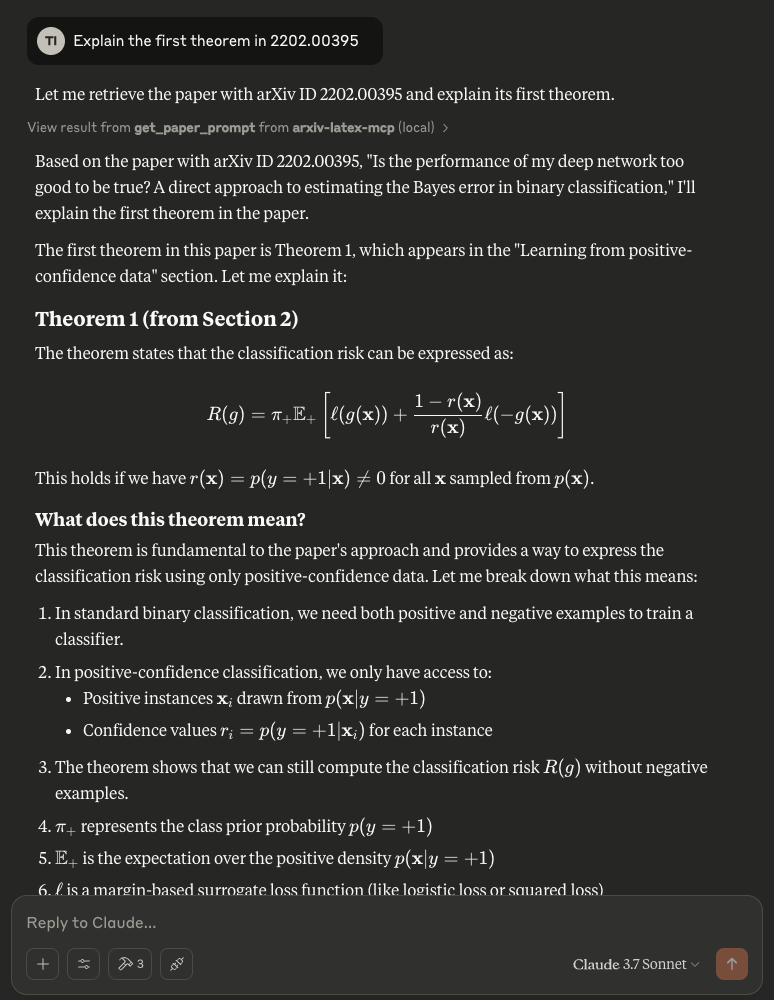
You can ask an agent about equation-heavy papers without first copying text out of PDFs.
Returns the flattened LaTeX source of an arXiv paper through `get_paper_prompt`.
Provides the paper abstract through `get_paper_abstract`.
Shows section headings with `list_paper_sections`.
Retrieves a section by path with `get_paper_section`.
Supports Claude Desktop installation through a `.mcpb` package.
python -m arxiv_latex_mcp



An MCP server that enables Claude Desktop, Claude Code, Cursor, or other MCP clients to directly access and process arXiv papers by fetching the LaTeX source. It uses arxiv-to-prompt under the hood to handle downloading and processing the LaTeX.
Why use the LaTeX source instead of uploading PDFs? Many PDF chat applications often struggle with mathematical content and equation-heavy papers. By utilizing the original LaTeX source code from arXiv papers, the LLM can accurately understand and handle equations and notations. This approach is particularly valuable for fields like computer science, mathematics, and engineering where precise interpretation of mathematical expressions is crucial.
If you are using Claude Desktop, you can utilize Desktop Extensions by double-clicking on the .mcpb file to install.
Download the .mcpb file from here.
Supported on macOS, Windows, and Linux.
Otherwise, you can run the server directly from PyPI with uvx:
{
  "mcpServers": {
    "arxiv-latex-mcp": {
      "command": "uvx",
      "args": ["arxiv-latex-mcp"]
    }
  }
}
You can also install it with pip install arxiv-latex-mcp and run arxiv-latex-mcp, or use:
python -m arxiv_latex_mcp
If you prefer to run from a local checkout, add the following configuration to your config file:
{
  "mcpServers": {
      "arxiv-latex-mcp": {
          "command": "uv",
          "args": [
              "--directory",
              "/ABSOLUTE/PATH/TO/arxiv-latex-mcp",
              "run",
              "python",
              "-m",
              "arxiv_latex_mcp"
          ]
      }
  }
}
You may need to replace the command field with the full path of uv: check this by running which uv (MacOS/Linux) or where uv (Windows).
Restart the application after saving the above.
For Claude Desktop, click on the hammer icon, and you should see the following in the list of "Available MCP tools":
get_paper_prompt — Get the full flattened LaTeX of a paperget_paper_abstract — Get just the abstractlist_paper_sections — List section headings of a paperget_paper_section — Get a specific section by pathTry asking questions about a paper from arXiv, e.g., "Explain the first theorem in 2202.00395"
Sign in to join the discussion.
No comments yet. Be the first to say what this is good for.
Real-time global intelligence dashboard. AI-powered news aggregation, geopolitical monitoring, and infrastructure tracking in a unified situational awareness interface
High-performance code intelligence MCP server. Indexes codebases into a persistent knowledge graph — average repo in milliseconds. 158 languages, sub-ms queries, 99% fewer tokens. Single static binary, zero dependencies.

Universal provider proxy for OpenAI Codex & Claude Code — use any LLM (Claude, Gemini, Grok, DeepSeek, Ollama…) with Codex CLI, App, SDK, and Claude Code

Git-native persistent memory for AI coding agents. Implements Google OKF v0.2 with sub-300µs in-memory BM25 search, embedded MCP server, and progressive disclosure. Slashes token bloat by 80% with zero external databases or dependencies. Built in pure Go.

Stop your AI from making things up — it proposes, deterministic tools decide, every claim checked against ground truth with evidence. Grounded facts and context survive resets. Reverse engineering is the proving ground. MCP server + CLI.
x64dbg-MCP Server is a native MCP (Model Context Protocol) plugin for x64dbg that exposes the debugger's full functionality over HTTP. Connect any MCP-compatible AI assistant and control x64dbg programmatically: set breakpoints, step through code, read memory, dump registers, and more. Built with Zig — zero dependencies, single-binary output, cros