

koala73/worldmonitorConnectors
Real-time global intelligence dashboard. AI-powered news aggregation, geopolitical monitoring, and infrastructure tracking in a unified situational awareness interface
86k
This is a local code intelligence backend that plugs into MCP clients. It indexes a codebase into a persistent graph, then lets the agent search symbols, trace calls, map changes, and ask architecture questions from that graph.
Builders who use agentic coding tools and want those tools to remember and query a repository structure directly.
You can ask your agent about code relationships and impact instead of re-explaining the same files and paths.
Indexes repositories into a local knowledge graph with symbols, calls, imports, routes, and cross-service links.
Exposes search, trace, architecture, impact analysis, dead code detection, Cypher queries, and ADR management through MCP.
Uses tree-sitter grammars and semantic type resolution for many languages, all bundled in the binary.
Serves a 3D visualization UI from the binary at localhost:9749.
Can watch projects for changes and re-index them in the background.
Runs as a native binary with no API key, hosted service, or language runtime required.
curl -fsSL https://raw.githubusercontent.com/DeusData/codebase-memory-mcp/main/install.sh | bash
curl -fsSL https://raw.githubusercontent.com/DeusData/codebase-memory-mcp/main/install.sh | bash
tar xzf codebase-memory-mcp-*.tar.gz
./install.sh
Expand-Archive codebase-memory-mcp-windows-amd64.zip -DestinationPath .
Unblock-File .\install.ps1
.\install.ps1
codebase-memory-mcp --ui=true --port=9749
codebase-memory-mcp config set auto_index true










The fastest and most efficient code intelligence engine for AI coding agents. Full-indexes an average repository in milliseconds, the Linux kernel (28M LOC, 75K files) in 3 minutes. Answers structural queries in under 1ms. Ships as a native executable with a small verified runtime-asset set for macOS, Linux, and Windows — download, run install, done.
High-quality parsing through tree-sitter AST analysis across all 162 languages, enhanced with Hybrid LSP semantic type resolution for Python, TypeScript / JavaScript / JSX / TSX, PHP, C#, Go, C, C++, Java, Kotlin, Rust, and Perl — producing a persistent knowledge graph of functions, classes, call chains, HTTP routes, and cross-service links. 15 MCP tools. No language runtime, hosted service, or API key. Plug and play across 45 supported automatic/conditional client surfaces.
Research — The design and benchmarks behind this project are described in the preprint Codebase-Memory: Tree-Sitter-Based Knowledge Graphs for LLM Code Exploration via MCP (arXiv:2603.27277). Evaluated across 31 real-world repositories: 83% answer quality, 10× fewer tokens, 2.1× fewer tool calls vs. file-by-file exploration.
Security & Trust — This tool reads your codebase and writes to your agent configuration files. That is what it is designed to do. If you prefer to audit before running, the full source is here. For each release product, three behaviourally identical executable candidates (unstripped, debug-stripped, stripped) are submitted to VirusTotal before testing; the selected candidate is then packaged with its SHA-256 unchanged. Release notes link every measured candidate result. Publication permits only the narrowly documented single-Microsoft
!mltolerance in SECURITY.md. All processing happens 100% locally; your code never leaves your machine. Found a security issue? We want to know — see SECURITY.md. Security is Priority #1 for us.
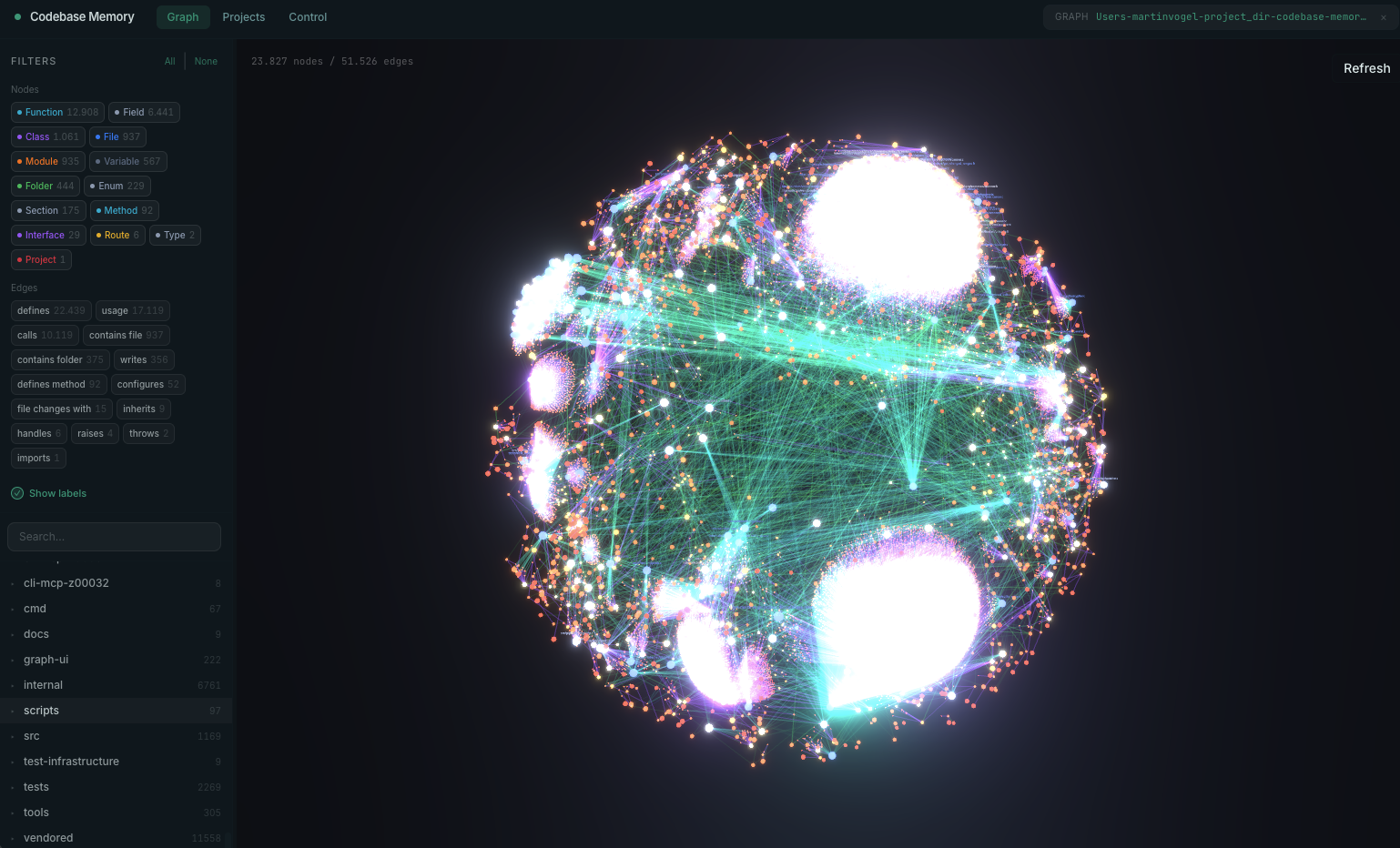
Built-in 3D graph visualization — explore your knowledge graph at localhost:9749
install → restart agent → done.install configures detected clients and safely activates conditional clients only when their documented platform, marker, or explicit existing config path is present. See Multi-Agent Support for the complete matrix and manual/UI-only boundaries.localhost:9749, served from the binary itself.Resource nodes for K8s kinds, Module nodes for Kustomize overlays with IMPORTS edges to referenced resources.One-line install (macOS / Linux):
curl -fsSL https://raw.githubusercontent.com/DeusData/codebase-memory-mcp/main/install.sh | bash
With graph visualization UI:
curl -fsSL https://raw.githubusercontent.com/DeusData/codebase-memory-mcp/main/install.sh | bash
Windows (PowerShell):
# 1. Download the installer
Invoke-WebRequest -Uri https://raw.githubusercontent.com/DeusData/codebase-memory-mcp/main/install.ps1 -OutFile install.ps1

# 2. (Optional but recommended) Inspect the script
notepad install.ps1

# 3. Unblock the downloaded file (removes Mark-of-the-Web restriction added by browsers/Invoke-WebRequest)
Unblock-File .\install.ps1

# 4. Run it
.\install.ps1
Note: If you see a script execution policy error, run
Set-ExecutionPolicy -Scope Process Bypassfirst, or invoke withPowerShell -ExecutionPolicy Bypass -File .\install.ps1.
Options: --skip-config (binary only, no agent setup), --dir=<path> (custom location).
Antivirus note: Microsoft Defender may flag a release binary as
Trojan:Script/Wacatac.B!ml. This is a known false positive — typically 61 of ~62 engines return clean, and the same detection family hitsgh, llama.cpp, Godot and Microsoft's own Go toolchain. See Antivirus False Positives for the evidence, how to verify the artifacts yourself, and how to report it if you think we are wrong.
Restart your coding agent. Say "Index this project" — done.
Download the archive for your platform from the latest release:
codebase-memory-mcp-<os>-<arch>.tar.gz (macOS/Linux) or .zip (Windows)Extract and install (each archive includes install.sh or install.ps1):
macOS / Linux:
tar xzf codebase-memory-mcp-*.tar.gz
./install.sh
Windows (PowerShell):
Expand-Archive codebase-memory-mcp-windows-amd64.zip -DestinationPath .
Unblock-File .\install.ps1
.\install.ps1
Restart your coding agent.
The install command automatically strips macOS quarantine attributes and ad-hoc signs the binary — no manual xattr/codesign needed.
The install command auto-detects installed coding agents and configures their documented MCP entries plus durable instructions, skills, and lifecycle hooks where supported.
CBM automatically shares one per-account coordination daemon across Claude Code, Codex, OpenCode, and every other configured client. There is no opt-in setting for MCP servers or hook clients: the first daemon-backed CBM session starts it, each session registers its own work, and the final session shuts it down. The daemon owns long-lived background services such as watchers, shared indexing jobs, and the optional UI. Closing one session cancels work owned only by that session, while work still needed by another session continues.
The detached daemon does not depend on an MCP frontend's stderr. It keeps owner-only durable records under the canonical ${CBM_CACHE_DIR}/logs directory (default ~/.cache/codebase-memory-mcp/logs):
| File | Contents |
|---|---|
cbm-daemon.log | Daemon lifecycle, watcher/indexing, UI, resource, and error events. |
daemon-conflicts.ndjson | Exact-build, coordination-ABI, and cache-root admission conflicts. |
activation-events.ndjson | Install/update/uninstall activation progress and outcomes. |
Thin frontends still write immediate startup and session-specific errors to their own stderr; MCP JSON-RPC stdout remains clean.
All active CBM processes must run the exact same version, executable build, coordination ABI, and canonical cache root. Equivalent CBM_CACHE_DIR aliases resolve to the same root; a genuinely different root is rejected while any CBM process is active. MCP servers, hooks, one-shot CLI commands, temporary index workers, and the daemon share a crash-safe OS admission barrier; starting an ordinary conflicting process fails before doing work and records an explicit conflict in ${CBM_CACHE_DIR}/logs/daemon-conflicts.ndjson.
The native install, update, and uninstall commands are the deliberate exception to that conflict rule. Download, verification, and private same-filesystem staging happen first so a bad candidate never disrupts active work. Activation then publishes account-wide maintenance intent, asks the daemon and every temporary local operation to cancel, and waits to a finite deadline for all coordinated CBM processes to exit. It holds the admission and lifetime barriers exclusively while changing the active binary, configuration, PATH, or indexes. New CBM work cannot enter during this window. Activation progress and results are recorded in ${CBM_CACHE_DIR}/logs/activation-events.ndjson, and a successful command tells you to restart open coding-agent sessions so they launch the activated build.
Package-manager setup (npm, PyPI, or Go) verifies and publishes a coherent private cached runtime set. Sidecars are replaced before the executable with per-file atomic renames; an interrupted multi-file publication is detected and repaired on the next launch rather than being described as one crash-atomic filesystem transaction. It does not replace the active native installation and therefore does not stop running CBM sessions. When that cached binary is executed, it still enters the same exact-build admission barrier. The shell and PowerShell installers invoke the verified candidate's native install command, so they do receive the full account-wide activation guarantee.
The ordinary cli mode is intentionally separate: it runs one command locally and never starts or connects to the coordination daemon, registers a daemon session, or starts watchers/UI. Its only shared state is the OS admission barrier plus per-project locks for graph mutations. While the command is running, a temporary monitor lets activation cancel that operation and its supervised worker safely; the monitor exits with the command and never becomes a standing daemon. See CLI Mode for details.
The graph UI is built into the binary — every install on every channel has it. Then run it:
codebase-memory-mcp --ui=true --port=9749
Open http://localhost:9749 in your browser. The UI is owned by the shared coordination daemon, so concurrent agent sessions do not start duplicate HTTP servers.
Enable automatic indexing on MCP session start:
codebase-memory-mcp config set auto_index true
When enabled, new projects are indexed automatically on first connection. Previously-indexed projects are registered with the background watcher for ongoing git-based change detection. Configurable file limit: config set auto_index_limit 50000.
Watcher registration is controlled separately by auto_watch (default true). Set config set auto_watch false to keep a session from registering its project with the background watcher — useful when working across many projects and you want each session contained to explicit indexing.
To turn the watcher off entirely, set config set watcher_enabled false (default true): the background poll thread never starts and no project is registered, while auto_index and manual index_repository keep working. Unlike auto_watch — which is consulted per session — watcher_enabled is read once when the background daemon starts, so run codebase-memory-mcp daemon stop after changing it; reconnecting your MCP client alone will not restart the daemon. See docs/CONFIGURATION.md.
Updates run from the install script on every platform, not from inside the running binary. codebase-memory-mcp update validates your flags and then prints the exact command to run:
# macOS / Linux
bash "<install-dir>/install.sh"
# Windows
powershell -ExecutionPolicy Bypass -File "<install-dir>\install.ps1"
The install script is placed next to the binary at install time, so the printed path resolves beside the executable. It is idempotent, so re-running it is the update: it stops the daemon, retires the running binary, installs the new one, and cleans up.
Why it works this way. On Windows it is a hard requirement — a running executable cannot replace its own image, so the swap has to happen from a process that is not the binary being replaced. On macOS and Linux it is a deliberate choice: an in-process updater is structurally a downloader (fetch an archive, verify it, unpack it, mark a file executable, run it), and shipping that composite in every binary to serve a command most people run a handful of times is a poor trade. The release archives now carry no download URLs at all, and cbm makes no network request of its own accord — it does not check for new versions in the background, and nothing phones home. You find out about releases from the install script, your package manager, or GitHub.
If PowerShell refuses to run the script because the file came from the internet, Unblock-File it first.
Installed through npm or pip? Update with your package manager on every platform (npm install -g codebase-memory-mcp@latest / pip install -U codebase-memory-mcp).
codebase-memory-mcp uninstall
Removes owned agent config entries, skills, hooks, instructions, and the installed binary. Existing graph indexes are listed and deleted only after confirmation.
The install script placed beside the binary is reported, not deleted — uninstall prints its path and the rm command for it. It is left alone on purpose: it may be your own copy, a symlink into a checkout, or managed by a package manager, and an uninstaller should not delete a file it cannot prove it owns.
get_architecture returns languages, packages, entry points, routes, hotspots, boundaries, layers, and clusters in a single callmanage_adr persists architectural decisions across sessionsdetect_changes maps uncommitted changes to affected symbols with risk classificationMATCH (f:Function)-[:CALLS]->(g) WHERE f.name = 'main' RETURN g.namesemantic_query): vector search across the entire graph, powered by bundled Nomic nomic-embed-code embeddings (40K tokens, 768d int8) compiled into the binary — no API key, no Ollama, no Docker. 11-signal combined scoring (TF-IDF, RRI, API/Type/Decorator signatures, AST profiles, data flow, Halstead-lite, MinHash, module proximity, graph diffusion).cbm_camel_split tokenizer (camelCase / snake_case aware)search_graph): regex name patterns, label filters, min/max degree, file scopingsearch_code): graph-augmented grep over indexed files onlyEMITS / LISTENS_ON) for Socket.IO, EventEmitter, and generic pub-sub patterns across 8 languages with constant resolutionCROSS_* edges link nodes across multiple repos indexed under the same storeCALLS — a callable is invoked at the source siteCALL_REFERENCE — a callable is used at a supported reference site (for example, a direct value argument) and resolves to one exact targetUSAGE — an identifier is used, but a unique callable target is not proven (including ambiguous or complex expressions)IMPORTS, DEFINES, IMPLEMENTS, INHERITSHTTP_CALLS, ASYNC_CALLS (cross-service)EMITS, LISTENS_ON (channels)DATA_FLOWS with arg-to-param mapping + field access chainsSIMILAR_TO (MinHash + LSH near-clone detection, Jaccard scored)SEMANTICALLY_RELATED (vocabulary-mismatch, same-language, score ≥ 0.80)@myorg/pkg, github.com/foo/bar, use my_crate::foo resolved via manifest scanning (package.json, go.mod, Cargo.toml, pyproject.toml, composer.json, pubspec.yaml, pom.xml, build.gradle, mix.exs, *.gemspec)~/.cache/codebase-memory-mcp/codebase-memory-mcp cli search_graph '{"project": "my-project", "name_pattern": ".*Handler.*"}'go installCommit a single compressed file to your repo and your teammates skip the reindex.
.codebase-memory/graph.db.zst is a zstd-compressed snapshot of the knowledge graph that lives next to your source. When you index, the artifact is written or refreshed; when a teammate clones the repo and runs codebase-memory-mcp for the first time, the artifact is decompressed and incremental indexing fills in their local diff.
VACUUM INTO compacted, then zstd 1.5.7 compressed (8–13:1 ratio typical)zstd -9 + index strip + VACUUM INTO) — written on explicit index_repositoryzstd -3) — written by the watcher for low-latency incremental updatesindex_repository imports the artifact first, then runs incremental indexing — avoiding the full reindex cost.codebase-memory/.gitattributes line with merge=ours is auto-created on first export, so concurrent edits don't produce conflicts on the binary artifact.gitattributes and leave the auto-created .codebase-memory/.gitattributes in place — the nearer file goes on supplying merge=ours, and only filter comes from the root:
.codebase-memory/graph.db.zst filter=lfs diff=lfs merge=lfs -text
.zst; artifact.json is small and carries the schema version. The attribute applies to future commits only, so a repo that already has the blobs in history needs git-filter-repo to rewrite them first. Two costs to weigh before adopting it: GitHub meters LFS storage and bandwidth, and its objects cannot be pruned without contacting support; and every teammate needs git lfs install — without it their checkout leaves a pointer file where the artifact should be, the integrity-checked import refuses it, and they fall back to a full reindex..codebase-memory/ to .gitignore if you prefer everyone to reindex from scratch.The result is similar in spirit to graphify's graphify-out/ directory, but as a single compressed file with explicit two-tier export, integrity-checked import, and zero merge friction.
codebase-memory-mcp is a structural analysis backend — it builds and queries the knowledge graph. It does not include an LLM. Instead, it relies on your MCP client (Claude Code, or any MCP-compatible agent) to be the intelligence layer.
You: "what calls ProcessOrder?"

Agent calls: trace_path(function_name="ProcessOrder", direction="inbound")

codebase-memory-mcp: executes graph query, returns structured results

Agent: presents the call chain in plain English
Why no built-in LLM? Other code graph tools embed an LLM for natural language → graph query translation. This means extra API keys, extra cost, and another model to configure. With MCP, the agent you're already talking to is the query translator.
Benchmarked on Apple M3 Pro:
| Operation | Time | Notes
Sign in to join the discussion.
No comments yet. Be the first to say what this is good for.
Real-time global intelligence dashboard. AI-powered news aggregation, geopolitical monitoring, and infrastructure tracking in a unified situational awareness interface

Universal provider proxy for OpenAI Codex & Claude Code — use any LLM (Claude, Gemini, Grok, DeepSeek, Ollama…) with Codex CLI, App, SDK, and Claude Code

Git-native persistent memory for AI coding agents. Implements Google OKF v0.2 with sub-300µs in-memory BM25 search, embedded MCP server, and progressive disclosure. Slashes token bloat by 80% with zero external databases or dependencies. Built in pure Go.

Local-first code intelligence graph for MCP and CLI. Builds a persistent map of your codebase so AI coding tools read only what matters, with benchmarked context reductions on reviews and large-repo workflows.

Stop your AI from making things up — it proposes, deterministic tools decide, every claim checked against ground truth with evidence. Grounded facts and context survive resets. Reverse engineering is the proving ground. MCP server + CLI.
20 MB lightweight cross-platform database client for 90+ databases, including MySQL, PostgreSQL, SQLite, Redis, MongoDB, DuckDB, SQL Server, and Dameng. Built-in AI, MCP Server, CLI, desktop and Docker. | 轻量级跨平台数据库管理工具,支持 MySQL、PostgreSQL、SQLite、Redis、MongoDB、达梦等 90+ 数据库,提供桌面端、Docker、CLI、内置 AI 助手和 MCP Server。