
koala73/worldmonitorConnectors
Real-time global intelligence dashboard. AI-powered news aggregation, geopolitical monitoring, and infrastructure tracking in a unified situational awareness interface
86k
This project sets up a source-scoped workflow where NotebookLM reads the PDF and returns only the answer needed for a note. A topic registry chooses or reuses a NotebookLM notebook, then the MCP query targets a single `source_id` so the resulting Markdown stays grounded in one PDF.
Builders who want to turn Drive PDFs into Obsidian notes without loading full documents into their agent context.
You can create reusable wiki notes from PDFs while keeping the agent focused on one selected source.
Uses a registry of topics and keywords to choose a reusable NotebookLM notebook for each PDF.
Queries NotebookLM with `source_ids=[target_source_id]` so note generation stays tied to one PDF.
Runs a check to confirm the title, author, and topic before generating the final note.
Keeps drive URL, file ID, notebook ID, target source ID, and query scope in the note frontmatter.
Includes unit tests and a CLI check for notebook selection logic.
claude.ai -> Settings -> Integrations -> Google Drive -> Connect
uv tool install notebooklm-mcp-cli
nlm login
nlm setup add claude-code
cp commands/pdf-to-wiki.md ~/.claude/commands/pdf-to-wiki.md
OUTPUT_DIR=~/your-obsidian-vault/AI_Generated
Turn large Google Drive PDFs into Obsidian wiki notes without loading the full PDF text into Claude or Codex context. NotebookLM reads the source, and the agent receives only the structured answer needed to create a reusable note.
vNext update: reuse one NotebookLM notebook per topic, while each new note-generation query is scoped to the newly attached or selected PDF source.
That is the main product value:
Topic notebook = reusable knowledge container
MCP query with source_ids = target-PDF-only extraction
/pdf-to-wiki https://drive.google.com/file/d/YOUR_FILE_ID "K-IFRS 1109 Financial Instruments" --topic audit-accounting
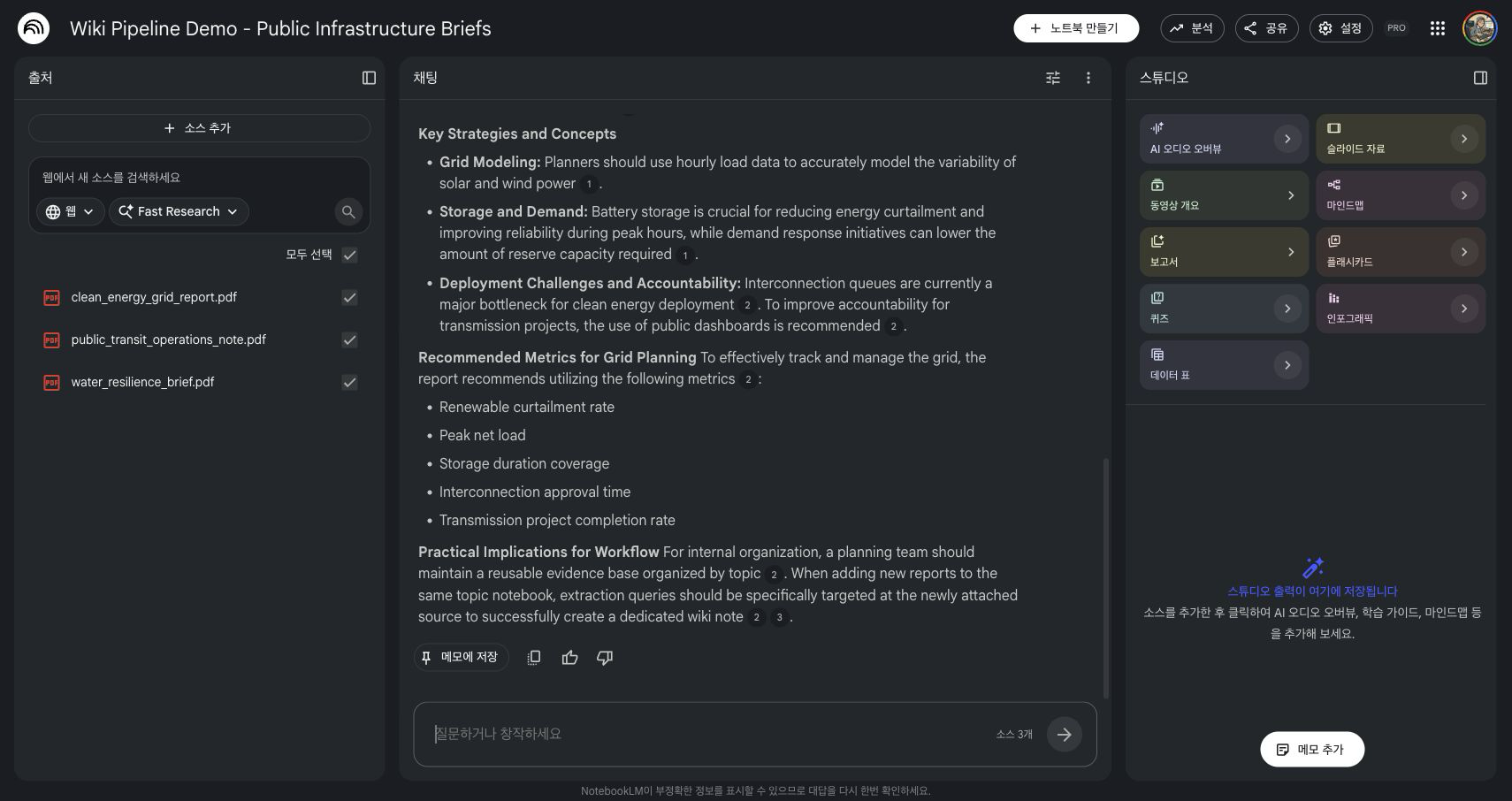
The screenshot above is an actual NotebookLM notebook screen from a live MCP test using original public-safe demo PDFs. The topic notebook contains three related infrastructure sources: clean energy grid planning, urban water resilience, and public transit operations. For note generation, the MCP call used source_ids=[target_source_id], and NotebookLM returned sources_used with only the target clean-energy source.
The old safe pattern was:
1 PDF = 1 NotebookLM notebook
That avoids source contamination, but it does not scale well. Users who process many PDFs about the same topic end up with scattered one-off notebooks.
The vNext pattern is:
1 topic = 1 reusable NotebookLM notebook
1 new wiki note = query only 1 target source inside that notebook
For example, a public-infrastructure notebook can contain:
clean_energy_grid_report.pdfwater_resilience_brief.pdfpublic_transit_operations_note.pdfWhen you want a wiki note for only the clean-energy grid PDF, call:
notebook_query(
    notebook_id="public-infrastructure-topic-notebook",
    source_ids=["target:clean-energy-grid-report"],
    query="Summarize insights using only the Clean Energy Grid Planning Report."
)
The notebook remains reusable for future topic-level questions, but the note extraction remains grounded in one selected PDF.
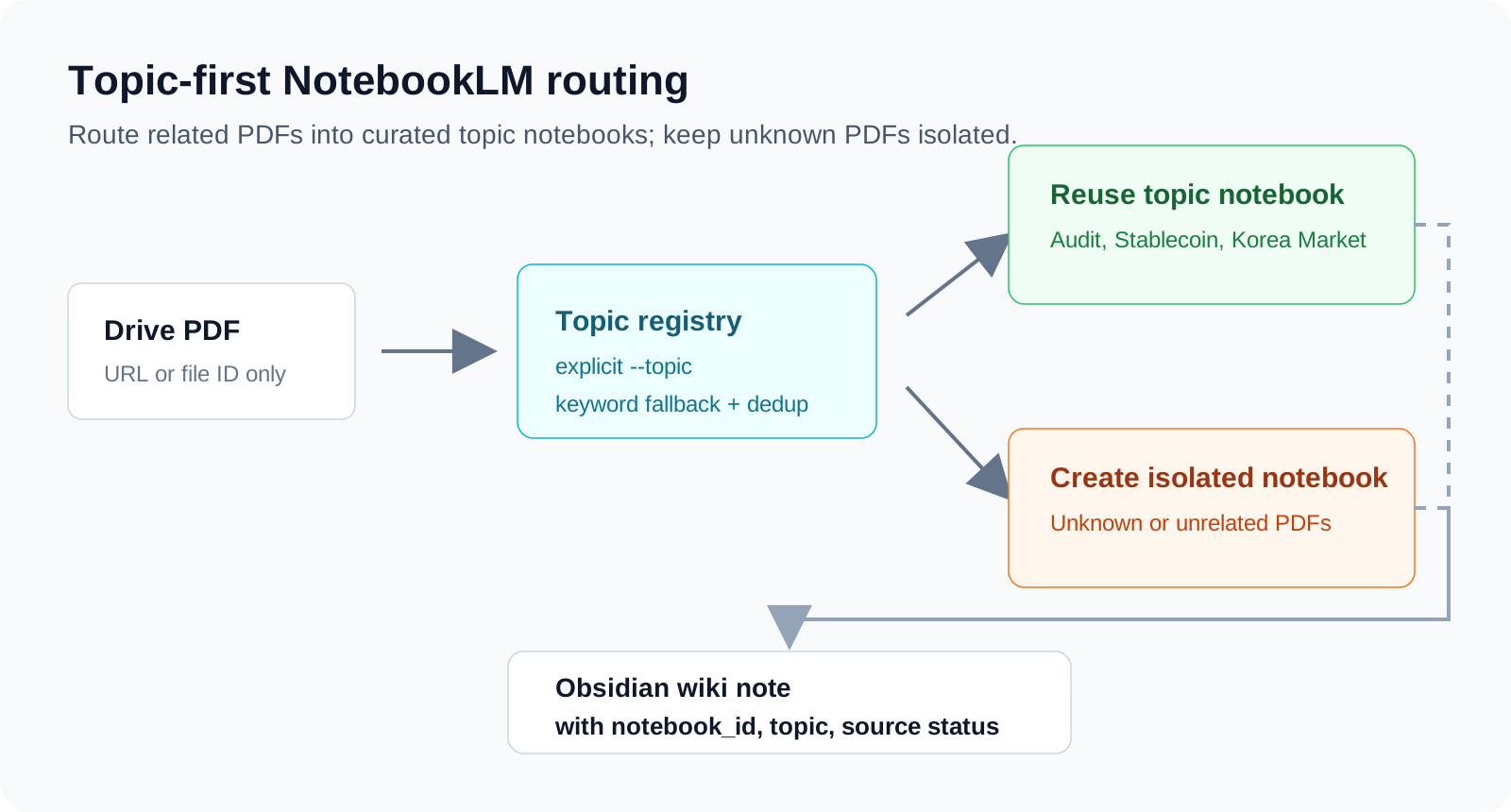
source_ids=[target_source_id].target_source_id, sources_used, and query_scope in the completion report.Google Drive PDF
|
| pass Drive URL or file ID only
v
Topic registry
|
| choose topic notebook by --topic or routing keywords
v
Reusable NotebookLM topic notebook
|
| notebook_query(source_ids=[target_source_id], query=...)
v
NotebookLM answer grounded in the target PDF
|
| agent formats Markdown and wikilinks
v
Obsidian wiki note
claude.ai -> Settings -> Integrations -> Google Drive -> Connect
notebooklm-mcp-cli.uv tool install notebooklm-mcp-cli
nlm login
nlm setup add claude-code
cp commands/pdf-to-wiki.md ~/.claude/commands/pdf-to-wiki.md
~/.claude/commands/pdf-to-wiki.md.OUTPUT_DIR=~/your-obsidian-vault/AI_Generated
Copy the example registry and fill in your own NotebookLM notebook IDs.
cp config/notebooks.example.json config/notebooks.local.json
Example:
{
  "default_policy": "single_source_notebook",
  "default_extraction_mode": "source_scoped_topic_query",
  "topics": [
    {
      "id": "public-infrastructure",
      "label": "Public Infrastructure",
      "notebook_id": "NOTEBOOKLM_NOTEBOOK_ID_FOR_PUBLIC_INFRASTRUCTURE",
      "routing_keywords": ["clean energy", "water resilience", "public transit", "infrastructure"],
      "sources": []
    }
  ]
}
Check the routing decision locally:
python3 scripts/notebook_registry.py \
  "https://drive.google.com/file/d/YOUR_FILE_ID/view" \
  --title "Clean Energy Grid Planning Report" \
  --topic public-infrastructure \
  --registry config/notebooks.local.json
Expected decision shape:
{
  "topic_id": "public-infrastructure",
  "notebook_action": "reuse_topic_notebook",
  "extraction_mode": "source_scoped_topic_query",
  "extraction_notebook_action": "reuse_topic_notebook",
  "topic_notebook_action": "query_target_source_in_topic",
  "source_action": "add_source"
}
Add the PDF to the topic notebook:
source_add(
  notebook_id="{topic_notebook_id}",
  source_type="drive",
  document_id="{drive_file_id}",
  doc_type="pdf",
  wait=True,
  wait_timeout=120.0
)
Then query only the target source:
notebook_query(
  notebook_id="{topic_notebook_id}",
  source_ids=["{target_source_id}"],
  query="{target-PDF-only prompt}"
)
The prompt should also state the scope:
primary_scope: target PDF only
source_scoped_query: query only this target source_id
topic_notebook_context: other PDFs in the same notebook may be used only for a separated comparison section
The live test found an important operational gap: Drive search may return a wrong PDF when filenames are generic. Before generating the final note, run a short source verification query:
Using only target_source_id, verify the document title, author, and topic.
If it is not the requested document, stop and report source_mismatch.
This prevents the pipeline from summarizing a wrong source that happened to match the search query.
Generated notes should preserve the routing and query scope:
source: notebooklm
drive_url: {drive_url}
drive_file_id: {drive_file_id}
notebook_id: {topic_notebook_id}
target_source_id: {target_source_id}
sources_used: [{target_source_id}]
notebook_policy: reuse_topic_notebook
extraction_mode: source_scoped_topic_query
query_scope: target_source_only
topic: {topic_id}
created: {YYYY-MM-DD}
tags: [ai-generated, pdf-analysis]
Run deterministic routing tests:
python3 -m unittest discover -v
Run a CLI smoke test:
python3 scripts/notebook_registry.py \
  "https://drive.google.com/file/d/YOUR_FILE_ID/view" \
  --title "Clean Energy Grid Planning Report" \
  --topic public-infrastructure
source_add for PDF ingestion.notebook_query(source_ids=[target_source_id]) for new note extraction..
├── config/
│ └── notebooks.example.json
├── commands/
│ └── pdf-to-wiki.md
├── scripts/
│ └── notebook_registry.py
├── tests/
│ └── test_notebook_registry.py
├── docs/
│ ├── assets/
│ └── adr/
└── examples/
Sign in to join the discussion.
No comments yet. Be the first to say what this is good for.
Real-time global intelligence dashboard. AI-powered news aggregation, geopolitical monitoring, and infrastructure tracking in a unified situational awareness interface
High-performance code intelligence MCP server. Indexes codebases into a persistent knowledge graph — average repo in milliseconds. 158 languages, sub-ms queries, 99% fewer tokens. Single static binary, zero dependencies.

Universal provider proxy for OpenAI Codex & Claude Code — use any LLM (Claude, Gemini, Grok, DeepSeek, Ollama…) with Codex CLI, App, SDK, and Claude Code

Git-native persistent memory for AI coding agents. Implements Google OKF v0.2 with sub-300µs in-memory BM25 search, embedded MCP server, and progressive disclosure. Slashes token bloat by 80% with zero external databases or dependencies. Built in pure Go.

Stop your AI from making things up — it proposes, deterministic tools decide, every claim checked against ground truth with evidence. Grounded facts and context survive resets. Reverse engineering is the proving ground. MCP server + CLI.
x64dbg-MCP Server is a native MCP (Model Context Protocol) plugin for x64dbg that exposes the debugger's full functionality over HTTP. Connect any MCP-compatible AI assistant and control x64dbg programmatically: set breakpoints, step through code, read memory, dump registers, and more. Built with Zig — zero dependencies, single-binary output, cros