
koala73/worldmonitorConnectors
Real-time global intelligence dashboard. AI-powered news aggregation, geopolitical monitoring, and infrastructure tracking in a unified situational awareness interface
86k
ContextForge sits in front of MCP servers, A2A agents, and REST or gRPC APIs and exposes them through one managed gateway. It adds discovery, auth, retries, rate limiting, plugins, and tracing, so agent clients can call many backends through one endpoint.
Builders who want their agent to call tools and APIs through one unified gateway.
You can register many tool and API backends once and let your agent reach them through a single governed endpoint.
Federates MCP, A2A, REST, and gRPC services behind one endpoint.
Wraps REST and gRPC services as MCP tools and virtual servers.
Keeps a registry of tools, prompts, resources, and servers.
Adds auth, retries, rate limiting, and user-scoped tokens.
Provides OpenTelemetry tracing and supports Phoenix, Jaeger, Zipkin, and other OTLP backends.
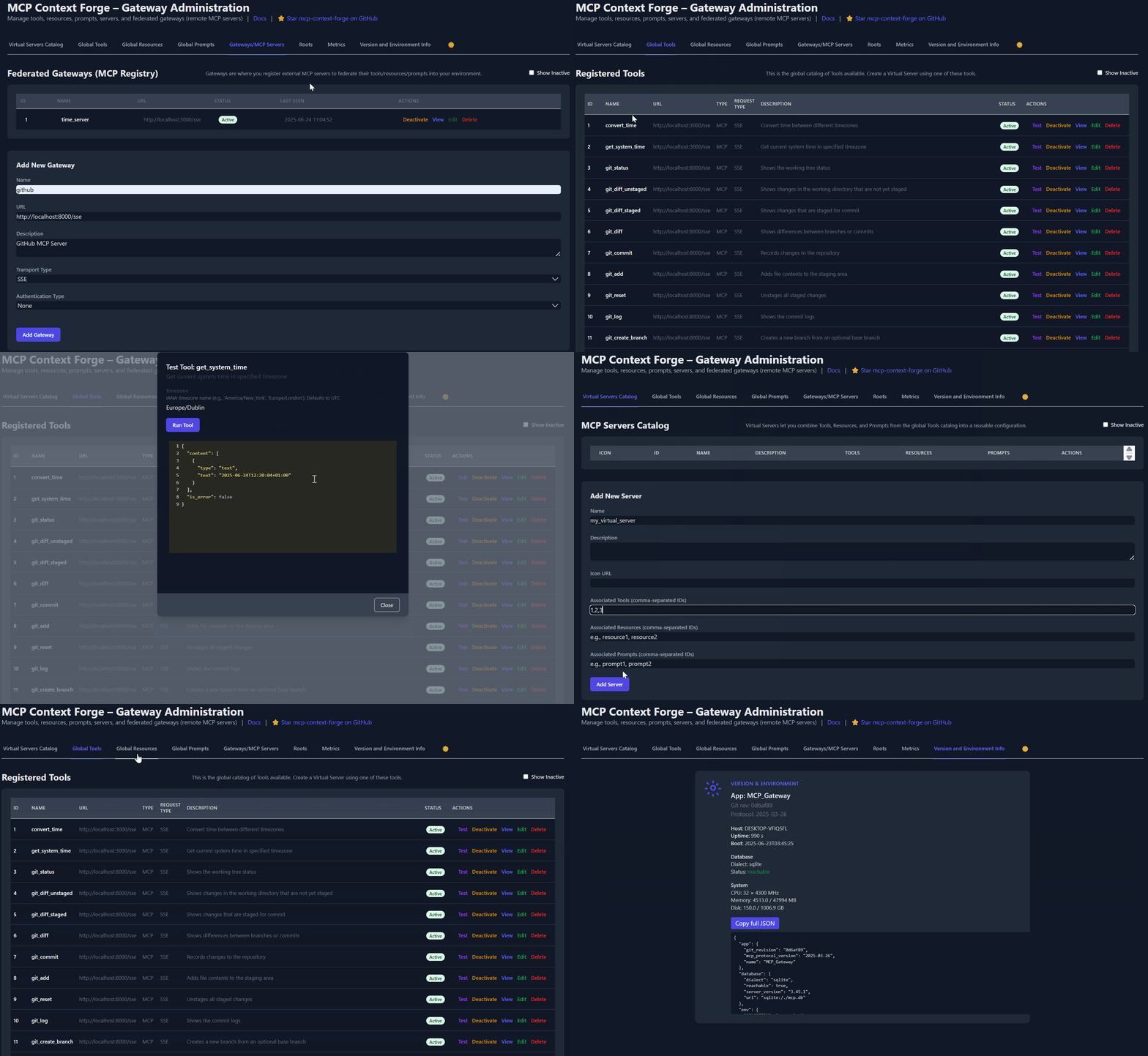
Includes a web admin interface for configuration, logs, and management.
Extends transports, protocols, and integrations with plugins.
# 1️⃣  Isolated env + install from PyPI using uv
mkdir mcpgateway ; cd mcpgateway
uv venv
.\.venv\Scripts\activate
uv pip install mcp-contextforge-gateway

# Continue with steps 2️⃣-4️⃣ above...
docker run -d --name mcpgateway --network=host \
  -v $(pwd)/data:/data -e DATABASE_URL=sqlite:////data/mcp.db \
  -e MCPGATEWAY_UI_ENABLED=true -e HOST=0.0.0.0 -e PORT=4444 \
  -e JWT_SECRET_KEY="${JWT_SECRET_KEY}" -e AUTH_ENCRYPTION_SECRET="${AUTH_ENCRYPTION_SECRET}" \
ghcr.io/ibm/mcp-context-forge:latestdocker build -f Containerfile -t mcpgateway:airgapped .
docker run -d --name mcpgateway -p 4444:4444 \
-e MCPGATEWAY_UI_AIRGAPPED=true -e MCPGATEWAY_UI_ENABLED=true \
-e HOST=0.0.0.0 -e JWT_SECRET_KEY="${JWT_SECRET_KEY}" \
-e AUTH_ENCRYPTION_SECRET="${AUTH_ENCRYPTION_SECRET}" \
mcpgateway:airgappedpodman run -d --name mcpgateway \ -p 4444:4444 -e HOST=0.0.0.0 -e DATABASE_URL=sqlite:///./mcp.db \ ghcr.io/ibm/mcp-context-forge:1.0.0-RC-3
mkdir -p $(pwd)/data && chmod 777 $(pwd)/data podman run -d --name mcpgateway --restart=on-failure \ -p 4444:4444 -v $(pwd)/data:/data \ -e DATABASE_URL=sqlite:////data/mcp.db \ ghcr.io/ibm/mcp-context-forge:1.0.0-RC-3
podman run -d --name mcpgateway --network=host \ -v $(pwd)/data:/data -e DATABASE_URL=sqlite:////data/mcp.db \ ghcr.io/ibm/mcp-context-forge:1.0.0-RC-3
An open source registry and proxy that federates MCP, A2A, and REST/gRPC APIs with centralized governance, discovery, and observability. Optimizes Agent & Tool calling, and supports plugins.






ContextForge is an open source registry and proxy that federates tools, agents, and APIs into one clean endpoint for your AI clients. It provides centralized governance, discovery, and observability across your AI infrastructure:
It runs as a fully compliant MCP server, deployable via PyPI or Docker, and scales to multi-cluster environments on Kubernetes with Redis-backed federation and caching.
| Resource | Description |
|---|---|
| 5-Minute Setup | Get started fast — uvx, Docker, Compose, or local dev |
| Getting Help | Support options, FAQ, community channels |
| Issue Guide | How to file bugs, request features, contribute |
| Full Documentation | Complete guides, tutorials, API reference |
| Deprecations | Deprecated runtime paths and migration guidance |
ContextForge is an open source registry and proxy that federates any Model Context Protocol (MCP) server, A2A server, or REST/gRPC API, providing centralized governance, discovery, and observability. It optimizes agent and tool calling, and supports plugins. See the project roadmap for more details.
It currently supports:

For a list of upcoming features, check out the ContextForge Roadmap
2025-11-25)Adapts REST APIs into tools with:
See Observability Documentation for setup guides with Phoenix, Jaeger, and other backends.
ContextForge is published on PyPI as mcp-contextforge-gateway.
⚠️
JWT_SECRET_KEYandAUTH_ENCRYPTION_SECRETare required in every environment — including local development. The gateway will not start without them. Generate real secrets withpython3 -m mcpgateway.scripts.init_secretsbefore first run.
TLDR — single command using uv:
# 1️⃣ Generate secure secrets (creates .env.secrets)
python3 -m mcpgateway.scripts.init_secrets
# 2️⃣ Export the generated values
export JWT_SECRET_KEY="$(grep '^JWT_SECRET_KEY=' .env.secrets | cut -d= -f2)"
export AUTH_ENCRYPTION_SECRET="$(grep '^AUTH_ENCRYPTION_SECRET=' .env.secrets | cut -d= -f2)"
# 3️⃣ Start the gateway
JWT_SECRET_KEY="$JWT_SECRET_KEY" \
AUTH_ENCRYPTION_SECRET="$AUTH_ENCRYPTION_SECRET" \
MCPGATEWAY_UI_ENABLED=true \
MCPGATEWAY_ADMIN_API_ENABLED=true \
PLATFORM_ADMIN_EMAIL=admin@example.com \
uvx --from mcp-contextforge-gateway mcpgateway --host 0.0.0.0 --port 4444
# 1️⃣ Create an isolated env and install from PyPI
mkdir mcpgateway && cd mcpgateway
python3 -m venv .venv && source .venv/bin/activate
pip install --upgrade pip
pip install mcp-contextforge-gateway
# 2️⃣ Download .env.example and generate real secrets
curl -O https://raw.githubusercontent.com/IBM/mcp-context-forge/main/.env.example
cp .env.example .env
# Generate cryptographically secure secrets into .env.secrets
python3 -m mcpgateway.scripts.init_secrets
# Patch the generated secrets into .env (replaces __REPLACE_ME__ placeholders)
python3 -m mcpgateway.scripts.init_secrets --patch-env .env
# 3️⃣ Start the gateway
mcpgateway --host 0.0.0.0 --port 4444 &
# 4️⃣ Generate a bearer token and smoke-test
export JWT_SECRET_KEY=$(grep '^JWT_SECRET_KEY=' .env | cut -d= -f2)
export MCPGATEWAY_BEARER_TOKEN=$(python3 -m mcpgateway.utils.create_jwt_token \
--username admin@example.com --exp 10080 --secret "$JWT_SECRET_KEY")
curl -s -H "Authorization: Bearer $MCPGATEWAY_BEARER_TOKEN" \
http://127.0.0.1:4444/version | jq
# 1️⃣ Isolated env + install from PyPI
mkdir mcpgateway ; cd mcpgateway
python3 -m venv .venv ; .\.venv\Scripts\Activate.ps1
pip install --upgrade pip
pip install mcp-contextforge-gateway
# 2️⃣ Download .env.example and generate real secrets
Invoke-WebRequest -Uri "https://raw.githubusercontent.com/IBM/mcp-context-forge/main/.env.example" -OutFile ".env.example"
Copy-Item .env.example .env
# Generate cryptographically secure secrets into .env.secrets
python3 -m mcpgateway.scripts.init_secrets
# Patch the generated secrets into .env (replaces __REPLACE_ME__ placeholders)
python3 -m mcpgateway.scripts.init_secrets --patch-env .env
# 3️⃣ Launch the gateway
mcpgateway.exe --host 0.0.0.0 --port 4444
# 4️⃣ Bearer token and smoke-test
$Env:JWT_SECRET_KEY = (Get-Content .env | Select-String '^JWT_SECRET_KEY=').ToString().Split('=')[1]
$Env:MCPGATEWAY_BEARER_TOKEN = python3 -m mcpgateway.utils.create_jwt_token `
--username admin@example.com --exp 10080 --secret $Env:JWT_SECRET_KEY
curl -s -H "Authorization: Bearer $Env:MCPGATEWAY_BEARER_TOKEN" `
http://127.0.0.1:4444/version | jq
# 1️⃣ Isolated env + install from PyPI using uv
mkdir mcpgateway ; cd mcpgateway
uv venv
.\.venv\Scripts\activate
uv pip install mcp-contextforge-gateway
# Continue with steps 2️⃣-4️⃣ above...
Copy .env.example to .env and tweak any of the settings (or use them as env variables).
# 1️⃣ Spin up the sample MCP time server using mcpgateway.translate & docker (replace docker with podman if needed)
python3 -m mcpgateway.translate \
--stdio "docker run --rm -i ghcr.io/ibm/fast-time-server:latest -transport=stdio" \
--expose-sse \
--port 8003
# Or using the official mcp-server-git using uvx:
pip install uv # to install uvx, if not already installed
python3 -m mcpgateway.translate --stdio "uvx mcp-server-git" --expose-sse --port 9000
# NEW: Expose via multiple protocols simultaneously!
python3 -m mcpgateway.translate \
--stdio "uvx mcp-server-git" \
--expose-sse \
--expose-streamable-http \
--port 9000
# Now accessible via both /sse (SSE) and /mcp (streamable HTTP) endpoints
# 2️⃣ Register it with the gateway
curl -s -X POST -H "Authorization: Bearer $MCPGATEWAY_BEARER_TOKEN" \
-H "Content-Type: application/json" \
-d '{"name":"fast_time","url":"http://localhost:8003/sse"}' \
http://localhost:4444/gateways
# 3️⃣ Verify tool catalog
curl -s -H "Authorization: Bearer $MCPGATEWAY_BEARER_TOKEN" http://localhost:4444/tools | jq
# 4️⃣ Create a *virtual server* bundling those tools. Use the ID of tools from the tool catalog (Step #3) and pass them in the associatedTools list.
curl -s -X POST -H "Authorization: Bearer $MCPGATEWAY_BEARER_TOKEN" \
-H "Content-Type: application/json" \
-d '{"server":{"name":"time_server","description":"Fast time tools","associated_tools":[<ID_OF_TOOLS>]}}' \
http://localhost:4444/servers | jq
# Example curl
curl -s -X POST -H "Authorization: Bearer $MCPGATEWAY_BEARER_TOKEN" \
-H "Content-Type: application/json" \
-d '{"server":{"name":"time_server","description":"Fast time tools","associated_tools":["6018ca46d32a4ac6b4c054c13a1726a2"]}}' \
http://localhost:4444/servers | jq
# 5️⃣ List servers (should now include the UUID of the newly created virtual server)
curl -s -H "Authorization: Bearer $MCPGATEWAY_BEARER_TOKEN" http://localhost:4444/servers | jq
# 6️⃣ Client HTTP endpoint. Inspect it interactively with the MCP Inspector CLI (or use any MCP client)
npx -y @modelcontextprotocol/inspector
# Transport Type: Streamable HTTP, URL: http://localhost:4444/servers/UUID_OF_SERVER_1/mcp, Header Name: "Authorization", Bearer Token
Use the official OCI image from GHCR with Docker or Podman. Please note: Currently, arm64 is not supported on production. If you are e.g. running on MacOS with Apple Silicon chips (M1, M2, etc), you can run the containers using Rosetta or install via PyPi instead.
Important:
docker compose up -ddoes not build the gateway image locally by default — it uses the pre-built image from GHCR. The compose file includes abuild:block as a fallback, but local builds require a hermetic wheel closure that is only produced by the CI pipeline. If you see acryptographyor dependency resolution error during build, you are hitting this — just pull the image instead (step 2 below handles this automatically).You also must have a
.envfile with real secrets before runningdocker compose up -d. The gateway will not start with placeholder values.
Get a full stack running with PostgreSQL and Redis:
# 1️⃣ Clone the repository
git clone https://github.com/IBM/mcp-context-forge.git
cd mcp-context-forge
# 2️⃣ Set up .env with real secrets AND pull the pre-built images
cp .env.example .env
python3 -m mcpgateway.scripts.init_secrets --patch-env .env
# .env now has strong JWT_SECRET_KEY and AUTH_ENCRYPTION_SECRET
# Pull pre-built images from GHCR (avoids local build entirely)
docker pull ghcr.io/ibm/mcp-context-forge:latest
echo 'IMAGE_LOCAL=ghcr.io/ibm/mcp-context-forge:latest' >> .env
# Build only the nginx image (small, local-only, builds in seconds)
docker compose build nginx
# 3️⃣ Start the full stack
docker compose up -d
# 4️⃣ Check status
docker compose ps
# 5️⃣ View logs
docker compose logs -f gateway
# 6️⃣ Access Admin UI: http://localhost:8080/admin
# Login: PLATFORM_ADMIN_EMAIL / PLATFORM_ADMIN_PASSWORD (from .env)
# 7️⃣ Generate an API token
export JWT_SECRET_KEY=$(grep '^JWT_SECRET_KEY=' .env | cut -d= -f2)
docker compose exec gateway python3 -m mcpgateway.utils.create_jwt_token \
--username admin@example.com --exp 10080 --secret "$JWT_SECRET_KEY"
What you get:
Enable HTTPS (optional):
# Start with TLS enabled (auto-generates self-signed certs)
make compose-tls
# Access via HTTPS: https://localhost:8443/admin
# Or bring your own certificates:
# Unencrypted key:
mkdir -p certs
cp your-cert.pem certs/cert.pem && cp your-key.pem certs/key.pem
make compose-tls
# Passphrase-protected key:
mkdir -p certs
cp your-cert.pem certs/cert.pem && cp your-encrypted-key.pem certs/key-encrypted.pem
echo "KEY_FILE_PASSWORD=your-passphrase" >> .env
make compose-tls
Deploy to Kubernetes with enterprise-grade features:
# Add Helm repository (when available)
# helm repo add mcp-context-forge https://ibm.github.io/mcp-context-forge
# helm repo update
# For now, use local chart
git clone https://github.com/IBM/mcp-context-forge.git
cd mcp-context-forge/charts/mcp-stack
# Generate secrets first
python3 -m mcpgateway.scripts.init_secrets
JWT_SECRET=$(grep '^JWT_SECRET_KEY=' .env.secrets | cut -d= -f2)
ENC_SECRET=$(grep '^AUTH_ENCRYPTION_SECRET=' .env.secrets | cut -d= -f2)
# Install with PostgreSQL (default)
# IMPORTANT: replace <strong-password> with a real password — do not use 'changeme' in production
helm install mcp-gateway . \
--set mcpContextForge.secret.PLATFORM_ADMIN_EMAIL=admin@yourcompany.com \
--set mcpContextForge.secret.PLATFORM_ADMIN_PASSWORD=<strong-password> \
--set mcpContextForge.secret.BASIC_AUTH_PASSWORD=<strong-password> \
--set "mcpContextForge.secret.JWT_SECRET_KEY=${JWT_SECRET}" \
--set "mcpContextForge.secret.AUTH_ENCRYPTION_SECRET=${ENC_SECRET}"
# Check deployment status
kubectl get pods -l app.kubernetes.io/name=mcp-context-forge
# Port forward to access Admin UI
kubectl port-forward svc/mcp-gateway-mcp-context-forge 4444:80
# Access: http://localhost:4444/admin
# Generate API token (reads JWT_SECRET_KEY from the pod's environment)
kubectl exec deployment/mcp-gateway-mcp-context-forge -- \
python3 -m mcpgateway.utils.create_jwt_token \
--username admin@yourcompany.com --exp 10080 --secret "${JWT_SECRET}"
SSRF note: Helm defaults to strict SSRF settings (
SSRF_ALLOW_PRIVATE_NETWORKS=false). If you register in-cluster tool URLs, allow only your cluster CIDRs viamcpContextForge.config.SSRF_ALLOWED_NETWORKSor, for local-only benchmark setups, temporarily setSSRF_ALLOW_PRIVATE_NETWORKS=true. Seedocs/docs/manage/configuration.md#ssrf-protectionanddocs/docs/deployment/helm.md.
Enterprise Features:
# Generate secrets first (creates .env.secrets)
python3 -m mcpgateway.scripts.init_secrets
export JWT_SECRET_KEY="$(grep '^JWT_SECRET_KEY=' .env.secrets | cut -d= -f2)"
export AUTH_ENCRYPTION_SECRET="$(grep '^AUTH_ENCRYPTION_SECRET=' .env.secrets | cut -d= -f2)"
docker run -d --name mcpgateway \
-p 4444:4444 \
-e MCPGATEWAY_UI_ENABLED=true \
-e MCPGATEWAY_ADMIN_API_ENABLED=true \
-e HOST=0.0.0.0 \
-e JWT_SECRET_KEY="${JWT_SECRET_KEY}" \
-e AUTH_ENCRYPTION_SECRET="${AUTH_ENCRYPTION_SECRET}" \
-e AUTH_REQUIRED=true \
-e PLATFORM_ADMIN_EMAIL=admin@example.com \
-e PLATFORM_ADMIN_PASSWORD=<strong-password> \
-e PLATFORM_ADMIN_FULL_NAME="Platform Administrator" \
-e DATABASE_URL=sqlite:///./mcp.db \
-e SECURE_COOKIES=false \
ghcr.io/ibm/mcp-context-forge:latest
# Tail logs
docker logs -f mcpgateway
# Generate API token (using the same secret)
docker run --rm -it \
-e JWT_SECRET_KEY="${JWT_SECRET_KEY}" \
ghcr.io/ibm/mcp-context-forge:latest \
python3 -m mcpgateway.utils.create_jwt_token \
--username admin@example.com --exp 10080 --secret "${JWT_SECRET_KEY}"
Browse to http://localhost:4444/admin and login with PLATFORM_ADMIN_EMAIL / PLATFORM_ADMIN_PASSWORD.
Persist SQLite database:
mkdir -p $(pwd)/data && touch $(pwd)/data/mcp.db && chmod 777 $(pwd)/data
docker run -d --name mcpgateway --restart unless-stopped \
-p 4444:4444 -v $(pwd)/data:/data \
-e DATABASE_URL=sqlite:////data/mcp.db \
-e MCPGATEWAY_UI_ENABLED=true -e MCPGATEWAY_ADMIN_API_ENABLED=true \
-e HOST=0.0.0.0 -e JWT_SECRET_KEY="${JWT_SECRET_KEY}" \
-e AUTH_ENCRYPTION_SECRET="${AUTH_ENCRYPTION_SECRET}" \
-e PLATFORM_ADMIN_EMAIL=admin@example.com -e PLATFORM_ADMIN_PASSWORD=<strong-password> \
ghcr.io/ibm/mcp-context-forge:latest
Host networking (access local MCP servers):
docker run -d --name mcpgateway --network=host \
-v $(pwd)/data:/data -e DATABASE_URL=sqlite:////data/mcp.db \
-e MCPGATEWAY_UI_ENABLED=true -e HOST=0.0.0.0 -e PORT=4444 \
-e JWT_SECRET_KEY="${JWT_SECRET_KEY}" -e AUTH_ENCRYPTION_SECRET="${AUTH_ENCRYPTION_SECRET}" \
ghcr.io/ibm/mcp-context-forge:latest
Airgapped deployment (no internet):
docker build -f Containerfile -t mcpgateway:airgapped .
docker run -d --name mcpgateway -p 4444:4444 \
  -e MCPGATEWAY_UI_AIRGAPPED=true -e MCPGATEWAY_UI_ENABLED=true \
  -e HOST=0.0.0.0 -e JWT_SECRET_KEY="${JWT_SECRET_KEY}" \
  -e AUTH_ENCRYPTION_SECRET="${AUTH_ENCRYPTION_SECRET}" \
  mcpgateway:airgapped
podman run -d --name mcpgateway \
  -p 4444:4444 -e HOST=0.0.0.0 -e DATABASE_URL=sqlite:///./mcp.db \
  ghcr.io/ibm/mcp-context-forge:1.0.0-RC-3
Persist SQLite:
mkdir -p $(pwd)/data && chmod 777 $(pwd)/data
podman run -d --name mcpgateway --restart=on-failure \
  -p 4444:4444 -v $(pwd)/data:/data \
  -e DATABASE_URL=sqlite:////data/mcp.db \
  ghcr.io/ibm/mcp-context-forge:1.0.0-RC-3
Host networking:
podman run -d --name mcpgateway --network=host \
  -v $(pwd)/data:/data -e DATABASE_URL=sqlite:////data/mcp.db \
  ghcr.io/ibm/mcp-context-forge:1.0.0-RC-3
.env files - Put all the -e FOO= lines into a file and replace them with --env-file .env. See the provided .env.example for reference.
Pinned tags - Use an explicit version (e.g. 1.0.0-RC-3) instead of latest for reproducible builds.
JWT tokens - Generate one in the running container (reads the secret from the container environment):
docker exec mcpgateway python3 -m mcpgateway.utils.create_jwt_token \
  --username admin@example.com --exp 10080 --secret "${JWT_SECRET_KEY}"
Upgrades - Stop, remove, and rerun with the same -v $(pwd)/data:/data mount; your DB and config stay intact.
curl -s -H "Authorization: Bearer $MCPGATEWAY_BEARER_TOKEN" \
     http://localhost:4444/health | jq
curl -s -H "Authorization: Bearer $MCPGATEWA
Sign in to join the discussion.
No comments yet. Be the first to say what this is good for.
Real-time global intelligence dashboard. AI-powered news aggregation, geopolitical monitoring, and infrastructure tracking in a unified situational awareness interface
High-performance code intelligence MCP server. Indexes codebases into a persistent knowledge graph — average repo in milliseconds. 158 languages, sub-ms queries, 99% fewer tokens. Single static binary, zero dependencies.

Universal provider proxy for OpenAI Codex & Claude Code — use any LLM (Claude, Gemini, Grok, DeepSeek, Ollama…) with Codex CLI, App, SDK, and Claude Code

Git-native persistent memory for AI coding agents. Implements Google OKF v0.2 with sub-300µs in-memory BM25 search, embedded MCP server, and progressive disclosure. Slashes token bloat by 80% with zero external databases or dependencies. Built in pure Go.

Stop your AI from making things up — it proposes, deterministic tools decide, every claim checked against ground truth with evidence. Grounded facts and context survive resets. Reverse engineering is the proving ground. MCP server + CLI.
x64dbg-MCP Server is a native MCP (Model Context Protocol) plugin for x64dbg that exposes the debugger's full functionality over HTTP. Connect any MCP-compatible AI assistant and control x64dbg programmatically: set breakpoints, step through code, read memory, dump registers, and more. Built with Zig — zero dependencies, single-binary output, cros