
koala73/worldmonitorConnectors
Real-time global intelligence dashboard. AI-powered news aggregation, geopolitical monitoring, and infrastructure tracking in a unified situational awareness interface
86k
FastMCP ThreatIntel connects an agent to threat-intelligence sources through MCP and a standalone CLI. It looks up indicators such as IPs, domains, URLs, and hashes, then returns analysis, attribution hints, and reports in formats like HTML, JSON, and STIX.
Builders who want their agent to inspect suspicious indicators and return threat-intel findings.
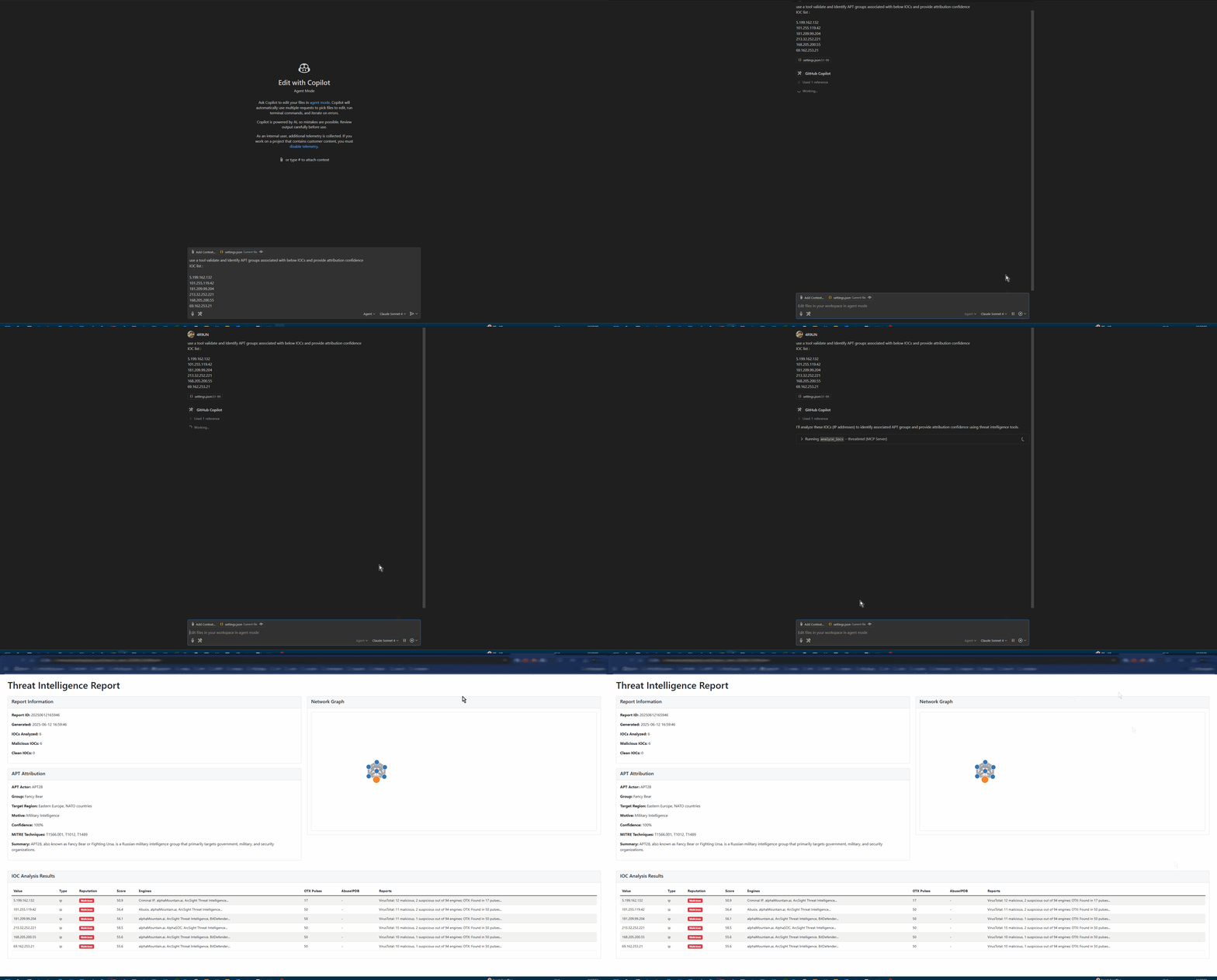
You can ask an MCP-capable agent to investigate IOCs without switching between separate threat-intelligence sites.
Checks IPs, domains, URLs, and file hashes against VirusTotal, AlienVault OTX, AbuseIPDB, and IPinfo.
Lets you query threats in plain English and auto-detect common indicator types.
Adds confidence-scored attribution and MITRE ATT&CK context to findings.
Supports single IOC analysis, batch file analysis, and interactive sessions through `threatintel`.
Exposes the threat-intel engine to Claude Desktop, VS Code Roo-Cline, and other MCP clients.
Generates Markdown, JSON, HTML, STIX, PDF, and CSV outputs for sharing or downstream use.
# Install from PyPI
pip install fastmcp-threatintel

# Interactive setup wizard
threatintel setup

# Analyze your first IOC
threatintel analyze 8.8.8.8 --output-format table --verbose
# Pull and run with your API keys
docker pull arjuntrivedi/fastmcp-threatintel:latest
docker run -e VIRUSTOTAL_API_KEY=your_key \
           -e OTX_API_KEY=your_key \
           arjuntrivedi/fastmcp-threatintel:latest \
analyze 192.168.1.1# Clone and install with Poetry git clone https://github.com/4R9UN/fastmcp-threatintel.git cd fastmcp-threatintel poetry install # Activate and run poetry shell threatintel analyze example.com --output-format html --open-browser
"Analyze IP 8.8.8.8 for security threats and provide geolocation data" "Check if domain example.com has any malicious associations" "Perform comprehensive threat analysis on 185.220.101.1 with APT attribution" "Generate a security incident report for these IOCs: [list]"







🚀 MCP AI Powered Threat Intelligence - Revolutionizing Cybersecurity Built by Arjun Trivedi (4R9UN) - Enterprise-Grade Threat Intelligence Platform
A comprehensive Model Context Protocol (MCP) server that provides enterprise-grade threat intelligence capabilities through natural language AI prompts. Analyze IPs, domains, URLs, and file hashes across multiple threat intelligence platforms with advanced APT attribution and interactive reporting.
graph TB
A[AI Assistant] --> B[MCP Protocol]
C[CLI Interface] --> D[Core Engine]
B --> D
D --> E[IOC Processor]
D --> F[Attribution Engine]
D --> G[Report Generator]
E --> H[VirusTotal API]
E --> I[OTX API]
E --> J[AbuseIPDB API]
E --> K[IPinfo API]
F --> L[APT Patterns]
F --> M[MITRE ATT&CK]
G --> N[HTML Reports]
G --> O[JSON Export]
G --> P[STIX Output]
Choose your preferred installation method and get started in minutes:
# Install from PyPI
pip install fastmcp-threatintel
# Interactive setup wizard
threatintel setup
# Analyze your first IOC
threatintel analyze 8.8.8.8 --output-format table --verbose
# Pull and run with your API keys
docker pull arjuntrivedi/fastmcp-threatintel:latest
docker run -e VIRUSTOTAL_API_KEY=your_key \
-e OTX_API_KEY=your_key \
arjuntrivedi/fastmcp-threatintel:latest \
analyze 192.168.1.1
# Clone and install with UV
git clone https://github.com/4R9UN/fastmcp-threatintel.git
cd fastmcp-threatintel
uv sync
# Run interactive setup
uv run threatintel setup
# Start analyzing
uv run threatintel interactive
# Clone and install with Poetry
git clone https://github.com/4R9UN/fastmcp-threatintel.git
cd fastmcp-threatintel
poetry install

# Activate and run
poetry shell
threatintel analyze example.com --output-format html --open-browser
Get your free API keys and unlock the full potential:
| Service | Status | Free Tier Limit | Get Your Key |
|---|---|---|---|
| VirusTotal | Required | 1,000 requests/day | Sign Up → |
| OTX | Required | Unlimited | Sign Up → |
| AbuseIPDB | Optional | 1,000 requests/day | Sign Up → |
| IPinfo | Optional | 50,000 requests/month | Sign Up → |
Create a .env file in your project directory:
# Required API Keys
VIRUSTOTAL_API_KEY=your_virustotal_api_key
OTX_API_KEY=your_alienvault_otx_api_key
# Optional API Keys (for enhanced functionality)
ABUSEIPDB_API_KEY=your_abuseipdb_api_key
IPINFO_API_KEY=your_ipinfo_api_key
# Performance Tuning
CACHE_TTL=3600 # Cache duration (seconds)
MAX_RETRIES=3 # API retry attempts
REQUEST_TIMEOUT=30 # Request timeout (seconds)
# Quick single IOC analysis
threatintel analyze 192.168.1.1 --verbose
# Batch analysis from file
threatintel batch iocs.txt --output-file report.html --output-format html
# Interactive threat hunting session
threatintel interactive
# Start MCP server for AI integration
threatintel server --host 0.0.0.0 --port 8000
Integrate with AI assistants for natural language threat intelligence:
{
"mcpServers": {
"threatintel": {
"command": "threatintel",
"args": ["server", "--port", "8001"],
"env": {
"VIRUSTOTAL_API_KEY": "your_key",
"OTX_API_KEY": "your_key"
}
}
}
}
{
"mcpServers": {
"threatintel": {
"command": "threatintel",
"args": ["server"],
"env": {
"VIRUSTOTAL_API_KEY": "your_key",
"OTX_API_KEY": "your_key"
}
}
}
}
🔗 Complete MCP Integration Guide →
"Analyze IP 8.8.8.8 for security threats and provide geolocation data"
"Check if domain example.com has any malicious associations"
"Perform comprehensive threat analysis on 185.220.101.1 with APT attribution"
"Generate a security incident report for these IOCs: [list]"
We welcome contributions from the cybersecurity community!
# Fork and clone
git clone https://github.com/YOUR_USERNAME/fastmcp-threatintel.git
cd fastmcp-threatintel

# Setup development environment
uv sync --dev
uv run pre-commit install

# Make your changes and test
uv run pytest
uv run ruff format . && uv run ruff check .

# Submit your PR
git push origin feature/your-feature
📖 Complete Contributing Guide →
This project is licensed under the Apache License 2.0 - see the LICENSE file for details.
Special thanks to the cybersecurity community and these amazing projects:
🌟 Star this repo if you find it useful! 🌟


📚 Documentation • 🐛 Report Bug • 💡 Request Feature • 💬 Discussions
📦 PyPI Package • 🐳 Docker Hub
Built with ❤️ by Arjun Trivedi (4R9UN) for the cybersecurity community
Sign in to join the discussion.
No comments yet. Be the first to say what this is good for.
Real-time global intelligence dashboard. AI-powered news aggregation, geopolitical monitoring, and infrastructure tracking in a unified situational awareness interface
High-performance code intelligence MCP server. Indexes codebases into a persistent knowledge graph — average repo in milliseconds. 158 languages, sub-ms queries, 99% fewer tokens. Single static binary, zero dependencies.

Universal provider proxy for OpenAI Codex & Claude Code — use any LLM (Claude, Gemini, Grok, DeepSeek, Ollama…) with Codex CLI, App, SDK, and Claude Code

Git-native persistent memory for AI coding agents. Implements Google OKF v0.2 with sub-300µs in-memory BM25 search, embedded MCP server, and progressive disclosure. Slashes token bloat by 80% with zero external databases or dependencies. Built in pure Go.

Stop your AI from making things up — it proposes, deterministic tools decide, every claim checked against ground truth with evidence. Grounded facts and context survive resets. Reverse engineering is the proving ground. MCP server + CLI.
x64dbg-MCP Server is a native MCP (Model Context Protocol) plugin for x64dbg that exposes the debugger's full functionality over HTTP. Connect any MCP-compatible AI assistant and control x64dbg programmatically: set breakpoints, step through code, read memory, dump registers, and more. Built with Zig — zero dependencies, single-binary output, cros