
koala73/worldmonitorConnectors
Real-time global intelligence dashboard. AI-powered news aggregation, geopolitical monitoring, and infrastructure tracking in a unified situational awareness interface
86k
Jonex combines multimodal parsing with ontology-first retrieval, vector indexing, and graph-backed knowledge search. Agents can use the unified gateway or the MCP server to ask questions over uploaded files, document sources, and video content with traced references.
Builders who want agents to work from a shared knowledge base instead of re-reading raw files.
You can turn documents, media, and domain rules into a searchable knowledge service your agent can call.
Processes documents, images, audio, and video with configurable parser profiles, ASR, and vision-language models.
Compiles domain ontology before search so answers can use structured knowledge, not just text chunks.
Stores knowledge in vector indexes and graph databases like Milvus and Neo4j for hybrid retrieval.
Exposes sign-in and knowledge-search APIs through `api_gateway/` instead of direct service access.
Provides agent-facing tools in `mcp_server/` for connecting builders' agents to knowledge operations.
Includes Docker Compose files, env examples, and startup scripts for local and platform deployment.
git clone https://github.com/yuezhiai/jonex.git
cd jonex
make init
make build
make up
make ps
http://localhost/
Username: admin
Password: admin123
Tenant: tenant_jonex_demo
.\jonex.ps1 init
.\jonex.ps1 build
.\jonex.ps1 up
.\jonex.ps1 ps

AI Multimodal Domain Knowledge Engine
Built for Enterprise Agents · Powered by the Dual Engines of Jonex Wiki and Graph Ontology





English | 中文
Overview | Quick Start | Local Development | API Quickstart | Integration profile | Document and video parsing | Runtime requirements | Community & Security | License
If you find value in Jonex, please ⭐ Star the project to support us.
Jonex unifies an all-in-one multimodal parsing engine with an AI-ready knowledge engine. Ontology compiles domain reasoning into the knowledge layer before retrieval begins.
It is an end-to-end enterprise AI knowledge platform that turns raw content into reusable knowledge services. Jonex connects data ingestion, multimodal parsing, domain knowledge compilation, vector and graph indexing, source-grounded retrieval, feedback loops, and business applications in one governed system.
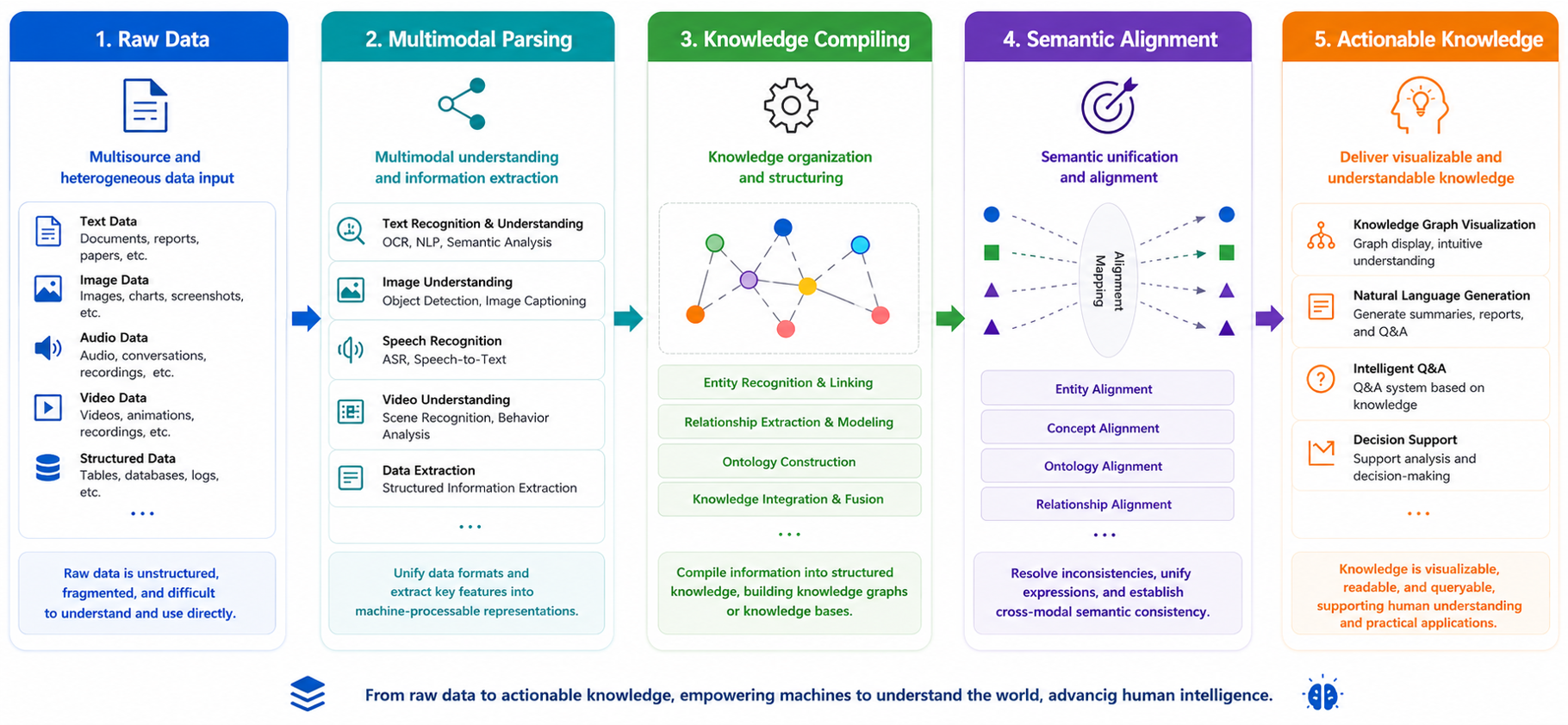
Docker Compose is the fastest way to run the complete platform.
make on macOS or Linuxgit clone https://github.com/yuezhiai/jonex.git
cd jonex
make init
This creates:
deploy/.env for the platform, database, object storage, and LLM Gatewaydeploy/.env.rag for LightRAG, embeddings, and parsingdeploy/.env.mcp for the MCP server.env files for Shell, Core Business, Ecosystem Management, Platform Management, and Dev GatewayConfigure at least one OpenAI-compatible LLM and embedding provider in deploy/.env:
LLMGW_UPSTREAM_LLM_HOST=https://your-openai-compatible-host/v1
LLMGW_UPSTREAM_LLM_API_KEY=your_llm_api_key

LLMGW_UPSTREAM_EMBED_HOST=https://your-embedding-host/v1
LLMGW_UPSTREAM_EMBED_API_KEY=your_embedding_api_key
If your model names differ from the defaults, update the matching LLM_MODEL / EMBEDDING_MODEL keys — they are defined in both deploy/.env and deploy/.env.rag, and EMBEDDING_MODEL must be kept identical in the two files (it is used to build the vector index).
Keep LIGHTRAG_API_KEY identical in deploy/.env and deploy/.env.rag. For audio, video, or advanced image processing, also configure the VLM and ASR connections in deploy/.env.
make build
make up
make ps
The first build creates the shared jonex/python-base:local image before Compose builds the platform services in parallel.
Use make logs to follow service logs when troubleshooting; press Ctrl+C to stop following them without stopping the platform.
Visit:
http://localhost/
Local demo credentials:
Username: admin
Password: admin123
Tenant: tenant_jonex_demo
Security warning: These credentials are for local evaluation only. Change or remove the default administrator account before binding Jonex to a non-loopback interface, sharing the deployment, or exposing it to any network. Complete the production checklist in SECURITY.md before deployment.
.\jonex.ps1 init
.\jonex.ps1 build
.\jonex.ps1 up
.\jonex.ps1 ps
Use .\jonex.ps1 logs when you need to follow service logs.
If script execution is restricted:
powershell -ExecutionPolicy Bypass -File .\jonex.ps1 help
make down
On Windows:
.\jonex.ps1 down
Local development uses root-level environment files and VSCode Debug. It is separate from the Docker deployment configuration under deploy/.
>=3.12.13>=20.18.0 (Node.js 22 LTS recommended)>=9.0.0cp .env.local.example .env.local
cp .env.rag.local.example .env.rag.local
mkdir -p .vscode
cp docs/examples/launch.json.example .vscode/launch.json
make frontends-install
Set local middleware addresses in .env.local to 127.0.0.1, or replace SERVER_IP with a remote infrastructure host. Backend processes are started from VSCode Run and Debug; the Makefile no longer starts host backend processes.
Start the required local dependencies:
make dev-infra-up  # PostgreSQL, Redis, etcd, MinIO, and Milvus
# Or, when running the complete RAG stack locally:
make dev-deps-up   # Middleware plus LightRAG and Atomic RAG
Start the frontend gateway and applications in separate terminals:
make dev-gateway
make dev-frontend
Open http://localhost:8080.
admin / admin123 in the demo tenant tenant_jonex_demo.All external APIs are exposed through the unified Gateway.
curl -X POST "http://localhost/api/v1/auth/login" \
  -H "Content-Type: application/json" \
  -H "X-Tenant-ID: tenant_jonex_demo" \
  -d '{"username":"admin","password":"admin123"}'
Use the returned access_token to call ontology-first search:
curl -X POST "http://localhost/api/v1/knowledge-base/search/ontology" \
  -H "Authorization: Bearer <access_token>" \
  -H "Content-Type: application/json" \
  -d '{
    "query": "What are the key risks described in these documents?",
    "knowledge_base_ids": ["<knowledge-base-id>"],
    "mode": "hybrid",
    "top_k": 5,
    "with_reasoning": true
  }'
The response includes the answer, matched knowledge bases, ontology instances, RAG usage, structured source references, and an optional reasoning trace.
In production, the browser communicates only with Frontend Gateway. Business APIs, capability services, and infrastructure components are not directly exposed to frontend applications.
| Deployment profile | Requirements |
|---|---|
| Core platform | Docker Engine or Docker Desktop, Docker Compose v2 with Buildx, PostgreSQL 15, Redis 7, and object storage |
| Vector retrieval | Milvus, etcd, and MinIO or compatible equivalents |
| Ontology graph | A supported graph database service; Neo4j is the packaged integration |
| CPU parsing | Suitable for evaluation and light workloads; capacity scales with file size and concurrency |
| Accelerated parsing | Optional NVIDIA GPU and Container Toolkit for faster OCR, ASR, and vision-language processing; VRAM depends on the selected models |
| Cloud parsing | A compatible parsing or media-analysis endpoint, credentials, object storage, and outbound network access |
This repository is licensed under the Jonex Open Source License, based on Apache License 2.0 with additional conditions. Third-party components remain under their respective licenses; see NOTICE and THIRD_PARTY_NOTICES.md.
Providing enterprise Agents with ontology-powered knowledge services that are reasoning-ready, traceable, and callable.


Click ⭐ Star to support us, thank you!
© 2026 JONEX
Sign in to join the discussion.
No comments yet. Be the first to say what this is good for.
Real-time global intelligence dashboard. AI-powered news aggregation, geopolitical monitoring, and infrastructure tracking in a unified situational awareness interface
High-performance code intelligence MCP server. Indexes codebases into a persistent knowledge graph — average repo in milliseconds. 158 languages, sub-ms queries, 99% fewer tokens. Single static binary, zero dependencies.

Universal provider proxy for OpenAI Codex & Claude Code — use any LLM (Claude, Gemini, Grok, DeepSeek, Ollama…) with Codex CLI, App, SDK, and Claude Code

Git-native persistent memory for AI coding agents. Implements Google OKF v0.2 with sub-300µs in-memory BM25 search, embedded MCP server, and progressive disclosure. Slashes token bloat by 80% with zero external databases or dependencies. Built in pure Go.

Stop your AI from making things up — it proposes, deterministic tools decide, every claim checked against ground truth with evidence. Grounded facts and context survive resets. Reverse engineering is the proving ground. MCP server + CLI.
20 MB lightweight cross-platform database client for 90+ databases, including MySQL, PostgreSQL, SQLite, Redis, MongoDB, DuckDB, SQL Server, and Dameng. Built-in AI, MCP Server, CLI, desktop and Docker. | 轻量级跨平台数据库管理工具,支持 MySQL、PostgreSQL、SQLite、Redis、MongoDB、达梦等 90+ 数据库,提供桌面端、Docker、CLI、内置 AI 助手和 MCP Server。