
koala73/worldmonitorConnectors
Real-time global intelligence dashboard. AI-powered news aggregation, geopolitical monitoring, and infrastructure tracking in a unified situational awareness interface
86k
MCP-Typescribe turns TypeDoc JSON into an MCP server that agents can query. It indexes symbols, members, parameters, types, descriptions, implementations, and usages so an agent can inspect an API on demand instead of reading all docs at once.
Builders who want their agent to understand a new TypeScript API from structured docs.
You can point an agent at an unfamiliar API and have it look up the right symbols, relationships, and examples as it works.
Loads TypeDoc-generated JSON and builds an index for fast lookups.
Provides tools like `search_symbols`, `get_symbol_details`, `list_members`, and `find_usages`.
Lets agents inspect parameter info, return types, inheritance, implementations, and hierarchy.
Exposes the API knowledge through the Model Context Protocol for MCP-capable assistants.
Includes a server runner that starts from a JSON docs file.
npm install
npx typedoc --json docs/api.json --entryPointStrategy expand path/to/your/typescript/files
npx typedoc --tsconfig tsconfig.docs.json
npm run build
npx @modelcontextprotocol/inspector node ./dist/mcp-server/cli.js run-server docs/api.json
[!CAUTION] Public development is currently suspended as no active community formed. We are working on a follow-up project, specifically for the yFiles API. You can read more, here: yFiles MCP Server. yFiles developers can use the MCP to query API, development guides, source code snippets and recipes using those tools, instead. They work far better than the implementation in this repository.

Large Language Models (LLMs) have made incredible strides in code generation and developer productivity. However, they face a key limitation: they can only reliably use APIs and libraries they’ve seen during training. This creates a bottleneck for adopting new tools, SDKs, or internal APIs — LLMs simply don’t know how to use them effectively.
While tools can be given source code access (when interacting with APIs for which the sources are available) or access to documentation files (e.g. typescript type definition files), this doesn't scale well for large APIs. LLMs need a more efficient way to learn more about an API. Putting all the documentation into context for every request is inefficient, unfeasible, and leads to poor results.
Larger new or internal APIs remain "invisible" to LLMs.
Developers must manually guide LLMs or provide example usage.
Innovation is slowed by the lag between an API’s release and its widespread understanding by AI tools.
This project is an open-source implementation of the Model Context Protocol (MCP)—a protocol designed to provide LLMs with contextual, real-time access to information. In this case it's the API documentation, and particularly for now in this project TypeScript definitions.
Parse TypeScript (and other) definitions into a machine-readable format.
Serve this context dynamically to LLMs through tools like Claude, Cline, Cursor, or Windsurf and other custom interfaces.
Enable agentic behavior by letting LLMs query, plan, and adapt to unfamiliar APIs without retraining.
Plug-and-play API support for LLM-based coding assistants.
Faster onboarding for new or proprietary SDKs.
A step toward more autonomous, context-aware coding agents.
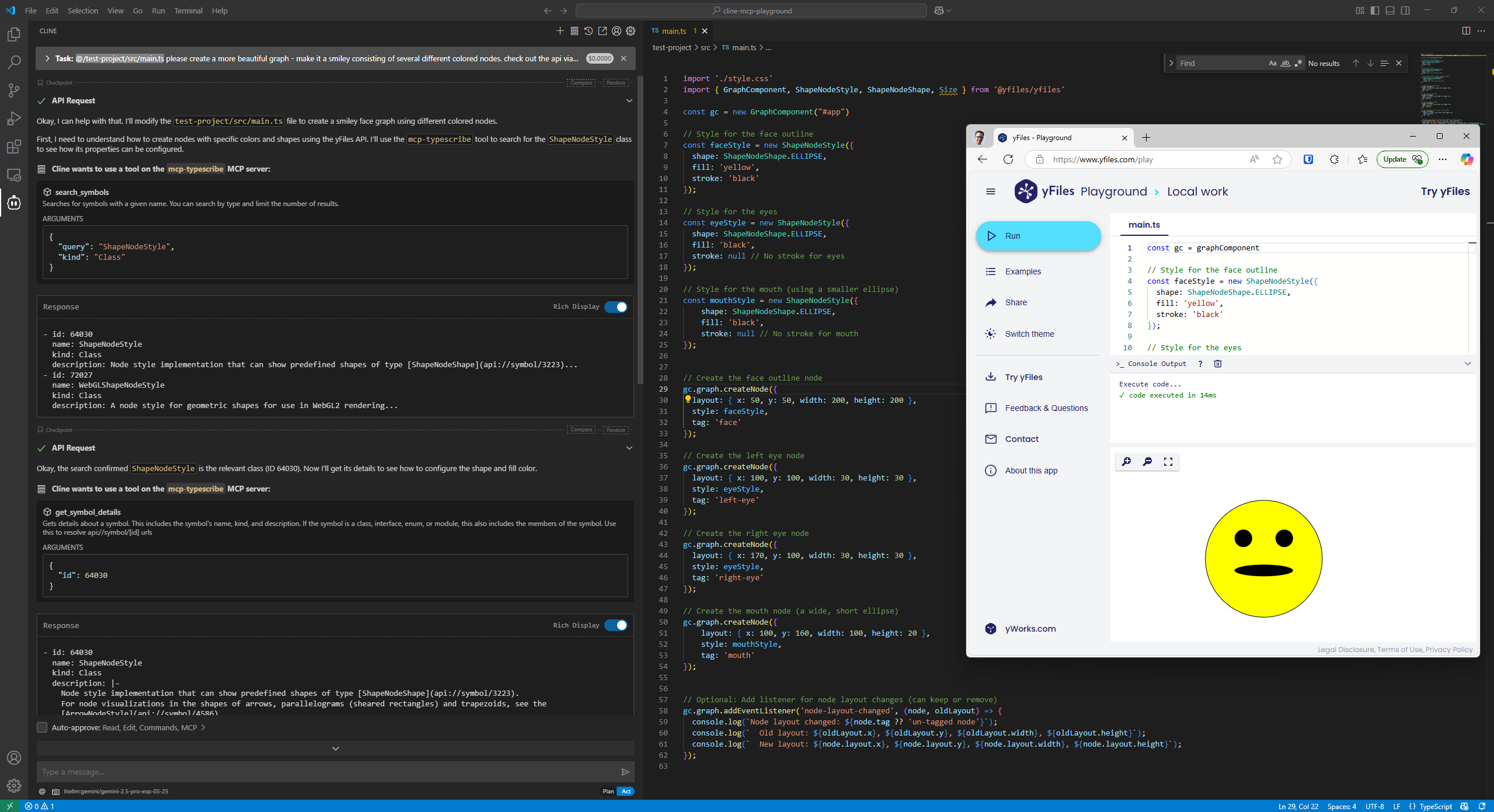
This project provides a way for AI agents to efficiently explore and understand unknown TypeScript APIs. It loads TypeDoc-generated JSON documentation and exposes it through a set of query endpoints that allow agents to search for symbols, get detailed information about specific parts of the API, and understand relationships between different components.
The server provides the following tools for querying the API:
search_symbols: Find symbols by name with optional filtering by kindget_symbol_details: Get detailed information about a specific symbollist_members: List methods and properties of a class or interfaceget_parameter_info: Get information about function parametersfind_implementations: Find implementations of interfaces or subclassessearch_by_return_type: Find functions returning a specific typesearch_by_description: Search in JSDoc commentsget_type_hierarchy: Show inheritance relationshipsfind_usages: Find where a type/function is usednpm install
Generate TypeDoc JSON for your TypeScript API:
npx typedoc --json docs/api.json --entryPointStrategy expand path/to/your/typescript/files
If you (only) have an existing.d.ts file, you can create an api json file like so:
Create a separate tsconfig.docs.json:
{
  "extends": "./tsconfig.json",
  "files": ["existing.d.ts"],
  "typedocOptions": {
    "entryPoints": ["existing.d.ts"],
    "json": "docs/api.json",
    "pretty": false
  }
}
Then do
npx typedoc --tsconfig tsconfig.docs.json
Build the project:
npm run build
Explore the MCP server:
npx @modelcontextprotocol/inspector node ./dist/mcp-server/cli.js run-server docs/api.json
Connect an AI agent to the server to query the API
E.g. with cline in VSCode, specify the following MCP server in cline_mcp_settings.json:
{
  "mcpServers": {
    "typescribe": {
      "command": "npx",
      "args": [
        "-y",
        "mcp-typescribe@latest",
        "run-server",
        "<PATH_TO_API_DOT_JSON>"
      ],
      "env": {}
    }
  }
}
Enable the server and likely auto-approve the various tools. Tell the agent to use the "typescribe" tool to learn about your API.
src/sample-api/: A sample TypeScript API for testing - it uses a weird German-like dialect for the API names to test that the LLM does not hallucinate the APIsrc/mcp-server/: The MCP server implementation
utils/: Utility functionsschemas/: JSON schemas for the MCP toolscore/: Core functionalityserver.ts: The MCP server implementationindex.ts: Entry point for the library exportscli.ts: the entry point for the CLI/binarytests/: Tests for the API functionalitynpm test
npm run build
MIT
Copyright 2025 yWorks GmbH - https://www.yworks.com
Sign in to join the discussion.
No comments yet. Be the first to say what this is good for.
Real-time global intelligence dashboard. AI-powered news aggregation, geopolitical monitoring, and infrastructure tracking in a unified situational awareness interface
High-performance code intelligence MCP server. Indexes codebases into a persistent knowledge graph — average repo in milliseconds. 158 languages, sub-ms queries, 99% fewer tokens. Single static binary, zero dependencies.

Universal provider proxy for OpenAI Codex & Claude Code — use any LLM (Claude, Gemini, Grok, DeepSeek, Ollama…) with Codex CLI, App, SDK, and Claude Code

Git-native persistent memory for AI coding agents. Implements Google OKF v0.2 with sub-300µs in-memory BM25 search, embedded MCP server, and progressive disclosure. Slashes token bloat by 80% with zero external databases or dependencies. Built in pure Go.

Local-first code intelligence graph for MCP and CLI. Builds a persistent map of your codebase so AI coding tools read only what matters, with benchmarked context reductions on reviews and large-repo workflows.

Stop your AI from making things up — it proposes, deterministic tools decide, every claim checked against ground truth with evidence. Grounded facts and context survive resets. Reverse engineering is the proving ground. MCP server + CLI.