

koala73/worldmonitorConnectors
Real-time global intelligence dashboard. AI-powered news aggregation, geopolitical monitoring, and infrastructure tracking in a unified situational awareness interface
86k
ROS2 MCP Server is a Python MCP bridge for ROS 2. It gives agents tools to list topics and services, inspect message types, publish and subscribe, and send or cancel action goals over stdio. It also ships prompt workflows for topic analysis, relays, health checks, and topic diffing.
Builders who want Claude Code, Copilot, or other MCP clients to control and inspect ROS 2 systems.
You can turn natural-language requests into ROS 2 reads, writes, and tests without hand-building the plumbing.
Lists ROS 2 topics, subscribes to them, publishes messages, and echoes topic data.
Lists services and actions, calls services, sends action goals, waits for results, and cancels goals.
Returns message field names and types so agents can build valid nested payloads.
Fetches stored topic messages from WiseVision Data Black Box for later analysis.
Includes prompts for topic echo analysis, topic relays, node health checks, and topic diff monitoring.
Runs as a Dockerized MCP server over stdio to keep setup simple.
npx @modelcontextprotocol/inspector uv --directory /path/to/ros2_mcp run mcp_ros_2_server



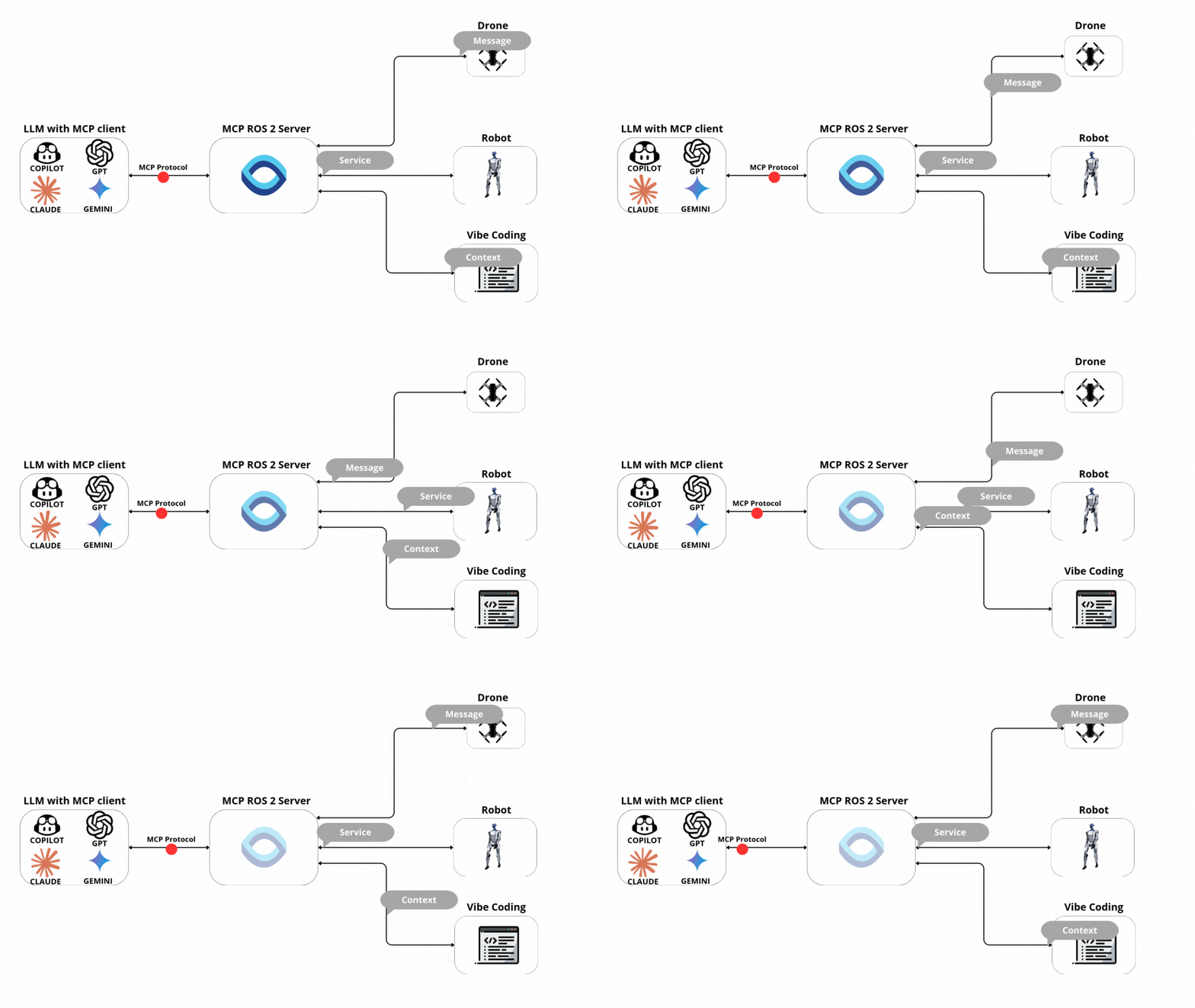
A Python implementation of the Model Context Protocol (MCP) for ROS 2. This server enables AI tooling to connect with ROS 2 nodes, topics, and services using the MCP standard over stdio. Designed to be the easiest ROS 2 MCP server to configure.
Subscribe to a ROS2 topic, collect messages for a specified duration, and provide statistical analysis of the collected data.
➡️ Can auto-detect topic if only one is available. Analyzes message rates, counts, and statistics on numeric fields.
Subscribe to one ROS2 topic and republish messages to another topic with optional transformations.
➡️ Supports identity relay, rate limiting, and change-based filtering.
Check if expected ROS2 topics and services are available and functioning correctly with optional publication rate monitoring.
➡️ Provides comprehensive health report with status indicators and recommendations.
Compare two ROS2 topics and report differences in their messages with detailed field-by-field analysis.
➡️ Useful for comparing raw sensor data with filtered/processed versions or verifying topic synchronization.
Note: To call a service with a custom (non-default) type, source the package that defines it before starting the server.
Save hours of development time with native AI integration for your ROS 2 projects:
Perfect for: Robotics developers, researchers, students, and anyone working with ROS 2 who wants to leverage AI for faster development and debugging.
If you find this useful, please ⭐ star the repo — it helps others discover it.
🚀 Enjoying this project? Feel free to contribute or reach out for support! Write issues, submit PRs, or join our Discord community to connect with other ROS 2 and AI enthusiasts.
Contributions are welcome! Please check the open issues for ways to help, open a pull request, or drop by our Discord to discuss ideas before diving in. By participating, you agree to follow our Code of Conduct.
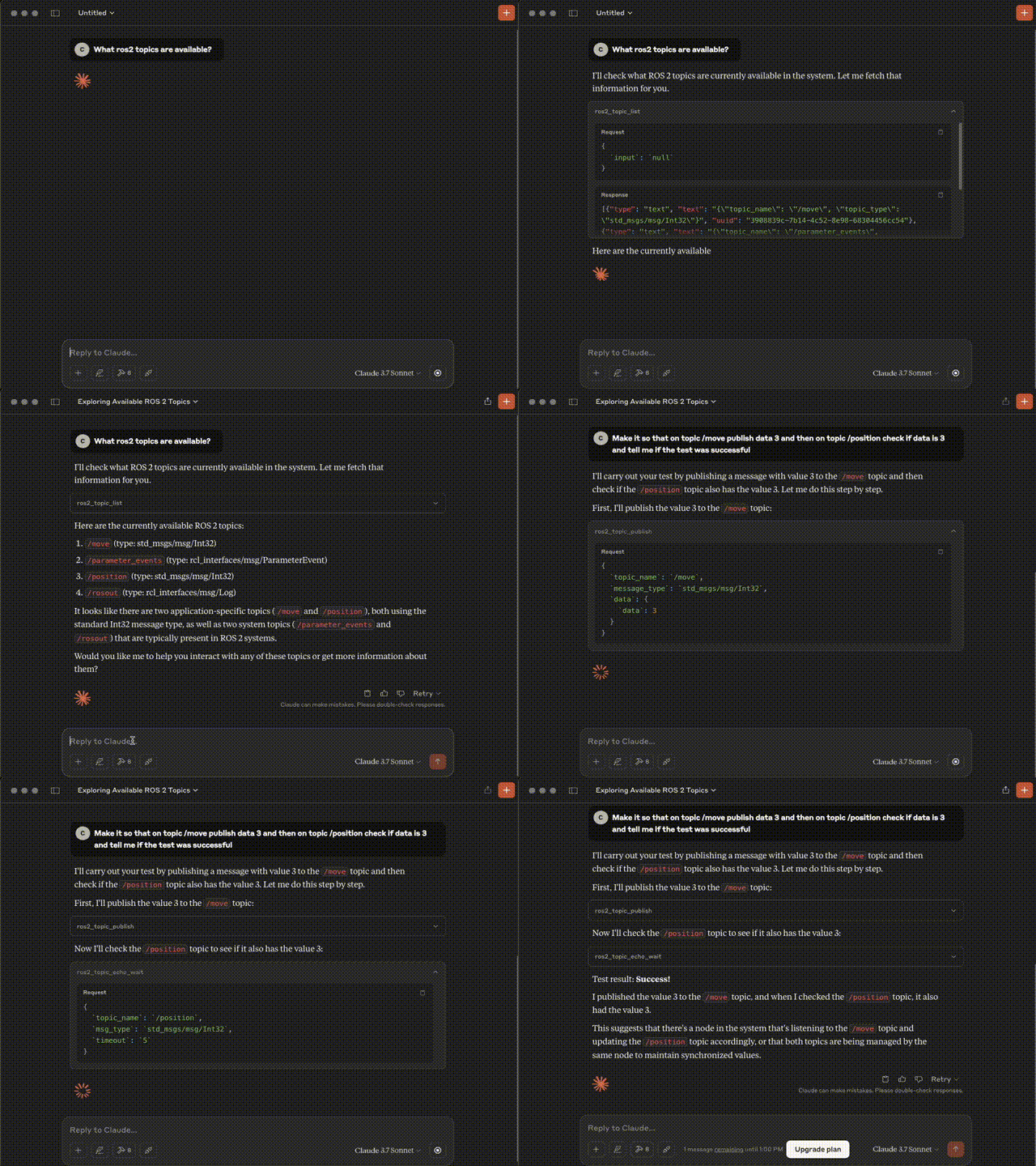
Follow the installation guide for step-by-step instructions:
If the first tool call returns an incomplete list of topics/services right after container start, DDS discovery may still be in progress. The server performs a one-time warm-up on the first tool call in container environments; tune it via:
MCP_ROS_DISCOVERY_STABLE_SEC (default: 1.0)MCP_ROS_DISCOVERY_TIMEOUT_SEC (default: 5.0)MCP_ROS_DISCOVERY_WARMUP=false to disableCheck out the Gazebo Drone Demo section
| Tool | Description | Inputs | Outputs |
|---|---|---|---|
ros2_topic_list | Returns list of available topics | – | topic_name (string): Topic name topic_type (string): Message type |
ros2_topic_subscribe | Subscribes to a ROS 2 topic and collects messages for a duration or message limit | topic_name (string) duration (float) message_limit (int) (defaults: first msg, 5s) | messages count duration |
ros2_get_messages | Retrieves past messages from a topic (data black box) | topic_name (string) message_type (string) number_of_messages (int) time_start (str) time_end (str) | timestamps messages |
ros2_get_message_fields | Gets field names and types for a message type | message_type (string) | Field names + types |
ros2_topic_publish | Publishes message to a topic | topic_name (string) message_type (string) data (dict) | status |
| Tool | Description | Inputs | Outputs |
|---|---|---|---|
ros2_service_list | Returns list of available services | – | service_name (string) service_type (string) request_fields (array) |
ros2_service_call | Calls a ROS 2 service | service_name (string) service_type (string) fields (array) force_call (bool, default: false) | result (string) error (string, if any) |
| Tool | Description | Inputs | Outputs |
|---|---|---|---|
ros2_list_actions | Returns list of available ROS 2 actions with their types and request fields | – | actions[] (array) └ name (string) └ types[] (array of string) └ request_fields (array) |
ros2_send_action_goal | Sends a goal to an action. Optionally waits for the result. | action_name (string) action_type (string) goal_fields (object) wait_for_result (bool, default: false) timeout_sec (number, default: 60.0) | accepted (bool) goal_id (string|null) send_goal_stamp (object|null) waited (bool) result_timeout_sec (number|null) status_code (int|null) status (string|null) result (object|null) | error (string) |
ros2_cancel_action_goal | Cancels a specific goal or all goals for an action | action_name (string) goal_id_hex (string, required if cancel_all=false) cancel_all (bool, default: false) stamp_sec (int, default: 0) stamp_nanosec (int, default: 0) wait_timeout_sec (number, default: 3.0) | service (string) return_code (int) return_code_text (string) goals_canceling[] (array of {goal_id, stamp}) | error (string) |
ros2_action_request_result | Waits for the RESULT of a given goal via GetResult | action_name (string) action_type (string) goal_id_hex (string, 32-char UUID) timeout_sec (number|null, default: 60.0) wait_for_service_sec (number, default: 3.0) | service (string) goal_id (string) waited (bool) result_timeout_sec (number|null) status_code (int|null) status (string|null) result (object|null) | error (string) |
ros2_action_subscribe_feedback | Subscribes to feedback messages for an action. Can filter by goal_id. Collects messages for duration or max count. | action_name (string) action_type (string) goal_id_hex (string|null) duration_sec (number, default: 5.0) max_messages (int, default: 100) | topic (string) action_type (string) goal_id_filter (string|null) duration_sec (number) messages[] (array of {goal_id, feedback, recv_stamp}) | error (string) |
ros2_action_subscribe_status | Subscribes to an action's status topic and returns collected status frames | action_name (string) duration_sec (number, default: 5.0) max_messages (int, default: 100) | topic (string) duration_sec (number) frames[] (array of {stamp, statuses[]}) | error (string) |
Since MCP servers run over stdio, debugging can be challenging. For the best debugging experience, we strongly recommend using the MCP Inspector.
You can launch the MCP Inspector via npm with this command:
npx @modelcontextprotocol/inspector uv --directory /path/to/ros2_mcp run mcp_ros_2_server
Upon launching, the Inspector will display a URL that you can access in your browser to begin debugging.
We built this server to make AI‑assisted ROS 2 development fast and reliable. Internally, we needed a simple way for agents to discover message types, publish/subscribe to topics, and call services—without boilerplate or flaky networking. That led to a few core design goals:
After dogfooding it, we open‑sourced the project to help the broader ROS 2 community build faster with AI. It’s now useful not only for development, but also for controlling robots, running QoS experiments, and analyzing live data and robot/swarm state. The project is actively maintained—features and improvements ship regularly based on user feedback. If this project helps you, please star the repo and share your use case!
Sign in to join the discussion.
No comments yet. Be the first to say what this is good for.
Real-time global intelligence dashboard. AI-powered news aggregation, geopolitical monitoring, and infrastructure tracking in a unified situational awareness interface
High-performance code intelligence MCP server. Indexes codebases into a persistent knowledge graph — average repo in milliseconds. 158 languages, sub-ms queries, 99% fewer tokens. Single static binary, zero dependencies.

Universal provider proxy for OpenAI Codex & Claude Code — use any LLM (Claude, Gemini, Grok, DeepSeek, Ollama…) with Codex CLI, App, SDK, and Claude Code

Git-native persistent memory for AI coding agents. Implements Google OKF v0.2 with sub-300µs in-memory BM25 search, embedded MCP server, and progressive disclosure. Slashes token bloat by 80% with zero external databases or dependencies. Built in pure Go.

Local-first code intelligence graph for MCP and CLI. Builds a persistent map of your codebase so AI coding tools read only what matters, with benchmarked context reductions on reviews and large-repo workflows.

Stop your AI from making things up — it proposes, deterministic tools decide, every claim checked against ground truth with evidence. Grounded facts and context survive resets. Reverse engineering is the proving ground. MCP server + CLI.