

heygen-com/hyperframesFrameworks & SDKs
Write HTML. Render video. Built for agents.
49k
Webiny gives you a self-hosted content platform you extend with TypeScript instead of configuring as a closed SaaS. It runs on Lambda, DynamoDB, S3, and CloudFront, and its framework exposes lifecycle hooks, GraphQL extensions, admin UI extension points, and infrastructure hooks.
.png%3Foriginal&w=3840&q=75)
Builders who want a self-hosted CMS they can extend in TypeScript and run in their own AWS account.
You can build and run a multi-tenant content platform without managing servers, while still customizing the CMS in code.
Custom content models, GraphQL API, field-level permissions, localization, and versioning.
A drag-and-drop page editor with a Next.js SDK and React-based custom page elements.
Tenant isolation for data, users, assets, and permissions from a single deployment.
Lifecycle hooks, dependency injection, GraphQL schema extensions, admin UI extensions, and infrastructure extensions.
An MCP server and agent instructions that give Claude Code, Cursor, and other agents Webiny-specific context.
Pulumi-based provisioning for Lambda, DynamoDB, S3, CloudFront, and optional OpenSearch.
npx create-webiny-project my-project
cd my-project
yarn webiny deploy
yarn webiny watch admin  # React dev server on localhost:3001
yarn webiny watch api    # Local Lambda execution environment
git clone <your-repo>
yarn
# Ready to develop

AI-programmable CMS for enterprises hosting on AWS




Open-source content platform. Self-hosted on AWS serverless. Built as a TypeScript framework you extend with code, not a closed product you configure through a UI.
Runs on Lambda, DynamoDB, S3, and CloudFront inside your own AWS account. Scales automatically. No servers to manage. Infrastructure provisioned via IaC (Pulumi) in a single deploy command.
Used in production by teams managing hundreds of millions of content records, petabytes of assets, and thousands of editors — including Amazon, Emirates, Fortune 500 companies, government agencies, and SaaS platforms that white-label Webiny inside their own products.
Documentation · Learn Webiny Course · Community Slack
Headless CMS — Custom content models, GraphQL API, field-level permissions, localization, versioning. Models can be defined through the admin UI or in code via the framework.

Website Builder — Visual drag-and-drop page editor with a Next.js SDK. Render pages through your own frontend (Vercel, CloudFront, wherever). Create custom page elements with React components.
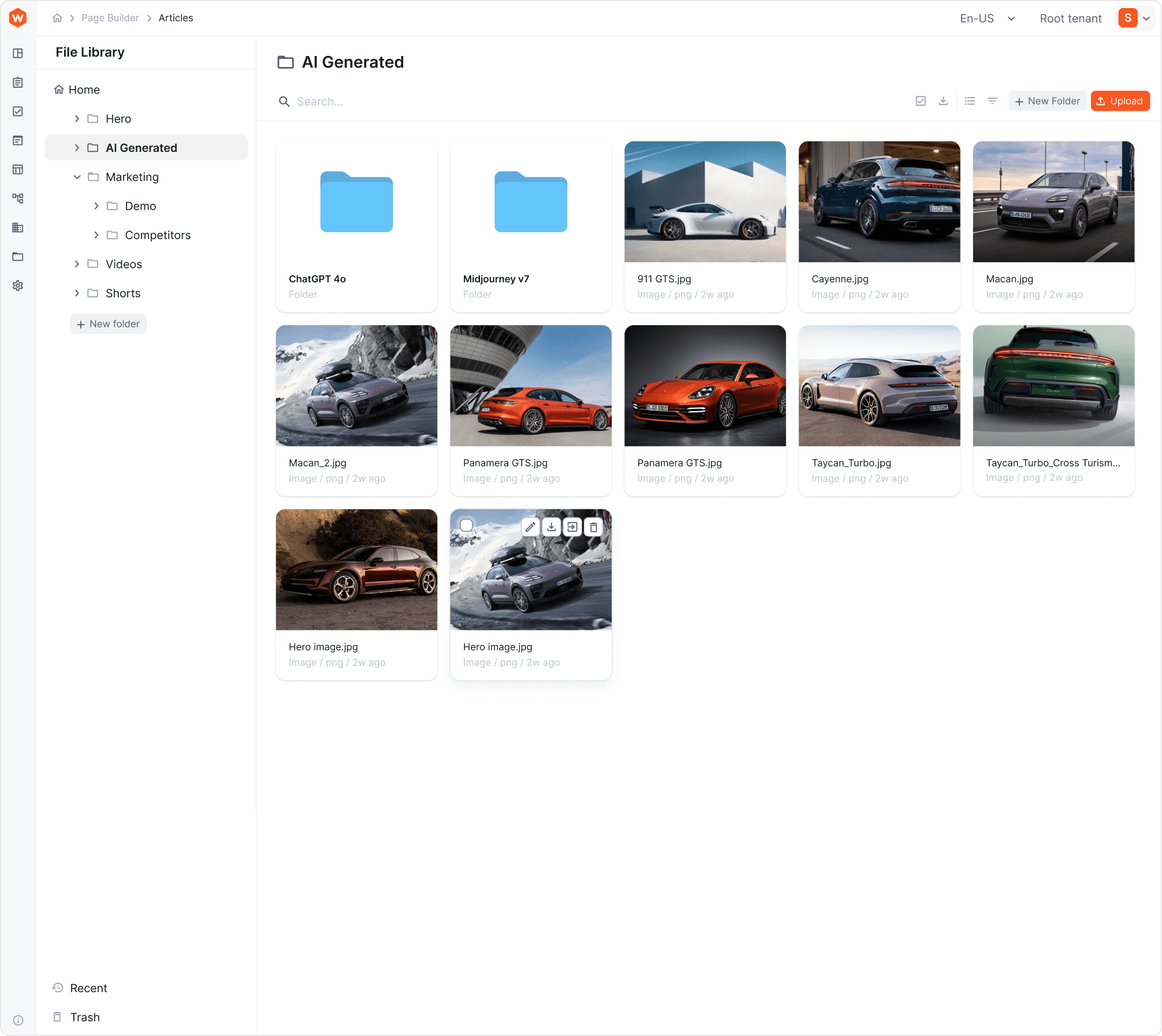 File Manager — Digital asset management with CDN delivery, folder structure, tagging, search. Integrated into CMS and Website Builder.
Publishing Workflows — Multi-step content approval with draft states, reviewer assignments, scheduled publishing, and audit trails.
Multi-Tenancy — Native tenant isolation (data, users, assets, permissions) from a single deployment. One instance can host thousands of tenants. Tenants are created and managed programmatically via GraphQL API. Supports hierarchical tenant structures (Root → Brand → Market, Root → Client → Site, etc.).
Webiny Framework — TypeScript framework with lifecycle hooks, dependency injection, GraphQL schema extensions, admin UI extension points, and infrastructure extensions. This is the core — it's what makes Webiny programmable rather than just configurable.
┌─────────────────────────────────────────────────────┐
│                    Your AWS Account                  │
│                                                      │
│  ┌──────────┐  ┌──────────┐  ┌─────┐  ┌──────────┐ │
│  │  Lambda   │  │ DynamoDB │  │ S3  │  │CloudFront│ │
│  │ (API +   │  │ (Content │  │(Assets)│ │  (CDN)  │ │
│  │  business │  │  storage) │  │     │  │          │ │
│  │  logic)   │  │          │  │     │  │          │ │
│  └──────────┘  └──────────┘  └─────┘  └──────────┘ │
│                                                      │
│  Optional: OpenSearch (full-text search at scale)    │
│  Optional: VPC deployment, multi-AZ, custom config   │
│                                                      │
│  All provisioned automatically via Pulumi IaC         │
└─────────────────────────────────────────────────────┘
Stack: TypeScript, React, GraphQL, Node.js, Pulumi, AWS serverless services.
What you control: Everything. The IaC templates are open-source. Modify Lambda memory, add CloudWatch alarms, change VPC configuration, add custom AWS resources — it's your infrastructure.
What you don't manage: Servers. Patching. Scaling. Capacity planning. That's the point of serverless.
Prerequisites: Node.js 22+, Yarn, AWS account with programmatic access.
npx create-webiny-project my-project
cd my-project
yarn webiny deploy
First deploy takes 5–15 minutes (AWS provisioning). After that, you get an admin panel URL. Create your first admin account, and you're in.
Local development:
yarn webiny watch admin  # React dev server on localhost:3001
yarn webiny watch api    # Local Lambda execution environment
New team member onboarding:
git clone <your-repo>
yarn
# Ready to develop
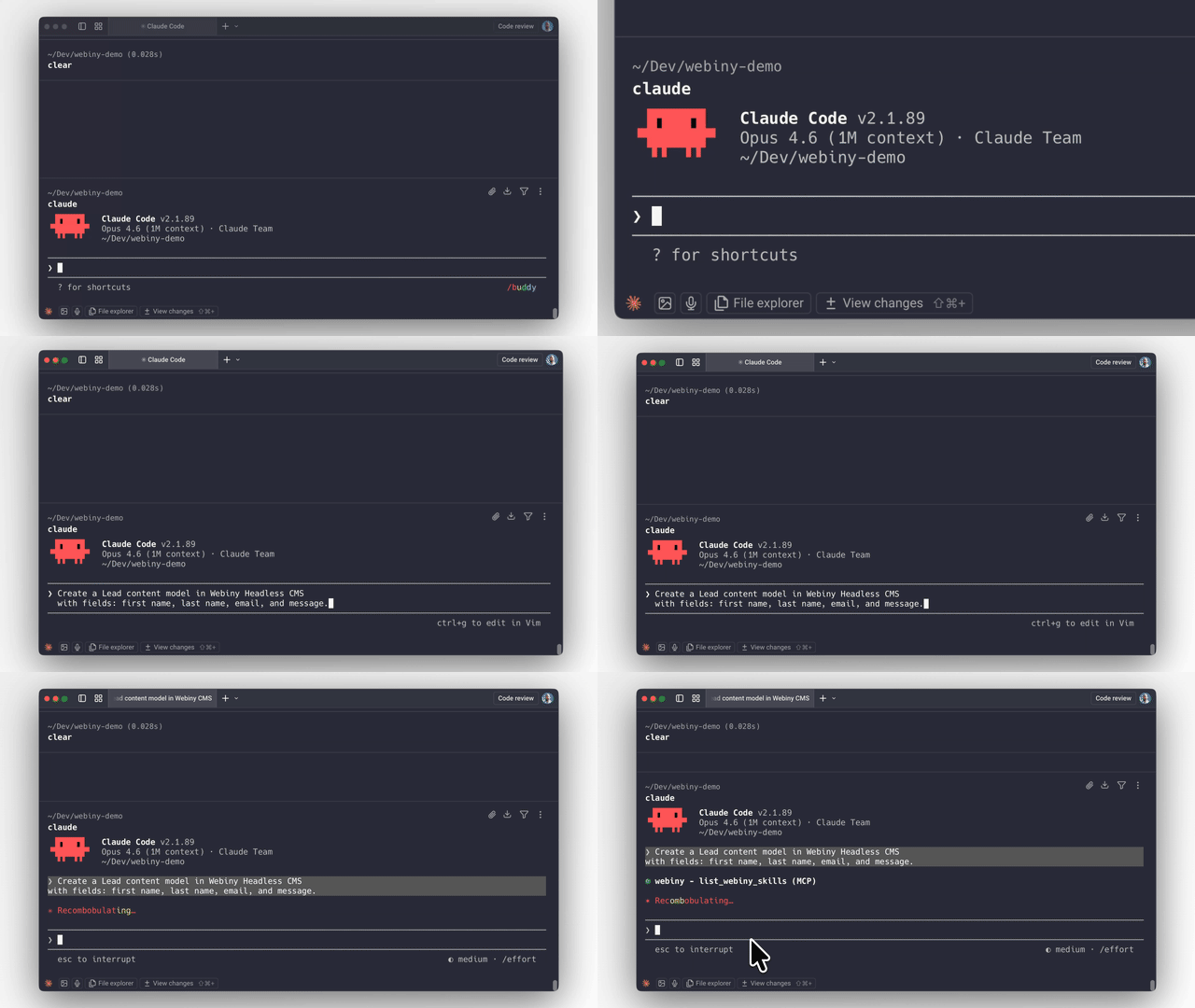
Webiny ships with an MCP server and AI skills that give AI coding agents (Claude Code, Cursor, Kiro, etc.) deep context about the platform's architecture, extension points, and patterns.
This means you can ask an AI agent to:
The AI produces code that follows Webiny's actual patterns because the MCP server gives it real knowledge of the framework — not generic guesses.
Why this works better on Webiny than most platforms: The framework is strongly typed with explicit extension points. AI-generated code either fits the type system or it doesn't compile. There's no ambiguous plugin API where the AI has to guess. Types enforce correctness.
Getting started with the MCP server:
# The MCP server runs locally inside your Webiny project
# Connect it to your AI coding tool of choice
# See docs for tool-specific setup instructions
→ AI-Assisted Development Guide
All customization happens in the extensions/ folder and is registered in webiny.config.tsx. Four extension types:
API Extensions — Custom GraphQL schemas, resolvers, lifecycle hooks, business logic.
// extensions/NotifyOnPublish.ts — Example: send Slack notification when content is published
class NotifyOnPublish implements CmsLifecycleHook.Interface {
  constructor(private slackService: SlackService.Interface) {}

  async afterPublish(params: AfterPublishParams): Promise<void> {
    await this.slackService.notify(`Content published: ${params.entry.title}`);
  }
}
Admin Extensions — Custom UI components, white-label branding, new views, tenant-specific themes. Standard React — use any patterns and libraries you already know.
Infrastructure Extensions — Modify AWS resources via Pulumi. Add Lambda functions, S3 buckets, CloudWatch alarms, or change existing resource configuration.
CLI Extensions — Custom commands for deployment workflows, data migrations, code generators.
Be honest with yourself about these:
Community Edition — MIT license. Free forever. Includes Headless CMS, Website Builder, File Manager.
Business Edition — Commercial license starting at $79/mo. Adds RBAC, multi-tenancy, publishing workflows.
Enterprise Edition — Custom pricing. Adds SSO, audit logs, team management, priority support, managed hosting option.
All plans: unlimited content entries, pages, assets, API calls, roles, and workflows. No per-seat pricing traps. No API metering.
my-webiny-project/
  extensions/          # Your custom code lives here
  public/              # Admin app static assets
  webiny.config.tsx    # Project configuration (React components, type-safe)
  package.json
  tsconfig.json
Single package.json. Single tsconfig.json. Configuration in webiny.config.tsx uses React components for type safety and IDE auto-completion.
npx create-webiny-project <name>    # Create new project
yarn webiny deploy                   # Deploy to AWS
yarn webiny deploy core api          # Deploy specific apps
yarn webiny watch admin              # Local admin dev server
yarn webiny watch api                # Local Lambda dev environment
yarn webiny info                     # Show endpoints and URLs
yarn webiny destroy                  # Tear down all AWS resources
We welcome contributions. See CONTRIBUTING.md for guidelines.
Before opening a PR, please check existing issues or start a discussion — it helps us give you better guidance and avoids duplicate work.
Sign in to join the discussion.
No comments yet. Be the first to say what this is good for.
Write HTML. Render video. Built for agents.
Ultra-lightweight, open-source, self-hosted personal AI agent framework in Python with WebUI, tools, memory, MCP, multi-agent workflows, automation, and chat apps

SkillOpt is a text-space optimizer that trains reusable natural-language skills for frozen LLM agents through trajectory-driven edits, validation-gated updates, and deployable best_skill.md artifacts.

Omnigent is an open-source AI agent framework and meta-harness: orchestrate Claude Code, Codex, Cursor, Pi, and custom agents — swap harnesses without rewriting, enforce policies and sandboxing, and collaborate in real time from any device.

A theoretical reconstruction of the Claude Mythos architecture, built from first principles using the available research literature.
🕷️ An adaptive Web Scraping framework that handles everything from a single request to a full-scale crawl!