
koala73/worldmonitorConnectors
Real-time global intelligence dashboard. AI-powered news aggregation, geopolitical monitoring, and infrastructure tracking in a unified situational awareness interface
86k
powhttp-mcp plugs an agent into powhttp so it can read captured HTTP traffic, compare browser and program requests, and trace related flows. It includes prompts and tools for endpoint mapping, schema checks, fingerprinting, and scraper generation.
Builders who work in Cursor or Claude Code and want their agent to debug HTTP traffic from powhttp.
You can turn captured HTTP traffic into concrete debugging, endpoint mapping, and scraper-building work inside your agent.
List sessions, search entries, fetch full request and response details, and inspect TLS or HTTP/2 events.
Compare two entries or use the `compare_browser_program` prompt to spot anti-bot differences.
Generate HTTP, TLS, and HTTP/2 fingerprints and trace related requests from a seed entry.
Cluster endpoints, describe them, inspect GraphQL operations, and extract GraphQL errors.
Infer merged schemas, query bodies with JQ, and validate bodies against Go structs, Zod, or JSON Schema.
Use the `generate_scraper` prompt to create PoC Go scrapers from captured traffic.
go install github.com/usestring/powhttp-mcp/cmd/powhttp-mcp@latest
go install github.com/usestring/powhttp-mcp/cmd/powhttp-mcp@v1.0.0
go env GOPATH
export PATH="$PATH:$(go env GOPATH)/bin"
export PATH="$PATH:$(go env GOPATH)/bin"
source ~/.zshrc # or ~/.bashrc, etc.



An MCP server that gives AI assistants X-ray vision into HTTP traffic captured by powhttp.
Using /generate_scraper to build a BMW car listing monitor:
https://github.com/user-attachments/assets/be098e9d-d700-491c-ae7f-5afb12732728
Schema validation in action - correcting data structures for edge cases:
https://github.com/user-attachments/assets/1156c537-70ab-4179-ad4a-c148988ac503
Install via go install:
go install github.com/usestring/powhttp-mcp/cmd/powhttp-mcp@latest
Or install a specific version:
go install github.com/usestring/powhttp-mcp/cmd/powhttp-mcp@v1.0.0
Download and install Go from the official website: https://go.dev/doc/install
If you get command not found: powhttp-mcp after installation, you need to add Go's bin directory to your PATH.
Find your Go bin directory:
go env GOPATH
This returns your Go workspace directory, typically ~/go (macOS/Linux) or C:\Users\yourname\go (Windows). The binaries are installed in the bin subdirectory.
For bash (~/.bashrc or ~/.bash_profile):
export PATH="$PATH:$(go env GOPATH)/bin"
For zsh (~/.zshrc):
export PATH="$PATH:$(go env GOPATH)/bin"
For fish (~/.config/fish/config.fish):
fish_add_path (go env GOPATH)/bin
Then reload your shell:
source ~/.zshrc # or ~/.bashrc, etc.
PowerShell (current session):
$env:PATH += ";$(go env GOPATH)\bin"
Permanently via PowerShell:
[Environment]::SetEnvironmentVariable("PATH", $env:PATH + ";$(go env GOPATH)\bin", "User")
Or via System Settings:
Win + R, type sysdm.cpl, press Enter%USERPROFILE%\go\binBefore using powhttp-mcp, you need to enable the Data API in powhttp:
POWHTTP_BASE_URL in your MCP configuration
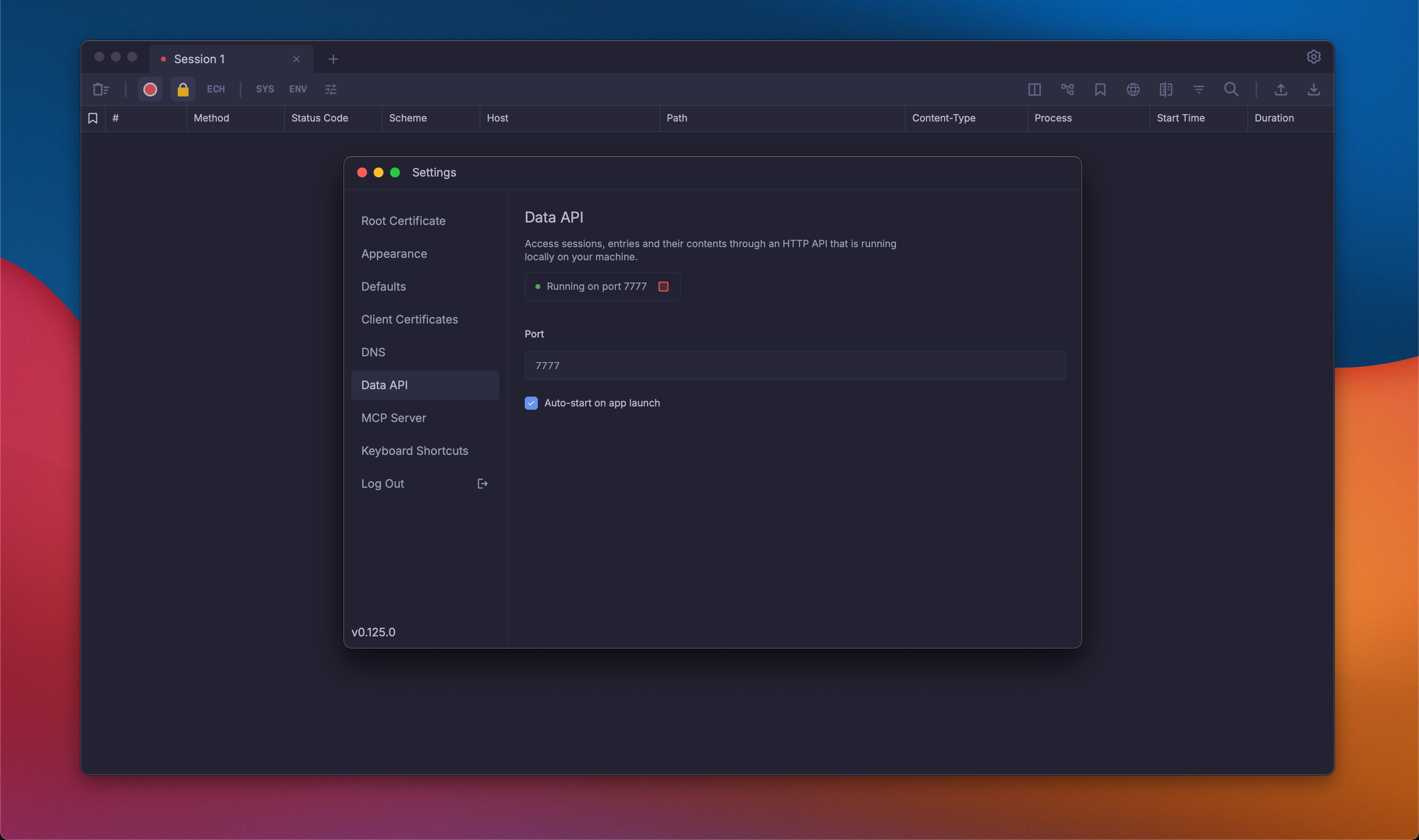
Add to your .cursor/mcp.json:
{
  "mcpServers": {
    "powhttp": {
      "command": "powhttp-mcp",
      "env": {
        "POWHTTP_BASE_URL": "http://localhost:7777",
        "POWHTTP_PROXY_URL": "http://localhost:8888"
      }
    }
  }
}
Add to your Claude Desktop config (~/Library/Application Support/Claude/claude_desktop_config.json on macOS):
{
  "mcpServers": {
    "powhttp": {
      "command": "powhttp-mcp",
      "env": {
        "POWHTTP_BASE_URL": "http://localhost:7777",
        "POWHTTP_PROXY_URL": "http://localhost:8888"
      }
    }
  }
}
Add using the CLI:
claude mcp add powhttp -e POWHTTP_BASE_URL=http://localhost:7777 -e POWHTTP_PROXY_URL=http://localhost:8888 -- powhttp-mcp
The generated scraper running successfully:
https://github.com/user-attachments/assets/52b30cbf-7c66-40b1-a3fe-9c12d37ece11
powhttp-mcp provides 4 prompts for guided workflows:
| Prompt | Description |
|---|---|
base_prompt | START HERE: Essential guide for efficient tool usage and token optimization |
compare_browser_program | Compare browser vs program traffic to find anti-bot detection differences |
build_api_map | Build an API endpoint catalog from captured traffic |
generate_scraper | Generate PoC Go scrapers from captured traffic |
powhttp-mcp provides 17 tools for HTTP traffic analysis:
| Tool | Description |
|---|---|
powhttp_sessions_list | List all sessions with entry counts |
powhttp_session_active | Get the currently active session |
powhttp_search_entries | Search entries with filters and free text |
powhttp_get_entry | Get full details of a specific entry |
powhttp_get_tls | Get TLS handshake events for a connection |
powhttp_get_http2_stream | Get HTTP/2 frame details for a stream |
powhttp_fingerprint | Generate HTTP, TLS, and HTTP/2 fingerprints |
powhttp_diff_entries | Compare two entries to find detection differences |
powhttp_extract_endpoints | Cluster entries into endpoint groups |
powhttp_describe_endpoint | Generate detailed endpoint description |
powhttp_trace_flow | Trace related requests around a seed entry |
powhttp_validate_schema | Validate entry bodies against a schema |
powhttp_query_body | Extract specific fields from bodies using JQ expressions |
powhttp_infer_schema | Infer merged schema from multiple entry bodies with field statistics |
powhttp_graphql_operations | Cluster GraphQL traffic by operation name and type |
powhttp_graphql_inspect | Parse and inspect individual GraphQL operations |
powhttp_graphql_errors | Extract and categorize GraphQL errors from responses |
See internal/mcp/README.md for detailed tool documentation.
| Variable | Description | Default |
|---|---|---|
POWHTTP_BASE_URL | Where to find the powhttp API server | http://localhost:7777 |
POWHTTP_PROXY_URL | Proxy URL used by prompts when generating scrapers and debugging | http://127.0.0.1:8890 |
LOG_LEVEL | How verbose the logs are: debug, info, warn, error | info |
LOG_FILE | File to write logs to (empty = print to console) | "" (console) |
| Variable | Description | Default |
|---|---|---|
HTTP_CLIENT_TIMEOUT_MS | How long to wait for API responses (milliseconds) | 10000 (10s) |
FETCH_WORKERS | How many entries to fetch in parallel | 16 |
ENTRY_CACHE_MAX_ITEMS | How many entries to keep in memory cache | 512 |
REFRESH_INTERVAL_MS | How often to check for new entries (milliseconds) | 2000 (2s) |
REFRESH_TIMEOUT_MS | Max time for index refresh operation (milliseconds) | 15000 (15s) |
FRESHNESS_THRESHOLD_MS | Consider data stale after this many milliseconds | 500 (0.5s) |
| Variable | Description | Default |
|---|---|---|
TOOL_MAX_BYTES_DEFAULT | Max response body size tools return (bytes) | 2000000 (2MB) |
RESOURCE_MAX_BODY_BYTES | Max body size for MCP resources (bytes) | 65536 (64KB) |
TLS_MAX_EVENTS_DEFAULT | Max TLS handshake events to return | 200 |
H2_MAX_EVENTS_DEFAULT | Max HTTP/2 frames to return | 200 |
BOOTSTRAP_TAIL_LIMIT | Max entries to load when starting up | 20000 |
| Variable | Description | Default |
|---|---|---|
COMPACT_MAX_ARRAY_ITEMS | In compact mode, trim arrays to this many items | 3 |
COMPACT_MAX_STRING_LEN | Truncate strings longer than this (chars) | 500 |
COMPACT_MAX_DEPTH | Max nesting depth for compaction (0 = unlimited) | 0 |
DEFAULT_SEARCH_LIMIT | Default max results for search_entries | 10 |
DEFAULT_QUERY_LIMIT | Default max entries for query_body | 20 |
DEFAULT_CLUSTER_LIMIT | Default max clusters for extract_endpoints | 15 |
DEFAULT_EXAMPLES_PER_ITEM | Default examples shown per cluster | 3 |
| Variable | Description | Default |
|---|---|---|
LOG_MAX_SIZE_MB | Rotate log when it reaches this size (MB) | 10 |
LOG_MAX_BACKUPS | Keep this many old log files | 5 |
LOG_MAX_AGE_DAYS | Delete log files older than this (days) | 28 |
LOG_COMPRESS | Compress old log files (true/false) | true |
go build ./cmd/powhttp-mcp
go test ./...
Have a feature suggestion or found a bug? We'd love to hear from you!
enhancement labelWe use squash merges for all pull requests. When creating a PR, ensure the PR title follows Conventional Commits format, as it will become the commit message:
Triggers release:
feat: - minor version bumpfix: - patch version bumpperf: - patch version bumprevert: - patch version bumpfeat!: or BREAKING CHANGE: - major version bumpNo release:
docs:, chore:, refactor:, test:, style:, build:, ci:Versioning is automated via release-please.
This project is licensed under the GNU Affero General Public License v3.0 - see the LICENSE file for details.
About String — String ( better website coming soon :) ) extracts structured data from any website at scale. We handle all the code and maintenance.
This project was built during an internal hackathon focused on developer experience tooling. Special thanks to:
Sign in to join the discussion.
No comments yet. Be the first to say what this is good for.
Real-time global intelligence dashboard. AI-powered news aggregation, geopolitical monitoring, and infrastructure tracking in a unified situational awareness interface
High-performance code intelligence MCP server. Indexes codebases into a persistent knowledge graph — average repo in milliseconds. 158 languages, sub-ms queries, 99% fewer tokens. Single static binary, zero dependencies.

Universal provider proxy for OpenAI Codex & Claude Code — use any LLM (Claude, Gemini, Grok, DeepSeek, Ollama…) with Codex CLI, App, SDK, and Claude Code

Git-native persistent memory for AI coding agents. Implements Google OKF v0.2 with sub-300µs in-memory BM25 search, embedded MCP server, and progressive disclosure. Slashes token bloat by 80% with zero external databases or dependencies. Built in pure Go.

Local-first code intelligence graph for MCP and CLI. Builds a persistent map of your codebase so AI coding tools read only what matters, with benchmarked context reductions on reviews and large-repo workflows.

Stop your AI from making things up — it proposes, deterministic tools decide, every claim checked against ground truth with evidence. Grounded facts and context survive resets. Reverse engineering is the proving ground. MCP server + CLI.