
koala73/worldmonitorConnectors
Real-time global intelligence dashboard. AI-powered news aggregation, geopolitical monitoring, and infrastructure tracking in a unified situational awareness interface
86k
This project adds U.S. Census Bureau statistics to any MCP-capable assistant. It connects the assistant to the Census Data API and to a local Postgres database for faster, richer geography and dataset search. The server exposes tools for listing datasets, fetching geography levels, pulling aggregate data, and resolving FIPS codes. It also ships a population prompt for common lookup flows.
Builders who want their agent to query official Census data while they research, compare places, or fill in statistics.
You can ask your agent for official Census Bureau numbers and geography matches without leaving your workspace.
Provides a `list-datasets` tool that returns available Census datasets.
Provides `fetch-dataset-geography` and `resolve-geography-fips` tools for finding geography levels and FIPS codes.
Provides `fetch-aggregate-data` for querying Census API data with dataset, year, geography, and variable filters.
Includes a `get_population_data` prompt for population statistics by state, county, city, and other areas.
Uses `mcp-db/` migrations and seed data to mirror part of the Census data for better search and performance.
Includes Docker Compose and helper scripts to run the database and server together.
npm run prod:down
npm run prod:build





Bringing official Census Bureau statistics to AI assistants everywhere.
The U.S. Census Bureau Data API MCP is a Model Context Protocol (MCP) server that connects AI assistants with data from the Census Data API and other official Census Bureau sources. This project is built using the MCP Typescript SDK.
To get started, you will need:
To use the U.S. Census Bureau Data API MCP server:
docker compose --profile prod run --rm census-mcp-db-init sh -c "npm run migrate:up && npm run seed" to pull data from the Census Data API into the local database. This is only required on first-time setup.Here is an example configuration file that includes the appropriate scripts for launching the MCP Server:
{
  "mcpServers": {
    "mcp-census-api": {
      "command": "bash",
      "args": [
        "/Path/To/Server/us-census-bureau-data-api-mcp/scripts/mcp-connect.sh"
      ],
      "env": {
        "CENSUS_API_KEY": "YOUR_CENSUS_API_KEY"
      }
    }
  }
}
Note that the CENSUS_API_KEY variable is required. This defines the env variable in the MCP Client and passes it to the MCP server via the mcp-connect script.
Be sure to update the path to the us-census-bureau-data-api-mcp directory in args and provide a valid CENSUS_API_KEY.
When a new version of this project is released, you will need to rebuild the production environment for the latest features. From the mcp-db/ directory, run the following:
npm run prod:down
npm run prod:build
After that, you can relaunch your MCP Client and it should connect to the server again.
The U.S. Census Bureau Data API MCP server uses data from the Census Data API and other official sources to construct contextually rich data and statistics for use with AI Assistants. The Census Data API is the primary source of data but some of the API's data is pulled down to a local postgres container to enable more robust and performant search functionality. Below is an illustration of how user prompts are processed by AI Assistants and the MCP Server.
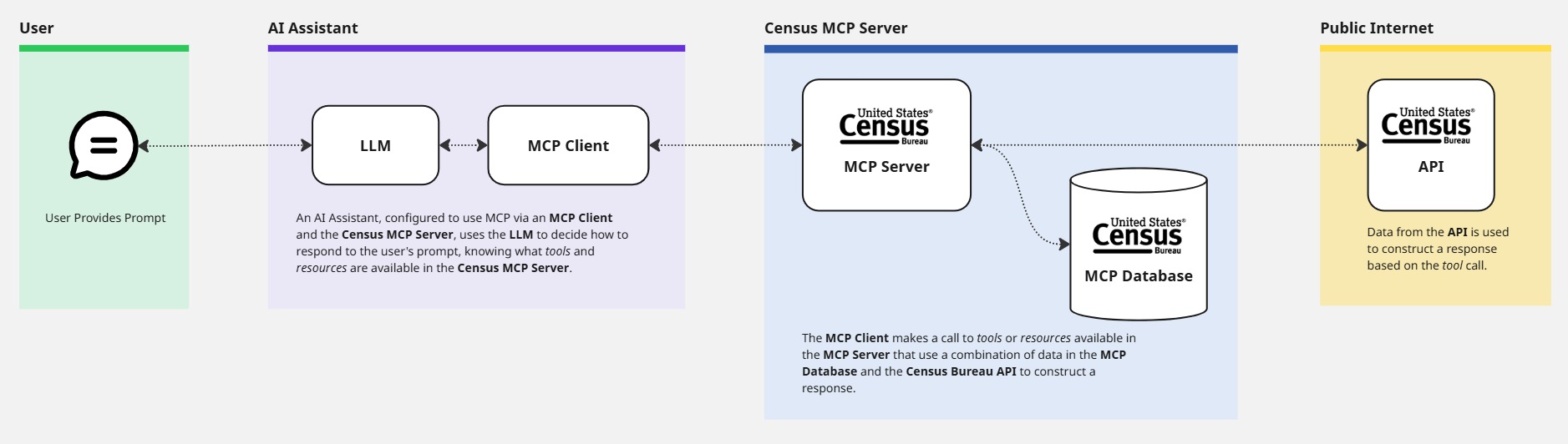
Run docker compose --profile dev up from the root of the project to build the containers. This starts the MCP Database containers that runs migrations and seeds a local postgres database to supplement information from the Census Bureau API. It also starts the MCP Server itself.
By default, all logging functions are disabled in the mcp-server to prevent json validation errors when interacting with the MCP server through MCP clients. To enable logging for development purposes, set DEBUG_LOGS=true when interacting with the server directly using the examples below, e.g. echo '{CALL_ARGUMENTS}' docker exec -e DEBUG_LOGS=true -i -e CENSUS_API_KEY=YOUR_CENSUS_API_KEY mcp-server node dist/index.js.
This project uses Vitest to test the MCP Server and MCP Database.
Prior to running the MCP Server tests, a valid Census Bureau API key is required. This key should be defined in the .env file of the mcp-server directory. The sample.env offers an example of how this .env file should look.
To run tests, navigate to the mcp-server/ directory and run npm run test. To run ESLint, run npm run lint from the same directory.
A .env file needs to be created in the mcp-db/ directory with a valid DATABASE_URL variable defined. The sample.env in the same directory includes the default value.
To run tests, navigate to the mcp-db/ directory and run npm run test.
mcp-server/src/ - Source code for the MCP Server.mcp-server/src/index.ts - Starts the MCP Server and registers tools.mcp-server/src/server.ts - Defines the McpServer class that handles calls to the server, e.g. how tools/list and tools/calls respond to requestsmcp-server/src/tools/ - Includes tool definitions and shared classes, e.g. BaseTool and ToolRegistry, to reduce repetition and exposes the tools list to the servermcp-server/src/schema/ - Houses each tool’s schema and is used to validate schemas in testsThe MCP server exposes several methods: tools/list, tools/call, prompts/list, and prompts/get.
This section covers tools that can be called.
The list-datasets tool is used for fetching a subset of metadata for all datasets that are available in the Census Bureau's API.
It requires no arguments.
The fetch-dataset-geography tool is used for fetching available geography levels for filtering a given dataset. It accepts the following arguments:
'acs/acs1'1987The fetch-aggregate-data tool is used for fetching aggregate data from the Census Bureau's API. It accepts the following arguments:
'acs/acs1'1987'NAME', 'B01001_001E'S01010400000US41'for': 'state*'false), e.g. trueThe resolve-geography-fips tool is used to search across all Census Bureau geographies to return a list of potential matches and the correct FIPS codes and parameters used to query data in them. This tool accepts the following arguments:
PhiladelphiaPlace, 160This section covers prompts that can be called. According to the Model Context Protocol docs, prompts are "pre-built instruction templates that tell the model to work with specific tools and resources". This means that prompts override the default model behavior. Prompts are not a menu of allowed questions. They are instructions, not constraints on server capability.
This get_population_data prompt retrieves population statistics for US states, counties, cities, and other geographic areas. It resolves geographic names to their corresponding FIPS codes before fetching data. This prompt accepts the following argument:
geography_name (required): Name of the geographic area (state, county, city, etc.)For easier command-line usage, this project includes bash helper scripts in the scripts/dev directory that wrap the complex Docker commands and handle the CENSUS_API_KEY parameter automatically.
For more information about the parameters above and all available predicates, review the Census Bureau's API documentation.
Sign in to join the discussion.
No comments yet. Be the first to say what this is good for.
Real-time global intelligence dashboard. AI-powered news aggregation, geopolitical monitoring, and infrastructure tracking in a unified situational awareness interface
High-performance code intelligence MCP server. Indexes codebases into a persistent knowledge graph — average repo in milliseconds. 158 languages, sub-ms queries, 99% fewer tokens. Single static binary, zero dependencies.

Universal provider proxy for OpenAI Codex & Claude Code — use any LLM (Claude, Gemini, Grok, DeepSeek, Ollama…) with Codex CLI, App, SDK, and Claude Code

Git-native persistent memory for AI coding agents. Implements Google OKF v0.2 with sub-300µs in-memory BM25 search, embedded MCP server, and progressive disclosure. Slashes token bloat by 80% with zero external databases or dependencies. Built in pure Go.

Stop your AI from making things up — it proposes, deterministic tools decide, every claim checked against ground truth with evidence. Grounded facts and context survive resets. Reverse engineering is the proving ground. MCP server + CLI.
20 MB lightweight cross-platform database client for 90+ databases, including MySQL, PostgreSQL, SQLite, Redis, MongoDB, DuckDB, SQL Server, and Dameng. Built-in AI, MCP Server, CLI, desktop and Docker. | 轻量级跨平台数据库管理工具,支持 MySQL、PostgreSQL、SQLite、Redis、MongoDB、达梦等 90+ 数据库,提供桌面端、Docker、CLI、内置 AI 助手和 MCP Server。