
High-performance code intelligence MCP server. Indexes codebases into a persistent knowledge graph — average repo in milliseconds. 158 languages, sub-ms queries, 99% fewer tokens. Single static binary, zero dependencies.
MCP server for GDB and LLDB debugging
MDB-MCP exposes GDB and LLDB through MCP so an agent can start sessions, run debugger commands, and list active sessions. It supports automatic debugger selection, with experimental LLDB support on macOS.
Builders who want their agent to debug binaries with GDB or LLDB.
You can inspect and control live debugging sessions from your agent instead of switching between tools.
What it does
Unified debugger tools
`debugger_status()`, `debugger_start()`, `debugger_terminate(session_id)`, `debugger_list_sessions()`, and `debugger_command(session_id, command)` work across available debuggers.
GDB session tools
`gdb_start(gdb_path)`, `gdb_terminate(session_id)`, `gdb_list_sessions()`, and `gdb_command(session_id, command)` handle GDB sessions directly.
LLDB session tools
`lldb_start()`, `lldb_terminate(session_id)`, `lldb_list_sessions()`, and `lldb_command(session_id, command)` handle LLDB sessions directly.
MCP integrations
README examples show setup for Claude Desktop, VSCode Copilot, and Windsurf using stdio commands.
Session management and tests
The repo includes session manager code under `modules/` and test coverage in `tests/` for server and debugger behavior.
How to get it
- 1Run
uv sync uv venv uv run server.py
- 2To enable LLDB support on macOS, install LLVM (which includes LLDB) and python via…
# Install LLDB for supporting python3.14 bindings brew install llvm python3 # Install MCP and debugging dependencies pip3 install mcp pygdbmi --break-system-packages
README
Multi-Debugger MCP Server (LLDB and GDB)
A Model Context Protocol server that provides debugging functionality for both GDB and LLDB debuggers, for use with Claude Desktop, VSCode Copilot, or other AI assistants.
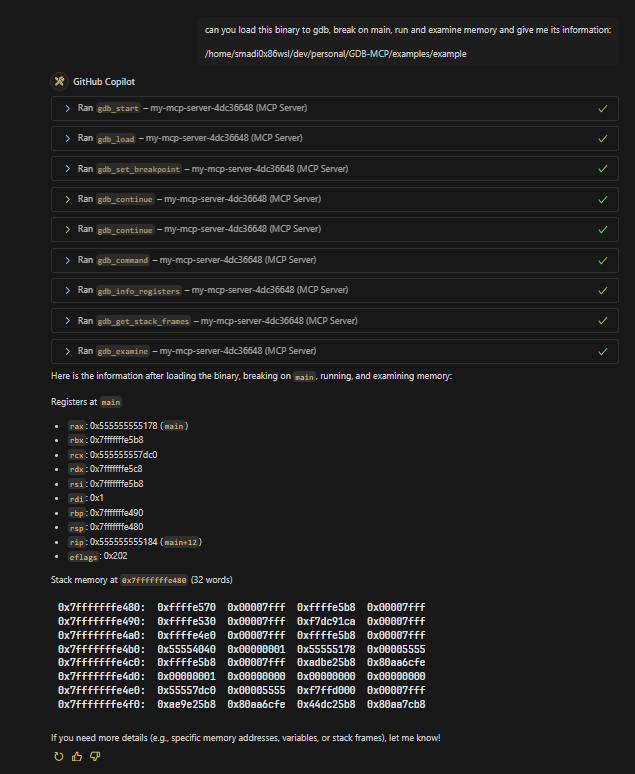
Quick Start
uv sync
uv venv
uv run server.py
Integration
Note that you can use uv run to run the server.py script or you can use uv venv to create a virtual environment and then run /home/youruser/dev/personal/GDB-MCP/.venv/bin/python /home/youruser/dev/personal/GDB-MCP/server.py.
Claude Desktop
Add to your claude_desktop_config.json:
{
"mcpServers": {
"gdb": {
"command": "uv",
"args": ["run", "/home/youruser/dev/personal/GDB-MCP/server.py"],
"disabled": false
}
}
}
VSCode Copilot
If you're using WSL:
"mcp": {
"servers": {
"my-mcp-server-4dc36648": {
"type": "stdio",
"command": "wsl",
"args": [
"/home/youruser/dev/personal/GDB-MCP/.venv/bin/python",
"/home/youruser/dev/personal/GDB-MCP/server.py"
]
}
}
}
If you're not using WSL:
"mcp": {
"servers": {
"my-mcp-server-db89eee1": {
"type": "stdio",
"command": "/home/youruser/dev/personal/GDB-MCP/.venv/bin/python",
"args": ["/home/youruser/dev/personal/GDB-MCP/server.py"]
}
}
}
Windsurf
{
"mcpServers": {
"debugger-mcp": {
"command": "python3",
"args": ["/Users/youruser/dev/GDB-MCP/server.py"]
}
}
}
Experimental LLDB Support (macOS)
This project includes experimental native LLDB support alongside GDB, with automatic debugger selection.

Installation
To enable LLDB support on macOS, install LLVM (which includes LLDB) and python via Homebrew:
# Install LLDB for supporting python3.14 bindings
brew install llvm python3
# Install MCP and debugging dependencies
pip3 install mcp pygdbmi --break-system-packages
Available Tools
Unified Tools
debugger_status(): Show available debuggers and their statusdebugger_start(): Start debugging session with auto-detected debuggerdebugger_terminate(session_id): Terminate debugging sessiondebugger_list_sessions(): List all active debugging sessionsdebugger_command(session_id, command): Execute debugger command
LLDB Tools
lldb_start(): Start new LLDB debugging sessionlldb_terminate(session_id): Terminate LLDB debugging sessionlldb_list_sessions(): List all active LLDB sessionslldb_command(session_id, command): Execute arbitrary LLDB command
GDB Tools
gdb_start(gdb_path): Start new GDB debugging sessiongdb_terminate(session_id): Terminate GDB debugging sessiongdb_list_sessions(): List all active GDB sessionsgdb_command(session_id, command): Execute any GDB command
Use
*_command()functions for all advanced debugger operations, your LLM client should already know how to use it, but it doesn't hurt to mention it.
Checking Status
You can verify debugger availability:
from modules.lldb import LLDBSessionManager
from modules.gdb import GDBSessionManager
print("LLDB available:", LLDBSessionManager.is_available())
print("GDB available:", GDBSessionManager.is_available())
Testing
uv run python run-tests.py --check-deps
uv run python run-tests.py --type all
Examples
Check the examples directory for example prompts.
Example binaries are compiled to
arm64andamd64, pick the one that matches your system architecture.
License
This project is licensed under the GNU Version 3.0 License, see the LICENSE file for details.
Files in the repo
- examples
- images
- modules
- tests
- .gitignore
- .python-version
- LICENSE
- pyproject.toml
- pytest.ini
- README.md
- run-tests.py
- server.py
- TODO.md
- uv.lock
Discussion (0)
Ask about usage, or say what you built with itSign in to join the discussion.
No comments yet. Be the first to say what this is good for.
More connectors

Universal provider proxy for OpenAI Codex & Claude Code — use any LLM (Claude, Gemini, Grok, DeepSeek, Ollama…) with Codex CLI, App, SDK, and Claude Code
Git-native persistent memory for AI coding agents. Implements Google OKF v0.2 with sub-300µs in-memory BM25 search, embedded MCP server, and progressive disclosure. Slashes token bloat by 80% with zero external databases or dependencies. Built in pure Go.
Local-first code intelligence graph for MCP and CLI. Builds a persistent map of your codebase so AI coding tools read only what matters, with benchmarked context reductions on reviews and large-repo workflows.
Stop your AI from making things up — it proposes, deterministic tools decide, every claim checked against ground truth with evidence. Grounded facts and context survive resets. Reverse engineering is the proving ground. MCP server + CLI.
20 MB lightweight cross-platform database client for 90+ databases, including MySQL, PostgreSQL, SQLite, Redis, MongoDB, DuckDB, SQL Server, and Dameng. Built-in AI, MCP Server, CLI, desktop and Docker. | 轻量级跨平台数据库管理工具,支持 MySQL、PostgreSQL、SQLite、Redis、MongoDB、达梦等 90+ 数据库,提供桌面端、Docker、CLI、内置 AI 助手和 MCP Server。
