

koala73/worldmonitorConnectors
Real-time global intelligence dashboard. AI-powered news aggregation, geopolitical monitoring, and infrastructure tracking in a unified situational awareness interface
86k
This bridge translates OpenAI chat requests into Claude Code CLI calls and translates Claude responses back into OpenAI format. It keeps persistent sessions per agent and channel, maps tool calls, and supports extended thinking settings. The dashboard shows live requests, sessions, and cost data.
Builders who want Claude Code behind an OpenAI-compatible API with persistent sessions and a live dashboard.
You can route agent traffic to Claude Code without changing your OpenClaw setup, while keeping session memory and request tracking.
Serves `/v1/chat/completions` and `/v1/models` so existing OpenAI-style clients can connect.
Keeps a separate Claude CLI session for each channel and agent name, and restores state after restarts.
Reads OpenClaw tools, injects tool instructions into Claude’s prompt, and converts `<tool_call>` output back to OpenAI `tool_calls`.
Maps `reasoning_effort` to Claude CLI effort levels and can disable thinking when it is not requested.
Provides a React dashboard with live activity, session usage, request history, and per-agent cost tracking.
Includes macOS launchd and Linux systemd service files plus a macOS installer script.
# Recommended: auto-detects paths, reads .env, generates plist
./service/install-mac.sh
cp service/openclaw-claude-bridge.service ~/.config/systemd/user/
# Edit the file if your project path differs from ~/openclaw-claude-bridge
systemctl --user daemon-reload
systemctl --user enable --now openclaw-claude-bridge
loginctl enable-linger $USER  # start at boot without login
systemctl --user status openclaw-claude-bridge
journalctl --user -u openclaw-claude-bridge -n 50
systemctl --user restart openclaw-claude-bridge


繁體中文 | English
An OpenAI-compatible HTTP proxy that lets OpenClaw agents use Claude through Claude Code CLI — with tool calling, session memory, and extended thinking.
OpenClaw speaks the OpenAI API format. Claude Code CLI speaks its own format. This bridge sits in between and translates — so your OC agents can talk to Claude without either side needing to change.
  OpenClaw agent                  Bridge                     Claude CLI
  (Discord/Telegram)
        │                           │                              │
        │  POST /v1/chat/           │                              │
        │  completions              │  Translate messages           │
        ├──────────────────────────▶│  Inject tool protocol        │
        │                           │  Map thinking level          │
        │                           │                              │
        │                           │  stdin ──▶ claude --print    │
        │                           │  stdout ◀── stream-json      │
        │                           │                              │
        │  SSE stream               │  Parse response:             │
        ◀──────────────────────────│  ├─ text → clean output      │
        │                           │  └─ <tool_call> → OpenAI fmt │
        │                           │                              │
        │  tool_calls?              │                              │
        │  Yes → OC runs tools      │                              │
        │  No  → answer to user     │                              │
Key principle: The bridge never executes tools. It only translates. OpenClaw owns the tool loop.
# 1. Clone and install (also builds the dashboard automatically)
git clone https://github.com/shinglokto/openclaw-claude-bridge.git
cd openclaw-claude-bridge
npm install

# 2. Configure
cp .env.example .env
# Edit .env — review settings, change DASHBOARD_PASS

# 3. Make sure Claude CLI is installed and logged in
claude --version
claude auth status

# 4. Start
npm start

# 5. Health check
curl http://localhost:3456/health
<tool_call> XML into OpenAI's tool_calls format; otherwise it returns clean textEach agent in each conversation gets its own persistent Claude CLI session. This means Claude remembers previous messages without the bridge needing to resend the full history every time.
Discord #general — two agents sharing the same channel:

  researcher (first message)  → new session created (session-aaa)
  helper-bot (first message)  → new session created (session-bbb)
  researcher (second message) → resumes session-aaa (only sends new messages)
  user runs /new in OC        → old session purged, fresh one created
The routing key is channel + agent name, so agents in the same channel never interfere with each other.
Session state survives restarts — mappings and request history are saved to state.json and restored on startup. Stale sessions (where the CLI session file no longer exists) are automatically pruned.
For more details on the three-tier session lookup and edge cases, see docs/architecture.md.
The bridge reads the tools array from OpenClaw's request and dynamically generates tool-calling instructions that get injected into Claude's system prompt. Claude outputs <tool_call> XML blocks, which the bridge converts into standard OpenAI tool_calls.
This means any new tools added in OpenClaw are automatically available to Claude — no bridge changes needed.
Claude's native tools (Bash, Read, Write, etc.) are disabled via --tools "" so it can only call tools through OpenClaw's gateway.
The bridge supports Claude's extended thinking via the reasoning_effort parameter:
reasoning_effort | Claude CLI --effort | Behaviour |
|---|---|---|
| (not set) | (default) | Thinking OFF |
minimal / low | low | Quick intuition |
medium | medium | Moderate reasoning |
high / xhigh | high | Deep step-by-step |
When reasoning_effort is not provided, thinking is disabled entirely (MAX_THINKING_TOKENS=0).
The bridge includes a React dashboard accessible at http://<server-ip>:3458/.
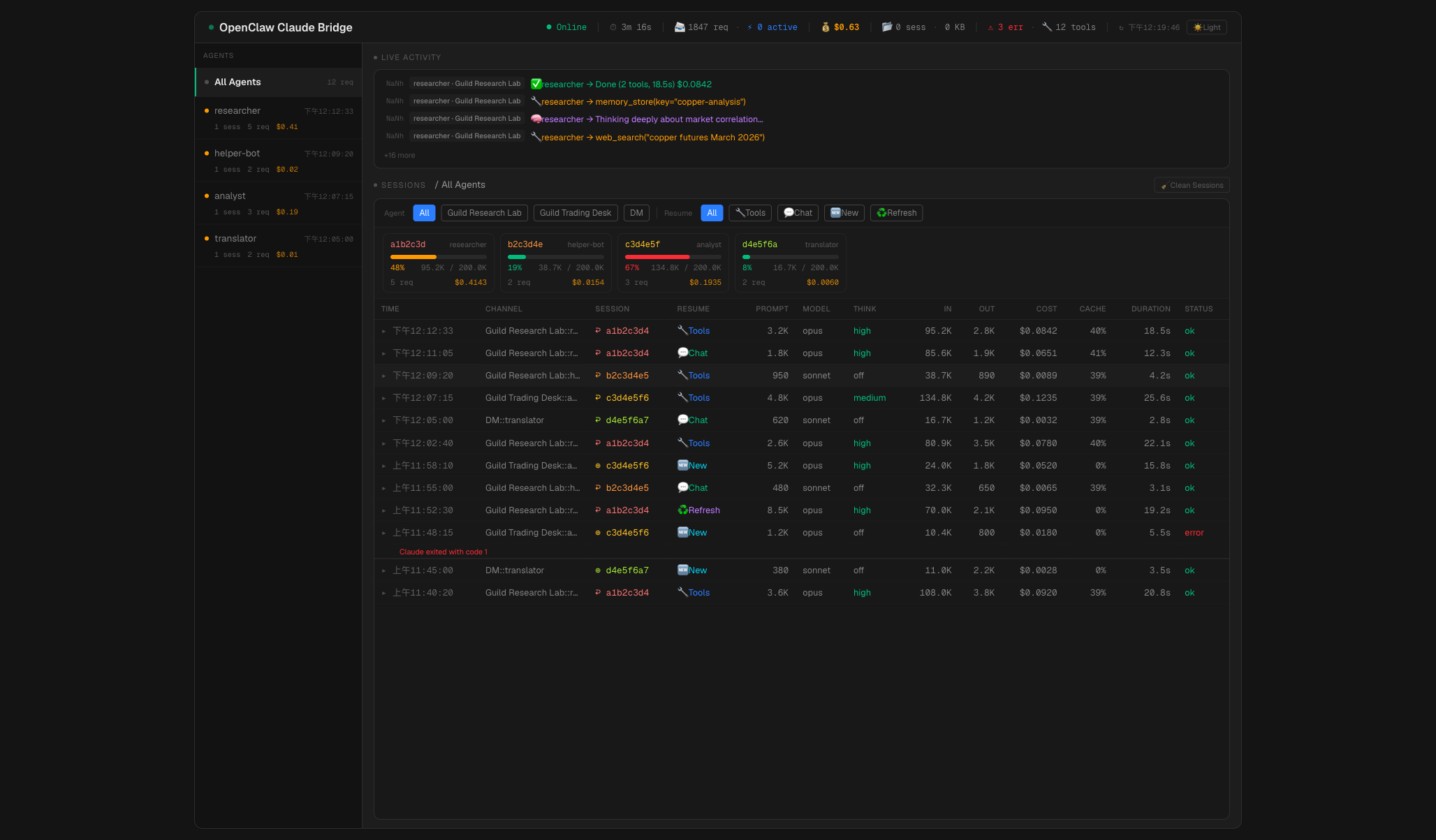
Header bar — live metrics across the top: online/offline status, uptime, total requests, active requests, total cost, session count + disk size, error count, available tools, and a dark/light theme toggle.
Agent sidebar — lists all agents sorted by recency. Each shows an activity indicator (green if active in last 5 min, amber if 30 min, gray if idle), session count, request count, and cost. Selecting an agent filters all panels. On mobile, collapses to a horizontal pill bar.
Live activity feed — real-time event stream with emoji-coded messages: 🧠 thinking, 🔧 tool calls, 🔄 resume, ♻️ context refresh, ✅ done, ❌ error. Shows relative timestamps and agent/channel labels.
Context cards — per-session context window usage with progress bars. Color-coded: green (<40%), amber (40–65%), red (>65%). Each card shows session ID, agent, token counts, and cost.
Request table — 13-column table showing every request: time, channel, session (color-coded), resume method (emoji badges: 🔧 Tools, 💬 Chat, 🆕 New, ♻️ Refresh, etc.), prompt size, model, thinking level, input/output tokens, cost, cache hit rate, duration, and status. Rows expand to show activity logs and errors. Supports channel and resume method filtering, and pagination.
Session cleanup — one-click button to delete CLI sessions older than 24 hours.
Password protection: Set DASHBOARD_PASS in your environment to enable HTTP Basic Auth (user: admin). If not set, the dashboard is open.
For detailed architecture of the dashboard, see docs/architecture.md.
| Variable | Required | Default | Description |
|---|---|---|---|
DASHBOARD_PASS | No | — | Dashboard password (Basic Auth, user: admin) |
OPUS_MODEL | No | opus | CLI model alias for Opus (use opus[1m] for 1M context) |
SONNET_MODEL | No | sonnet | CLI model alias for Sonnet (use sonnet[1m] for 1M context) |
HAIKU_MODEL | No | haiku | CLI model alias for Haiku |
IDLE_TIMEOUT_MS | No | 120000 | Kill CLI subprocess after this many ms of no output |
OPENCLAW_BRIDGE_PORT | No | 3456 | API server port |
OPENCLAW_BRIDGE_STATUS_PORT | No | 3458 | Dashboard port |
CLAUDE_BIN | No | claude | Path to Claude Code CLI binary |
MAX_PER_CHANNEL | No | 2 | Max concurrent requests per channel |
MAX_GLOBAL | No | 20 | Max concurrent requests globally |
| Port | Bind | Purpose |
|---|---|---|
3456 | 127.0.0.1 | OpenAI-compatible API (localhost only) |
3458 | 0.0.0.0 | Dashboard (LAN accessible) |
Add this provider to your OpenClaw config (~/.openclaw/openclaw.json):
{
  "models": {
    "providers": {
      "claude-bridge": {
        "baseUrl": "http://localhost:3456/v1",
        "apiKey": "not-needed",
        "api": "openai-completions",
        "models": [
          {
            "id": "claude-opus-latest",
            "name": "Claude Opus",
            "contextWindow": 1000000,
            "maxTokens": 128000,
            "reasoning": true
          },
          {
            "id": "claude-sonnet-latest",
            "name": "Claude Sonnet",
            "contextWindow": 1000000,
            "maxTokens": 64000,
            "reasoning": true
          }
        ]
      }
    }
  }
}
Then assign the model to your agent. The apiKey can be any non-empty string — the bridge doesn't check it.
# Recommended: auto-detects paths, reads .env, generates plist
./service/install-mac.sh
Manual management:
# Status
launchctl list | grep openclaw-claude-bridge

# Restart (reload plist config)
launchctl bootout gui/$(id -u)/com.openclaw.claude-bridge
launchctl bootstrap gui/$(id -u) ~/Library/LaunchAgents/com.openclaw.claude-bridge.plist

# Logs
tail -f ~/openclaw-claude-bridge/bridge.log
cp service/openclaw-claude-bridge.service ~/.config/systemd/user/
# Edit the file if your project path differs from ~/openclaw-claude-bridge
systemctl --user daemon-reload
systemctl --user enable --now openclaw-claude-bridge
loginctl enable-linger $USER  # start at boot without login
systemctl --user status openclaw-claude-bridge
journalctl --user -u openclaw-claude-bridge -n 50
systemctl --user restart openclaw-claude-bridge
| Method | Path | Port | Description |
|---|---|---|---|
POST | /v1/chat/completions | 3456 | OpenAI-compatible chat completions (SSE or JSON) |
GET | /v1/models | 3456 | Available model list |
GET | /health | 3456 | Health check → {"status":"ok"} |
GET | /status | 3458 | Runtime stats JSON (uptime, requests, sessions, activity) |
POST | /cleanup | 3458 | Delete CLI sessions older than 24h |
GET | / | 3458 | Dashboard (React SPA) |
openclaw-claude-bridge/
├── src/
│   ├── index.js         Entry point, HTTP servers, graceful shutdown
│   ├── server.js        Request handling, session management, state persistence
│   ├── claude.js        CLI subprocess, stream parsing, thinking/effort mapping
│   ├── tools.js         Dynamic tool protocol builder
│   └── convert.js       OpenAI message format → Claude CLI text format
├── dashboard/           React/TypeScript/Tailwind dashboard (Vite)
│   ├── src/             Components, hooks, lib, types
│   ├── dist/            Production build (npm run build)
│   └── package.json
├── service/
│   ├── openclaw-claude-bridge.service     Linux systemd user service
│   ├── com.openclaw.claude-bridge.plist   macOS launchd agent (template)
│   └── install-mac.sh                    macOS one-line installer
├── docs/                Technical documentation
├── .env.example         Environment variable template
├── state.json           Runtime state (auto-generated, gitignored)
└── package.json
DASHBOARD_PASS is set--tools "" disables all Claude native tools — no host command execution--dangerously-skip-permissions is required for headless operation (no terminal to prompt for confirmation; safe because native tools are disabled).env contains secrets and is gitignored| Dependency | Version | Notes |
|---|---|---|
| Node.js | >= 18 | Runtime |
| Claude Code CLI | latest | Must be logged in (claude auth login) |
| OpenClaw | >= 2026.1 | Gateway on port 18789 |
Platforms: macOS (Apple Silicon / Intel), Linux (x64 / ARM)
This project is an independent, community-built tool and is not affiliated with or endorsed by Anthropic. Users are responsible for ensuring their usage complies with Anthropic's Terms of Service.
Sign in to join the discussion.
No comments yet. Be the first to say what this is good for.
Real-time global intelligence dashboard. AI-powered news aggregation, geopolitical monitoring, and infrastructure tracking in a unified situational awareness interface
High-performance code intelligence MCP server. Indexes codebases into a persistent knowledge graph — average repo in milliseconds. 158 languages, sub-ms queries, 99% fewer tokens. Single static binary, zero dependencies.

Universal provider proxy for OpenAI Codex & Claude Code — use any LLM (Claude, Gemini, Grok, DeepSeek, Ollama…) with Codex CLI, App, SDK, and Claude Code

Git-native persistent memory for AI coding agents. Implements Google OKF v0.2 with sub-300µs in-memory BM25 search, embedded MCP server, and progressive disclosure. Slashes token bloat by 80% with zero external databases or dependencies. Built in pure Go.

Local-first code intelligence graph for MCP and CLI. Builds a persistent map of your codebase so AI coding tools read only what matters, with benchmarked context reductions on reviews and large-repo workflows.

Stop your AI from making things up — it proposes, deterministic tools decide, every claim checked against ground truth with evidence. Grounded facts and context survive resets. Reverse engineering is the proving ground. MCP server + CLI.