
koala73/worldmonitorConnectors
Real-time global intelligence dashboard. AI-powered news aggregation, geopolitical monitoring, and infrastructure tracking in a unified situational awareness interface
86k
This project exposes WHOOP health and fitness data to MCP clients through authenticated tools, resources, and prompts. It handles OAuth, token refresh, retries, pagination, and local token storage so an agent can answer questions about recovery, sleep, workouts, cycles, and trends.
Builders who want their agent to work with WHOOP recovery, sleep, and workout data.
You can ask an agent about your WHOOP data instead of checking the app yourself.
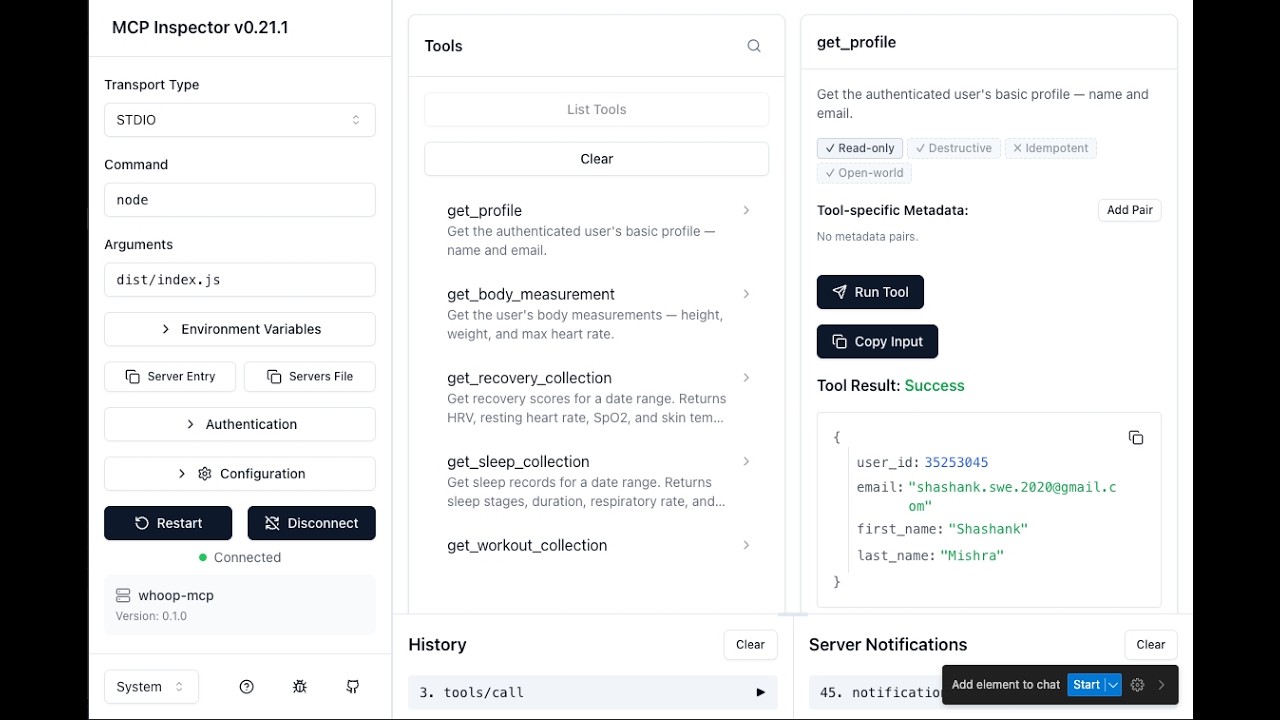
Provides tools for profile, body measurements, recovery, sleep, workouts, cycles, weekly summaries, trend analysis, comparisons, baselines, sleep debt, calendar views, and today’s snapshot.
Exposes ambient health context through resources and guided conversation starters through prompts.
Uses browser-based OAuth2, refreshes tokens automatically, and stores them locally with restricted file permissions.
Accepts relative date expressions like `last 7 days`, `this week`, and `last 3 months`.
Includes a `doctor` command for configuration checks and an aggregate privacy mode that limits access to summary-only tools.
Server name: io.github.shashankswe2020-ux/whoop
curl "https://registry.modelcontextprotocol.io/v0.1/servers?search=io.github.shashankswe2020-ux/whoop"
npm install -g whoop-ai-mcp
git clone https://github.com/shashankswe2020-ux/whoop-mcp.git
cd whoop-mcp
npm install
npm run build
npx whoop-ai-mcp setup
WHOOP_CLIENT_ID=... WHOOP_CLIENT_SECRET=... npx whoop-ai-mcp setup --verify






An MCP (Model Context Protocol) server that connects AI assistants like Claude to your WHOOP health and fitness data. Ask questions about your recovery, sleep, workouts, and more — all through natural conversation.
📦 Published on the MCP Registry as
io.github.shashankswe2020-ux/whoop— discoverable by any MCP-compatible client.
0.7.0 — Trustworthy Personal Analytics: Personal baselines, sleep debt, structured results, aggregate privacy and local diagnostics. See the changelog and release checklist.
doctor checks configuration and token-file metadata without network or OAuth activity~/.whoop-mcp/tokens.json with 0600 permissions@modelcontextprotocol/sdk + zod)Registry snapshot collected 2026-08-30. Versions and publish dates can change; this is an ecosystem comparison, not a source-code security audit.
| Package | Latest | Published (UTC) | MCP Registry identity | Runtime deps | Notable signals |
|---|---|---|---|---|---|
| whoop-ai-mcp (this repo) | 0.6.1 | 2026-08-07 | ✅ io.github.shashankswe2020-ux/whoop | 2 | 14 tools, 4 resources, 5 prompts, analytics, HTTP + stdio, OAuth 2.1 connector |
| whoop-mcp-unofficial | 0.6.5 | 2026-08-29 | ✅ io.github.davidmosiah/whoop-mcp | 6 | 20+ tools, SQLite cache, privacy modes |
| mcp-server-whoop | 0.2.2 | 2026-07-17 | ✅ io.github.Yadheedhya06/mcp-server-whoop | 2 | Read-only/local-first, npm provenance, SBOM and security checks |
| @souravpn/whoop-mcp | 1.0.2 | 2026-05-27 | ✅ io.github.souravpn/whoop-mcp | 1 | Simple standalone server with OAuth setup |
| @nchemb/whoop-mcp | 0.2.0 | 2026-04-27 | — | 4 | Shared OAuth relay and local SQLite cache |
| whoop-mcp-server | 0.0.5 | 2026-03-13 | — | 2 | WHOOP Developer Platform API server |
| whoop-mcp | 0.1.2 | 2026-03-11 | — | 1 | Server built with the xmcp framework |
| @roebot0/whoop-mcp | 1.0.0 | 2026-04-06 | — | 3 | Axios-based server and separate auth command |
| @alacore/whoop-mcp-server | 1.0.1 | 2025-10-09 | — | 2 | API v2 integration; requires pnpm |
Findings
mcpName identities.Published 0.6.1 strengths
The table above is the historical August 30 snapshot, so its 14-tool count is intentional. Version 0.7.0 adds two tools; its scope and evidence are in the September feature scan.
Evidence and reproducibility: package names, versions, publish dates,
dependency counts, descriptions, and mcpName values come from the npm Registry
search and package manifests. Feature notes were checked against each package's
published metadata/README where available. Re-run the scan with:
curl -s 'https://registry.npmjs.org/-/v1/search?text=whoop%20mcp&size=20'
Watch a detailed walkthrough of setting up and using whoop-ai-mcp with Claude Desktop:
Covers: creating a WHOOP Developer App, configuring Claude Desktop, OAuth authentication, and querying your health data through natural conversation.
http://localhost:3000/callbackDon't have a WHOOP yet? Here's how to get started:
This server is published on the official MCP Registry. MCP clients that support the registry can discover and install it automatically:
Server name: io.github.shashankswe2020-ux/whoop
You can also browse it via the registry API:
curl "https://registry.modelcontextprotocol.io/v0.1/servers?search=io.github.shashankswe2020-ux/whoop"
Add this to your Claude Desktop configuration file:
macOS: ~/Library/Application Support/Claude/claude_desktop_config.json
Windows: %APPDATA%\Claude\claude_desktop_config.json
{
  "mcpServers": {
    "whoop": {
      "command": "npx",
      "args": ["whoop-ai-mcp"],
      "env": {
        "WHOOP_CLIENT_ID": "your_client_id",
        "WHOOP_CLIENT_SECRET": "your_client_secret"
      }
    }
  }
}
Replace your_client_id and your_client_secret with the credentials from your WHOOP Developer App.
On first launch, a browser window will open for you to authorize access to your WHOOP data. After authorizing, tokens are cached locally and refresh automatically.
Then ask Claude something like:
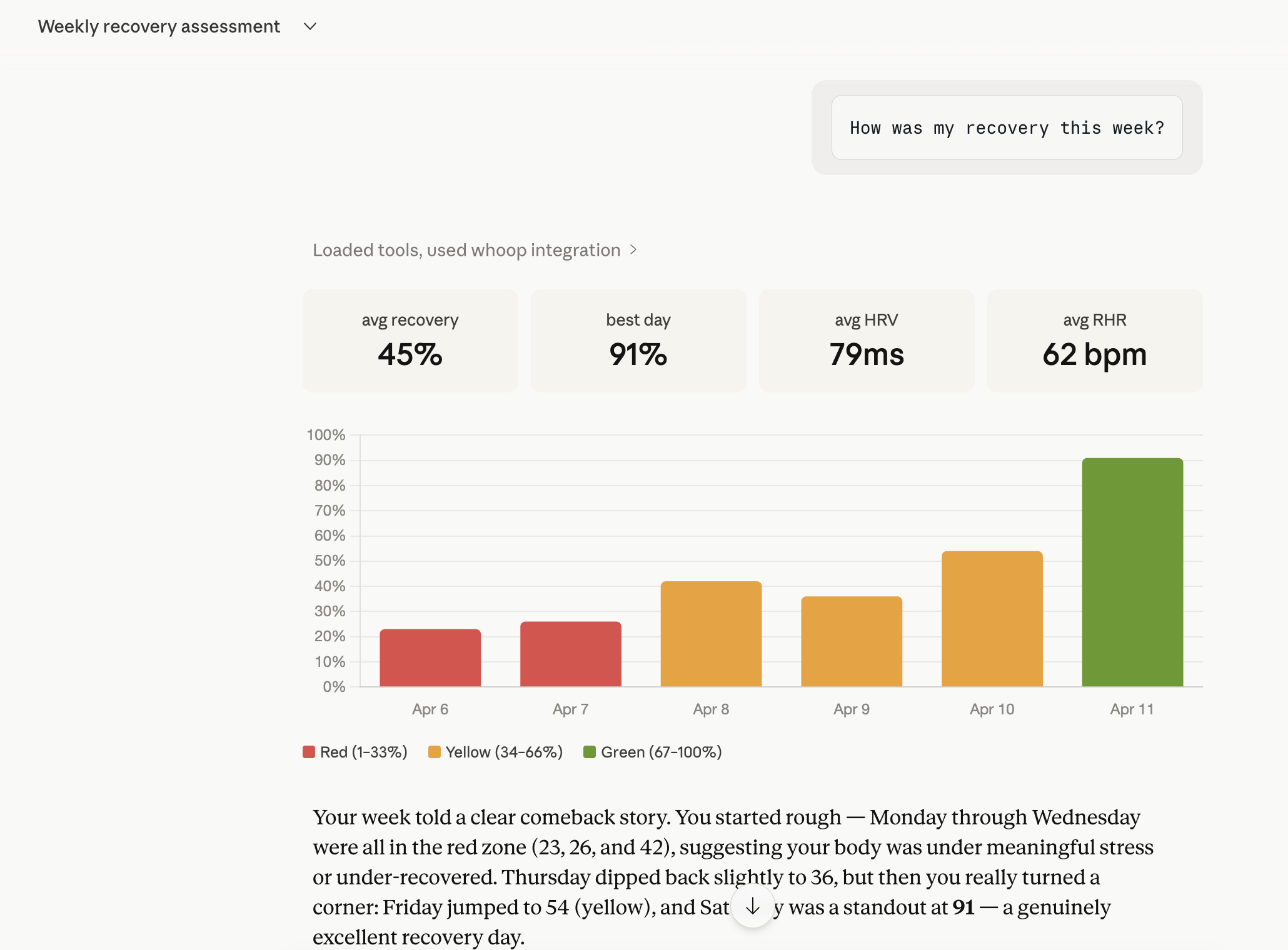
"How am I doing today?"
"Show me my sleep data from the last 3 days"
"What workouts did I do this month?"
"Is my HRV trending up or down?"
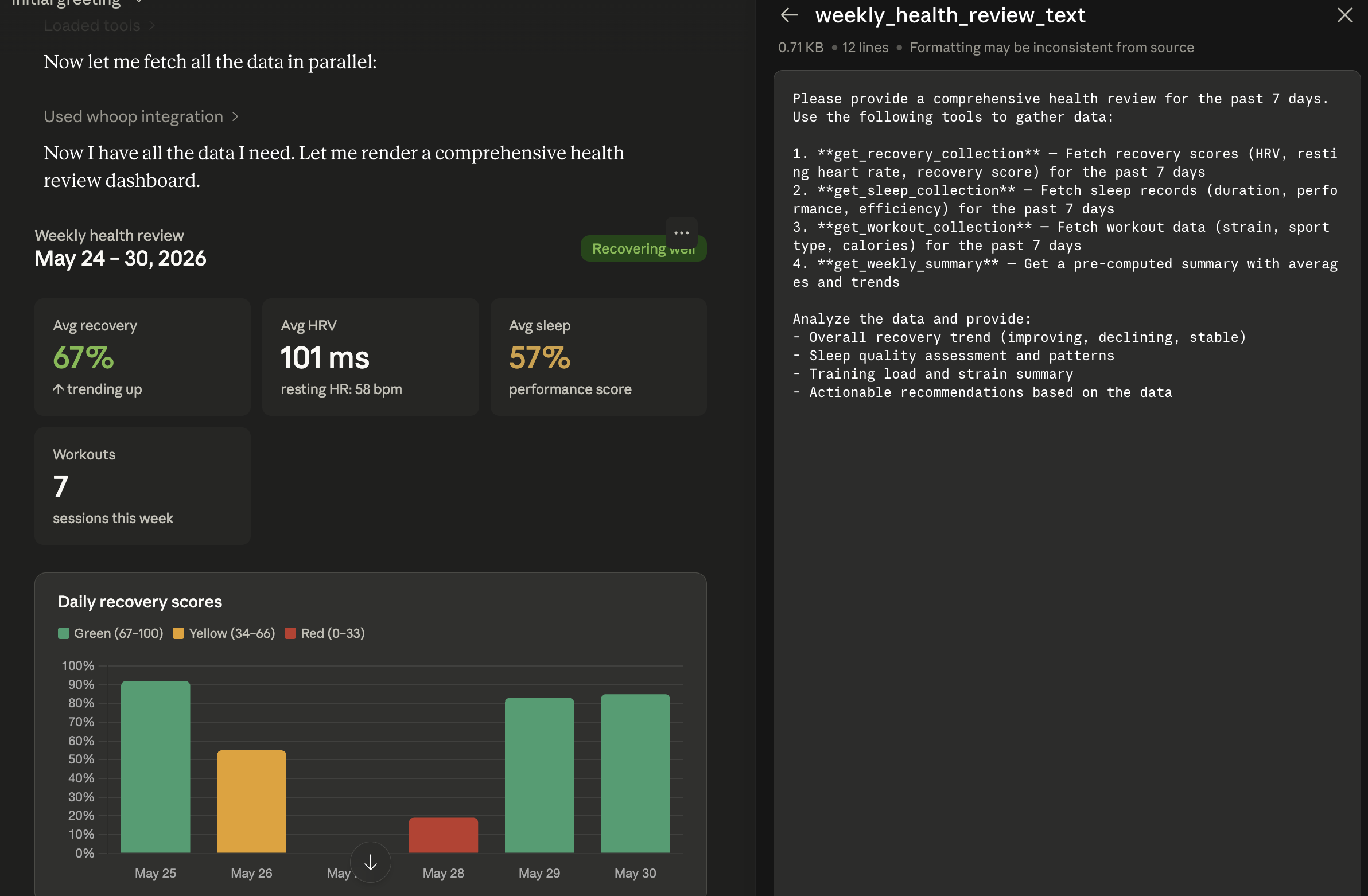
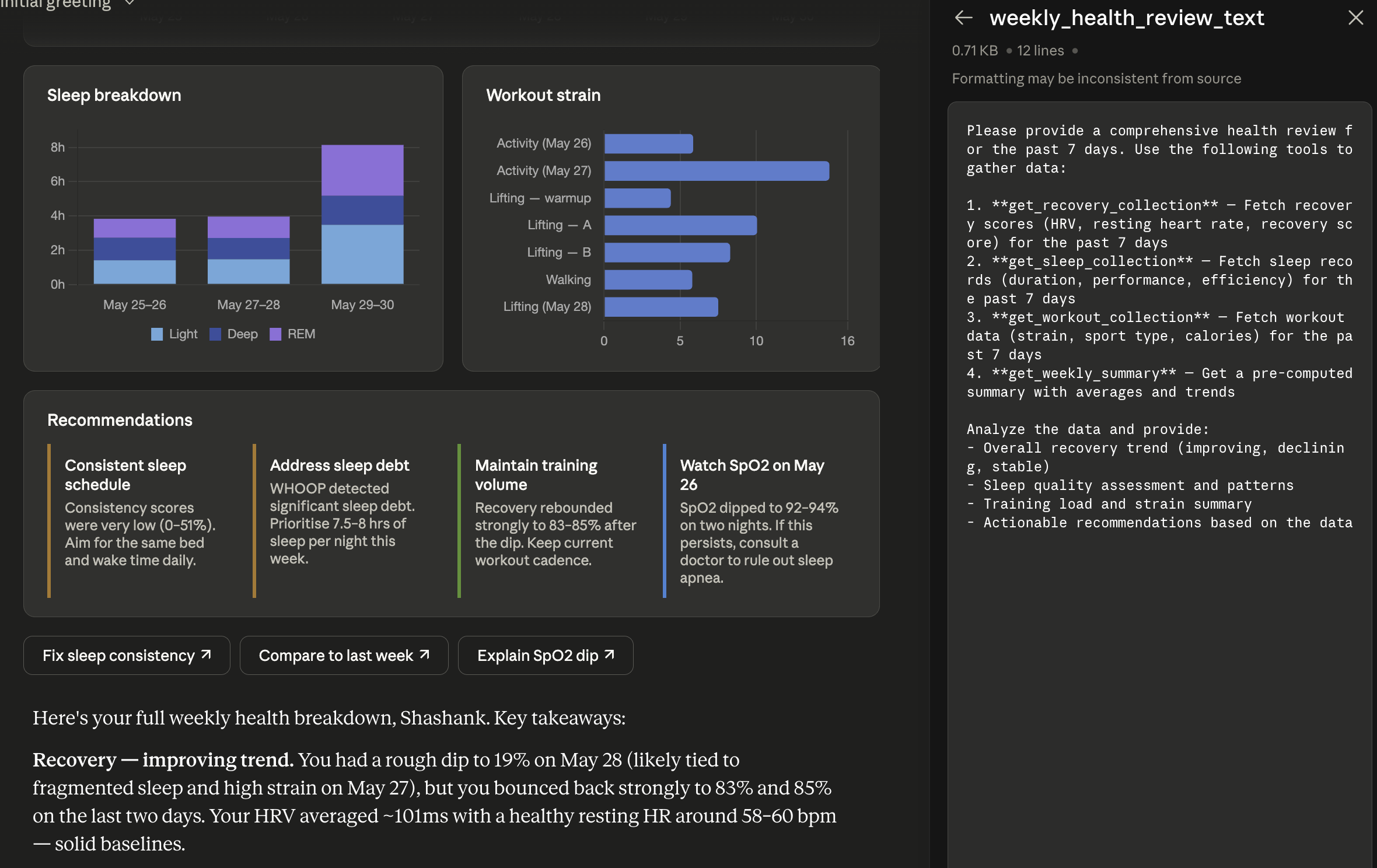
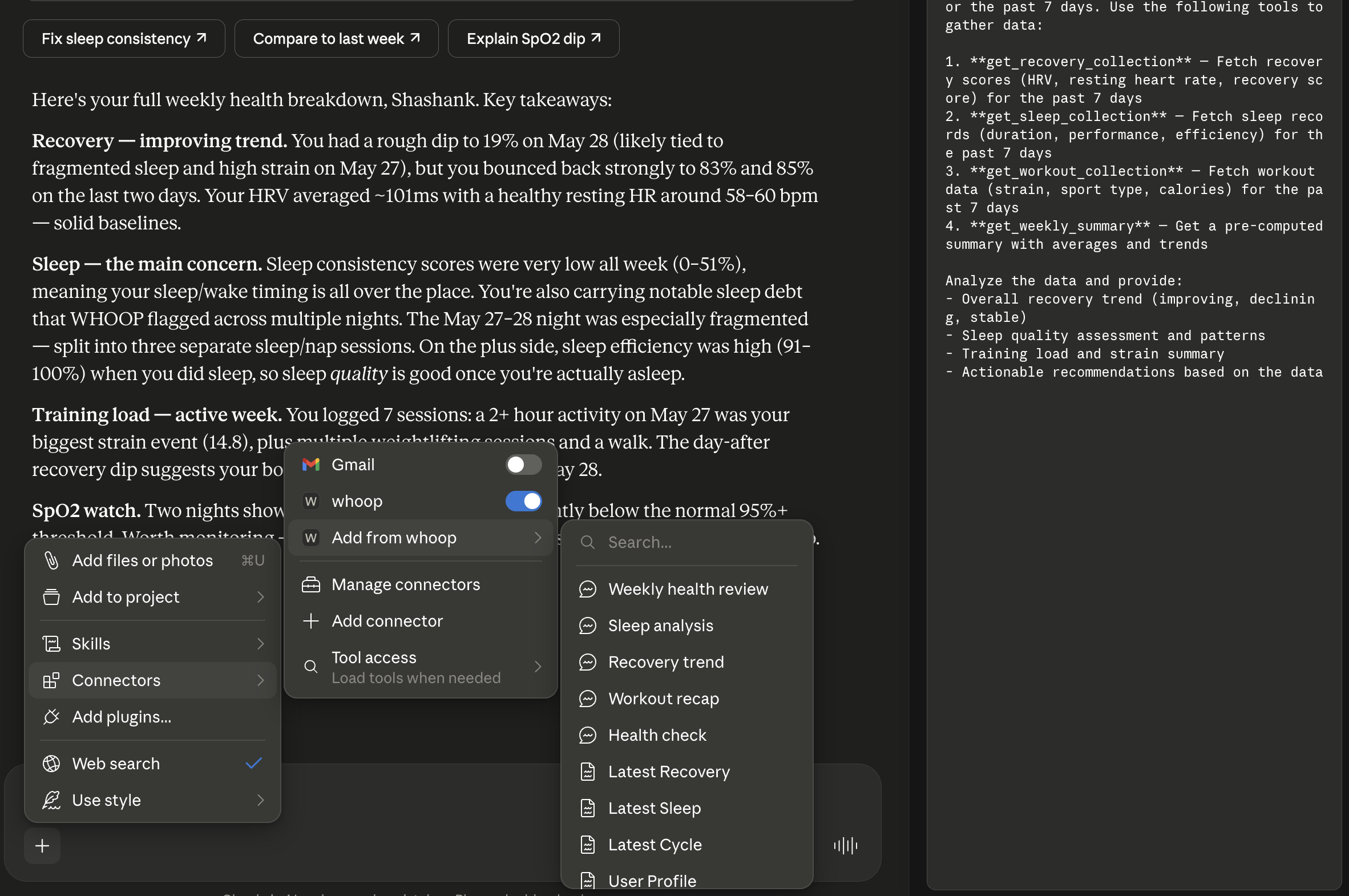
"Give me a weekly health summary"
"Show me my recovery calendar for last 2 weeks"
whoop-mcp connected in Claude Desktop:
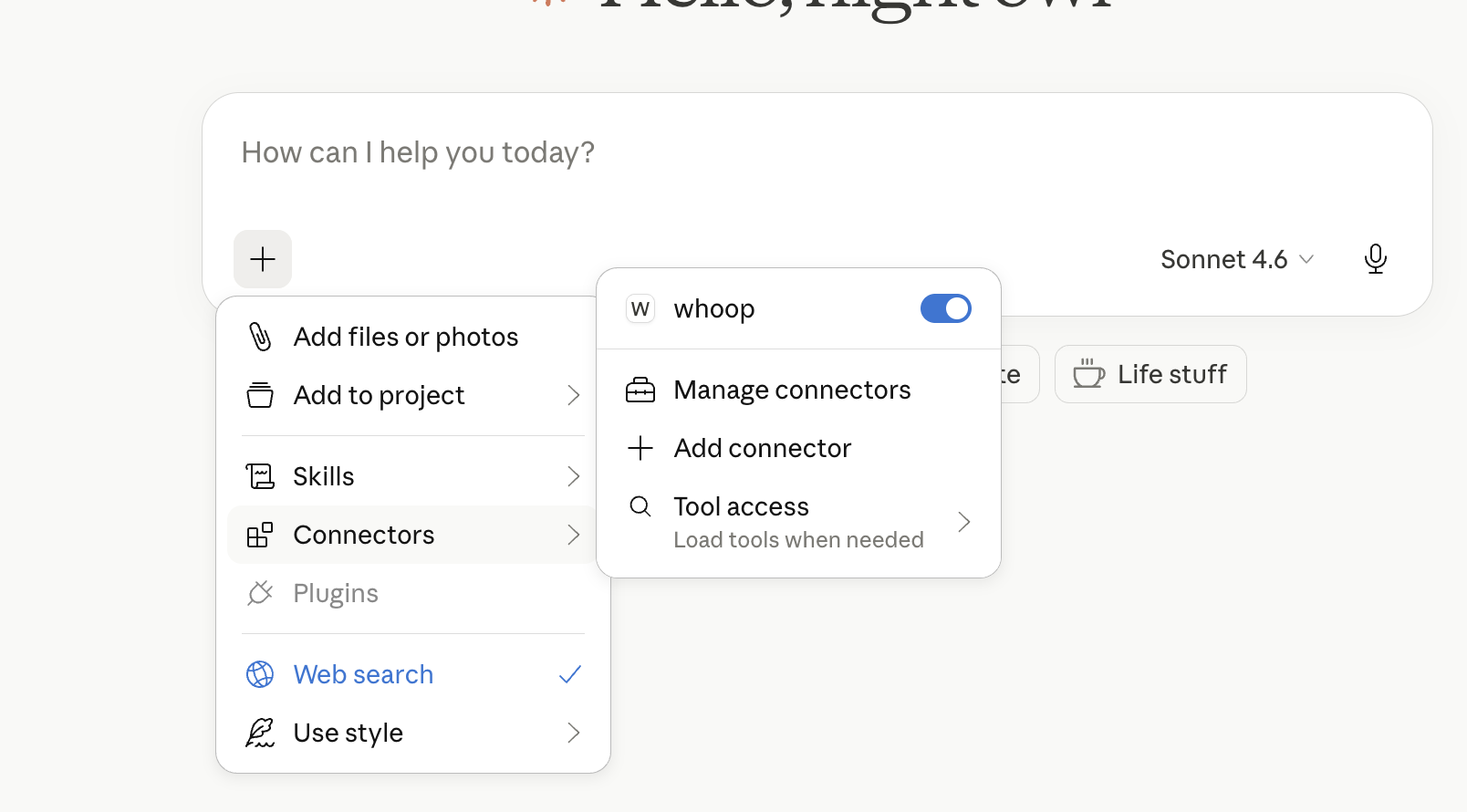
Chatting with WHOOP data through Claude:
Weekly Health Report demo (Claude Desktop):
No installation needed — Claude Desktop runs it automatically with the config above.
npm install -g whoop-ai-mcp
git clone https://github.com/shashankswe2020-ux/whoop-mcp.git
cd whoop-mcp
npm install
npm run build
whoop-ai-mcp setup)For a guided installation that writes the Claude Desktop config (or prints the registration command for Claude Code, Codex, or GitHub Copilot) and verifies your WHOOP credentials in one go:
npx whoop-ai-mcp setup
Flags:
--client=claude-desktop (default) writes/merges claude_desktop_config.json
with an automatic .bak backup.--client=claude-code prints the equivalent claude mcp add command.--client=codex prints the equivalent codex mcp add command (registers the
server in ~/.codex/config.toml).--client=copilot prints the equivalent code --add-mcp command for GitHub
Copilot in VS Code.--verify runs the OAuth flow end-to-end and fetches your profile to confirm
everything is wired correctly before exiting.--client-id / --client-secret skip the interactive prompts (useful for
scripts; secrets entered interactively are masked).If WHOOP_CLIENT_ID and WHOOP_CLIENT_SECRET are already exported in your
shell, the wizard uses them automatically — no prompts. Combine with
--verify to do a one-shot config-correctness check:
WHOOP_CLIENT_ID=... WHOOP_CLIENT_SECRET=... npx whoop-ai-mcp setup --verify
If the Claude Desktop config file already contains a whoop MCP entry from
a previous setup, the wizard short-circuits — it reads the existing
credentials, prints Existing whoop entry found in <path>, and either
verifies them (with --verify) or exits without rewriting the file. To
overwrite an existing entry, pass explicit --client-id / --client-secret
flags.
Precedence: --client-id / --client-secret flags > existing claude-desktop
config > WHOOP_CLIENT_ID / WHOOP_CLIENT_SECRET env vars > interactive
prompts.
Example session:
shashankmishra@Shashanks-MacBook-Pro ~ % npx whoop-ai-mcp setup --client=claude-desktop
WHOOP MCP — Setup Wizard
------------------------

WHOOP Client ID (from https://developer.whoop.com): xxxxxxxx-xxxx-xxxx-xxxx-xxxxxxxxxxxx
WHOOP Client Secret (input hidden): ****************************************************************

Claude Desktop config written: /Users/shashankmishra/Library/Application Support/Claude/claude_desktop_config.json
Previous config backed up to: /Users/shashankmishra/Library/Application Support/Claude/claude_desktop_config.json.bak
Restart Claude Desktop to load the new server.
Re-running against an already-configured Claude Desktop install (existing
whoop entry in claude_desktop_config.json) short-circuits to a
verification-only flow — no prompts, no rewrite:
shashankmishra@Shashanks-MacBook-Pro ~ % whoop-ai-mcp setup --verify
WHOOP MCP — Setup Wizard
------------------------

Target client (claude-desktop / claude-code) [claude-desktop]:
Existing whoop entry found in /Users/shashankmishra/Library/Application Support/Claude/claude_desktop_config.json.

Verifying credentials with WHOOP...
Cached tokens expired, attempting refresh...
Token refresh successful.
OAuth flow complete. Fetching profile...
Profile OK: {"user_id":35253045,"email":"shashank.swe.2020@gmail.com","first_name":"Shashank","last_name":"Mishra"}

Existing config verified — no changes made.
| Variable | Required | Description |
|---|---|---|
WHOOP_CLIENT_ID | Yes | Your WHOOP Developer App client ID |
WHOOP_CLIENT_SECRET | Yes | Your WHOOP Developer App client secret |
Set these in your Claude Desktop config (see Quickstart) or as shell environment variables:
export WHOOP_CLIENT_ID=your_client_id
export WHOOP_CLIENT_SECRET=your_client_secret
http://localhost:3000/callbackhttps://github.com/shashankswe2020-ux/whoop-mcp or your own URLread:profileread:recoveryread:sleepread:workoutread:cyclesread:body_measurementget_profileGet the authenticated user's basic profile — name and email.
Parameters: None
get_body_measurementGet the user's body measurements — height, weight, and max heart rate.
Parameters: None
get_recovery_collectionGet recovery scores for a date range. Returns HRV, resting heart rate, SpO2, and skin temp for each day.
Parameters:
| Parameter | Type | Required | Description |
|---|---|---|---|
start | string | No | ISO 8601 or relative expression ("today", "last 7 days", "this week"). |
end | string | No | ISO 8601 or relative expression. Defaults to now. |
limit | number | No | Max records to return (1–25). Defaults to 10. |
nextToken | string | No | Pagination token from a previous response. |
get_sleep_collectionGet sleep records for a date range. Returns sleep stages, duration, respiratory rate, and performance scores.
Parameters:
| Parameter | Type | Required | Description |
|---|---|---|---|
start | string | No | ISO 8601 or relative expression ("today", "last 7 days", "this week"). |
end | string | No | ISO 8601 or relative expression. Defaults to now. |
limit | number | No | Max records to return (1–25). Defaults to 10. |
nextToken | string | No | Pagination token from a previous response. |
get_workout_collectionGet workout records for a date range. Returns strain, heart rate zones, calories, and sport type.
Parameters:
| Parameter | Type | Required | Description |
|---|---|---|---|
start | string | No | ISO 8601 or relative expression ("today", "last 7 days", "this week"). |
end | string | No | ISO 8601 or relative expression. Defaults to now. |
limit | number | No | Max records to return (1–25). Defaults to 10. |
nextToken | string | No | Pagination token from a previous response. |
get_cycle_collectionGet physiological cycles for a date range. Returns strain, calories, and heart rate data per cycle.
Parameters:
| Parameter | Type | Required | Description |
|---|---|---|---|
start | string | No | ISO 8601 or relative expression ("today", "last 7 days", "this week"). |
end | string | No | ISO 8601 or relative expression. Defaults to now. |
limit | number | No | Max records to return (1–25). Defaults to 10. |
nextToken | string | No | Pagination token from a previous response. |
get_sleep_by_idGet a single sleep record by ID. Returns sleep stages, duration, respiratory rate, and performance scores.
Parameters:
| Parameter | Type | Required | Description |
|---|---|---|---|
id | string | Yes | The sleep record ID. |
get_workout_by_idGet a single workout record by ID. Returns strain, heart rate zones, calories, and sport type.
Parameters:
| Parameter | Type | Required | Description |
|---|---|---|---|
id | string | Yes | The workout record ID. |
get_cycle_by_idGet a single physiological cycle by ID. Returns strain, calories, and heart rate data.
Parameters:
| Parameter | Type | Required | Description |
|---|---|---|---|
id | number | Yes | The cycle record ID. |
get_weekly_summaryGet a summarized health report for a given week — average recovery, HRV, RHR, sleep duration and quality, workout count and strain, plus recovery trend direction.
Parameters:
| Parameter | Type | Required | Description |
|---|---|---|---|
week_start | string | No | ISO 8601 or relative expression ("last week", "this week"). Defaults to most recent Monday. |
compare_periodsCompare health metrics between two time periods — shows improvement or regression in recovery, sleep, and strain.
Parameters:
| Parameter | Type | Required | Description |
|---|---|---|---|
period_a_start | string | Yes | ISO 8601 start of the first period. |
period_a_end | string | Yes | ISO 8601 end of the first period. |
period_b_start | string | Yes | ISO 8601 start of the second period. |
period_b_end | string | Yes | ISO 8601 end of the second period. |
get_trendAnalyze a health metric trend over time — detects direction (improving/declining/stable), variability, and anomalies using linear regression.
Parameters:
| Parameter | Type | Required | Description |
|---|---|---|---|
metric | string | Yes | One of: recovery, hrv, rhr, sleep_duration, sleep_performance, strain. |
days | number | No | Number of days to analyze (7–90). Default: 30. |
get_todayGet today's complete health snapshot — recovery score, last night's sleep, current strain, and last workout in one call. Perfect for "how am I doing today?" questions.
Parameters: None
Returns: Recovery score with zone, sleep breakdown (hours, stages, performance), current strain, last workout (sport + strain), and a human-readable summary.
Recovery is returned only when it matches the current local cycle and primary sleep.
Pending or invalid primary sleep never falls back to an older recovery. Missing optional
sleep percentages are null, not zero. data_quality distinguishes missing, pending,
stale, unscored, calibrating, invalid and failed sources; cache status and fetch time
remain unknown when the client cannot establish them.
For compatibility, sleep.total_hours remains time in bed. Use time_in_bed_hours
or asleep_hours explicitly; summaries now use scored asleep stages. The latest
workout includes occurred_at and recording percentage and may be historical.
get_baselinesReturns personal distributions for HRV, resting heart rate, respiratory rate,
asleep hours and recovery score. baseline_days is an integer from 14 to 180
(default 30). Each band includes mean, median, standard deviation, percentiles,
sample size and the latest observation's midrank percentile.
The latest observation and current local day are excluded from each baseline. Calibrating, unscored, invalid and unjoinable observations are excluded. A metric needs 14 historical points after exclusions; otherwise its band is null with an insufficient-data status. Constant distributions are labeled explicitly.
get_sleep_debtAnalyzes scored main sleeps using days (3-90, default 14) and optional start
(ISO or a supported relative expression). With start, the window extends forward
for days calendar days, clamped to evaluation time. Resolved bounds are returned.
total_debt_hours sums observed nightly deficits. Need excludes WHOOP's accumulated
debt component and preserves the signed nap adjustment; achieved sleep is light +
slow-wave + REM. standing_debt_hours is the latest WHOOP debt value, separately
dated, not the deficit sum. Missing nights are not zero-sleep nights; fewer than
three usable nights returns null aggregates. Circular local-clock statistics describe
consistency and heuristic social jetlag, not clinical diagnoses or recovery forecasts.
Analytics paginate up to 500 records per source and report upstream truncation.
Sleep-debt calculations use all selected records but echo at most 30 nights, with
a separate output_capped flag. Both tools include a statistical/medical disclaimer.
get_calendarGet a day-by-day grid of recovery, sleep, and strain for a date range. Perfect for weekly/monthly overviews.
Parameters:
| Parameter | Type | Required | Description |
|---|---|---|---|
days | number | No | Number of days to show (1–90). Default: 7. |
start | string | No | Start date — ISO 8601 or relative expression ("last 14 days", "this month"). Defaults to N days ago. |
Returns: Per-day grid with recovery score + zone (green/yellow/red), sleep hours, sleep performance, and strain. Includes period averages.
All tools advertise outputSchema and return validated structuredContent alongside
equivalent JSON text for older clients. Provider bodies and internal error details
are not returned in tool or resource errors.
Set WHOOP_MCP_PRIVACY_MODE=aggregate in the server process environment to expose
only get_weekly_summary, compare_periods, get_trend, get_baselines, and
get_sleep_debt. Per-record arrays, latest observations, standing debt, identity
fields and exact activity timestamps are omitted. Period bounds are date-only.
Raw resources and all five existing prompts are unavailable in this mode because
their workflows require raw tools/resources. Tool arguments cannot override the policy.
The default is standard, retaining all 16 tools, four resources and five prompts.
The standard-mode resource and prompt lists later in this README do not apply to
aggregate mode. To enable aggregation in a client configuration, add
"WHOOP_MCP_PRIVACY_MODE": "aggregate" to the server's existing env object.
Restart and reconnect after changing the process policy. Aggregate mode minimizes
disclosure; it is not anonymization, does not erase previously shared data, and
still sends health aggregates to the assistant provider.
get_today and the two new analytics tools use recorded offsets for local-day
attribution. Existing calendar and weekly-summary grouping remains UTC for compatibility.
An offset is not a timezone database and cannot reconstruct within-sleep DST changes.
For a local build:
npm ci --ignore-scripts
npm run build
node dist/index.js doctor --json
With 0.7.0 installed, use whoop-ai-mcp doctor or
whoop-ai-mcp doctor --json directly. The command is not present in 0.6.1.
Checks runtime, configuration presence, privacy/transport settings and token-file metadata without reading token contents, calling WHOOP, launching OAuth or writing files. Exit codes: 0 = locally ready, 1 = remediation needed, 2 = invalid arguments. T
Sign in to join the discussion.
No comments yet. Be the first to say what this is good for.
Real-time global intelligence dashboard. AI-powered news aggregation, geopolitical monitoring, and infrastructure tracking in a unified situational awareness interface
High-performance code intelligence MCP server. Indexes codebases into a persistent knowledge graph — average repo in milliseconds. 158 languages, sub-ms queries, 99% fewer tokens. Single static binary, zero dependencies.

Universal provider proxy for OpenAI Codex & Claude Code — use any LLM (Claude, Gemini, Grok, DeepSeek, Ollama…) with Codex CLI, App, SDK, and Claude Code

Git-native persistent memory for AI coding agents. Implements Google OKF v0.2 with sub-300µs in-memory BM25 search, embedded MCP server, and progressive disclosure. Slashes token bloat by 80% with zero external databases or dependencies. Built in pure Go.

Stop your AI from making things up — it proposes, deterministic tools decide, every claim checked against ground truth with evidence. Grounded facts and context survive resets. Reverse engineering is the proving ground. MCP server + CLI.
20 MB lightweight cross-platform database client for 90+ databases, including MySQL, PostgreSQL, SQLite, Redis, MongoDB, DuckDB, SQL Server, and Dameng. Built-in AI, MCP Server, CLI, desktop and Docker. | 轻量级跨平台数据库管理工具,支持 MySQL、PostgreSQL、SQLite、Redis、MongoDB、达梦等 90+ 数据库,提供桌面端、Docker、CLI、内置 AI 助手和 MCP Server。