

heygen-com/hyperframesFrameworks & SDKs
Write HTML. Render video. Built for agents.
49k
SciTeX combines data loading, experiment sessions, plotting, statistics, literature search, manuscript compilation, and verification into one package. The same capabilities are exposed through Python APIs, a CLI, and MCP tools, so people and agents can use the same workflow from different entry points.
Builders who want their agent to handle research tasks, figures, statistics, and manuscript assembly from one Python package.
You can run a reproducible research workflow without switching between separate tools for analysis, writing, and verification.
`@stx.session` injects config, logger, and plotting setup, then writes frozen run metadata and logs into a dated output directory.
`stx.io` loads and saves many formats, auto-creates output folders, and can track saved files with Clew hashes.
`stx.plt` builds figures that save data plus YAML recipes, and can restyle plots without changing the underlying data hash.
`stx.stats` runs statistical tests, reports effect sizes and confidence intervals, and annotates plots with results.
`stx.scholar` searches and enriches papers, while `stx.writer` compiles LaTeX manuscripts and adds figures and tables.
`stx.clew` builds a hash-chain DAG from files to manuscript claims so you can trace and verify research outputs.
The same functions are exposed through `scitex <group> <command>` and `scitex mcp start` for agent use.
# Recommended — uv resolver, ~3 min (10–30× faster than pip on scitex[all])
uv pip install "scitex[all]"

# Plain pip works but expect ~30–90 min — pip's resolver backtracks
# heavily on the full extras set. See Installation Tips below.
pip install "scitex[all]"
$ python script.py --data-path experiment.csv --n-samples 200
$ python script.py --help
# usage: script.py [-h] [--data-path DATA_PATH] [--n-samples N_SAMPLES]
# Analyze data. Docstring becomes --help text.
script_out/FINISHED_SUCCESS/2026-03-18_14-30-00_Z5MR/
├── sine.png, sine.csv         # Figure + auto-exported plot data
├── CONFIGS/CONFIG.yaml        # Frozen parameters
└── logs/{stdout,stderr}.log # Execution logsscitex scholar crossref-scitex search "neural oscillations" --abstracts scitex scholar fetch --from-bibtex references.bib --project myproject
scitex)

Python Library for Science. For AI and Human Researchers




Docs ·
Quick Start ·
API ·
pip install scitex[all]
This repository provides scitex, the orchestration layer of the SciTeX ecosystem — solving key problems in scientific research:
| # | Problem | Solution |
|---|---|---|
| 1 | Fragmented tools -- literature search, statistics, figures, and writing each require separate tools with incompatible formats | Unified toolkit -- import scitex as stx provides 73 modules under one namespace, accessible via Python API, CLI, and MCP. These modules are standalone packages but loosely coupled through a plugin registry — each works on its own, yet composes into designed synergy (save a figure → auto-exports CSV + YAML recipe → hash-tracked by Clew → citeable in scitex-writer). |
| 2 | No verification -- existing tools address whether work could be reproduced, not whether it has been verified | Cryptographic verification -- Clew builds SHA-256 hash-chain DAGs linking every manuscript claim back to source data |
| 3 | AI agents lack context -- general-purpose LLMs cannot operate across the full research lifecycle without domain-specific tools | 323 MCP tools -- AI agents run statistics, create figures, search literature, and compile manuscripts through structured tool calls |
| 4 | No custom tooling -- every lab needs domain-specific tools, but building and sharing them requires deep infrastructure knowledge | App Maker and Store -- researchers create custom apps with scitex-app SDK and share via SciTeX Cloud |
| 5 | Vendor lock-in -- cloud research tools (Overleaf, Zotero, Mendeley, Colab, GitHub Copilot) keep data on third-party servers and depend on APIs that can disappear overnight or monetize tomorrow | Open and self-hostable -- every SciTeX package is AGPL-3.0; the full 39-package ecosystem runs on your own hardware (or SciTeX Cloud which itself is self-hostable); cloud integrations are pluggable extras, not requirements |
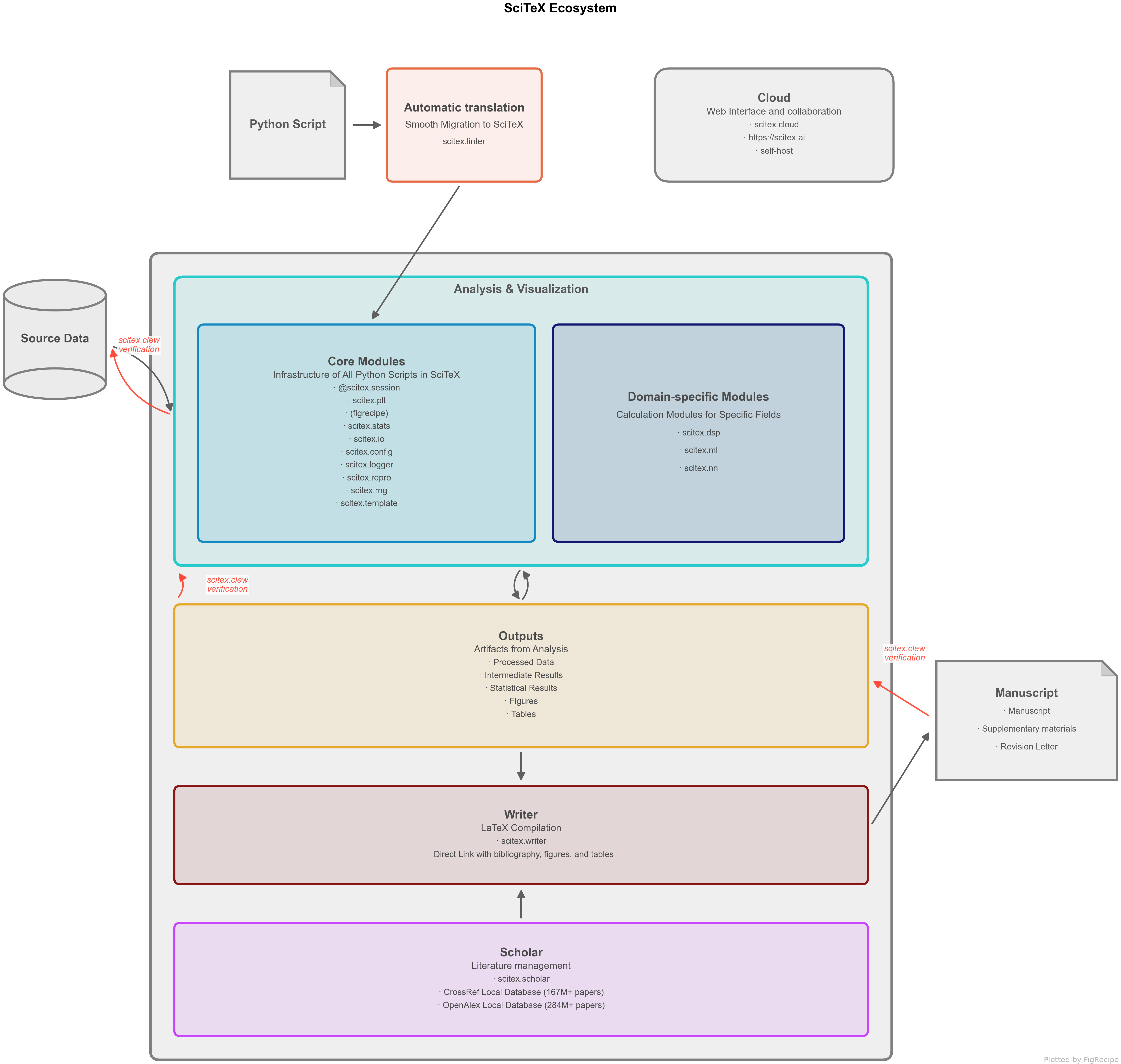
Figure 1. SciTeX research pipeline -- from literature search to manuscript compilation, with every step cryptographically linked.
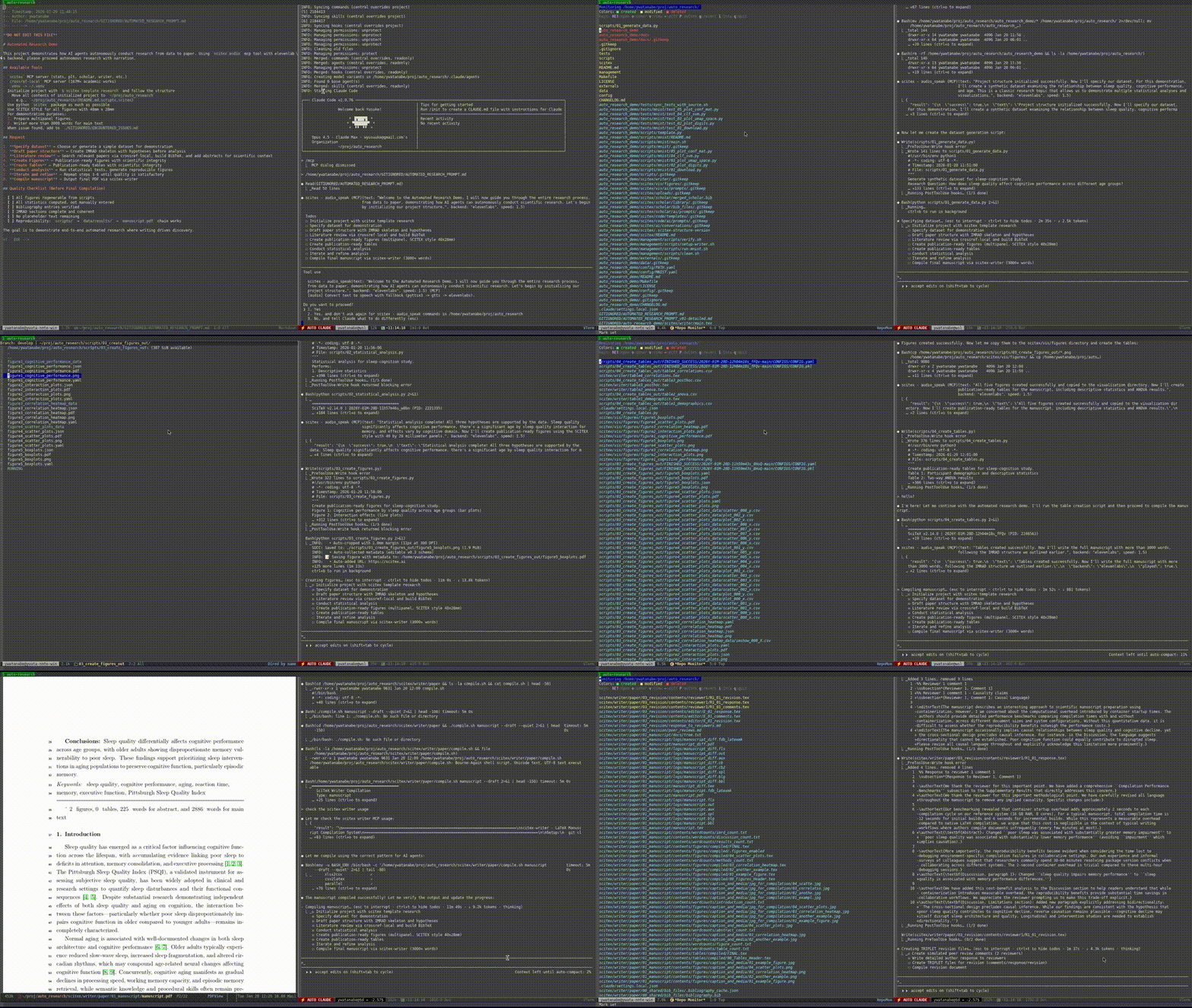
40 min, minimal human intervention — an AI agent using SciTeX completed a full research cycle: literature search, statistical analysis, publication-ready figures, a 21-page manuscript, and peer review simulation. More demos are available at https://scitex.ai/demos/.
# Recommended — uv resolver, ~3 min (10–30× faster than pip on scitex[all])
uv pip install "scitex[all]"
# Plain pip works but expect ~30–90 min — pip's resolver backtracks
# heavily on the full extras set. See Installation Tips below.
pip install "scitex[all]"
Why uv?
scitex[all]pulls a large transitive set (numpy/pandas/torch/jax/playwright/openalex-local/sphinx-rtd-theme/…). pip's serial resolver walks version histories trying to satisfy every constraint and can spend 30+ min just downloading metadata before installing a single wheel. uv resolves the same set in parallel in 1–3 min. Install uv once withpip install uv(orcurl -LsSf https://astral.sh/uv/install.sh | sh).
pip install scitex # Core only (minimal)
pip install scitex[plt,stats,scholar] # Typical research setup
pip install scitex[plt] # Publication-ready figures (figrecipe)
pip install scitex[stats] # Statistical testing (23+ tests)
pip install scitex[scholar] # Literature search, PDF download, BibTeX enrichment
pip install scitex[writer] # LaTeX manuscript compilation
pip install scitex[audio] # Text-to-speech
pip install scitex[ai] # LLM APIs (OpenAI, Anthropic, Google) + ML tools
pip install scitex[dataset] # Scientific datasets (DANDI, OpenNeuro, PhysioNet)
pip install scitex[browser] # Web automation (Playwright)
pip install scitex[capture] # Screenshot capture and monitoring
pip install scitex[cloud] # Cloud platform integration
Requires Python 3.10+. Prefix any of the above with uv (e.g. uv pip install scitex[plt,stats,scholar]) for a 10–30× faster resolve.
[all] sizescitex[all] pulls the full 33-package ecosystem plus heavy extras (playwright browsers, torch, jax, pymupdf, Apptainer/Docker integrations, etc.). With plain pip this takes 30–90 minutes because pip's resolver thrashes on the transitive set; with uv it takes ~3 min. Recommended order of preference:
# 1. uv (recommended) — parallel Rust resolver, 10-30× faster
pip install uv && uv pip install "scitex[all]"
# 2. pip with extended timeouts (default 15s aborts mid-wheel on slow links)
pip install --timeout 600 --retries 5 "scitex[all]"
# 3. Install in groups if a single run keeps failing
uv pip install scitex[io,stats,plt] # core analysis layer first
uv pip install scitex[scholar,writer] # research layer
uv pip install scitex[audio,browser,dataset,cloud] # heavy extras last
# 4. Mirror — for networks where pypi.org is unreliable
uv pip install -i https://pypi.tuna.tsinghua.edu.cn/simple "scitex[all]"
If a single dep hangs, identify it with pip install -v and install that package alone with --no-deps, then resume the full install.
| Category | Modules | Description |
|---|---|---|
| Core | session, io, config, clew | Experiment tracking, file I/O, config, cryptographic verification |
| Analysis | stats, plt, dsp, linalg | Statistics, plotting, signal processing, linear algebra |
| Research | scholar, writer, diagram, canvas | Literature, manuscripts, diagrams, figure composition |
| ML/AI | ai, nn, torch, cv, benchmark | LLM APIs, neural networks, PyTorch, computer vision |
| Data | pd, db, dataset, schema | Pandas utilities, databases, scientific datasets |
| Infra | app, cloud, tunnel, container | App SDK, cloud, SSH tunnels, containers |
| Automation | browser, capture, audio, notification | Web automation, screenshots, TTS, notifications |
| Dev | dev, template, linter, introspect | Ecosystem tools, scaffolding, code analysis |
The 33-package ecosystem follows a strict dependency cascade: upstream imports middle imports downstream, never the reverse. Downstream apps must work standalone; the umbrella only orchestrates.
Upstream (orchestration — SOC, integration tests only)
scitex (scitex-python), scitex-cloud
│ imports / re-exposes
▼
Middle (shared infrastructure — wraps, doesn't replace)
scitex-io, scitex-stats, scitex-app, scitex-ui, scitex-audio, scitex-dev
│ integrates / wraps via plugin registry
▼
Downstream (standalone apps — own IO/GUI, unit tests)
figrecipe, scitex-writer, scitex-scholar, scitex-clew, scitex-notebook,
scitex-dataset, scitex-ssh, scitex-container, scitex-browser, scitex-linter,
openalex-local, crossref-local, socialia, + utility leaves
(scitex-{path,str,dict,logging,types,db,repro,audit,parallel,compat,gists,etc,core})
One-line contract: downstream does not know upstream exists; upstream does not duplicate downstream logic. See 01_ecosystem_01_upstream-and-downstream.md for full rules (testing, cascade, interfaces) and 01_ecosystem_02_dependency-and-version-pinning.md for dep-pinning.
Every capability in the SciTeX umbrella is reachable through three surfaces, so humans and AI agents share one toolkit:
| Interface | Entry point | Example |
|---|---|---|
| Python API | import scitex as stx | stx.io.save(fig, "result.png") |
| CLI | scitex <group> <command> | scitex io convert data.csv data.parquet |
| MCP | scitex mcp start | 323 tools an AI agent calls directly |
The Python API is the primary surface; the CLI and MCP server expose the same logic for shells and AI agents. See the Quick Start below for runnable Python examples and the Full MCP reference.
@scitex.session -- Reproducible Experiment TrackingOne decorator gives you: auto-CLI, YAML config injection, random seed fixation, structured output, and logging.
import scitex as stx
import numpy as np
@stx.session
def main(
data_path: str = "./data.csv", # --data-path data.csv
n_samples: int = 100, # --n-samples 200
CONFIG=stx.session.INJECTED, # Aggregated ./config/*.yaml
plt=stx.session.INJECTED, # Pre-configured matplotlib
logger=stx.session.INJECTED, # Session logger
):
"""Analyze data. Docstring becomes --help text."""
# Load
data = stx.io.load(data_path)
# Demo data
x = np.linspace(0, 2 * np.pi, n_samples)
y = np.sin(x) + np.random.randn(n_samples) * 0.1
# FigRecipe Plot
fig, ax = stx.plt.subplots()
ax.plot(x, y)
ax.set_xyt("Time", "Amplitude", "Noisy Sine Wave")
# Save sine.png + sine.csv with logging message
stx.io.save(fig, "sine.png")
return 0
if __name__ == "__main__":
main()
$ python script.py --data-path experiment.csv --n-samples 200
$ python script.py --help
# usage: script.py [-h] [--data-path DATA_PATH] [--n-samples N_SAMPLES]
# Analyze data. Docstring becomes --help text.
script_out/FINISHED_SUCCESS/2026-03-18_14-30-00_Z5MR/
├── sine.png, sine.csv # Figure + auto-exported plot data
├── CONFIGS/CONFIG.yaml # Frozen parameters
└── logs/{stdout,stderr}.log # Execution logs
The injected CONFIG is a DotDict merging YAML user configs with session-resolved keys:
| Key | Meaning |
|---|---|
CONFIG.ID | Session identifier, e.g. 2026-04-23T21-30-00_Z5MR |
CONFIG.PID | Python process ID |
CONFIG.START_DATETIME | When the session started |
CONFIG.FILE | Path to caller script |
CONFIG.SDIR_OUT | Base output dir, e.g. analysis_out/ |
CONFIG.SDIR_RUN | This run's dir, e.g. analysis_out/FINISHED_SUCCESS/<ID>/ |
CONFIG.ARGS | Parsed CLI args |
CONFIG.MODEL.* | Values from ./config/MODEL.yaml (one namespace per YAML file) |
Use CONFIG.SDIR_RUN / "results.csv" to re-load a file saved earlier in the same session. A frozen copy of CONFIG is persisted to CONFIG.SDIR_RUN/CONFIGS/{CONFIG.yaml,CONFIG.pkl} so any run is fully auditable. See the Session config docs for the full reference.
scitex.io -- Unified File I/O (50+ Formats)import scitex as stx
# Save and load -- format detected from extension.
# symlink_from_cwd=True drops a symlink at cwd so round-trip by filename works;
# without it, save() routes to <script>_out/ and load() must use an absolute path.
stx.io.save(df, "results.csv", symlink_from_cwd=True)
df = stx.io.load("results.csv")
stx.io.save(arr, "data.npy", symlink_from_cwd=True)
arr = stx.io.load("data.npy")
stx.io.save(fig, "figure.png") # Also exports figure data as CSV
stx.io.save(config, "config.yaml")
stx.io.save(model, "model.pkl")
# Aggregate ./config/*.yaml into a single DotDict
CONFIG = stx.io.load_configs(config_dir="./config")
print(CONFIG.MODEL.hidden_size) # Dot-notation access
# Register custom formats
@stx.io.register_saver(".custom")
def save_custom(obj, path, **kw):
with open(path, "w") as f:
f.write(str(obj))
@stx.io.register_loader(".custom")
def load_custom(path, **kw):
with open(path) as f:
return f.read()
Supports: CSV, JSON, YAML, TOML, HDF5, NPY, NPZ, PKL, PNG, JPG, SVG, PDF, Excel, Parquet, Zarr, INI, TXT, MAT, WAV, MP3, BibTeX, and more.
Built-in features: Auto directory creation, path resolution to <script_name>_out/, symlinks (symlink_from_cwd=True), save logging with file size, and Clew hash tracking.
scitex.plt -- Reproducible, Restylable FiguresPowered by figrecipe. Figures are reproducible nodes in the Clew verification DAG -- scientific data and visual style are decomposed, so figures can be restyled (fonts, colors, layout) without altering the underlying data hash. Every figure auto-exports its data as CSV + a YAML recipe for exact reproduction.
import scitex as stx
fig, axes = stx.plt.subplots(1, 3)
axes[0].stx_line(x, y)
axes[0].set_xyt("Time", "Value", "Line")
axes[1].stx_violin([g1, g2, g3])
axes[1].set_xyt("Group", "Score", "Violin")
axes[2].stx_heatmap(corr_matrix)
axes[2].set_xyt("X", "Y", "Heatmap")
stx.io.save(fig, "analysis.png") # Saves analysis.png + analysis.csv + analysis.yaml
# Restyle without changing data (hash stays valid for Clew verification)
stx.plt.reproduce("analysis.yaml", style="nature")
scitex.stats -- Publication-Ready Statistics (23+ Tests)import scitex as stx
result = stx.stats.run_test("ttest_ind", group1, group2, return_as="dataframe")
# Returns: p-value, effect size (Cohen's d), CI, normality check, power
recommendations = stx.stats.recommend_tests(data)
stx.stats.annotate(ax, test=result, style="apa") # stars + "t(58) = 2.34, p = .021, d = 0.60" on a matplotlib Axes
scitex.scholar -- Literature ManagementSearch, download, enrich papers. Backed by local CrossRef (167M+) and OpenAlex (250M+) databases.
import scitex as stx
scholar = stx.scholar.Scholar() # lazy-load library
papers = scholar.process_papers(["neural oscillations working memory"])
scholar.download_pdfs_from_dois(["10.1038/s41586-024-07804-3"])
scholar.enrich_papers(bibtex_path="references.bib")
scitex scholar crossref-scitex search "neural oscillations" --abstracts
scitex scholar fetch --from-bibtex references.bib --project myproject
scitex.writer -- LaTeX Manuscript Compilationimport scitex as stx
stx.writer.compile.manuscript("paper/") # latexmk wrapper
stx.writer.figures.add("paper/", "results.png", caption="Main results")
stx.writer.tables.add("paper/", "stats.csv", caption="Statistical summary")
scitex.notification -- Multi-Backend NotificationsGet notified when experiments finish -- via desktop, phone call, SMS, or email -- with automatic fallback.
import scitex as stx
stx.notification.alert("Experiment complete: accuracy = 94.2%")
stx.notification.call("Training diverged -- loss is NaN")
stx.notification.sms("GPU job finished on node-42")

@stx.session(notify=True)   # Notifies on completion or failure
def main(CONFIG=stx.session.INJECTED): ...
scitex.clew -- Cryptographic Verification for AI-Driven ScienceAs AI agents produce research at scale, the question shifts from "could this be reproduced?" to "has this been verified?". Clew builds a SHA-256 hash-chain DAG linking every manuscript claim back to source data.
import scitex as stx

# Every stx.io.load/save automatically records file hashes -- zero config
stx.clew.status()                          # {'verified': 12, 'mismatched': 0, 'missing': 0}
stx.clew.chain("results/figure1.png")      # Trace one file back to source data
stx.clew.dag(claims=True)                  # Verify all manuscript claims

# Register traceable assertions
stx.clew.add_claim(
    file_path="paper/main.tex", claim_type="statistic", line_number=142,
    claim_value="t(58) = 2.34, p = .021",
    source_session="2026-03-18_14-30-00_Z5MR", source_file="results/stats.csv",
)

stx.clew.mermaid(claims=True)              # Visualize provenance DAG
| Mode | Function | Answers |
|---|---|---|
| Project | clew.dag() | Is the whole project intact? |
| File | clew.chain("output.csv") | Can I trust this specific file? |
| Claim | clew.verify_claim("Fig 1") | Is this manuscript assertion valid? |
L1 hash comparison (ms) / L2 sandbox re-execution (min) / L3 registered timestamp proof (optional).
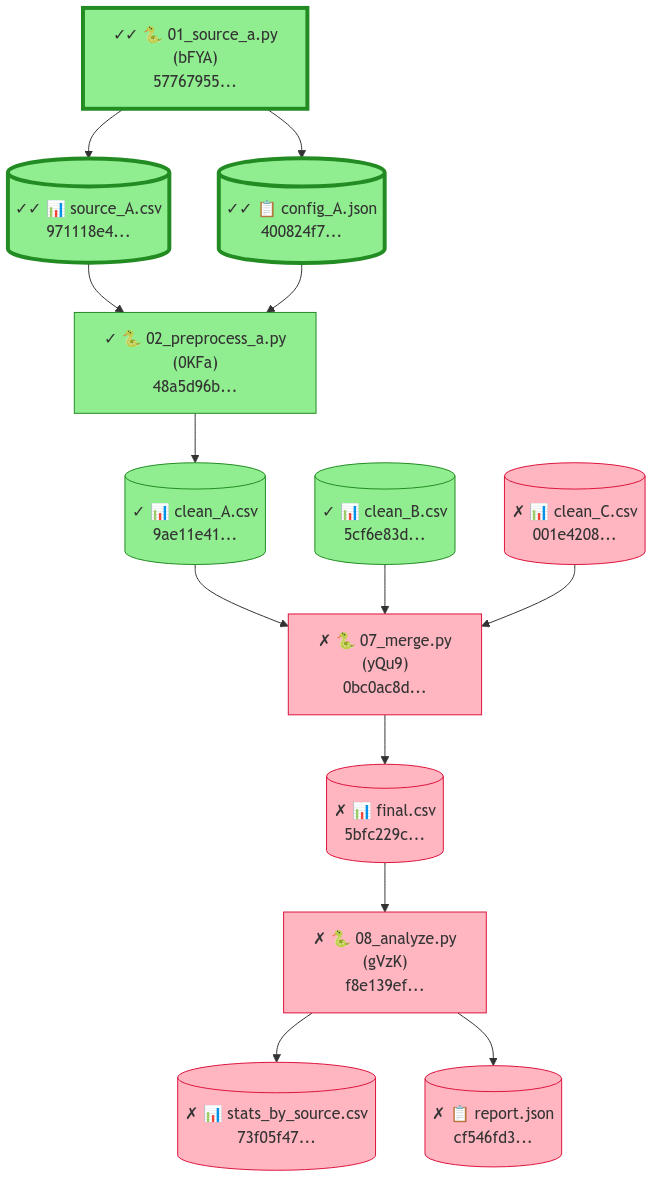
Figure 2. Clew verification DAG -- green nodes are verified (hash match), red nodes have mismatches. Each node shows its SHA-256 hash prefix.
scitex.audio -- Text-to-Speech (ElevenLabs / LuxTTS / gTTS / pyttsx3)import scitex as stx
stx.audio.speak("Training complete. Accuracy ninety-four percent.")
stx.audio.speak("Offline only", backend="pyttsx3") # force offline
stx.audio.speak("Report", output_path="report.mp3", play=False) # TTS → file
Backends fall back automatically: ElevenLabs (paid, highest) → LuxTTS (offline, 48 kHz, voice-cloning) → gTTS (free online) → pyttsx3 (offline espeak).
scitex.dataset -- OpenNeuro / DANDI / PhysioNet / Zenodo Fetcherimport scitex as stx
ds = stx.dataset.neuroscience.openneuro.fetch_all_datasets(max_datasets=10)
stx.dataset.neuroscience.dandi.fetch_all_datasets(max_datasets=10)
hits = stx.dataset.search_datasets(ds, text_query="phase-amplitude coupling")
Uniform API across neuroscience / biomedical / clinical-trial repositories.
scitex.container -- Apptainer / Docker Managementimport scitex as stx
stx.container.apptainer.build(def_name="recipe") # versioned SIF
stx.container.apptainer.switch_version("2.19.5") # atomic active-SIF flip
stx.container.apptainer.rollback() # revert to previous
snap = stx.container.env_snapshot() # full env for papers
Reproducible HPC containers — build, version, rollback, env-snapshot for manuscripts.
scitex.tunnel -- Persistent SSH Reverse Tunnelsimport scitex as stx
stx.tunnel.setup(port=8888, bastion_server="gw.example.com")
stx.tunnel.status() # {"8888": "active"}
NAT traversal for lab machines — autossh-backed systemd service.
scitex.linter -- 47-Rule Convention Checkerimport scitex as stx
issues = stx.linter.lint_file("src/")
for i in issues:
print(f"{i.filepath}:{i.line} [{i.rule.id}] {i.message}")
Lints SciTeX projects for ecosystem conventions (stx.io.save usage, CONFIGS naming, matplotlib prefs, import hygiene). Complements ruff/flake8.
scitex.repro -- Seed Everything + Array Hashingimport scitex as stx
rng = stx.repro.RandomStateManager(seed=42) # seeds random + numpy + torch + tf
run_id = stx.repro.gen_ID() # "20260423_2155_abc12345"
digest = stx.repro.hash_array(np_array) # deterministic SHA
One call seeds every RNG; generates experiment-run IDs; hashes arrays for fingerprinting.
scitex.parallel -- Threaded Map with tqdmimport scitex as stx
results = stx.parallel.run(download, [(u,) for u in urls], n_jobs=-1)
Drop-in parallel map for I/O-bound work — HTTP fetches, file reads, API calls. tqdm progress bar built-in.
scitex.path -- Project-Aware Paths & Session Dirsimport scitex as stx
root = stx.path.find_git_root() # walk up for .git/
out = stx.path.get_spath("results.csv") # → {script}_out/results.csv
stx.path.create_relative_symlink(src, dst) # relative (portable) symlink
latest = stx.path.find_latest(".", "model_", ".pt") # model_v003.pt (highest version)
stx.path.fix_broken_symlinks("dir/", remove=True) # cleanup dangling links
Auto-routes saves to {script}_out/ and resolves session-scoped paths so @stx.session scripts produce dated, hash-trackable output dirs with no boilerplate.
scitex.logging -- Extended Logging + Exception Hierarchy + Teeimport scitex as stx
logger = stx.logging.getLogger(__name__)
logger.success("Training converged at epoch 87") # SUCCESS level (custom)
logger.fail("Validation loss diverged") # FAIL level (custom)
# Structured warnings with SciTeX categories
stx.logging.warn_deprecated("old_api", replacement="new_api", version="3.0")
stx.logging.warn_data_loss("NaN values dropped in column 'bp'")
# Typed exceptions (30+ subclasses of SciTeXError)
raise stx.logging.ShapeError("expected (N, 2), got (N, 3)")
# Tee stdout/stderr to a log file
with stx.logging.Tee("run.log"):
main() # prints
Sign in to join the discussion.
No comments yet. Be the first to say what this is good for.
Write HTML. Render video. Built for agents.
Ultra-lightweight, open-source, self-hosted personal AI agent framework in Python with WebUI, tools, memory, MCP, multi-agent workflows, automation, and chat apps

SkillOpt is a text-space optimizer that trains reusable natural-language skills for frozen LLM agents through trajectory-driven edits, validation-gated updates, and deployable best_skill.md artifacts.

Omnigent is an open-source AI agent framework and meta-harness: orchestrate Claude Code, Codex, Cursor, Pi, and custom agents — swap harnesses without rewriting, enforce policies and sandboxing, and collaborate in real time from any device.

A theoretical reconstruction of the Claude Mythos architecture, built from first principles using the available research literature.
🕷️ An adaptive Web Scraping framework that handles everything from a single request to a full-scale crawl!