


koala73/worldmonitorConnectors
Real-time global intelligence dashboard. AI-powered news aggregation, geopolitical monitoring, and infrastructure tracking in a unified situational awareness interface
86k
ExcelMcp connects an agent to the real Excel desktop app through MCP or a CLI. It keeps Excel features like formulas, Power Query, DAX, VBA, PivotTables, charts, and workbook formatting intact because it works through the official COM API.
Builders who want their agent to inspect, edit, and automate live Excel workbooks.
You can ask an agent to do real Excel work and keep the workbook open for live review and follow-up edits.
Exposes the same Excel commands through an MCP server for chat-based assistants and a CLI for scripts and coding agents.
Works with ranges, formulas, worksheets, files, calculation, formatting, and named ranges.
Supports Power Query, DAX, Power Pivot, Excel Tables, PivotTables, and data connections.
Creates and edits charts, slicers, conditional formatting, screenshots, drawings, and sparklines.
Runs VBA, Python in Excel, Goal Seek, scenarios, data tables, windows, and XML Maps.
AI assistant or script
        │
   MCP Server / CLI
        │
 ExcelMcp Core commands
        │
 Real Excel COM API




Website · Installation · Features · Troubleshooting · 1-minute demo
Automate real Microsoft Excel with AI. Excel MCP Server lets GitHub Copilot, Claude, ChatGPT, and other agents control Excel through natural-language requests—using either MCP or a token-efficient CLI.
Unlike file-parser tools, ExcelMcp drives the actual Excel application through
its official COM API. It can refresh Power Query, recalculate formulas, evaluate
DAX, run VBA and Python =PY(), and preserve PivotTables, charts, macros, the
Data Model, and workbook formatting.
31 tools with 326 operations cover end-to-end Excel automation.
[!IMPORTANT] Requires Windows, Microsoft Excel 2016 or later, and an interactive desktop. It is not intended for Linux, macOS, or server-side batch processing.
| Use case | Recommended path |
|---|---|
| VS Code | Install the extension |
| Claude Desktop or another MCP client | Install the MCP Server |
| Coding agents and scripts | Install the CLI |
| Not sure which to choose? | Read the installation overview |
Close open Excel workbooks before starting; ExcelMcp requires exclusive access while automating them.
Explore the complete reference for all 326 operations.
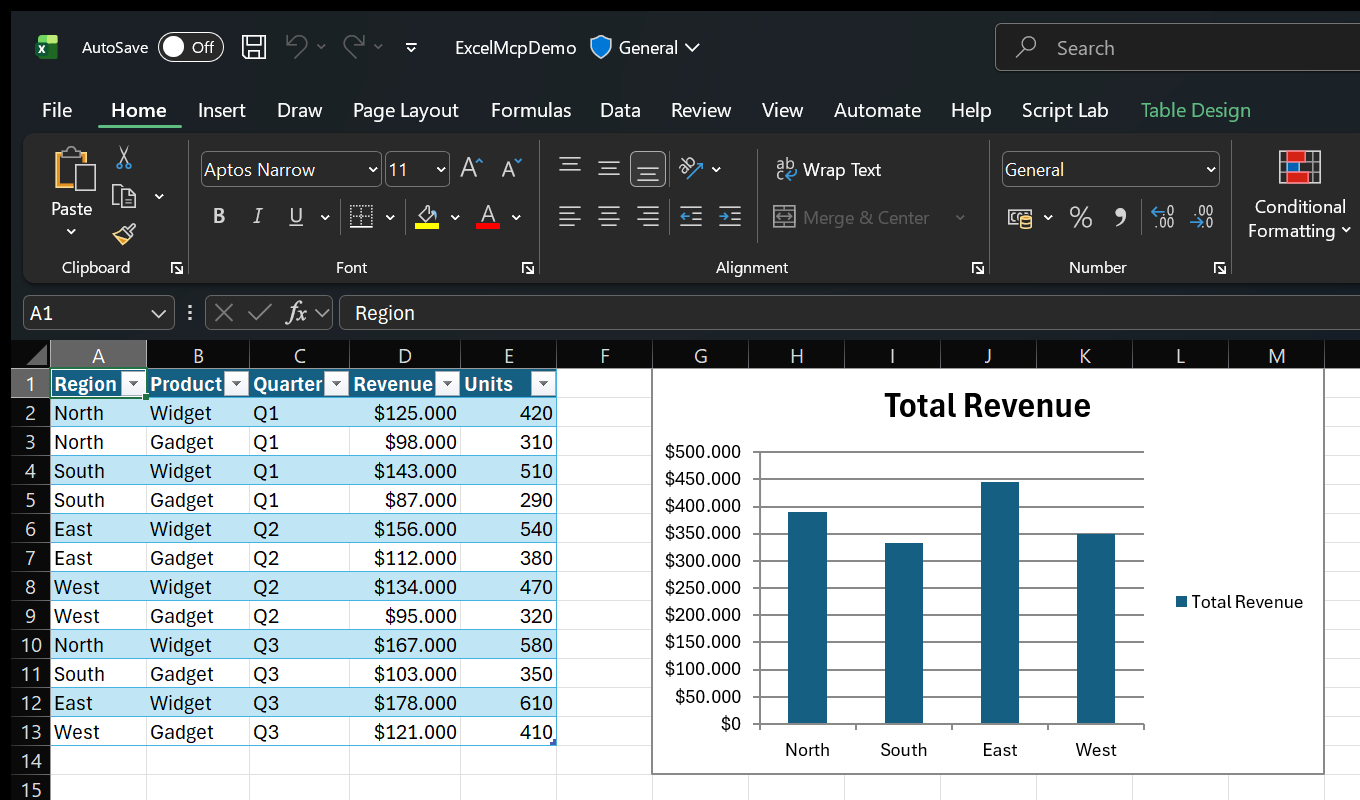
Ask in plain language:
Because Excel performs the work, you can inspect results live and continue editing the workbook normally.
See more examples and use cases.
Both entry points expose the same Core commands and behavior.
| Interface | Best for | Why |
|---|---|---|
| MCP Server | Conversational assistants and exploratory work | Rich schemas, tool discovery, and persistent sessions |
CLI (excelcli) | Coding agents, automation, and scripts | One compact tool surface and substantially lower token usage |
The MCP Server calls the ExcelMcp service in-process. The CLI uses a background daemon so workbook sessions persist across commands.
AI assistant or script
        │
   MCP Server / CLI
        │
 ExcelMcp Core commands
        │
 Real Excel COM API
Read the architecture or browse the MCP Server and CLI guides.
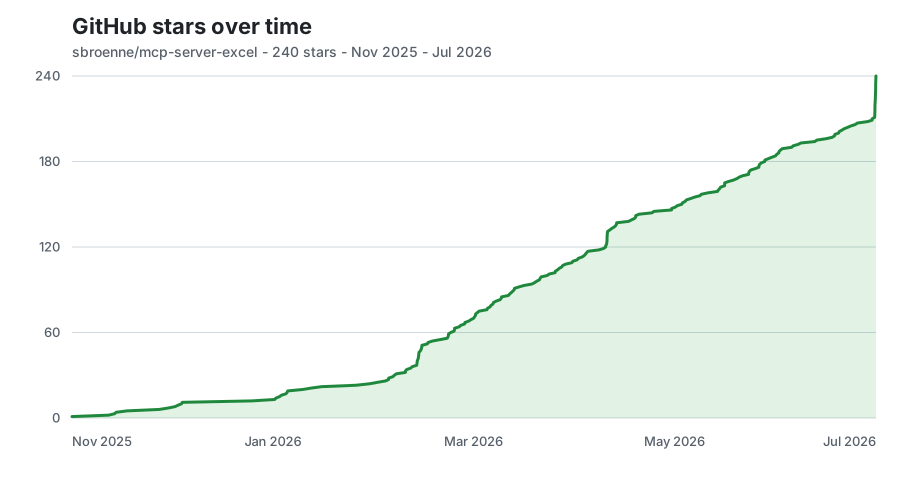
Documentation · Changelog · Contributing · Security · Privacy
License: MIT License - see LICENSE file
Other projects by the author:
Sign in to join the discussion.
No comments yet. Be the first to say what this is good for.
Real-time global intelligence dashboard. AI-powered news aggregation, geopolitical monitoring, and infrastructure tracking in a unified situational awareness interface
High-performance code intelligence MCP server. Indexes codebases into a persistent knowledge graph — average repo in milliseconds. 158 languages, sub-ms queries, 99% fewer tokens. Single static binary, zero dependencies.

Universal provider proxy for OpenAI Codex & Claude Code — use any LLM (Claude, Gemini, Grok, DeepSeek, Ollama…) with Codex CLI, App, SDK, and Claude Code

Git-native persistent memory for AI coding agents. Implements Google OKF v0.2 with sub-300µs in-memory BM25 search, embedded MCP server, and progressive disclosure. Slashes token bloat by 80% with zero external databases or dependencies. Built in pure Go.

Local-first code intelligence graph for MCP and CLI. Builds a persistent map of your codebase so AI coding tools read only what matters, with benchmarked context reductions on reviews and large-repo workflows.

Stop your AI from making things up — it proposes, deterministic tools decide, every claim checked against ground truth with evidence. Grounded facts and context survive resets. Reverse engineering is the proving ground. MCP server + CLI.