Sandbox
@rebel0789/codexpro

Local MCP server for ChatGPT repo access

CodexPro is a local MCP server for ChatGPT Developer Mode. It exposes approved repo and machine tools so ChatGPT can work on code without leaving the roots you allow. It supports reading, searching, editing, review, safe shell checks, attachment import, and workspace switching, with tunnel options for HTTPS access from ChatGPT web.

1,906 stars192 forksJavaScriptUpdated 1mo ago
Who it's for

Builders who want ChatGPT to act on a local repository with explicit project access and safety limits.

What it delivers

You can let ChatGPT inspect and change a repo from your machine instead of re-explaining context in every chat.

What it does

Approved repo access

Lets ChatGPT work only in repos and roots you explicitly allow.

Repo reading and editing

Provides tools to read, search, inspect, edit, and apply guarded patches.

Safe command execution

Runs allowlisted bash checks with safety defaults and blocked paths.

Attachment import

Imports ChatGPT attachments into the local workspace from approved hosts.

Workspace and handoff support

Writes plans under `.ai-bridge`, exports context bundles, and switches between allowed projects.

HTTPS tunnel options

Supports Cloudflare, ngrok, Tailscale, and local-only modes for ChatGPT web access.

How to get it

  1. 1An HTTPS URL to your machine for ChatGPT web (tunnel or Tailscale Funnel)
    npm install -g codexpro
    cd /path/to/your/repo
    codexpro setup

README

CodexPro logo

CodexPro

Give ChatGPT local coding tools for repos you explicitly allow.

npm CI License Website

What it is

CodexPro is a local MCP server. It connects your ChatGPT session to your machine and repos you allow.

ChatGPT can read, search, edit, review, verify, import attachments, and write handoff plans. It stays inside those roots.

It is not a hosted SaaS product, model proxy, quota bypass, account pool, or remote shell service.

Install

Needs:

  • Node.js 20+
  • A ChatGPT account that can create custom MCP plugins
  • An HTTPS URL to your machine for ChatGPT web (tunnel or Tailscale Funnel)
npm install -g codexpro
cd /path/to/your/repo
codexpro setup

Connect in ChatGPT

  1. Settings -> Security and login → turn Developer mode on (keep CSP enforcement on).
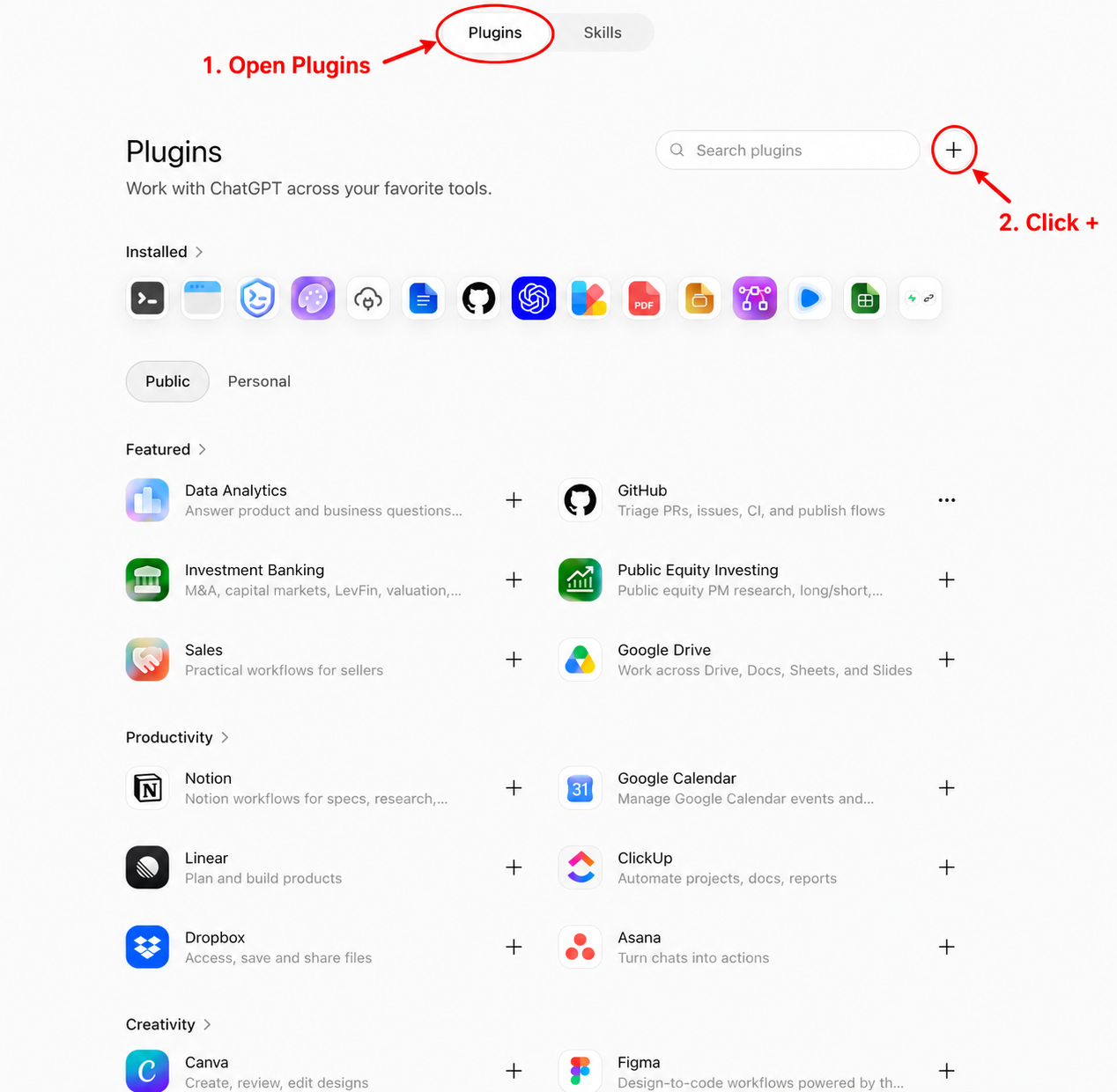
  2. Settings -> Plugins → Plugins tab → + beside Search plugins.
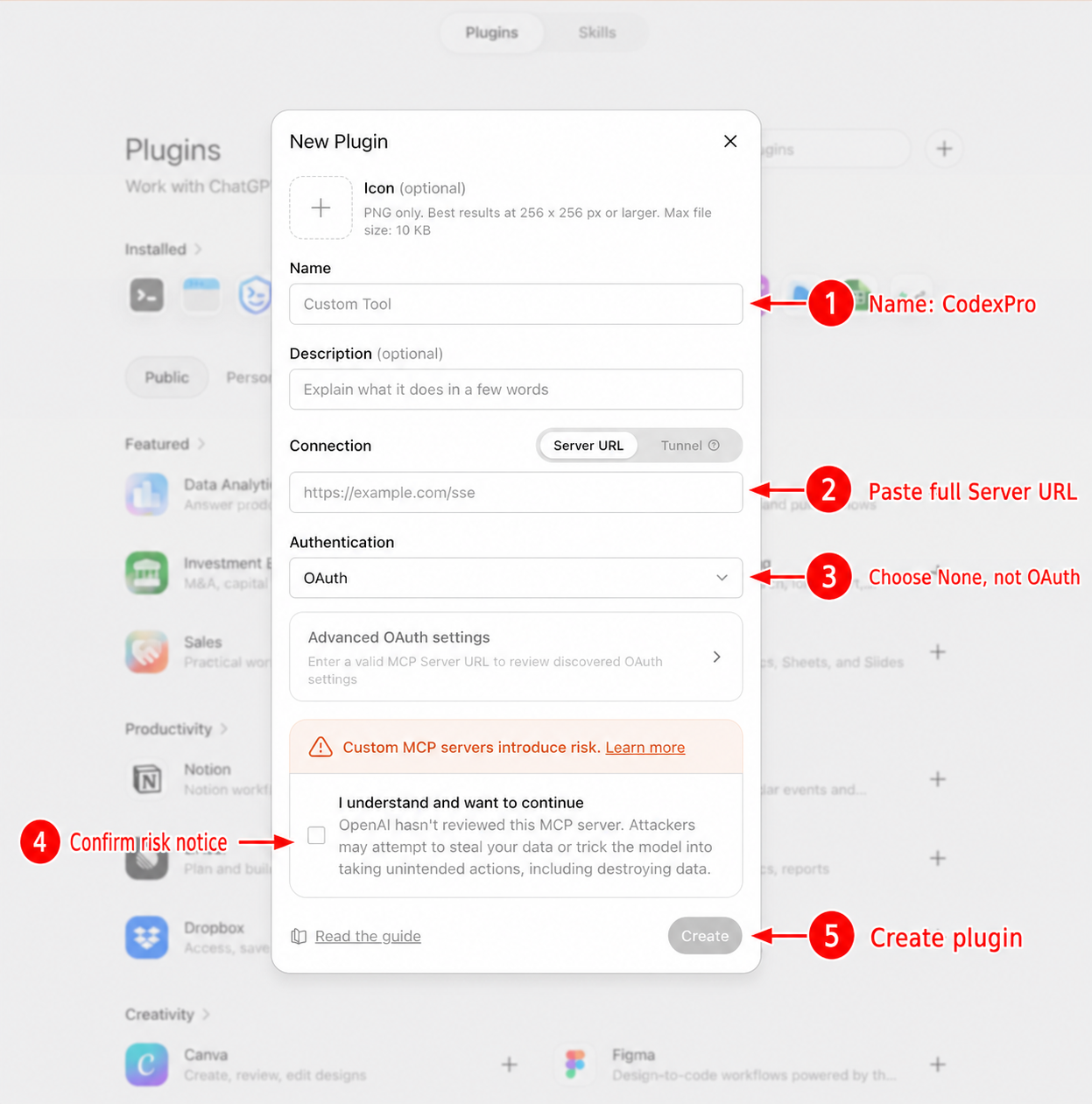
  3. Create a plugin named CodexPro.
  4. Connection: Server URL → paste the URL CodexPro copied.
  5. Authentication: No Authentication / None (change this if the form defaults to OAuth).

CodexPro auth is the token already in that URL. Do not share the URL.

Open Plugins and click +Complete the New Plugin form
Open Plugins and click the plus buttonComplete the New Plugin form

Daily use from the same repo:

codexpro start

If plugin creation fails, run codexpro connection-test and check whether ChatGPT requests reach the local server.

What ChatGPT can do

With workspace write mode (the normal agent setup):

  • read, search, and inspect the repo
  • edit with write, edit, or guarded apply_patch
  • import ChatGPT attachments with import_file
  • run allowlisted checks with bash
  • review diffs with show_changes
  • write plans under .ai-bridge
  • export a context bundle for chats that cannot call tools

Multiple projects

One CodexPro process can allow more than one repo:

codexpro settings set --project ~/code/web --project ~/code/api
codexpro settings show
codexpro start

Ask ChatGPT to open_workspace on an allowed project. open_current_workspace returns to the launch repo.

For two ChatGPT accounts or hard isolation, run two CodexPro processes on different ports and Server URLs.

Commands

codexpro setup
codexpro start
codexpro start --root /path/to/repo
codexpro doctor
codexpro connection-test
codexpro settings
codexpro inspect
codexpro review

Useful modes:

codexpro start --no-bash
codexpro start --tool-mode minimal
codexpro start --tool-mode full
codexpro start --mode handoff
codexpro start --mode pro
codexpro start --headless

Opt-in tool cards:

CODEXPRO_TOOL_CARDS=1 codexpro start

Public HTTPS options

ChatGPT web needs HTTPS:

codexpro start --tunnel cloudflare          # quick demo URL (changes)
codexpro ngrok --hostname your.ngrok-free.dev
codexpro stable --hostname codexpro.example.com --tunnel-name codexpro
codexpro tailscale --hostname your-device.your-tailnet.ts.net
codexpro start --tunnel none                # local only

Keep a stable token for stable hostnames:

mkdir -p ~/.codexpro
openssl rand -hex 32 > ~/.codexpro/http-token
chmod 600 ~/.codexpro/http-token

Prefer Authorization: Bearer <token> when the client supports headers. The ?codexpro_token= query form is a personal compatibility fallback.

Safety defaults

  • Public tunnels require a CodexPro HTTP token (min 24 bytes)
  • Writes stay hidden unless write mode is workspace
  • Safe bash is the default
  • Blocked paths cover .env, keys, .git, build caches, and similar
  • Attachment import only accepts ChatGPT Apps SDK file objects from approved HTTPS hosts

Read SECURITY.md before exposing a tunnel.

Update

npm install -g codexpro@latest
codexpro --version

Restart codexpro start after updating. Saved profiles under ~/.codexpro stay in place.

Development

npm install
npm run build
npm run smoke
npm run stress
npm run release:check

Publish only from the CodexPro root:

cd /path/to/codexpro
npm run release:publish

Docs

Files in the repo

Repository payload25 top-level entries
  • .github
  • docs
  • scripts
  • src
  • .gitignore
  • .npmignore
  • AGENTS.example.md
  • CHANGELOG.md
  • CHATGPT_PROMPT.md
  • CODEX_PROMPT.md
  • config.example.env
  • CONTRIBUTING.md
  • CONTRIBUTORS.md
  • design.md
  • DOMAIN_SETUP.md
  • FAQ_ZH.md
  • FAQ.md
  • LICENSE
  • package-lock.json
  • package.json
  • PUBLIC_LAUNCH_CHECKLIST.md
  • README_ZH.md
  • README.md
  • SECURITY.md
  • tsconfig.json

Discussion (0)

Ask about usage, or say what you built with it

Sign in to join the discussion.

No comments yet. Be the first to say what this is good for.

More connectors

High-performance code intelligence MCP server. Indexes codebases into a persistent knowledge graph — average repo in milliseconds. 158 languages, sub-ms queries, 99% fewer tokens. Single static binary, zero dependencies.

43k

Universal provider proxy for OpenAI Codex & Claude Code — use any LLM (Claude, Gemini, Grok, DeepSeek, Ollama…) with Codex CLI, App, SDK, and Claude Code

14k
okf-memory/
okf-agent-memory

Git-native persistent memory for AI coding agents. Implements Google OKF v0.2 with sub-300µs in-memory BM25 search, embedded MCP server, and progressive disclosure. Slashes token bloat by 80% with zero external databases or dependencies. Built in pure Go.

547
tirth8205/
code-review-graph

Local-first code intelligence graph for MCP and CLI. Builds a persistent map of your codebase so AI coding tools read only what matters, with benchmarked context reductions on reviews and large-repo workflows.

31k
2akouwu/
reverify

Stop your AI from making things up — it proposes, deterministic tools decide, every claim checked against ground truth with evidence. Grounded facts and context survive resets. Reverse engineering is the proving ground. MCP server + CLI.

1.1k
t8y2/dbxConnectors

20 MB lightweight cross-platform database client for 90+ databases, including MySQL, PostgreSQL, SQLite, Redis, MongoDB, DuckDB, SQL Server, and Dameng. Built-in AI, MCP Server, CLI, desktop and Docker. | 轻量级跨平台数据库管理工具,支持 MySQL、PostgreSQL、SQLite、Redis、MongoDB、达梦等 90+ 数据库,提供桌面端、Docker、CLI、内置 AI 助手和 MCP Server。

19k