MCP Server for ArangoDB
A Model Context Protocol server for ArangoDB
This is a TypeScript-based MCP server that provides database interaction capabilities through ArangoDB. It implements core database operations and allows seamless integration with ArangoDB through MCP tools. You can use it wih Claude app and also extension for VSCode that works with mcp like Cline!
Features
Tools
| Tool | Category | Read-only | Mutates data/schema | Purpose |
|---|
arango_query | Query | No | Maybe | Execute general AQL with bind variables, bounded results, and query guardrails. |
arango_read_query | Query | Yes | No | Execute read-only AQL and reject write/DDL keywords. |
arango_validate_query | Query | Yes | No | Parse and validate AQL without executing it. |
arango_explain_query | Query | Yes | No | Inspect AQL execution plans, index usage, and optimizer output. |
arango_describe_database | Discovery | Yes | No | Summarize collections, counts, indexes, and sample fields. |
arango_list_collections | Discovery | Yes | No | List collections in the configured database. |
arango_get_collection | Discovery | Yes | No | Return collection properties, count, and indexes. |
arango_create_collection | Collection | No | Yes | Create document or edge collections. |
arango_drop_collection | Collection | No | Yes | Drop a collection, requiring confirm: true. |
arango_get_document | Document | Yes | No | Fetch one document by collection and _key. |
arango_list_documents | Document | Yes | No | List documents with limit and offset pagination. |
arango_count_documents | Document | Yes | No | Count documents in a collection. |
arango_sample_documents | Document | Yes | No | Return a small random sample for schema discovery. |
arango_insert | Document | No | Yes | Insert one document into a collection. |
arango_bulk_insert | Document | No | Yes | Insert up to 1000 documents in one request. |
arango_update | Document | No | Yes | Partially update one document by _key. |
arango_bulk_update | Document | No | Yes | Patch up to 1000 documents by _key or _id. |
arango_remove | Document | No | Yes | Remove one document by _key. |
arango_list_indexes | Index | Yes | No | List indexes for a collection. |
arango_create_index | Index | No | Yes | Create persistent, geo, TTL, or inverted indexes. |
arango_list_views | ArangoSearch | Yes | No | List ArangoSearch and search-alias Views. |
arango_create_search_view | ArangoSearch | No | Yes | Create an ArangoSearch View linked to a collection. |
arango_search | ArangoSearch | Yes | No | Search an ArangoSearch View with analyzer-aware BM25 ranking. |
arango_list_analyzers | Analyzer | Yes | No | List ArangoSearch Analyzers. |
arango_create_analyzer | Analyzer | No | Yes | Create an ArangoSearch Analyzer. |
arango_list_graphs | Graph | Yes | No | List named graphs. |
arango_create_graph | Graph | No | Yes | Create a named graph with one edge definition. |
arango_insert_edge | Graph | No | Yes | Insert an edge document with _from and _to. |
arango_traverse | Graph | Yes | No | Traverse edges from a start vertex using an edge collection or named graph. |
arango_shortest_path | Graph | Yes | No | Find the shortest path between two vertices using an edge collection or named graph. |
arango_backup | Backup | No | Filesystem | Backup collections to JSON files under ARANGO_BACKUP_ROOT. |
All tools return JSON text and structuredContent when successful. Read-heavy tools expose bounded limit parameters to keep responses agent-friendly. Query tools also support guardrails such as memoryLimit, maxRuntime, and failOnWarning where applicable.
Installation
Installing via NPM
To install arango-server globally via NPM, run the following command:
npm install -g arango-server
Running via NPX
To run arango-server directly without installation, use the following command:
npx -y arango-server
Configuring for VSCode Agent
To use arango-server with the VSCode Copilot agent, you must have at least VSCode 1.99.0 installed and follow these steps:
-
Create or edit the MCP configuration file:
-
Workspace-specific configuration: Create or edit the .vscode/mcp.json file in your workspace.
-
User-specific configuration: Optionally, specify the server in the setting(mcp) VS Code user settings to enable the MCP server across all workspaces.
Tip: You can refer here to the MCP configuration documentation of VSCode for more details on how to set up the configuration file.
-
Add the following configuration:
{
  "servers": {
    "arango-mcp": {
      "type": "stdio",
      "command": "npx",
      "args": ["-y", "arango-server"],
      "env": {
        "ARANGO_URL": "http://localhost:8529",
        "ARANGO_DB": "your_database_name",
        "ARANGO_USERNAME": "your_username",
        "ARANGO_PASSWORD": "your_password"
      }
    }
  }
}
-
Start the MCP server:
- Open the Command Palette in VSCode (
Ctrl+Shift+P or Cmd+Shift+P on Mac).
- Run the command
MCP: Start Server and select arango-mcp from the list.
-
Verify the server:
- Open the Chat view in VSCode and switch to Agent mode.
- Use the
Tools button to verify that the arango-server tools are available.
To use with Claude Desktop
Go to: Settings > Developer > Edit Config or
- MacOS:
~/Library/Application Support/Claude/claude_desktop_config.json
- Windows:
%APPDATA%/Claude/claude_desktop_config.json
You can check out mcp documentation to set it up too.
To use with OpenCode
Add the following configuration to your OpenCode config file, such as opencode.json or opencode.jsonc:
{
  "$schema": "https://opencode.ai/config.json",
  "mcp": {
    "arango": {
      "type": "local",
      "command": ["npx", "-y", "arango-server"],
      "enabled": true,
      "environment": {
        "ARANGO_URL": "your_database_url",
        "ARANGO_DB": "your_database_name",
        "ARANGO_USERNAME": "your_username",
        "ARANGO_PASSWORD": "your_password"
      }
    }
  }
}
After restarting OpenCode, ask it to use the arango MCP tools for ArangoDB tasks.
To use with Cline VSCode Extension
Go to: Cline Extension > MCP Servers > Edit Configuration or
- MacOS:
~/Library/Application Support/Code/User/globalStorage/cline.cline/config.json
- Windows:
%APPDATA%/Code/User/globalStorage/cline.cline/config.json
Add the following configuration to the mcpServers section:
{
  "mcpServers": {
    "arango": {
      "command": "npx",
      "args": ["-y", "arango-server"],
      "env": {
        "ARANGO_URL": "your_database_url",
        "ARANGO_DB": "your_database_name",
        "ARANGO_USERNAME": "your_username",
        "ARANGO_PASSWORD": "your_password"
      }
    }
  }
}
You can also use the above configuration to get this server working with WARP
Environment Variables
The server requires the following environment variables:
ARANGO_URL - ArangoDB server URL (note: 8529 is the default port for ArangoDB for local development)ARANGO_DB - Database nameARANGO_USERNAME - Database userARANGO_PASSWORD - Database passwordARANGO_BACKUP_ROOT - Optional root directory for arango_backup output. Defaults to ./backups.
Usage
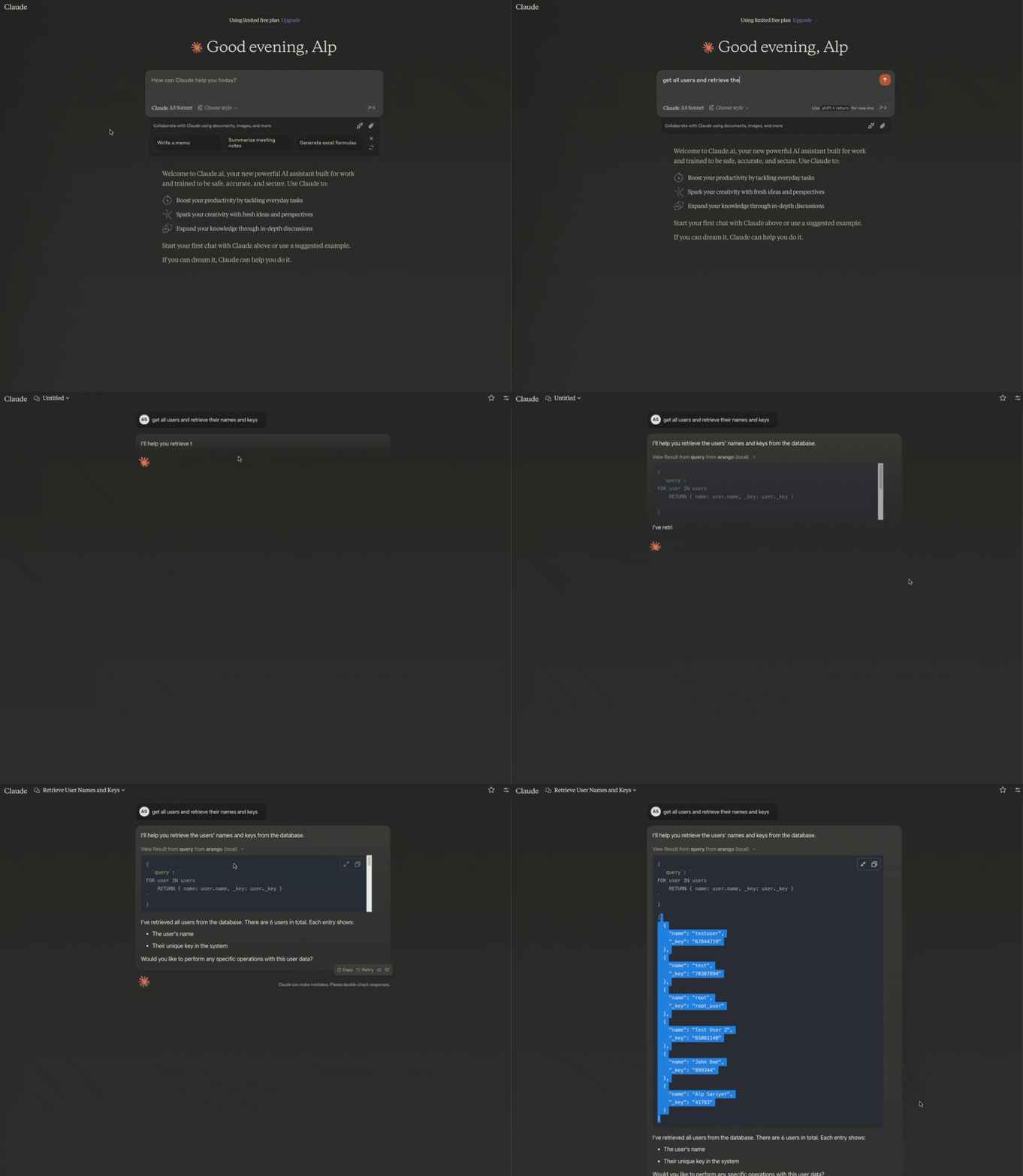
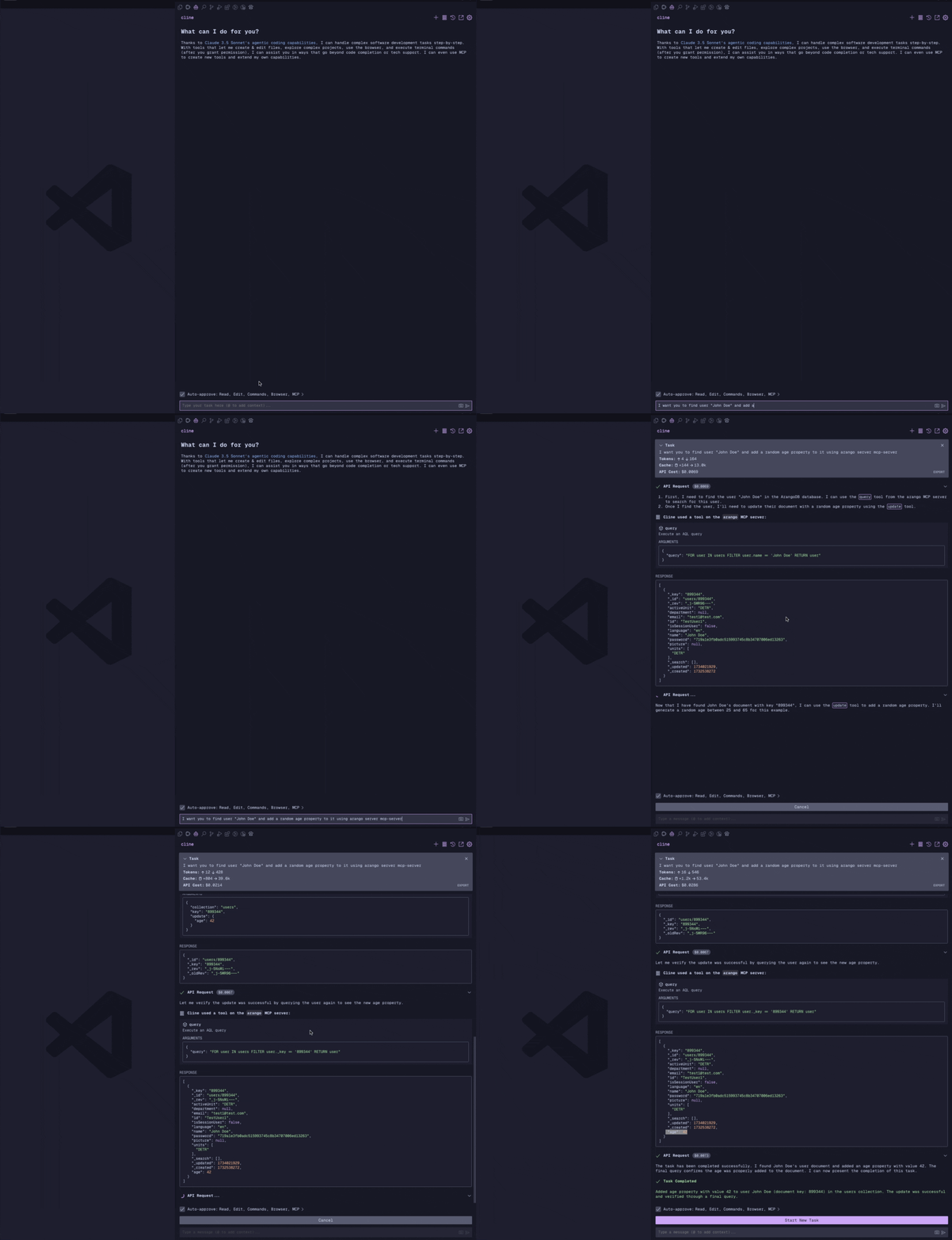
You can pretty much provide any meaningful prompt and Claude will try to execute the appropriate function.
Some example propmts:
- "List all collections in the database"
- "Query all users"
- "Insert a new document with name 'John Doe' and email "john@example.com' to the 'users' collection"
- "Update the document with key '123456' or name 'Jane Doe' to change the age to 48"
- "Create a new collection named 'products'"
Usage with Claude App
Uasge with Cline VSCode extension
Query all users:
{
  "query": "FOR user IN users RETURN user",
  "limit": 100
}
Insert a new document:
{
  "collection": "users",
  "document": {
    "name": "John Doe",
    "email": "john@example.com"
  }
}
Update a document:
{
  "collection": "users",
  "key": "123456",
  "update": {
    "name": "Jane Doe"
  }
}
Remove a document:
{
  "collection": "users",
  "key": "123456"
}
List all collections:
{
} // No parameters required
Backup database collections:
{
  "outputDir": "nightly_1", // Safe subdirectory name under ARANGO_BACKUP_ROOT. Absolute paths and slashes are rejected.
  "collection": "users", // Optional. If omitted, all collections are backed up.
  "docLimit": 1000 // Optional. Maximum documents per collection. Defaults to 1000 and is capped at 10000.
}
Set ARANGO_BACKUP_ROOT to choose where backups are stored. The server rejects path traversal, absolute paths, symlink escapes, and existing output files to mitigate arbitrary file write risks.
Create a new collection:
{
  "name": "products",
  "type": "document", // "document" or "edge" (optional, defaults to "document")
  "waitForSync": false // Optional, defaults to false
}
Drop a collection:
{
  "name": "products",
  "confirm": true
}
Note: The server is database-structure agnostic and can work with any collection names or structures as long as they follow ArangoDB's document and edge collection models.
Disclaimer
For Development Use Only
This tool is designed for local development environments only. While technically it could connect to a production database, this would create significant security risks and is explicitly discouraged. We use it exclusively with our development databases to maintain separation of concerns and protect production data.
Development
Contributions are welcome. Please read CONTRIBUTING.md before opening a pull request.
-
Clone the repository
-
Install dependencies:
npm run build
-
For development with auto-rebuild:
npm run watch
Debugging
Since MCP servers communicate over stdio, debugging can be challenging. recommended debugging can be done by using MCP Inspector for development:
npm run inspector
The Inspector will provide a URL to access debugging tools in your browser.
Testing
npm test
The test suite includes regression coverage for the arango_backup path handling that prevents absolute paths, traversal, and symlink escapes.
To run the integration smoke test with a local Docker ArangoDB instance:
npm run test:integration
The integration test starts a temporary Docker ArangoDB instance, starts the MCP server over stdio, lists tools, verifies outputSchema, creates a temporary collection, inserts documents, queries with limit, verifies backup output stays under ARANGO_BACKUP_ROOT, rejects an absolute backup path, cleans up the collection, and stops the container.
The test container uses host port 18529 by default to avoid conflicting with a local ArangoDB on 8529. Override it with ARANGO_PORT if needed.
License
This project is licensed under the MIT License - see the LICENSE file for details.





