

heygen-com/hyperframesFrameworks & SDKs
Write HTML. Render video. Built for agents.
49k
Excelize gives Go code a way to read, write, and update XLSX and related Excel formats. It includes workbook and worksheet operations, cell access, streaming reads and writes, charts, images, styles, pivot tables, and other spreadsheet parts.
Builders who want Go code to create, read, or modify Excel workbooks.
You can generate and update spreadsheet files in code instead of handling Excel by hand.
Create new files with `NewFile()` and open existing workbooks with `OpenFile()`.
Set and get cell values, read rows, and work with sheet data directly.
Add charts and pictures to worksheets with chart and graphic options.
Use the streaming API to read or write worksheets with large amounts of data.
Work with tables, styles, pivot tables, data validation, merged cells, and sheet settings.
Read and write XLSX, XLSM, XLTX, XLTM, and XLAM files using ECMA-376 XML structures.
go get github.com/xuri/excelize
go get github.com/xuri/excelize/v2





Excelize is a library written in pure Go providing a set of functions that allow you to write to and read from XLAM / XLSM / XLSX / XLTM / XLTX files. Supports reading and writing spreadsheet documents generated by Microsoft Excel™ 2007 and later. Supports complex components by high compatibility, and provided streaming API for generating or reading data from a worksheet with huge amounts of data. This library needs Go version 1.25.0 or later. The full docs can be seen using go's built-in documentation tool, or online at go.dev and docs reference.
go get github.com/xuri/excelize
go get github.com/xuri/excelize/v2
Here is a minimal example usage that will create spreadsheet file.
package main

import (
    "fmt"

    "github.com/xuri/excelize/v2"
)

func main() {
    f := excelize.NewFile()
    defer func() {
        if err := f.Close(); err != nil {
            fmt.Println(err)
        }
    }()
    // Create a new sheet.
    index, err := f.NewSheet("Sheet2")
    if err != nil {
        fmt.Println(err)
        return
    }
    // Set value of a cell.
    f.SetCellValue("Sheet2", "A2", "Hello world.")
    f.SetCellValue("Sheet1", "B2", 100)
    // Set active sheet of the workbook.
    f.SetActiveSheet(index)
    // Save spreadsheet by the given path.
    if err := f.SaveAs("Book1.xlsx"); err != nil {
        fmt.Println(err)
    }
}
The following constitutes the bare to read a spreadsheet document.
package main

import (
    "fmt"

    "github.com/xuri/excelize/v2"
)

func main() {
    f, err := excelize.OpenFile("Book1.xlsx")
    if err != nil {
        fmt.Println(err)
        return
    }
    defer func() {
        // Close the spreadsheet.
        if err := f.Close(); err != nil {
            fmt.Println(err)
        }
    }()
    // Get value from cell by given worksheet name and cell reference.
    cell, err := f.GetCellValue("Sheet1", "B2")
    if err != nil {
        fmt.Println(err)
        return
    }
    fmt.Println(cell)
    // Get all the rows in the Sheet1.
    rows, err := f.GetRows("Sheet1")
    if err != nil {
        fmt.Println(err)
        return
    }
    for _, row := range rows {
        for _, colCell := range row {
            fmt.Print(colCell, "\t")
        }
        fmt.Println()
    }
}
With Excelize chart generation and management is as easy as a few lines of code. You can build charts based on data in your worksheet or generate charts without any data in your worksheet at all.
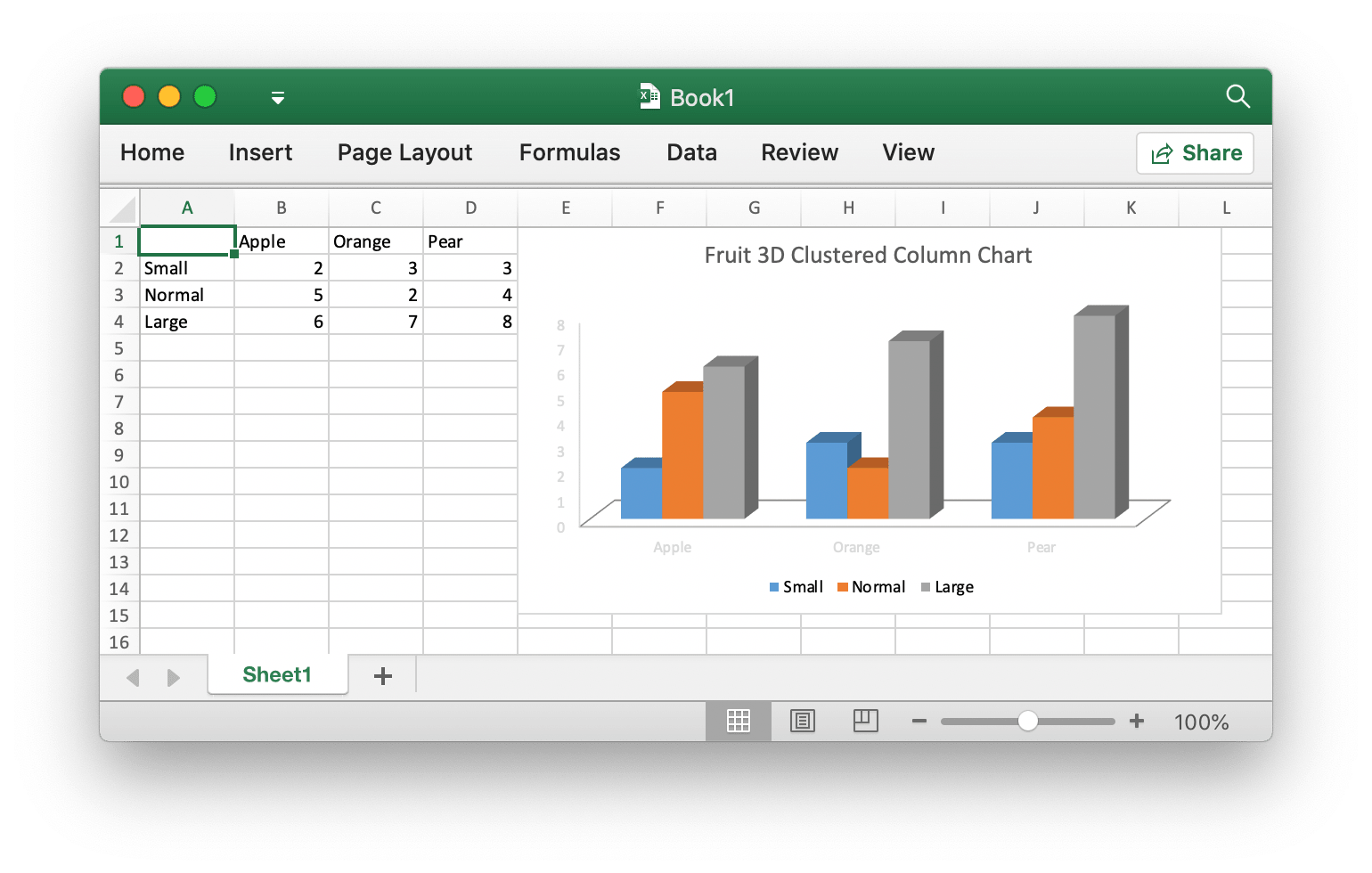
package main

import (
    "fmt"

    "github.com/xuri/excelize/v2"
)

func main() {
    f := excelize.NewFile()
    defer func() {
        if err := f.Close(); err != nil {
            fmt.Println(err)
        }
    }()
    for idx, row := range [][]interface{}{
        {nil, "Apple", "Orange", "Pear"}, {"Small", 2, 3, 3},
        {"Normal", 5, 2, 4}, {"Large", 6, 7, 8},
    } {
        cell, err := excelize.CoordinatesToCellName(1, idx+1)
        if err != nil {
            fmt.Println(err)
            return
        }
        f.SetSheetRow("Sheet1", cell, &row)
    }
    if err := f.AddChart("Sheet1", "E1", &excelize.Chart{
        Type: excelize.Col3DClustered,
        Series: []excelize.ChartSeries{
            {
                Name:       "Sheet1!$A$2",
                Categories: "Sheet1!$B$1:$D$1",
                Values:     "Sheet1!$B$2:$D$2",
            },
            {
                Name:       "Sheet1!$A$3",
                Categories: "Sheet1!$B$1:$D$1",
                Values:     "Sheet1!$B$3:$D$3",
            },
            {
                Name:       "Sheet1!$A$4",
                Categories: "Sheet1!$B$1:$D$1",
                Values:     "Sheet1!$B$4:$D$4",
            }},
        Title: excelize.ChartTitle{
            Paragraph: []excelize.RichTextRun{
                {
                    Text: "Fruit 3D Clustered Column Chart",
                },
            },
        },
    }); err != nil {
        fmt.Println(err)
        return
    }
    // Save spreadsheet by the given path.
    if err := f.SaveAs("Book1.xlsx"); err != nil {
        fmt.Println(err)
    }
}
package main

import (
    "fmt"
    _ "image/gif"
    _ "image/jpeg"
    _ "image/png"

    "github.com/xuri/excelize/v2"
)

func main() {
    f, err := excelize.OpenFile("Book1.xlsx")
    if err != nil {
        fmt.Println(err)
        return
    }
    defer func() {
        // Close the spreadsheet.
        if err := f.Close(); err != nil {
            fmt.Println(err)
        }
    }()
    // Insert a picture.
    if err := f.AddPicture("Sheet1", "A2", "image.png", nil); err != nil {
        fmt.Println(err)
    }
    // Insert a picture to worksheet with scaling.
    if err := f.AddPicture("Sheet1", "D2", "image.jpg",
        &excelize.GraphicOptions{ScaleX: 0.5, ScaleY: 0.5}); err != nil {
        fmt.Println(err)
    }
    // Insert a picture offset in the cell with printing support.
    enable, disable := true, false
    if err := f.AddPicture("Sheet1", "H2", "image.gif",
        &excelize.GraphicOptions{
            PrintObject:     &enable,
            LockAspectRatio: false,
            OffsetX:         15,
            OffsetY:         10,
            Locked:          &disable,
        }); err != nil {
        fmt.Println(err)
    }
    // Save the spreadsheet with the origin path.
    if err = f.Save(); err != nil {
        fmt.Println(err)
    }
}
Contributions are welcome! Open a pull request to fix a bug, or open an issue to discuss a new feature or change. XML is compliant with part 1 of the 5th edition of the ECMA-376 Standard for Office Open XML.
This program is under the terms of the BSD 3-Clause License. See https://opensource.org/licenses/BSD-3-Clause.
The Excel logo is a trademark of Microsoft Corporation. This artwork is an adaptation.
The Go gopher was created by Renee French. Licensed under the Creative Commons 4.0 Attributions license.

Sign in to join the discussion.
No comments yet. Be the first to say what this is good for.
Write HTML. Render video. Built for agents.
Ultra-lightweight, open-source, self-hosted personal AI agent framework in Python with WebUI, tools, memory, MCP, multi-agent workflows, automation, and chat apps

SkillOpt is a text-space optimizer that trains reusable natural-language skills for frozen LLM agents through trajectory-driven edits, validation-gated updates, and deployable best_skill.md artifacts.

Omnigent is an open-source AI agent framework and meta-harness: orchestrate Claude Code, Codex, Cursor, Pi, and custom agents — swap harnesses without rewriting, enforce policies and sandboxing, and collaborate in real time from any device.

A theoretical reconstruction of the Claude Mythos architecture, built from first principles using the available research literature.
🕷️ An adaptive Web Scraping framework that handles everything from a single request to a full-scale crawl!