
koala73/worldmonitorConnectors
Real-time global intelligence dashboard. AI-powered news aggregation, geopolitical monitoring, and infrastructure tracking in a unified situational awareness interface
86k
This repo shows how to expose ArcGIS Pro actions as MCP tools. The add-in runs inside ArcGIS Pro and listens on a Named Pipe, while the .NET 8 MCP server forwards tool calls between Copilot and the add-in.
Builders who want Copilot or another MCP client to work with ArcGIS Pro maps and layers.
You can ask an agent to inspect maps, count features, and zoom to layers without leaving ArcGIS Pro.
Runs in-process in ArcGIS Pro and exposes GIS operations through a local Named Pipe server.
Defines MCP tools in a .NET 8 console app and forwards calls to the add-in through a bridge client.
Uses `.mcp.json` so Visual Studio Copilot can start and use the server.
Includes sample operations such as `pro.getActiveMapName`, `pro.listLayers`, `pro.countFeatures`, and `pro.zoomToLayer`.
This repository demonstrates how to integrate a Model Context Protocol (MCP) server with an ArcGIS Pro Add-In. The goal is to expose ArcGIS Pro functionality as MCP tools so that GitHub Copilot (in Agent mode) or any MCP client can interact with your GIS environment.
.mcp.json.This can allow Copilot (Agent Mode) to query maps, list layers, count features, zoom to layers, and more — directly in ArcGIS Pro.
ArcGisProMcpSample/
+- ArcGisProBridgeAddIn/           # ArcGIS Pro Add-In project (in-process)
¦  +- Config.daml
¦  +- Module.cs
¦  +- ProBridgeService.cs          # Named Pipe server + command handler
¦  +- IpcModels.cs                 # IPC request/response DTOs
+- ArcGisMcpServer/                # MCP server project (.NET 8)
¦  +- Program.cs
¦  +- Tools/ProTools.cs            # MCP tool definitions (bridge client)
¦  +- Ipc/BridgeClient.cs          # Named Pipe client
¦  +- Ipc/IpcModels.cs             # Shared IPC DTOs
+- .mcp.json                       # MCP server manifest for VS Copilot
The Add-In starts a Named Pipe server on ArcGIS Pro launch. It handles operations like:
pro.getActiveMapNamepro.listLayerspro.countFeaturespro.zoomToLayerModule.cs (in sample is in a button)protected override bool Initialize()
{
_service = new ProBridgeService("ArcGisProBridgePipe");
_service.Start();
return true; // initialization successful
}
protected override bool CanUnload()
{
_service?.Dispose();
return true;
}
ProBridgeService handlercase "pro.countFeatures":
{
if (req.Args == null ||
!req.Args.TryGetValue("layer", out string? layerName) ||
string.IsNullOrWhiteSpace(layerName))
return new(false, "arg 'layer' required", null);
int count = await QueuedTask.Run(() =>
{
var fl = MapView.Active?.Map?.Layers
.OfType<FeatureLayer>()
.FirstOrDefault(l => l.Name.Equals(layerName, StringComparison.OrdinalIgnoreCase));
if (fl == null) return 0;
using var fc = fl.GetFeatureClass();
return (int)fc.GetCount();
});
return new(true, null, new { count });
}
The MCP server uses the official ModelContextProtocol NuGet package.
Program.csawait Host.CreateDefaultBuilder(args)
.ConfigureServices(services =>
{
services.AddSingleton(new BridgeClient("ArcGisProBridgePipe"));
services.AddMcpServer()
.WithStdioServerTransport()
.WithToolsFromAssembly(typeof(ProTools).Assembly);
})
.RunConsoleAsync();
[McpServerToolType]
public static class ProTools
{
    private static BridgeClient _client;
    public static void Configure(BridgeClient client) => _client = client;

    [McpServerTool(Title = "Count features in a layer", Name = "pro.countFeatures")]
    public static async Task<object> CountFeatures(string layer)
    {
        var r = await _client.OpAsync("pro.countFeatures", new() { ["layer"] = layer });
        if (!r.Ok) throw new Exception(r.Error);
        var count = ((System.Text.Json.JsonElement)r.Data).GetProperty("count").GetInt32();
        return new { layer, count };
    }
}
.mcp.json ManifestPlace in solution root (.mcp.json):
{
  "servers": {
    "arcgis": {
      "type": "stdio",
      "command": "dotnet",
      "args": [
        "run",
        "--project",
        "McpServer/ArcGisMcpServer/ArcGisMcpServer.csproj"
      ]
    }
  }
}
.mcp.json and starts the MCP server.pro.listLayers ? returns the layers in the active mappro.countFeatures layer=Buildings ? returns the feature countpro.selectByAttribute, pro.getCurrentExtent, pro.exportLayer.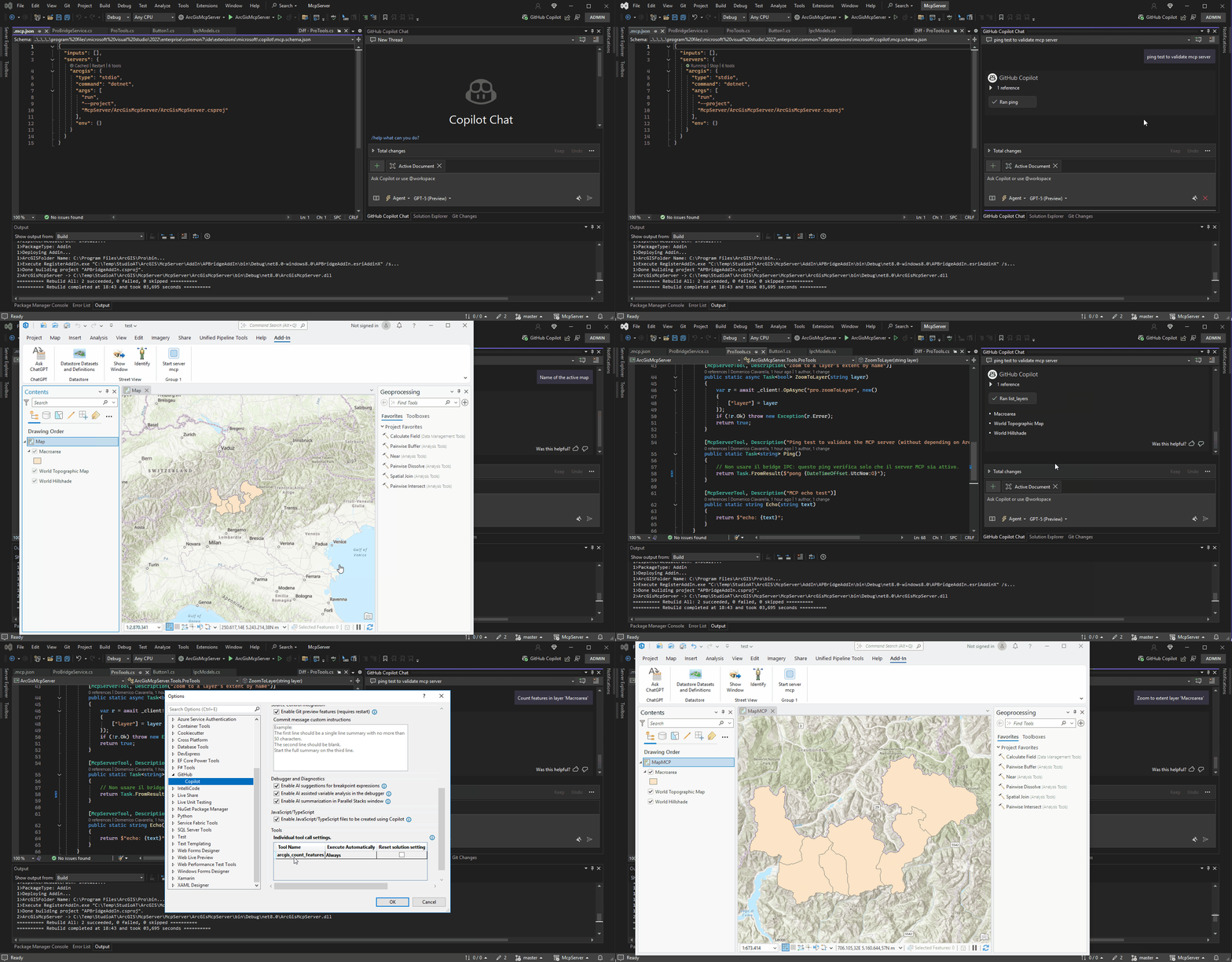
Sign in to join the discussion.
No comments yet. Be the first to say what this is good for.
Real-time global intelligence dashboard. AI-powered news aggregation, geopolitical monitoring, and infrastructure tracking in a unified situational awareness interface
High-performance code intelligence MCP server. Indexes codebases into a persistent knowledge graph — average repo in milliseconds. 158 languages, sub-ms queries, 99% fewer tokens. Single static binary, zero dependencies.

Universal provider proxy for OpenAI Codex & Claude Code — use any LLM (Claude, Gemini, Grok, DeepSeek, Ollama…) with Codex CLI, App, SDK, and Claude Code

Git-native persistent memory for AI coding agents. Implements Google OKF v0.2 with sub-300µs in-memory BM25 search, embedded MCP server, and progressive disclosure. Slashes token bloat by 80% with zero external databases or dependencies. Built in pure Go.

Local-first code intelligence graph for MCP and CLI. Builds a persistent map of your codebase so AI coding tools read only what matters, with benchmarked context reductions on reviews and large-repo workflows.

Stop your AI from making things up — it proposes, deterministic tools decide, every claim checked against ground truth with evidence. Grounded facts and context survive resets. Reverse engineering is the proving ground. MCP server + CLI.