Sandbox
@nautilus-ops/mcp-center

MCP registry and proxy for client connections

MCP Center provides a central registry plus proxy layer for MCP servers. It supports SSE and streamable transport, routes client traffic through one service, and is built to run on Docker or Kubernetes.

40 stars8 forksRustUpdated 1y ago
Who it's for

Builders who want their agent clients to connect to multiple MCP servers through one managed gateway.

What it delivers

You can register MCP servers once and connect to them through a single proxy instead of wiring each server separately.

What it does

MCP server registry

Stores MCP server entries and exposes API endpoints to add, list, and manage them.

Reverse proxy connection layer

Forwards client requests to the right MCP server through `/proxy/connect/...`.

Transport support

Supports both SSE transport and streamable transport for MCP servers.

Multiple registry backends

Supports memory-based and external API registries.

Kubernetes deployment

Includes a Helm chart and deployment docs for cluster setup.

How to get it

  1. 1Run
    curl -X GET http://localhost:5432/api/registry/mcp-server \
      -H "Authorization: Bearer your-admin-token"
  2. 2Run
    curl -X GET http://localhost:5432/proxy/connect/my-mcp-server/1.0.0 \
      -H "Authorization: Bearer your-api-key"

README

MCP Center

MacOS Rust MCP

A centralized platform for managing and connecting MCP (Model Context Protocol) servers. MCP Center provides a high-performance proxy service that enables seamless communication between MCP clients and multiple MCP servers.

Motivation

In our Kubernetes cluster, we have deployed various MCP Servers, including both in-house and third-party implementations, each running as independent services. Accessing these services currently requires configuring separate K8s Ingress or Service Gateway for each MCP Server, which increases operational complexity and maintenance overhead.

To address this, we propose a centralized MCP registry and reverse-proxy service that enables managed hosting of MCP Servers, which can be deployed either on Docker or Kubernetes. With this centralized service:

  • Service discovery becomes unified, eliminating the need to configure access paths for each MCP Server individually.
  • Authentication can be managed consistently across all MCP Servers, enhancing system security.
  • Leveraging a plugin system, we can modify or filter MCP Tool parameters, enabling tool-level traceability and monitoring (see issue #7).
  • Lifecycle management of MCP Servers can be standardized, simplifying deployment, scaling, and upgrades.

This approach improves maintainability, provides a foundation for future features such as unified tracing, auditing, and monitoring, and allows organizations to easily manage and host MCP Servers across different environments.

Architecture
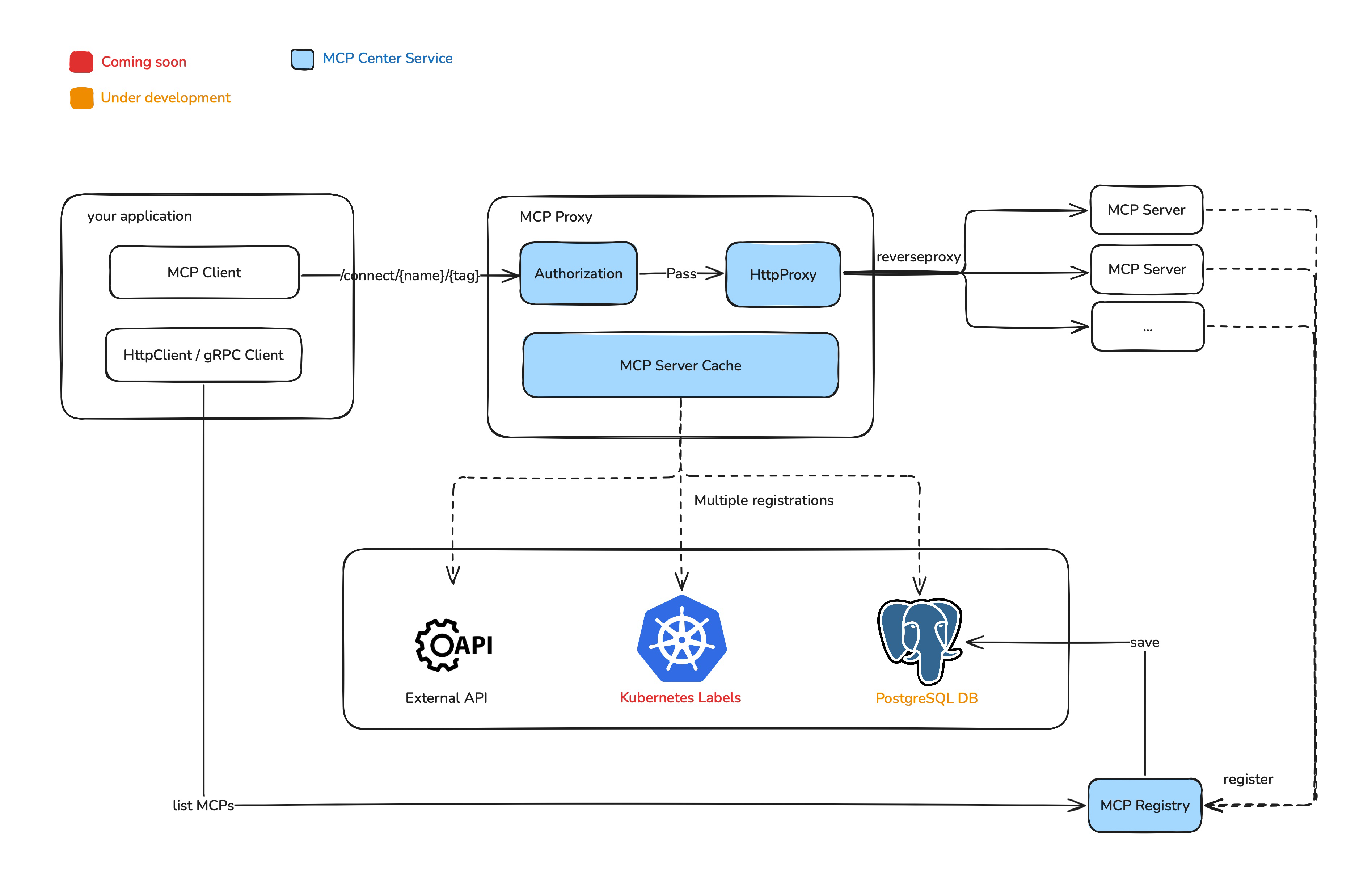
architecture_diagram.png

Features

  • MCP SSE Transport Proxy - Server-Sent Events transport support
  • MCP Streamable Transport Proxy - Streamable transport protocol support
  • Multiple Registry Types - Support for memory-based and external API registries
  • High Performance - Built with Axum proxy framework for optimal performance
  • Kubernetes Ready - Complete Helm chart for easy deployment

Quick Start

Using Docker

# 1. Pull the latest image
docker pull nautilusops/mcp-center:latest

# 2. Start the container
docker run -d \
  --name mcp-center \
  -p 5432:5432 \
  -e MCP_ADMIN_TOKEN=your-custom-token \
  -e POSTGRES_HOST=your-postgres-host \
  -e POSTGRES_PORT=your-postgres-port \
  -e POSTGRES_USERNAME=your-postgres-username \
  -e POSTGRES_PASSWORD=your-postgres-password \
  -e POSTGRES_DATABASE=your-postgres-database \
  nautilusops/mcp-center:latest

Using Helm

Please see here to deploy with helm

From Source

# Clone the repository
git clone https://github.com/nautilus-ops/mcp-center.git
cd mcp-center

# Build the project
cargo build --release

# Set environments
export MCP_ADMIN_TOKEN=your-custom-token
export POSTGRES_HOST=your-postgres-host
export POSTGRES_PORT=your-postgres-port
export POSTGRES_USERNAME=your-postgres-username
export POSTGRES_PASSWORD=your-postgres-password
export POSTGRES_DATABASE=your-postgres-database

# Run the application
./target/release/mcp-center run --config bootstrap.toml

Usage Examples

1. Register MCP Server

curl -X POST http://localhost:5432/api/registry/mcp-server \
  -H "Content-Type: application/json" \
  -H "Authorization: Bearer your-admin-token" \
  -d '{
    "name": "my-mcp-server",
    "tag": "1.0.0",
    "endpoint": "http://my-server:8080/sse",
    "transport_type": "sse",
    "description": "My MCP server"
  }'

2. Get All MCP Servers

curl -X GET http://localhost:5432/api/registry/mcp-server \
  -H "Authorization: Bearer your-admin-token"

3. Connect to MCP Server via Proxy

curl -X GET http://localhost:5432/proxy/connect/my-mcp-server/1.0.0 \
  -H "Authorization: Bearer your-api-key"

Development

Prerequisites

  • Rust 1.89.0 or later
  • Docker (for containerized builds)
  • Kubernetes cluster (for deployment testing)

Building

# Development build
cargo build

# Release build
cargo build --release

# Docker build
docker build -t mcp-center .

Testing

# Run unit tests
cargo test

# Run integration tests
cargo test --test integration

# Run with specific features
cargo test --features integration

Contributing

  1. Fork the repository
  2. Create a feature branch (git checkout -b feature/amazing-feature)
  3. Commit your changes (git commit -m 'Add amazing feature')
  4. Push to the branch (git push origin feature/amazing-feature)
  5. Open a Pull Request

License

This project is licensed under the Apache License, Version 2.0 - see the LICENSE file for details.

Roadmap

  • MCP Server Registry Center: Centralized management of MCP server endpoints
  • Authentication & Authorization: JWT-based authentication
  • Metrics & Monitoring: Prometheus metrics and Grafana dashboards
  • Load Balancing: Advanced load balancing algorithms
  • Rate Limiting: Request rate limiting and throttling
  • Plugin System: Extensible plugin architecture

Files in the repo

Repository payload20 top-level entries
  • .github
  • .helm
  • .migration
  • docs
  • mc-booter
  • mc-common
  • mc-db
  • mc-loader
  • mc-registry
  • mc-service
  • mc-token
  • .gitignore
  • bootstrap.toml
  • Cargo.lock
  • Cargo.toml
  • Dockerfile
  • LICENSE
  • Makefile
  • mcp_servers.toml.example
  • README.md

Discussion (0)

Ask about usage, or say what you built with it

Sign in to join the discussion.

No comments yet. Be the first to say what this is good for.

More connectors

High-performance code intelligence MCP server. Indexes codebases into a persistent knowledge graph — average repo in milliseconds. 158 languages, sub-ms queries, 99% fewer tokens. Single static binary, zero dependencies.

43k

Universal provider proxy for OpenAI Codex & Claude Code — use any LLM (Claude, Gemini, Grok, DeepSeek, Ollama…) with Codex CLI, App, SDK, and Claude Code

14k
okf-memory/
okf-agent-memory

Git-native persistent memory for AI coding agents. Implements Google OKF v0.2 with sub-300µs in-memory BM25 search, embedded MCP server, and progressive disclosure. Slashes token bloat by 80% with zero external databases or dependencies. Built in pure Go.

547
tirth8205/
code-review-graph

Local-first code intelligence graph for MCP and CLI. Builds a persistent map of your codebase so AI coding tools read only what matters, with benchmarked context reductions on reviews and large-repo workflows.

31k
2akouwu/
reverify

Stop your AI from making things up — it proposes, deterministic tools decide, every claim checked against ground truth with evidence. Grounded facts and context survive resets. Reverse engineering is the proving ground. MCP server + CLI.

1.1k
t8y2/dbxConnectors

20 MB lightweight cross-platform database client for 90+ databases, including MySQL, PostgreSQL, SQLite, Redis, MongoDB, DuckDB, SQL Server, and Dameng. Built-in AI, MCP Server, CLI, desktop and Docker. | 轻量级跨平台数据库管理工具,支持 MySQL、PostgreSQL、SQLite、Redis、MongoDB、达梦等 90+ 数据库,提供桌面端、Docker、CLI、内置 AI 助手和 MCP Server。

19k
