
koala73/worldmonitorConnectors
Real-time global intelligence dashboard. AI-powered news aggregation, geopolitical monitoring, and infrastructure tracking in a unified situational awareness interface
86k
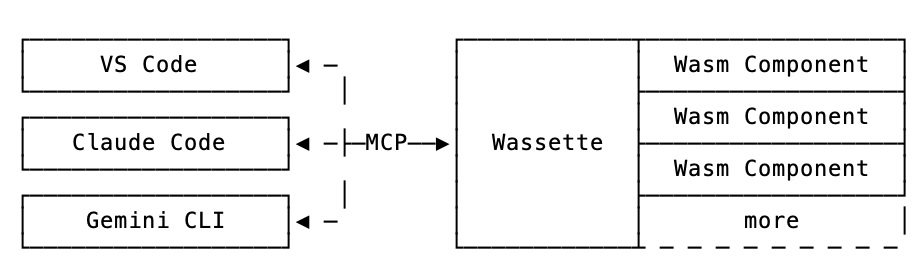
Wassette is a security-oriented runtime that exposes WebAssembly Components to AI agents through MCP. You register it with your agent, then load components from OCI artifacts and call them as tools inside a Wasmtime sandbox.
Builders who want their agent to call reusable WebAssembly tools through MCP.
You can add new agent tools without leaving chat, while keeping those tools isolated in a WebAssembly sandbox.
Exposes components as tools that MCP clients can load and invoke.
Runs components in a security sandbox so tool execution stays separated from the host.
Supports `oci://` component references such as the time component shown in the README.
The docs cover setup for GitHub Copilot, Copilot CLI, Claude Code, and Codex CLI.
Provides sample components in `examples/` for time, weather, search, files, GitHub, memory, and more.
Includes `crates/policy` and `crates/component2json` for policy handling and component metadata work.
curl -fsSL https://raw.githubusercontent.com/microsoft/wassette/main/scripts/install.sh | bash
A security-oriented runtime that runs WebAssembly Components via MCP
Quick Start | FAQ | Documentation | Releases | Contributing | Discord
[!WARNING] Early Development: This repository is not production ready yet. It is in early development and may change significantly.
Quick start: For Linux/macOS, use our one-liner install script:
curl -fsSL https://raw.githubusercontent.com/microsoft/wassette/main/scripts/install.sh | bash
For complete installation instructions for all platforms (including Windows, Homebrew, Nix, Docker, and more), see our Installation Guide.
With Wassette installed, the next step is to register it with your agent of choice. See our Quick Start guide (3 simple steps), or check the MCP Clients guide for detailed setup instructions for GitHub Copilot, Copilot CLI, Claude Code, and Codex CLI.
Once configured, you can start loading WebAssembly components. To teach your agent to tell the time, ask it to load a time component:
Please load the time component from oci://ghcr.io/microsoft/time-server-js:latest
Now that the time component is loaded, we can ask your agent to tell you the current time:
What is the current time?
The agent will respond with the current time, which is fetched from the time component running in a secure WebAssembly sandbox:
The current time July 31, 2025 at 10:30 AM UTC
Congratulations! You've just run your first Wasm Component and taught your agent how to tell time!
https://github.com/user-attachments/assets/8e5a371c-ac72-406d-859c-03833ee83963
You can join us via the #wassette channel on the Microsoft Open Source Discord:
Please see CONTRIBUTING.md for more information on how to contribute to this project.
This project is licensed under the MIT License.
This project may contain trademarks or logos for projects, products, or services. Authorized use of Microsoft trademarks or logos is subject to and must follow Microsoft’s Trademark & Brand Guidelines. Use of Microsoft trademarks or logos in modified versions of this project must not cause confusion or imply Microsoft sponsorship. Any use of third-party trademarks or logos are subject to those third-party’s policies.
Thanks to all contributors who are helping shape Wassette into something great.
Sign in to join the discussion.
No comments yet. Be the first to say what this is good for.
Real-time global intelligence dashboard. AI-powered news aggregation, geopolitical monitoring, and infrastructure tracking in a unified situational awareness interface
High-performance code intelligence MCP server. Indexes codebases into a persistent knowledge graph — average repo in milliseconds. 158 languages, sub-ms queries, 99% fewer tokens. Single static binary, zero dependencies.

Universal provider proxy for OpenAI Codex & Claude Code — use any LLM (Claude, Gemini, Grok, DeepSeek, Ollama…) with Codex CLI, App, SDK, and Claude Code

Git-native persistent memory for AI coding agents. Implements Google OKF v0.2 with sub-300µs in-memory BM25 search, embedded MCP server, and progressive disclosure. Slashes token bloat by 80% with zero external databases or dependencies. Built in pure Go.

Local-first code intelligence graph for MCP and CLI. Builds a persistent map of your codebase so AI coding tools read only what matters, with benchmarked context reductions on reviews and large-repo workflows.

Stop your AI from making things up — it proposes, deterministic tools decide, every claim checked against ground truth with evidence. Grounded facts and context survive resets. Reverse engineering is the proving ground. MCP server + CLI.