 AskDB — Give AI agents safe access to your database.
Your database, sandboxed. Your fields, controlled. One MCP endpoint for every AI tool.
https://github.com/user-attachments/assets/baa53f34-b0b4-41ee-89b3-60d133e8004d




Install ·
Try Locally ·
Connect AI ·
Security ·
FAQ
About AskDB
AskDB is a self-hosted bridge between your MongoDB or PostgreSQL database and any AI agent that speaks MCP. It clones your production data into an isolated sandbox, lets you control exactly which fields the AI can see, and exposes a single /mcp endpoint that plugs into Claude, ChatGPT, Cursor, and anything else.
No data masking. No fake data. Hidden fields are simply omitted from every response — the AI never knows they exist. Every query is audited.
Get started in 3 steps
| Step | What happens |
|---|
| 01 | Connect | Paste your MongoDB or PostgreSQL connection string in the dashboard |
| 02 | Configure | Browse real sample data, toggle which fields the AI can see |
| 03 | Query | Give your AI agent https://<your-domain>/mcp — done |
Works with · Claude Desktop · Claude Code · ChatGPT · Cursor · any MCP client
Features
- Sandbox isolation. Production data cloned into a Docker container. AI reads the copy, never the original.
- Field-level control. Toggle any field or collection visible/hidden — changes take effect immediately, no re-sync.
- PII auto-detection. Fields like
email, password, ssn, phone are detected and pre-hidden automatically.
- MongoDB + PostgreSQL. One MCP tool surface across engines.
list-databases, collection-schema, find, aggregate, count, distinct, sample-documents, execute-typescript, save-insight.
- Query validation. Allowlist-only reads. Write operations and dangerous pipeline stages rejected.
- Audit trail. Every MCP query logged with timestamp, execution time, target, and row count.
- OAuth + API keys. Remote clients (Claude, Cursor) use OAuth. Local configs use bearer tokens (SHA-256 hashed, shown once).
- Multi-database. Connect every database you own — Mongo and Postgres side by side. Each tool accepts a
connectionId.
- Interactive result viewer.
find / aggregate / sample-documents results render as a sortable table in MCP Apps–capable hosts (Claude Desktop, Claude on web, VS Code Copilot). Non-Apps clients get plain JSON.
- Code Mode. An
execute-typescript tool lets the AI run a sandboxed TypeScript program that composes multiple queries in one round trip. Details →
How It Works
┌─────────────────────────────────────────────────┐
│ Your Server │
│ │
│ ┌──────────────┐ ┌───────────────┐ │
│ │ Dashboard │──────>│ SQLite │ │
│ │ + API + MCP │ │ (config only) │ │
│ │ :3100 │ └───────────────┘ │
│ └──────────────┘ │
│ ┌───────────────┐ │
│ │ Sandbox │<── clone from prod
│ │ Mongo / PG │ │
│ └───────────────┘ │
└─────────────────────────────────────────────────┘
^
| MCP (Streamable HTTP)
Claude / ChatGPT / Cursor
- Connect — paste your MongoDB or PostgreSQL connection string
- Clone — AskDB runs the per-engine dump/restore (
mongodump/mongorestore for Mongo, pg_dump/pg_restore for Postgres) into an isolated Docker container
- Configure — browse your schema with real sample data, toggle fields visible or hidden
- Query — give your AI agent the MCP URL — hidden fields are stripped from every response
The AI never knows hidden fields exist.
Install on a VPS (one command)
On a fresh Ubuntu 22.04+ or Debian 12+ VPS:
curl -fsSL https://github.com/mgorabbani/askdb/releases/latest/download/install.sh | sudo bash
The installer will install Docker if missing, prompt for your domain and Let's Encrypt email, generate all secrets, and bring up the stack behind Caddy with auto-provisioned HTTPS. Total time on a fresh VPS is 2–3 minutes.
Don't have a VPS yet? exe.dev spins up a ready-to-go Ubuntu/Debian VPS in a couple of clicks — a quick way to get to the one-liner above.
Set up your domain
-
In your DNS provider, add an A record pointing to your VPS IP:
name:   askdb         (or any subdomain)
value:  <VPS public IP>
proxy:  **OFF**       — Cloudflare users: grey cloud, not orange.
                        The orange proxy blocks Let's Encrypt HTTP-01.
-
Verify DNS has propagated: dig +short askdb.example.com
-
Open ports 80 and 443 on your VPS firewall.
-
Run the installer above.
Create your admin account
The first time you open https://<your-domain>, the dashboard redirects you to /setup to create the admin account. Do this before connecting Claude or Cursor — you'll use the same account for the OAuth prompt. After the first signup, further registrations are rejected.
Alternative install modes
- Caddy (default): auto-provisioned HTTPS. Requires a domain with A record.
- Proxyless: you run your own reverse proxy (Coolify, Traefik, nginx). AskDB binds
127.0.0.1:3100.
- Quick test (nip.io): zero setup — the installer detects your VPS public IP and issues a real Let's Encrypt cert for
<ip>.nip.io. No DNS, no domain. Ideal for trial runs. Ports 80/443 still required.
- Cloudflare Tunnel: no open ports, no public IP needed. See below.
Cloudflare Tunnel in 90 seconds
If you already have a domain on Cloudflare (free plan works):
- Open Cloudflare dashboard → click the Ask AI button in the top bar.
- Prompt it: "Create a new Cloudflare Tunnel named askdb, route the hostname
askdb.example.com to http://askdb:3100, and give me the connector token." Replace askdb.example.com with the subdomain you want.
- Copy the token it returns (long
eyJ... string).
- Run the installer, pick option 3) Cloudflare Tunnel, paste the token, enter the same subdomain. The VPS handles Docker, routing, and certs — Cloudflare handles TLS and DNS automatically.
No firewall changes. No A records. The subdomain starts serving over HTTPS within a minute.
Upgrade
sudo bash <(curl -fsSL https://github.com/mgorabbani/askdb/releases/latest/download/install.sh)
The installer is idempotent — re-running it pulls the latest images and restarts. Secrets, data, and your .env are preserved.
Uninstall
# stop containers, keep data
sudo bash <(curl -fsSL https://github.com/mgorabbani/askdb/releases/latest/download/uninstall.sh)

# stop containers AND delete the askdb-data volume + /opt/askdb
sudo bash <(curl -fsSL https://github.com/mgorabbani/askdb/releases/latest/download/uninstall.sh) --purge
Backups
Your data lives in the askdb-data Docker volume. Back it up with:
docker run --rm -v askdb-data:/data alpine tar czf - /data > askdb-backup.tgz
Try it locally with Docker
Want to kick the tires before pointing a domain at a VPS? This runs AskDB on your own machine in a few minutes — no installer, no DNS, no HTTPS.
Requires Docker Desktop (macOS / Windows) or Docker Engine + Compose plugin (Linux).
git clone https://github.com/mgorabbani/askdb.git
cd askdb

cat > .env <<EOF
COMPOSE_PROFILES=proxyless
DOMAIN=localhost
BETTER_AUTH_URL=http://localhost:3100
TRUSTED_ORIGINS=http://localhost:3100,http://127.0.0.1:3100
EOF

docker compose up --build -d
# wait ~45s for first build + healthcheck
open http://localhost:3100
Create an admin account in the dashboard, add a database connection, and try the MCP URL at http://127.0.0.1:3100/mcp. Local MCP clients (Claude Code / Cursor with a fixed bearer token) work; remote OAuth flows need HTTPS, so use the VPS install for Claude Desktop / Cursor remote.
Stop with docker compose down (keeps data) or docker compose down -v (wipes volumes).
Connecting Your AI Agent
Claude, Cursor, and any other remote-MCP client connect to https://<your-domain>/mcp. Paste that URL as a custom connector and complete the OAuth approval in your browser. No port, no path rewriting, no API key.
For clients that expect a fixed bearer token (Claude Code, Cursor local configs), create an API key in the dashboard and add it to your config:
{
  "askdb": {
    "type": "streamable-http",
    "url": "https://YOUR_SERVER/mcp",
    "headers": {
      "Authorization": "Bearer ask_sk_YOUR_KEY"
    }
  }
}
Security
These invariants always hold:
- Production databases are never written to — read-only connections only
- Hidden fields never appear in MCP responses — stripped at query time
- Hidden collections are never listed or queryable
- All queries are validated — only
find, aggregate, count, distinct allowed
- Dangerous aggregation stages are blocked —
$merge, $out, $collStats, $currentOp, $listSessions
$lookup on hidden collections is rejected- Connection strings are encrypted at rest (AES-256-GCM), never logged
- API keys are hashed (SHA-256), shown once, never stored in plaintext
- Every MCP query is logged to the audit trail
Docker socket hardening: the compose file includes a tecnativa/docker-socket-proxy sidecar so AskDB never has direct access to /var/run/docker.sock — only the API endpoints it needs are exposed.
Roadmap
Community & Contributing
License
AskDB is licensed under the MIT License.
The MIT License means you can self-host, fork, modify, and use AskDB freely — including in commercial and proprietary projects — provided you keep the copyright and license notice.
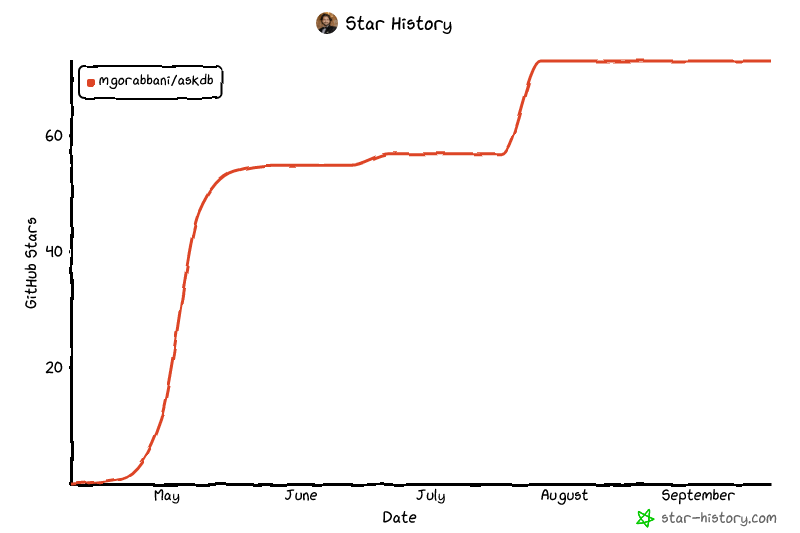
Star History
Open source under the MIT License. Built for people who want AI to understand their data, not own it.




