



heygen-com/hyperframesFrameworks & SDKs
Write HTML. Render video. Built for agents.
49k
E.D.D.I. is a Java and Quarkus-based engine that turns JSON configuration into multi-agent behavior. It includes routing, memory, RAG, scheduling, tool calling, and support for MCP and A2A, plus deployment paths for Docker and Kubernetes.
Builders who want to define, run, and govern AI agents without wiring everything by hand.
You can ship agent workflows with persistent memory, tool access, and compliance controls without writing the orchestration code yourself.
Routes conversations to single agents or groups, supports debates, nested groups, voting, negotiation, and runtime agent creation.
Stores persistent user and team memory, keeps rolling summaries, and supports context windowing and recall tools.
Acts as an MCP server and client, and implements A2A for agent-to-agent communication and skill discovery.
Connects to multiple embedding providers and vector stores, ingests documents, and exposes built-in tools like web search, HTTP calls, PDF reading, and memory access.
Adds approval gates, audit logging, secrets vaulting, quotas, and compliance features for GDPR, HIPAA, and EU AI Act workflows.
Ships Docker Compose overlays, Kubernetes manifests, Helm charts, and installer scripts for local and server deployments.
curl -fsSL https://raw.githubusercontent.com/labsai/EDDI/main/install.sh | bash
Invoke-WebRequest -UseBasicParsing -Uri "https://raw.githubusercontent.com/labsai/EDDI/main/install.ps1" -OutFile "install.ps1"
Unblock-File .\install.ps1
.\install.ps1
bash install.sh --defaults                 # All defaults, no prompts
bash install.sh --db=postgres --with-auth  # PostgreSQL + Keycloak
bash install.sh --full                     # Everything enabled (DB + auth + monitoring)
bash install.sh --local                    # Build Docker image from local source
./mvnw package -DskipTests    # Build the Java app
bash install.sh --local        # Build Docker image + start containers
eddi update
# Linux / macOS
~/.eddi/eddi update

# Windows (PowerShell)
& "$HOME\.eddi\eddi.cmd" update




E.D.D.I (Enhanced Dialog Driven Interface) is a production-grade, config-driven multi-agent orchestration middleware for conversational AI. It coordinates users, AI agents, and business systems through intelligent routing, persistent memory, and API orchestration — without writing code.
Built with Java 25 and Quarkus. Ships as a Red Hat-certified Docker image. Selected as a UNIDO Trusted Partner for Industrial AI. Native support for MCP (Model Context Protocol), A2A (Agent-to-Agent), Slack, OpenAPI, and OAuth 2.0.
Website · Documentation · License: Apache 2.0
The fastest way to get EDDI running is the one-command installer. It sets up EDDI + your choice of database via Docker Compose and points you at the dashboard, where the Platform Operator (or the form-based agent wizard) creates your first AI agent for you.
Linux / macOS / WSL2:
curl -fsSL https://raw.githubusercontent.com/labsai/EDDI/main/install.sh | bash
Windows (PowerShell):
Invoke-WebRequest -UseBasicParsing -Uri "https://raw.githubusercontent.com/labsai/EDDI/main/install.ps1" -OutFile "install.ps1"
Unblock-File .\install.ps1
.\install.ps1
Requires Docker. The wizard auto-generates a unique vault encryption key for secret management.
bash install.sh --defaults                 # All defaults, no prompts
bash install.sh --db=postgres --with-auth  # PostgreSQL + Keycloak
bash install.sh --full                     # Everything enabled (DB + auth + monitoring)
bash install.sh --local                    # Build Docker image from local source
The --local flag is for contributors testing pre-release builds:
./mvnw package -DskipTests    # Build the Java app
bash install.sh --local        # Build Docker image + start containers
The installer creates an eddi CLI wrapper that makes updating easy:
eddi update
This pulls the latest Docker image from the registry and restarts the containers. It works even when the same tag (e.g. latest) was re-published — Docker always checks the remote digest for changes.
eddicommand not found? The CLI lives at~/.eddi/eddi(Linux/macOS) or~/.eddi/eddi.cmd(Windows). Either restart your terminal so the PATH takes effect, or use the full path:# Linux / macOS ~/.eddi/eddi update # Windows (PowerShell) & "$HOME\.eddi\eddi.cmd" update
If the eddi CLI isn't available, run the equivalent docker commands from your install directory (~/.eddi by default):
cd ~/.eddi
docker compose --env-file .env -f docker-compose.yml pull
docker compose --env-file .env -f docker-compose.yml up -d
Adjust the -f flags to match your setup (e.g. add -f docker-compose.auth.yml if using Keycloak).
If you prefer manual control over Docker Compose:
# Default (EDDI + MongoDB)
docker compose up

# PostgreSQL instead of MongoDB — a complete stack, so it is NOT layered on
# docker-compose.yml (an overlay cannot un-declare the base's mongodb service)
docker compose -f docker-compose.postgres-only.yml up

# With Keycloak authentication
docker compose -f docker-compose.yml -f docker-compose.auth.yml up

# With Prometheus + Grafana monitoring
docker compose -f docker-compose.yml -f docker-compose.monitoring.yml up

# With a local LLM — Ollama on the same Docker network, reachable as
# http://ollama:11434 (no host.docker.internal needed)
docker compose -f docker-compose.yml -f docker-compose.ollama.yml up -d

# Auth + monitoring + NATS together (overlays stack in any combination)
docker compose -f docker-compose.yml -f docker-compose.auth.yml \
  -f docker-compose.monitoring.yml -f docker-compose.nats.yml up
Available compose overlays: docker-compose.auth.yml (Keycloak), docker-compose.monitoring.yml (Prometheus+Grafana), docker-compose.nats.yml (NATS JetStream), docker-compose.ollama.yml (local LLM), docker-compose.chroma.yml (vector store), docker-compose.local.yml (build from source). docker-compose.postgres-only.yml is a complete standalone stack rather than an overlay — use it on its own, not with -f docker-compose.yml.
The Ollama overlay pulls llama3.2:3b on first start and keeps models in a named volume; override with OLLAMA_PULL_MODEL=qwen3:4b, or set it empty to skip the pull. It also sets EDDI_OLLAMA_DEFAULT_BASE_URL, so the agent wizard and the setup API pre-fill a base URL that resolves from inside the container — the one thing that trips up every first local-LLM agent, because localhost there is the container, not the host.
docker pull labsai/eddi # Pull latest from Docker Hub
→ hub.docker.com/r/labsai/eddi
Most multi-agent frameworks (LangGraph, CrewAI, AutoGen) are Python/Node libraries — great for prototyping, hard to govern in production. EDDI approaches from the opposite direction: a deterministic engine built to safely govern non-deterministic AI.
| Dimension | Typical Python/Node Frameworks | EDDI |
|---|---|---|
| Concurrency | GIL or single-threaded event loop | Java 25 Virtual Threads — true OS-level parallelism |
| Agent Logic | Embedded in application code | Versioned JSON configurations — update behavior without redeployment |
| Security Model | Often relies on sandboxed code execution | No dynamic code execution at all; envelope-encrypted vault, SSRF protection |
| Compliance | Requires custom implementation | GDPR, HIPAA, EU AI Act infrastructure built-in |
| Audit Trail | Application-level logging | HMAC-SHA256 immutable ledger with cryptographic agent signing |
| Deployment | pip/npm + manual infrastructure | One-command Docker install, Kubernetes/OpenShift-ready |
"The engine is strict so the AI can be creative." — Project Philosophy
|
📊 Dashboard 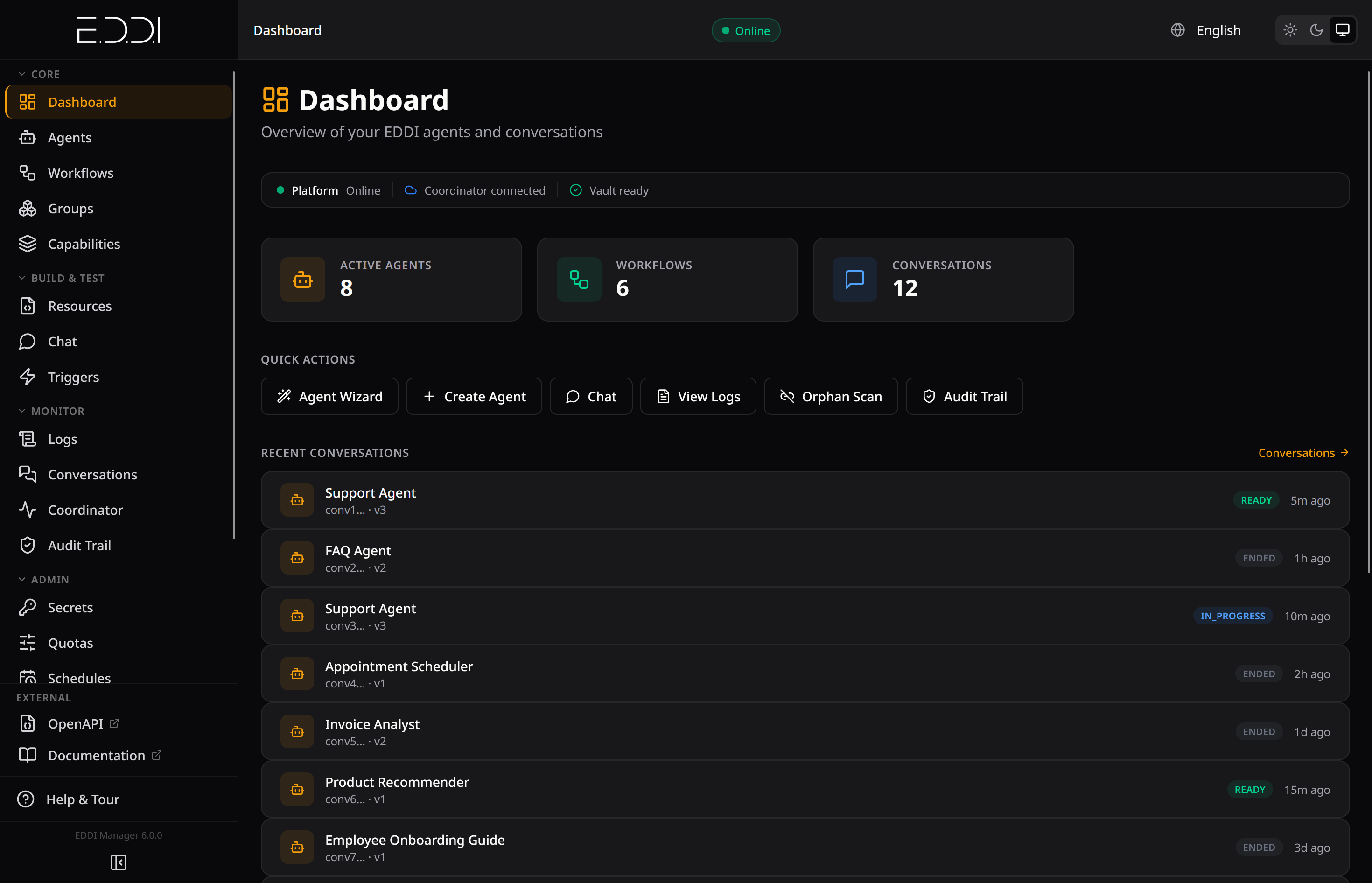
Platform overview with active agents, workflows, quick actions, and recent conversations |
🤖 Agent Fleet 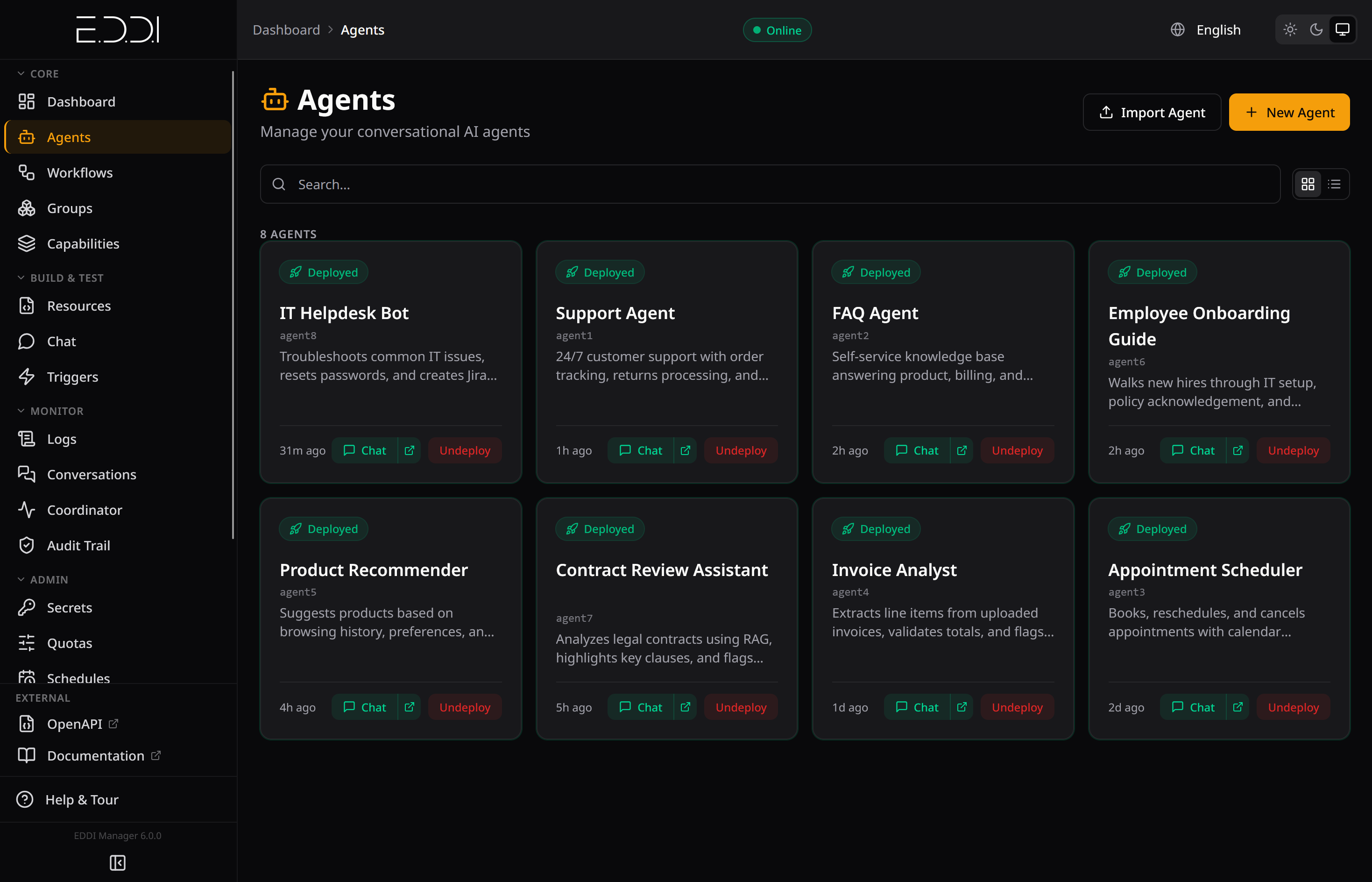
All deployed agents at a glance with status, descriptions, and one-click chat |
|
💬 Live Conversation 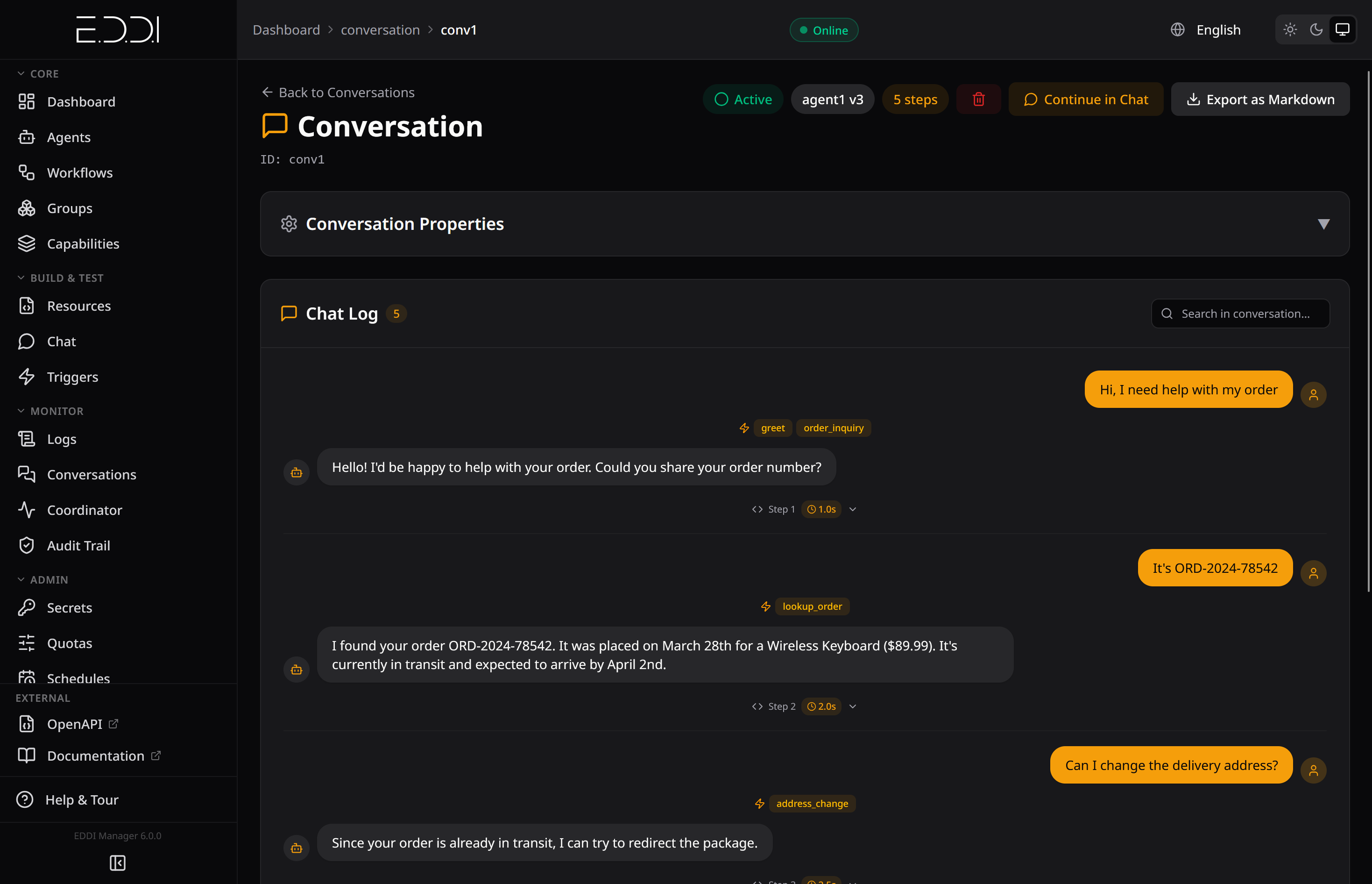
Real-time conversation with visible actions, step timing, and tool calls |
🗣️ Multi-Agent Debate 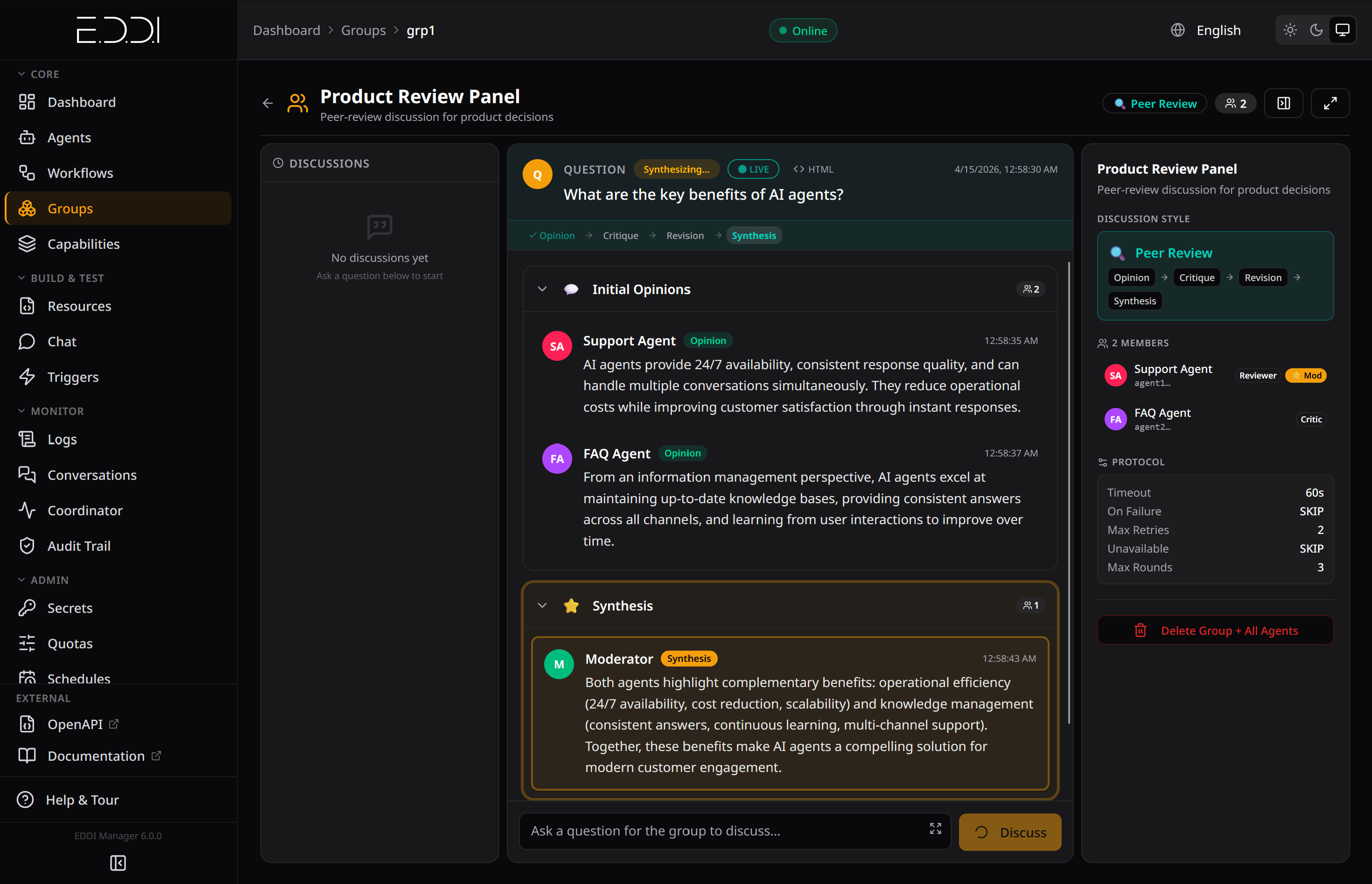
Peer Review with phased discussion: Opinion → Critique → Revision → Synthesis |
|
🛡️ Secrets Vault 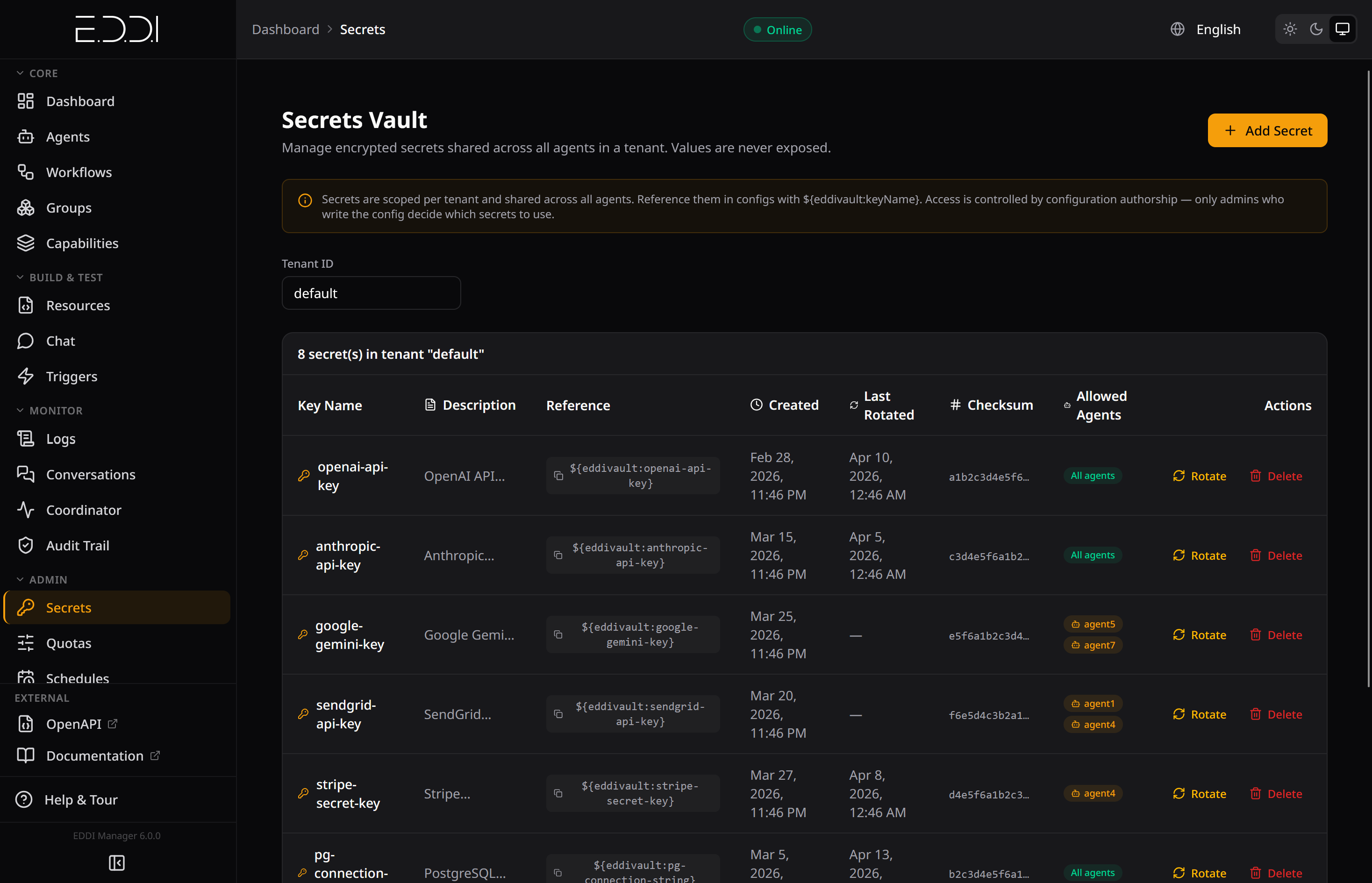
Envelope-encrypted secrets with rotation tracking, checksums, and per-agent access control |
💰 Tenant Quotas 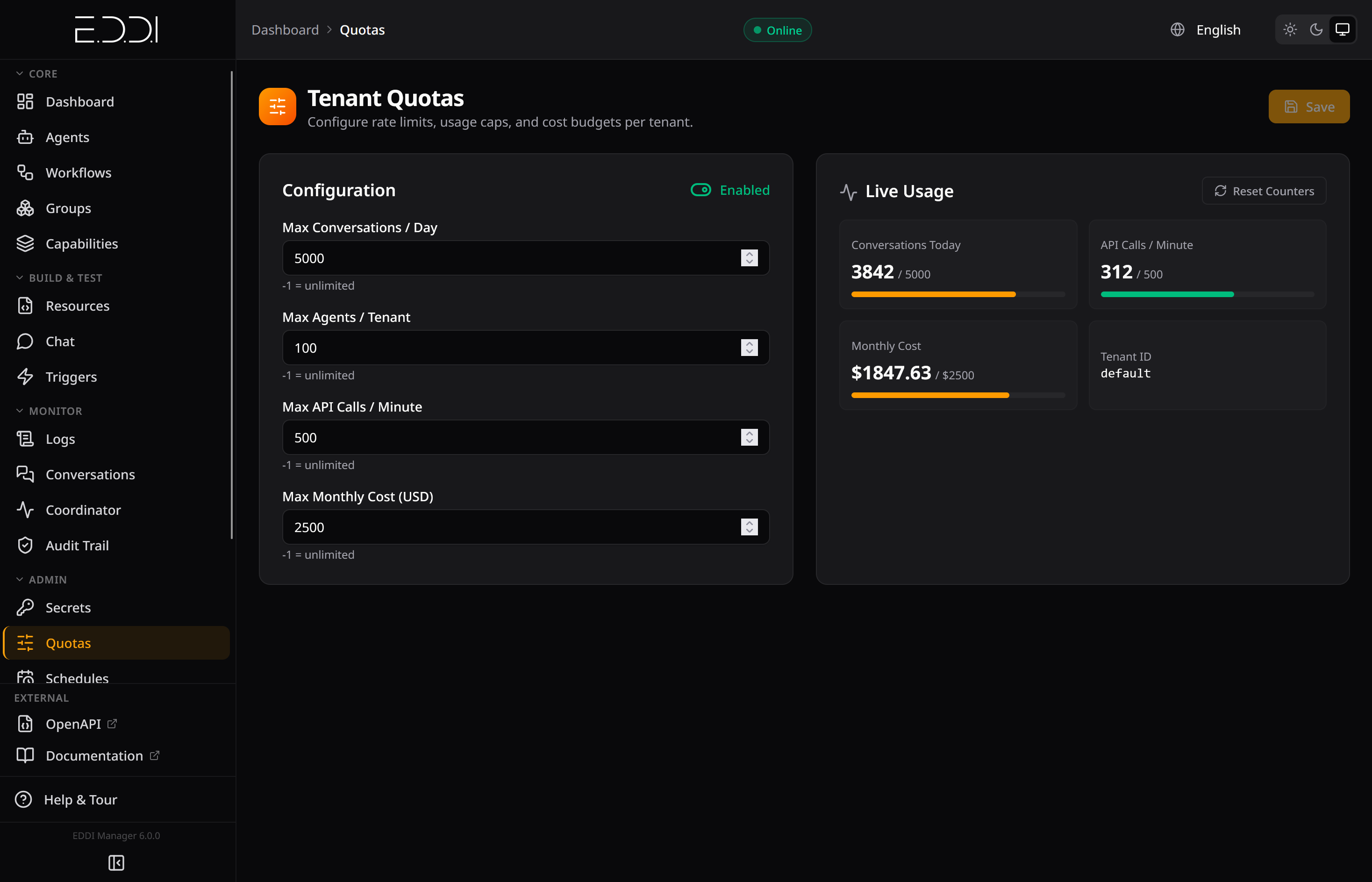
Rate limits, cost budgets, and live usage monitoring per tenant |
|
⚡ LLM Task Configuration 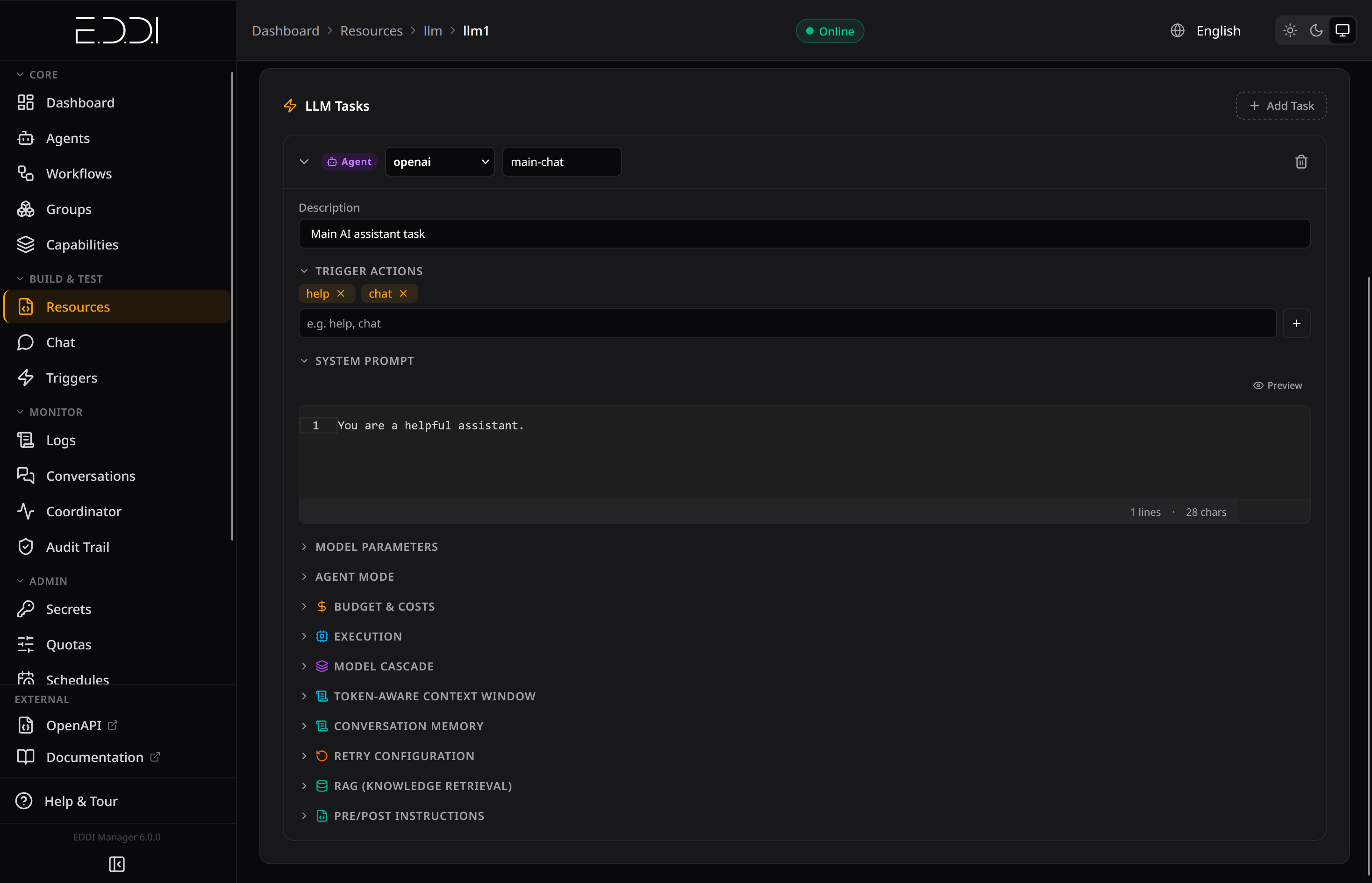
System prompt, model parameters, cascading, RAG, context window, and budget settings |
📋 Real-Time Logs 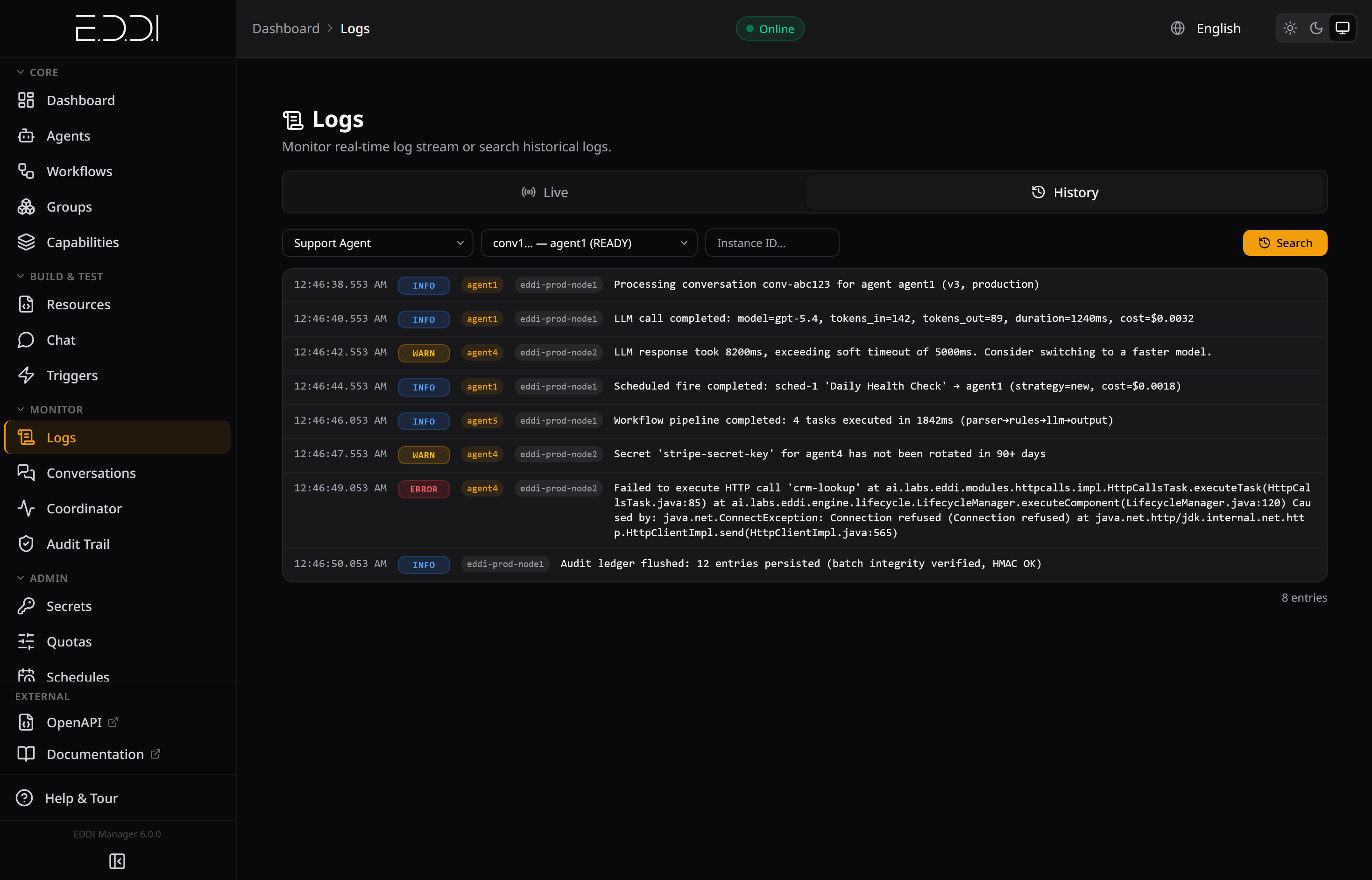
Live log stream with per-call cost tracking, token counts, warnings, and errors |
|
🧠 Persistent User Memory 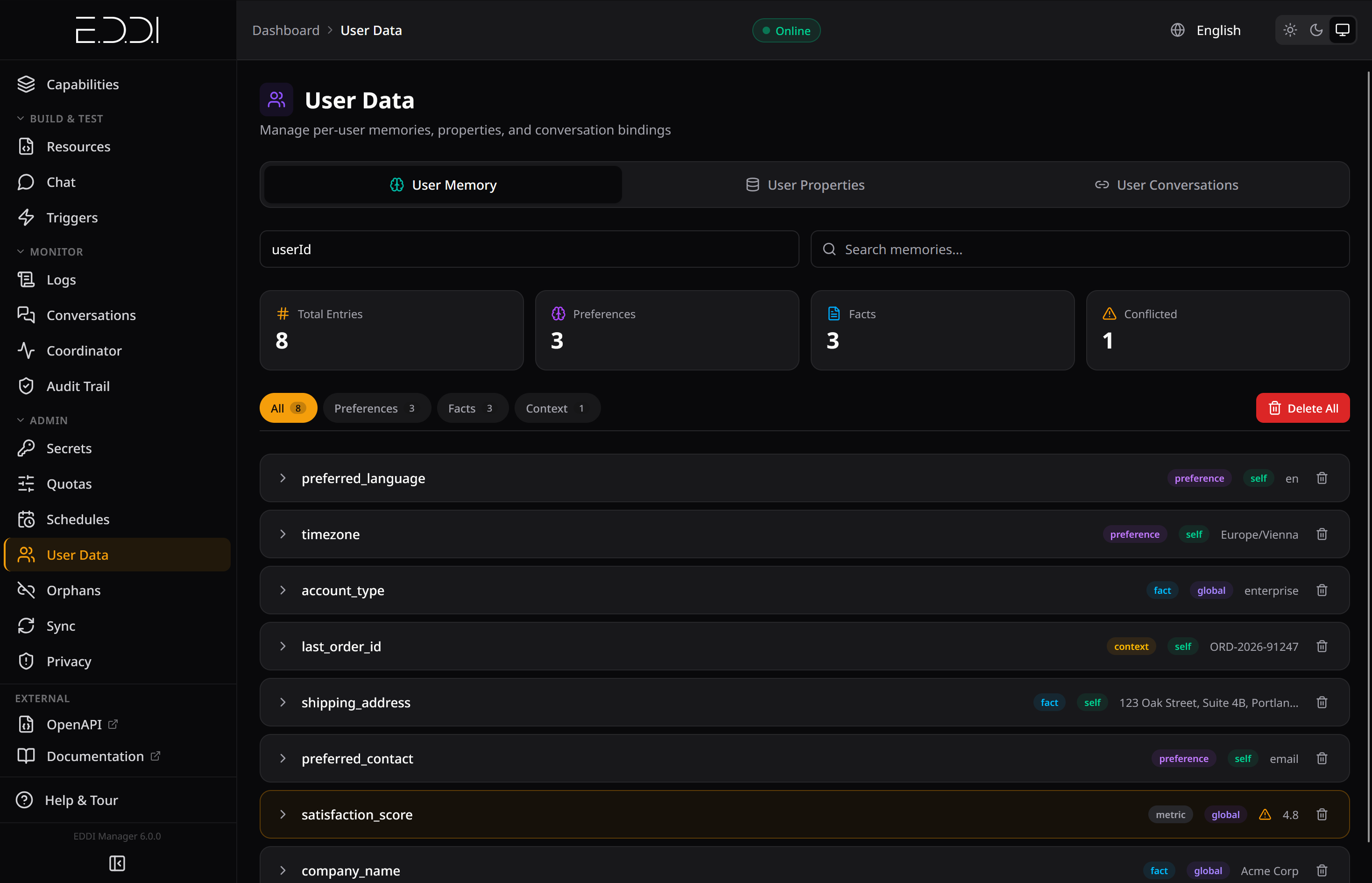
Cross-session memory with categorized entries, visibility scoping, and conflict detection |
⏰ Scheduled Execution 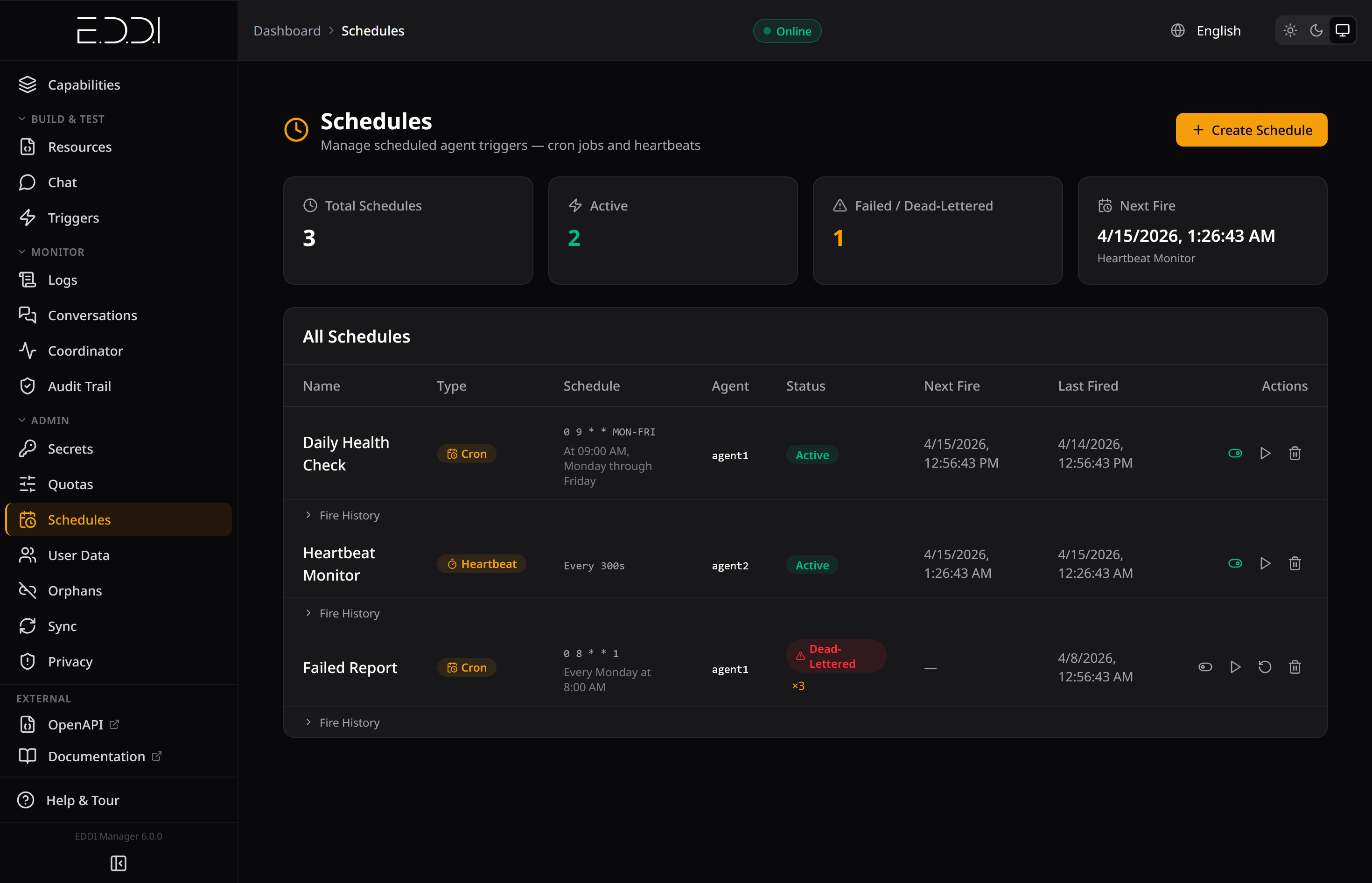
Cron jobs and heartbeats with fire history, retry logic, and dead-letter tracking |
|
🔧 Agent Detail 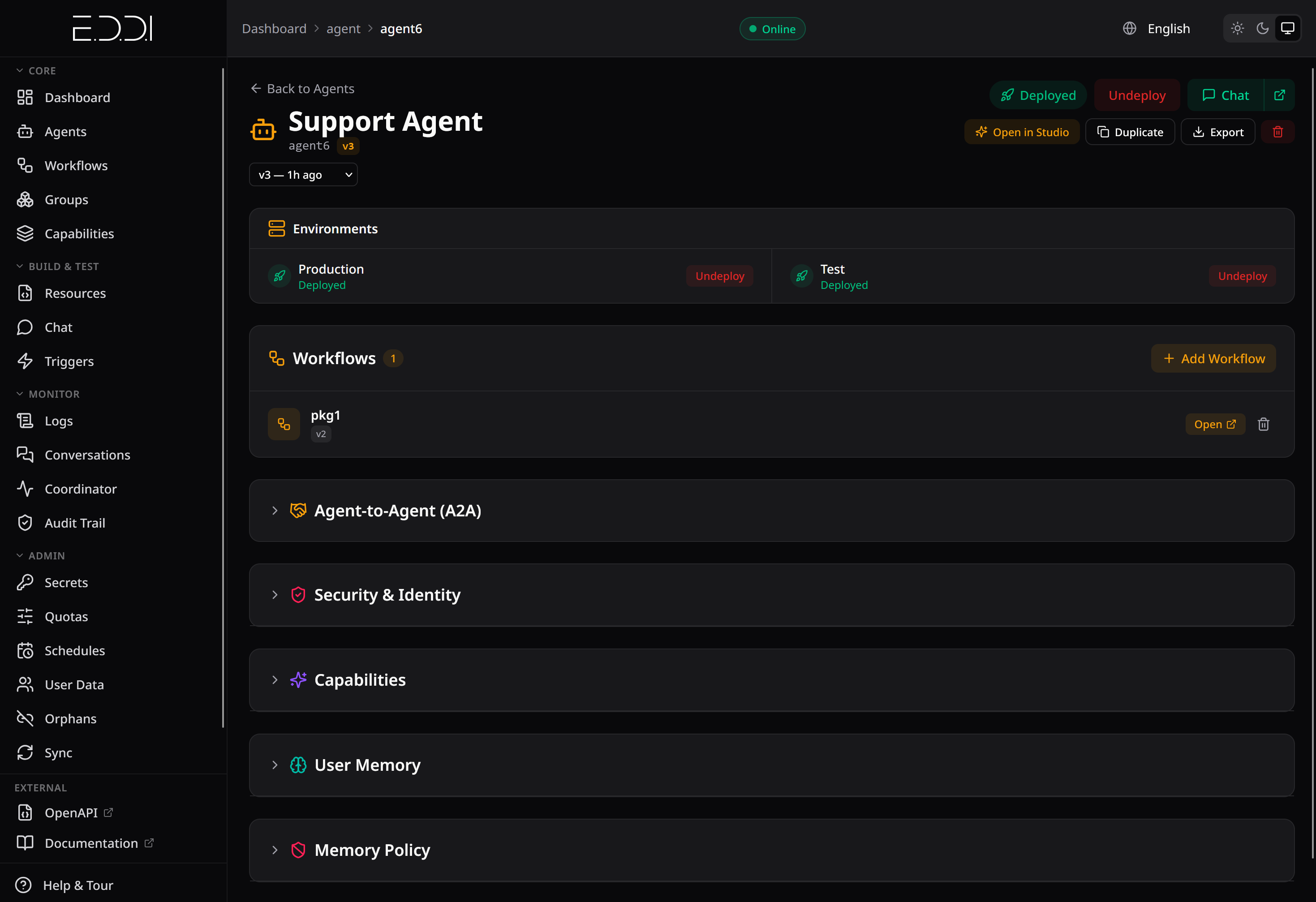
Full agent config: environments, workflows, A2A, security, capabilities, and memory policy |
VOTE phases collect explicit ballots (majority or approval, weighted, quorum-gated) and record a decision with the full tally, the raw ballots, and the losing side's dissentsRETRO phase distils lessons into team-owned group memory, so they surface in every member's later discussions — institutional knowledge that compounds run over run| Category | Providers |
|---|---|
| Cloud APIs | OpenAI · Anthropic Claude · Google Gemini · Mistral AI |
| Enterprise Cloud | Azure OpenAI · Amazon Bedrock · Oracle GenAI · Google Vertex AI |
| Self-Hosted | Ollama · Jlama · Hugging Face |
| Compatible | Any OpenAI-compatible endpoint (DeepSeek, Cohere, etc.) via baseUrl |
jsonResponseFormat policy (auto | on | off) negotiates structured JSON output across all execution paths with provider-aware rulesGLOBAL, USER, CONVERSATION) to avoid redundant calls; fail-safe to USER on misconfigurationEDDI implements open standards — not proprietary APIs:
| Standard | Role | What It Enables |
|---|---|---|
| MCP (Model Context Protocol) | Server (80+ tools) + Client | Control EDDI from Antigravity, Claude Desktop, Cursor, Windsurf, or any MCP client — setup guide. Connect agents to external MCP tool servers |
| A2A (Agent-to-Agent Protocol) | Full implementation | Cross-platform agent communication, Agent Cards, and skill discovery |
| OpenAPI 3.1 | Native generation + consumption | Auto-generated spec. Paste any OpenAPI spec → get a fully deployed API-calling agent |
| OAuth 2.0 / OIDC | Keycloak integration | Authentication, authorization, and multi-tenant isolation |
| SSE (Server-Sent Events) | Streaming transport | Token-by-token chat responses, including most tool-enabled turns, which stream over the provider's streaming transport instead of going silent until the tool loop finishes (a single-chunk fallback still applies to cascade agents, providers without a streaming builder, and a few other configurations) — plus a live tool_call event for "Using {tool}…" status, group discussion feeds, and live log streaming |
global, agent, group)longTerm / conversation / step scoping — EDDI's importance extraction mechanismmaxToolContextTokens caps tool output within a single turn (default 60k tokens), evicting oldest tool exchanges to prevent provider context-window errors while preserving tool-call pairing| Tool | Description |
|---|---|
| 🔍 Web Search | DuckDuckGo or Google Custom Search |
| 🧮 Calculator | Sandboxed recursive-descent math parser (no eval(), no code injection) |
| 🌐 Web Scraper | SSRF-protected content extraction from web pages |
| 📄 PDF Reader | SSRF-protected document extraction |
| ☁️ Weather · 🕐 DateTime | Real-time data tools |
| 📊 Data Formatter · 📝 Text Summarizer | Data transformation tools |
| 🔌 HTTP Calls as Tools | Expose your own REST APIs as LLM-callable tools with full security sandboxing |
| 🧠 User Memory | Read/write/search persistent user memory |
| 🔙 Conversation Recall | Drill back into summarized conversation history |
| 📎 Multimodal Attachments | Image, PDF, audio, and video input with MIME-based routing |
POST /conversations/{id}/attachments with multipart/form-data)IAttachmentStore SPI with grant-based access control and per-tenant quotasAttachmentTextExtractor) and forwarded as inline context to any LLM, not just vision modelsModelCapabilityService routes images to vision-capable LLMs and falls back to text metadata for otherscontentTypeMatcher behavior rule condition routes image/*, application/pdf, etc. to different workflowsdeleteByConversation() cascades to attachment storage when conversations are erasedpersistent (reuse same conversation across fires) or new (fresh context each time)maxAgentsPerTenant enforcement on agent deploymentPAUSE_CONVERSATION action halts the entire pipeline; new user input returns 409 Conflict until a human resumesPHASE or TASK granularityWAIT_INDEFINITELY, AUTO_APPROVE, AUTO_REJECT, or ABORT when humans don't respond in timeeval(), no script engines, no reflection-based execution| Regulation | EDDI Support |
|---|---|
| EU AI Act | Immutable HMAC-SHA256 audit ledger, decision traceability, risk classification guidance |
| GDPR | Cascading data erasure (Art. 17), data portability (Art. 15/20), restriction of processing (Art. 18), per-category retention, pseudonymization |
| CCPA | Right to delete, right to know, data portability |
| HIPAA | Deployment guide, BAA template, LLM provider BAA matrix, session timeout guidance |
| International | PIPEDA 🇨🇦 · LGPD 🇧🇷 · APPI 🇯🇵 · POPIA 🇿🇦 · PDPA 🇸🇬🇹🇭🇲🇾 · PIPL 🇨🇳 compatibility documented |
{{snippets.safety_rules}}/q/metrics (tools, vault, memory, scheduling, conversations). Pre-built Grafana dashboard includededdi.pipeline.task carrying eddi.task.id, eddi.task.type, eddi.task.index, eddi.conversation.id and eddi.agent.id. The equivalent metric tags are un-prefixed (task.id, task.type)/q/health/live and /q/health/readyonEmpty / onTruncation / onRefusal), streaming timeout retry, and admin endpoint to reset stuck conversations📖 Monitoring Guide: See docs/monitoring/monitoring-guide.md for architecture overview, metrics reference, alerting rules, and a production checklist.
| Guide | Description |
|---|---|
| Getting Started | Setup and first steps |
| Developer Quickstart | Build your first agent in 5 minutes |
| Architecture | Deep dive into EDDI's design and pipeline |
| LLM Configuration | Connecting to 12 LLM providers |
| Behavior Rules | Configuring agent routing logic |
| HTTP Calls | External API integration |
| RAG | Knowledge base retrieval setup |
| MCP Server | 80+ tools for AI-assisted agent management |
| A2A Protocol | Agent-to-Agent peer communication |
| OpenAI-Compatible API | Agents as OpenAI models for Open WebUI & SDKs |
| Slack Integration | Deploy agents to Slack and run group discussions |
| Group Conversations | Debate, voting, artifacts, standing teams |
| User Memory | Cross-conversation fact retention |
| Memory Policy | Commit flags and strict write discipline |
| Model Cascading | Cost-optimized multi-model routing |
| Human-in-the-Loop | Approval gates, timeout policies, Slack & MCP surfaces |
| Scheduling & Heartbeats | Cron schedules, heartbeats, dream consolidation |
| Agent Sync | Live instance-to-instance sync and upgrade imports |
| Import / Export | ZIP-based agent portability and merge |
| Prompt Snippets | Reusable system prompt building blocks |
| Attachments | Multimodal attachment pipeline |
| Capability Matching | A2A skill discovery and routing |
| Security | SSRF protection, sandboxing, and hardening |
| Secrets Vault | Envelope encryption and auto-vaulting |
| Audit Ledger | EU AI Act-compliant audit trail |
| Kubernetes | Deploy with Kustomize or Helm |
| Monitoring & Tracing | Prometheus, Grafana, OpenTelemetry, alerting |
| Red Hat & OpenShift | RHEL support, certified container, automated release |
| Full Documentation | Complete documentation site |
EDDI provides built-in infrastructure for regulatory compliance:
| Guide | Covers |
|---|---|
| GDPR / CCPA | Data erasure, export, Art. 18 restriction of processing, per-category retention, and consent guidance |
| HIPAA | Healthcare deployment guide — encryption, BAAs, LLM provider matrix, session management |
| EU AI Act | AI risk classification, decision traceability, immutable audit ledger |
| Privacy & Data Processing | Data flows, LLM provider matrix, international regulations (PIPEDA, LGPD, APPI, POPIA, PDPA, PIPL) |
| Compliance Data Flow | Single-page data flow diagram for auditors |
| Incident Response | Breach response runbook (GDPR 72h, CCPA 45 days, HIPAA 60 days) |
| Tool | Version | Notes |
|---|---|---|
| Java (JDK) | 25 | Eclipse Temurin recommended |
| Maven | 3.9+ | Bundled via mvnw / mvnw.cmd wrapper — no install needed |
| MongoDB | 6.0+ | Local instance or Docker (docker run -d -p 27017:27017 mongo:7) |
| Docker | Latest | For integration tests and container builds |
Windows users: Replace
./mvnwwith.\mvnw.cmdin all commands below.
Dev mode starts the application with live reload — code changes are picked up automatically without restarting:
# Linux / macOS
./mvnw compile quarkus:dev

# Windows (PowerShell)
.\mvnw.cmd compile quarkus:dev
Then open http://localhost:7070. The Quarkus Dev UI is available at http://localhost:7070/q/dev.
Dev mode also enables:
r in the terminal to re-run tests on changes💡 Secrets Vault: To use the secrets vault (storing API keys encrypted), set the master key before starting:
# Linux/macOS
export EDDI_VAULT_MASTER_KEY=my-dev-passphrase

# Windows (PowerShell)
$env:EDDI_VAULT_MASTER_KEY = "my-dev-passphrase"

# Or in a .env file (already in .gitignore)
echo "EDDI_VAULT_MASTER_KEY=my-dev-passphrase" > .env
Without this, the vault is disabled and secret management returns HTTP 503. Any passphrase works for local development. See Secrets Vault for production setup.
| Command | What It Does |
|---|---|
./mvnw compile quarkus:dev | Start dev mode with live reload (port 7070) |
./mvnw compile | Compile sources only (fast feedback). Also runs the two validate-phase style gates, so it fails on an unused import (Checkstyle) or an unformatted file (formatter:validate) — neither edits your sources; run ./mvnw formatter:format to fix formatting |
./mvnw clean compile | Clean build — delete target/ and recompile from scratch |
./mvnw test | Run unit tests (excludes *IT.java integration tests) |
./mvnw verify | Compile + unit tests + package. Integration tests are skipped — skipITs defaults to true in pom.xml |
./mvnw verify -DskipITs=false | Full build — adds the *IT.java integration tests (requires Docker). This is what CI runs |
./mvnw validate | Run the blocking style gates — Checkstyle (UnusedImports/RedundantImport fail the build; FileLength/LineLength stay advisory) and formatter:validate, which reports unformatted files without touching them |
./mvnw formatter:format | Auto-format Java sources using the project Eclipse formatter — the fix for a formatter:validate failure |
./mvnw package -DskipTests | Build the JAR without running tests (for install.sh --local) |
./mvnw clean package '-Dquarkus.container-image.build=true' | Build the app + Docker image |
./mvnw package -Plicense-gen -DskipTests | Generate third-party licenses (Red Hat certification) |
./mvnw quarkus:dev -Dsuspend | Start dev mode and wait for debugger on port 5005 |
./mvnw quarkus:dev -Ddebug=false | Start dev mode without the debug agent |
JaCoCo is configured to run automatically during ./mvnw test. After tests complete, find the coverage report at:
target/site/jacoco/index.html
| Property | Default | Description |
|---|---|---|
-Dquarkus.http.port=<port> | 7070 | Override the HTTP port |
-Dmongodb.connectionString=<uri> | dev: mongodb://localhost:27017/eddi | MongoDB connection, read by PersistenceModule. quarkus.mongodb.connection-string is a different key that only the health check reads |
-Dmongodb.database=<name> | eddi | MongoDB database name |
-Dquarkus.profile=<profile> | dev | Active Quarkus profile (dev, test, prod) |
-DskipTests | false | Skip all tests |
-DskipITs | true | Skip integration tests only |
# Build app + Docker image
./mvnw clean package '-Dquarkus.container-image.build=true'

# Build without container (for install.sh --local)
./mvnw package -DskipTests

# Generate third-party licenses (Red Hat certification)
./mvnw package -Plicense-gen -DskipTests
No shipped manifest creates the eddi-secrets Secret that holds the vault master
key — a Secret in the manifests would be reconciled on every kubectl apply and
overwrite a live key, making everything already encrypted with it undecryptable.
So the Secret is created out-of-band, before the first apply. Without it the
EDDI pod sits in ContainerCreating (MountVolume.SetUp failed: secret "eddi-secrets" not found) and never starts.
# Kustomize overlays — create the vault Secret first, then apply
bash k8s/create-secrets.sh                 # PowerShell 7: pwsh -File .\k8s\create-secrets.ps1
kubectl apply -k k8s/overlays/mongodb/     # MongoDB backend
kubectl apply -k k8s/overlays/postgres/    # PostgreSQL backend

# Quickstart (one-file manifest; same Secret step, see the Kubernetes Guide)
kubectl apply -f https://raw.githubusercontent.com/labsai/EDDI/main/k8s/quickstart.yaml

# Helm (renders the Secret itself, so the key is a required value)
helm install eddi ./helm/eddi \
  --set eddi.vaultMasterKey="$(openssl rand -base64 24)" \
  --namespace eddi --create-namespace
Includes overlays for auth (Keycloak), monitoring (Prometheus/Grafana), NATS messaging, Ingress, and production hardening (PDB, NetworkPolicy — deliberately no HPA). See the Kubernetes Guide for details, including the Keycloak upgrade note for existing installs.
We welcome contributions! Please read our Contributing Guide for details on setting up your development environment, code style, commit conventions, and the pull request process.
Every PR is automatically checked by CI (build + tests), CodeQL (security), dependency review, and AI-powered code review.
EDDI ships with security-by-default for production deployments:
AuthStartupGuard fails startup if OIDC is disabled in production without explicit opt-outSafeHttpClient with private IP blocking, redirect validation, and scheme enforcementX-Content-Type-Options, X-Frame-Options, Content-Security-Policy configured out of the boxsecurity-extended queriesFor vulnerability reports, see our Security Policy. For architecture details, see Security Architecture.
This project follows the Contributor Covenant Code of Conduct.
Sign in to join the discussion.
No comments yet. Be the first to say what this is good for.
Write HTML. Render video. Built for agents.
Ultra-lightweight, open-source, self-hosted personal AI agent framework in Python with WebUI, tools, memory, MCP, multi-agent workflows, automation, and chat apps

SkillOpt is a text-space optimizer that trains reusable natural-language skills for frozen LLM agents through trajectory-driven edits, validation-gated updates, and deployable best_skill.md artifacts.

Omnigent is an open-source AI agent framework and meta-harness: orchestrate Claude Code, Codex, Cursor, Pi, and custom agents — swap harnesses without rewriting, enforce policies and sandboxing, and collaborate in real time from any device.

A theoretical reconstruction of the Claude Mythos architecture, built from first principles using the available research literature.
🕷️ An adaptive Web Scraping framework that handles everything from a single request to a full-scale crawl!