


koala73/worldmonitorConnectors
Real-time global intelligence dashboard. AI-powered news aggregation, geopolitical monitoring, and infrastructure tracking in a unified situational awareness interface
86k
This project connects Apache Spark History Server to AI agents and terminal workflows. The MCP server exposes Spark data as tools and prompts, while the `shs` CLI gives the same data through direct commands for scripts and humans.
Builders who use Claude Code, Codex, or other MCP-capable agents to inspect Spark jobs and troubleshoot runs.
You can ask an agent to trace a Spark failure or compare runs without digging through the history server by hand.
Lists applications and shows application details, attempts, status, resources, and duration.
Surfaces jobs, stages, task failures, executors, thread dumps, and resource timelines for debugging.
Compares SQL executions, stages, job environments, and job performance across runs.
Provides prompts like `investigate_failure` and `compare_applications` for repeatable investigations.
Offers a terminal-first way to query Spark History Server, generate config, and compare applications.
Includes Helm deployment files for running the MCP server in Kubernetes.
# Run directly with uvx (no install needed)
uvx --from mcp-apache-spark-history-server spark-mcp

# Or install with pip
uv tool install mcp-apache-spark-history-server
spark-mcp






Connect AI agents and engineers to Apache Spark History Server for intelligent job analysis, performance monitoring, and investigation
[!IMPORTANT]
✨ NEW — Spark History Server CLI is now available
A standalone Go binary that queries Spark History Server directly from your terminal — no MCP, no AI framework, no daemon process. Inspect jobs, compare runs, investigate failures, and script against the Spark REST API.
This project provides two interfaces to your Spark History Server data:
🛠️ SHS CLI (shs) | ⚡ MCP Server | |
|---|---|---|
| For | Engineers, shell scripts, CI/CD, coding agents | AI agents and MCP-compatible clients |
| Mental model | "I know the command I want to run" | "Agent, investigate this Spark app" |
| Install | Single static binary — no dependencies | Python 3.12+, uv |
| Get started | CLI docs → | MCP docs → |
📺 See it in action:
shs) — For Engineers & ScriptsA standalone Go binary. Query your Spark History Server directly from the terminal, shell scripts, or CI/CD pipelines. Also works as a skill for coding agents like Claude Code and Kiro.
# Auto-detect latest version, OS, and architecture
VERSION=$(curl -s https://api.github.com/repos/kubeflow/mcp-apache-spark-history-server/releases | grep -m1 '"tag_name": "cli/' | cut -d'"' -f4 | sed 's|cli/||')
OS=$(uname -s | tr '[:upper:]' '[:lower:]')
ARCH=$(uname -m)
[ "$ARCH" = "x86_64" ] && ARCH="amd64"
[ "$ARCH" = "aarch64" ] && ARCH="arm64"

curl -sSL "https://github.com/kubeflow/mcp-apache-spark-history-server/releases/download/cli%2F${VERSION}/shs-${VERSION}-${OS}-${ARCH}.tar.gz" | tar xz
sudo mv shs /usr/local/bin/
# Generate a config file
shs setup config > config.yaml   # then set your Spark History Server URL

# Explore applications
shs apps
shs jobs -a APP_ID --status failed
shs stages -a APP_ID --sort duration
shs compare apps --app-a APP1 --app-b APP2

# Use as a skill with Claude Code or Kiro
shs setup skill > ~/.claude/skills/spark-history.md
CLI documentation for full usage, or check out a real-world example of Claude Code comparing two TPC-DS 3TB benchmark runs.
An MCP (Model Context Protocol) server that exposes Spark History Server data as tools for AI agents. Agents query your Spark infrastructure using natural language — the server handles tool selection, multi-server routing, and structured data retrieval.
Use the MCP server when you want an AI agent to conduct multi-step investigations, synthesize findings across tools, or answer natural-language questions about your Spark applications.
# Run directly with uvx (no install needed)
uvx --from mcp-apache-spark-history-server spark-mcp

# Or install with pip
uv tool install mcp-apache-spark-history-server
spark-mcp
The package is published to PyPI.
Register the server with a single command. Both examples run it over stdio via uvx.
With no config file present, the server defaults to a Spark History Server at http://localhost:18080;
point it elsewhere with a config file or SHS_SERVERS__LOCAL__URL.
Claude Code (claude mcp add):
claude mcp add --env SHS_MCP__TRANSPORT=stdio --env SHS_SERVERS__LOCAL__URL=http://localhost:18080\
  --transport stdio spark-history \
  -- uvx --from mcp-apache-spark-history-server spark-mcp
Kiro CLI (kiro-cli mcp add):
kiro-cli mcp add --name spark-history --command uvx \
  --args --from --args mcp-apache-spark-history-server --args spark-mcp \
  --env SHS_MCP__TRANSPORT=stdio --env SHS_SERVERS__LOCAL__URL=http://localhost:18080
Verify in either client with claude mcp list / kiro-cli mcp list, then ask the agent to "list the available Spark applications."
The server also ships prompts — guided, multi-step workflows you run as a command. In Claude Code: /mcp__spark-history__investigate_failure <app_id>. In Kiro CLI: /prompts investigate_failure (or @investigate_failure). See Prompts for the full list and arguments.
The commands above have two layers: the client's own options and the arguments/environment forwarded to spark-mcp. spark-mcp itself takes a single flag, --config / -c; everything else is set through SHS_* environment variables.
To pass to spark-mcp… | Claude Code | Kiro CLI |
|---|---|---|
A flag (e.g. --config) | append after --: … spark-mcp --config /path/config.yaml | add --args pairs: --args --config --args /path/config.yaml |
| An environment variable | --env KEY=value (before --transport) | --env KEY=value |
For example, to point at a remote Spark History Server with an explicit config file:
# Claude Code
claude mcp add --env SHS_MCP__TRANSPORT=stdio --transport stdio spark-history \
  -- uvx --from mcp-apache-spark-history-server spark-mcp --config ~/.config/spark-mcp/config.yaml

# Kiro CLI
kiro-cli mcp add --name spark-history --command uvx \
  --args --from --args mcp-apache-spark-history-server --args spark-mcp \
  --args --config --args ~/.config/spark-mcp/config.yaml \
  --env SHS_MCP__TRANSPORT=stdio
Basic configuration below. Create a file named config.yaml:
servers:
  local:
    default: true
    url: "http://your-spark-history-server:18080"
    auth:            # optional
      username: "user"
      password: "pass"
    include_plan_description: false   # include SQL plans by default (default: false)

mcp:
  transport: "streamable-http"   # or: stdio
  port: "18888"
  debug: false
The server looks for its config file in the following order and uses the first one it finds:
--config / -c flag (e.g. spark-mcp --config /path/to/config.yaml)SHS_MCP_CONFIG environment variable./config.yaml in the current working directory~/.config/spark-mcp/config.yaml (honors $XDG_CONFIG_HOME when set)If none exist, the server starts with built-in defaults that can be overridden by SHS_* environment variables. When a path is given explicitly via the flag or SHS_MCP_CONFIG but the file is missing, the server fails fast instead of falling back.
Tip for MCP clients: when the server is launched by an MCP client (Claude Desktop, Kiro, etc.), the working directory is not guaranteed, so a
./config.yamlmay not be found. Prefer--config/SHS_MCP_CONFIG, or place the file at~/.config/spark-mcp/config.yaml.
Configurations can be overridden with environment variables. Nesting levels are
separated by a double underscore (__), so field names and server names may
themselves contain single underscores (e.g. SHS_SERVERS__MY_SERVER__URL maps
to servers.my_server.url).
SHS_MCP__PORT          Port for MCP server (default: 18888)
SHS_MCP__TRANSPORT     Transport mode: streamable-http or stdio
SHS_MCP__DEBUG         Enable debug mode (default: false)
SHS_MCP__ADDRESS       Bind address (default: localhost)
SHS_SERVERS__*__URL     URL for a specific server
SHS_SERVERS__*__AUTH__USERNAME
SHS_SERVERS__*__AUTH__PASSWORD
SHS_SERVERS__*__AUTH__TOKEN
SHS_SERVERS__*__VERIFY_SSL
SHS_SERVERS__*__SSL_CA_CERT    Path to a PEM CA bundle for a specific server
SHS_SERVERS__*__TIMEOUT
SHS_SERVERS__*__EMR_CLUSTER_ARN
SHS_SERVERS__*__INCLUDE_PLAN_DESCRIPTION
Configure multiple Spark History Servers and route queries to specific ones:
servers:
  production:
    default: true
    url: "http://prod-spark-history:18080"
    auth:
      username: "user"
      password: "pass"
  staging:
    url: "http://staging-spark-history:18080"
Agents can target a specific server per query:
"Get application
<app_id>from the production server"
For a private CA or TLS-inspecting proxy, keep verify_ssl: true and point
ssl_ca_cert to a mounted PEM bundle:
servers:
  local:
    ssl_ca_cert: "/etc/ssl/custom-ca/ca-bundle.pem"
Set the same path with SHS_SERVERS__LOCAL__SSL_CA_CERT. The CA certificates
in the bundle are added to the container's default trust roots, so include the
issuing CA and intermediates.
graph TB
subgraph Clients
A[🤖 AI Agent / LLM]
B[👩💻 Engineer / Script / CI]
C[🔧 Coding Agent - Claude Code / Kiro]
end
subgraph "Kubeflow Spark AI Toolkit"
D[⚡ MCP Server]
E[🛠️ CLI - shs]
end
subgraph "Spark History Servers"
F[🔥 Production]
G[🔥 Staging / Dev]
end
A -->|MCP Protocol| D
B -->|Terminal commands| E
C -->|shs skill file| E
D -->|REST API| F
D -->|REST API| G
E -->|REST API| F
E -->|REST API| G
| Agent | Transport | Guide |
|---|---|---|
| Claude Desktop | stdio | Setup → |
| Claude Code | stdio or streamable-http | Setup → |
| Kiro | streamable-http | Setup → |
| LangGraph | streamable-http | Setup → |
| Strands Agents | streamable-http | Setup → |
| Local / Inspector | streamable-http | Setup → |
| Tool | Description |
|---|---|
list_applications | List applications with optional status, date, and limit filters; pass app_id for a single application's detail (status, resources, duration, attempts). Returned applications always include their attempts. |
| Tool | Description |
|---|---|
list_jobs | List jobs with status/job-id filtering and sorting (e.g. slowest by duration) |
| Tool | Description |
|---|---|
list_stages | List stages with status filtering and sorting (e.g. slowest by duration) |
get_stage | Stage detail with attempt and task metric distributions |
list_stage_task_failures | Failed tasks of a stage with their error messages (exception/stack trace) |
| Tool | Description |
|---|---|
list_executors | List executors with executor-id filtering and sorting (failed-tasks/duration/gc/id) |
get_executor_summary | Aggregate metrics across all executors |
get_resource_usage_timeline | Chronological executor add/remove with resource totals |
get_executor_thread_dump | JVM thread dump for a driver/executor, with state/name/blocked filters (running apps only) |
| Tool | Description |
|---|---|
get_environment | Spark config, JVM info, system properties, classpath; optional section filter to return a single part |
| Tool | Description |
|---|---|
list_sql_executions | List SQL executions as curated summaries, with status/description filters, sorting, and a default limit |
get_sql_execution | SQL execution header by default; opt-in plan, node metrics, job summaries, aggregated stage metrics, and stage list |
compare_sql_executions | Compare aggregated performance metrics (stages, tasks, shuffle, spill, GC) between two SQL executions; opt-in plan-structure diff |
| Tool | Description |
|---|---|
get_job_bottlenecks | Identify bottlenecks across stages, tasks, and executors |
| Tool | Description |
|---|---|
compare_job_environments | Diff Spark configs between two applications |
compare_job_performance | Diff performance metrics between two applications |
compare_stages | Compare two stages (optionally across applications): stage metrics and per-task p25/p50/p75/max quantiles |
| Tool | Description |
|---|---|
aws_analyze_spark_workload | One-shot root cause analysis of failed/slow Spark workloads |
aws_spark_code_recommendation | Code fix recommendations for identified Spark issues |
Automatically available when AWS credentials and region are configured. See IAM setup guide.
get_job_bottlenecks + list_stages + compare_job_performancelist_jobs + get_stagecompare_job_performance + compare_job_environmentslist_sql_executions + get_sql_execution + compare_sql_executionsBeyond tools, the server exposes MCP prompts — reusable, multi-step investigation workflows that your agent runs as a single command. Each prompt expands into a guided sequence of tool calls (which the agent still executes one at a time), so you get a consistent, evidence-driven analysis without having to remember the right tool order.
| Prompt | Arguments | Description |
|---|---|---|
investigate_failure | app_id (required), server (optional) | Guided root-cause investigation for a failed Spark application — walks from the failed app down to the individual task exceptions. |
compare_applications | app_a (required), app_b (required), server (optional), context (optional) | Layered, descriptive comparison of two applications (configuration → app metrics → SQL/jobs → stages). |
serveris optional: when omitted, the prompt searches every configured server for the application(s). Passserver="<name>"only to target a specific server or disambiguate an id that exists on more than one.
MCP prompts surface as slash commands with the format /mcp__<server>__<prompt> (note the double underscores), where <server> is the name you registered the server under (spark-history in the examples above). Type / to discover them, then pass arguments space-separated after the command:
# Investigate a failed application
/mcp__spark-history__investigate_failure spark-cc4d615a5e6b4500b8eb1e9deb48cb4e

# Target a specific configured server
/mcp__spark-history__investigate_failure spark-cc4d615a5e6b4500b8eb1e9deb48cb4e production

# Compare two applications
/mcp__spark-history__compare_applications spark-app-A spark-app-B
List and run prompts with the /prompts command, or type @ then Tab to autocomplete. Run a prompt by name and supply its arguments:
# Open the prompt picker (shows prompts from all MCP servers)
/prompts

# Run a prompt directly
/prompts investigate_failure

# Or use the @ shortcut
@investigate_failure
Kiro CLI prompts you for arguments interactively when the prompt declares them, so you can run /prompts investigate_failure and provide app_id (and optionally server) when asked.
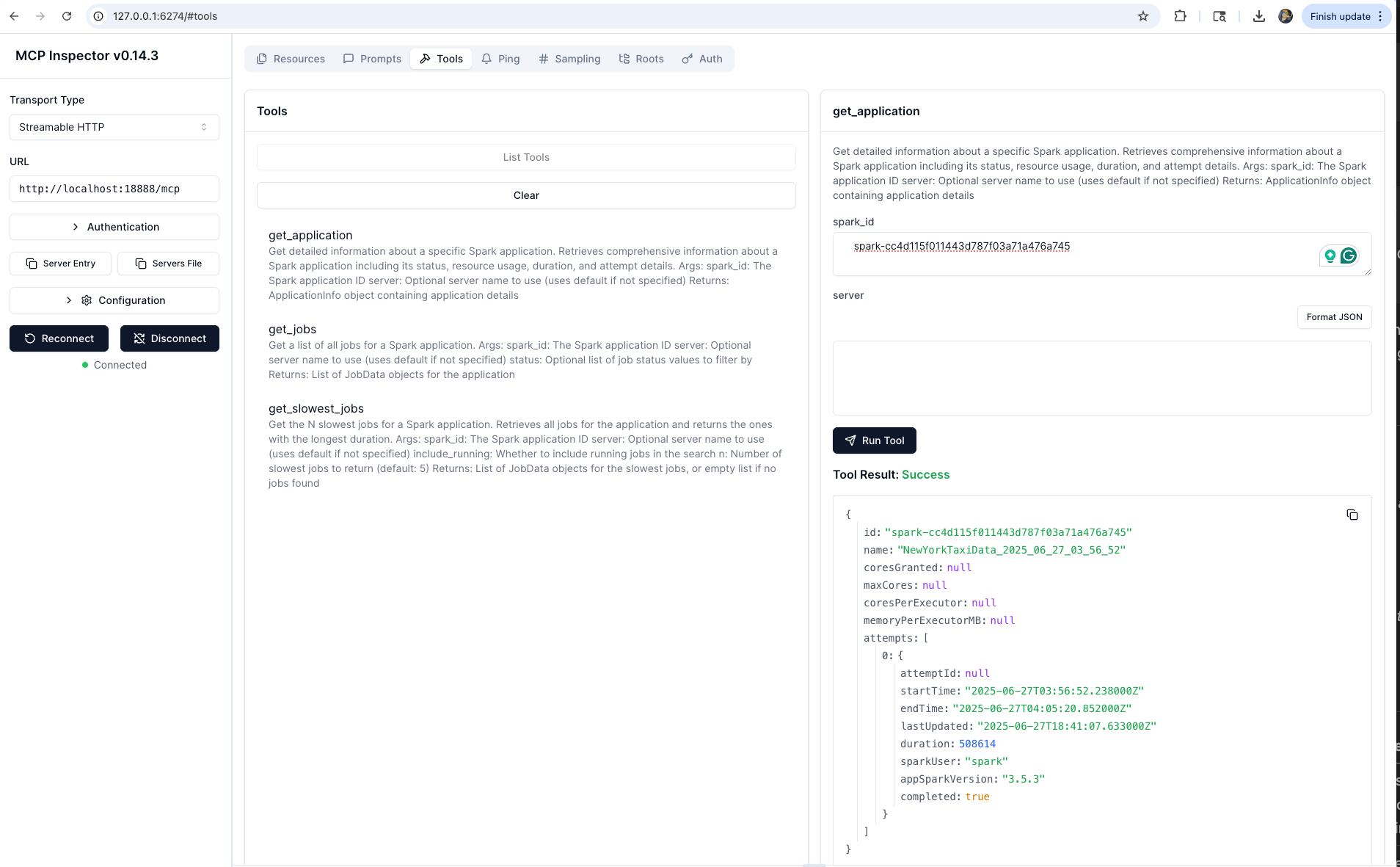
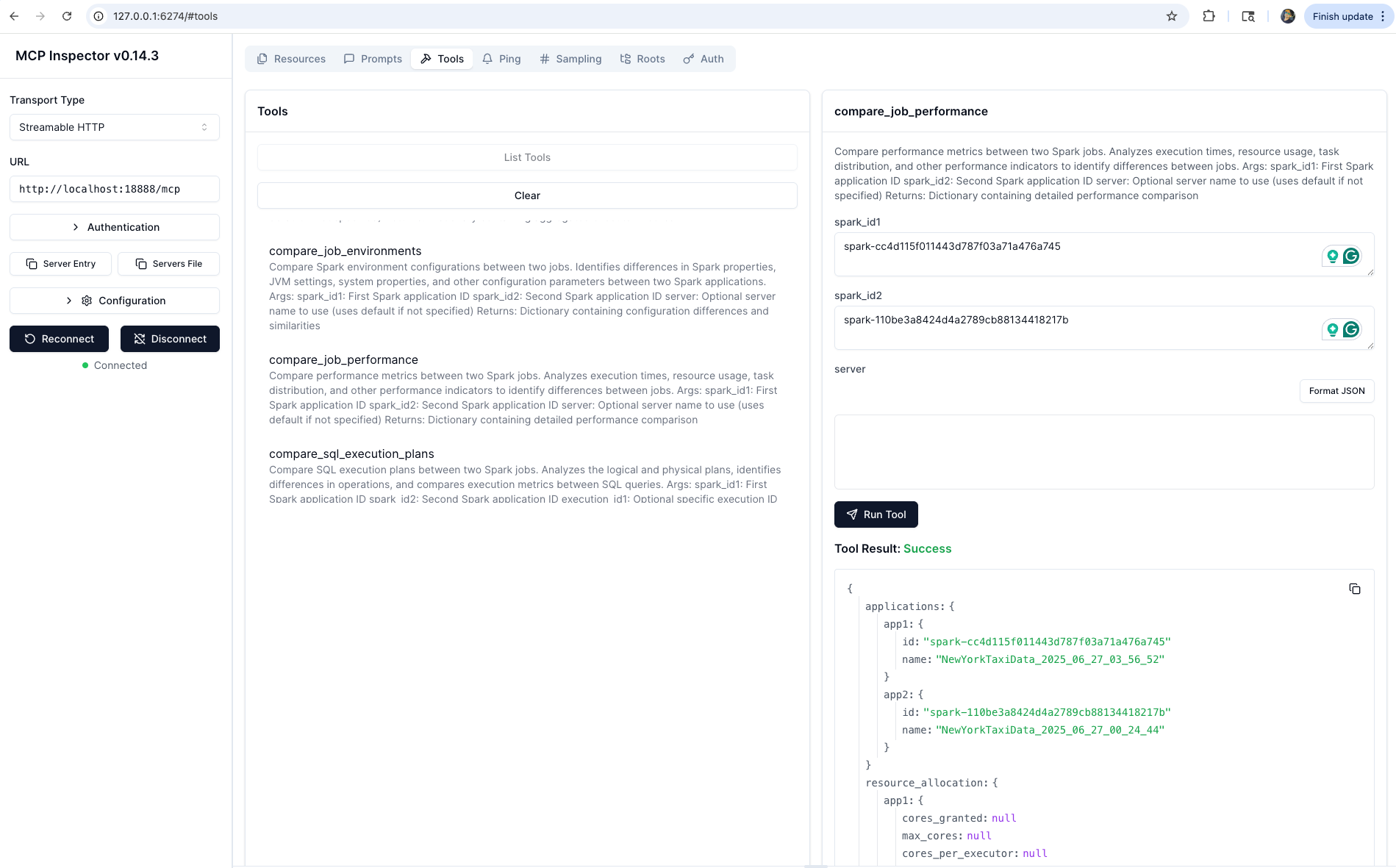
Deploy the MCP server using Helm:
helm install spark-history-mcp ./deploy/kubernetes/helm/mcp-apache-spark-history-server/

# Production configuration
helm install spark-history-mcp ./deploy/kubernetes/helm/mcp-apache-spark-history-server/ \
  --set replicaCount=3 \
  --set autoscaling.enabled=true
See deploy/kubernetes/helm/ for full configuration options.
When deployed in Kubernetes, connect Claude Desktop via mcp-remote:
kubectl port-forward svc/mcp-apache-spark-history-server 18888:18888
git clone https://github.com/kubeflow/mcp-apache-spark-history-server.git
cd mcp-apache-spark-history-server

# Install Task runner
brew install go-task   # macOS; see https://taskfile.dev/installation/ for others

# MCP Server
task install           # install Python dependencies
task start-spark-bg    # start Spark History Server with sample data
task start-mcp-bg      # start MCP server
task start-inspector-bg  # open MCP Inspector at http://localhost:6274
task stop-all

# CLI
cd skills/cli
task build             # build ./bin/shs
task test              # unit tests
task test-e2e          # e2e tests (starts/stops Docker SHS automatically)
task start-shs         # start SHS with CLI e2e sample data
Using this project? Add your organization to ADOPTERS.md and help grow the community.
See CONTRIBUTING.md for guidelines.
Apache License 2.0 — see LICENSE.
Built for use with Apache Spark™ History Server. Not affiliated with or endorsed by the Apache Software Foundation.
Connect your Spark infrastructure to AI agents and engineers
🛠️ SHS CLI · ⚡ MCP Server · 🧪 Test · 🤝 Contribute
Built by the community, for the community 💙
Sign in to join the discussion.
No comments yet. Be the first to say what this is good for.
Real-time global intelligence dashboard. AI-powered news aggregation, geopolitical monitoring, and infrastructure tracking in a unified situational awareness interface
High-performance code intelligence MCP server. Indexes codebases into a persistent knowledge graph — average repo in milliseconds. 158 languages, sub-ms queries, 99% fewer tokens. Single static binary, zero dependencies.

Universal provider proxy for OpenAI Codex & Claude Code — use any LLM (Claude, Gemini, Grok, DeepSeek, Ollama…) with Codex CLI, App, SDK, and Claude Code

Git-native persistent memory for AI coding agents. Implements Google OKF v0.2 with sub-300µs in-memory BM25 search, embedded MCP server, and progressive disclosure. Slashes token bloat by 80% with zero external databases or dependencies. Built in pure Go.

Local-first code intelligence graph for MCP and CLI. Builds a persistent map of your codebase so AI coding tools read only what matters, with benchmarked context reductions on reviews and large-repo workflows.

Stop your AI from making things up — it proposes, deterministic tools decide, every claim checked against ground truth with evidence. Grounded facts and context survive resets. Reverse engineering is the proving ground. MCP server + CLI.