
koala73/worldmonitorConnectors
Real-time global intelligence dashboard. AI-powered news aggregation, geopolitical monitoring, and infrastructure tracking in a unified situational awareness interface
86k
Agent Fusion runs locally and gives agents access to semantic search over code, Markdown, Word files, and PDFs. It combines semantic, symbol, and full-text search, then lets agents walk nearby chunks for more context. A separate task manager can route work across multiple AIs, collect votes, and keep a record of decisions. The repo is set up as a single JAR app with TOML configuration and local storage.
Builders who want their agent to search local code and docs, and optionally coordinate work across multiple agents.
You can ask an agent to find relevant code or documentation in your own project instead of guessing from grep results.
Indexes code and documents into chunks with embeddings and answers `query_context` requests locally.
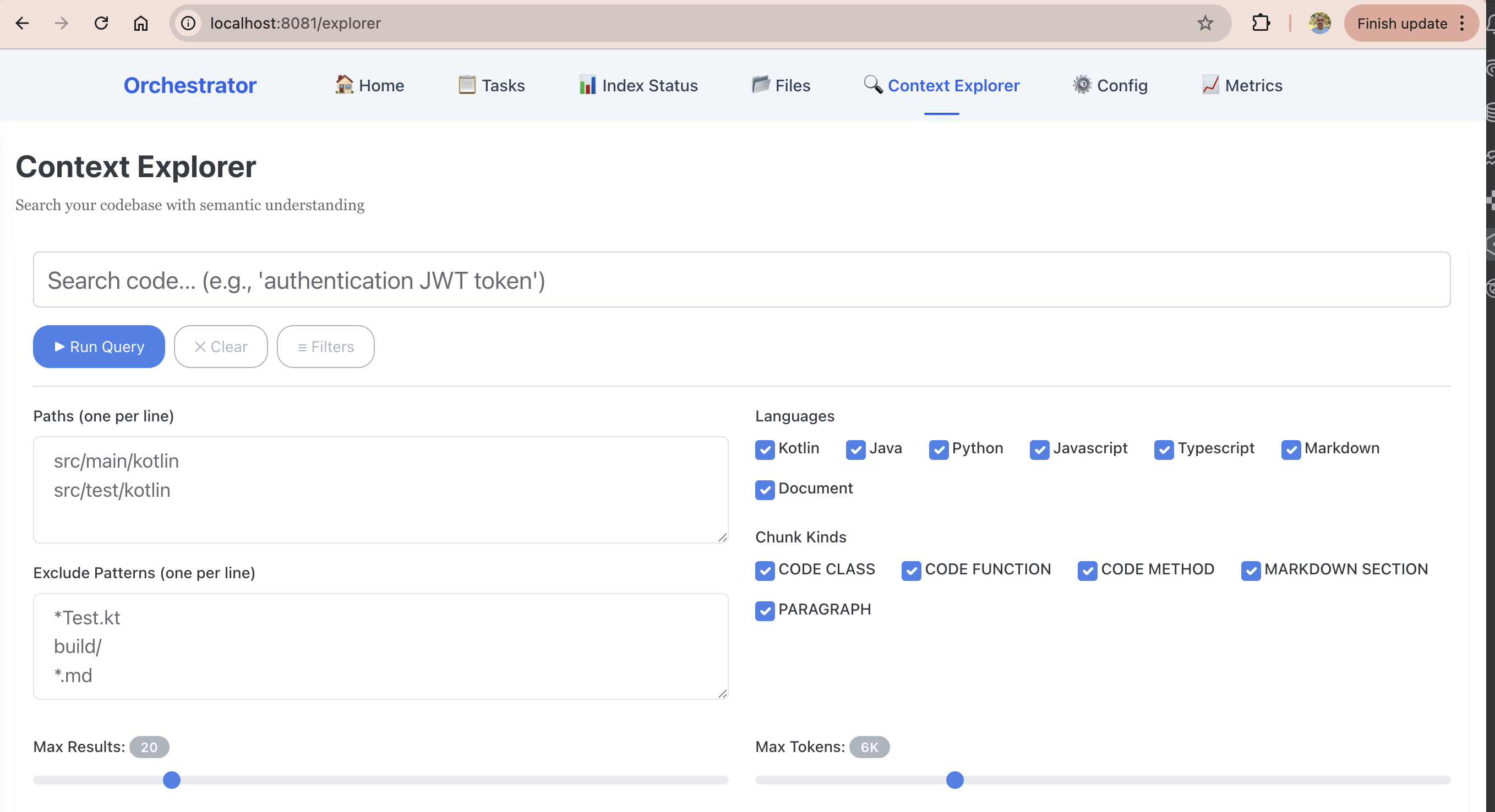
Combines semantic search, symbol matching, and full-text search to rank results.
Uses chunk IDs for parent, child, sibling, and previous or next relationships so agents can pull surrounding context.
Watches configured folders and updates the index when files change.
Exposes the context engine through MCP so Claude Code and other MCP-compatible agents can use it.
Routes tasks, supports voting, and records proposals and decisions in a web dashboard.

Agent Fusion MCP tool gives multiple AI coding assistants instant access to your files—code, documents, PDFs, and more—through intelligent indexing. Self-contained deployment: runs as a single JAR with no external APIs, Docker, or cloud dependencies—just Java and a TOML config It has two independent components (each can be used alone or together):
docs/other_model.md).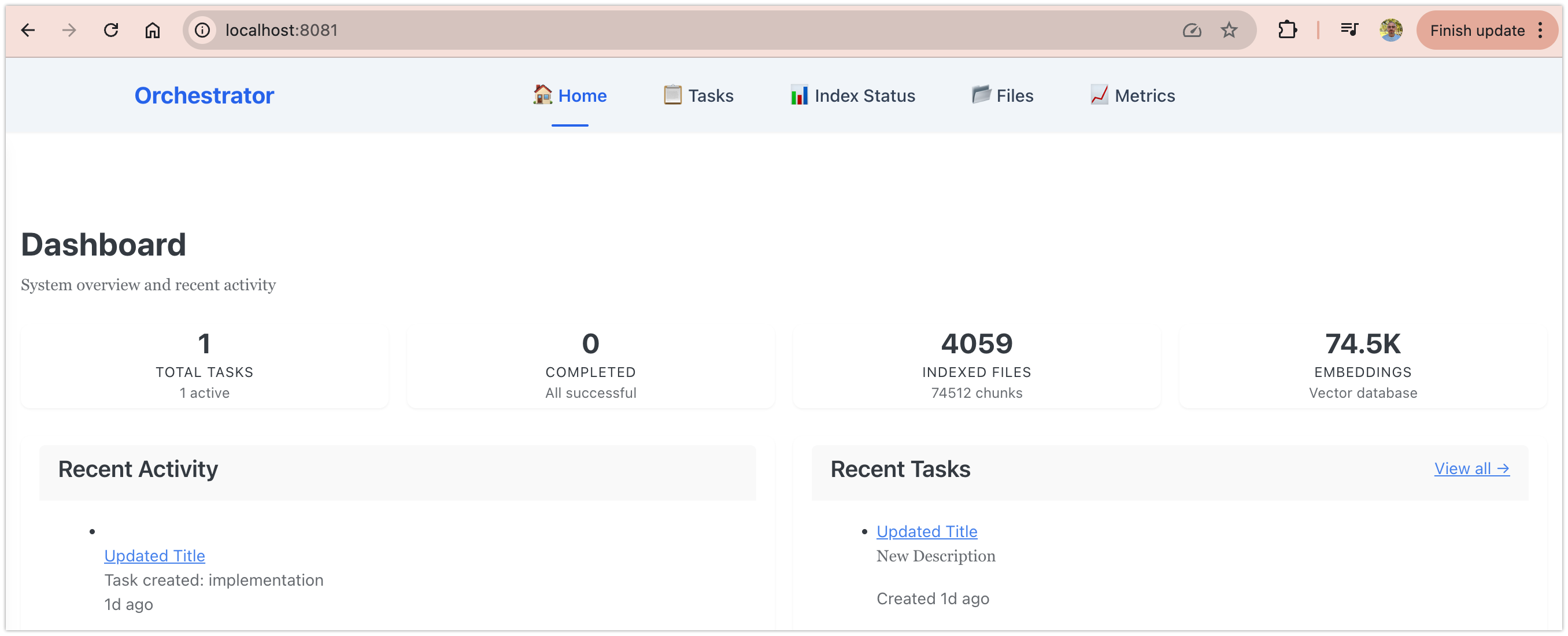
🎥 Watch the demo to see AI assistants collaborating in action.
Most AI coding agents rely on grep and text matching. Ask them "find authentication logic" and they grep for "authentication" — missing every file that actually implements auth but calls it "login", "credentials", "token validation", or "access control".
Semantic search understands concepts, not just keywords:
Even when the exact words aren't in the code.
Agent Fusion fetches up-to-date code examples and documentation right into your LLM's context:
1️⃣ Write your prompt naturally – Ask your AI assistant what you'd normally ask
2️⃣ Tell the LLM to use query_context – Just add "use query_context to find X" in your prompt
3️⃣ Get working code answers – Instant, accurate answers based on your actual codebase
No tab-switching. No hallucinated APIs that don't exist. No outdated code generation.
Installation Guide – Step-by-step setup (takes 5-10 minutes)
The Context Engine uses three search types combined:
Results are ranked by relevance across all methods, ensuring you find what you're actually looking for — not just keyword matches.
The Context Engine is independent—use it alone for smart search, or combine it with the Task Manager. Configured in fusionagent.toml, stores everything locally. Configure watch paths and file types to index in the config file.
The Task Manager is completely optional. Use it to coordinate work between multiple AIs:
The Task Manager works best when AIs have access to the Context Engine—they stay coordinated. But you can use Task Manager without Context Engine if you prefer traditional task management.
Use Task Manager when:
Intelligent indexing and search for any files (works standalone):
fusionagent.tomlWorkflow coordination for multiple AIs (optional addon):
Sign in to join the discussion.
No comments yet. Be the first to say what this is good for.
Real-time global intelligence dashboard. AI-powered news aggregation, geopolitical monitoring, and infrastructure tracking in a unified situational awareness interface
High-performance code intelligence MCP server. Indexes codebases into a persistent knowledge graph — average repo in milliseconds. 158 languages, sub-ms queries, 99% fewer tokens. Single static binary, zero dependencies.

Universal provider proxy for OpenAI Codex & Claude Code — use any LLM (Claude, Gemini, Grok, DeepSeek, Ollama…) with Codex CLI, App, SDK, and Claude Code

Git-native persistent memory for AI coding agents. Implements Google OKF v0.2 with sub-300µs in-memory BM25 search, embedded MCP server, and progressive disclosure. Slashes token bloat by 80% with zero external databases or dependencies. Built in pure Go.

Local-first code intelligence graph for MCP and CLI. Builds a persistent map of your codebase so AI coding tools read only what matters, with benchmarked context reductions on reviews and large-repo workflows.

Stop your AI from making things up — it proposes, deterministic tools decide, every claim checked against ground truth with evidence. Grounded facts and context survive resets. Reverse engineering is the proving ground. MCP server + CLI.