
koala73/worldmonitorConnectors
Real-time global intelligence dashboard. AI-powered news aggregation, geopolitical monitoring, and infrastructure tracking in a unified situational awareness interface
86k
MIE gives your agents a shared knowledge graph for facts, decisions, entities, events, and links between them. It runs as an MCP server with a shared daemon underneath, so multiple clients can query and update the same memory store.
Builders who want Claude Code, Cursor, or other MCP clients to keep project context across sessions.
You can stop re-explaining decisions and context every time you switch agents or start a new chat.
Stores typed memory nodes such as facts, decisions, entities, events, and topics, with relationships between them.
Exposes tools like `mie_store`, `mie_query`, `mie_update`, `mie_conflicts`, and `mie_export` through MCP.
Runs a shared daemon so multiple MCP clients can access the same memory store at once.
Supports exact lookup, semantic search, and traversing related nodes to return structured context.
Lets the connected agent decide what to store, so the server stays a storage layer instead of running its own LLM.
Can import from JSON, Datalog, markdown, ADRs, and git history, and export the full graph for backup or migration.
brew tap kraklabs/mie
brew install mie
mie init                    # Quick setup with defaults
mie init --interview        # Interactive — asks about your stack, team, and project
Stop re-explaining yourself to every AI agent. MIE gives all your agents — Claude, ChatGPT, Cursor, Gemini — a shared, persistent knowledge graph they can read and write. Decisions, context, facts, and relationships survive across sessions, tools, and providers.
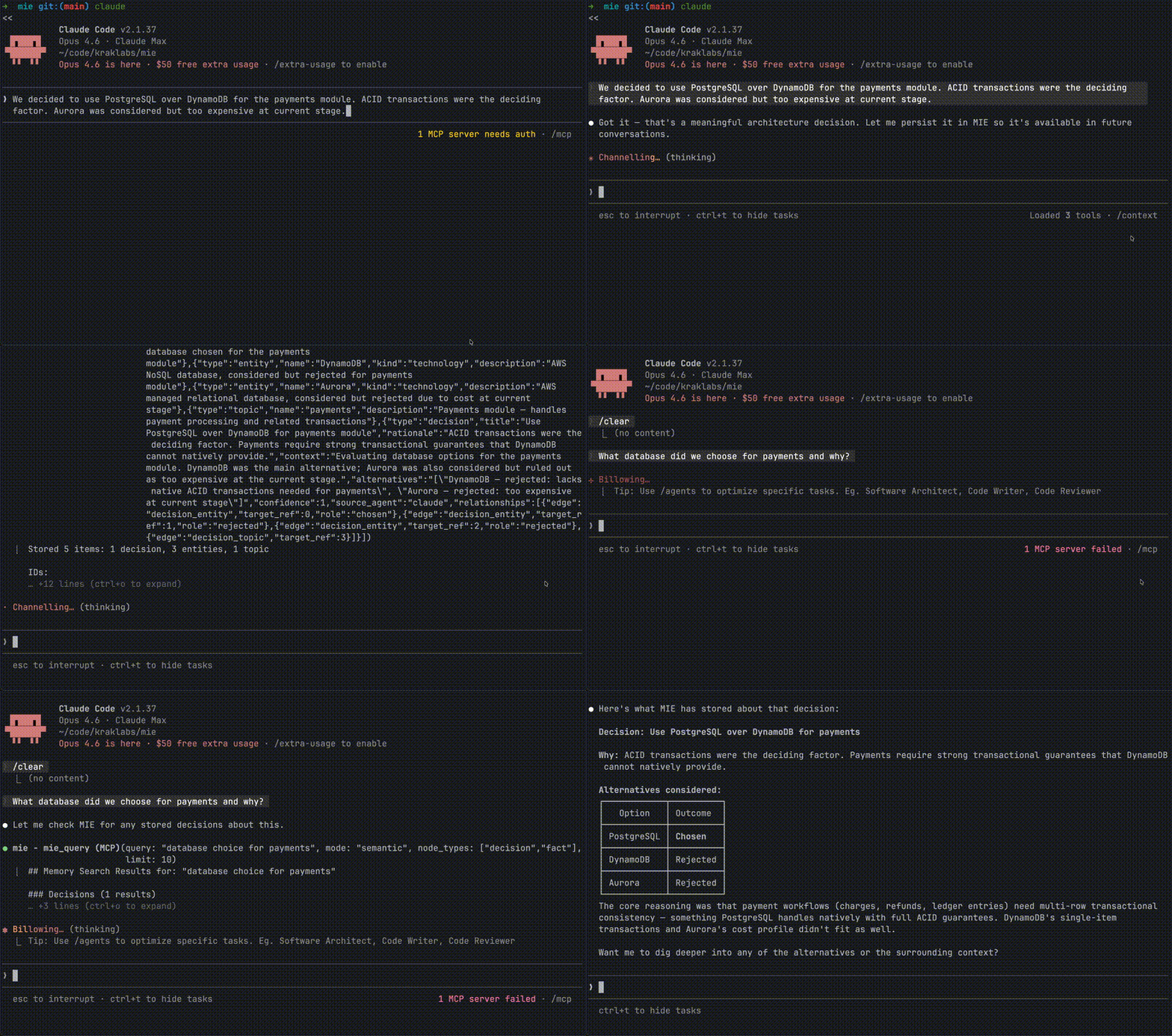


You explained your entire architecture to Claude. Two hours of context, decisions, tradeoffs. Next day, new conversation — it knows nothing. So you explain it again. Then you switch to Cursor for implementation. Zero context. You open ChatGPT to brainstorm a different angle. Blank slate.
Every AI agent you use is brilliant but amnesiac. And none of them talk to each other.
MIE fixes this. One knowledge graph. Every agent reads from it. Every agent writes to it. Your decisions, your context, your rules — always available, everywhere.
You: "We chose PostgreSQL over DynamoDB because we need ACID
      transactions for the payments module. Alternative was Aurora
      but too expensive at current stage."

          Claude stores this via MIE
                    ↓
┌─────────────────────────────────────────────┐
│              MIE Knowledge Graph             │
│                                              │
│  Decision: PostgreSQL over DynamoDB          │
│  Rationale: ACID transactions for payments   │
│  Alternatives: [DynamoDB, Aurora]            │
│  Entities: payments-module, PostgreSQL       │
│  Status: active                              │
└─────────────────────────────────────────────┘
                    ↓
    Next week, in Cursor, different project:
    "What database did we choose and why?"
    → Cursor queries MIE, gets full context instantly
No copy-pasting. No "as I mentioned before." No starting from zero.
| Platform Memory | MIE | |
|---|---|---|
| Cross-agent | ❌ Claude doesn't know what you told ChatGPT | ✅ All agents share the same graph |
| Structured | ❌ Flat text summaries | ✅ Typed nodes: facts, decisions, entities, events |
| Queryable | ❌ Basic keyword recall | ✅ Semantic search, graph traversal, conflict detection |
| Portable | ❌ Locked to one provider | ✅ Your data, your machine, exportable |
| Relationships | ❌ None | ✅ "This decision relates to this entity and was triggered by this event" |
| History | ❌ Overwrites silently | ✅ Invalidation chains — see what changed and why |
brew tap kraklabs/mie
brew install mie
mie init                    # Quick setup with defaults
mie init --interview        # Interactive — asks about your stack, team, and project
Claude Code (.mcp.json):
{
  "mcpServers": {
    "mie": {
      "command": "mie",
      "args": ["--mcp"]
    }
  }
}
Cursor (.cursor/mcp.json):
{
  "mcpServers": {
    "mie": {
      "command": "mie",
      "args": ["--mcp"]
    }
  }
}
That's it. Your agents now share a brain.
MIE isn't a chat log. It stores structured knowledge as a graph:
Facts — Things that are true about your world. "Our API uses JWT with RS256 signing." · "The team is 6 engineers across 3 timezones."
Decisions — Choices with rationale and alternatives. "Chose Go over Rust for CIE because of CGO CozoDB bindings. Alternatives: Rust, Python."
Entities — People, companies, projects, technologies. "Kraklabs — independent software and AI lab." · "CIE — Code Intelligence Engine."
Events — Timestamped occurrences. "Launched v0.4.0 on 2026-01-15." · "Client demo scheduled for March 10."
Topics — Recurring themes that connect everything. "Architecture" · "Security" · "Product Strategy"
These connect through typed relationships — a decision references entities, relates to topics, and may be triggered by events. When an agent queries "what do you know about our security decisions?", MIE traverses the graph and returns structured context, not keyword matches.
MIE exposes 12 tools through the Model Context Protocol:
| Tool | What it does |
|---|---|
mie_analyze | Surfaces related context before storing — the agent decides what's worth remembering |
mie_store | Writes facts, decisions, entities, events, and relationships to the graph |
mie_bulk_store | Batch store up to 50 nodes with cross-references — ideal for importing knowledge from files or git history |
mie_get | Retrieve a single memory node by ID with full details |
mie_query | Semantic search, exact lookup, or graph traversal across all node types |
mie_list | List and filter nodes with pagination |
mie_update | Invalidate outdated facts, update statuses — with full history preserved |
mie_delete | Remove nodes with cascade (embedding + edges) or remove individual relationships |
mie_conflicts | Detect contradictions in stored knowledge |
mie_export | Export the full graph as JSON or Datalog |
mie_repair | Rebuild HNSW indexes and clean orphaned embeddings |
mie_status | Graph health, node counts, usage metrics |
Unlike other memory solutions that run an LLM on the server to classify what to store, MIE uses an agent-as-evaluator pattern. The server provides context; your agent (which is already running an LLM) decides what matters. This means zero additional inference cost — your memory layer doesn't burn tokens.
This philosophy extends to importing: when you ask your agent to "import knowledge from this repo", the agent reads your files, ADRs, or git history directly and uses mie_bulk_store to persist what it extracts. MIE stays as a pure storage engine — the connected agent IS the LLM.
┌─────────────────────────────────────┐
│  Any MCP Client                     │
│  Claude · Cursor · ChatGPT* · etc   │
└──────────────┬──────────────────────┘
               │ MCP (JSON-RPC over stdio)
┌──────────────▼──────────────────────┐
│  MIE Server  (one per MCP client)   │
│  12 tools · semantic search ·       │
│  graph traversal · conflicts        │
└──────────────┬──────────────────────┘
               │ Unix domain socket
┌──────────────▼──────────────────────┐
│  MIE Daemon  (shared singleton)     │
│  Manages exclusive DB lock ·        │
│  Serves multiple clients            │
└──────────────┬──────────────────────┘
               │ Datalog queries
┌──────────────▼──────────────────────┐
│  CozoDB (embedded)                  │
│  Graph DB · HNSW vectors · ACID     │
└─────────────────────────────────────┘
       + Ollama (optional, local embeddings)
ChatGPT via custom GPT Actions pointing to MIE Cloud (coming soon).
Multiple MCP clients (Claude, Cursor, etc.) can run simultaneously — the daemon holds the exclusive database lock and multiplexes access. The daemon starts automatically on first use or can be managed manually via mie daemon.
 Store                    Query                     Evolve
 ─────                    ─────                     ──────
 Your agent learns   →    Next session, any    →    Facts change.
 something new.           agent queries MIE         Old ones get
 It stores a fact,        for context before        invalidated, not
 a decision, or an        responding. Full          deleted. The graph
 entity — with            graph of related          keeps history of
 confidence scores        knowledge returns         what was known
 and relationships.       in milliseconds.          and when.
# .mie/config.yaml
version: "1"
storage:
  engine: rocksdb         # rocksdb, sqlite, or mem
embedding:
  enabled: true
  provider: ollama        # ollama, openai, or nomic
  model: nomic-embed-text
mcp:
  # Option A: only expose these tools (whitelist)
  include_tools:
    - mie_analyze
    - mie_store
    - mie_query
  # Option B: expose all except these (blacklist)
  # exclude_tools:
  #   - mie_export
  #   - mie_repair
All settings can be overridden with environment variables. Embeddings are optional — MIE works without them (exact search only).
The mcp section is optional. When omitted, all 12 tools are exposed. Use include_tools to whitelist specific tools, or exclude_tools to hide a few. If both are set, include_tools takes precedence. Filtered tools are also rejected on tools/call.
mie init                    # Create config with defaults
mie init --interview        # Interactive project bootstrapping
mie --mcp                   # Start as MCP server (auto-starts daemon)
mie daemon start            # Start daemon in background
mie daemon start --foreground  # Start daemon in foreground (for debugging)
mie daemon stop             # Stop running daemon
mie daemon status           # Check if daemon is running
mie status                  # Show graph statistics
mie export                  # Export memory graph
mie import -i backup.json   # Import from JSON or Datalog
mie reset --yes             # Delete all data
mie query "<cozoscript>"    # Raw Datalog query (debug)
ollama pull nomic-embed-textMIE works without Ollama. You get exact-match search and graph traversal. Add Ollama for semantic search ("find things related to deployment" instead of exact keywords).
MIE pairs naturally with CIE (Code Intelligence Engine). Run both as MCP servers:
{
  "mcpServers": {
    "cie": { "command": "cie", "args": ["--mcp"] },
    "mie": { "command": "mie", "args": ["--mcp"] }
  }
}
CIE gives your agent deep understanding of your codebase. MIE gives it memory of everything else — decisions, architecture, people, events. Together, your agent knows your code and remembers why it's built that way.
Join the waitlist: kraklabs.com/mie
MIE is dual-licensed:
We welcome contributions. See contributing.md for guidelines.
Sign in to join the discussion.
No comments yet. Be the first to say what this is good for.
Real-time global intelligence dashboard. AI-powered news aggregation, geopolitical monitoring, and infrastructure tracking in a unified situational awareness interface
High-performance code intelligence MCP server. Indexes codebases into a persistent knowledge graph — average repo in milliseconds. 158 languages, sub-ms queries, 99% fewer tokens. Single static binary, zero dependencies.

Universal provider proxy for OpenAI Codex & Claude Code — use any LLM (Claude, Gemini, Grok, DeepSeek, Ollama…) with Codex CLI, App, SDK, and Claude Code

Git-native persistent memory for AI coding agents. Implements Google OKF v0.2 with sub-300µs in-memory BM25 search, embedded MCP server, and progressive disclosure. Slashes token bloat by 80% with zero external databases or dependencies. Built in pure Go.

Local-first code intelligence graph for MCP and CLI. Builds a persistent map of your codebase so AI coding tools read only what matters, with benchmarked context reductions on reviews and large-repo workflows.

Stop your AI from making things up — it proposes, deterministic tools decide, every claim checked against ground truth with evidence. Grounded facts and context survive resets. Reverse engineering is the proving ground. MCP server + CLI.