Laravel Loop




Laravel Loop is a powerful Model Context Protocol (MCP) server designed specifically for Laravel applications. It connects your Laravel application with AI assistants using the MCP protocol.
Laravel Loop uses Prism behind the scenes to build the tools.
[!IMPORTANT]
Laravel Loop and its pre-built tools are still in development and this is a beta version.
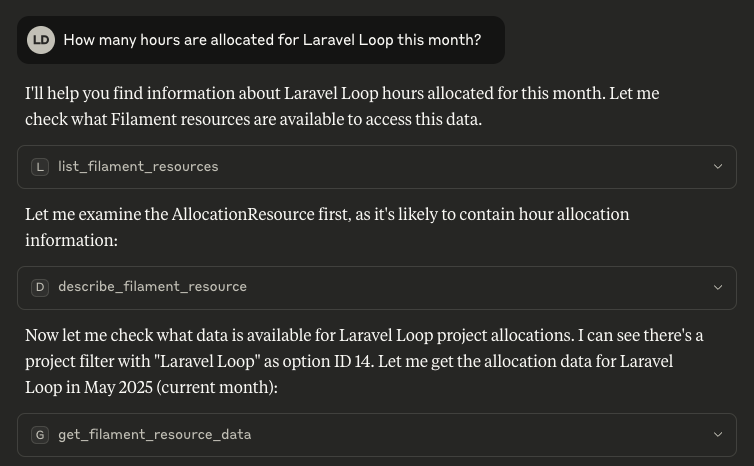
What It Does
Laravel Loop allows you to:
- Create and expose your own tools directly integrated with your Laravel application
- Connect with MCP clients like Claude Code, Cursor, Windsurf, and more
Pre-built tools:
- Filament MCP Server.
- Laravel Model Tools (Interact with your models data):
Kirschbaum\Loop\Toolkits\LaravelModelToolkit (Write operations to come)
- Laravel Factories Tools (Create test data from your MCP Client):
Kirschbaum\Loop\Toolkits\LaravelFactoriesToolkit
- Stripe Tool (Interact with the Stripe API):
Kirschbaum\Loop\Tools\StripeTool
Installation
You can install the package via composer:
composer require kirschbaum-development/laravel-loop
Publish the configuration file:
php artisan vendor:publish --tag="loop-config"
Usage
First, you must register your tools (If you don't know where to put, put in app/Providers/AppServiceProvider).
use Illuminate\Support\ServiceProvider;
use Kirschbaum\Loop\Facades\Loop;
use Kirschbaum\Loop\Toolkits;
use Kirschbaum\Loop\Tools;

Loop::toolkit(Kirschbaum\Loop\Filament\FilamentToolkit::make());
Custom Tools
To build your own tools, you can use the Loop::tool method.
use Kirschbaum\Loop\Facades\Loop;
use Kirschbaum\Loop\Tools\CustomTool;

Loop::tool(
    CustomTool::make(
        name: 'custom_tool',
        description: 'This is a custom tool',
    )
        ->withStringParameter(name: 'name', description: 'The name of the user', required: true)
        ->withNumberParameter(name: 'age', description: 'The age of the user')
        ->using(function (string $name, ?int $age = null) {
            return sprintf('Hello, %s! You are %d years old.', $name, $age ?? 'unknown');
        }),
    );
);
The available parameters types can be found in the Prism Tool Documentation.
Custom Tool Objects
You can also build your own tool classes. Each tool must implement the Tool contract, and return a Prism\Prism\Tool instance in the build method.
use Kirschbaum\Loop\Contracts\Tool;

class HelloTool implements Tool
{
    use \Kirschbaum\Loop\Concerns\Makeable;

    public function build(): \Prism\Prism\Tool
    {
        return app(\Prism\Prism\Tool::class)
            ->as($this->getName())
            ->for('Says hello to the user')
            ->withStringParameter('name', 'The name of the user to say hello to.', required: true)
            ->using(fn (string $name) => "Hello, $name!");
    }

    public function getName(): string
    {
        return 'hello';
    }
}
If you want to provide multiple similar tools, you can build a toolkit which returns a collection of tools.
use Kirschbaum\Loop\Collections\ToolCollection;
use Kirschbaum\Loop\Contracts\Toolkit;

class LaravelFactoriesToolkit implements Toolkit
{
    use \Kirschbaum\Loop\Concerns\Makeable;

    public function getTools(): ToolCollection
    {
        return new ToolCollection([
            HelloTool::make(),
            GoodbyeTool::make(),
        ]);
    }
}
Connecting to the MCP server
For this to be really useful, you need to connect your MCP client (Claude Code, Claude Desktop, Cursor, Windsurf, etc) to the Laravel LoopMCP server.
The MCP protocol has two main transports to connect: STDIO and Streamable HTTP, and the deprecated HTTP+SSE transport. Laravel Loop supports all of them.
The easiest way to configure your MCP client is to use the php artisan loop:mcp:config command. This will guide you through the process of configuring your MCP client.
php artisan loop:mcp:generate-config
STDIO
To run the MCP server using STDIO, we provide the following artisan command:
php artisan loop:mcp:start [--user-id=1 [--user-model=] [--auth-guard=] [--debug]
To connect Laravel Loop MCP server to Claude Code, for example, you can use the following command:
claude mcp add laravel-loop-mcp php /your/full/path/to/laravel/artisan loop:mcp:start

# with an authenticated user
claude mcp add laravel-loop-mcp php /your/full/path/to/laravel/artisan loop:mcp:start --user-id=1 --user-model=App\Models\User

# with debug mode
claude mcp add laravel-loop-mcp php /your/full/path/to/laravel/artisan loop:mcp:start --debug
To configure Laravel Loop in Cursor, Claude or any MCP clients with a JSON config file:
{
  "mcpServers": {
    "laravel-loop-mcp": {
      "command": "php",
      "args": [
        "/your/full/path/to/laravel/artisan",
        "loop:mcp:start",
        "--user-id=1"
      ]
    }
  }
}
Streamable HTTP & SSE
Having to run PHP or Node to run the MCP server can be annoying. To avoid this, you can use the Streamable HTTP or SSE transport, which connects the MCP client directly to your application via HTTP.
Laravel Loop also supports the streamable HTTP transport and the deprecated HTTP+SSE transport.
[!IMPORTANT]
NOTE: The Streamable HTTP transport is new and not yet supported by all MCP clients, while the SSE (supported by most MCP clients) is deprecated.
The following docs are for both transports. Please note you only need to enable one of them.
1. Enable and configure the transport
To enable the Streamable HTTP transport, update your .env file:
# streamable http
LOOP_STREAMABLE_HTTP_ENABLED=true

# sse
LOOP_SSE_ENABLED=true
Note: When using SSE, the default driver is file, which is the simplest and most convenient for local development. However, for production, we recommend using redis to avoid issues with file locking. You can change the driver and additional options in the config/loop.php file.
This will expose two MCP endpoints:
/mcp that supports the new Streamable HTTP transport./mcp/sse that supports the deprecated HTTP+SSE transport.
Note: If you are running your application locally with https, most clients will fail due to the self-signed certificates. To avoid this, use the STDIO transport or use the http protocol locally.
2. Configure authentication (optional)
Be aware that if you are exposing your endpoint publicly, you are exposing your data to the world. To ensure your MCP endpoints are secure, make sure to configure the streamable_http.middleware or sse.middleware config options. We recommend using something like Sanctum (configured by default) to protected the endpoint.
[
    'streamable_http' => [
        'middleware' => ['auth:sanctum'],
    ],

    'sse' => [
        'middleware' => ['auth:sanctum'],
    ],
]
3. Add the MCP server to your client
Then, you just need to configure the MCP server endpoint in your client:
Claude Code
claude mcp add laravel-loop-mcp http://your-url.test/mcp/sse -t sse
From JSON config file
{
  "mcpServers": {
    "laravel-loop-mcp": {
      "url": "http://your-url.test/mcp/sse",
    }
  }
}
Please note that not all clients support direct SSE connections. For those situations, you can proxy it through the mcp-remote package. This requires you to have Node.js (> 20) installed. Below an example using the mcp-remote package.
{
  "mcpServers": {
    "laravel-loop-mcp": {
      "command": "npx",
      "args": [
        "mcp-remote",
        "https://your-remote-url.com/mcp",
        "--header",
        "Authorization: Bearer ${AUTH_TOKEN}"
      ]
    }
  }
}
Troubleshooting
Connection failed: MCP error -32000: Connection closed
If you get this error, it likely means there's some error happening in your application. Check your applicationlogs for more details.
Error: spawn php ENOENT
This can happen when your "php" binary is not in the PATH. This can be solved in a few ways:
- Add the path to your
.bashrc or .zshrc file. Sometimes it can be only in the .zshrc file but applications like Claude use .bashrc.
- Use the full path of the PHP binary. You can get it by running
which php in your terminal.
- This can be a good option to ensure you always use the proper version of PHP for a given project. If you use Herd, for example, your
php will change depending on the selected version.
Manually call tools and verify output
Sometimes when building tools, you may be getting unexpected results and debugging from the MCP client can be difficult. You can manually call tools and verify the output by running the following command:
php artisan loop:mcp:call
Make sure to check your application logs
If you are getting an unkown error, check your application logs for more details.
Roadmap
Security
If you discover any security related issues, please email security@kirschbaumdevelopment.com instead of using the issue tracker.
Sponsorship
Development of this package is sponsored by Kirschbaum Development Group, a developer driven company focused on problem solving, team building, and community. Learn more about us or join us!
License
The MIT License (MIT). Please see License File for more information.




