
koala73/worldmonitorConnectors
Real-time global intelligence dashboard. AI-powered news aggregation, geopolitical monitoring, and infrastructure tracking in a unified situational awareness interface
86k
Anyquery gives you one SQL layer over files, databases, and app integrations like Notion, GitHub, and Airtable. It plugs into LLMs through MCP, and it can also run as a MySQL server for SQL clients that already speak MySQL.

Builders who want Claude Code, Cursor, or another agent to query their data and connected apps from one place.
You can ask an agent or SQL client questions across many tools without stitching each integration together yourself.
Run SQL over files, databases, and app data from one shell and one engine.
Start an MCP server with `anyquery mcp --stdio` or `anyquery mcp --host 127.0.0.1 --port 8070`.
Run `anyquery server` and connect from MySQL clients like TablePlus or Metabase.
Install plugins from the registry or create your own to add new integrations.
Read CSV, JSON, JSONL, Parquet, HTML, YAML, TOML, logs, and local files through modules.
# To be started by the LLM client
anyquery mcp --stdio
# To connect using an HTTP and SSE tunnel
anyquery mcp --host 127.0.0.1 --port 8070
# Copy the ID returned by the command, and paste it in the LLM client (e.g. ChatGPT, TypingMind)
anyquery gpt
anyquery server &
mysql -u root -h 127.0.0.1 -P 8070
curl -fsSL https://anyquery.dev/install.sh | sh
brew install anyquery
# Install using an AUR helper like yay
yay -S anyquery-git

# paru
paru -S anyquery-git







Sponsored by


Atlas Cloud is a full-modal AI inference platform: a single API and one account for chat completions,
image generation, and video generation across 300+ curated models (DeepSeek, FLUX, Kling, Qwen…).
With the Anyquery plugin, you can call all of them directly from SQL.
Anyquery is a SQL query engine that allows you to run SQL queries on pretty much anything. It supports querying files, databases, and apps (e.g. Apple Notes, Notion, Chrome, Todoist, etc.). It's built on top of SQLite and uses plugins to extend its functionality.
It can also connect to LLMs (e.g. ChatGPT, Claude, Cursor, TypingMind, etc.) to allow them to access your data.
Finally, it can act as a MySQL server, allowing you to run SQL queries from your favorite MySQL-compatible client (e.g. TablePlus, Metabase, etc.).
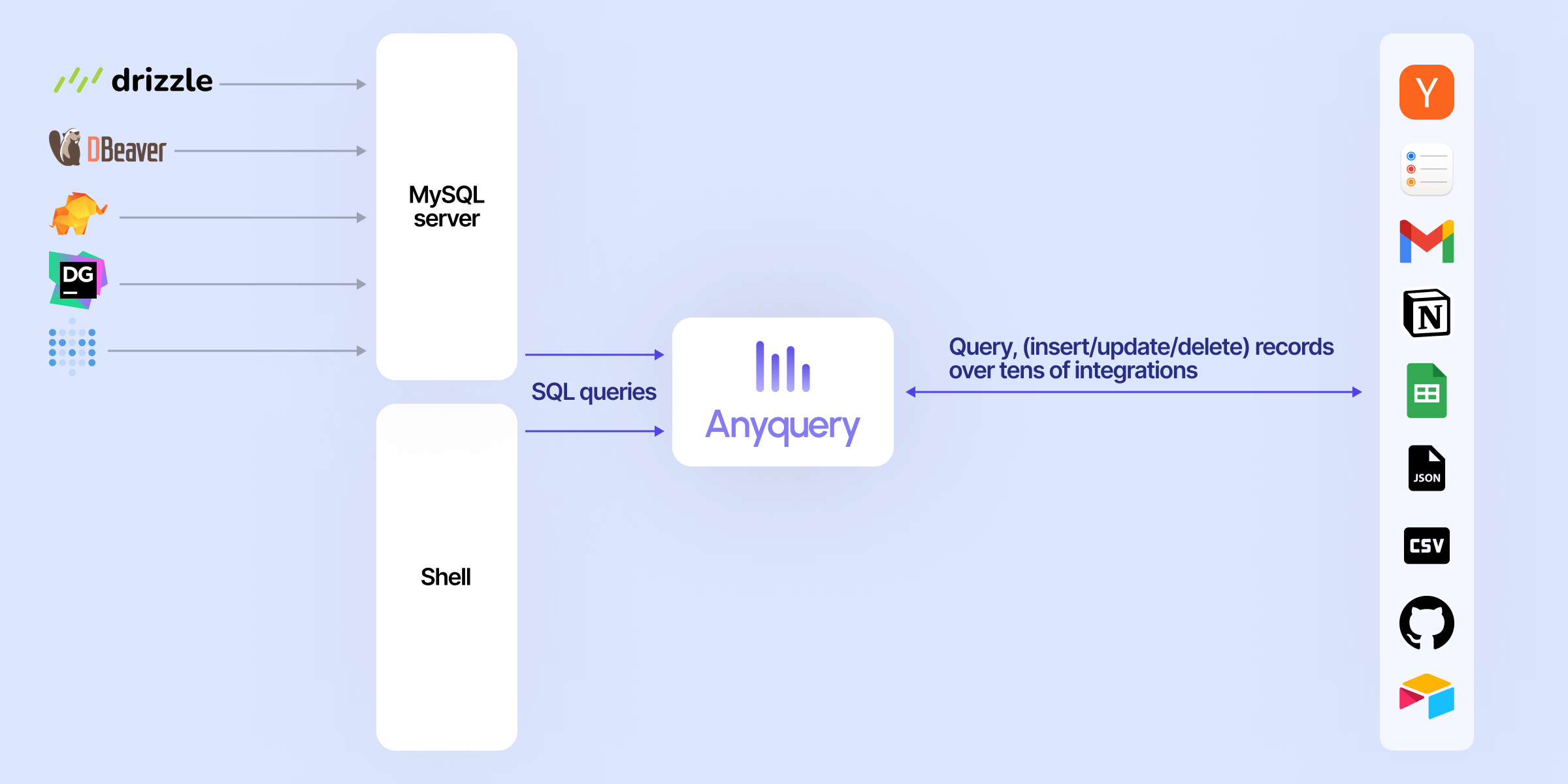
LLMs can connect to Anyquery using the Model Context Protocol (MCP). This protocol provides context for LLMs that support it. You can start the MCP server with the following command:
# To be started by the LLM client
anyquery mcp --stdio
# To connect using an HTTP and SSE tunnel
anyquery mcp --host 127.0.0.1 --port 8070
You can also connect to clients that supports function calling (e.g. ChatGPT, TypingMind). Refer to each connection guide in the documentation for more information.
# Copy the ID returned by the command, and paste it in the LLM client (e.g. ChatGPT, TypingMind)
anyquery gpt

The documentation provides detailed instructions on how to run queries with Anyquery.
But let's see a quick example. Type anyquery in your terminal to open the shell mode. Then, run the following query:
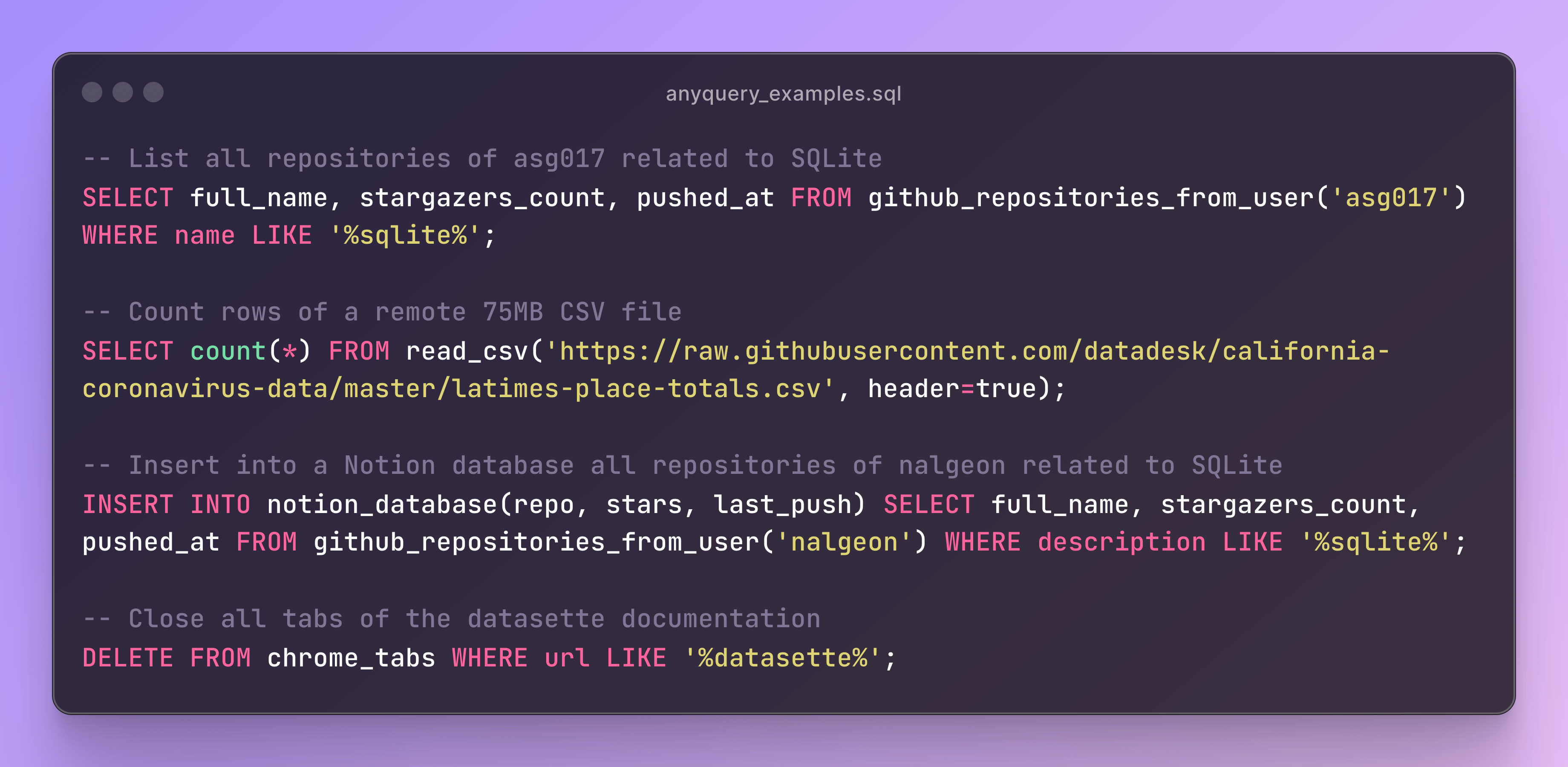
You can also launch the MySQL server with anyquery server and connect to it with your favorite MySQL-compatible client.
anyquery server &
mysql -u root -h 127.0.0.1 -P 8070
The documentation provides detailed instructions on how to install Anyquery on your system. You can install anyquery from Homebrew, APT, YUM/DNF, Scoop, Winget and Chocolatey. You can also download the binary from the releases page.
The fastest way to get started. This downloads the right binary for your platform, verifies its checksum, and adds it to your PATH — no sudo required:
curl -fsSL https://anyquery.dev/install.sh | sh
To pin a version or install elsewhere, set ANYQUERY_VERSION (e.g. 0.4.5) or ANYQUERY_INSTALL_DIR. To update later, re-run the same command. On Windows, use Scoop, Winget, or Chocolatey (below).
brew install anyquery
# Install using an AUR helper like yay
yay -S anyquery-git

# paru
paru -S anyquery-git
echo "deb [trusted=yes] https://apt.julienc.me/ /" | sudo tee /etc/apt/sources.list.d/anyquery.list
sudo apt update
sudo apt install anyquery
echo "[anyquery]
name=Anyquery
baseurl=https://yum.julienc.me/
enabled=1
gpgcheck=0" | sudo tee /etc/yum.repos.d/anyquery.repo
sudo dnf install anyquery
scoop bucket add anyquery https://github.com/julien040/anyquery-scoop
scoop install anyquery
winget install JulienCagniart.anyquery
choco install anyquery
Requires Go 1.26+ (some dependencies don't support older versions).
CGO_ENABLED=1 go install -tags "vtable fts5 sqlite_json sqlite_math_functions" github.com/julien040/anyquery@main
Anyquery relies on cgo (through go-sqlite3), so you need a C compiler (gcc, clang, or a mingw toolchain on Windows) available in your PATH.
Anyquery is plugin-based, and you can install plugins to extend its functionality. You can install plugins from the official registry or create your own. Anyquery can also load any SQLite extension.
Anyquery is an independent open-source project. These companies support its development:
Anyquery is built and maintained by one person. Sponsoring keeps it free and open-source, and puts your logo in this README and on anyquery.dev.
Anyquery is licensed under the AGPLv3 license for the core engine. The RPC library is licensed under the MIT license so that anyone can reuse plugins in different projects.
The plugins are not subject to the AGPL license. Each plugins has its own license and the copyright is owned by the plugin author. See the LICENSE file for more information.
If you want to contribute to Anyquery, please read the contributing guidelines. I currently only accept minor contributions, but I'm open to any suggestions or feedback.
You can have a brief overview of the project in the architecture documentation.
Sign in to join the discussion.
No comments yet. Be the first to say what this is good for.
Real-time global intelligence dashboard. AI-powered news aggregation, geopolitical monitoring, and infrastructure tracking in a unified situational awareness interface
High-performance code intelligence MCP server. Indexes codebases into a persistent knowledge graph — average repo in milliseconds. 158 languages, sub-ms queries, 99% fewer tokens. Single static binary, zero dependencies.

Universal provider proxy for OpenAI Codex & Claude Code — use any LLM (Claude, Gemini, Grok, DeepSeek, Ollama…) with Codex CLI, App, SDK, and Claude Code

Git-native persistent memory for AI coding agents. Implements Google OKF v0.2 with sub-300µs in-memory BM25 search, embedded MCP server, and progressive disclosure. Slashes token bloat by 80% with zero external databases or dependencies. Built in pure Go.

Local-first code intelligence graph for MCP and CLI. Builds a persistent map of your codebase so AI coding tools read only what matters, with benchmarked context reductions on reviews and large-repo workflows.

Stop your AI from making things up — it proposes, deterministic tools decide, every claim checked against ground truth with evidence. Grounded facts and context survive resets. Reverse engineering is the proving ground. MCP server + CLI.