
MCP Steroid

Connect your AI coding agent to a real JetBrains IDE
Install devrig, and your agent works through the whole IntelliJ — not just the files



Website •
Demo Videos •
Blog Post •
Discord
What is devrig?
devrig is the product you install: a small command-line
tool that connects your AI coding agent (Claude Code, Codex, or Gemini) to a real JetBrains IDE.
It brings its own runtime, registers itself with your agent, and bridges the agent's calls to
the IDE — no manual MCP wiring.
devrig reaches the IDE through MCP Steroid, a JetBrains IDE plugin (this repo) that exposes the
IDE's real semantic actions — typed refactorings, inspections, the debugger, and test runs — over
the open Model Context Protocol. You install devrig; devrig
uses MCP Steroid.
Unlike file-only assistants, this gives AI agents the same capabilities developers use: semantic
code understanding, advanced refactorings, debugging, test running, visual awareness, and the
entire IntelliJ API surface — all inside the running IDE's JVM.
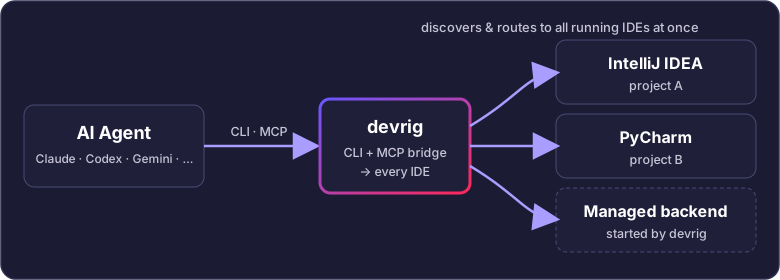
One bridge, every IDE
A single devrig process connects your AI Agent to all the IntelliJ-family IDEs running on
your machine at once — each open on a different project — and can download and start more on demand.
What your agent gets
- Visual IDE understanding — screenshots + OCR + component tree
- UI automation — control the IDE like a human developer
- Native IntelliJ APIs — PSI, inspections, refactorings, and more
- Kotlin scripting — full platform access at runtime via
steroid_execute_code
- Standard MCP protocol — connects to MCP-compatible AI agents
We continuously measure IDE-access vs plain-shell agents on real codebases. See the
experiment findings for the evidence-based results.
Explore the CLI
The command tree is discoverable from either direction:
devrig --help
devrig tools
devrig help execute_code
devrig list_projects --json
devrig open_project --project_path="$PWD" --task_id=demo-open --reason="open current project from CLI" --wait --json
devrig prompt mcp-steroid://prompt/skill --project_name="PROJECT_NAME_FROM_LIST_PROJECTS" --json
list_projects is canonical (projects and project are compatibility aliases). Human output is
readable and may use terminal color; commands that advertise --json emit one ANSI-free document for
agents and scripts. Incomplete commands print focused help with every missing value. See the
devrig CLI guide or the contributor
CLI contract.
Install
1. Install devrig — one command
macOS / Linux
curl -fsSL https://devrig.dev/install.sh | sh
Windows
irm https://devrig.dev/install.ps1 | iex
The script does exactly two things: it installs the devrig CLI with its own bundled runtime into ~/.mcp-steroid, and it registers the stable devrig launcher on your PATH (if devrig is not found afterwards, open a new terminal or add ~/.mcp-steroid/bin to PATH). It never touches your agent configs or your IDEs — it finishes by printing the explicit next-step commands (steps 2 and 3 below). Installation is idempotent; re-run it any time to update.
2. Register your AI agent
devrig install claude
devrig install codex
devrig install gemini
devrig install <agent> registers devrig as the mcp-steroid MCP server in Claude Code, Codex, or Gemini (one of claude, codex, gemini). The entry lands in the user-scope config, so it is visible from every project. For any other MCP client, devrig install config prints the manual mcp.json snippet to paste. See the devrig CLI guide for the full command set.
3. Install the MCP Steroid plugin
devrig install plugin
devrig install plugin installs (or updates) the MCP Steroid plugin into every JetBrains IDE currently running on your machine — each IDE asks for your confirmation with its own native install dialog, so nothing is installed silently. Alternatively, install MCP Steroid from the JetBrains Marketplace (search MCP Steroid in Settings > Plugins > Marketplace).
Requirements
- A JetBrains IDE — IntelliJ IDEA, PyCharm, GoLand, WebStorm, Rider, CLion, or Android Studio.
- A standard desktop IDE runs with a real display: the normal GUI on macOS/Windows, or under Xvfb (a virtual X display) on Linux/CI. Plain non-backend headless mode is unsupported (best-effort, see #177); a frontendless Remote Development backend is supported. Backend product mode, not the presence of a client window or the raw AWT-headless flag alone, determines that distinction — see Running devrig in CI.
- An MCP-compatible AI agent (Claude Code, Codex, or Gemini).
For a clean machine with no IDE running, an agent can discover the download catalog with devrig backend download --json, install IDEA Ultimate 2026.2, and call steroid_open_project. The managed IU-262 backend starts on demand as a frontendless Remote Development backend with MCP Steroid included; no separate start command or client window is required. Readiness is the project path plus Maven/Gradle import, not a screenshot. See the devrig CLI guide.
Faster plugin updates (optional): add https://devrig.dev/updatePlugins.xml in Settings > Plugins > Gear icon > Manage Plugin Repositories.... Or install a ZIP from GitHub Releases via Install Plugin from Disk.
Verify the connection
When the plugin starts, it writes the connection details to .idea/mcp-steroid.md in each open project. Ask your agent to list the open projects:
claude -p "List all open projects using steroid_list_projects"
codex exec "List all open projects using steroid_list_projects"
gemini "List all open projects using steroid_list_projects"
If you see your open IntelliJ projects, the connection works. The plugin also serves the raw server URL at http://127.0.0.1:6315/mcp (Streamable HTTP transport) for clients that prefer to talk to the IDE directly.
Local development loop (deploy both halves from a checkout)
Working on MCP Steroid itself? Two Gradle tasks push your checkout into the live environment — no IDE restarts, no reinstalling.
One-time per IDE: install the Plugin Hot Reload plugin into every IDE you deploy to — download the ZIP from its Releases page, then Settings | Plugins | ⚙ | Install Plugin from Disk…, restart once. It exposes the local hot-reload endpoint (a ~/.<pid>.hot-reload marker per running IDE) that deployPlugin talks to.
# 1. devrig (the CLI): build, stage under ~/.mcp-steroid/devrig/, and regenerate the
#    ~/.mcp-steroid/bin/devrig launcher via `devrig install devrig`.
./gradlew deployDevrig

# assert: the launcher runs YOUR build — a dev version stamped with your checkout's git hash
~/.mcp-steroid/bin/devrig version
# → <base>.19999-SNAPSHOT-<git hash of your HEAD>

# 2. the IDE plugin: build the plugin ZIP and hot-reload it into every running IDE.
./gradlew :ij-plugin:deployPlugin

# assert: the task output ends with SUCCESS per IDE —
#   Installing and loading plugin: MCP Steroid (<base>.19999-SNAPSHOT-<git hash>)
#   Plugin MCP Steroid reloaded successfully
Both tasks fail loudly instead of half-deploying: deployDevrig fails when devrig install devrig cannot write the launcher (e.g. a DEVRIG_BIN_NO_AUTO_REGISTER opt-out), and deployPlugin fails with No running IDEs found when no IDE with the hot-reload plugin is up, or on anything but SUCCESS from an IDE.
Compatible AI Agents
devrig install registers MCP Steroid directly with:
- Claude (Claude Code)
- Codex CLI
- Gemini CLI
MCP Steroid speaks the standard Model Context Protocol, so other MCP-capable clients can also connect to the plugin's server directly — see How it works.
Capabilities
Design philosophy in one breath
The MCP tool surface is intentionally small — power lives in
mcp-steroid:// prompt resources that teach agents to call IntelliJ's
APIs directly inside steroid_execute_code. New tools and new
McpScriptContext methods are not the lever for "agents deliver more";
better recipes are. The full canonical statement lives in
docs/PHILOSOPHY.md and is mirrored at runtime
as mcp-steroid://skill/design-philosophy.
8 MCP Tools
| Tool | Description |
|---|
Execute Code (steroid_execute_code) | Run Kotlin code inside the IDE's JVM with full API access |
Execute Feedback (steroid_execute_feedback) | Provide execution ratings back to agents |
Fetch Resource (steroid_fetch_resource) | Fetch any mcp-steroid:// skill guide / recipe by URI |
Vision Screenshot (steroid_take_screenshot) | Capture IDE screenshots with component metadata |
Vision Input (steroid_input) | Send keyboard/mouse events to the IDE via a sequence-string DSL |
List Projects (steroid_list_projects) | Discover all open IntelliJ projects |
List Windows (steroid_list_windows) | Enumerate IDE windows and components |
Open Project (steroid_open_project) | Open projects programmatically |
58 MCP Resources
Comprehensive guides and examples covering:
- LSP Operations (11) — Go to definition, find references, hover, completion
- IDE Power Operations (22) — Refactorings, code generation, project analysis
- Debugger Integration (7) — Breakpoints, thread control, debugging workflows
- Test Runner (10) — Run tests, inspect results, navigate test trees
- VCS Operations (3) — Git annotations, file history
- Project Workflows (4) — Open projects with trust levels
- Skill Guides (3) — IntelliJ API, debugger, and test runner guides
Featured Demo Videos
Watch all demos: MCP Steroid Playlist
Configuration
MCP Steroid can be configured via IntelliJ's Registry (Help > Find Action > Registry) or JVM system properties.
| Registry Key | Default | Description |
|---|
mcp.steroid.server.port | 6315 | MCP server port (0 for auto-assign) |
mcp.steroid.server.host | 127.0.0.1 | Bind address (use 0.0.0.0 for Docker) |
mcp.steroid.storage.path | (empty) | Custom storage path (default: ~/.mcp-steroid/runs/) |
See the full Configuration Documentation on the website.
Architecture
- Technology: Kotlin on the JVM, running inside the IDE process
- HTTP Server: Ktor 3.3.2 (Streamable HTTP + SSE)
- Protocol: Model Context Protocol (MCP)
- Default Port: 6315
- OCR: Tesseract 5.5.1
- Platform: IntelliJ Platform Plugin SDK
The server runs inside the IDE's JVM process — no inter-process communication. Direct access to the project model, semantic index, PSI tree, test runner, debugger, and VCS layer.
About the Project
MCP Steroid is an open-source project by Eugene Petrenko (@jonnyzzz), licensed under Apache 2.0.
Read more:
IntelliJ IDEA, IntelliJ Platform, PyCharm, WebStorm, and JetBrains are trademarks of JetBrains s.r.o.
Contributing
We welcome contributions! See CONTRIBUTING.md for guidelines on
how to get started, and CONTRIBUTORS.md for the list of people
who have helped make MCP Steroid better.
License
MCP Steroid is open-source software licensed under the Apache License 2.0.
Links
Built with care for the AI agent developer community




