ChatGPT Codex Proxy
Run Claude Code on your ChatGPT Plus/Pro subscription — zero workflow change.
What is this?
This proxy lets Claude Code talk to ChatGPT's Codex backend instead of Anthropic's API.
You keep using claude exactly as before — same UI, same slash commands, same MCP tools — while inference is served by GPT.
Claude Code ──POST /v1/messages──> chatgpt-codex-proxy ──POST /codex/responses──> ChatGPT
<──Anthropic response── <──Codex SSE response──
When to use this
| Situation | This proxy helps? |
|---|
| Anthropic quota exhausted / rate limited | ✅ Switch to GPT with one env var |
| Want to try GPT models without leaving Claude Code | ✅ Same workflow, different backend |
| Have ChatGPT Plus/Pro idle and want to make use of it | ✅ No API key cost |
| Need MCP tools (Stitch, Linear, etc.) to work with GPT | ✅ Only proxy that bridges this |
| Need an OpenAI-compatible endpoint for other clients | Use ChatMock instead |
| Need Ollama compatibility | Use ChatMock instead |
Why this, not ChatMock or similar tools
ChatMock and similar projects expose an OpenAI/Ollama-compatible API — great for general-purpose clients, but you'd have to switch away from Claude Code entirely.
This proxy is built specifically for Claude Code:
- Zero workflow change —
claude command, keybindings, CLAUDE.md, slash commands, all work unchanged.
- MCP tools cross the boundary — Claude Code's MCP servers (Stitch, Linear, Chrome DevTools, etc.) are normally only available to Claude's backend. This proxy reads
~/.claude.json at startup, connects to your MCP servers, and injects their tool schemas into every GPT request. GPT gets the same tool access Claude would have.
- Parallel tool call safety — the proxy detects mutating tools (Edit, Write, Delete, Bash) and automatically disables
parallel_tool_calls to prevent unsafe concurrent file operations.
- Claude model name passthrough — use
--model claude-sonnet-4-20250514 as usual; the proxy maps it to the right Codex model automatically. Or use GPT model names directly in passthrough mode.
Example session
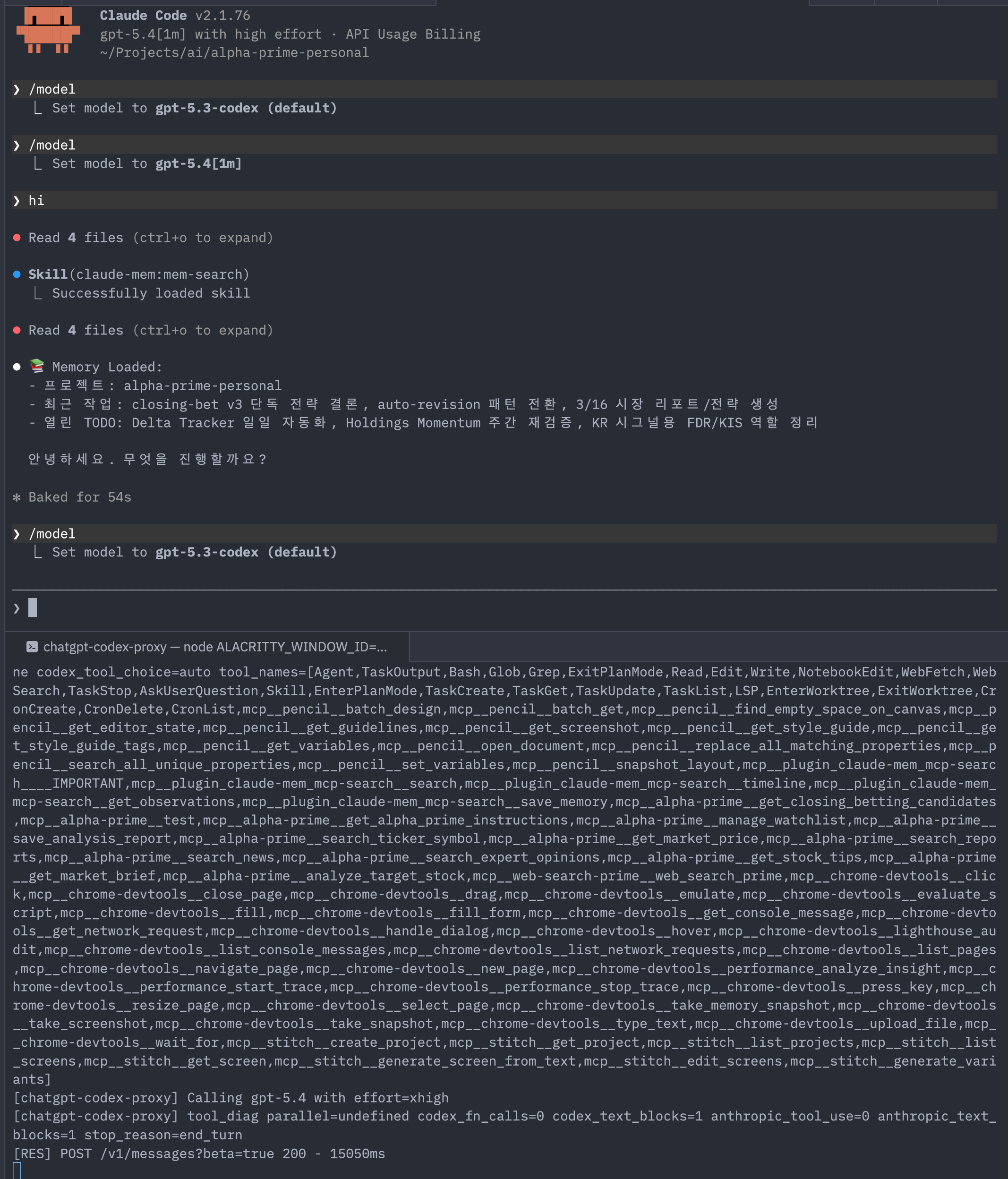
Features
- Anthropic Messages API compatible (
POST /v1/messages)
- OAuth 2.0 login — no API key, just your ChatGPT subscription
- Full request/response transformation (Anthropic ↔ Codex)
- SSE streaming
- Claude → Codex model mapping with env overrides
- MCP tool injection (see below)
Quick start
git clone <repo-url>
cd chatgpt-codex-proxy
npm install && npm run build
# Login with your ChatGPT account (browser opens)
npm run login
# Start the proxy
npm run dev
Then in another terminal:
export ANTHROPIC_BASE_URL=http://127.0.0.1:19080
export ANTHROPIC_API_KEY=dummy   # value is unused; variable must be set
claude
That's it. Claude Code is now running on GPT.
Optional: shell helper
Add this to .zshrc/.bashrc for a quick gpt alias:
gpt() {
  emulate -L zsh
  local proxy_port="${CHATGPT_CODEX_PROXY_PORT:-19080}"
  local token="${ANTHROPIC_AUTH_TOKEN:-${ANTHROPIC_API_KEY:-dummy}}"

  export ANTHROPIC_BASE_URL="http://127.0.0.1:${proxy_port}"
  export ANTHROPIC_AUTH_TOKEN="$token"
  export ANTHROPIC_API_KEY="${ANTHROPIC_API_KEY:-$token}"
  export API_TIMEOUT_MS="${API_TIMEOUT_MS:-90000}"
  export PASSTHROUGH_MODE="${PASSTHROUGH_MODE:-true}"
  unset CLAUDE_CONFIG_DIR

  echo "Using local Codex proxy on :${proxy_port}"
  claude "$@"
}
MCP tool injection
Claude Code's MCP tools are normally invisible to non-Claude backends. This proxy bridges that gap.
Claude Code                   chatgpt-codex-proxy               ChatGPT Codex API
   │  tools: [Edit, Bash, ...]      │  tools: [Edit, Bash, ...        │
   │  (deferred: stitch, qmd, ...)  │          + mcp__stitch__*       │
   │                                │          + mcp__qmd__*  ]       │
   │ ──────────────────────────────>│ ──────────────────────────────> │
How it works:
- On startup: reads
~/.claude.json → mcpServers
- Runs MCP handshake (
initialize → tools/list) for each enabled server
- Caches schemas in memory for the lifetime of the proxy process
- On every
/v1/messages request: appends cached tools to the Codex tools array
- When GPT calls a tool: Claude Code receives the
tool_use response, executes the real MCP call, and sends the result back through the proxy
Both HTTP (type: http) and stdio (command) MCP servers are supported.
Configuration — set PROXY_MCP_SERVERS in .env:
# Specific servers (names must match keys in ~/.claude.json)
PROXY_MCP_SERVERS=stitch,linear

# All servers registered in ~/.claude.json
PROXY_MCP_SERVERS=all

# Disabled (default)
PROXY_MCP_SERVERS=
Startup log:
[mcp-registry] connecting to: stitch, linear
[mcp-registry] stitch: 8 tools loaded
[mcp-registry] linear: 6 tools loaded
[mcp-registry] ready: 14 total MCP tools
Configuration
.env setup
cp .env.example .env
Model mapping
By default (PASSTHROUGH_MODE=true) the proxy forwards whatever model name Claude Code sends straight to Codex. Set PASSTHROUGH_MODE=false to enable automatic Claude → Codex mapping:
| Claude model | Codex model |
|---|
claude-sonnet-4-20250514 | gpt-5.2-codex |
claude-3-5-sonnet-20241022 | gpt-5.2-codex |
claude-3-haiku-20240307 | gpt-5.3-codex-spark |
claude-3-opus-20240229 | gpt-5.3-codex-xhigh |
| (fallback) | gpt-5.2-codex |
Override per family:
ANTHROPIC_DEFAULT_HAIKU_MODEL=gpt-5.3-codex-spark
ANTHROPIC_DEFAULT_SONNET_MODEL=gpt-5.2-codex
ANTHROPIC_DEFAULT_OPUS_MODEL=gpt-5.2-codex
Available Codex models
| Model | Effort | Notes |
|---|
gpt-5.4 | high | Flagship (2026) |
gpt-5 | high | |
gpt-5-codex | high | Optimized for agentic coding |
gpt-5-codex-mini | medium | |
gpt-5.3-codex | high | |
gpt-5.3-codex-xhigh | xhigh | |
gpt-5.3-codex-medium | medium | |
gpt-5.3-codex-low | low | |
gpt-5.3-codex-spark | low | Speed-optimized, >1000 tok/s |
gpt-5.2-codex | high | Proxy default |
gpt-5.2-codex-xhigh | xhigh | |
gpt-5.2-codex-medium | medium | |
gpt-5.2-codex-low | low | |
gpt-5.1-codex | high | |
gpt-5.1-codex-max | xhigh | |
gpt-5.1-codex-mini | medium | |
Shorthand aliases: gpt-5.3 → gpt-5.3-codex, gpt-5.2 → gpt-5.2-codex, gpt-5.1 → gpt-5.1-codex
Effort control
Claude Code's effort slider only affects native Claude models — it is not included in API requests when using GPT models. Control reasoning effort via:
Method 1 — model name suffix (recommended)
export ANTHROPIC_DEFAULT_SONNET_MODEL="gpt-5.3-codex-xhigh"  # xhigh
export ANTHROPIC_DEFAULT_HAIKU_MODEL="gpt-5.3-codex-spark"   # low
Method 2 — global override
PROXY_DEFAULT_EFFORT=high
Priority: thinking.budget_tokens in request → model name suffix/table → PROXY_DEFAULT_EFFORT → medium
CLI commands
| Command | Description |
|---|
npm run login | OAuth login (browser) |
npm run logout | Delete stored token |
npm run status | Show auth status |
npm run dev | Start dev server (hot reload) |
npm run start | Start production server |
API compatibility
| Capability | Support | Notes |
|---|
| Basic chat | ✅ | |
| Streaming | ✅ | SSE |
| Multi-turn | ✅ | |
| System prompt | ✅ | Mapped to instructions |
| Tool calling | ✅ | Full tool_use/tool_result cycle |
| Image input | ⚠️ | Limited |
| Temperature | ❌ | Not supported by Codex backend |
| Max tokens | ❌ | Not supported by Codex backend |
Environment variables
| Variable | Default | Description |
|---|
PORT | 19080 | Server port |
PROXY_JSON_LIMIT | 20mb | JSON body size limit |
CODEX_BASE_URL | https://chatgpt.com/backend-api | Codex API base URL |
PASSTHROUGH_MODE | true | false to enable Claude→Codex model mapping |
ANTHROPIC_DEFAULT_HAIKU_MODEL | - | Codex model for Haiku requests |
ANTHROPIC_DEFAULT_SONNET_MODEL | - | Codex model for Sonnet requests |
ANTHROPIC_DEFAULT_OPUS_MODEL | - | Codex model for Opus requests |
PROXY_DEFAULT_EFFORT | (auto) | low / medium / high / xhigh |
PROXY_MCP_SERVERS | (disabled) | all or comma-separated server names from ~/.claude.json |
Troubleshooting
# Health check
curl -fsS http://127.0.0.1:19080/health

# Port in use
lsof -tiTCP:19080 -sTCP:LISTEN -nP

# Passthrough test
gpt --model gpt-5.2

# Mapping mode test
PASSTHROUGH_MODE=false gpt --model claude-sonnet-4-20250514

# Recent logs
tail -n 120 /tmp/chatgpt-codex-proxy.log

# Tool calling smoke test
python3 scripts/tool_calling_smoke.py --base-url http://127.0.0.1:19080 --model gpt-5.2
Project structure
chatgpt-codex-proxy/
├── src/
│   ├── index.ts           # Entry point
│   ├── server.ts          # Express server
│   ├── cli.ts             # CLI commands
│   ├── auth.ts            # OAuth login
│   ├── routes/
│   │   └── messages.ts    # /v1/messages endpoint
│   ├── transformers/
│   │   ├── request.ts     # Anthropic → Codex
│   │   └── response.ts    # Codex → Anthropic
│   ├── codex/
│   │   ├── client.ts      # Codex API client
│   │   └── models.ts      # Model mapping
│   ├── mcp/
│   │   ├── config.ts      # Read ~/.claude.json MCP server configs
│   │   ├── client.ts      # HTTP + stdio MCP clients
│   │   └── registry.ts    # Tool schema cache (singleton)
│   ├── types/
│   │   └── anthropic.ts   # Types
│   └── utils/
│       └── errors.ts      # Error handling
├── .env.example
├── package.json
├── tsconfig.json
└── README.md
Security
Designed for personal, local-machine usage only.
npm run dev  # binds to localhost only
export ANTHROPIC_BASE_URL=http://127.0.0.1:19080
If you deploy to a server: add authentication, restrict CORS, add rate limiting, set token file permissions to 600, add monitoring.
Do not bind to 0.0.0.0 unless you have implemented all of the above.
License
MIT




