Sandbox
@hellokaton/unsplash-mcp-server

MCP server for Unsplash image search

Unsplash MCP Server adds Unsplash photo search to MCP-capable editors and agents. The main tool is `search_photos`, which lets your agent look up images by keyword and filter by color, orientation, sorting, and page size.

235 stars24 forksPythonUpdated 4mo ago
Who it's for

Builders who want their agent to search Unsplash images without leaving the editor.

What it delivers

You can fetch relevant Unsplash images from inside your agent workflow instead of switching to the browser.

What it does

Unsplash photo search

Searches Unsplash’s photo library from an MCP tool called `search_photos`.

Search filters

Supports keyword relevance, color schemes, orientation, sorting, and pagination.

Cursor setup example

Shows a ready-to-copy Cursor MCP configuration with `uv run --with fastmcp fastmcp run ./server.py`.

Smithery install path

Provides one-command installs for Cursor and Windsurf through Smithery.

How to get it

  1. 1Cursor IDE
    npx -y @smithery/cli@latest install @hellokaton/unsplash-mcp-server --client cursor --key 7558c683-****-****
  2. 2Windsurf
    npx -y @smithery/cli@latest install @hellokaton/unsplash-mcp-server --client windsurf --key 7558c683-****-****
  3. 3Cline
    npx -y @smithery/cli@latest install @hellokaton/unsplash-mcp-server --client cline --key 7558c683-****-****

README

MseeP.ai Security Assessment Badge

Unsplash MCP Server

English | 简体中文

A simple MCP server for seamless Unsplash image integration and search capabilities.

Python 3.9+ License: MIT

Trust Score smithery badge

📋 Overview

Unsplash MCP Server is used for searching rich, high-quality images. It's ideal for developers who want to integrate Unsplash functionality into their own applications.

✨ Features

  • Advanced Image Search: Search Unsplash's extensive photo library with filters for:
    • Keyword relevance
    • Color schemes
    • Orientation options
    • Custom sorting and pagination

🔑 Obtaining Unsplash Access Key

Before installing this server, you'll need to obtain an Unsplash API Access Key:

  1. Create a developer account at Unsplash
  2. Register a new application
  3. Get your Access Key from the application details page
  4. Use this key in the configuration steps below

For more details, refer to the official Unsplash API documentation.

🚀 Installation

To install Unsplash Image Integration Server for Claude Desktop automatically via Smithery:

IDE Setup

Cursor IDE

npx -y @smithery/cli@latest install @hellokaton/unsplash-mcp-server --client cursor --key 7558c683-****-****

Windsurf

npx -y @smithery/cli@latest install @hellokaton/unsplash-mcp-server --client windsurf --key 7558c683-****-****

Cline

npx -y @smithery/cli@latest install @hellokaton/unsplash-mcp-server --client cline --key 7558c683-****-****

Manual Installation

# Clone the repository
git clone https://github.com/hellokaton/unsplash-mcp-server.git

# Navigate to project directory
cd unsplash-mcp-server

# Create virtual environment
uv venv

# Install dependencies
uv pip install .

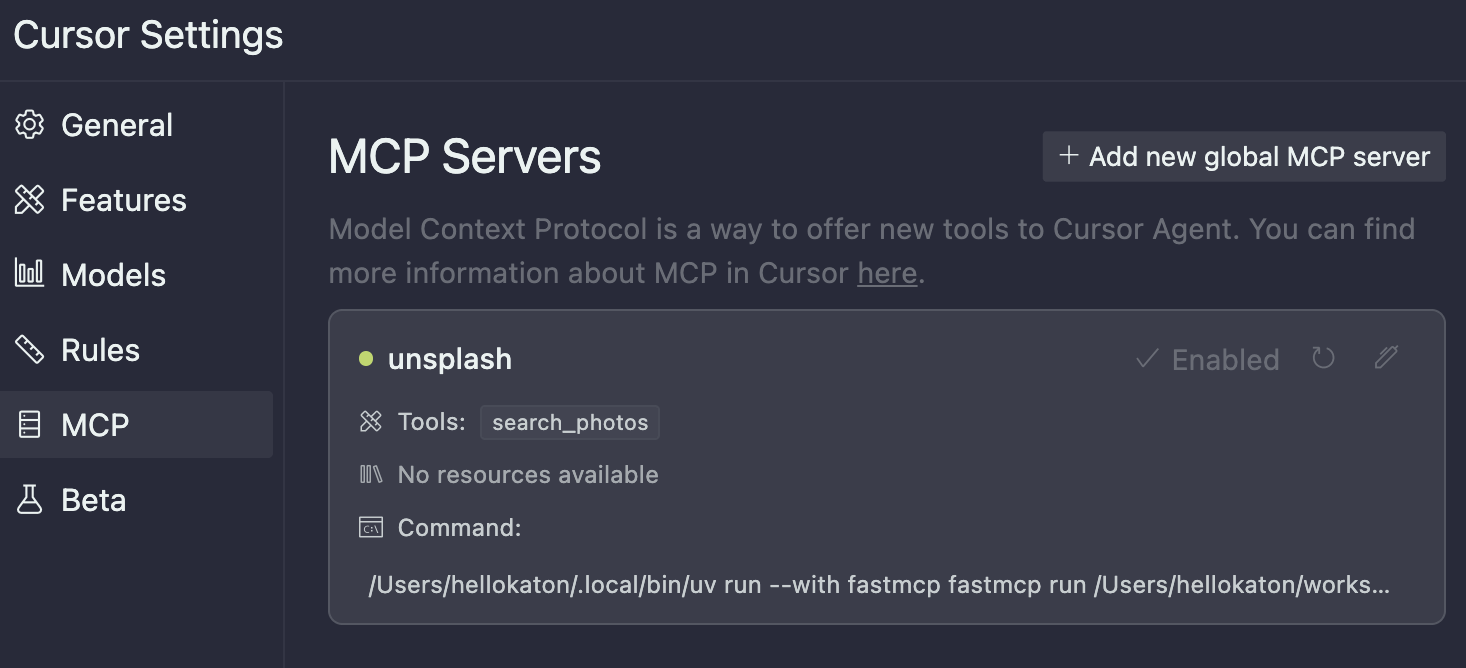
Cursor Editor Integration

Add the following configuration to your Cursor editor's settings.json:

⚠️ Note: Please adjust the following configuration according to your actual installation:

  • If uv is not in your system PATH, use an absolute path (e.g., /path/to/uv)
  • ./server.py should be modified to the actual location of your server script (can use absolute path or path relative to workspace)
Cursor Configuration Screenshot
{
  "mcpServers": {
    "unsplash": {
      "command": "uv",
      "args": ["run", "--with", "fastmcp", "fastmcp", "run", "./server.py"],
      "env": {
        "UNSPLASH_ACCESS_KEY": "${YOUR_ACCESS_KEY}"
      }
    }
  }
}

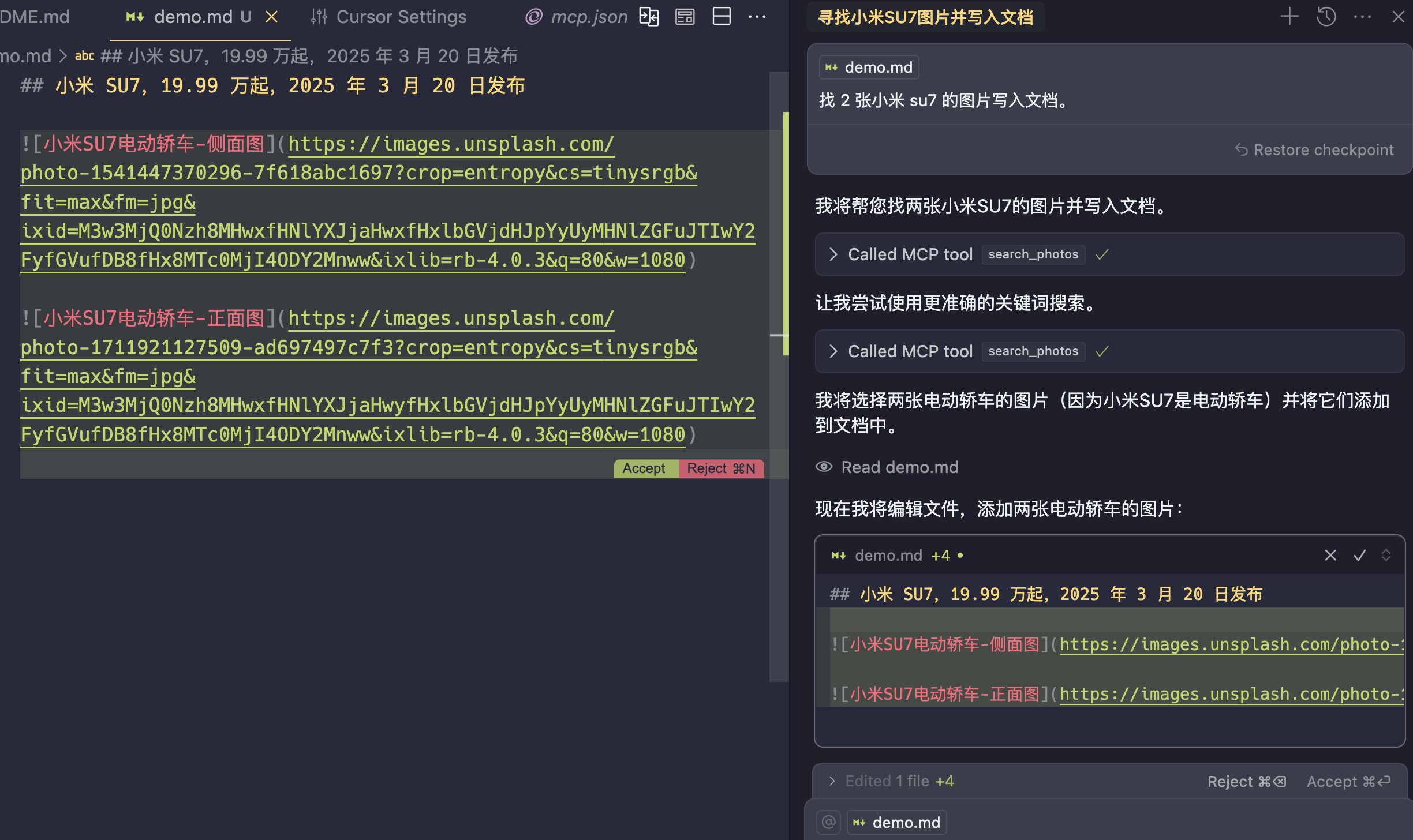
Using in Cursor
Unsplash MCP in Cursor

🛠️ Available Tools

Search Photos

{
  "tool": "search_photos",
  "query": "mountain",
  "per_page": 5,
  "orientation": "landscape"
}

🔄 Other Implementations

📄 License

MIT License

📬 Contact

Files in the repo

Repository payload10 top-level entries
  • screenshots
  • .gitignore
  • Dockerfile
  • LICENSE
  • pyproject.toml
  • README_zh.md
  • README.md
  • server.py
  • smithery.yaml
  • uv.lock

Discussion (0)

Ask about usage, or say what you built with it

Sign in to join the discussion.

No comments yet. Be the first to say what this is good for.

More connectors

High-performance code intelligence MCP server. Indexes codebases into a persistent knowledge graph — average repo in milliseconds. 158 languages, sub-ms queries, 99% fewer tokens. Single static binary, zero dependencies.

43k

Universal provider proxy for OpenAI Codex & Claude Code — use any LLM (Claude, Gemini, Grok, DeepSeek, Ollama…) with Codex CLI, App, SDK, and Claude Code

14k
okf-memory/
okf-agent-memory

Git-native persistent memory for AI coding agents. Implements Google OKF v0.2 with sub-300µs in-memory BM25 search, embedded MCP server, and progressive disclosure. Slashes token bloat by 80% with zero external databases or dependencies. Built in pure Go.

547
tirth8205/
code-review-graph

Local-first code intelligence graph for MCP and CLI. Builds a persistent map of your codebase so AI coding tools read only what matters, with benchmarked context reductions on reviews and large-repo workflows.

31k
2akouwu/
reverify

Stop your AI from making things up — it proposes, deterministic tools decide, every claim checked against ground truth with evidence. Grounded facts and context survive resets. Reverse engineering is the proving ground. MCP server + CLI.

1.1k
t8y2/dbxConnectors

20 MB lightweight cross-platform database client for 90+ databases, including MySQL, PostgreSQL, SQLite, Redis, MongoDB, DuckDB, SQL Server, and Dameng. Built-in AI, MCP Server, CLI, desktop and Docker. | 轻量级跨平台数据库管理工具,支持 MySQL、PostgreSQL、SQLite、Redis、MongoDB、达梦等 90+ 数据库,提供桌面端、Docker、CLI、内置 AI 助手和 MCP Server。

19k


