

koala73/worldmonitorConnectors
Real-time global intelligence dashboard. AI-powered news aggregation, geopolitical monitoring, and infrastructure tracking in a unified situational awareness interface
86k
ExStruct turns Excel workbooks into structured JSON so agents can work with cells, tables, charts, shapes, formulas, and merged areas. It also provides a patch-based editing CLI and an MCP server so agent runtimes can read, validate, make, and update workbooks through the same core.
Builders who want their agent to extract, inspect, or edit Excel workbooks through CLI or MCP.
You can feed Excel files to an agent in a structured form instead of forcing it to infer the workbook from screenshots or raw cells.
Reads workbooks into JSON with cells, table candidates, shapes, charts, SmartArt, merged cells, print areas, and page-break areas.
Supports light, standard, and verbose modes, with COM-rich extraction on Windows and best-effort OOXML parsing elsewhere.
Provides `patch`, `make`, `validate`, `ops list`, and `ops describe` commands for reviewable workbook edits.
Runs as an MCP server with tools such as `exstruct_extract`, `exstruct_patch`, `exstruct_make`, and workbook readers.
Includes a repo-owned skill at `.agents/skills/exstruct-cli/` to guide agents through validate, dry-run, inspect, and apply steps.
Ships JSON schemas, CLI docs, MCP docs, and example workbooks for tables, flowcharts, forms, and charts.
pip install exstruct
exstruct patch --input book.xlsx --ops ops.json --backend openpyxl
exstruct patch --input book.xlsx --ops - --dry-run --pretty < ops.json
exstruct make --output new.xlsx --ops ops.json --backend openpyxl
exstruct ops list
exstruct ops describe create_chart --pretty
exstruct validate --input book.xlsx --pretty
uvx --from 'exstruct[mcp]' exstruct-mcp --root C:\data --log-file C:\logs\exstruct-mcp.log --on-conflict rename
pip install exstruct[mcp]
exstruct-mcp --root C:\data --log-file C:\logs\exstruct-mcp.log --on-conflict rename
Excel Structured Extraction Engine






ExStruct reads Excel workbooks into structured data and applies patch-based editing workflows through a shared core. It provides extraction APIs, a JSON-first editing CLI, and an MCP server for host-managed integrations, with options tuned for LLM/RAG preprocessing, reviewable edit flows, and local automation.
Detection heuristics, editing workflows, and output modes are adjustable for LLM/RAG pipelines and local automation.
light: cells + table candidates + print areas + shapes/charts (best-effort via direct OOXML parsing)libreoffice: best-effort non-COM mode for .xlsx/.xlsm. When the LibreOffice runtime is available, it adds merged cells, shapes, connectors, and chartsstandard: Excel COM mode with texted shapes + arrows, charts, SmartArt, and merged-cell rangesverbose: outputs all shapes with width/height and also emits cell hyperlinksformulas_map (formula string -> cell coordinates) via openpyxl/COM. It is enabled by default in verbose and can be controlled with include_formulas_map.--pretty for formatting), YAML, and TOON (optional dependencies).exstruct.edit only when you need the same patch contract from Python.verbose mode, or with include_cell_links=True, cell links are emitted in links.pip install exstruct
Optional extras:
pip install pyyamlpip install python-toonpip install pypdfium2 pillow (mode=libreoffice is not supported)pip install exstruct[yaml,toon,render]Platform note:
python3-uno. ExStruct probes a compatible system Python automatically for mode=libreoffice; if your environment needs an explicit interpreter, set EXSTRUCT_LIBREOFFICE_PYTHON_PATH=/usr/bin/python3.--probe mode before selection. An incompatible EXSTRUCT_LIBREOFFICE_PYTHON_PATH fails fast instead of surfacing a delayed bridge SyntaxError during extraction.exstruct input.xlsx > output.json # compact JSON to stdout by default
exstruct input.xlsx -o out.json --pretty # write pretty JSON to a file
exstruct input.xlsx --format yaml # YAML (requires pyyaml)
exstruct input.xlsx --format toon # TOON (requires python-toon)
exstruct input.xlsx --sheets-dir sheets/ # write one file per sheet
exstruct input.xlsx --auto-page-breaks-dir auto_areas/ # always shown; execution requires standard/verbose + Excel COM
exstruct input.xlsx --alpha-col # output column keys as A, B, ..., AA
exstruct input.xlsx --include-backend-metadata # include shape/chart backend metadata
exstruct input.xlsx --mode light # cells + table candidates + best-effort OOXML shapes/charts
exstruct input.xlsx --mode libreoffice # best-effort extraction of shapes/connectors/charts without COM
exstruct input.xlsx --pdf --image # PDF and PNGs (Excel COM required)
Auto page-break export is available from both the API and the CLI when Excel/COM is available. The CLI always exposes --auto-page-breaks-dir, but validates it at execution time.
mode=libreoffice rejects --pdf, --image, and --auto-page-breaks-dir early, and mode=light also rejects --auto-page-breaks-dir. Use standard or verbose with Excel COM for those features.
By default, the CLI keeps legacy 0-based numeric string column keys ("0", "1", ...). Use --alpha-col when you need Excel-style keys ("A", "B", ...).
By default, serialized shape/chart output omits backend metadata (provenance, approximation_level, confidence) to reduce token usage. Use --include-backend-metadata or the corresponding Python/MCP option when you need it.
exstruct patch --input book.xlsx --ops ops.json --backend openpyxl
exstruct patch --input book.xlsx --ops - --dry-run --pretty < ops.json
exstruct make --output new.xlsx --ops ops.json --backend openpyxl
exstruct ops list
exstruct ops describe create_chart --pretty
exstruct validate --input book.xlsx --pretty
patch and make print JSON PatchResult to stdout.ops list / ops describe expose the public patch-op schema.validate reports workbook readability (is_readable, warnings, errors).Recommended edit flow:
exstruct patch --dry-run and inspect PatchResult, warnings, and diff.--backend openpyxl when you want the dry run and the real apply to use the same engine.--backend auto, inspect PatchResult.engine; on Windows/Excel hosts the real apply may switch to COM.--dry-run only after the result is acceptable.ExStruct also ships one repo-owned Skill for agents that should follow the editing CLI safely instead of rediscovering the workflow each time.
Canonical repo source:
.agents/skills/exstruct-cli/You can install it with the following single command:
npx skills add harumiWeb/exstruct/.agents/skills --skill exstruct-cli
If your runtime cannot use npx skills add, place the same folder manually
into a local skill directory that discovers SKILL.md-based skills.
Use this Skill when the agent needs help choosing between patch, make,
validate, ops list, and ops describe, or when it should follow the safe
validate -> dry-run -> inspect -> apply -> verify workflow.
Example prompt for agents:
Use
$exstruct-clito choose the right ExStruct editing CLI command, follow a safe validate/dry-run/inspect workflow, and explain any backend constraints for this workbook task.
MCP is the integration / compatibility layer around the same editing core. Use
it when you need host-managed path restrictions, transport mapping, artifact
mirroring, or approval-aware agent execution. For ordinary Python workbook
editing, openpyxl / xlwings are usually a better fit. For local shell or
agent workflows, prefer the editing CLI.
uvx (recommended)You can run it directly without installation:
uvx --from 'exstruct[mcp]' exstruct-mcp --root C:\data --log-file C:\logs\exstruct-mcp.log --on-conflict rename
Benefits:
pip install requireduvx --from 'exstruct[mcp]==0.4.4' exstruct-mcpYou can also install it with pip:
pip install exstruct[mcp]
exstruct-mcp --root C:\data --log-file C:\logs\exstruct-mcp.log --on-conflict rename
Available tools:
| Tool name | Description |
|---|---|
exstruct_extract | Extracts data from a workbook. |
exstruct_capture_sheet_images | Captures sheet images. |
exstruct_make | Creates a new workbook. |
exstruct_patch | Applies editing patches to a workbook. |
exstruct_read_json_chunk | Reads extracted JSON chunks. |
exstruct_read_range | Reads cells from a specified range. |
exstruct_read_cells | Reads data cell by cell. |
exstruct_read_formulas | Reads cell formulas. |
exstruct_validate_input | Validates input data. |
For more details and API usage, see the documentation site: MCP Server
from pathlib import Path
from exstruct import extract, export, set_table_detection_params

# Tune table detection (optional)
set_table_detection_params(table_score_threshold=0.3, density_min=0.04)

# Modes: "light" / "standard" / "verbose"
wb = extract("input.xlsx", mode="standard")  # standard does not emit links by default
export(wb, Path("out.json"), pretty=False)  # compact JSON
export(wb, Path("out.json"), include_backend_metadata=True)  # opt into backend metadata

# Helpful model methods: iteration, indexing, and direct serialization
first_sheet = wb["Sheet1"]          # get a sheet with __getitem__
for name, sheet in wb:              # __iter__ yields (name, SheetData)
    print(name, len(sheet.rows))
wb.save("out.json", pretty=True)    # save WorkbookData based on extension
first_sheet.save("sheet.json")      # save SheetData the same way
print(first_sheet.to_yaml())        # YAML string (requires pyyaml)
print(first_sheet.to_json(include_backend_metadata=True))  # opt in when needed

# ExStructEngine: per-instance configuration
from exstruct import (
    DestinationOptions,
    ExStructEngine,
    FilterOptions,
    FormatOptions,
    OutputOptions,
    StructOptions,
    export_auto_page_breaks,
)

engine = ExStructEngine(
    options=StructOptions(mode="verbose"),  # verbose includes hyperlinks by default
    output=OutputOptions(
        format=FormatOptions(pretty=True),
        filters=FilterOptions(
            include_shapes=False,
            include_backend_metadata=True,
        ),  # opt into backend metadata when needed
        destinations=DestinationOptions(sheets_dir=Path("out_sheets")),  # save per-sheet files
    ),
)
wb2 = engine.extract("input.xlsx")
engine.export(wb2, Path("out_filtered.json"))

# Enable hyperlinks in standard mode
engine_links = ExStructEngine(options=StructOptions(mode="standard", include_cell_links=True))
with_links = engine_links.extract("input.xlsx")

# Export one file per print area
from exstruct import export_print_areas_as
export_print_areas_as(wb, "areas", fmt="json", pretty=True)

# Extract / export auto page-break areas (COM only; raises if no auto breaks exist)
engine_auto = ExStructEngine(
    output=OutputOptions(
        destinations=DestinationOptions(auto_page_breaks_dir=Path("auto_areas"))
    )
)
wb_auto = engine_auto.extract("input.xlsx")  # includes SheetData.auto_print_areas
engine_auto.export(wb_auto, Path("out_with_auto.json"))
export_auto_page_breaks(wb_auto, "auto_areas", fmt="json", pretty=True)
Note (non-COM environments): even when Excel COM is unavailable, cells + table_candidates are still returned, and .xlsx / .xlsm keep best-effort OOXML shapes / charts when available.
from exstruct import set_table_detection_params

set_table_detection_params(
    table_score_threshold=0.35,  # raise it to be stricter
    density_min=0.05,
    coverage_min=0.2,
    min_nonempty_cells=3,
)
Higher values reduce false positives. Lower values reduce missed detections.
.xlsx / .xlsm (no COM required).include_cell_links=True.table_candidates, hyperlinks, and colors_map..xlsx / .xlsm still preserve best-effort OOXML shapes/charts when available.Excel and pypdfium2 are required:
exstruct input.xlsx --pdf --image --dpi 144
This writes <output>.pdf and PNG files under <output>_images/.
To show how far exstruct can structure Excel, we parse an Excel workbook that combines the following three elements on a single sheet and show an LLM reasoning example based on the JSON output.
The image below is the actual sample Excel sheet.
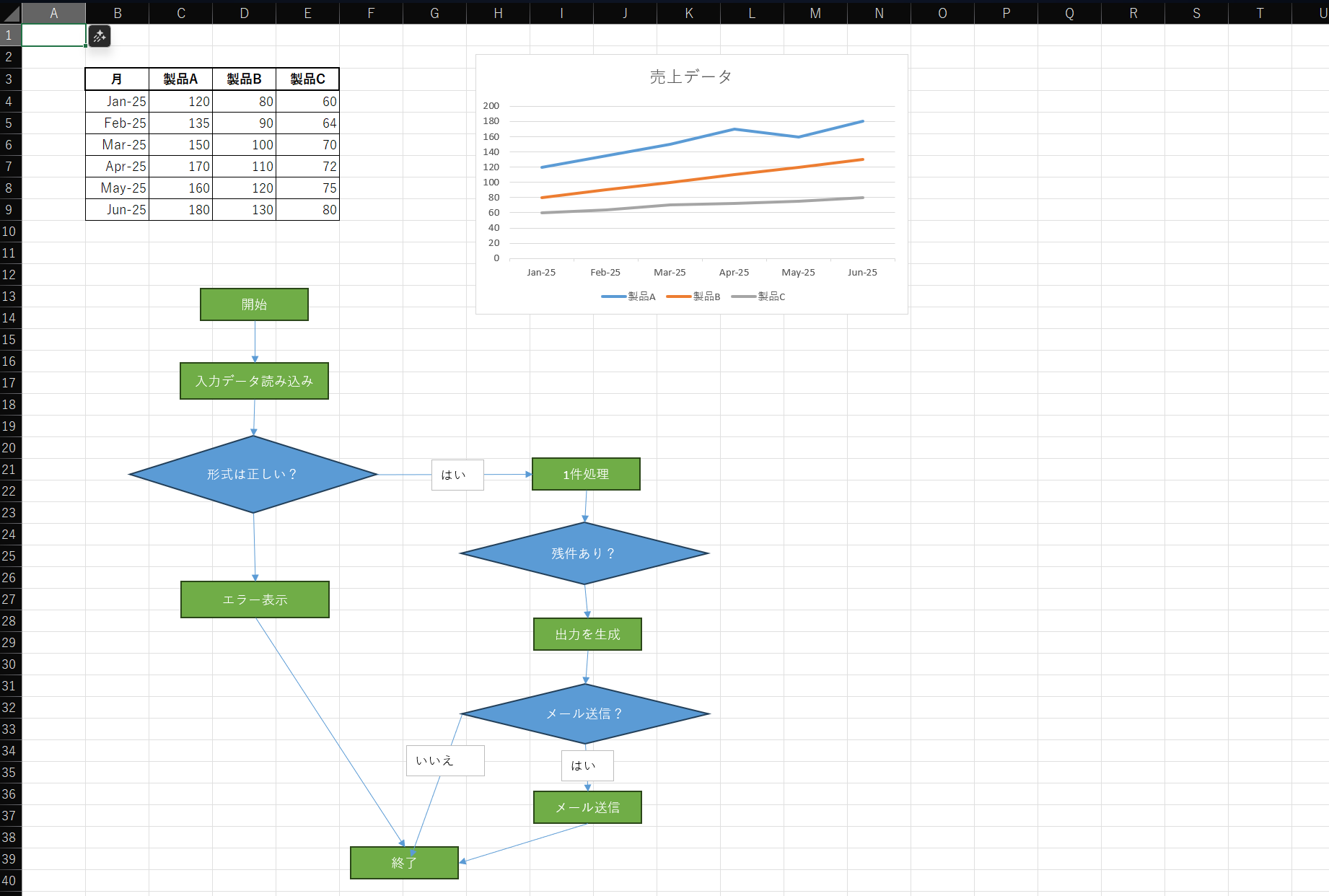
Sample Excel: sample/sample.xlsx
This sample Excel contains the following data:
| Month | Product A | Product B | Product C |
|---|---|---|---|
| Jan-25 | 120 | 80 | 60 |
| Feb-25 | 135 | 90 | 64 |
| Mar-25 | 150 | 100 | 70 |
| Apr-25 | 170 | 110 | 72 |
| May-25 | 160 | 120 | 75 |
| Jun-25 | 180 | 130 | 80 |
The sheet includes the following flow:
Below is a shortened JSON output example from parsing the workbook above.
{
  "book_name": "sample.xlsx",
  "sheets": {
    "Sheet1": {
      "rows": [
        {
          "r": 3,
          "c": {
            "1": "月",
            "2": "製品A",
            "3": "製品B",
            "4": "製品C"
          }
        },
        ...
      ],
      "shapes": [
        {
          "id": 1,
          "text": "開始",
          "l": 148,
          "t": 220,
          "kind": "shape",
          "type": "AutoShape-FlowchartProcess"
        },
        {
          "id": 2,
          "text": "入力データ読み込み",
          "l": 132,
          "t": 282,
          "kind": "shape",
          "type": "AutoShape-FlowchartProcess"
        },
        {
          "l": 193,
          "t": 246,
          "kind": "arrow",
          "begin_arrow_style": 1,
          "end_arrow_style": 2,
          "begin_id": 1,
          "end_id": 2,
          "direction": "N"
        },
        ...
      ],
      "charts": [
        {
          "name": "Chart 1",
          "chart_type": "Line",
          "title": "売上データ",
          "y_axis_range": [
            0.0,
            200.0
          ],
          "series": [
            {
              "name": "製品A",
              "name_range": "Sheet1!$C$3",
              "x_range": "Sheet1!$B$4:$B$9",
              "y_range": "Sheet1!$C$4:$C$9"
            },
            ...
          ],
          "l": 377,
          "t": 25
        }
      ],
      "table_candidates": [
        "B3:E9"
      ]
    }
  }
}
Below is a Markdown reconstruction of the Excel workbook. It expresses the table, chart, and flowchart as separate structures.

---

## Sales Data Table

| Month      | Product A | Product B | Product C |
| ---------- | --------- | --------- | --------- |
| 2025-01-01 | 120       | 80        | 60        |
| 2025-02-01 | 135       | 90        | 64        |
| 2025-03-01 | 150       | 100       | 70        |
| 2025-04-01 | 170       | 110       | 72        |
| 2025-05-01 | 160       | 120       | 75        |
| 2025-06-01 | 180       | 130       | 80        |

---

## Sales Data (Line Chart)

- Chart title: **売上データ**
- Chart type: line chart
- Y-axis range: 0 to 200
- Data series:
  - Product A: 120 -> 135 -> 150 -> 170 -> 160 -> 180
  - Product B: 80 -> 90 -> 100 -> 110 -> 120 -> 130
  - Product C: 60 -> 64 -> 70 -> 72 -> 75 -> 80

---

## Process Flow (Mermaid Flowchart)

```mermaid
flowchart TD
    A[Start]
    B[Load input data]
    C{Is the format valid?}
    D[Process one item]
    E{Items remaining?}
    F[Generate output]
    G{Send email?}
    H[Show error]
    I[Send email]
    J[Finish]

    A --> B
    B --> C
    C -->|yes| D
    C --> H
    D --> E
    E --> F
    F --> G
    G -->|yes| I
    G -->|no| J
    H --> J
    I --> J
```
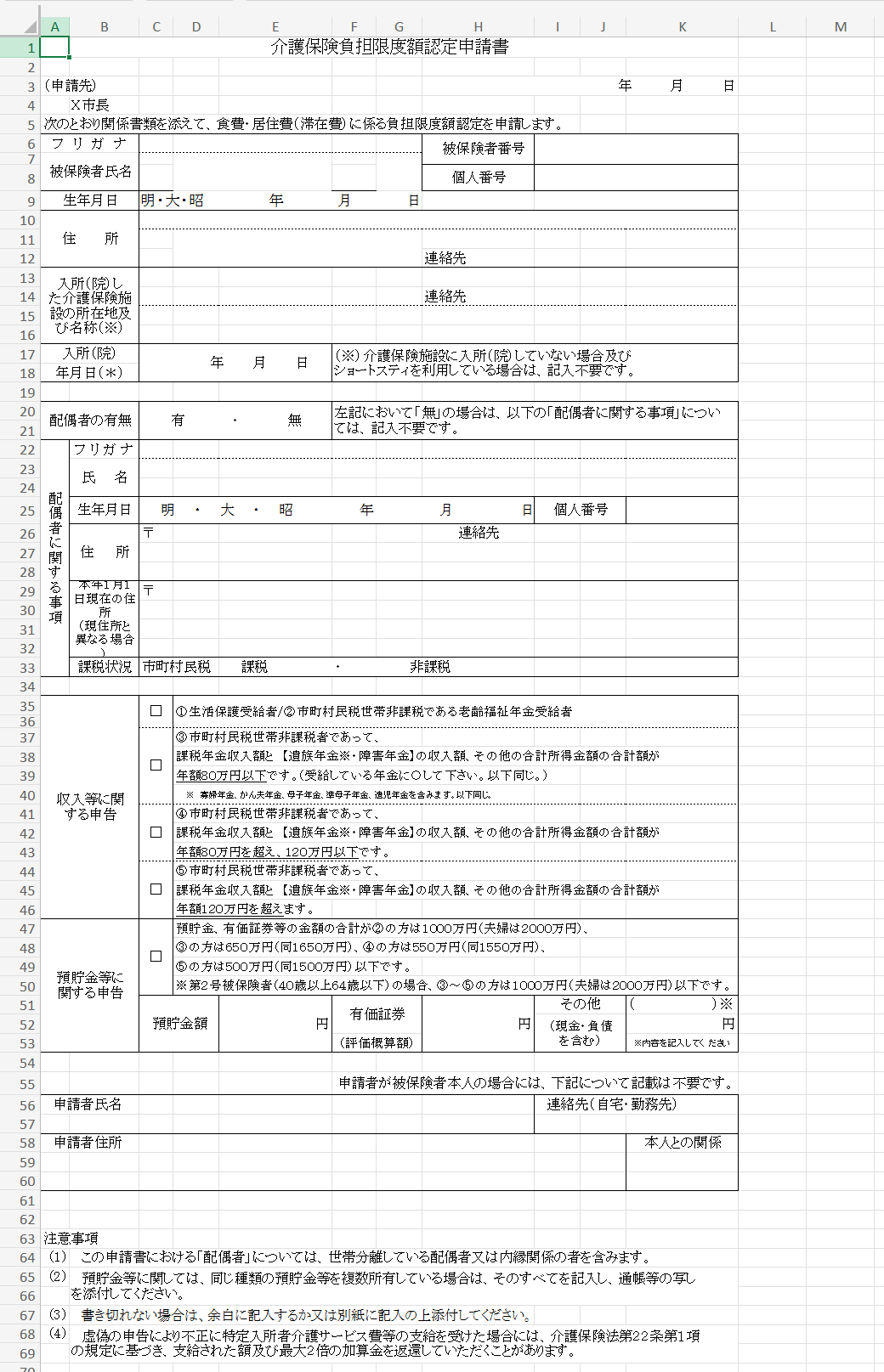
(Truncated for brevity)
{
  "book_name": "ja_form.xlsx",
  "sheets": {
    "Sheet1": {
      "rows": [
        { "r": 1, "c": { "0": "介護保険負担限度額認定申請書" } },
        {
          "r": 3,
          "c": { "0": "(申請先)", "7": "      年    月    日" }
        },
        { "r": 4, "c": { "1": "X市長 " } },
        ...
      ],
      "table_candidates": ["B25:C26", "C37:D50"],
      "merged_cells": {
        "schema": ["r1", "c1", "r2", "c2", "v"],
        "items": [
          [55, 5, 55, 10, "申請者が被保険者本人の場合には、下記について記載は不要です。"],
          [54, 8, 54, 10, " "],
          [51, 5, 52, 6, "有価証券"],
          ...
        ]
      }
    }
  }
}
# Long-Term Care Insurance Burden Limit Certification Application

(Submitted to)                                    Year    Month    Day
Mayor of City X

Attach the related documents below and apply for certification of the burden limit for food and housing expenses.

---

## Insured Person Information

| Item | Value |
| ---- | ----- |
| Furigana | |
| Name | |
| Insured Person Number | |
| Personal Number | |
| Date of Birth | Meiji / Taisho / Showa Year Month Day |
| Address | |
| Contact | |

---

## Long-Term Care Facility Entered / Hospitalized In

| Item | Value |
| ---- | ----- |
| Facility name / location | |
| Contact | |
| Date of entry / admission | Year Month Day |

If the applicant has not entered a care insurance facility, or uses short stay only, this section is not required.

---

## Presence of a Spouse

| Item | Value |
| ---- | ----- |
| Spouse | Yes / No |

If "No", the following spouse section is not required.

---

## Spouse Information

| Item | Value |
| ---- | ----- |
| Furigana | |
| Name | |
| Date of Birth | Meiji / Taisho / Showa Year Month Day |
| Personal Number | |
| Address | Postal code |
| Contact | |
| Address as of January 1 of this year (if different) | Postal code |
| Tax status | Municipal resident tax: taxable / non-taxable |

---

## Declaration of Income and Other Status

Check the applicable item below.

- □ 1. Livelihood protection recipient
- □ 2. Old-age welfare pension recipient in a household exempt from municipal resident tax
- □ 3. Person exempt from municipal resident tax whose taxable pension income + survivor/disability pension + other income totals **800,000 JPY or less per year**
- □ 4. Same as above, but **over 800,000 JPY up to 1,200,000 JPY**
- □ 5. Same as above, but **over 1,200,000 JPY**

Survivor pension includes widow's pension, widower's pension, mother's pension, quasi-mother's pension, and orphan's pension.

---

## Declaration of Deposits and Other Assets

- □ The total amount of deposits, securities, and other assets is below the following threshold:
  - Category 2: 10 million JPY (20 million JPY for couples)
  - Category 3: 6.5 million JPY (16.5 million JPY for couples)
  - Category 4: 5.5 million JPY (15.5 million JPY for couples)
  - Category 5: 5 million JPY (15 million JPY for couples)
  - Second insured persons (ages 40-64): Categories 3-5 must be 10 million JPY or less (20 million JPY for couples)

### Asset breakdown

| Item | Amount |
| ---- | ------ |
| Deposits | JPY |
| Securities (estimated value) | JPY |
| Other (including cash / debt) | JPY (describe) |

---

## Applicant Information (not required when the applicant is the insured person)

| Item | Value |
| ---- | ----- |
| Applicant name | |
| Contact (home / office) | |
| Applicant address | |
| Relationship to insured person | |

---

## Notes

1. In this application, "spouse" includes a spouse living separately and a common-law partner.
2. If you own multiple assets of the same kind, list all of them and attach copies of bankbooks or equivalent documents.
3. If there is not enough space, write on the margin or on a separate sheet and attach it.
4. If benefits are obtained through a false declaration, the paid amount and up to twice that amount as an additional charge may need to be repaid under Article 22, Paragraph 1 of the Long-Term Care Insurance Act.
The result above shows the following clearly:
ExStruct JSON is already in a format that AI can understand semantically as-is.
Other LLM inference samples built with this library are available in the following directories:
This benchmark demonstrates that the library can:
In short, exstruct = "an engine that converts Excel into a format AI can understand."

Universal provider proxy for OpenAI Codex & Claude Code — use any LLM (Claude, Gemini, Grok, DeepSeek, Ollama…) with Codex CLI, App, SDK, and Claude Code

Git-native persistent memory for AI coding agents. Implements Google OKF v0.2 with sub-300µs in-memory BM25 search, embedded MCP server, and progressive disclosure. Slashes token bloat by 80% with zero external databases or dependencies. Built in pure Go.

Local-first code intelligence graph for MCP and CLI. Builds a persistent map of your codebase so AI coding tools read only what matters, with benchmarked context reductions on reviews and large-repo workflows.

Stop your AI from making things up — it proposes, deterministic tools decide, every claim checked against ground truth with evidence. Grounded facts and context survive resets. Reverse engineering is the proving ground. MCP server + CLI.