

heygen-com/hyperframesFrameworks & SDKs
Write HTML. Render video. Built for agents.
49k
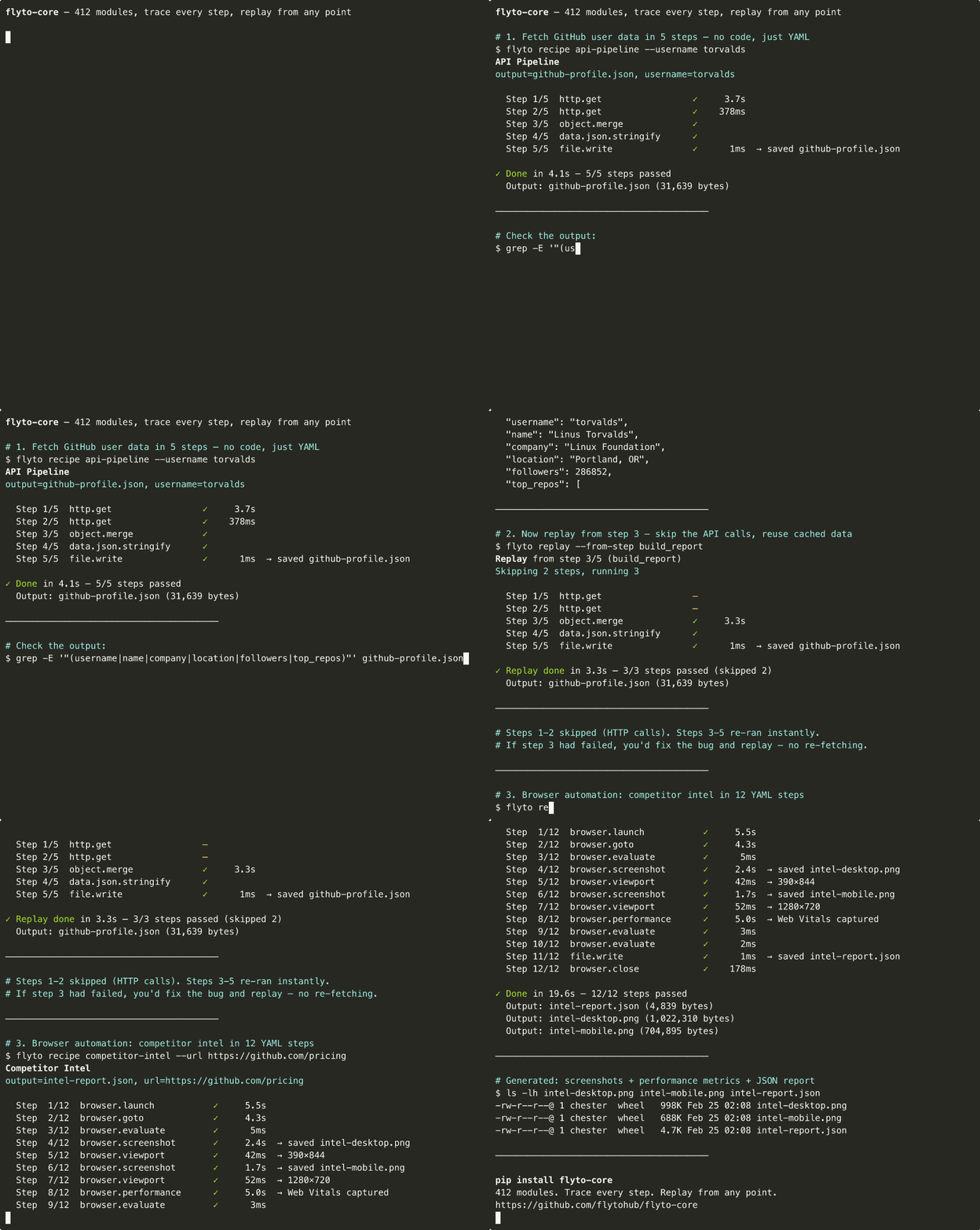
Flyto2 Core runs workflows as explicit steps, so browser actions, API calls, file writes, and verification all happen in one traced execution. If a step fails, you can replay from that step and keep the earlier work intact.
Builders who want their agent runs to be repeatable, inspectable, and resumable across browser and API work.
You can resume a failed run from the exact step that broke instead of re-running the whole job.
Records the input, output, timing, and status for each workflow step.
Re-executes only the chosen step and keeps earlier steps intact.
Includes browser steps such as launch, goto, click, evaluate, screenshot, and performance capture.
Exposes the module catalog to tools like Claude Code, Cursor, and Windsurf through MCP.
Provides workflow run, replay, single-module execution, and module discovery endpoints.
Ships ready-made workflows like competitor intel, site audit, and scrape-to-CSV.
pip install flyto-core[browser] && playwright install chromium
flyto recipe competitor-intel --url https://github.com/pricing
pip install flyto-core            # Core engine + CLI + MCP server
pip install flyto-core[browser]   # + browser automation (Playwright)
playwright install chromium        # one-time browser setup
# Run a built-in recipe
flyto recipe site-audit --url https://example.com

# Run your own YAML workflow
flyto run my-workflow.yaml

# List all recipes
flyto recipes
pip install flyto-core
claude mcp add flyto-core -- python -m core.mcp_server
pip install flyto-core[api]
flyto serve
# ✓ flyto-core running on 127.0.0.1:8333
AI said it finished. Flyto2 shows the proof.
A Python execution engine for AI agents. It runs browser and API work as explicit steps, records what every step did, and replays from the step that failed — instead of re-running the whole job.
The current public inventory is 480 registry-backed modules across 88 catalog categories, including triggers, queue modules, workflow versioning, metering hooks, browser automation, API calls, data transforms, verification, files, and crypto.



flyto2.com · Cloud Automation · Documentation · MCP Docs · YouTube
pip install flyto-core[browser] && playwright install chromium
flyto recipe competitor-intel --url https://github.com/pricing
  Step  1/12  browser.launch         ✓      420ms
  Step  2/12  browser.goto           ✓    1,203ms
  Step  3/12  browser.evaluate       ✓       89ms
  Step  4/12  browser.screenshot     ✓    1,847ms  → saved intel-desktop.png
  Step  5/12  browser.viewport       ✓       12ms  → 390×844
  Step  6/12  browser.screenshot     ✓    1,621ms  → saved intel-mobile.png
  Step  7/12  browser.viewport       ✓        8ms  → 1280×720
  Step  8/12  browser.performance    ✓    5,012ms  → Web Vitals captured
  Step  9/12  browser.evaluate       ✓       45ms
  Step 10/12  browser.evaluate       ✓       11ms
  Step 11/12  file.write             ✓        3ms  → saved intel-report.json
  Step 12/12  browser.close          ✓       67ms

  ✓ Done in 10.3s — 12/12 steps passed
Screenshots captured. Performance metrics extracted. JSON report saved. Every step traced.
With a shell script you re-run the whole thing. With flyto-core:
flyto replay --from-step 8
Steps 1–7 are instant. Only step 8 re-executes. Full context preserved.
| Playwright / Selenium | Shell scripts | flyto-core | |
|---|---|---|---|
| Step 8 fails | Re-run everything | Re-run everything | flyto replay --from-step 8 |
| What happened at step 3? | Add print(), re-run | Add echo, re-run | Full trace: input, output, timing |
| Browser + API + file I/O | Write glue code | 3 languages | All built-in |
| Share with team | "Clone my repo" | "Clone my repo" | pip install flyto-core |
| Run in CI | Wrap in pytest/bash | Fragile | flyto run workflow.yaml |
# Competitive pricing: screenshots + Web Vitals + JSON report
flyto recipe competitor-intel --url https://competitor.com/pricing

# Full site audit: SEO + accessibility + performance
flyto recipe full-audit --url https://your-site.com

# Web scraping → CSV export
flyto recipe scrape-to-csv --url https://news.ycombinator.com --selector ".titleline a"
Every recipe is traced. Every run is replayable. See all 41 recipes ->
pip install flyto-core            # Core engine + CLI + MCP server
pip install flyto-core[browser]   # + browser automation (Playwright)
playwright install chromium        # one-time browser setup
Recipes are just YAML files. Write your own:
name: price-monitor
steps:
  - id: open
    module: browser.launch
    params: { headless: true }

  - id: page
    module: browser.goto
    params: { url: "https://competitor.com/pricing" }

  - id: prices
    module: browser.evaluate
    params:
      script: |
        JSON.stringify([...document.querySelectorAll('.price')].map(e => e.textContent))

  - id: save
    module: file.write
    params: { path: "prices.json", content: "${prices.result}" }

  - id: close
    module: browser.close
flyto run price-monitor.yaml
Every run produces an execution trace and state snapshots. If step 3 fails, replay from step 3 — no re-running the whole thing.
# Run a built-in recipe
flyto recipe site-audit --url https://example.com

# Run your own YAML workflow
flyto run my-workflow.yaml

# List all recipes
flyto recipes
pip install flyto-core
claude mcp add flyto-core -- python -m core.mcp_server
Or add to your MCP config:
{
  "mcpServers": {
    "flyto-core": {
      "command": "python",
      "args": ["-m", "core.mcp_server"]
    }
  }
}
Your AI gets all 480 modules as tools.
pip install flyto-core[api]
flyto serve
# ✓ flyto-core running on 127.0.0.1:8333
| Endpoint | Purpose |
|---|---|
POST /v1/workflow/run | Execute workflow with evidence + trace |
POST /v1/workflow/{id}/replay/{step} | Replay from any step |
POST /v1/execute | Execute a single module |
GET /v1/modules | Discover all modules |
POST /mcp | MCP Streamable HTTP transport |
import asyncio
from core.modules.registry import ModuleRegistry

async def main():
    result = await ModuleRegistry.execute(
        "string.reverse",
        params={"text": "Hello"},
        context={}
    )
    print(result)  # {"ok": True, "data": {"result": "olleH"}}

asyncio.run(main())
| Category | Count | Examples |
|---|---|---|
browser.* | 54 | launch, goto, click, evaluate, screenshot, performance, challenge |
flow.* | 24 | switch, loop, branch, parallel, retry, circuit breaker, rate limit |
array.* | 15 | filter, sort, map, reduce, unique, chunk, flatten |
api.* | 13 | OpenAI, Anthropic, Gemini, Notion, Slack, Telegram |
data.* | 13 | JSON, YAML, CSV, XML parse/generate/convert |
string.* | 11 | reverse, uppercase, split, replace, trim, slugify, template |
ai.* | 10 | chat, model calls, vision, embeddings, moderation |
object.* | 10 | keys, values, merge, pick, omit, get, set, flatten |
testing.* | 10 | assertions, scenarios, E2E steps, reports |
image.* | 9 | resize, convert, crop, rotate, watermark, OCR, compress |
verify.* | 9 | evidence, visual diff, rulesets, annotations |
file.* | 8 | read, write, copy, move, delete, exists, edit, diff |
stats.* | 8 | mean, median, percentile, correlation, standard deviation |
test.* | 8 | API, browser, and visual checks |
check.* | 7 | validation and guard checks |
crypto.* | 7 | AES encrypt/decrypt, JWT create/verify, hashes |
http.* | 7 | get, request, batch, paginate, session |
validate.* | 7 | email, url, json, phone, credit card |
| 66 more prefixes | 221 | Docker, archive, math, k8s, network, PDF, AWS, cache, git |
See the Full Module Catalog for every module, parameter, and description.
CLI, MCP, HTTP, Python, and packaged recipes converge on the same workflow engine, module registry, policy, trace, evidence, and replay boundaries. Start with the Technical Whitepaper, then use the Architecture Map and exhaustive source reference for implementation detail.
| You want to | Go to |
|---|---|
| Run one of the other built-in recipes | docs/RECIPES.md |
| Browse every module and parameter | docs/TOOL_CATALOG.md |
| See the module categories at a glance | 480 Modules, 88 Catalog Categories |
| Configure network, filesystem, auth, and permission switches | docs/CONFIGURATION.md |
| Install a module pack or plugin | docs/PLUGIN_SDK.md |
| Write your own module | docs/MODULE_SPECIFICATION.md |
| Understand why the engine is shaped this way | docs/WHY.md |
| Read the product boundary between the three packages | ARCHITECTURE.md |
We welcome contributions! See CONTRIBUTING.md for guidelines.
python -m pytest
python -m ruff check .
flyto recipe full-audit --url https://example.com
Report security vulnerabilities via security@flyto2.com. See SECURITY.md for the security policy and the environment variables that define the filesystem and outbound-network boundaries.
SECURITY_STATUS.md lists every published advisory with its severity, affected range, fixed-in version, and the regression test that covers it. Two boundaries are enforced registry-wide by tests that fail the build — every module taking a caller-supplied path must reach the filesystem sandbox helper, and every module taking a caller-supplied URL or host must reach an SSRF guard — so coverage is a CI property rather than a convention.


Apache License 2.0 — free for personal and commercial use.
Cloud Automation · Pricing · flyto2.com
A hosted deployment is available on Frontier AI.
Also known as: open source AI agent framework for production workflows · Python AI workflow automation with Playwright · MCP server automation with trace and replay · browser automation that can resume from a failed step
Sign in to join the discussion.
No comments yet. Be the first to say what this is good for.
Write HTML. Render video. Built for agents.
Ultra-lightweight, open-source, self-hosted personal AI agent framework in Python with WebUI, tools, memory, MCP, multi-agent workflows, automation, and chat apps

SkillOpt is a text-space optimizer that trains reusable natural-language skills for frozen LLM agents through trajectory-driven edits, validation-gated updates, and deployable best_skill.md artifacts.

Omnigent is an open-source AI agent framework and meta-harness: orchestrate Claude Code, Codex, Cursor, Pi, and custom agents — swap harnesses without rewriting, enforce policies and sandboxing, and collaborate in real time from any device.

A theoretical reconstruction of the Claude Mythos architecture, built from first principles using the available research literature.
🕷️ An adaptive Web Scraping framework that handles everything from a single request to a full-scale crawl!