High-performance code intelligence MCP server. Indexes codebases into a persistent knowledge graph — average repo in milliseconds. 158 languages, sub-ms queries, 99% fewer tokens. Single static binary, zero dependencies.
MCP server for iTerm terminal control
iterm-mcp connects an MCP client to the active iTerm session so the model can run commands, inspect output, and manage long-running REPLs. It exposes tools for writing to the terminal, reading output, and sending control characters.
Builders who want their agent to use the iTerm session they already have open.
You can delegate terminal tasks to an agent and watch it work in the same shell you are already using.
What it does
Write commands to iTerm
`write_to_terminal` sends text to the active terminal and returns the number of output lines produced.
Read terminal output
`read_terminal_output` reads a requested number of lines from the active iTerm session.
Send control characters
`send_control_character` sends inputs like Ctrl-C and Ctrl-Z to manage running processes.
Supports REPL workflows
The model can start interactive sessions and continue working inside them instead of only running one-off commands.
Minimal dependency setup
The server is built to run with few dependencies and can be launched with `npx`.
How to get it
- 1To install iTerm for Claude Desktop automatically via Smithery
npx -y @smithery/cli install iterm-mcp --client claude
README
iterm-mcp
A Model Context Protocol server that provides access to your iTerm session.
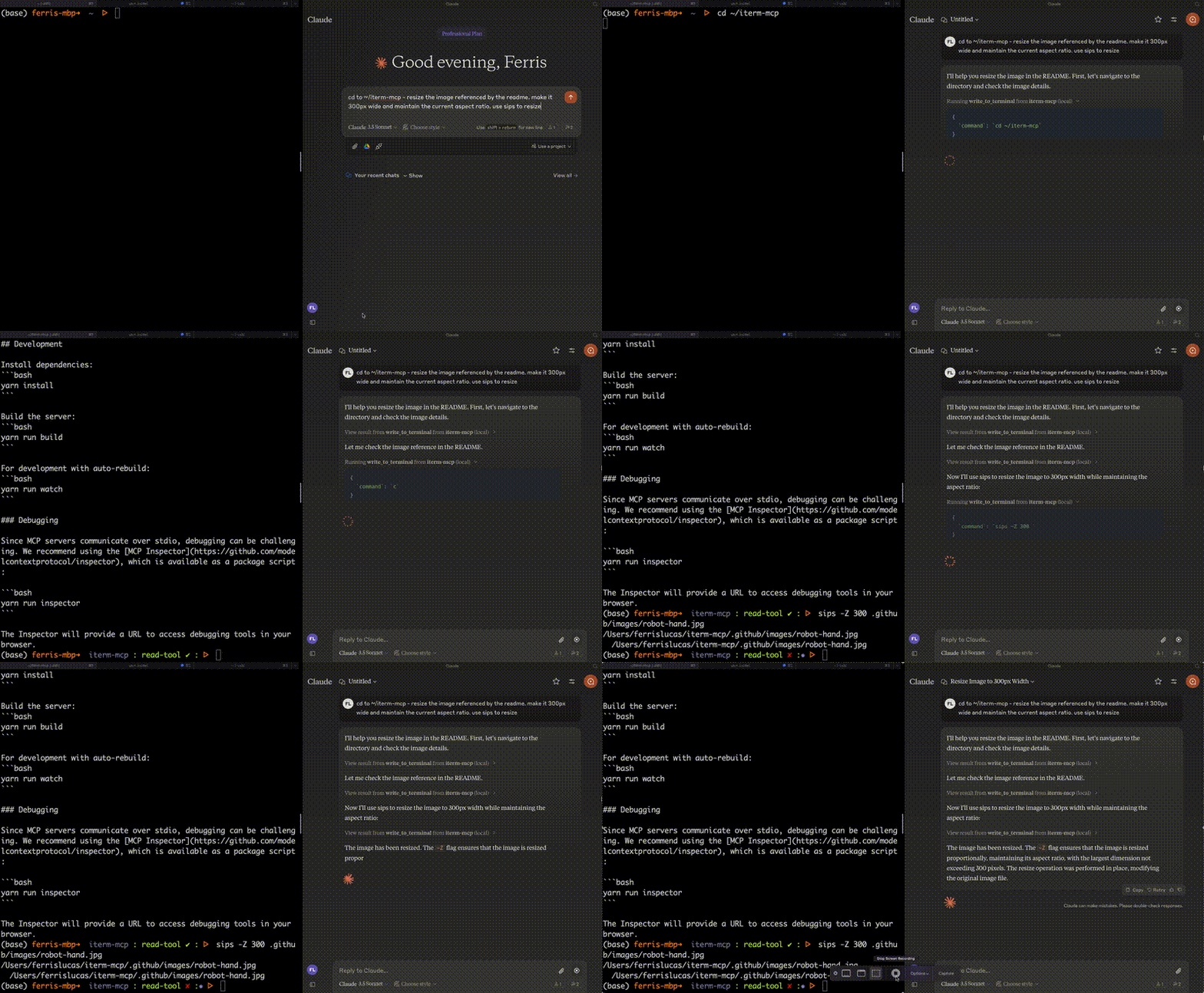
Features
Efficient Token Use: iterm-mcp gives the model the ability to inspect only the output that the model is interested in. The model typically only wants to see the last few lines of output even for long running commands.
Natural Integration: You share iTerm with the model. You can ask questions about what's on the screen, or delegate a task to the model and watch as it performs each step.
Full Terminal Control and REPL support: The model can start and interact with REPL's as well as send control characters like ctrl-c, ctrl-z, etc.
Easy on the Dependencies: iterm-mcp is built with minimal dependencies and is runnable via npx. It's designed to be easy to add to Claude Desktop and other MCP clients. It should just work.
Safety Considerations
- The user is responsible for using the tool safely.
- No built-in restrictions: iterm-mcp makes no attempt to evaluate the safety of commands that are executed.
- Models can behave in unexpected ways. The user is expected to monitor activity and abort when appropriate.
- For multi-step tasks, you may need to interrupt the model if it goes off track. Start with smaller, focused tasks until you're familiar with how the model behaves.
Tools
write_to_terminal- Writes to the active iTerm terminal, often used to run a command. Returns the number of lines of output produced by the command.read_terminal_output- Reads the requested number of lines from the active iTerm terminal.send_control_character- Sends a control character to the active iTerm terminal.
Requirements
- iTerm2 must be running
- Node version 18 or greater
Installation
To use with Claude Desktop, add the server config:
On macOS: ~/Library/Application Support/Claude/claude_desktop_config.json
On Windows: %APPDATA%/Claude/claude_desktop_config.json
{
"mcpServers": {
"iterm-mcp": {
"command": "npx",
"args": [
"-y",
"iterm-mcp"
]
}
}
}
Installing via Smithery
To install iTerm for Claude Desktop automatically via Smithery:
npx -y @smithery/cli install iterm-mcp --client claude

Development
Install dependencies:
yarn install
Build the server:
yarn run build
For development with auto-rebuild:
yarn run watch
Debugging
Since MCP servers communicate over stdio, debugging can be challenging. We recommend using the MCP Inspector, which is available as a package script:
yarn run inspector
yarn debug <command>
The Inspector will provide a URL to access debugging tools in your browser.
Files in the repo
- .github
- src
- test
- .gitignore
- jest.config.cjs
- LICENSE.md
- package.json
- README.md
- tsconfig.json
- yarn.lock
Discussion (0)
Ask about usage, or say what you built with itSign in to join the discussion.
No comments yet. Be the first to say what this is good for.
More connectors

Universal provider proxy for OpenAI Codex & Claude Code — use any LLM (Claude, Gemini, Grok, DeepSeek, Ollama…) with Codex CLI, App, SDK, and Claude Code
Git-native persistent memory for AI coding agents. Implements Google OKF v0.2 with sub-300µs in-memory BM25 search, embedded MCP server, and progressive disclosure. Slashes token bloat by 80% with zero external databases or dependencies. Built in pure Go.
Local-first code intelligence graph for MCP and CLI. Builds a persistent map of your codebase so AI coding tools read only what matters, with benchmarked context reductions on reviews and large-repo workflows.
Stop your AI from making things up — it proposes, deterministic tools decide, every claim checked against ground truth with evidence. Grounded facts and context survive resets. Reverse engineering is the proving ground. MCP server + CLI.
20 MB lightweight cross-platform database client for 90+ databases, including MySQL, PostgreSQL, SQLite, Redis, MongoDB, DuckDB, SQL Server, and Dameng. Built-in AI, MCP Server, CLI, desktop and Docker. | 轻量级跨平台数据库管理工具,支持 MySQL、PostgreSQL、SQLite、Redis、MongoDB、达梦等 90+ 数据库,提供桌面端、Docker、CLI、内置 AI 助手和 MCP Server。
