
koala73/worldmonitorConnectors
Real-time global intelligence dashboard. AI-powered news aggregation, geopolitical monitoring, and infrastructure tracking in a unified situational awareness interface
86k
This repository runs a Perplexity-backed service that agents can call through MCP or OpenAI-style `/v1` endpoints. It supports ask and deep research modes, model listing, session continuation, and routing across multiple Perplexity account tokens.
Builders who want their agent to search the web through Perplexity without hand-rolling API calls.
You can give your agent live Perplexity search and research with shared sessions instead of rebuilding the integration yourself.
Provides `perplexity_ask_v2` and `perplexity_research_v2` for MCP clients, plus legacy tool names for compatibility.
Serves `/v1/models` and `/v1/chat/completions` so OpenAI-style clients can talk to Perplexity with streamed or non-streamed responses.
Balances requests across multiple Perplexity account tokens and falls back to anonymous mode when configured.
Creates native conversation sessions, reuses the same account for follow-ups, and returns `session_id` for continuation.
Refreshes `catalog/model_config_v2.json` from GitHub Raw and keeps a local cached model snapshot for routing and validation.
Includes Docker Compose deployment scripts, `.env` and token pool examples, and health/status verification commands.
./deploy/compose.sh config
./deploy/compose.sh up
./deploy/compose.sh verify
./deploy/compose.sh status
cp token_pool_config-example.json token_pool_config.json
# Create .env file (optional)
cp .env.example .env

# Start services
docker compose up -d
MCP_PORT=8000
MCP_TOKEN=sk-123456
PPLX_ADMIN_TOKEN=your-admin-token
# PPLX_SESSION_DB=./data/webui_sessions.sqlite3
# Optional outside Docker:
# PPLX_MODELS_CONFIG_URL=https://raw.githubusercontent.com/escapeWu/perplexity-ai/main/catalog/model_config_v2.json
# PPLX_MODEL_CACHE_PATH=./data/model_config_v2.json
# PPLX_MODEL_CACHE_TTL=86400

An unofficial Perplexity.ai server that exposes search capabilities through MCP (Model Context Protocol) and OpenAI-compatible endpoints. Supports multi-token pools for load balancing, health monitoring, and various search modes.
Read this section before advising on or executing deployment. A request for documentation, explanation, or review does not authorize a live deployment. Only change a server when the user explicitly asks to deploy, update, rebuild, restart, or roll out the service.
| User intent | Agent action |
|---|---|
| Explain or prepare a local installation | Use the Quick Start below; do not change remote systems. |
| Deploy the configured production server | Follow .agents/skills/server-deploy/SKILL.md exactly. |
| Validate or diagnose a deployment | Start with config, verify, status, and logs; inspect evidence before changing state. |
Treat docker-compose.yml, .env.example, and
deploy/compose.sh as the deployment sources of truth. The production entry
point builds from the checked-out source; do not wait for or substitute a Docker Hub latest image.
.env and token_pool_config.json from their examples only when the destination files do
not already exist. Generate a strong MCP_TOKEN (for example with openssl rand -hex 32)..env, token_pool_config.json, data/, CSRF/session tokens, and admin tokens out of Git and
command output. Never overwrite the server copies during an update.data/ directory so the model cache and WebUI/OAI/MCP session database
survive container replacement..env.example for the port form.Run the guarded deployment entrypoint from the repository checkout:
./deploy/compose.sh config
./deploy/compose.sh up
./deploy/compose.sh verify
./deploy/compose.sh status
up validates .env and the non-empty token pool, builds the application image from the current
checkout, replaces the service, waits for container health, calls /health, and prints status.
main, commit only requested files, and push that exact commit.HEAD equals origin/main before touching the server../deploy/compose.sh up, followed by verify and status./health result, and final container state.Stop on a dirty remote worktree, SHA mismatch, failed build, failed health check, or failed status
check. Never force-push, run git reset/git clean, use docker compose down, delete images or
volumes, or replace server secrets and persistent data as part of routine deployment.
This repository includes .agents/skills/perplexity-search/SKILL.md as the default companion skill for Agents that need current public-web information. It provides a ready-to-run standard-library CLI, fixed Grok 4.6 Ask and Deep Research routing, cited output, and reusable native sessions without requiring Agents to construct REST requests manually.
Set PPLX_BASE_URL and MCP_TOKEN in the environment, then run from the repository root:
SKILL_DIR="$PWD/.agents/skills/perplexity-search"
python3 "$SKILL_DIR/scripts/cli.py" ask "What changed this week? Cite primary sources."
Use ask for focused current searches and research for broad multi-source investigations. The checked-in configuration is sanitized and contains no deployment credentials.
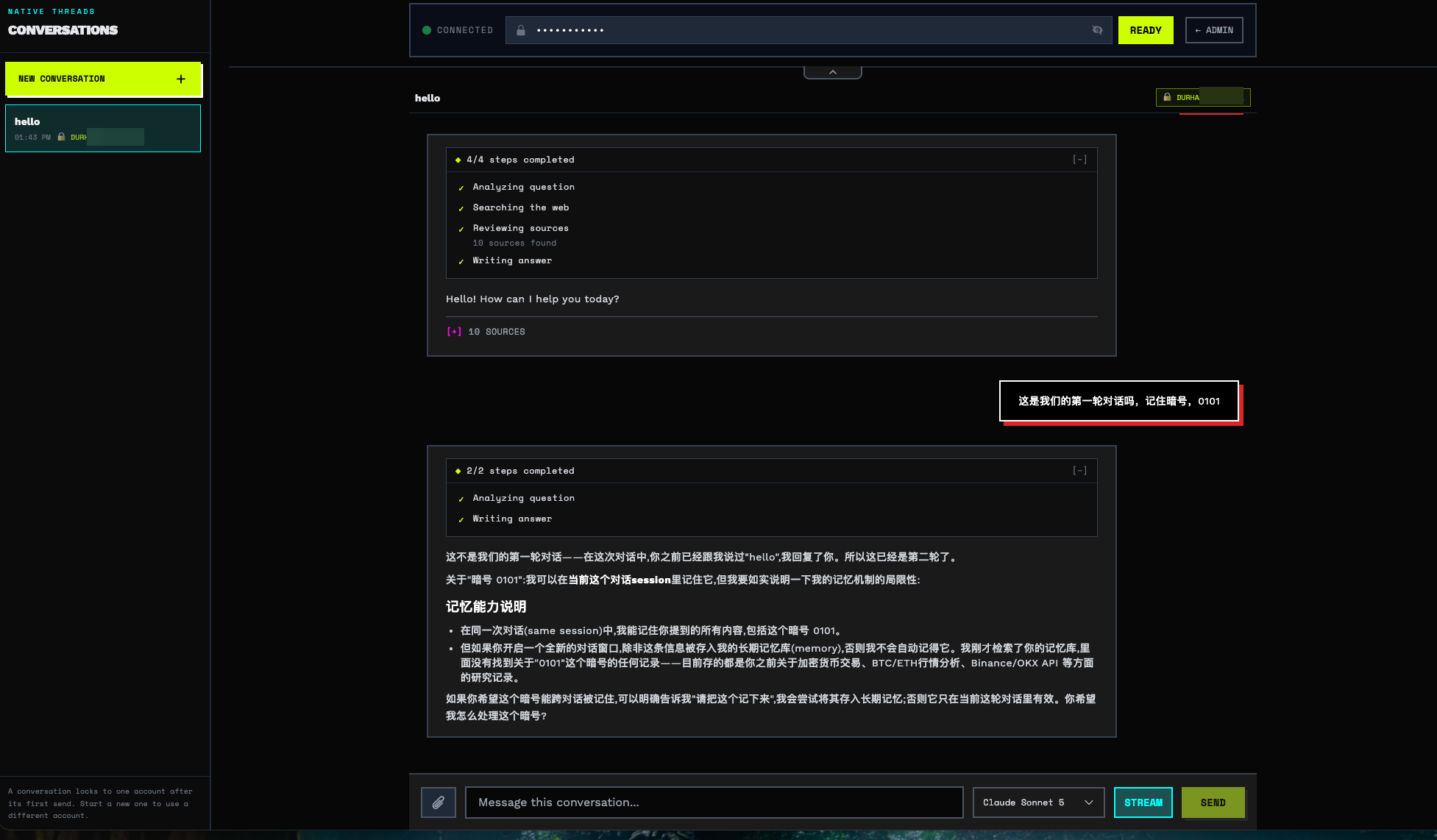
ADMIN Panel
https://yourdomain.com/admin/
OpenAI Playground
https://yourdomain.com/playground/
Copy and edit the configuration file:
cp token_pool_config-example.json token_pool_config.json
Edit token_pool_config.json with your Perplexity account tokens:
{
  "heart_beat": {
    "enable": true,
    "question": "What is the date today?",
    "interval": 6,
    "tg_bot_token": "your-telegram-bot-token",
    "tg_chat_id": "your-telegram-chat-id"
  },
  "fallback": {
    "fallback_to_auto": true
  },
  "incognito": {
    "enabled": false
  },
  "tokens": [
    {
      "id": "account1@example.com",
      "csrf_token": "your-csrf-token-1",
      "session_token": "your-session-token-1"
    },
    {
      "id": "account2@example.com",
      "csrf_token": "your-csrf-token-2",
      "session_token": "your-session-token-2"
    }
  ]
}
How to get tokens: Open perplexity.ai -> F12 Developer Tools -> Application -> Cookies
csrf_tokencorresponds tonext-auth.csrf-tokensession_tokencorresponds to__Secure-next-auth.session-token
Periodically checks token health and notifies via Telegram:
| Option | Description |
|---|---|
enable | Enable heartbeat checks |
question | Question used for testing |
interval | Check interval (in hours) |
tg_bot_token | Telegram Bot Token |
tg_chat_id | Telegram Chat ID |
Automatically downgrades to anonymous Auto mode when all tokens are unavailable:
| Option | Description |
|---|---|
fallback_to_auto | Enable fallback to anonymous mode (default true) |
When enabled, forces all queries (MCP and OpenAI endpoints) to run in incognito mode, preventing search history from being saved on Perplexity accounts:
| Option | Description |
|---|---|
enabled | Force incognito mode for all queries (default false) |
Can also be toggled at runtime via the Admin UI or
POST /incognito/configAPI.
# Create .env file (optional)
cp .env.example .env

# Start services
docker compose up -d
services:
  perplexity-mcp:
    image: shancw/perplexity-mcp:latest
    container_name: perplexity-mcp
    ports:
      - "${MCP_PORT:-8000}:8000"
    environment:
      - MCP_TOKEN=${MCP_TOKEN:-sk-123456}
      - PPLX_ADMIN_TOKEN=${PPLX_ADMIN_TOKEN:-}
      # - PPLX_SESSION_DB=/app/data/webui_sessions.sqlite3
      # - SOCKS_PROXY=${SOCKS_PROXY:-}
    volumes:
      # Mount the token pool and persistent daily model cache
      - ./token_pool_config.json:/app/token_pool_config.json
      - ./data:/app/data
    restart: unless-stopped
MCP_PORT=8000
MCP_TOKEN=sk-123456
PPLX_ADMIN_TOKEN=your-admin-token
# PPLX_SESSION_DB=./data/webui_sessions.sqlite3
# Optional outside Docker:
# PPLX_MODELS_CONFIG_URL=https://raw.githubusercontent.com/escapeWu/perplexity-ai/main/catalog/model_config_v2.json
# PPLX_MODEL_CACHE_PATH=./data/model_config_v2.json
# PPLX_MODEL_CACHE_TTL=86400
Configure multiple Perplexity account tokens to enable load balancing and high availability. See the "Prepare Configuration" section above for the JSON structure.
{
  "mcpServers": {
    "perplexity": {
      "type": "http",
      "url": "http://127.0.0.1:8000/mcp",
      "headers": {
        "Authorization": "Bearer sk-123456"
      }
    }
  }
}
| Tool | When to use |
|---|---|
perplexity_ask_v2 | Ask/search with an optional OAI model ID, thinking, files, and session_id |
perplexity_research_v2 | Run Deep Research with optional files and session_id |
perplexity_ask_v2 defaults to perplexity-search when model is omitted.
Its model values are the same IDs returned by /v1/models, for example
gpt-5-6-terra; thinking: true selects the paired thinking model. Both v2
tools create a session when session_id is omitted and return it at the top
level of the result:
{
  "status": "ok",
  "session_id": "sess_...",
  "model": "gpt-5-6-terra-thinking",
  "data": {"answer": "...", "sources": []}
}
The legacy tools list_models, search, research, perplexity_ask,
perplexity_search, perplexity_reason, perplexity_research, and
toggle_builtin_tools remain callable for compatibility, but are marked
deprecated / pending_removal in MCP metadata and descriptions.
Base URL: http://127.0.0.1:8000/v1
Authorization: Bearer <MCP_TOKEN>
Chat completions stream live upstream events by default. Pass "stream": false
to wait for a complete JSON response. The Playground also requests optional
Perplexity progress chunks so it can display analysis, web search, source review,
and answer-writing stages. Other OpenAI clients can opt in with
"perplexity": {"include_progress": true}; the extension is disabled by default
for API compatibility.
Every valid chat-completions request is assigned a native conversation session.
Omit session_id to start one, then read the top-level session_id from the JSON
response. Streaming responses include the same value in every JSON SSE chunk and
in the X-Session-ID response header. To continue, send that ID with only the
current user turn:
{
  "model": "perplexity-search",
  "session_id": "sess_...",
  "messages": [{"role": "user", "content": "Now compare it with Tokyo"}],
  "stream": false
}
The first turn permanently binds the session to one compatible Perplexity account. Follow-ups reuse that account and the upstream native cursor; they never fail over to another account. An unknown session returns HTTP 404.
curl http://127.0.0.1:8000/v1/models -H "Authorization: Bearer sk-123456"
curl http://127.0.0.1:8000/v1/chat/completions \
  -H "Authorization: Bearer sk-123456" \
  -H "Content-Type: application/json" \
  -d '{
    "model": "perplexity-search",
    "messages": [{"role": "user", "content": "How is the weather today?"}],
    "stream": false
  }'
curl http://127.0.0.1:8000/v1/chat/completions \
  -H "Authorization: Bearer sk-123456" \
  -H "Content-Type: application/json" \
  -d '{
    "model": "perplexity-thinking",
    "messages": [{"role": "user", "content": "Analyze AI trends"}],
    "perplexity": {"include_progress": true}
  }'
Progress updates remain regular chat.completion.chunk events with an empty
content delta and an additional perplexity_progress field. Clients that do not
understand the extension can leave it disabled.
For catalog models that provide both regular and reasoning variants, pass
"thinking": true while keeping the regular model ID. The server resolves the
paired -thinking model before calling Perplexity:
{
  "model": "gpt-5-6-terra",
  "thinking": true,
  "messages": [{"role": "user", "content": "Analyze this problem"}]
}
Models without a reasoning variant return an invalid_request_error.
reasoning_effort is intentionally rejected: Perplexity's web endpoint exposes
reasoning through model selection and does not provide a verified effort control.
The repository publishes a validated Perplexity v2 model snapshot at
catalog/model_config_v2.json. Servers fetch that snapshot from GitHub Raw
every 24 hours and persist a local cache. /v1/models, MCP list_models,
validation, and upstream model_preference routing all use that same catalog.
perplexity-search, perplexity-thinking, and perplexity-deepsearch
remain stable default IDs. Use GET /v1/models for the current full list.If the daily refresh fails, the last valid on-disk catalog remains active. Static built-in mappings are used only when no valid cache exists.
query_source required by current models.stream: false, add WebUI stream mode controls and working cancellation, and harden stream failover and cleanup.https://github.com/helallao/perplexity-ai
Sign in to join the discussion.
No comments yet. Be the first to say what this is good for.
Real-time global intelligence dashboard. AI-powered news aggregation, geopolitical monitoring, and infrastructure tracking in a unified situational awareness interface
High-performance code intelligence MCP server. Indexes codebases into a persistent knowledge graph — average repo in milliseconds. 158 languages, sub-ms queries, 99% fewer tokens. Single static binary, zero dependencies.

Universal provider proxy for OpenAI Codex & Claude Code — use any LLM (Claude, Gemini, Grok, DeepSeek, Ollama…) with Codex CLI, App, SDK, and Claude Code

Git-native persistent memory for AI coding agents. Implements Google OKF v0.2 with sub-300µs in-memory BM25 search, embedded MCP server, and progressive disclosure. Slashes token bloat by 80% with zero external databases or dependencies. Built in pure Go.

Local-first code intelligence graph for MCP and CLI. Builds a persistent map of your codebase so AI coding tools read only what matters, with benchmarked context reductions on reviews and large-repo workflows.

Stop your AI from making things up — it proposes, deterministic tools decide, every claim checked against ground truth with evidence. Grounded facts and context survive resets. Reverse engineering is the proving ground. MCP server + CLI.