













koala73/worldmonitorConnectors
Real-time global intelligence dashboard. AI-powered news aggregation, geopolitical monitoring, and infrastructure tracking in a unified situational awareness interface
86k
This server exposes Jupyter notebooks, cells, kernels, and execution through MCP so an agent can work on notebooks directly. It supports live notebook changes, multimodal outputs, notebook prompts, authentication, and multiple sandbox backends.
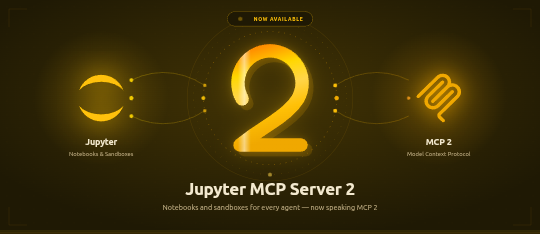
Builders who want their agent to open, edit, and run Jupyter notebooks instead of copying code in and out of them.
You can let an agent inspect notebooks, change cells, and run code against Jupyter or a sandbox without leaving your workflow.
Browse notebooks, create or switch notebooks, read notebook content, insert, edit, delete, move, and reorder cells, and clear outputs.
Run cells or arbitrary code with streaming output and multimodal results when the backend supports it.
Send execution to Jupyter Server or optional sandbox backends like Datalayer, Kaggle, Google Colab, Modal, Daytona, E2B, CoreWeave, and Cloudflare.
Expose JupyterLab commands as MCP tools, including notebook run-all-cells and get-selected-cell.
Install the Datalayer plugin to add notebook and run commands inside Claude Code.
Supports OAuth 2.1, personal access tokens, hooks, and OpenTelemetry tracing for tool calls and kernel execution.
pip install jupyterlab jupyter-collaboration jupyter-mcp-tools ipykernel
# Start JupyterLab on port 8888, allowing access from any IP and setting a token
jupyter lab --port 8888 --IdentityProvider.token MY_TOKEN --ip 0.0.0.0
pip install uv
uv --version
# should be 0.6.14 or higher

An MCP server developed for AI to connect and manage Jupyter Notebooks in real-time — and scale your Code Sandbox from local to the cloud (Datalayer, Kaggle, Google Colab, Modal, Daytona, E2B, CoreWeave, Cloudflare...)
Developed by Datalayer - Join our Discord



📖 Documentation · 🔧 Tools · 💬 Community
No process to run. Datalayer now hosts this server for you at
https://mcp.datalayer.run/mcp — one endpoint for every agent and every notebook.
Sign in from your browser, approve what the agent may do, and your work keeps running
on the server after the agent disconnects.
One command to connect Claude Code, with /datalayer:notebook, /datalayer:run and
/datalayer:status on top:
/plugin marketplace add datalayer/jupyter-mcp-server
/plugin install datalayer
→ Datalayer plugin for Claude Code
Free and open source, BSD 3-Clause — point it at any Jupyter you already run, local or JupyterHub, no account needed.
Built and maintained by Datalayer, where the same server drives always-on Notebooks with GPU Code Sandboxes and durable execution — so your agent keeps working on your data when your laptop does not.
No token to copy and paste. An agent that meets this server unauthenticated is told where to authenticate, opens your browser, and you sign in to Datalayer as yourself. The agent never sees your password — it receives a token scoped to what you approved, and you can disconnect one agent without touching the others.
What each agent may do is two separate decisions: the scopes you approve
(notebooks:read, notebooks:write, code:execute, data:read) say what kind of
operation it may perform, and your own Datalayer permissions still say which notebooks it
may touch. An agent can never reach a notebook you cannot.
Personal access tokens keep working, and remain the simpler path for a CLI or a script. → OAuth and identity
Pin code-sandboxes to match your jupyter-mcp-server. The sandbox variant
jupyter was renamed to jupyter-server in code-sandboxes 1.1.1, and the two packages
have to agree on the name.
Your jupyter-mcp-server | Install |
|---|---|
| >= 1.5.0 | code-sandboxes >= 1.1.1 |
| < 1.5.0 | code-sandboxes <= 1.0.9 |
# On 1.5.0 or later
pip install "jupyter-mcp-server>=1.5.0" "code-sandboxes>=1.1.1"

# Staying on an earlier jupyter-mcp-server
pip install "jupyter-mcp-server<1.5.0" "code-sandboxes<=1.0.9"
An older server with a newer code-sandboxes installs cleanly and then fails on the
first execution with Unknown sandbox variant: jupyter.
→ Release notes
Jupyter MCP Server 2 runs on the MCP Python SDK 2
(mcp>=2,<3), the SDK's first major release. Nothing changes in how you start or
configure the server, in the tools, or for the MCP clients connecting to it — the protocol
is negotiated with each client as before. What changes is the Python environment:
Your jupyter-mcp-server | mcp SDK |
|---|---|
| >= 2.0.0 | mcp >= 2 |
| < 2.0.0 | mcp < 2 |
Both are pinned in the package, so pip sorts it out; an environment holding another
package that still pins mcp<2 has to stay on jupyter-mcp-server<2 until that package
moves. Writing an extension or a custom token verifier against the SDK? See the
release notes for the renamed
imports.
--provider is now --document-provider (env var PROVIDER → DOCUMENT_PROVIDER).
It only ever chose where the notebook documents live — jupyter for the collaboration
API of a Jupyter Server, datalayer for the Datalayer spacer — while the old name and its
help text suggested it also chose where code runs. Execution is picked separately, with
--sandbox-variant (jupyter-server, datalayer, daytona, e2b, coreweave,
cloudflare, kaggle, google-colab, monty, modal).
Nothing breaks in v1.3.2: --provider is still accepted as an alias, PROVIDER is still
read, and a /connect payload carrying "provider" is still understood. Move to the new
names when convenient — the old ones are deprecated, not removed.
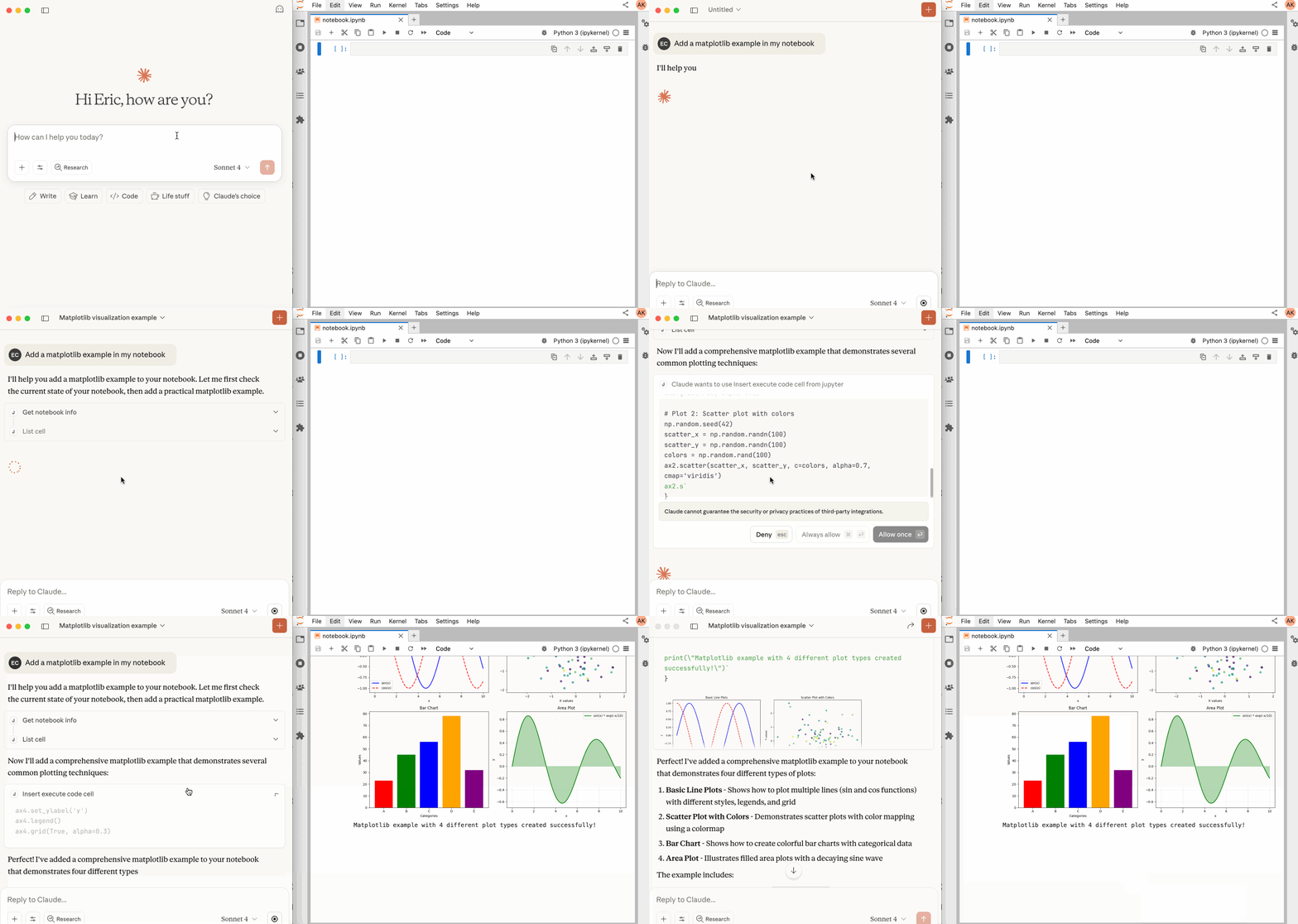
Compatible with any Jupyter deployment (local, JupyterHub, ...) and with Datalayer hosted Notebooks, where the Code Sandboxes come with GPUs and the execution survives a disconnect.
Every tool, with its parameters, schema and return value, is generated from a live snapshot of the running server and published at jupyter-mcp-server.datalayer.tech/mcp — so it is never out of step with the code, which a table copied into this file would be.
They fall into four groups:
Sandbox tools need the optional jupyter_mcp_sandboxes extension; see
Sandbox Variants.
Available only when JupyterLab mode is enabled. It is enabled by default.
In JupyterLab mode the server also exposes JupyterLab commands as MCP tools through
jupyter-mcp-tools —
notebook_run-all-cells and notebook_get-selected-cell by default, with more
selectable through allowed_jupyter_mcp_tools. The full list and how to configure it are
in the Additional Tools documentation.
The server implements the MCP
prompts feature.
jupyter-cite cites specific cells from a notebook, the way @ does in a coding IDE or
CLI. Input parameters and returned content are in the
Prompts documentation.
For comprehensive setup instructions—including Streamable HTTP transport, running as a Jupyter Server extension and advanced configuration—check out our documentation. Or, get started quickly with JupyterLab and STDIO transport here below.
pip install jupyterlab jupyter-collaboration jupyter-mcp-tools ipykernel
To confirm your environment is correctly configured:
This automatic saving behavior confirms that the real-time collaboration features are working properly, which is essential for MCP server integration.
# Start JupyterLab on port 8888, allowing access from any IP and setting a token
jupyter lab --port 8888 --IdentityProvider.token MY_TOKEN --ip 0.0.0.0
If you are running notebooks through JupyterHub instead of JupyterLab as above, refer to our JupyterHub setup guide.
Next, configure your MCP client to connect to the server. We offer two primary methods—choose the one that best fits your needs:
uvx (Recommended for Quick Start): A lightweight and fast method using uv. Ideal for local development and first-time users.Docker (Recommended for Production): A containerized approach that ensures a consistent and isolated environment, perfect for production or complex setups.First, install uv:
pip install uv
uv --version
# should be 0.6.14 or higher
See more details on uv installation.
Then, configure your client:
{
  "mcpServers": {
    "jupyter": {
      "command": "uvx",
      "args": ["jupyter-mcp-server@latest"],
      "env": {
        "JUPYTER_URL": "http://localhost:8888",
        "JUPYTER_TOKEN": "MY_TOKEN",
        "ALLOW_IMG_OUTPUT": "true"
      }
    }
  }
}
On macOS and Windows:
{
  "mcpServers": {
    "jupyter": {
      "command": "docker",
      "args": [
        "run", "-i", "--rm",
        "-e", "JUPYTER_URL",
        "-e", "JUPYTER_TOKEN",
        "-e", "ALLOW_IMG_OUTPUT",
        "datalayer/jupyter-mcp-server:latest"
      ],
      "env": {
        "JUPYTER_URL": "http://host.docker.internal:8888",
        "JUPYTER_TOKEN": "MY_TOKEN",
        "ALLOW_IMG_OUTPUT": "true"
      }
    }
  }
}
On Linux:
{
  "mcpServers": {
    "jupyter": {
      "command": "docker",
      "args": [
        "run", "-i", "--rm",
        "-e", "JUPYTER_URL",
        "-e", "JUPYTER_TOKEN",
        "-e", "ALLOW_IMG_OUTPUT",
        "--network=host",
        "datalayer/jupyter-mcp-server:latest"
      ],
      "env": {
        "JUPYTER_URL": "http://localhost:8888",
        "JUPYTER_TOKEN": "MY_TOKEN",
        "ALLOW_IMG_OUTPUT": "true"
      }
    }
  }
}
port in your Jupyter URLs matches the one used in the jupyter lab command. For simplified config, set this in JUPYTER_URL.JUPYTER_URL when both services are on the same server, or set individual variables for advanced deployments. The different URL variables exist because some deployments separate notebook storage (DOCUMENT_URL) from kernel execution (CODE_SANDBOX_URL).JUPYTER_TOKEN for simplified config or set DOCUMENT_TOKEN and CODE_SANDBOX_TOKEN individually for different credentials.DOCUMENT_ID parameter specifies the path to the notebook the MCP client default to connect. It should be relative to the directory where JupyterLab was started. If you omit DOCUMENT_ID, the MCP client can automatically list all available notebooks on the Jupyter server, allowing you to select one interactively via your prompts.ALLOW_IMG_OUTPUT to false if your LLM does not support mutimodel understanding.For detailed instructions on configuring various MCP clients—including Claude Desktop, VS Code, Cursor, Cline, and Windsurf — see MCP Client Configuration.
By default, code executes through the code-sandboxes jupyter-server variant against
a Jupyter Server (SANDBOX_VARIANT=jupyter-server). Setting SANDBOX_VARIANT to any
other value uses another code-sandboxes
engine via the sandbox's plain kernel client when the selected variant exposes
one, so the same notebook tools can run code on additional backends.
The spelling is not fussy: google_colab, google-colab and GOOGLE-COLAB all name the
same variant. The names below are the canonical ones.
Sandbox features are provided by the optional jupyter_mcp_sandboxes extension.
To expose sandbox lifecycle tools (launch_sandbox, list_sandboxes,
use_sandbox, terminate_sandbox) or run any non-jupyter-server sandbox variant,
install it with pip install jupyter_mcp_sandboxes.
| Engine | SANDBOX_VARIANT | Extra install | Key variables | Docs |
|---|---|---|---|---|
| Jupyter Server (default) | jupyter-server | — | JUPYTER_URL, JUPYTER_TOKEN | Setup |
| JupyterHub | jupyter-server | — | CODE_SANDBOX_URL, CODE_SANDBOX_TOKEN | Setup |
| Datalayer | datalayer | jupyter-mcp-server[datalayer] | CODE_SANDBOX_URL, CODE_SANDBOX_TOKEN, SANDBOX_ENVIRONMENT | Setup |
| Kaggle | kaggle | jupyter-mcp-server[kaggle] | Kaggle credentials, or CODE_SANDBOX_URL for interactive mode | Setup |
| Google Colab | google-colab | jupyter-mcp-server | CODE_SANDBOX_URL, CODE_SANDBOX_ID, CODE_SANDBOX_PROXY_TOKEN | Setup |
| Monty | monty | jupyter-mcp-server[monty] | — | Setup |
| Modal | modal | jupyter-mcp-server[modal] | Modal credentials | Setup |
| Daytona | daytona | jupyter-mcp-server[daytona] | DAYTONA_API_KEY, or DAYTONA_JWT_TOKEN + DAYTONA_ORGANIZATION_ID | Setup |
| E2B | e2b | jupyter-mcp-server[e2b] | E2B_API_KEY | Setup |
| CoreWeave | coreweave | jupyter-mcp-server[coreweave] | CWSANDBOX_API_KEY | Setup |
| Cloudflare | cloudflare | jupyter-mcp-server[cloudflare] | CLOUDFLARE_SANDBOX_API_URL, CLOUDFLARE_SANDBOX_API_KEY | Setup |
Each engine has its own page with the credentials it needs, the accelerator options it accepts and a worked client configuration — start from jupyter-mcp-server.datalayer.tech/code-sandboxes.
Run the test suite:
pytest tests/
Required environment variables for tests:
Optional environment variables:
TEST_MCP_SERVER: true/false toggle for standalone MCP server mode tests (default true).TEST_JUPYTER_SERVER: true/false toggle for Jupyter extension mode tests (default true).DATALAYER_API_KEY: required only for Datalayer cloud smoke/integration tests.DATALAYER_RUN_URL: optional custom Datalayer code sandbox URL for datalayer engine tests.SANDBOX_ENVIRONMENT: optional cloud environment override (for example ai-agents-env).We welcome contributions of all kinds! Here are some examples:
For detailed instructions on how to get started with development and submit your contributions, please see our Contributing Guide.
Looking for blog posts, videos, or other materials about Jupyter MCP Server?
👉 Visit the Resources section in our documentation for more!
Sign in to join the discussion.
No comments yet. Be the first to say what this is good for.
Real-time global intelligence dashboard. AI-powered news aggregation, geopolitical monitoring, and infrastructure tracking in a unified situational awareness interface
High-performance code intelligence MCP server. Indexes codebases into a persistent knowledge graph — average repo in milliseconds. 158 languages, sub-ms queries, 99% fewer tokens. Single static binary, zero dependencies.

Universal provider proxy for OpenAI Codex & Claude Code — use any LLM (Claude, Gemini, Grok, DeepSeek, Ollama…) with Codex CLI, App, SDK, and Claude Code

Git-native persistent memory for AI coding agents. Implements Google OKF v0.2 with sub-300µs in-memory BM25 search, embedded MCP server, and progressive disclosure. Slashes token bloat by 80% with zero external databases or dependencies. Built in pure Go.

Local-first code intelligence graph for MCP and CLI. Builds a persistent map of your codebase so AI coding tools read only what matters, with benchmarked context reductions on reviews and large-repo workflows.

Stop your AI from making things up — it proposes, deterministic tools decide, every claim checked against ground truth with evidence. Grounded facts and context survive resets. Reverse engineering is the proving ground. MCP server + CLI.