

koala73/worldmonitorConnectors
Real-time global intelligence dashboard. AI-powered news aggregation, geopolitical monitoring, and infrastructure tracking in a unified situational awareness interface
86k
CCPG starts a local gateway on your machine. Claude Code talks to the Anthropic-compatible endpoint, while other tools can use the OpenAI-compatible `/v1` surface, and the daemon routes requests to the provider and model you chose. It also includes a desktop UI for provider setup, connection tests, logs, history, and model chains. That lets you switch backends, inspect routed prompts, and keep the Claude Code loop intact.
Builders who want Claude Code and other clients to switch between local and cloud models from one local gateway.
You can keep your agent workflow and change providers per session without reworking your setup.
Claude Code sends requests to `127.0.0.1`, and CCPG translates and routes them to the selected provider.
Other tools can point at `http://127.0.0.1:49250/v1` and use model and chat endpoints through the same provider setup.
You can add built-in or custom providers, test connections, favorite entries, reorder them, and hide unused models.
Map Claude tiers to providers, aggregate all enabled providers, or build fallback chains that move to the next model when one fails.
The app records routed requests, previews, token counts, latency, warnings, and response text so you can see what the agent sent.
Run it as a native Tauri app on macOS, Windows, and Linux, or start the same daemon and panel with Docker Compose.
docker compose up -d --build
ccpg --DeepSeek # Or other configured provider
ccpg --DeepSeek --resume <session-id>
ccpg --OpenRouter --dangerously-skip-permissions
ccpg --Ollama --continue
Claude Code, your provider, one local gateway.
Run Claude Code through OpenAI Account, GitHub Copilot, OpenRouter, DeepSeek, Groq, xAI, Mistral, GLM, Minimax, Command Code, Ollama, LM Studio, llama.cpp, custom OpenAI/Anthropic-compatible endpoints, and many other providers, while keeping the Claude Code workflow intact.






Free, open source, and local-first.
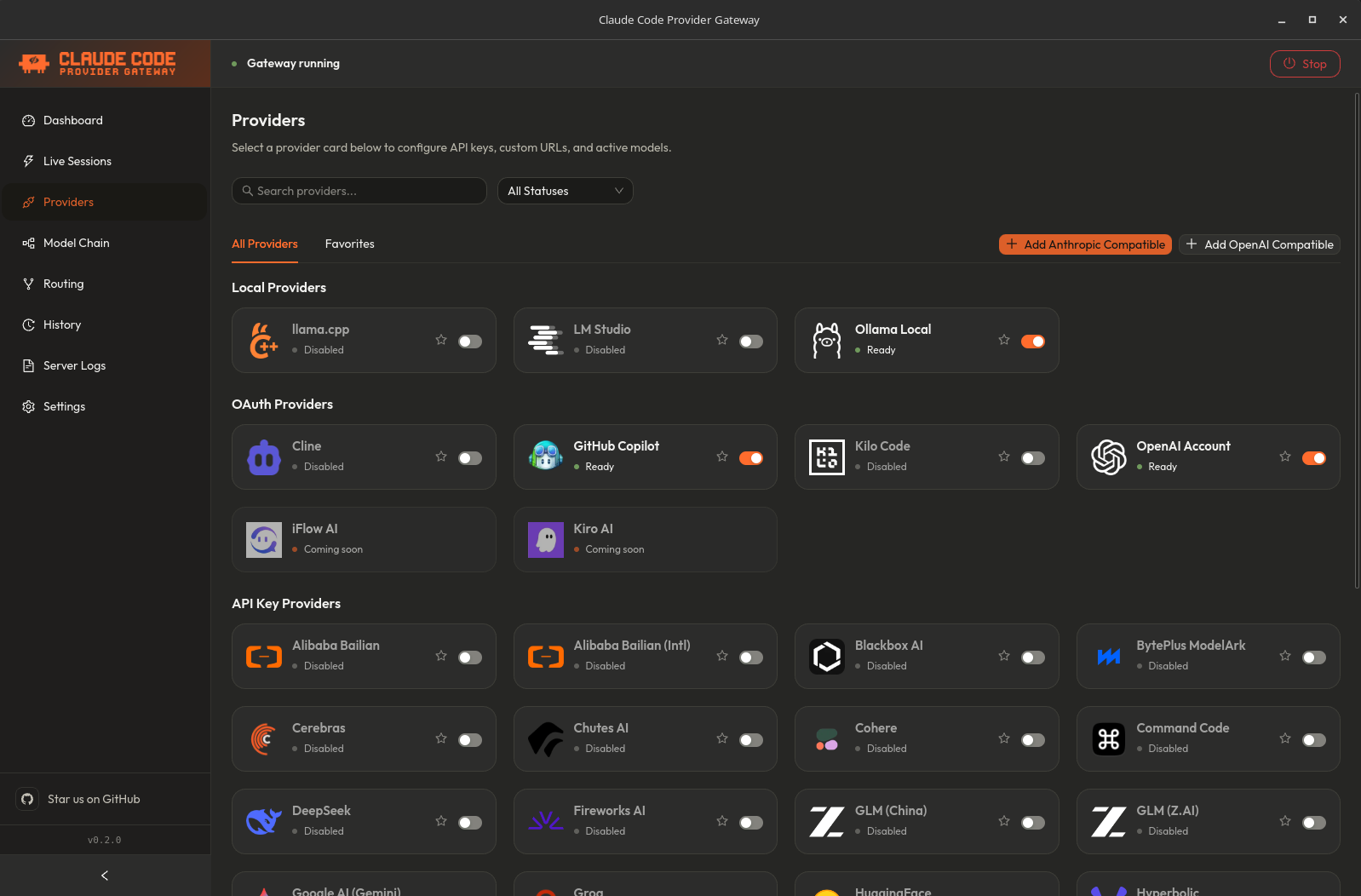
Claude Code Provider Gateway, or CCPG, is a desktop app that starts a local gateway on your machine. Claude Code talks to the Anthropic-compatible proxy surface, while external tools can use the OpenAI-compatible /v1 surface. The gateway routes each request to the provider and model you configured, translates protocols when needed, and streams the result back in the caller's expected format.
Claude Code -> CCPG desktop app -> local proxy -> your selected LLM provider
You keep Claude Code's agent loop, tool use, project context, custom commands, hooks, MCP servers, and IDE workflow. You choose the model backend.
CCPG is not an npm package for end users. It has two official runtime modes: the Tauri desktop app for a native local experience, and a Docker/Web mode for users who want to run the same daemon and panel in a browser without installing a desktop app.
Claude Code is one of the best AI coding tools available, but the default experience keeps you tied to one provider, one model catalog, and one pricing model.
CCPG gives you the missing control layer:
Everything runs locally. There is no hosted CCPG service, no telemetry, no account system, and no gateway markup. The app is MIT licensed, open source, and designed to run locally.
ccpg shell command from Dashboard -> Terminal Integration.ccpg --<provider>
[!WARNING] If your
.claude/settings.jsonor.claude/settings.local.jsonhas anenvblock withANTHROPIC_AUTH_TOKENorANTHROPIC_BASE_URL, remove those entries before launching viaccpg. Those env vars override the gateway endpoint and prevent CCPG from routing requests correctly.
After that, switch providers per session:
ccpg --OpenRouter
ccpg --OpenAIAccount
ccpg --Copilot
ccpg --Ollama
ccpg --all
ccpg --ModelChain
ccpg --my-chain
To run CCPG in a browser with Docker Compose:
docker compose up -d --build
Then open:
http://localhost:6767http://localhost:49250/v1Docker/Web state is persisted in the ccpg_data volume. For port mapping,
environment variables, Terminal Integration, reverse proxy setup, backups, and
Docker troubleshooting, see the Docker/Web Guide.
CCPG is an early release, feedback is welcome, and it is already usable for testing.
v0.1 is available now with desktop installers for macOS, Linux, and Windows. Expect rough edges, but the core flow is ready:
install app → add provider → test connection → run Claude Code through CCPG.
The primary packaged path is the desktop app: users should not need Node.js, npm, Rust, Bun, or hand-edited terminal config. Docker/Web is also supported for users who prefer a containerized browser UI.
The official documentation is at ccpg.live/docs. The repo also keeps the full Markdown docs in docs/ if you prefer reading them here:
127.0.0.1; CCPG translates and routes them.http://127.0.0.1:49250/v1 and use /v1/models plus /v1/chat/completions with the same enabled providers.opus, sonnet, and haiku to different providers and models.ccpg --<provider> terminals at once; each session keeps its own provider/model mode, primary model memory, heartbeat, and live request log.Ever wonder what Claude Code is actually sending to the API?
CCPG logs each request Claude Code sends through the gateway, including background calls that do not appear as normal chat messages. In the History UI you can inspect:
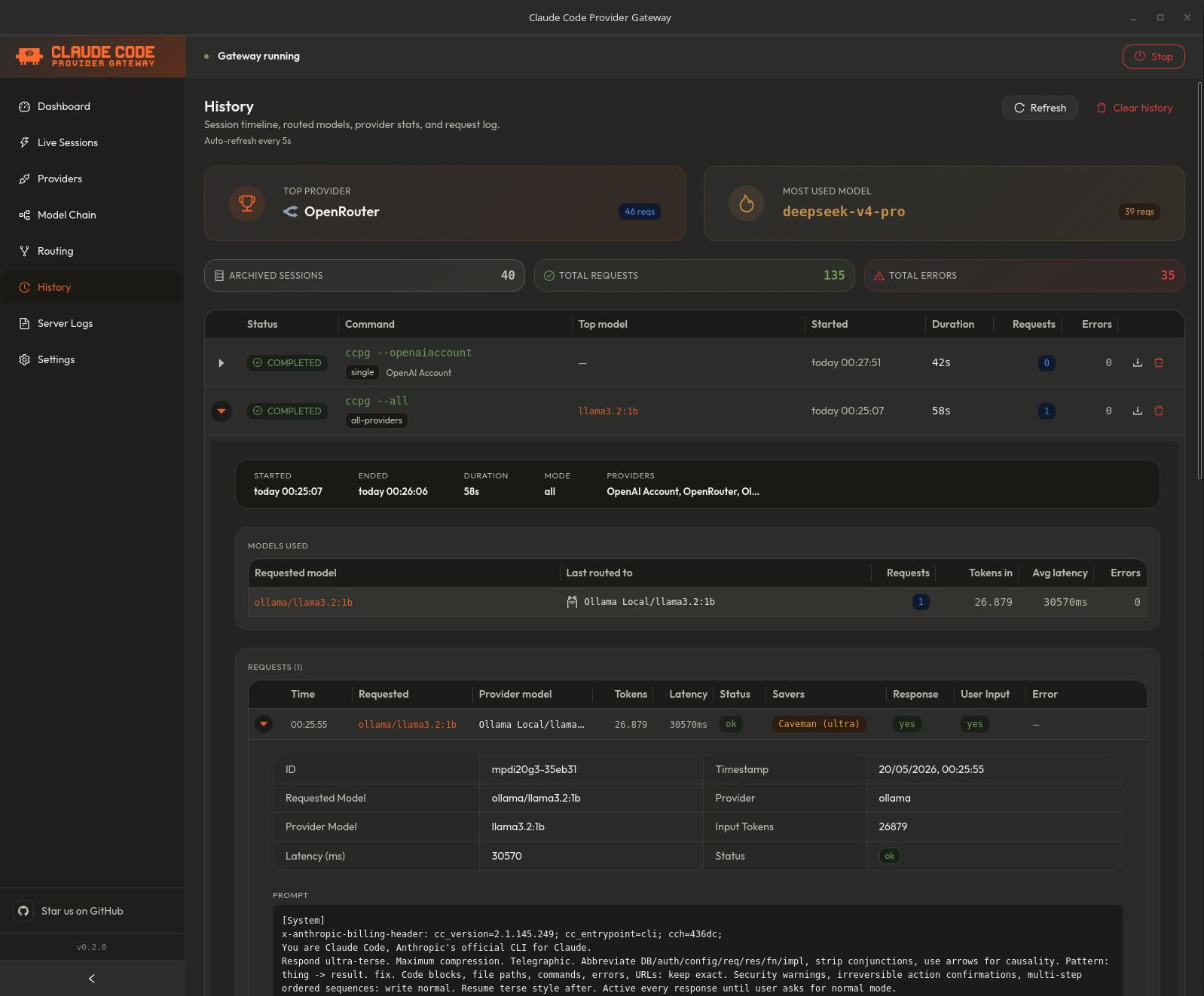
This is useful for debugging cost, understanding why a model behaved a certain way, and seeing background housekeeping calls that otherwise feel invisible.
CCPG includes two optional local token-saving features in Settings -> Token Savers:
| Feature | What it does | Best for |
|---|---|---|
| RTK compression | Compacts large tool_result payloads before the request reaches the provider. | Big rg, git diff, git status, find, ls, tree, numbered file dumps, and repetitive logs. |
| Caveman mode | Injects terse-response guidance into the system prompt. | Reducing response verbosity and output tokens. |
RTK does not change normal chat messages or errored tool results. If a request has no large tool output, there may be nothing to compress. When RTK does compress something, the daemon log records a line with bytes saved and the filter used.
Caveman is different: it does not reduce input tokens. It asks the model to answer more tersely, with levels lite, full, and ultra.
ccpg --all Worksccpg --all is not round-robin and it does not randomly pick a provider.
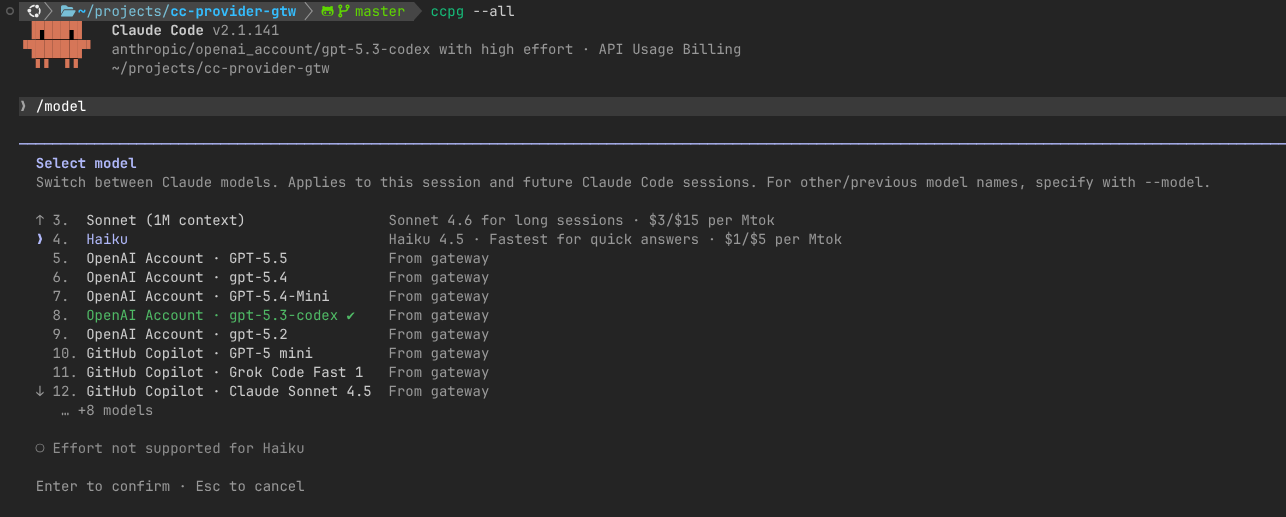
When you launch with --all, CCPG enables model discovery across every provider you turned on in the app. Claude Code's model picker sees gateway-prefixed model IDs such as:
anthropic/openrouter/anthropic/claude-sonnet-4.5
anthropic/deepseek/deepseek-chat
anthropic/ollama/qwen2.5-coder
When Claude Code sends a request for one of those models, CCPG reads the provider prefix and routes the request to that provider and model. If Claude Code later sends background requests using hardcoded Claude tier names, CCPG remembers the primary provider-prefixed model selected in the session and routes those background calls there too.
Use --all when you want to choose models from multiple providers inside one Claude Code session. Use ccpg --DeepSeek, ccpg --OpenRouter, or another single-provider flag when you want a simpler model list.
Model Chains let you create user-defined gateway models from the panel. Open
Model Chains, create a chain with a name and chain-slug, then add models from
active providers and enabled model lists. The order in the chain is the runtime
priority.
Claude Code sees each chain as a single custom model:
{Chain Name} · Gateway:custom-model (Defined by user)
Internally, the daemon exposes the model as anthropic/chain/<slug>. When a
request hits that chain, CCPG calls the first target model. If the provider
returns an API error, rate limit, credit/quota failure, network failure, or a
200 response whose stream ends, idles, errors, or parses without useful
Anthropic content before any answer content is emitted, CCPG retries that
target and then moves to the next target in the chain. Once useful content has
been emitted, CCPG keeps the stream attached to that provider and does not
rewind partial answers. If the upstream stream fails after content has started,
CCPG closes open content blocks and emits a terminal Anthropic-compatible error
frame before stopping the message. The session stays attached to the chain, so Claude Code
background tier calls continue through the same chain instead of leaking back
to the first provider.
The Model Chain page also includes an Economy/Local preset. It builds a Haiku -> DeepSeek -> Ollama-style waterfall from the providers and models you already have enabled/configured, skipping unavailable entries instead of requiring Anthropic-native Claude.
Each chain has optional Advanced Settings for fallback timing. Request timeout controls how long CCPG waits for response headers, first-token timeout controls how long a target may stall before useful Anthropic content, and total stream timeout caps one chain attempt. Empty fields use the defaults: 60s request, 30s first token, and 60s total stream.
Launch modes:
| Command | What Claude Code sees |
|---|---|
ccpg --<chain-slug> | Only that Model Chain. |
ccpg --ModelChain | All enabled Model Chains, and no provider models. |
ccpg --all | Enabled Model Chains plus all enabled provider models. |
Use a single chain-slug when you want one controlled fallback path. Use
--ModelChain when you want Claude Code's model picker to show every enabled
chain.
| Provider | Auth | Notes |
|---|---|---|
| OpenAI Account | OAuth PKCE | Uses your OpenAI account session from the desktop app. |
| GitHub Copilot | OAuth Device Flow | Uses Copilot model access available to your GitHub account. |
| Kilo Code | OAuth Device Flow | Uses a Kilo Code account token and organization id when provided. |
| Cline | OAuth authorization code | Uses the Cline account flow and refreshes tokens when possible. |
| Kiro AI | OAuth placeholder | Visible as coming soon; the OAuth flow is not implemented yet. |
| iFlow AI | OAuth placeholder | Visible as coming soon; the OAuth flow is not implemented yet. |
| Provider | Auth | Notes |
|---|---|---|
| OpenRouter | API key | Broad model catalog through one provider. |
| DeepSeek | API key | Anthropic-compatible endpoint. |
| NVIDIA NIM | API key | OpenAI-compatible endpoint, translated by CCPG. |
| Kimi (Moonshot) | API key | OpenAI-compatible endpoint, translated by CCPG. |
| Google AI (Gemini) | API key | OpenAI-compatible Gemini endpoint, translated by CCPG. |
| Groq, xAI, Mistral, Cerebras, Together AI, Fireworks AI | API key | OpenAI-compatible endpoints, translated by CCPG. |
| GLM, GLM China, SiliconFlow, Hyperbolic, Chutes AI, Perplexity, Nebius AI | API key | Regional and aggregator providers with model prefix routing. |
| Volcengine Ark, BytePlus ModelArk, Alibaba Bailian, Alibaba Bailian Intl | API key | OpenAI-compatible regional cloud providers. |
| Minimax, Minimax China | API key | Anthropic-compatible endpoints. |
| OpenCode Go, Xiaomi MiMo, Xiaomi MiMo Token Plan, Cohere, Blackbox AI, HuggingFace Router, Ollama Cloud | API key | Additional hosted model catalogs. |
| Command Code | API key | Custom provider transport that converts AI SDK v5 NDJSON streams into Anthropic SSE. |
| Custom OpenAI/Anthropic compatible | API key | Add self-hosted or third-party compatible endpoints from the Providers tab with a custom slug, base URL, optional PNG/WebP logo, and manual models when discovery is unavailable. |
| Provider | Default URL | Notes |
|---|---|---|
| Ollama | http://localhost:11434 | Pull models in Ollama, then select them in CCPG. |
| LM Studio | http://localhost:1234/v1 | Load a local model and enable the server. |
| llama.cpp | http://localhost:8080/v1 | Run the llama.cpp server locally. |
CCPG can also pass native Claude requests through to Anthropic when credentials are available. This is useful when you want Claude models and non-Anthropic models in the same gateway workflow.
See docs/PROVIDERS.md for the complete provider ID list, CLI flags, auth behavior, and contributor notes.
| Platform | Release format | Notes |
|---|---|---|
| macOS Apple Silicon | .dmg | Built by CI for aarch64-apple-darwin. |
| macOS Intel | .dmg | Built by CI for x86_64-apple-darwin. |
| Linux x86_64 | .deb, .rpm, .AppImage | CI builds on Ubuntu 22.04 with WebKitGTK dependencies. |
| Linux ARM64 | .deb, .rpm, .AppImage | CI builds on Ubuntu 22.04 ARM. |
| Windows x86_64 | .msi, -setup.exe | Windows WebView2 is required; it ships with modern Windows 10/11 through Windows Update. |
You also need Claude Code installed and able to run from your shell as claude.
Source development needs Node.js, npm workspaces, Bun, Rust, and Tauri system dependencies. See docs/DEVELOPMENT.md.
Download the latest desktop build from:
ccpg.live/download — or directly from GitHub Releases
Then:
ccpg shell command from Dashboard -> Terminal Integration.ccpg --DeepSeek # Or other configured provider
[!WARNING] If your
.claude/settings.jsonor.claude/settings.local.jsonhas anenvblock containingANTHROPIC_AUTH_TOKENorANTHROPIC_BASE_URL, remove those entries. They override the gateway endpoint and prevent CCPG from intercepting Claude Code's requests.
Any arguments after the provider flag are passed to Claude Code:
ccpg --DeepSeek --resume <session-id>
ccpg --OpenRouter --dangerously-skip-permissions
ccpg --Ollama --continue
| Flag | Mode |
|---|---|
--OpenAIAccount | OpenAI Account models |
--Copilot or --GitHubCopilot | GitHub Copilot models |
--OpenRouter | OpenRouter models |
--DeepSeek | DeepSeek models |
--NvidiaNim | NVIDIA NIM models |
--Kimi | Kimi models |
--Google or --GoogleAI | Google AI (Gemini) models |
--Ollama | Ollama local models |
--LMStudio | LM Studio local models |
--LlamaCpp | llama.cpp local models |
--Groq | Groq models |
--XAI or --Grok | xAI models |
--Mistral | Mistral models |
--Cerebras | Cerebras models |
--Together | Together AI models |
--Fireworks | Fireworks AI models |
--GLM or --ZAI | GLM models |
--SiliconFlow | SiliconFlow models |
--Hyperbolic | Hyperbolic models |
--Chutes | Chutes AI models |
--Perplexity | Perplexity models |
--Nebius | Nebius AI models |
--GLMCN | GLM China models |
--VolcengineArk or --Ark | Volcengine Ark models |
--BytePlus | BytePlus ModelArk models |
--Alicode or --Bailian | Alibaba Bailian models |
--AlicodeIntl | Alibaba Bailian Intl models |
--Minimax | Minimax models |
--MinimaxCN | Minimax China models |
--OpenCodeGo | OpenCode Go models |
--XiaomiMimo or --MiMo | Xiaomi MiMo models |
--XiaomiTokenPlan | Xiaomi MiMo Token Plan models |
--Cohere | Cohere models |
--Blackbox | Blackbox AI models |
--HuggingFace or --HF | HuggingFace Router models |
--OllamaCloud | Ollama Cloud models |
--KiloCode | Kilo Code models |
--Cline | Cline models |
--Kiro | Kiro AI placeholder |
--IFlow | iFlow AI placeholder |
--CommandCode | Command Code models |
--all or --a | All enabled providers in one model catalog |
--ModelChain, --ModelChains, or --chains | All enabled Model Chains |
--<chain-slug> | One enabled Model Chain with the matching slug |
--<custom-provider-slug> | One user-created custom provider with the matching slug |
Flags are case-insensitive in the Terminal Integration flow.
CCPG is free, open source, and runs locally.
There is no hosted CCPG bill. You only pay whatever your selected upstream provider charges, or nothing when you use a local provider. CCPG does not add a per-request fee and does not proxy traffic through a hosted CCPG server.
This table is about product focus, not a claim that other projects are bad. Terminal-first routers are great for technical users. CCPG is trying to make provider switching feel like a desktop product.
| Capability | CCPG | LiteLLM | claude-code-router |
|---|---|---|---|
| Install path | Desktop installer | pip install + config file | npm install + config file |
| User interface | Desktop app | Web admin + terminal | Terminal-first + basic web UI |
| Session history | ✅ Full UI with prompt/response preview | ⚠️ Opt-in via store_prompts_in_spend_logs | ❌ Plaintext log files only |
| Per-request token visibility | ✅ Yes, in history UI | ✅ Yes, in admin UI | ❌ No |
| Background prompt visibility | ✅ Yes | ❌ No | ❌ No |
| OpenAI Account OAuth | ✅ Built-in PKCE | ❌ Manual / custom | ❌ Manual / custom |
| GitHub Copilot OAuth | ✅ Built-in Device Flow | ❌ Manual / custom | ❌ Manual / custom |
| Kilo Code OAuth | ✅ Built-in Device Flow | ❌ No | ❌ No |
| Cline OAuth | ✅ Built-in authorization code | ❌ No | ❌ No |
| Local model support | ✅ Ollama, LM Studio, llama.cpp | ✅ Yes | ✅ Yes |
| Model Chains / fallback routing | ✅ Declarative UI, retry + next-model | ✅ Declarative config, error-type chains | ⚠️ Custom JS scripting only |
| All-providers aggregation | ✅ --all flag, unified model picker | ⚠️ API-level /models list, no UI picker | ❌ No |
| Model tier routing | ✅ Map opus/sonnet/haiku to any model | ✅ model_group_alias + router config | ✅ Slot-based (default/think/background/long) |
| Parallel terminal sessions | ✅ Per-session isolation, routing + logs | ⚠️ Concurrent connections, no session isolation | ⚠️ Stateless, no per-session tracking |
| Token saver / compression | ✅ RTK tool-result compression + Caveman mode | ✅ compress() SDK + /responses/compact | ❌ No |
| Outbound proxy support | ✅ HTTP/HTTPS proxy in Settings UI | ✅ Via HTTPS_PROXY env var | ✅ Via PROXY_URL in config |
| Provider management UI | ✅ Search, test, favorite, custom logos | ✅ Admin dashboard (add/edit/delete) | ⚠️ Config editor UI, no provider lifecycle |
| Secrets storage | ✅ AES-256-GCM encrypted store | ✅ Encrypted via LITELLM_MASTER_KEY | ❌ Env variable interpolation only |
| Windows support | ✅ .msi / -setup.exe native installer | ⚠️ Docker or pip install | ✅ npm package (Node 18+) |
| ARM64 / Apple Silicon support | ✅ Native .dmg and Linux ARM builds | ⚠️ pip works natively; Docker ARM images are secondary | ✅ Native via Node.js |
| No-install desktop experience | ✅ Download and open | ❌ CLI / Docker setup required | ❌ CLI setup required |
| Non-technical user focus | ✅ First-class | ❌ Not the primary target | ❌ Not the primary target |
┌────────────────┐     ┌───────────────────────────────────┐     ┌─────────────────┐
│  Claude Code   │     │   Claude Code Provider Gateway    │     │  OpenRouter     │
│                │────▶│  ┌─────────────────────────────┐  │────▶│  DeepSeek       │
│                │◀────│  │ Proxy :49250
Sign in to join the discussion.
No comments yet. Be the first to say what this is good for.
Real-time global intelligence dashboard. AI-powered news aggregation, geopolitical monitoring, and infrastructure tracking in a unified situational awareness interface
High-performance code intelligence MCP server. Indexes codebases into a persistent knowledge graph — average repo in milliseconds. 158 languages, sub-ms queries, 99% fewer tokens. Single static binary, zero dependencies.

Universal provider proxy for OpenAI Codex & Claude Code — use any LLM (Claude, Gemini, Grok, DeepSeek, Ollama…) with Codex CLI, App, SDK, and Claude Code

Git-native persistent memory for AI coding agents. Implements Google OKF v0.2 with sub-300µs in-memory BM25 search, embedded MCP server, and progressive disclosure. Slashes token bloat by 80% with zero external databases or dependencies. Built in pure Go.

Local-first code intelligence graph for MCP and CLI. Builds a persistent map of your codebase so AI coding tools read only what matters, with benchmarked context reductions on reviews and large-repo workflows.

Stop your AI from making things up — it proposes, deterministic tools decide, every claim checked against ground truth with evidence. Grounded facts and context survive resets. Reverse engineering is the proving ground. MCP server + CLI.