
koala73/worldmonitorConnectors
Real-time global intelligence dashboard. AI-powered news aggregation, geopolitical monitoring, and infrastructure tracking in a unified situational awareness interface
86k
This server connects an AI client to your TeslaMate PostgreSQL database so it can answer questions about driving, charging, efficiency, and battery trends. It supports local stdio and remote HTTP, plus read-only query tools, chart tools, and an opt-in write path.
Builders who want their agent to read TeslaMate data and answer car questions in plain language.
You can ask your agent about Tesla history and get answers from your own database instead of writing SQL.
Exposes TeslaMate PostgreSQL data through 35 MCP tools for search, analytics, schema lookup, and custom SQL.
Runs over stdio for desktop clients and over streamable HTTP with bearer auth for remote setups.
`show_charging_curve`, `show_battery_degradation`, and `show_drive_route` can render SVG in MCP Apps-capable clients.
`run_sql` uses a read-only transaction that is always rolled back, and the write tool is opt-in.
New query tools can be added with a `.sql` file and matching `.toml` sidecar in `src/teslamate_mcp/queries/`.
git clone https://github.com/cobanov/teslamate-mcp.git
cd teslamate-mcp
cp env.example .env      # set DATABASE_URL
uv sync
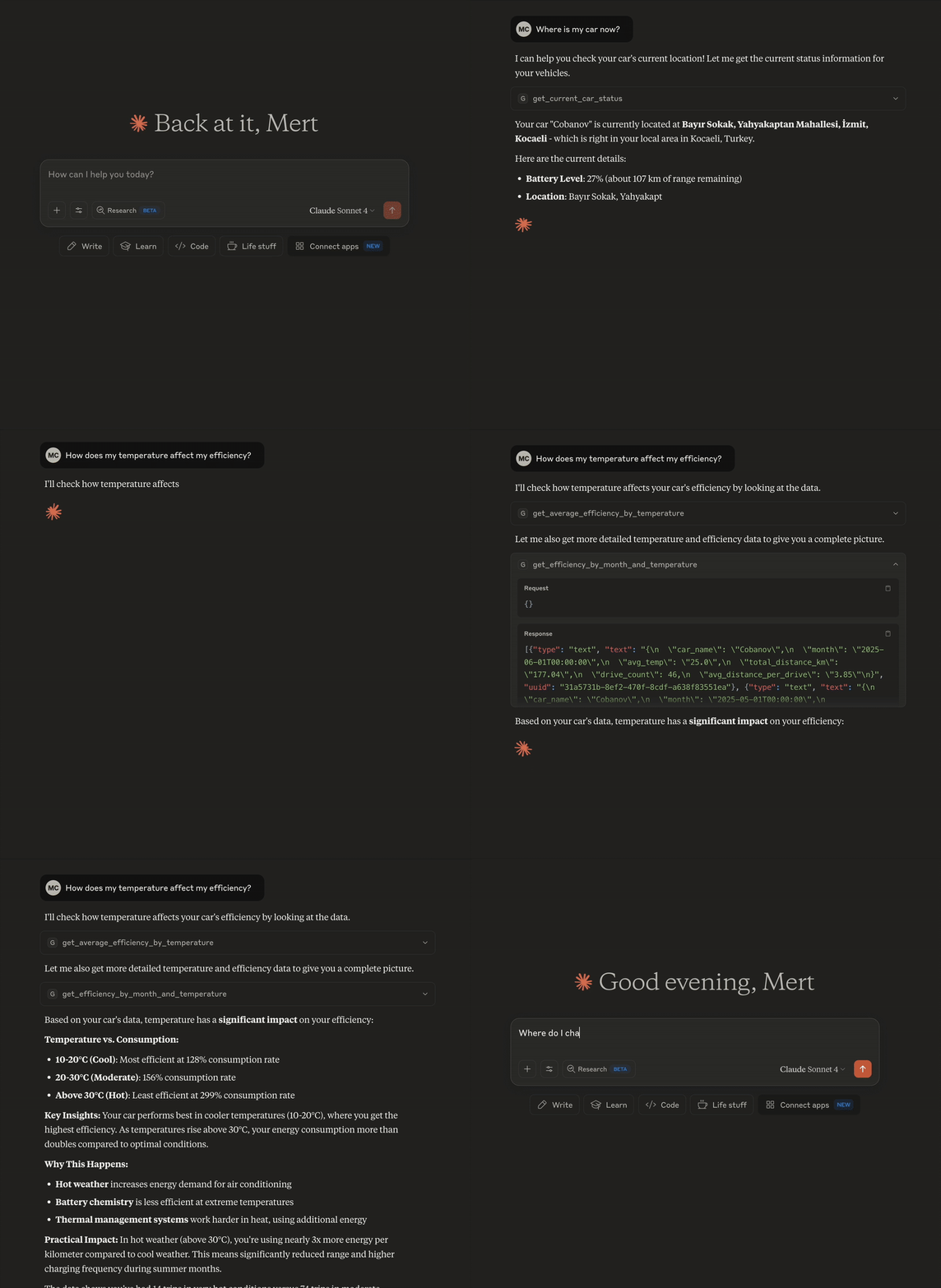
Ask your Tesla questions in plain language. Your own TeslaMate database, answered by whichever AI client you already use.




Documentation · Tool reference · Configuration · Deployment
TeslaMate records everything your car does into PostgreSQL, and its Grafana dashboards answer the questions someone anticipated. The interesting ones usually arrive later — is the battery actually degrading or was it just cold?, what did charging cost me at home versus on the road?, which drive was that weirdly inefficient one?
This is a Model Context Protocol server that hands that database to an AI client, so those questions get answered without you writing SQL.
You  ▸ has my battery actually degraded this year?

     ⚙ get_battery_capacity_trend(days=365)

     Usable capacity, estimated from your charging sessions rather
     than rated range:

       2025-11    53.8 kWh
       2026-02    53.1 kWh
       2026-07    52.4 kWh

     About 2.6% over eight months, which is unremarkable. The
     February dip tracks outside temperature, not capacity —
     get_average_efficiency_by_temperature shows the same shape.
run_sql for anything they don't cover, live schema introspection, and 3 interactive chart tools.car_name, days, limit, and threshold arguments. Call one with no arguments and you get the full classic report.show_charging_curve, show_battery_degradation, and show_drive_route render self-contained SVG. Everywhere else they return the same rows.run_sql executes in a READ ONLY transaction that is always rolled back. The single write tool is off by default and can only touch one column.Requires a running TeslaMate with PostgreSQL, and Python 3.11+ (or just Docker).
git clone https://github.com/cobanov/teslamate-mcp.git
cd teslamate-mcp
cp env.example .env      # set DATABASE_URL
uv sync
Point your client at it — for Claude Desktop or Cursor:
{
  "mcpServers": {
    "teslamate": {
      "command": "uv",
      "args": ["--directory", "/path/to/teslamate-mcp", "run", "teslamate-mcp", "stdio"]
    }
  }
}
Ask it something. teslamate-mcp list-tools prints everything it found.
docker run -d -p 8888:8888 \
  -e DATABASE_URL='postgresql://teslamate:…@host:5433/teslamate' \
  -e AUTH_TOKEN="$(uv run teslamate-mcp gen-token | cut -d= -f2)" \
  ghcr.io/cobanov/teslamate-mcp:latest
The endpoint is /mcp, the probe is /health. Multi-arch images (amd64, arm64) ship with every release.
This database is your location history. Keep it on a private network — a VPN or Tailscale — rather than the open internet. Deployment covers the options.
Everything beyond this page lives in the wiki:
| Tool Reference | All 35 tools, their parameters, what each returns |
| Configuration | Every environment variable, with guidance |
| Deployment | Docker, images, proxies, exposure, troubleshooting |
| Writing Queries | Add your own tool with a .sql + .toml pair — no Python |
| Write Tools | The opt-in charging-cost write path and its grant |
| Development | Setup, tests, layout, releasing |
Issues and pull requests are welcome — see CONTRIBUTING.md. Adding a query needs no Python at all: drop a .sql file and a .toml sidecar into src/teslamate_mcp/queries/ and the registry picks it up.
A large part of the 0.9 feature line — typed parameters, twelve new queries, MCP Apps, and the SDK v2 migration — was contributed by @batubozkan.
MIT — see LICENSE.
Sign in to join the discussion.
No comments yet. Be the first to say what this is good for.
Real-time global intelligence dashboard. AI-powered news aggregation, geopolitical monitoring, and infrastructure tracking in a unified situational awareness interface
High-performance code intelligence MCP server. Indexes codebases into a persistent knowledge graph — average repo in milliseconds. 158 languages, sub-ms queries, 99% fewer tokens. Single static binary, zero dependencies.

Universal provider proxy for OpenAI Codex & Claude Code — use any LLM (Claude, Gemini, Grok, DeepSeek, Ollama…) with Codex CLI, App, SDK, and Claude Code

Git-native persistent memory for AI coding agents. Implements Google OKF v0.2 with sub-300µs in-memory BM25 search, embedded MCP server, and progressive disclosure. Slashes token bloat by 80% with zero external databases or dependencies. Built in pure Go.

Stop your AI from making things up — it proposes, deterministic tools decide, every claim checked against ground truth with evidence. Grounded facts and context survive resets. Reverse engineering is the proving ground. MCP server + CLI.
20 MB lightweight cross-platform database client for 90+ databases, including MySQL, PostgreSQL, SQLite, Redis, MongoDB, DuckDB, SQL Server, and Dameng. Built-in AI, MCP Server, CLI, desktop and Docker. | 轻量级跨平台数据库管理工具,支持 MySQL、PostgreSQL、SQLite、Redis、MongoDB、达梦等 90+ 数据库,提供桌面端、Docker、CLI、内置 AI 助手和 MCP Server。