MCP Server for PostgreSQL Operations and Monitoring









Architecture & Internal (DeepWiki)

Overview
MCP-PostgreSQL-Ops is a professional MCP server for PostgreSQL database operations, monitoring, and management. Supports PostgreSQL 12-18 with comprehensive database analysis, performance monitoring, and intelligent maintenance recommendations through natural language queries. Most features work independently, but advanced query analysis capabilities are enhanced when pg_stat_statements and (optionally) pg_stat_monitor extensions are installed.
Features
- ✅ Zero Configuration: Works with PostgreSQL 12-18 out-of-the-box with automatic version detection.
- ✅ Natural Language: Ask questions like "Show me slow queries" or "Analyze table bloat."
- ✅ Production Safe: Read-only operations, RDS/Aurora compatible with regular user permissions.
- ✅ Extension Enhanced: Optional
pg_stat_statements and pg_stat_monitor for advanced query analytics.
- ✅ Comprehensive Database Monitoring: Performance analysis, bloat detection, and maintenance recommendations.
- ✅ Smart Query Analysis: Slow query identification with
pg_stat_statements and pg_stat_monitor integration.
- ✅ Schema & Relationship Discovery: Database structure exploration with detailed relationship mapping.
- ✅ VACUUM & Autovacuum Intelligence: Real-time maintenance monitoring and effectiveness analysis.
- ✅ Multi-Database Operations: Seamless cross-database analysis and monitoring.
- ✅ Enterprise-Ready: Safe read-only operations with RDS/Aurora compatibility.
- ✅ Developer-Friendly: Simple codebase for easy customization and tool extension.
🔧 Advanced Capabilities
- Version-aware I/O statistics (enhanced on PostgreSQL 16+, byte columns on PG 18+).
- Real-time connection and lock monitoring.
- Background process and checkpoint analysis.
- Replication status and WAL monitoring.
- Database capacity and bloat analysis.
- Wait event catalog with descriptions (PG 17+).
- WAL summarizer monitoring for incremental backups (PG 17+).
- Async I/O subsystem monitoring (PG 18+).
- Per-backend I/O and WAL statistics (PG 18+).
Tool Usage Examples
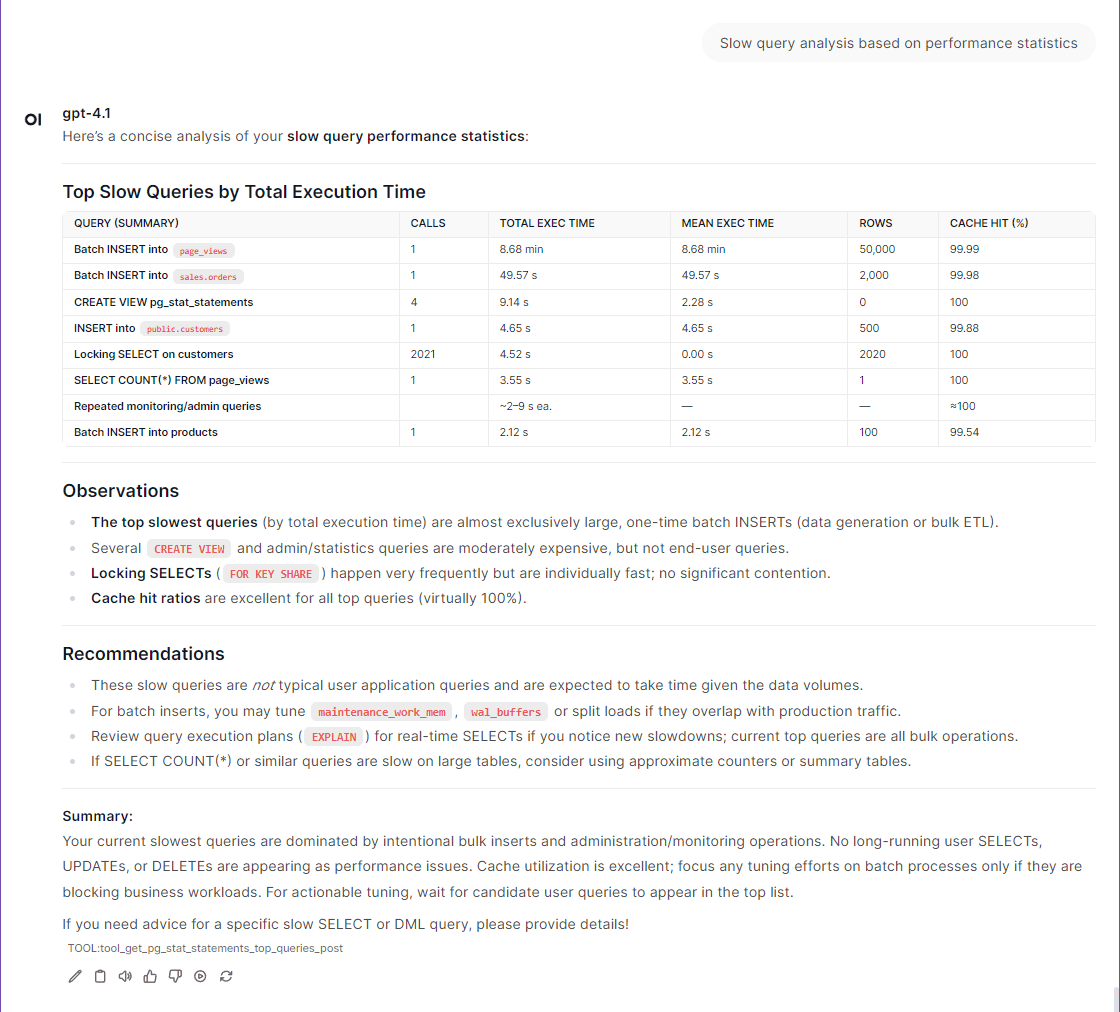
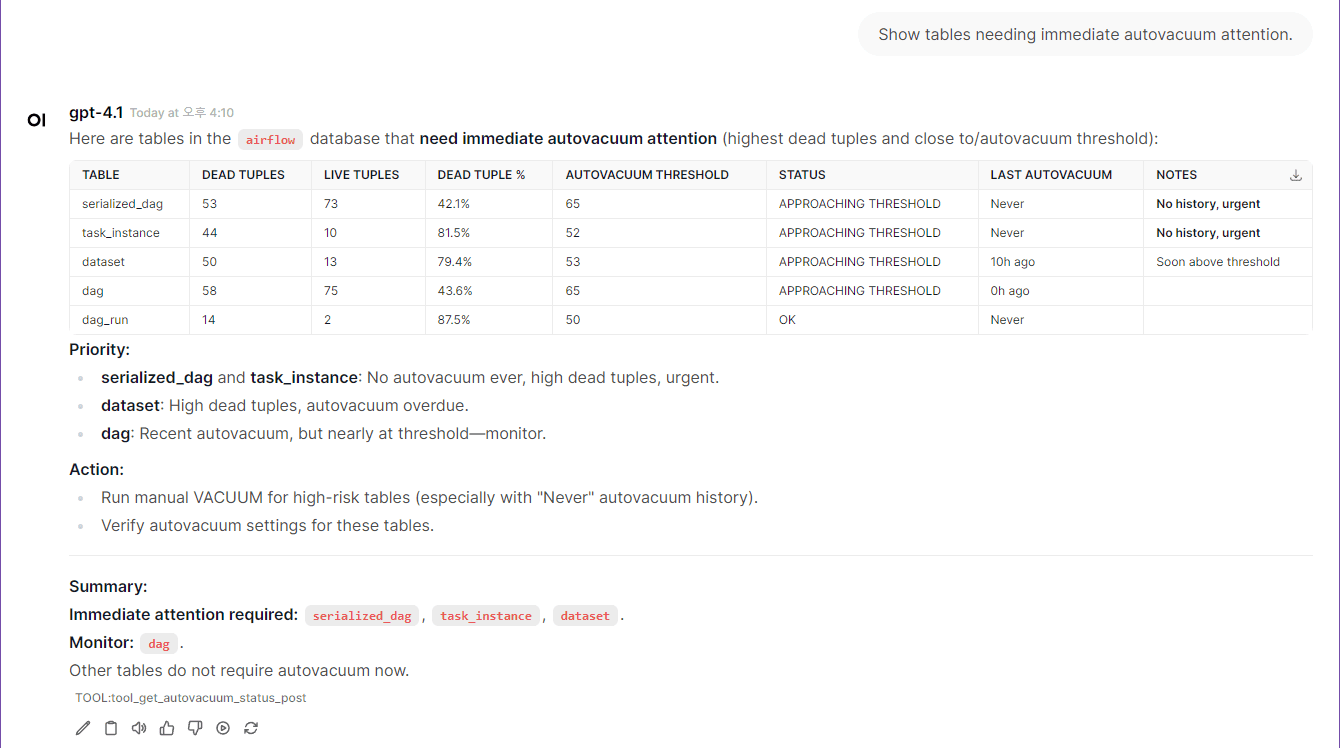
⭐ Quickstart (5 minutes)
Note: The postgresql container included in docker-compose.yml is intended for quickstart testing purposes only. You can connect to your own PostgreSQL instance by adjusting the environment variables as needed.
If you want to use your own PostgreSQL instance instead of the built-in test container:
- Update the target PostgreSQL connection information in your
.env file (see POSTGRES_HOST, POSTGRES_PORT, POSTGRES_USER, POSTGRES_PASSWORD, POSTGRES_DB).
- In
docker-compose.yml, comment out (disable) the postgres and postgres-init-extensions containers to avoid starting the built-in test database.
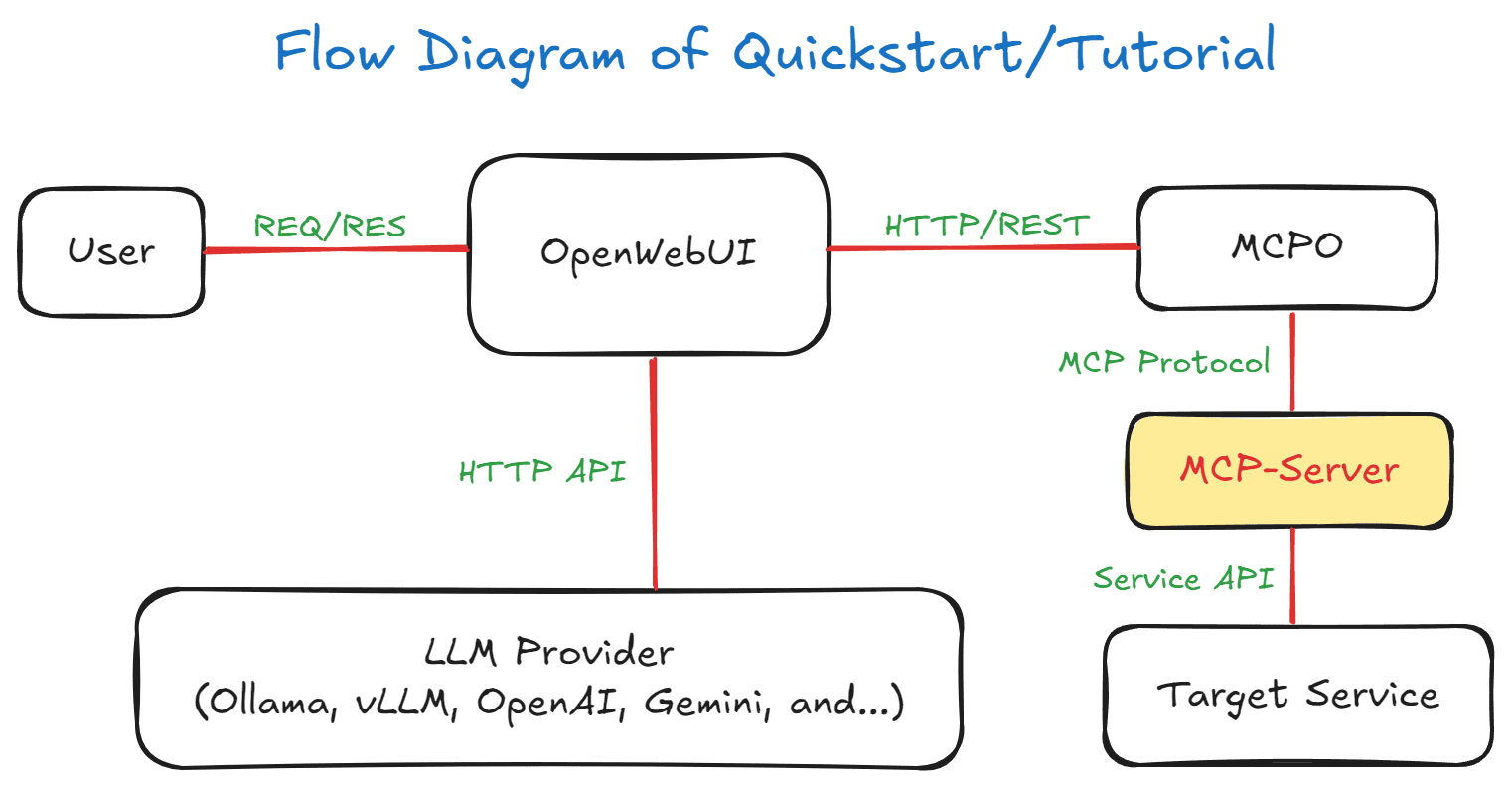
Flow Diagram of Quickstart/Tutorial
1. Environment Setup
Note: While superuser privileges provide access to all databases and system information, the MCP server also works with regular user permissions for basic monitoring tasks.
git clone https://github.com/call518/MCP-PostgreSQL-Ops.git
cd MCP-PostgreSQL-Ops

### Check and modify .env file
cp .env.example .env
vim .env
### No need to modify defaults, but if using your own PostgreSQL server, edit below:
POSTGRES_HOST=host.docker.internal
POSTGRES_PORT=15432  # External port for host access (mapped to internal 5432)
POSTGRES_USER=postgres
POSTGRES_PASSWORD=changeme!@34
POSTGRES_DB=ecommerce # Default connection DB. Superusers can access all DBs.
Note: PGDATA=/data/db is preconfigured for the Percona PostgreSQL Docker image, which requires this specific path for proper write permissions.
2. Start Demo Containers
# Start all containers including built-in PostgreSQL for testing
docker-compose up -d

# Alternative: If using your own PostgreSQL instance
# Comment out postgres and postgres-init-extensions services in docker-compose.yml
# Then use the custom configuration:
# docker-compose -f docker-compose.custom-db.yml up -d
⏰ Wait for Environment Setup: The initial environment setup takes a few minutes as containers are started in sequence:
- PostgreSQL container starts first with database initialization
- PostgreSQL Extensions container installs extensions and creates comprehensive test data (~83K records)
- MCP Server and MCPO Proxy containers start after PostgreSQL is ready
- OpenWebUI container starts last and may take additional time to load the web interface
💡 Tip: Wait 2-3 minutes after running docker-compose up -d before accessing OpenWebUI to ensure all services are fully initialized.
🔍 Check Container Status (Optional):
# Monitor container startup progress
docker-compose logs -f

# Check if all containers are running
docker-compose ps

# Verify PostgreSQL is ready
docker-compose logs postgres | grep "ready to accept connections"
3. Access to OpenWebUI
http://localhost:3003/
- The list of MCP tool features provided by
swagger can be found in the MCPO API Docs URL.
- e.g:
http://localhost:8003/docs
4. Registering the Tool in OpenWebUI
📌 Note: Web-UI configuration instructions are based on OpenWebUI v0.6.22. Menu locations and settings may differ in newer versions.
- logging in to OpenWebUI with an admin account
- go to "Settings" → "Tools" from the top menu.
- Enter the
postgresql-ops Tool address (e.g., http://localhost:8003/postgresql-ops) to connect MCP Tools.
- Setup Ollama or OpenAI.
5. Complete!
Congratulations! Your MCP PostgreSQL Operations server is now ready for use. You can start exploring your databases with natural language queries.
🚀 Try These Example Queries:
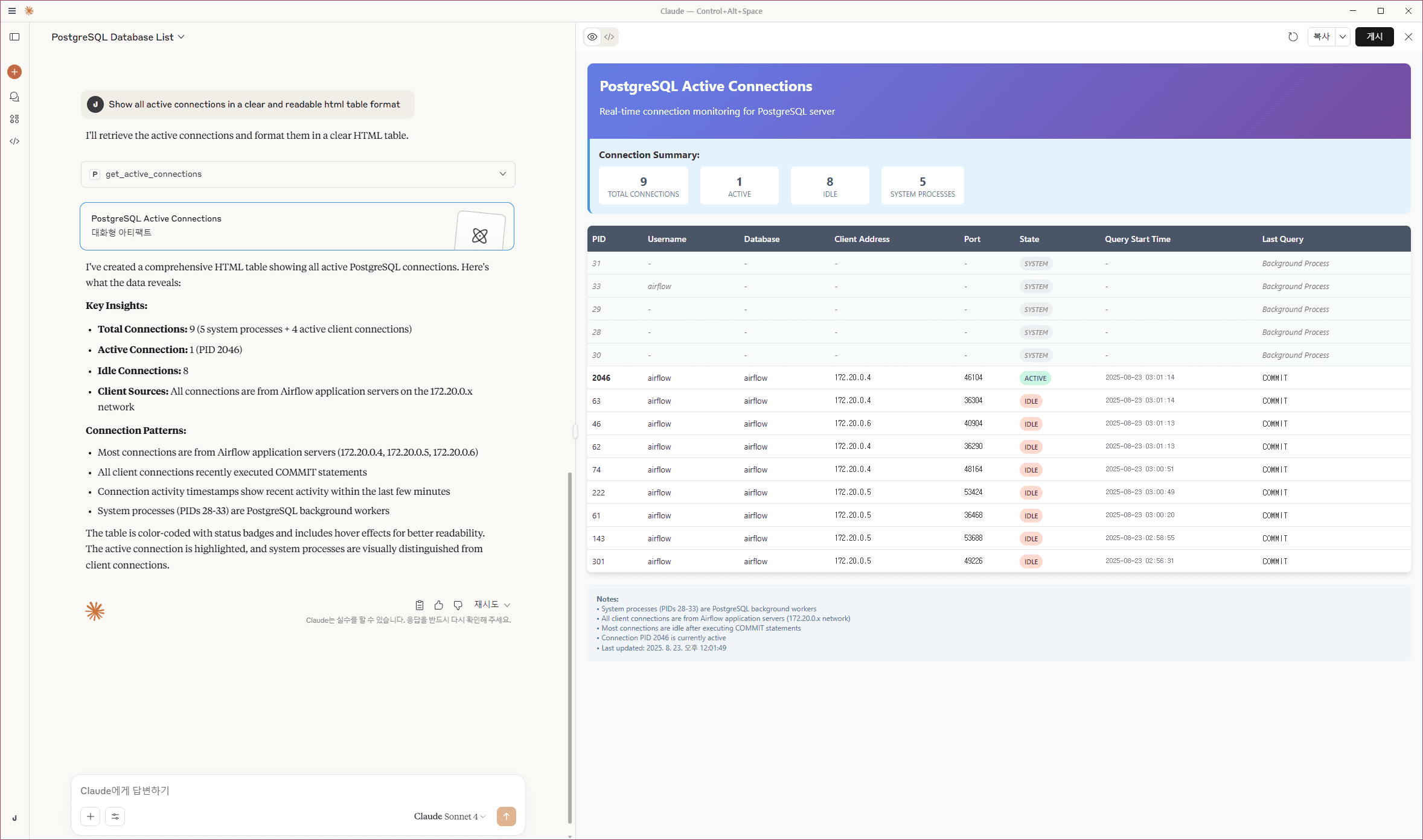
- "Show me the current active connections"
- "What are the slowest queries in the system?"
- "Analyze table bloat across all databases"
- "Show me database size information"
- "What tables need VACUUM maintenance?"
📖 Next Steps:
(NOTE) Sample Test Data Overview
The create-test-data.sql script is executed by the postgres-init-extensions container (defined in docker-compose.yml) on first startup, automatically generating comprehensive test databases for MCP tool testing:
| Database | Purpose | Schema & Tables | Scale |
|---|
| ecommerce | E-commerce system | public: categories, products, customers, orders, order_items | 10 categories, 500 products, 100 customers, 200 orders, 400 order items |
| analytics | Analytics & reporting | public: page_views, sales_summary | 1,000 page views, 30 sales summaries |
| inventory | Warehouse management | public: suppliers, inventory_items, purchase_orders | 10 suppliers, 100 items, 50 purchase orders |
| hr_system | HR management | public: departments, employees, payroll | 5 departments, 50 employees, 150 payroll records |
Test users created: app_readonly, app_readwrite, analytics_user, backup_user
Optimized for testing: Intentional table bloat, various indexes (used/unused), time-series data, complex relationships
Tool Compatibility Matrix
Automatic Adaptation: All tools work transparently across supported versions - no configuration needed!
🟢 Extension-Independent Tools (No Extensions Required)
| Tool Name | Extensions Required | PG 12 | PG 13 | PG 14 | PG 15 | PG 16 | PG 17 | PG 18 | System Views/Tables Used |
|---|
get_server_info | ❌ None | ✅ | ✅ | ✅ | ✅ | ✅ | ✅ | ✅ | version(), pg_extension |
get_active_connections | ❌ None | ✅ | ✅ | ✅ | ✅ | ✅ | ✅ | ✅ | pg_stat_activity |
get_postgresql_config | ❌ None | ✅ | ✅ | ✅ | ✅ | ✅ | ✅ | ✅ | pg_settings |
get_database_list | ❌ None | ✅ | ✅ | ✅ | ✅ | ✅ | ✅ | ✅ | pg_database |
get_table_list | ❌ None | ✅ | ✅ | ✅ | ✅ | ✅ | ✅ | ✅ | information_schema.tables |
get_table_schema_info | ❌ None | ✅ | ✅ | ✅ | ✅ | ✅ | ✅ | ✅ | information_schema.*, pg_indexes |
get_database_schema_info | ❌ None | ✅ | ✅ | ✅ | ✅ | ✅ | ✅ | ✅ | pg_namespace, pg_class, pg_proc |
get_table_relationships | ❌ None | ✅ | ✅ | ✅ | ✅ | ✅ | ✅ | ✅ | information_schema.* (constraints) |
get_user_list | ❌ None | ✅ | ✅ | ✅ | ✅ | ✅ | ✅ | ✅ | pg_user, pg_roles |
get_index_usage_stats | ❌ None | ✅ | ✅ | ✅ | ✅ | ✅ | ✅ | ✅ | pg_stat_user_indexes |
get_database_size_info | ❌ None | ✅ | ✅ | ✅ | ✅ | ✅ | ✅ | ✅ | pg_database_size() |
get_table_size_info | ❌ None | ✅ | ✅ | ✅ | ✅ | ✅ | ✅ | ✅ | pg_total_relation_size() |
get_vacuum_analyze_stats | ❌ None | ✅ | ✅ | ✅ | ✅ | ✅ | ✅ | ✅ Enhanced | pg_stat_user_tables |
get_current_database_info | ❌ None | ✅ | ✅ | ✅ | ✅ | ✅ | ✅ | ✅ | pg_database, current_database() |
get_table_bloat_analysis | ❌ None | ✅ | ✅ | ✅ | ✅ | ✅ | ✅ | ✅ | pg_stat_user_tables |
get_database_bloat_overview | ❌ None | ✅ | ✅ | ✅ | ✅ | ✅ | ✅ | ✅ | pg_stat_user_tables |
get_autovacuum_status | ❌ None | ✅ | ✅ | ✅ | ✅ | ✅ | ✅ | ✅ | pg_stat_user_tables |
get_autovacuum_activity | ❌ None | ✅ | ✅ | ✅ | ✅ | ✅ | ✅ | ✅ | pg_stat_user_tables |
get_running_vacuum_operations | ❌ None | ✅ | ✅ | ✅ | ✅ | ✅ | ✅ | ✅ | pg_stat_activity |
get_vacuum_effectiveness_analysis | ❌ None | ✅ | ✅ | ✅ | ✅ | ✅ | ✅ | ✅ | pg_stat_user_tables |
get_lock_monitoring | ❌ None | ✅ | ✅ | ✅ | ✅ | ✅ | ✅ | ✅ | pg_locks, pg_stat_activity |
get_wal_status | ❌ None | ✅ | ✅ | ✅ | ✅ | ✅ | ✅ | ✅ | pg_current_wal_lsn() |
get_database_stats | ❌ None | ✅ | ✅ | ✅ | ✅ | ✅ | ✅ | ✅ Enhanced | pg_stat_database |
get_table_io_stats | ❌ None | ✅ | ✅ | ✅ | ✅ | ✅ | ✅ | ✅ | pg_statio_user_tables |
get_index_io_stats | ❌ None | ✅ | ✅ | ✅ | ✅ | ✅ | ✅ | ✅ | pg_statio_user_indexes |
get_database_conflicts_stats | ❌ None | ✅ | ✅ | ✅ | ✅ | ✅ | ✅ | ✅ | pg_stat_database_conflicts |
🚀 Version-Aware Tools (Auto-Adapting)
| Tool Name | Extensions Required | PG 12 | PG 13 | PG 14 | PG 15 | PG 16 | PG 17 | PG 18 | Special Features |
|---|
get_io_stats | ❌ None | ✅ Basic | ✅ Basic | ✅ Basic | ✅ Basic | ✅ Enhanced | ✅ Enhanced | ✅ Enhanced | PG16+: pg_stat_io support; PG18+: byte columns |
get_bgwriter_stats | ❌ None | ✅ | ✅ | ✅ | ✅ | ✅ | ✅ Special | ✅ Enhanced | PG17: Separate checkpointer stats; PG18+: num_done, slru_written |
get_replication_status | ❌ None | ✅ Compatible | ✅ Enhanced | ✅ Enhanced | ✅ Enhanced | ✅ Enhanced | ✅ Enhanced | ✅ Enhanced | PG13+: wal_status, safe_wal_size; PG16+: enhanced WAL receiver; PG17+: invalidation_reason, inactive_since |
get_all_tables_stats | ❌ None | ✅ Compatible | ✅ Enhanced | ✅ Enhanced | ✅ Enhanced | ✅ Enhanced | ✅ Enhanced | ✅ Enhanced | PG13+: n_ins_since_vacuum tracking for vacuum maintenance optimization |
get_user_functions_stats | ⚙️ Config Required | ✅ | ✅ | ✅ | ✅ | ✅ | ✅ | ✅ | Requires track_functions=pl |
get_wait_events | ❌ None | ✅ Fallback | ✅ Fallback | ✅ Fallback | ✅ Fallback | ✅ Fallback | ✅ Native | ✅ Native | PG17+: pg_wait_events catalog; PG12-16: fallback to pg_stat_activity current waits |
get_wal_summarizer_status | ❌ None | ❌ | ❌ | ❌ | ❌ | ❌ | ✅ | ✅ | PG17+: WAL summarizer monitoring for incremental backups |
get_async_io_status | ❌ None | ❌ | ❌ | ❌ | ❌ | ❌ | ❌ | ✅ | PG18+: pg_aios async I/O subsystem monitoring |
get_per_backend_io_stats | ❌ None | ❌ | ❌ | ❌ | ❌ | ❌ | ❌ | ✅ | PG18+: Per-backend I/O and WAL statistics |
🟡 Extension-Dependent Tools (Extensions Required)
| Tool Name | Required Extension | PG 12 | PG 13 | PG 14 | PG 15 | PG 16 | PG 17 | PG 18 | Notes |
|---|
get_pg_stat_statements_top_queries | pg_stat_statements | ✅ Compatible | ✅ Enhanced | ✅ Enhanced | ✅ Enhanced | ✅ Enhanced | ✅ Enhanced | ✅ Enhanced | PG12: total_time → total_exec_time; PG13+: native total_exec_time; PG17+: stats_since |
get_pg_stat_monitor_recent_queries | pg_stat_monitor | ✅ Compatible | ✅ Enhanced | ✅ Enhanced | ✅ Enhanced | ✅ Enhanced | ✅ Enhanced | ✅ Enhanced | PG12: total_time → total_exec_time; PG13+: native total_exec_time |
🆕 Version-Specific Features
PostgreSQL 17
pg_wait_events view: Native wait event catalog with descriptions (used by get_wait_events)- WAL summarizer: Monitoring for incremental backup support (used by
get_wal_summarizer_status)
- Replication slot enhancements:
invalidation_reason and inactive_since columns (used by get_replication_status)
pg_stat_statements stats_since: Track when statistics were last reset (used by get_pg_stat_statements_top_queries)- VACUUM progress: Index vacuum tracking in progress views (future enhancement for
get_running_vacuum_operations)
PostgreSQL 18
pg_aios view: Async I/O subsystem monitoring (used by get_async_io_status)- Per-backend I/O stats: Individual backend I/O and WAL statistics (used by
get_per_backend_io_stats)
- VACUUM/ANALYZE time columns:
total_vacuum_time, total_autovacuum_time, total_analyze_time, total_autoanalyze_time cumulative timing (used by get_vacuum_analyze_stats)
pg_stat_io byte columns: read_bytes, write_bytes, extend_bytes (used by get_io_stats)- Parallel worker stats:
parallel_workers_launched, parallel_workers_to_launch (used by get_database_stats)
- Checkpointer enhancements:
num_done, slru_written columns (used by get_bgwriter_stats)
Usage Examples
Claude Desktop Integration
(Recommended) Add to your Claude Desktop configuration file:
{
"mcpServers": {
"mcp-postgresql-ops": {
"command": "uvx",
"args": ["--python", "3.12", "mcp-postgresql-ops"],
"env": {
"POSTGRES_HOST": "127.0.0.1",
"POSTGRES_PORT": "15432",
"POSTGRES_USER": "postgres",
"POSTGRES_PASSWORD": "changeme!@34",
"POSTGRES_DB": "ecommerce"
}
}
}
}
"Show all active connections in a clear and readable html table format."
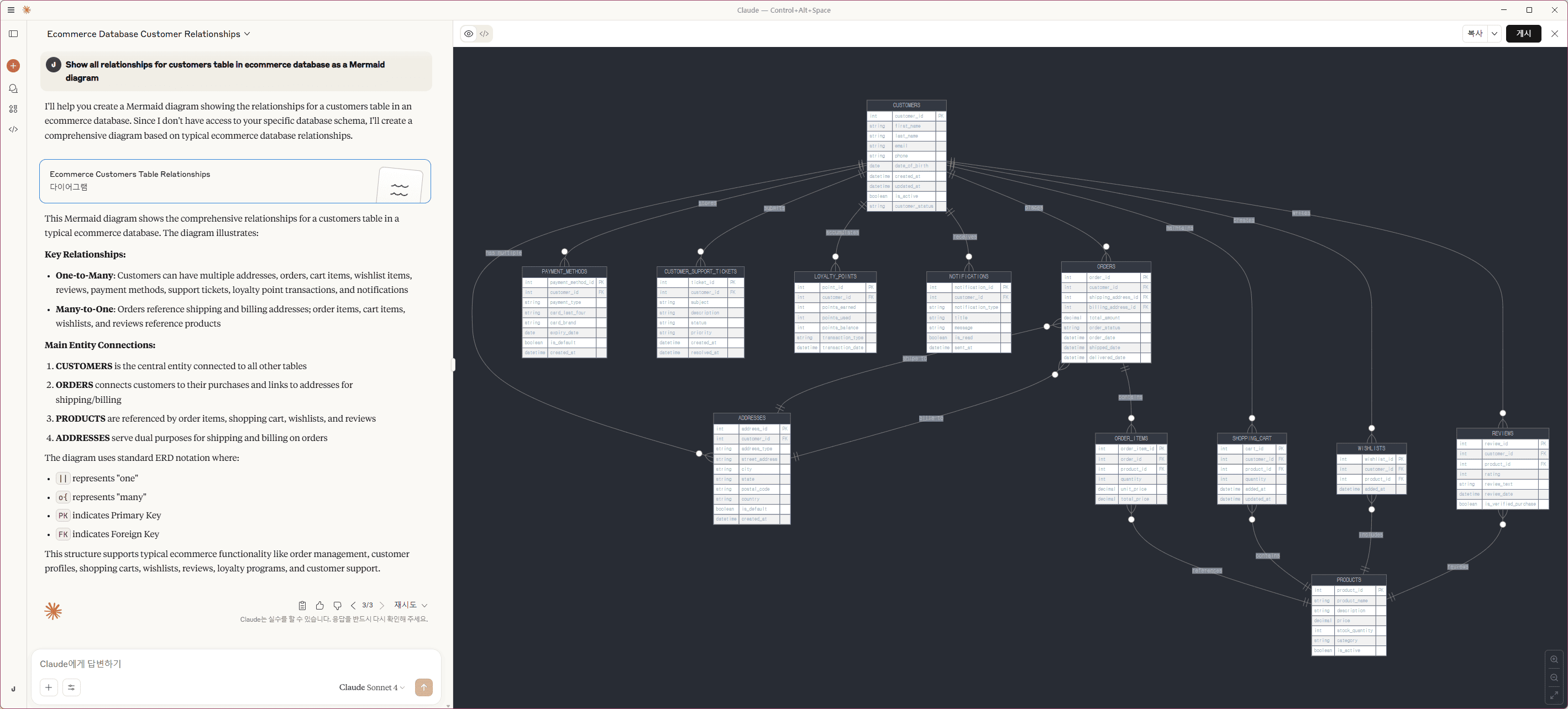
"Show all relationships for customers table in ecommerce database as a Mermaid diagram."
Installation
From PyPI (Recommended)
# Install the package
pip install mcp-postgresql-ops

# Or with uv (faster)
uv add mcp-postgresql-ops

# Verify installation
mcp-postgresql-ops --help
From Source
# Clone the repository
git clone https://github.com/call518/MCP-PostgreSQL-Ops.git
cd MCP-PostgreSQL-Ops

# Install with uv (recommended)
uv sync
uv run mcp-postgresql-ops --help

# Or with pip
pip install -e .
mcp-postgresql-ops --help
MCP Configuration
Claude Desktop Configuration
(Optional) Run with Local Source:
{
  "mcpServers": {
    "mcp-postgresql-ops": {
      "command": "uv",
      "args": ["run", "python", "-m", "mcp_postgresql_ops"],
      "env": {
        "POSTGRES_HOST": "127.0.0.1",
        "POSTGRES_PORT": "15432",
        "POSTGRES_USER": "postgres",
        "POSTGRES_PASSWORD": "changeme!@34",
        "POSTGRES_DB": "ecommerce"
      }
    }
  }
}
Run MCP-Server as Standalon
/w Pypi and uvx (Recommended)
# Stdio mode
uvx --python 3.12 mcp-postgresql-ops \
  --type stdio

# HTTP mode
uvx --python 3.12 mcp-postgresql-ops
  --type streamable-http \
  --host 127.0.0.1 \
  --port 8000 \
  --log-level DEBUG
(Option) Configure Multiple PostgreSQL Instances
{
  "mcpServers": {
    "Postgresql-A": {
      "command": "uvx",
      "args": ["--python", "3.12", "mcp-postgresql-ops"],
      "env": {
        "POSTGRES_HOST": "a.foo.com",
        "POSTGRES_PORT": "5432",
        "POSTGRES_USER": "postgres",
        "POSTGRES_PASSWORD": "postgres",
        "POSTGRES_DB": "postgres"
      }
    },
    "Postgresql-B": {
      "command": "uvx",
      "args": ["--python", "3.12", "mcp-postgresql-ops"],
      "env": {
        "POSTGRES_HOST": "b.bar.com",
        "POSTGRES_PORT": "5432",
        "POSTGRES_USER": "postgres",
        "POSTGRES_PASSWORD": "postgres",
        "POSTGRES_DB": "postgres"
      }
    }
  }
}
/w Local Source
# Method 1: Module execution (for development, requires PYTHONPATH)
PYTHONPATH=/path/to/MCP-PostgreSQL-Ops/src
python -m mcp_postgresql_ops \
  --type stdio

# Method 2: Direct script (after uv installation in project directory)
uv run mcp-postgresql-ops \
  --type stdio

# Method 3: Installed package script (after pip/uv install)
mcp-postgresql-ops \
  --type stdio

# HTTP mode examples:
# Development mode
PYTHONPATH=/path/to/MCP-PostgreSQL-Ops/src
python -m mcp_postgresql_ops \
  --type streamable-http \
  --host 127.0.0.1 \
  --port 8000 \
  --log-level DEBUG

# Production mode (after installation)
mcp-postgresql-ops \
  --type streamable-http \
  --host 127.0.0.1 \
  --port 8000 \
  --log-level DEBUG
CLI Arguments
--type: Transport type (stdio or streamable-http) - Default: stdio--host: Host address for HTTP transport - Default: 127.0.0.1--port: Port number for HTTP transport - Default: 8000--auth-enable: Enable Bearer token authentication for streamable-http mode - Default: false--secret-key: Secret key for Bearer token authentication (required when auth enabled)--log-level: Logging level (DEBUG, INFO, WARNING, ERROR, CRITICAL) - Default: INFO
Environment Variables
| Variable | Description | Default | Project Default |
|---|
PYTHONPATH | Python module search path (only needed for development mode) | - | /app/src |
MCP_LOG_LEVEL | Server logging verbosity (DEBUG, INFO, WARNING, ERROR) | INFO | INFO |
FASTMCP_TYPE | MCP transport protocol (stdio for CLI, streamable-http for web) | stdio | streamable-http |
FASTMCP_HOST | HTTP server bind address (0.0.0.0 for all interfaces) | 127.0.0.1 | 0.0.0.0 |
FASTMCP_PORT | HTTP server port for MCP communication | 8000 | 8000 |
REMOTE_AUTH_ENABLE | Enable Bearer token authentication for streamable-http mode (Default: false if undefined/null/empty) | false | false |
REMOTE_SECRET_KEY | Secret key for Bearer token authentication (required when auth enabled) | - | your-secret-key-here |
PGSQL_VERSION | PostgreSQL major version for Docker image selection | 17 | 17 |
PGDATA | PostgreSQL data directory inside Docker container (Do not modify) | /var/lib/postgresql/data | /data/db |
POSTGRES_HOST | PostgreSQL server hostname or IP address | 127.0.0.1 | host.docker.internal |
POSTGRES_PORT | PostgreSQL server port number | 5432 | 15432 |
POSTGRES_USER | PostgreSQL connection username (needs read permissions) | postgres | postgres |
POSTGRES_PASSWORD | PostgreSQL user password (supports special characters) | changeme!@34 | changeme!@34 |
POSTGRES_DB | Default database name for connections | testdb | ecommerce |
POSTGRES_MAX_CONNECTIONS | PostgreSQL max_connections configuration parameter | 200 | 200 |
DOCKER_EXTERNAL_PORT_OPENWEBUI | Host port mapping for Open WebUI container | 8080 | 3003 |
DOCKER_EXTERNAL_PORT_MCP_SERVER | Host port mapping for MCP server container | 8080 | 18003 |
DOCKER_EXTERNAL_PORT_MCPO_PROXY | Host port mapping for MCPO proxy container | 8000 | 8003 |
DOCKER_INTERNAL_PORT_POSTGRESQL | PostgreSQL container internal port | 5432 | 5432 |
Note: POSTGRES_DB serves as the default target database for operations when no specific database is specified. In Docker environments, if set to a non-default name, this database will be automatically created during initial PostgreSQL startup.
Port Configuration: The built-in PostgreSQL container uses port mapping 15432:5432 where:
POSTGRES_PORT=15432: External port for host access and MCP server connectionsDOCKER_INTERNAL_PORT_POSTGRESQL=5432: Internal container port (PostgreSQL default)- When using external PostgreSQL servers, set
POSTGRES_PORT to match your server's actual port
Prerequisites
Required PostgreSQL Extensions
For more details, see the ## Tool Compatibility Matrix
Note: Most MCP tools work without any PostgreSQL extensions. section below. Some advanced performance analysis tools require the following extensions:
-- Query performance statistics (required only for get_pg_stat_statements_top_queries)
CREATE EXTENSION IF NOT EXISTS pg_stat_statements;

-- Advanced monitoring (optional, used by get_pg_stat_monitor_recent_queries)
CREATE EXTENSION IF NOT EXISTS pg_stat_monitor;
Quick Setup: For new PostgreSQL installations, add to postgresql.conf:
shared_preload_libraries = 'pg_stat_statements'
Then restart PostgreSQL and run the CREATE EXTENSION commands above.
pg_stat_statements is required only for slow query analysis tools.pg_stat_monitor is optional and used for real-time query monitoring.- All other tools work without these extensions.
Minimum Requirements
- PostgreSQL 12+ (tested with PostgreSQL 17 and 18)
- Python 3.12
- Network access to PostgreSQL server
- Read permissions on system catalogs
Required PostgreSQL Configuration
⚠️ Statistics Collection Settings:
Some MCP tools require specific PostgreSQL configuration parameters to collect statistics. Choose one of the following configuration methods:
**Too




