
koala73/worldmonitorConnectors
Real-time global intelligence dashboard. AI-powered news aggregation, geopolitical monitoring, and infrastructure tracking in a unified situational awareness interface
86k
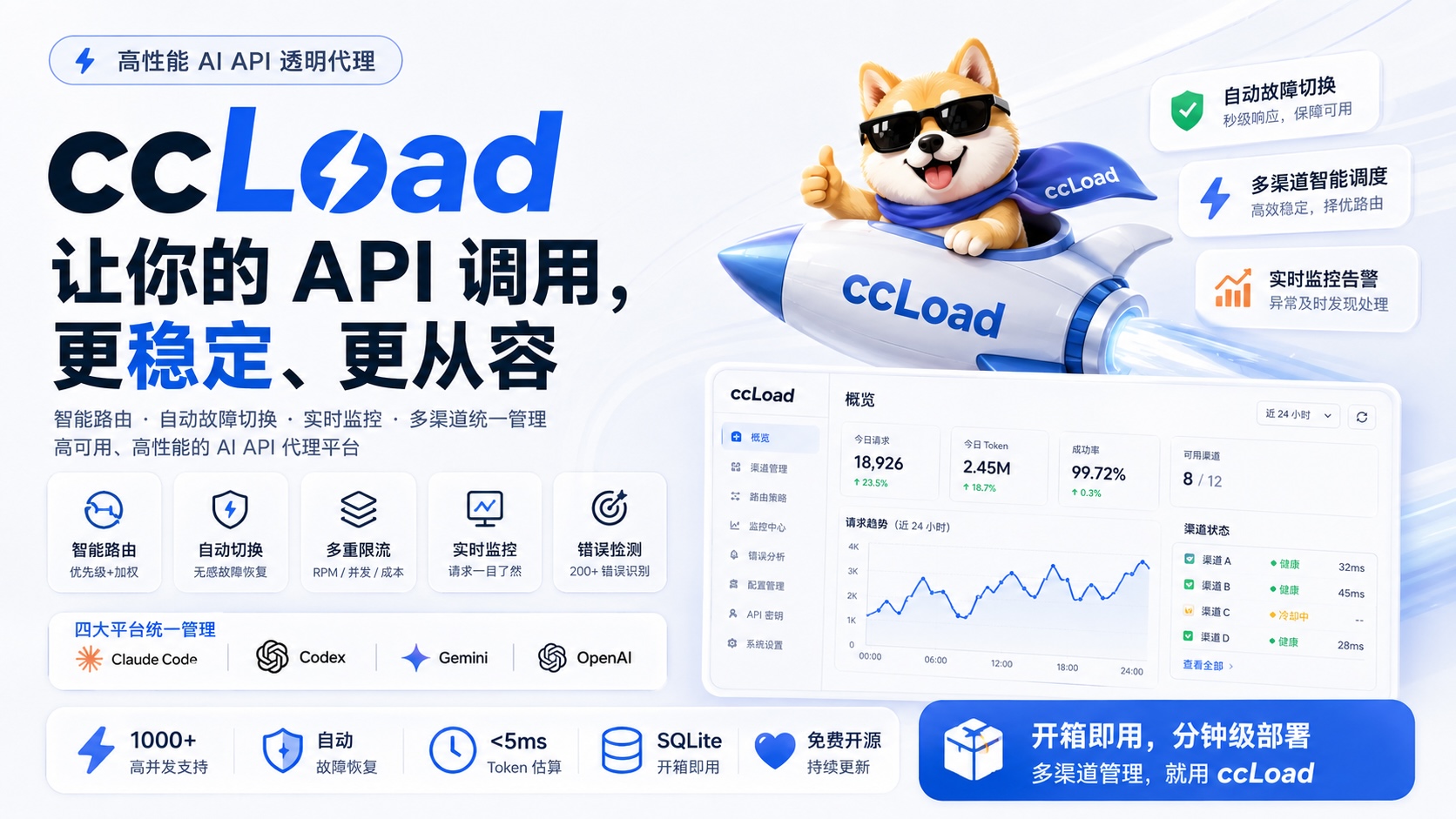
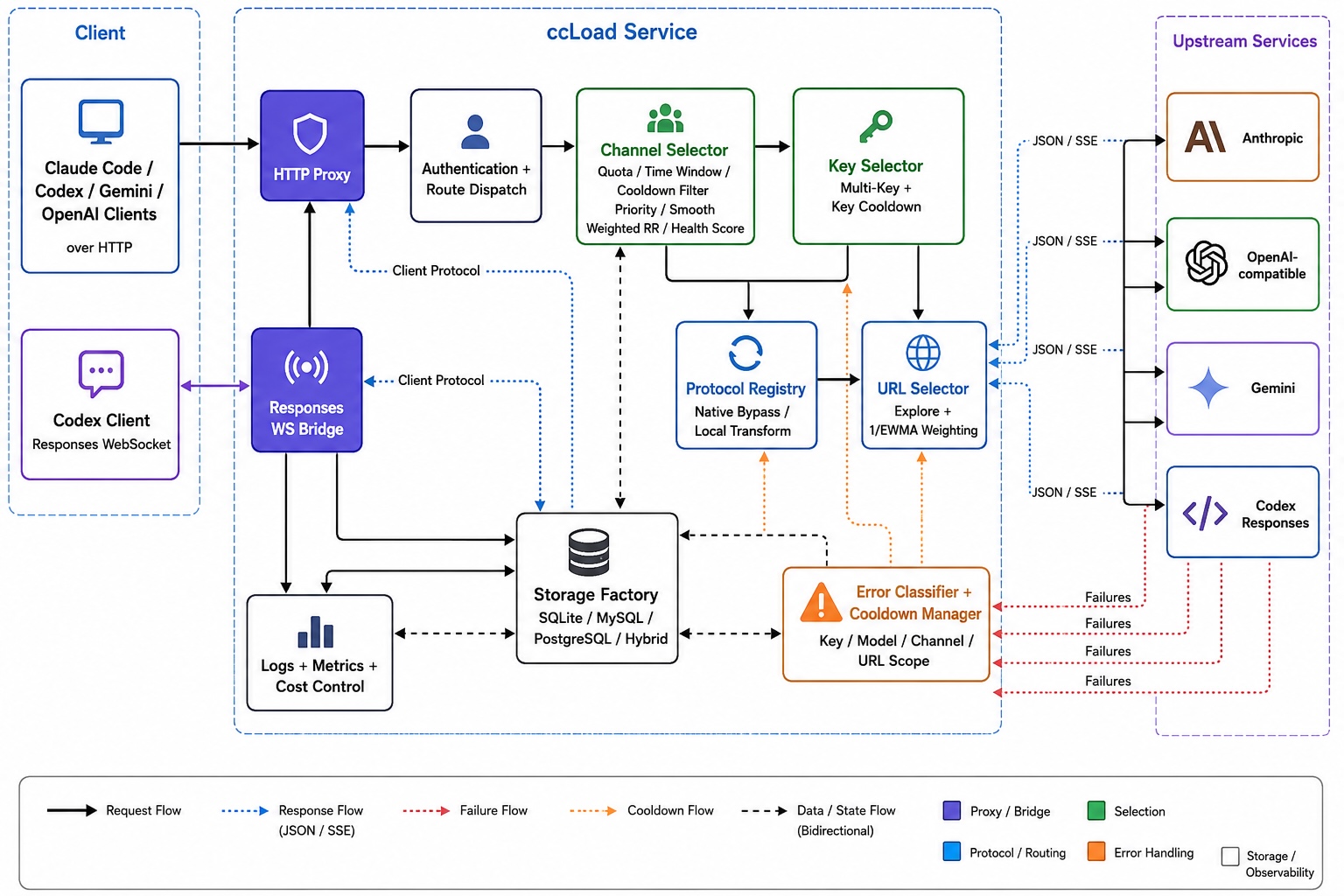
ccLoad sits between your agent client and several AI API providers. It chooses an upstream, retries on failures, applies cooldowns, transforms protocols when needed, and logs requests and costs in a dashboard.
Builders who want their agent clients to keep working across multiple AI API providers without manual switching.
You can keep coding with one stable gateway instead of managing keys, channels, and failover by hand.
Selects upstream channels by priority and weighted round-robin, while skipping cooled or unhealthy options.
Moves requests away from failed keys, models, channels, or URLs based on classified error types.
Applies exponential backoff to the specific model or key that failed instead of cooling an entire channel too early.
Lets one channel use several upstream URLs and weighs them by observed latency and health.
Adapts between Anthropic, OpenAI, Codex, and Gemini wire protocols per URL and request family.
Shows active requests, logs, token usage, latency, and cost in the web dashboard.
Treats HTTP 200 responses that contain error bodies as failures so they still follow failover rules.
Tracks per-token and per-channel costs, request limits, and credential quota windows.
# Download binary for your platform from GitHub Releases
wget https://github.com/caidaoli/ccLoad/releases/latest/download/ccload-linux-amd64
chmod +x ccload-linux-amd64
./ccload-linux-amd64
CCLOAD_POSTGRES=postgres://user:password@host:5432/ccload?sslmode=require
# Add empty commit to trigger rebuild
git commit --allow-empty -m "Trigger rebuild to pull latest image"
git push
docker run -d --name ccload \
  -p 8080:8080 \
  -e CCLOAD_PASS=your_admin_password \
  -e CCLOAD_POSTGRES="postgres://user:pass@postgres_host:5432/ccload?sslmode=require" \
  ghcr.io/caidaoli/ccload:latest
websocat \
  -H='Authorization: Bearer your-api-token' \
  -H='Session-Id: stable-conversation-id' \
  ws://localhost:8080/v1/responses
curl -X POST http://localhost:8080/v1/alpha/search \
  -H "Content-Type: application/json" \
  -H "Authorization: Bearer your-api-token" \
  -d '{
    "query": "golang channels"
  }'
AI API gateway for Claude Code, Codex, Gemini, and OpenAI.
English | 简体中文






Smart routing | Automatic failover | Model-aware cooldown | Multi-URL scheduling | Protocol transforms | Live monitoring | Cost control
ccLoad removes the operational mess of running multiple AI API upstreams. It keeps Claude Code, Codex, Gemini, and OpenAI-compatible clients on one stable gateway, then handles upstream selection, failover, cooldown, protocol conversion, request visibility, and cost limits in the service instead of in every client script.
During OpenAI Build Week, Codex powered by GPT-5.6 was the primary engineering agent used to:
5xx, key-level 429, model-unavailable 404, and explicit model-retirement 410 failures without unnecessarily cooling an entire channel.GPT-5.6 is also integrated into the product itself: ccLoad exposes GPT-5.6 through OpenAI-compatible and Codex Responses endpoints, includes Sol, Terra, and Luna model presets, calculates their standard, priority, flex, cached-token, and long-context costs, and applies routing and model-scoped cooldown decisions to them like any other configured upstream model.
The repository's AGENTS.md and CLAUDE.md provide persistent engineering constraints so Codex works against the same KISS-first review and testing rules in every session.
Common failure modes when you run several AI API channels:
429, 502, 504, expired keys, and overloaded providers should not stop the client workflow.ccLoad handles those cases with:
model_cooldown responses, upstream HTTP 5xx failures, key-level 429 rate limits, model-unavailable 404 errors, and explicit model-retirement 410 errors all cool only the actual upstream model first; other models on the same channel remain available. The channel is promoted to cooldown only after every configured model or every enabled key is cooling.{"error": {...}} structuretype field set to "error"error events (rate_limit_exceeded / too_many_requests) are handled as 429"当前模型负载过高" / "Current model load too high" (load warnings)system_id), with batch quota refresh, invalid-credential cleanup, and auto-disable for permanently rejected credentials(minimal/low/medium/high/xhigh/max), (none), (auto), or a numeric budget to any model name; ccLoad maps it to the upstream protocol's thinking parameters while routing on the base namemodel_multimodal_fallback), applied before thinking-suffix handling and channel/Key selectionEvery channel accepts all four client protocols. Upstream protocol selection is controlled by protocol_transform_mode and each structured URL's protocols declaration. upstream is strict client-protocol passthrough. auto tries the client protocol first, then probes OpenAI → Anthropic → Codex → Gemini while skipping the protocol already attempted, and advances only after an uncommitted capability error. local prioritizes URLs with explicit declarations and follows each URL's declared order; only when every URL is undeclared does it try Anthropic → Codex → OpenAI → Gemini. Incompatible URLs are skipped without a request or cooldown. Successful automatic detection is cached per URL and request family until restart or channel configuration changes. Only stable endpoint-level non-model 404/405 responses cache an all-protocols-unsupported result for that URL and request family; it is probed again after 10 minutes. Request-dependent 400/403/500 responses and local transform failures are retried on the next request.
Choose the deployment method that suits you best:
| Method | Difficulty | Cost | Use Case | HTTPS | Persistence |
|---|---|---|---|---|---|
| 🐳 Docker | ⭐⭐ | VPS required | Production, high performance | Config required | ✅ |
| 🤗 Hugging Face | ⭐ | Free | Personal use, quick trial | ✅ Auto | ✅ |
| 🔧 Source Build | ⭐⭐⭐ | Server required | Development, customization | Config required | ✅ |
| 📦 Binary | ⭐⭐ | Server required | Lightweight, simple setup | Config required | ✅ |
Using pre-built images (Recommended):
# Option 1: Using docker-compose (Simplest)
curl -o docker-compose.yml https://raw.githubusercontent.com/caidaoli/ccLoad/master/docker-compose.yml
curl -o .env https://raw.githubusercontent.com/caidaoli/ccLoad/master/.env.docker.example
# Edit .env file to set CCLOAD_PASS (required, service exits without it)
docker-compose up -d

# Option 2: Run image directly
docker pull ghcr.io/caidaoli/ccload:latest
docker run -d --name ccload \
  -p 8080:8080 \
  -e CCLOAD_PASS=your_secure_password \
  -v ccload_data:/app/data \
  ghcr.io/caidaoli/ccload:latest
Building from source:
# Clone project
git clone https://github.com/caidaoli/ccLoad.git
cd ccLoad

# Build and run with docker-compose
cp .env.docker.example .env  # edit .env to set CCLOAD_PASS
docker-compose -f docker-compose.build.yml up -d

# Or build manually
docker build -t ccload:local .
docker run -d --name ccload \
  -p 8080:8080 \
  -e CCLOAD_PASS=your_secure_password \
  -v ccload_data:/app/data \
  ccload:local
# Clone project
git clone https://github.com/caidaoli/ccLoad.git
cd ccLoad

# Build project (uses high-performance JSON library by default)
go build -tags sonic -o ccload .

# Or use Makefile
make build

# Run in development mode
go run -tags sonic .
# Or
make dev
# Download binary for your platform from GitHub Releases
wget https://github.com/caidaoli/ccLoad/releases/latest/download/ccload-linux-amd64
chmod +x ccload-linux-amd64
./ccload-linux-amd64
When a Cursor channel exists, ccLoad automatically downloads its pinned SDK Bridge, verifies the embedded SHA-256, and installs it atomically under its managed state directory. For offline installations, download the matching archive from the official Cursor SDK Bridge releases, place its cursor-sdk-bridge executable beside ccLoad, or set CURSOR_SDK_BRIDGE_BIN.
Hugging Face Spaces provides free container hosting with Docker support, ideal for personal and small team use.
Login to Hugging Face
Visit huggingface.co and log into your account
Create New Space
ccload (or custom name)MITDockerPublic or Private (private requires paid subscription)Create Dockerfile
Create a Dockerfile in the Space repository:
FROM ghcr.io/caidaoli/ccload:latest
ENV TZ=Asia/Shanghai
ENV PORT=7860
ENV SQLITE_PATH=/tmp/ccload.db
EXPOSE 7860
Create via:
Method A - Web Interface (Recommended):
Dockerfile as filenameMethod B - Git Command Line:
# Clone your Space repository
git clone https://huggingface.co/spaces/YOUR_USERNAME/ccload
cd ccload

# Create Dockerfile
cat > Dockerfile << 'EOF'
FROM ghcr.io/caidaoli/ccload:latest
ENV TZ=Asia/Shanghai
ENV PORT=7860
ENV SQLITE_PATH=/tmp/ccload.db
EXPOSE 7860
EOF

# Commit and push
git add Dockerfile
git commit -m "Add Dockerfile for ccLoad deployment"
git push
Configure Environment Variables (Secrets)
In Space settings (Settings → Variables and secrets → New secret):
| Variable | Value | Required | Description |
|---|---|---|---|
CCLOAD_PASS | None | ✅ Required | Admin interface password |
CCLOAD_API_TOKENS | token1|production,token2|development | Optional | Pre-seed API access tokens on startup |
Note: API access tokens can be pre-seeded with CCLOAD_API_TOKENS or managed in the Web admin interface /web/tokens.html.
Wait for Build and Startup
After pushing Dockerfile, Hugging Face will automatically:
Access Application
After build completes, access via:
https://YOUR_USERNAME-ccload.hf.spacehttps://YOUR_USERNAME-ccload.hf.space/web/https://YOUR_USERNAME-ccload.hf.space/v1/messagesFirst Access Note:
Advantages:
Limitations:
Important: Hugging Face Spaces Storage Policy
Due to Hugging Face Spaces limitations (/tmp directory clears on restart), we strongly recommend using an external MySQL or PostgreSQL database for complete data persistence:
Option 1: Hybrid Storage Mode (Recommended, Best Performance)
CCLOAD_MYSQL or CCLOAD_POSTGRES) plus CCLOAD_ENABLE_SQLITE_REPLICA=1 in SecretsDockerfile Example (Hybrid Mode):
FROM ghcr.io/caidaoli/ccload:latest
ENV TZ=Asia/Shanghai
ENV PORT=7860
# Configure in Secrets: CCLOAD_MYSQL or CCLOAD_POSTGRES, plus CCLOAD_ENABLE_SQLITE_REPLICA=1
EXPOSE 7860
Option 2: Pure External Database Mode
CCLOAD_MYSQL or CCLOAD_POSTGRES in SecretsRecommended Free MySQL Services:
MySQL Configuration Example (TiDB Cloud):
user:password@tcp(host:4000)/database?tls=trueCCLOAD_MYSQL variable in Hugging Face Space SecretsCCLOAD_ENABLE_SQLITE_REPLICA=1 for best performancePostgreSQL Configuration Example:
CCLOAD_POSTGRES=postgres://user:password@host:5432/ccload?sslmode=require
URL and libpq keyword DSNs are supported. Do not set CCLOAD_MYSQL and CCLOAD_POSTGRES at the same time.
Dockerfile Example (Pure External Database):
FROM ghcr.io/caidaoli/ccload:latest
ENV TZ=Asia/Shanghai
ENV PORT=7860
# Configure CCLOAD_MYSQL or CCLOAD_POSTGRES in Secrets; SQLITE_PATH is not required
EXPOSE 7860
Option 3: Local Storage Only (Not Recommended)
/tmp clears on Space restart, channel config lostWith pre-built images, updates are simple:
Image Refresh:
ghcr.io/caidaoli/ccload:latest) is releasedManual Trigger Update:
# Add empty commit to trigger rebuild
git commit --allow-empty -m "Trigger rebuild to pull latest image"
git push
Version Pinning (Optional): To lock specific version, modify Dockerfile:
FROM ghcr.io/caidaoli/ccload:v4.7.0  # Specify version
ENV TZ=Asia/Shanghai
ENV PORT=7860
ENV SQLITE_PATH=/tmp/ccload.db
EXPOSE 7860
Choose SQLite, MySQL, or PostgreSQL based on the deployment shape. MySQL and PostgreSQL are mutually exclusive.
SQLite Mode (Default):
# Set environment variables
export CCLOAD_PASS=your_admin_password
export PORT=8080
export SQLITE_PATH=./data/ccload.db

# Or use .env file
echo "CCLOAD_PASS=your_admin_password" > .env
echo "PORT=8080" >> .env
echo "SQLITE_PATH=./data/ccload.db" >> .env

# Start service
./ccload
MySQL Mode:
# 1. Create MySQL database
mysql -u root -p -e "CREATE DATABASE ccload CHARACTER SET utf8mb4 COLLATE utf8mb4_unicode_ci;"

# 2. Set environment variables
export CCLOAD_PASS=your_admin_password
export CCLOAD_MYSQL="user:password@tcp(localhost:3306)/ccload?charset=utf8mb4"
export PORT=8080

# Or use .env file
echo "CCLOAD_PASS=your_admin_password" > .env
echo "CCLOAD_MYSQL=user:password@tcp(localhost:3306)/ccload?charset=utf8mb4" >> .env
echo "PORT=8080" >> .env

# 3. Start service (auto-creates tables)
./ccload
PostgreSQL Mode:
# 1. Create the database and user in PostgreSQL

# 2. Set environment variables
export CCLOAD_PASS=your_admin_password
export CCLOAD_POSTGRES="postgres://user:password@localhost:5432/ccload?sslmode=disable"
export PORT=8080

# 3. Start service (auto-creates and migrates tables)
./ccload
Docker + MySQL:
# Option 1: docker-compose (Recommended)
cat > docker-compose.mysql.yml << 'EOF'
version: '3.8'
services:
  mysql:
    image: mysql:8.0
    environment:
      MYSQL_ROOT_PASSWORD: rootpass
      MYSQL_DATABASE: ccload
      MYSQL_USER: ccload
      MYSQL_PASSWORD: ccloadpass
    volumes:
      - mysql_data:/var/lib/mysql
    ports:
      - "3306:3306"
    healthcheck:
      test: ["CMD", "mysqladmin", "ping", "-h", "localhost"]
      interval: 10s
      timeout: 5s
      retries: 5

  ccload:
    image: ghcr.io/caidaoli/ccload:latest
    environment:
      CCLOAD_PASS: your_admin_password
      CCLOAD_MYSQL: "ccload:ccloadpass@tcp(mysql:3306)/ccload?charset=utf8mb4"
      PORT: 8080
    ports:
      - "8080:8080"
    depends_on:
      mysql:
        condition: service_healthy

volumes:
  mysql_data:
EOF

docker-compose -f docker-compose.mysql.yml up -d

# Option 2: Direct run (requires existing MySQL service)
docker run -d --name ccload \
  -p 8080:8080 \
  -e CCLOAD_PASS=
Sign in to join the discussion.
No comments yet. Be the first to say what this is good for.
Real-time global intelligence dashboard. AI-powered news aggregation, geopolitical monitoring, and infrastructure tracking in a unified situational awareness interface
High-performance code intelligence MCP server. Indexes codebases into a persistent knowledge graph — average repo in milliseconds. 158 languages, sub-ms queries, 99% fewer tokens. Single static binary, zero dependencies.

Universal provider proxy for OpenAI Codex & Claude Code — use any LLM (Claude, Gemini, Grok, DeepSeek, Ollama…) with Codex CLI, App, SDK, and Claude Code

Git-native persistent memory for AI coding agents. Implements Google OKF v0.2 with sub-300µs in-memory BM25 search, embedded MCP server, and progressive disclosure. Slashes token bloat by 80% with zero external databases or dependencies. Built in pure Go.

Local-first code intelligence graph for MCP and CLI. Builds a persistent map of your codebase so AI coding tools read only what matters, with benchmarked context reductions on reviews and large-repo workflows.

Stop your AI from making things up — it proposes, deterministic tools decide, every claim checked against ground truth with evidence. Grounded facts and context survive resets. Reverse engineering is the proving ground. MCP server + CLI.