

koala73/worldmonitorConnectors
Real-time global intelligence dashboard. AI-powered news aggregation, geopolitical monitoring, and infrastructure tracking in a unified situational awareness interface
86k
This repo exposes BitDive monitoring and QA operations through MCP tools for agent clients. It turns raw trace data into readable summaries, comparison reports, replay commands, and test-group workflows inside `server.py`. It sits between the agent and the BitDive Monitoring API, adding secret redaction, SQL normalization, trace ordering, and diff logic so the output is easier to act on.
Builders who use agent clients and need BitDive traces, replays, and regression checks in their workflow.
You can inspect, compare, and replay application traces without manually digging through BitDive JSON.
Provides heatmap, search, and recent-call tools to find the right module, service, method, or call ID.
Returns readable trace overviews, full traces, raw traces, and subtree views with redaction and ordered child calls.
Compares traces before and after a change, including path drift, payload differences, and normalized SQL deltas.
Generates curl and PowerShell replay commands from captured requests so you can rerun them locally.
Creates, lists, updates, and inspects BitDive test groups and replay test results through MCP tools.
pip install -r requirements.txt
python server.py
MCP_TRANSPORT=streamable-http MCP_HOST=0.0.0.0 MCP_PORT=8000 python server.py



Python MCP server for BitDive trace analysis, request reproduction, and regression management.
This repository exposes BitDive monitoring and QA operations to MCP clients such as Cursor, Claude Desktop, and other agent runtimes. The implementation lives in server.py and connects to the BitDive Monitoring API while adding its own formatting, normalization, and comparison logic on top.
Use this repository from the
python-mcp-serverbranch.
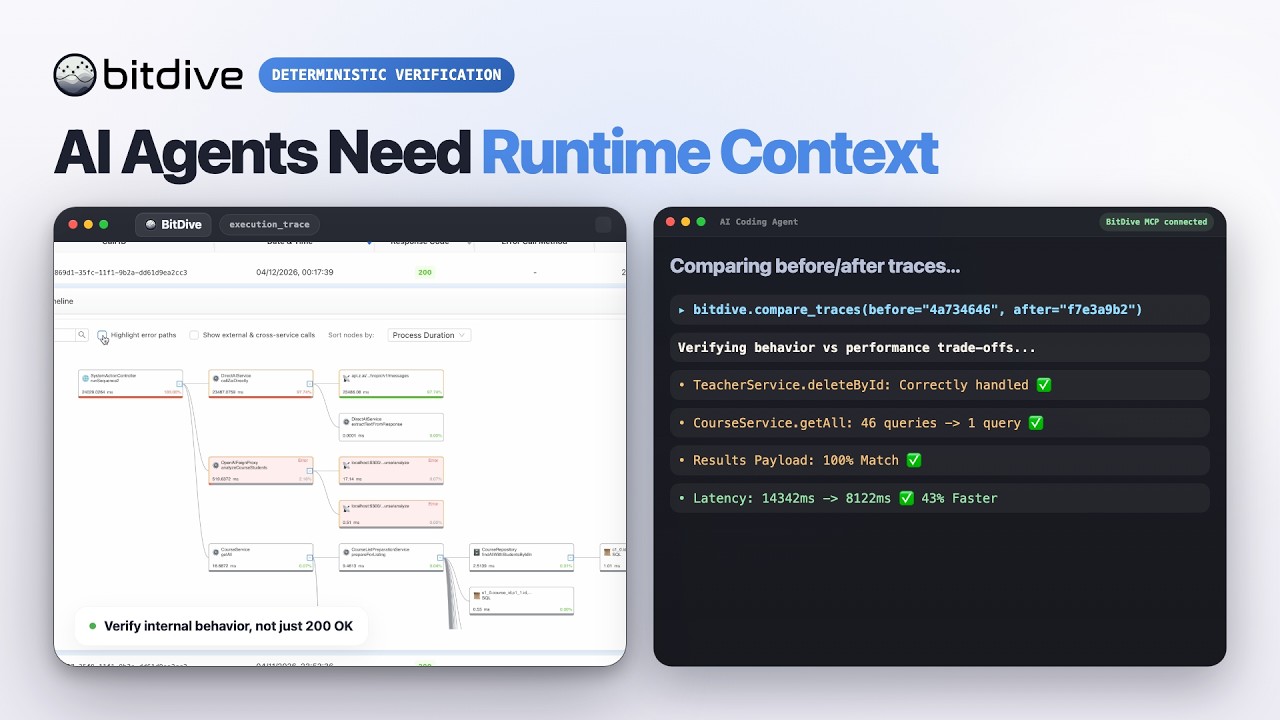
Watch the BitDive product demo on YouTube:
This server is not just a thin API proxy.
It wraps BitDive API endpoints and makes them usable for agent workflows:
Use this server when an AI agent or developer needs to:
The current server exposes 24 MCP tools.
Tool names follow their intent: discovery tools (you do not have an id yet) start with get_*_heatmap / list_* / find_* / search_*; inspect tools (you already have a call_id) start with get_trace*; compare tools diff traces.
| Group | Tools | When to use |
|---|---|---|
| Discovery (heatmaps) | get_system_heatmap, get_module_heatmap, get_service_heatmap | Don't know where to look yet; find a class/method and its metrics |
| Discovery (calls/methods) | list_recent_calls, find_calls_by_method, search_methods, search_methods_detailed | Get call_ids or locate a method by keyword |
Inspect one trace (needs call_id) | get_trace_overview, get_trace, get_trace_raw, get_trace_subtree | Read a known trace: overview → full de-noised → raw → single subtree |
| Compare | compare_traces, compare_traces_over_time | Before/after diff, or a chronological series |
| Reproduce | get_replay_command | Rebuild a curl/PowerShell command to replay a request |
| Utility | resolve_call_ids | Map call_ids to short Class.method names |
| Tests | create_test_group, list_test_groups, list_test_group_classes, list_test_group_methods, build_test_payload, delete_test_group, set_test_group_enabled, regenerate_test, get_test_results | Manage and inspect record-and-replay test groups |
get_system_heatmap or list_recent_calls to find a method or fresh call_id.get_trace_overview for a quick tree; get_trace for full de-noised payloads (default for deep analysis).compare_traces for before/after; open get_trace when the diff needs payload proof.get_replay_command, run it, wait ~45s, then list_recent_calls again.Tool names encode intent: discovery tools when you do not have a call_id yet; get_trace* when you do.
Several important behaviors are implemented inside server.py, not just delegated to the backend API.
get_trace_overview builds a readable execution treeget_trace returns the whole tree with full fidelity but without raw Jackson/type-wrapper noise (typically 50-65% smaller than get_trace_raw, secrets redacted, child calls ordered chronologically)get_trace_raw and get_trace_subtree are also redacted; use them only when you need the verbatim shape or a single method boundarycompare_traces detects method-path drifttraceId, and callId can be ignored for cleaner diffscurl and PowerShell commands are generated from recorded headers, method, URL, and body| Layer | Responsibility |
|---|---|
| BitDive backend | Stores traces, monitoring data, and test metadata |
mcp-server | Exposes MCP tools and adds comparison, normalization, and formatting logic |
| MCP client | Cursor, Claude Desktop, or another runtime invoking the tools |
httpxmcpInstall dependencies:
pip install -r requirements.txt
| Variable | Purpose | Default |
|---|---|---|
BITDIVE_MCP_TOKEN | Default token when a tool call does not pass mcp_token | none |
BITDIVE_API_URL | Base BitDive Monitoring API URL | https://cloud.bitdive.io/monitoring-api |
BITDIVE_SKIP_VERIFY | Disable TLS certificate verification when set to true | false |
MCP_TRANSPORT | MCP transport mode | stdio |
MCP_HOST | Host for HTTP mode | 0.0.0.0 |
MCP_PORT | Port for HTTP mode | 8000 |
Every tool also accepts an optional mcp_token parameter. If omitted, the server falls back to BITDIVE_MCP_TOKEN.
stdio modepython server.py
streamable-http modeMCP_TRANSPORT=streamable-http MCP_HOST=0.0.0.0 MCP_PORT=8000 python server.py
{
  "mcpServers": {
    "bitdive": {
      "command": "python",
      "args": [
        "/absolute/path/to/server.py"
      ],
      "env": {
        "BITDIVE_MCP_TOKEN": "your-token"
      }
    }
  }
}
| Path | Purpose |
|---|---|
server.py | MCP server implementation |
requirements.txt | Python dependencies |
Sign in to join the discussion.
No comments yet. Be the first to say what this is good for.
Real-time global intelligence dashboard. AI-powered news aggregation, geopolitical monitoring, and infrastructure tracking in a unified situational awareness interface
High-performance code intelligence MCP server. Indexes codebases into a persistent knowledge graph — average repo in milliseconds. 158 languages, sub-ms queries, 99% fewer tokens. Single static binary, zero dependencies.

Universal provider proxy for OpenAI Codex & Claude Code — use any LLM (Claude, Gemini, Grok, DeepSeek, Ollama…) with Codex CLI, App, SDK, and Claude Code

Git-native persistent memory for AI coding agents. Implements Google OKF v0.2 with sub-300µs in-memory BM25 search, embedded MCP server, and progressive disclosure. Slashes token bloat by 80% with zero external databases or dependencies. Built in pure Go.

Local-first code intelligence graph for MCP and CLI. Builds a persistent map of your codebase so AI coding tools read only what matters, with benchmarked context reductions on reviews and large-repo workflows.

Stop your AI from making things up — it proposes, deterministic tools decide, every claim checked against ground truth with evidence. Grounded facts and context survive resets. Reverse engineering is the proving ground. MCP server + CLI.