


heygen-com/hyperframesFrameworks & SDKs
Write HTML. Render video. Built for agents.
49k
OpenBrowser gives agents a browser they can drive through CDP, Python code execution, and MCP tools. It keeps state in a persistent namespace and browser profile, so sessions can carry cookies, tabs, and variables across calls.
Builders who want Claude Code, Codex, or another MCP client to automate web tasks without re-explaining context.
You can delegate web navigation, scraping, form filling, and browser-based testing while keeping session state between runs.
Lets an LLM write Python code in a persistent namespace to navigate pages, click elements, type text, and read results.
Uses Chrome DevTools Protocol for low-level browser control instead of only page-level automation wrappers.
Exposes browser actions through an MCP tool so Claude Code, Claude Desktop, Codex, and other MCP clients can use it.
Packages the browser tools as a Claude Code plugin with skills for web scraping, form filling, end-to-end testing, page analysis, accessibility audits, and file downloads.
Provides a CLI daemon with a persistent browser profile so variables, cookies, and login state survive across calls.
Can record browser sessions and export them to Jupyter notebooks or crawler code for reuse.
curl -fsSL https://raw.githubusercontent.com/billy-enrizky/openbrowser-ai/main/install.sh | sh
irm https://raw.githubusercontent.com/billy-enrizky/openbrowser-ai/main/install.ps1 | iex
curl -fsSL https://raw.githubusercontent.com/billy-enrizky/openbrowser-ai/main/install.sh | sh -s -- --local
brew tap billy-enrizky/openbrowser
brew install openbrowser-ai
pip install openbrowser-ai
uv pip install openbrowser-ai

AI browser automation, powered by code.
Cloud dashboard for saved cookies and scheduled tasks is available in the hosted version. Join the waitlist for early access: https://openbrowser.me :
https://github.com/user-attachments/assets/b17f97f3-f9f8-4707-8e39-abbbbe1a693b
Automating Walmart Product Scraping:
https://github.com/user-attachments/assets/c517c739-9199-47b0-bac7-c2c642a21094
OpenBrowserAI Automatic Flight Booking:
https://github.com/user-attachments/assets/632128f6-3d09-497f-9e7d-e29b9cb65e0f
OpenBrowserAI Automatic Form Filling:
https://github.com/user-attachments/assets/16f7ef1a-beb1-45e2-a733-9592536e0ef7




AI-powered browser automation using CodeAgent and CDP (Chrome DevTools Protocol)
OpenBrowser is a framework for intelligent browser automation. It combines direct CDP communication with a CodeAgent architecture, where the LLM writes Python code executed in a persistent namespace, to navigate, interact with, and extract information from web pages autonomously.
Full documentation: https://docs.openbrowser.me
-c flag for direct code execution from Bash, saved login state, and 10-minute auto-shutdowncurl -fsSL https://raw.githubusercontent.com/billy-enrizky/openbrowser-ai/main/install.sh | sh
irm https://raw.githubusercontent.com/billy-enrizky/openbrowser-ai/main/install.ps1 | iex
Detects uv, pipx, or pip and installs OpenBrowser automatically.
Install to ~/.local/bin without sudo:
curl -fsSL https://raw.githubusercontent.com/billy-enrizky/openbrowser-ai/main/install.sh | sh -s -- --local
brew tap billy-enrizky/openbrowser
brew install openbrowser-ai
pip install openbrowser-ai
uv pip install openbrowser-ai
Run directly without installing -- uvx downloads and caches the package automatically:
# MCP server mode
uvx openbrowser-ai --mcp

# CLI daemon mode
uvx openbrowser-ai -c "await navigate('https://example.com')"
pipx install openbrowser-ai
git clone https://github.com/billy-enrizky/openbrowser-ai.git
cd openbrowser-ai
uv pip install -e ".[agent]"
pip install openbrowser-ai[agent]      # LLM agent support (langgraph, langchain, litellm)
pip install openbrowser-ai[all]        # All LLM providers
pip install openbrowser-ai[anthropic]  # Anthropic Claude
pip install openbrowser-ai[groq]       # Groq
pip install openbrowser-ai[ollama]     # Ollama (local models)
pip install openbrowser-ai[aws]        # AWS Bedrock
pip install openbrowser-ai[azure]      # Azure OpenAI
pip install openbrowser-ai[video]      # Video recording support
No separate browser install needed. OpenBrowser auto-detects any installed Chromium-based browser (Chrome, Edge, Brave, Chromium) and uses it directly. If none is found and
uvxis available, Chromium is installed automatically on first run. To pre-install manually (requiresuvx):openbrowser-ai install
import asyncio
from openbrowser import CodeAgent, ChatGoogle

async def main():
    agent = CodeAgent(
        task="Go to google.com and search for 'Python tutorials'",
        llm=ChatGoogle(model="gemini-3-flash"),
    )

    result = await agent.run()
    print(f"Result: {result}")

asyncio.run(main())
from openbrowser import CodeAgent, ChatOpenAI, ChatAnthropic, ChatGoogle

# OpenAI
agent = CodeAgent(task="...", llm=ChatOpenAI(model="gpt-5.2"))

# Anthropic
agent = CodeAgent(task="...", llm=ChatAnthropic(model="claude-sonnet-4-6"))

# Google Gemini
agent = CodeAgent(task="...", llm=ChatGoogle(model="gemini-3-flash"))
import asyncio
from openbrowser import BrowserSession, BrowserProfile

async def main():
    profile = BrowserProfile(
        headless=True,
        viewport_width=1920,
        viewport_height=1080,
    )

    session = BrowserSession(browser_profile=profile)
    await session.start()

    await session.navigate_to("https://example.com")
    screenshot = await session.screenshot()

    await session.stop()

asyncio.run(main())
# Google (recommended)
export GOOGLE_API_KEY="..."

# OpenAI
export OPENAI_API_KEY="sk-..."

# Anthropic
export ANTHROPIC_API_KEY="sk-ant-..."

# Groq
export GROQ_API_KEY="gsk_..."

# AWS Bedrock
export AWS_ACCESS_KEY_ID="..."
export AWS_SECRET_ACCESS_KEY="..."
export AWS_DEFAULT_REGION="us-west-2"

# Azure OpenAI
export AZURE_OPENAI_API_KEY="..."
export AZURE_OPENAI_ENDPOINT="https://your-resource.openai.azure.com/"
from openbrowser import BrowserProfile

profile = BrowserProfile(
    headless=True,
    viewport_width=1280,
    viewport_height=720,
    disable_security=False,
    extra_chromium_args=["--disable-gpu"],
    record_video_dir="./recordings",
    proxy={
        "server": "http://proxy.example.com:8080",
        "username": "user",
        "password": "pass",
    },
)
| Provider | Class | Models |
|---|---|---|
ChatGoogle | gemini-3-flash, gemini-3-pro | |
| OpenAI | ChatOpenAI | gpt-5.2, o4-mini, o3 |
| Anthropic | ChatAnthropic | claude-sonnet-4-6, claude-opus-4-6 |
| Groq | ChatGroq | llama-4-scout, qwen3-32b |
| AWS Bedrock | ChatAWSBedrock | anthropic.claude-sonnet-4-6, amazon.nova-pro |
| AWS Bedrock (Anthropic) | ChatAnthropicBedrock | Claude models via Anthropic Bedrock SDK |
| Azure OpenAI | ChatAzureOpenAI | Any Azure-deployed model |
| OpenRouter | ChatOpenRouter | Any model on openrouter.ai |
| DeepSeek | ChatDeepSeek | deepseek-chat, deepseek-r1 |
| Cerebras | ChatCerebras | llama-4-scout, qwen-3-235b |
| Ollama | ChatOllama | llama-4-scout, deepseek-r1 (local) |
| OCI | ChatOCIRaw | Oracle Cloud GenAI models |
| Browser-Use | ChatBrowserUse | External LLM service |
Install OpenBrowser as a Claude Code plugin:
# Add the marketplace (one-time)
claude plugin marketplace add billy-enrizky/openbrowser-ai

# Install the plugin
claude plugin install openbrowser@openbrowser-ai
This installs the MCP server and 6 built-in skills:
| Skill | Description |
|---|---|
web-scraping | Extract structured data, handle pagination |
form-filling | Fill forms, login flows, multi-step wizards |
e2e-testing | Test web apps by simulating user interactions |
page-analysis | Analyze page content, structure, metadata |
accessibility-audit | Audit pages for WCAG compliance |
file-download | Download files (PDFs, CSVs) using browser session |
See plugin/README.md for detailed tool parameter documentation.
OpenBrowser works with OpenAI Codex via native skill discovery.
Tell Codex:
Fetch and follow instructions from https://raw.githubusercontent.com/billy-enrizky/openbrowser-ai/refs/heads/main/.codex/INSTALL.md
# Clone the repository
git clone https://github.com/billy-enrizky/openbrowser-ai.git ~/.codex/openbrowser

# Symlink skills for native discovery
mkdir -p ~/.agents/skills
ln -s ~/.codex/openbrowser/plugin/skills ~/.agents/skills/openbrowser

# Restart Codex
Then configure the MCP server in your project (see MCP Server below).
Detailed docs: .codex/INSTALL.md
OpenBrowser works with OpenCode.ai via plugin and skill symlinks.
Tell OpenCode:
Fetch and follow instructions from https://raw.githubusercontent.com/billy-enrizky/openbrowser-ai/refs/heads/main/.opencode/INSTALL.md
# Clone the repository
git clone https://github.com/billy-enrizky/openbrowser-ai.git ~/.config/opencode/openbrowser

# Create directories
mkdir -p ~/.config/opencode/plugins ~/.config/opencode/skills

# Symlink plugin and skills
ln -s ~/.config/opencode/openbrowser/.opencode/plugins/openbrowser.js ~/.config/opencode/plugins/openbrowser.js
ln -s ~/.config/opencode/openbrowser/plugin/skills ~/.config/opencode/skills/openbrowser

# Restart OpenCode
Then configure the MCP server in your project (see MCP Server below).
Detailed docs: .opencode/INSTALL.md
OpenClaw supports OpenBrowser via the CLI daemon. Install OpenBrowser,
then use openbrowser-ai -c from the Bash tool:
openbrowser-ai -c "await navigate('https://example.com')"
openbrowser-ai -c "print(await evaluate('document.title'))"
The daemon starts automatically on first use and persists variables across calls.
For OpenClaw plugin documentation, see docs.openclaw.ai/tools/plugin.
OpenBrowser includes an MCP (Model Context Protocol) server that exposes browser automation as tools for AI assistants like Claude. Listed on the MCP Registry as me.openbrowser/openbrowser-ai. No external LLM API keys required -- the MCP client provides the intelligence.
By default, MCP sessions reuse ~/.config/openbrowser/profiles/default and save cookies plus origin storage to ~/.config/openbrowser/profiles/default/storage_state.json, so logins survive MCP restarts. OpenBrowser also auto-cleans disposable Chromium caches in managed profiles, which keeps disk usage down without deleting cookies or login state.
Claude Code: add to your project's .mcp.json:
{
  "mcpServers": {
    "openbrowser": {
      "command": "uvx",
      "args": ["openbrowser-ai", "--mcp"]
    }
  }
}
Claude Desktop: add to ~/Library/Application Support/Claude/claude_desktop_config.json:
{
  "mcpServers": {
    "openbrowser": {
      "command": "uvx",
      "args": ["openbrowser-ai", "--mcp"],
      "env": {
        "OPENBROWSER_HEADLESS": "true"
      }
    }
  }
}
Run directly:
uvx openbrowser-ai --mcp
The MCP server exposes a single execute_code tool that runs Python code in a persistent namespace with browser automation functions. The LLM writes Python code to navigate, interact, and extract data, returning only what was explicitly requested.
Available functions (all async, use await):
| Category | Functions |
|---|---|
| Navigation | navigate(url, new_tab), go_back(), wait(seconds) |
| Interaction | click(index), input_text(index, text, clear), scroll(down, pages, index), send_keys(keys), upload_file(index, path) |
| Dropdowns | select_dropdown(index, text), dropdown_options(index) |
| Tabs | switch(tab_id), close(tab_id) |
| JavaScript | evaluate(code): run JS in page context, returns Python objects |
| Downloads | download_file(url, filename): download a file using browser cookies, list_downloads(): list downloaded files |
| State | browser.get_browser_state_summary(): get page metadata and interactive elements |
| CSS | get_selector_from_index(index): get CSS selector for an element |
| Completion | done(text, success): signal task completion |
Pre-imported libraries: json, csv, re, datetime, asyncio, Path, requests, numpy, pandas, matplotlib, BeautifulSoup
| Environment Variable | Description | Default |
|---|---|---|
OPENBROWSER_HEADLESS | Run browser without GUI | true |
OPENBROWSER_ALLOWED_DOMAINS | Comma-separated domain whitelist | (none) |
OPENBROWSER_USER_DATA_DIR | Chrome profile directory for persistent MCP sessions | ~/.config/openbrowser/profiles/default |
OPENBROWSER_STORAGE_STATE | JSON file used to save and restore cookies plus localStorage | ~/.config/openbrowser/profiles/default/storage_state.json |
OPENBROWSER_COMPACT_DESCRIPTION | Minimal tool description (~500 tokens) | false |
OPENBROWSER_MAX_OUTPUT | Max output characters per execution | 10000 |
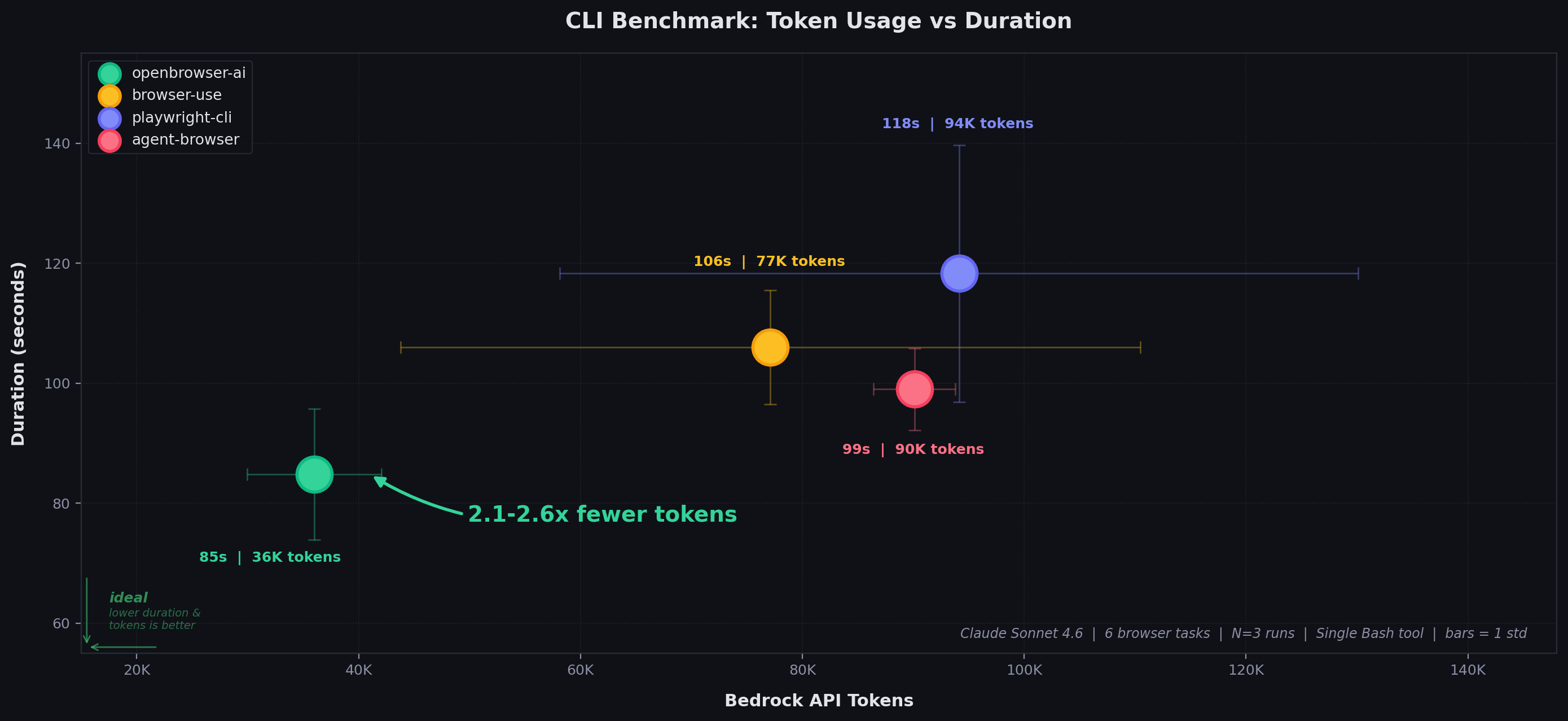
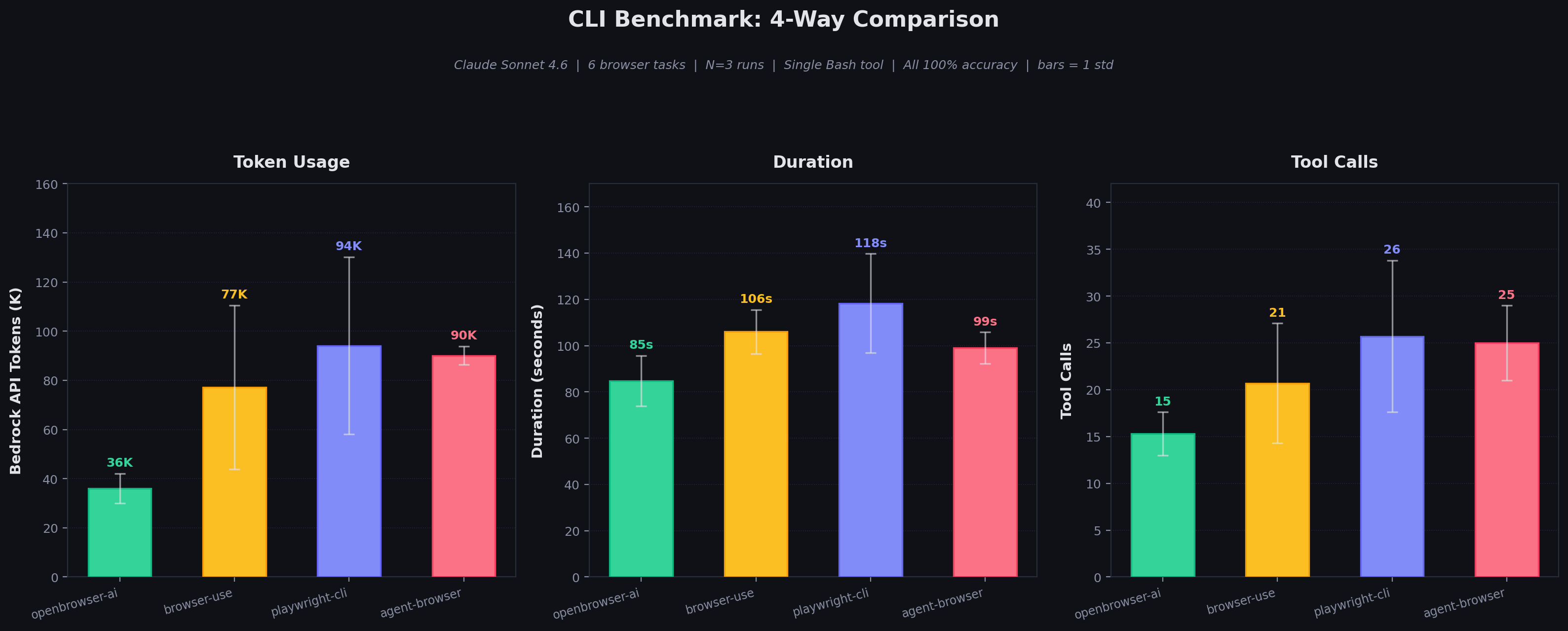
Four CLI tools compared with a single Bash tool each. Claude Sonnet 4.6 on Bedrock. Randomized order. All achieve 100% accuracy.
| CLI Tool | Duration (mean +/- std) | Tool Calls | Bedrock API Tokens | Response Chars |
|---|---|---|---|---|
| openbrowser-ai | 84.8 +/- 10.9s | 15.3 +/- 2.3 | 36,010 +/- 6,063 | 9,452 +/- 472 |
| browser-use | 106.0 +/- 9.5s | 20.7 +/- 6.4 | 77,123 +/- 33,354 | 36,241 +/- 12,940 |
| agent-browser | 99.0 +/- 6.8s | 25.0 +/- 4.0 | 90,107 +/- 3,698 | 56,009 +/- 39,733 |
| playwright-cli | 118.3 +/- 21.4s | 25.7 +/- 8.1 | 94,130 +/- 35,982 | 84,065 +/- 49,713 |
openbrowser-ai uses 2.1-2.6x fewer tokens than all competitors via Python code batching and compact DOM representation.
| Task | openbrowser-ai | browser-use | playwright-cli | agent-browser |
|---|---|---|---|---|
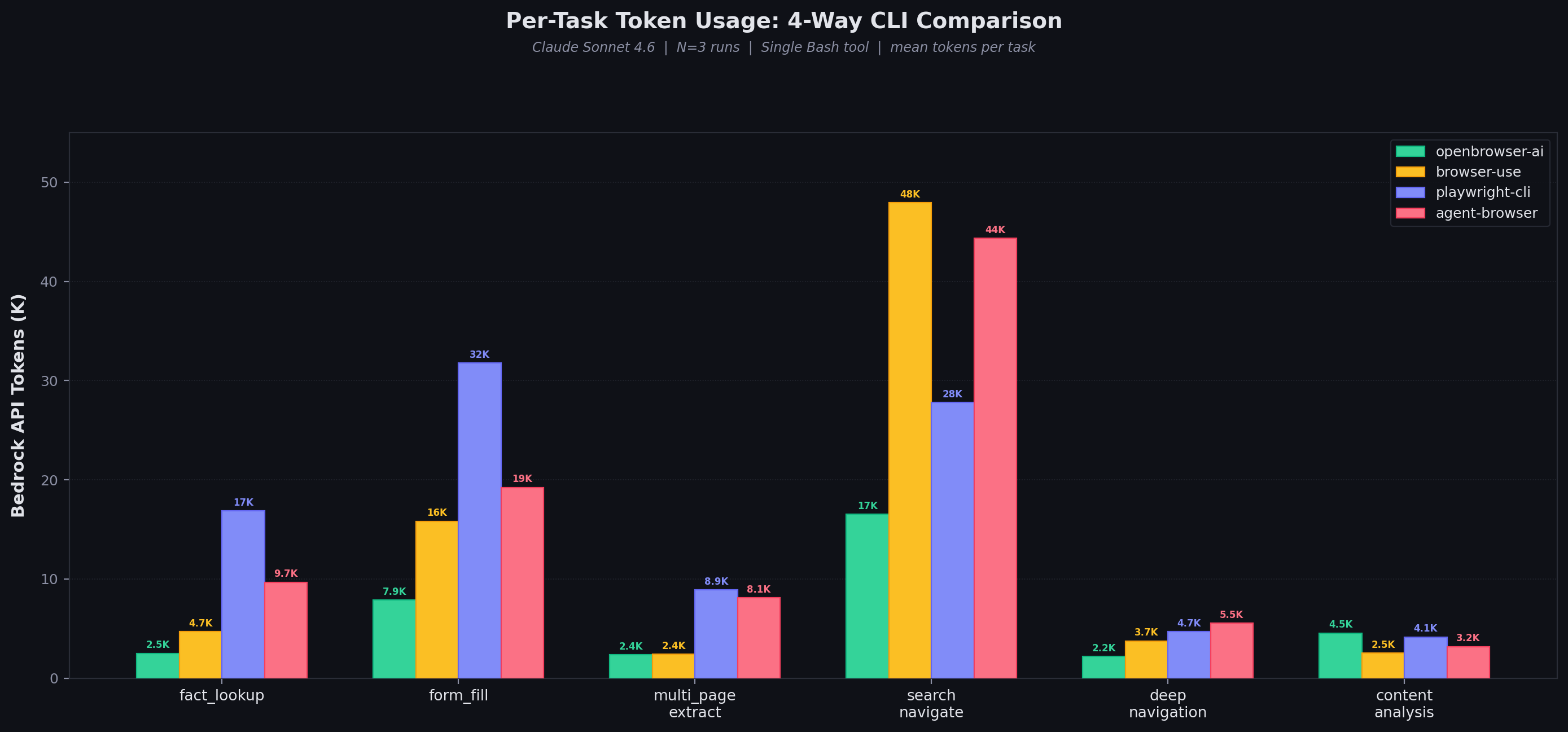
| fact_lookup | 2,504 | 4,710 | 16,857 | 9,676 |
| form_fill | 7,887 | 15,811 | 31,757 | 19,226 |
| multi_page_extract | 2,354 | 2,405 | 8,886 | 8,117 |
| search_navigate | 16,539 | 47,936 | 27,779 | 44,367 |
| deep_navigation | 2,178 | 3,747 | 4,705 | 5,534 |
| content_analysis | 4,548 | 2,515 | 4,147 | 3,189 |
openbrowser-ai wins 5 of 6 tasks. The advantage is largest on complex pages (search_navigate: 2.9x fewer tokens than browser-use) where code batching avoids repeated page state dumps.
| Model | openbrowser-ai | browser-use | playwright-cli | agent-browser |
|---|---|---|---|---|
| Claude Sonnet 4.6 ($3/$15 per M) | $0.12 | $0.24 | $0.29 | $0.27 |
| Claude Opus 4.6 ($5/$25 per M) | $0.24 | $0.45 | $0.56 | $0.51 |
Raw results are in benchmarks/e2e_4way_cli_results.json. Full 4-way comparison with methodology.
| MCP Server | Pass Rate | Duration (mean +/- std) | Tool Calls | Bedrock API Tokens |
|---|---|---|---|---|
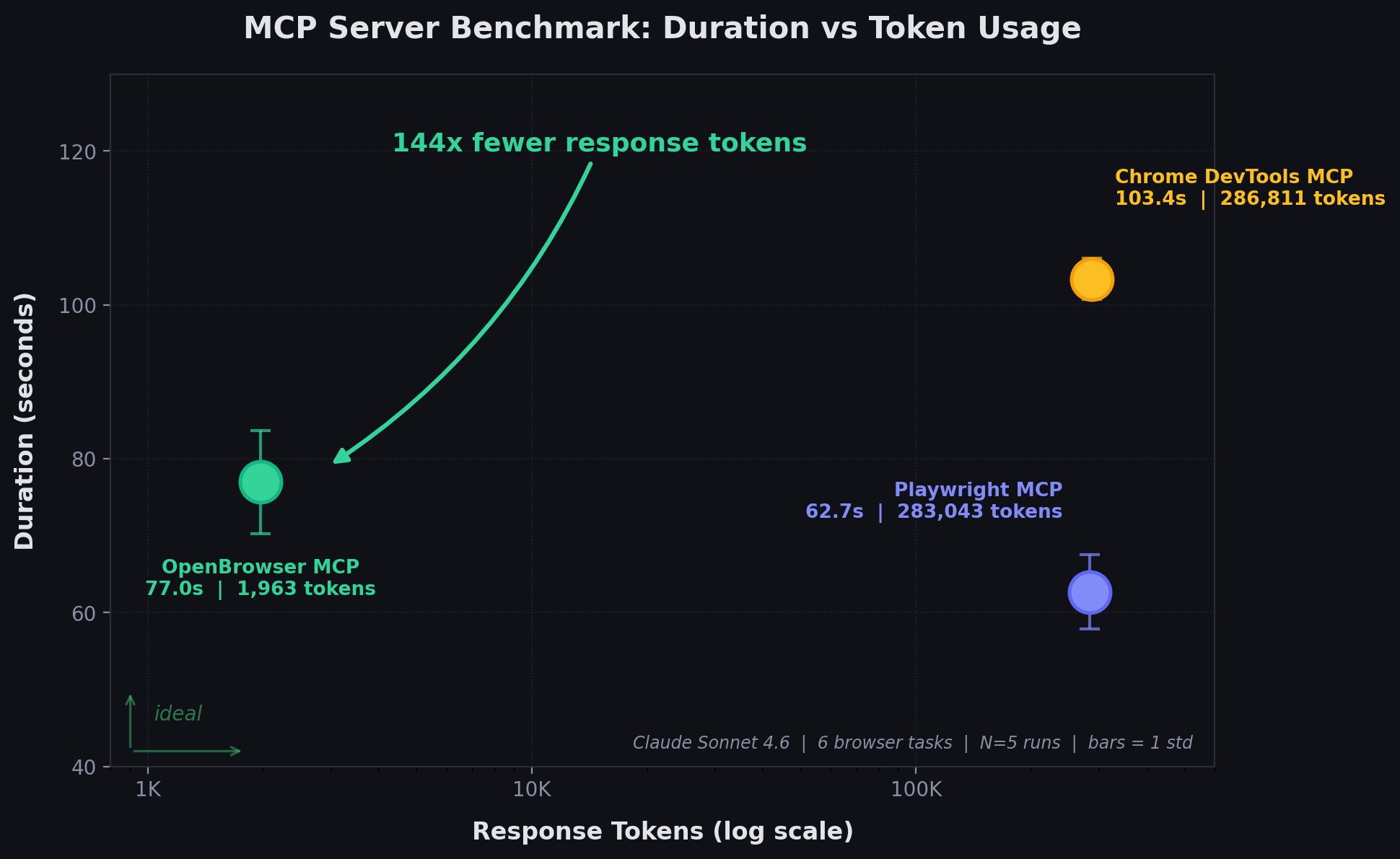
| Playwright MCP (Microsoft) | 100% | 62.7 +/- 4.8s | 9.4 +/- 0.9 | 158,787 |
| Chrome DevTools MCP (Google) | 100% | 103.4 +/- 2.7s | 19.4 +/- 0.5 | 299,486 |
| OpenBrowser MCP | 100% | 77.0 +/- 6.7s | 13.8 +/- 2.0 | 50,195 |
OpenBrowser uses 3.2x fewer tokens than Playwright and 6.0x fewer than Chrome DevTools. MCP response sizes: Playwright 1,132,173 chars, Chrome DevTools 1,147,244 chars, OpenBrowser 7,853 chars -- a 144x difference.
Full MCP comparison with methodology
# Run a browser automation task with an LLM agent
uvx openbrowser-ai -p "Search for Python tutorials on Google"

# Execute code directly via persistent daemon
uvx openbrowser-ai -c "await navigate('https://example.com')"
uvx openbrowser-ai -c "print(await evaluate('document.title'))"

# Daemon management
uvx openbrowser-ai daemon start     # Start daemon (auto-starts on first -c call)
uvx openbrowser-ai daemon stop      # Stop daemon and browser
uvx openbrowser-ai daemon status    # Show daemon info
uvx openbrowser-ai daemon restart   # Restart daemon

# Install browser
uvx openbrowser-ai install

# Run MCP server
uvx openbrowser-ai --mcp
The -c flag connects to a persistent browser daemon over a Unix socket (localhost TCP on Windows). Variables persist across calls while the daemon is running. The daemon starts automatically on first use and shuts down after 10 minutes of inactivity.
The CLI daemon stores its browser profile in ~/.config/openbrowser/profiles/daemon and also writes storage_state.json there, so cookies and login sessions survive daemon restarts. One-shot -p runs use ~/.config/openbrowser/profiles/cli with the same storage-state behavior. Managed profiles automatically clear disposable browser caches on startup and shutdown while keeping auth state.
openbrowser-ai/
├── .claude-plugin/            # Claude Code marketplace config
├── .codex/                    # Codex integration
│   └── INSTALL.md
├── .opencode/                 # OpenCode integration
│   ├── INSTALL.md
│   └── plugins/openbrowser.js
├── plugin/                    # Plugin package (skills + MCP config)
│   ├── .claude-plugin/
│   ├── .mcp.json
│   └── skills/                # 6 browser automation skills
├── src/openbrowser/
│   ├── __init__.py            # Main exports
│   ├── cli.py                 # CLI commands
│   ├── config.py              # Configuration
│   ├── actor/                 # Element interaction
│   ├── agent/                 # LangGraph agent
│   ├── browser/               # CDP browser control
│   ├── code_use/              # Code agent + shared executor
│   ├── daemon/                # Persistent browser daemon (Unix socket)
│   ├── dom/                   # DOM extraction
│   ├── llm/                   # LLM providers
│   ├── mcp/                   # MCP server
│   └── tools/                 # Action registry
├── benchmarks/                # MCP benchmarks and E2E tests
│   ├── playwright_benchmark.py
│   ├── cdp_benchmark.py
│   ├── openbrowser_benchmark.py
│   └── e2e_published_test.py
└── tests/                     # Test suite
# Run unit tests
pytest tests/

# Run with verbose output
pytest tests/ -v

# E2E test the MCP server against the published PyPI package
uv run python benchmarks/e2e_published_test.py
Run individual MCP server benchmarks (JSON-RPC stdio, 5-step Wikipedia workflow):
uv run python benchmarks/openbrowser_benchmark.py   # OpenBrowser MCP
uv run python benchmarks/playwright_benchmark.py     # Playwright MCP
uv run python benchmarks/cdp_benchmark.py            # Chrome DevTools MCP
Raw results are in benchmarks/e2e_4way_cli_results.json. See full comparison for methodology.
The project includes a FastAPI backend and a Next.js frontend, both containerized with Docker.
.env file in the project root with POSTGRES_PASSWORD and any LLM API keys (see backend/env.example)# Start backend + PostgreSQL (frontend runs locally)
docker-compose -f docker-compose.dev.yml up --build
# In a separate terminal, start the frontend
cd frontend && npm install && npm run dev
| Service | URL | Description |
|---|---|---|
| Backend | http://localhost:8000 | FastAPI + WebSocket + VNC |
| Frontend | http://localhost:3000 | Next.js dev server |
| PostgreSQL | localhost:5432 | Chat persistence |
| VNC | ws://localhost:6080 | Live browser view |
The dev compose mounts backend/app/ and src/ as volumes for hot-reload. API keys are loaded from backend/.env via env_file. The POSTGRES_PASSWORD is read from the root .env file.
# Start all services (backend + frontend + PostgreSQL)
docker-compose up --build
This builds and runs both the backend and frontend containers together with PostgreSQL.
The backend is a FastAPI application in backend/ with a Dockerfile at backend/Dockerfile. It includes:
/ws for real-time agent communicationSign in to join the discussion.
No comments yet. Be the first to say what this is good for.
Write HTML. Render video. Built for agents.
Ultra-lightweight, open-source, self-hosted personal AI agent framework in Python with WebUI, tools, memory, MCP, multi-agent workflows, automation, and chat apps

SkillOpt is a text-space optimizer that trains reusable natural-language skills for frozen LLM agents through trajectory-driven edits, validation-gated updates, and deployable best_skill.md artifacts.

Omnigent is an open-source AI agent framework and meta-harness: orchestrate Claude Code, Codex, Cursor, Pi, and custom agents — swap harnesses without rewriting, enforce policies and sandboxing, and collaborate in real time from any device.

A theoretical reconstruction of the Claude Mythos architecture, built from first principles using the available research literature.
🕷️ An adaptive Web Scraping framework that handles everything from a single request to a full-scale crawl!