

heygen-com/hyperframesFrameworks & SDKs
Write HTML. Render video. Built for agents.
49k
This repository packages Agent Skills support for the Strands Agents SDK. It discovers skills from a folder, generates a prompt from skill metadata, and then loads full instructions or resources only when a skill is activated.
Builders who use Strands Agents and want reusable skills with progressive disclosure.
You can keep your agent’s context lighter while still giving it specialized skills on demand.
Scans a skills directory and loads only skill metadata first.
Loads skill instructions only after activation, then loads resources only when needed.
Checks SKILL.md structure, name rules, path safety, and file size limits.
Provides a `skill` tool that injects skill instructions into the agent context.
Can run a skill inside an isolated sub-agent with `use_skill`.
Builds a system prompt from discovered skills so the agent knows what is available.
# Using requirements.txt
pip install -r requirements.txt

# Package installation (development mode)
pip install -e .
Basic architecture for using Agent Skills in Strands Agents SDK
This package implements the AgentSkills.io standard for use with Strands Agents SDK. It provides a reusable and extensible Agent Skills system designed based on the Progressive Disclosure principle.
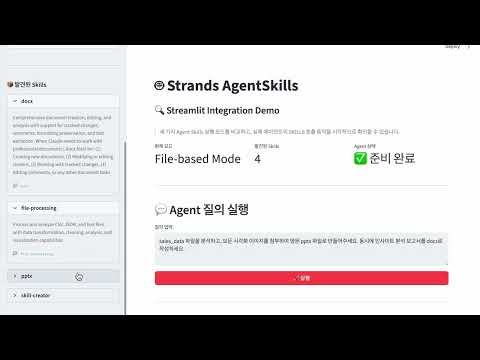
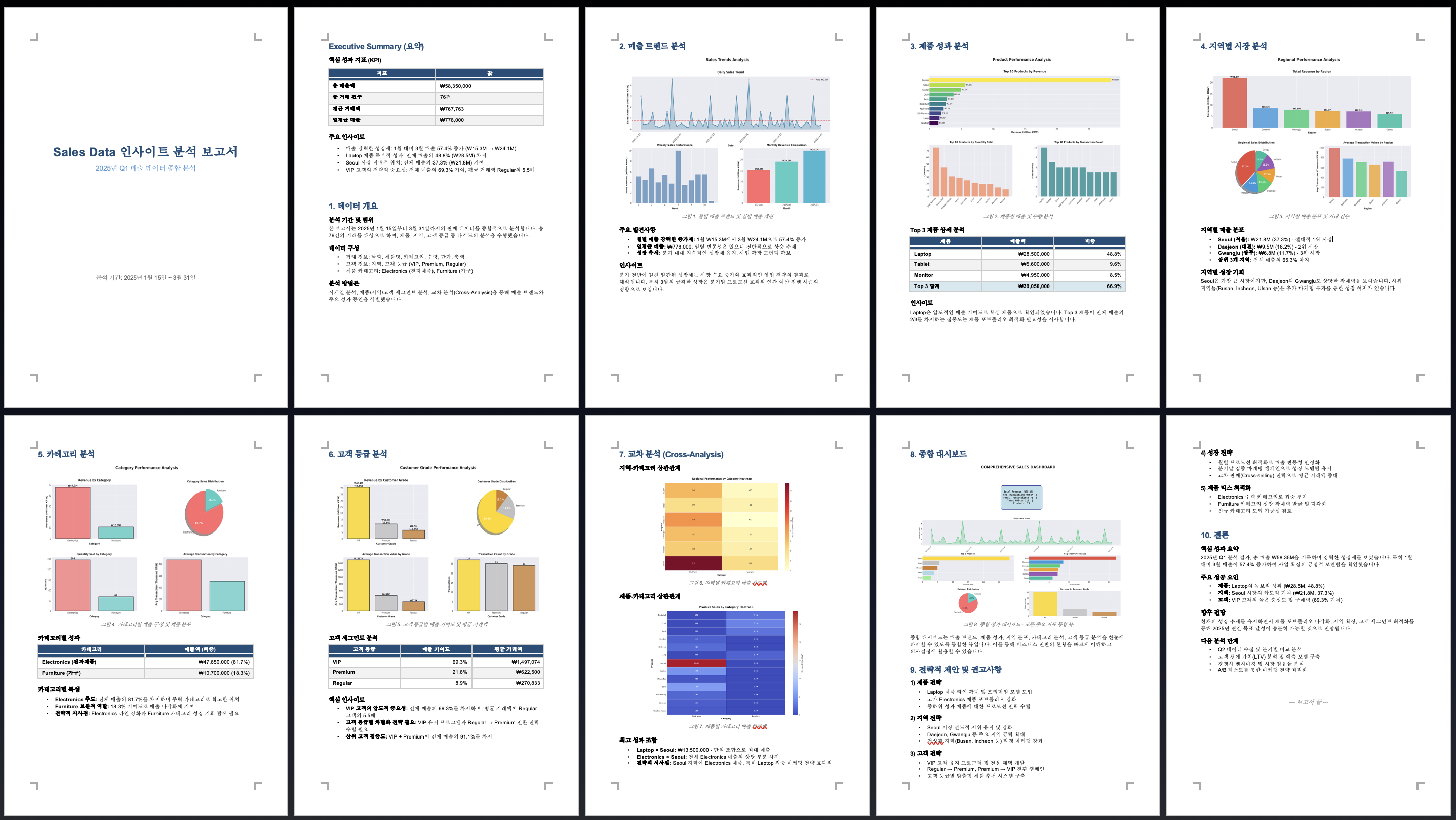
[skills/docx] Output |
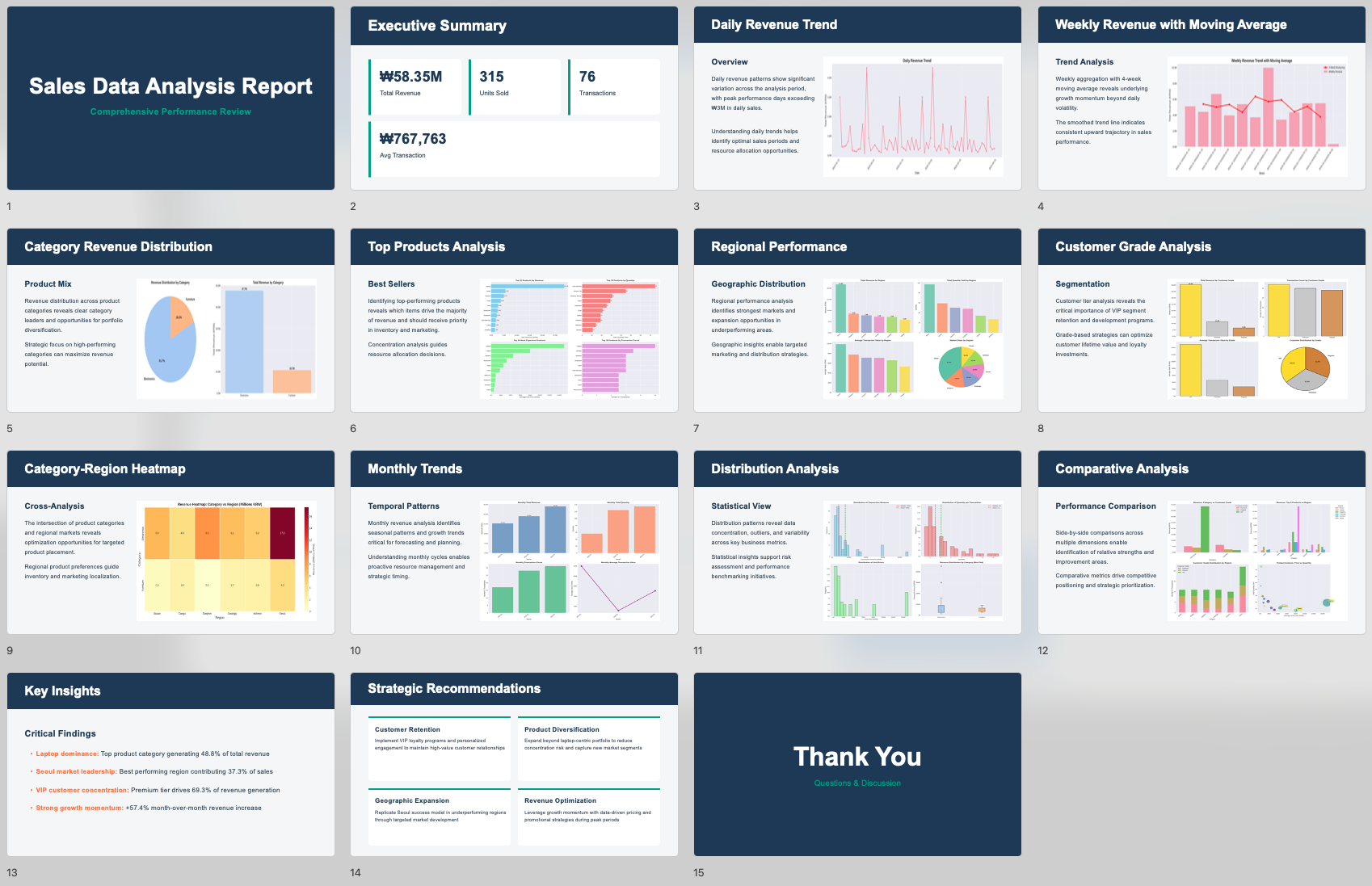
[skills/pptx] Output |
Agent Skills are modular capabilities that give AI Agents specialized abilities. Each Skill packages domain-specific knowledge (web research, file processing, etc.), workflows, and best practices to transform a general-purpose Agent into a domain expert.
Limitations of traditional tool-based approaches:
Agent Skills solutions:
This implementation follows these core principles:
Fully implements the AgentSkills.io standard:
name, descriptionlicense, compatibility, allowed-tools, metadataFor SKILL documentation, see WHAT_IS_SKILL.md.
Implements Progressive Disclosure following AgentSkills.io's 3-phase loading pattern. Load minimal metadata first, and full content only when needed:
scripts/, references/, assets/) only when neededToken efficiency:
| Phase | Timing | Content | Tokens |
|---|---|---|---|
| 1 | Startup | All skill metadata | ~100/skill |
| 2 | Activation | Single skill instructions | <5000 |
| 3 | As needed | Individual resource files | Variable |
Skills are not executable code. Skills are:
This package provides 3 implementation patterns for using Agent Skills in Strands Agents SDK:
flowchart TB
    subgraph "Agent Skills Implementation Patterns"
        direction TB

        P1["`**Pattern 1: File-based**
        LLM reads SKILL.md directly via file_read
        Most natural approach`"]

        P2["`**Pattern 2: Tool-based**
        Load Instructions via skill() tool
        Explicit skill activation`"]

        P3["`**Pattern 3: Meta-Tool (Agent as Tool)**
        Execute isolated Sub-agent via use_skill()
        Complete context separation`"]
    end

    P1 --> Result1["`Agent reads files directly
    ✓ Most natural
    ✓ Flexible access`"]

    P2 --> Result2["`Inject into Agent context
    ✓ Structured approach
    ✓ Easy token tracking`"]

    P3 --> Result3["`Independent Sub-agent execution
    ✓ Complete isolation
    ✓ Suitable for complex Skills`"]

    style P1 fill:#e8f5e9
    style P2 fill:#e3f2fd
    style P3 fill:#fff3e0
Pattern 1: File-based : LLM reads files directly. Most flexible and token-efficient.
Pattern 2: Tool-based
: Explicitly load instructions via skill tool. Use when structured approach is needed.
Pattern 3: Meta-Tool (Agent as Tool) : Meta-Tool approach where each Skill runs in an isolated Sub-agent as a tool.
| Aspect | File-based | Tool-based | Meta-Tool |
|---|---|---|---|
| Execution method | LLM reads files directly | Inject into context | Isolated Sub-agent |
| Context isolation | ❌ Shared | ❌ Shared | ✅ Complete isolation |
| Flexibility | ✅ High | ⚠️ Medium | ⚠️ Low |
| Token tracking | ⚠️ Difficult | ✅ Easy | ✅ Easy |
| Complexity | ✅ Low | ⚠️ Medium | ⚠️ High |
| Recommended use | General cases | When explicit control needed | Complex isolated execution |
💡 Selection Guide
- Inline Mode (Pattern 1, 2) — Choose for simple workflows, natural LLM skill selection, lightweight implementation
- Multi-Agent Mode (Pattern 3) — Choose when Skill isolation, explicit control, per-Skill tool separation, or usage tracking is needed
flowchart TD
    Start([skills_dir<br/>├── skill-a<br/>└── skill-b]) --> Discover[discover_skills<br/>load_metadata]
    Discover --> Props["SkillProperties<br/>- name, description<br/>- path, skill_dir"]

    Props --> Prompt[generate_skills_prompt]
    Prompt --> SysPrompt["System Prompt<br/>Only skill metadata<br/>~100 tokens/skill"]

    SysPrompt --> Agent["Main Agent created"]
    UserReq["User request"] --> Agent

    Agent --> Pattern{Implementation pattern?}

    Pattern -->|"Pattern 1: File-based"| FileRead1["file_read call<br/>LLM reads SKILL.md directly"]
    FileRead1 -.-> FileReadRes["(optional) Read Resources via file_read"]

    Pattern -->|"Pattern 2: Tool-based"| SkillTool["skill() call<br/>load_instructions"]
    SkillTool --> InstBody["Add Instructions to<br/>Agent context"]
    InstBody -.-> FileReadRes

    FileReadRes --> Response

    Pattern -->|"Pattern 3: Meta-Tool"| UseSkill["use_skill() call"]

    UseSkill --> SubAgentCreate

    subgraph SubAgentBox["Sub-agent (isolated execution environment)"]
        SubAgentCreate["Sub-agent created"]
        SubAgentCreate --> LoadSkill["Load SKILL.md<br/>→ system_prompt"]
        LoadSkill -.-> FileReadRes3["(optional) Read Resources via file_read"]
        FileReadRes3 --> SubExec["Execute and generate results"]
    end

    SubExec --> ReturnMain["Return results to<br/>Main Agent"]
    ReturnMain --> Response

    Response[Agent generates final response]

    style Start fill:#e1f5ff
    style Props fill:#fff4e1
    style SysPrompt fill:#fff4e1
    style Agent fill:#e8f5e9
    style Pattern fill:#f5f5f5
    style FileRead1 fill:#c8e6c9
    style SkillTool fill:#bbdefb
    style InstBody fill:#bbdefb
    style FileReadRes fill:#f5f5f5,stroke-dasharray:5 5
    style UseSkill fill:#ffe0b2
    style SubAgentBox fill:#fff8e1,stroke:#ff9800,stroke-width:2px
    style SubAgentCreate fill:#ffe0b2
    style LoadSkill fill:#ffe0b2
    style FileReadRes3 fill:#ffe0b2,stroke-dasharray:5 5
    style SubExec fill:#ffe0b2
    style ReturnMain fill:#ffe0b2
    style Response fill:#e8f5e9
agentskills/
├── __init__.py      # Public API
├── models.py        # SkillProperties (Phase 1 metadata)
├── parser.py        # load_metadata, load_instructions, load_resource
├── validator.py     # AgentSkills.io standard validation
├── discovery.py     # discover_skills (skill scanning)
├── tool.py          # create_skill_tool (Pattern 2: Tool-based)
├── agent_tool.py    # create_skill_agent_tool (Pattern 3: Meta-Tool)
├── prompt.py        # generate_skills_prompt (system prompt generation)
└── errors.py        # Exception hierarchy
For core API information, see API.md.
# Using requirements.txt
pip install -r requirements.txt

# Package installation (development mode)
pip install -e .
from agentskills import discover_skills, generate_skills_prompt
from strands import Agent
from strands_tools import file_read

# 1. Skill discovery (Phase 1: load only metadata)
skills = discover_skills("./skills")

# 2. Generate system prompt (include only skill metadata)
base_prompt = "You are a helpful AI assistant."
skills_prompt = generate_skills_prompt(skills)
full_prompt = base_prompt + "\n\n" + skills_prompt

# 3. Create Agent
agent = Agent(
    system_prompt=full_prompt,
    tools=[file_read],  # LLM reads SKILL.md when needed
    model="us.anthropic.claude-sonnet-4-5-20250929-v1:0",
)

# 4. Progressive Disclosure in action:
# Phase 1: metadata in system prompt
# Phase 2: LLM reads SKILL.md via file_read
# Phase 3: LLM reads resources via file_read
response = await agent.stream_async("Research Physical AI")
from agentskills import discover_skills, create_skill_tool, generate_skills_prompt
from strands import Agent
from strands_tools import file_read

# 1. Skill discovery (Phase 1: load only metadata)
skills = discover_skills("./skills")

# 2. Create skill tool
skill_tool = create_skill_tool(skills, "./skills")

# 3. Create agent with system prompt and skill tool
agent = Agent(
    system_prompt=base_prompt + "\n\n" + generate_skills_prompt(skills),
    tools=[skill_tool, file_read],  # skill + file_read combination
    model="us.anthropic.claude-sonnet-4-5-20250929-v1:0",
)

# Progressive Disclosure in action:
# Phase 1: metadata in system prompt
# Phase 2: skill(skill_name="web-research")
# Phase 3: read resources via file_read
response = await agent.stream_async("Research Physical AI")
from agentskills import discover_skills, create_skill_agent_tool, generate_skills_prompt
from strands import Agent
from strands_tools import file_read, file_write, shell

# 1. Skill discovery (Phase 1)
skills = discover_skills("./skills")

# 2. Create meta-tool (Agent as Tool pattern)
meta_tool = create_skill_agent_tool(
    skills,
    "./skills",
    additional_tools=[file_read, file_write, shell]  # Tools to provide to Sub-agent
)

# 3. Generate system prompt
base_prompt = """You are a helpful AI assistant with specialized skills.
Use the use_skill tool to execute skills in isolated sub-agents."""

full_prompt = base_prompt + "\n\n" + generate_skills_prompt(skills)

# 4. Create main agent
agent = Agent(
    system_prompt=full_prompt,
    tools=[meta_tool], # Sub-agent runs in isolation
    model="us.anthropic.claude-sonnet-4-5-20250929-v1:0",
)

# Progressive Disclosure + Meta-Tool:
# Phase 1: metadata in system prompt
# Phase 2: use_skill(skill_name, request) call
# Phase 3: Sub-agent receives SKILL.md as system prompt and executes
response = await agent.stream_async("Research Physical AI")
Complete examples are available in examples/:
1-discovery_skills.py - Pattern 1: File-based approach
file_read tool2-skill_tool_with_progressive_disclosure.py - Pattern 2: Tool-based approach
skill tool3-skill_agent_tool.py - Pattern 3: Meta-Tool approach (Agent as Tool)
4-streamlit_prompt_simulation.py - Streamlit-based Progressive Disclosure visualization
5-streamlit_strands_integration.py - Streamlit-based comparison demo of 3 patterns
For detailed example descriptions, see examples/README.md.
See CONTRIBUTING for more information.
This library is licensed under the MIT-0 License. See the LICENSE file.
Sign in to join the discussion.
No comments yet. Be the first to say what this is good for.
Write HTML. Render video. Built for agents.
Ultra-lightweight, open-source, self-hosted personal AI agent framework in Python with WebUI, tools, memory, MCP, multi-agent workflows, automation, and chat apps

SkillOpt is a text-space optimizer that trains reusable natural-language skills for frozen LLM agents through trajectory-driven edits, validation-gated updates, and deployable best_skill.md artifacts.

Omnigent is an open-source AI agent framework and meta-harness: orchestrate Claude Code, Codex, Cursor, Pi, and custom agents — swap harnesses without rewriting, enforce policies and sandboxing, and collaborate in real time from any device.

A theoretical reconstruction of the Claude Mythos architecture, built from first principles using the available research literature.
🕷️ An adaptive Web Scraping framework that handles everything from a single request to a full-scale crawl!