💾 Synology MCP Server
A Model Context Protocol (MCP) server for Synology NAS devices. Enables AI assistants to manage files and downloads through secure authentication and session management.
🌟 NEW: Unified server supports both Claude/Cursor (stdio) and Xiaozhi (WebSocket) simultaneously!
🚀 Quick Start with Docker
1️⃣ Setup Environment
# Clone repository
git clone https://github.com/atom2ueki/mcp-server-synology.git
cd mcp-server-synology

# Create environment file
cp env.example .env
2️⃣ Configure .env File
Basic Configuration (Claude/Cursor only):
# Required: Synology NAS connection
SYNOLOGY_URL=http://192.168.1.100:5000
SYNOLOGY_USERNAME=your_username
SYNOLOGY_PASSWORD=your_password

# Optional: Auto-login on startup
AUTO_LOGIN=true
VERIFY_SSL=false
Extended Configuration (Both Claude/Cursor + Xiaozhi):
# Required: Synology NAS connection
SYNOLOGY_URL=http://192.168.1.100:5000
SYNOLOGY_USERNAME=your_username
SYNOLOGY_PASSWORD=your_password
# Optional: Auto-login on startup
AUTO_LOGIN=true
VERIFY_SSL=false
# Enable Xiaozhi support
ENABLE_XIAOZHI=true
XIAOZHI_TOKEN=your_xiaozhi_token_here
XIAOZHI_MCP_ENDPOINT=wss://api.xiaozhi.me/mcp/
3️⃣ Run with Docker
One simple command supports both modes:
# Claude/Cursor only mode (default if ENABLE_XIAOZHI not set)
docker-compose up -d

# Both Claude/Cursor + Xiaozhi mode (if ENABLE_XIAOZHI=true in .env)
docker-compose up -d

# Build and run
docker-compose up -d --build
4️⃣ Alternative: Local Python
# Install the package and its dependencies
pip install .

# Run with environment control
python main.py
🔌 Client Setup
🤖 Claude Desktop
Add to your Claude Desktop configuration file:
macOS: ~/Library/Application Support/Claude/claude_desktop_config.json
Windows: %APPDATA%\Claude\claude_desktop_config.json
{
"mcpServers": {
"synology": {
"command": "docker-compose",
"args": [
"-f", "/path/to/your/mcp-server-synology/docker-compose.yml",
"run", "--rm", "synology-mcp"
],
"cwd": "/path/to/your/mcp-server-synology"
}
}
}
↗️ Cursor
Add to your Cursor MCP settings:
{
"mcpServers": {
"synology": {
"command": "docker-compose",
"args": [
"-f", "/path/to/your/mcp-server-synology/docker-compose.yml",
"run", "--rm", "synology-mcp"
],
"cwd": "/path/to/your/mcp-server-synology"
}
}
}
🔄 Continue (VS Code Extension)
Add to your Continue configuration (.continue/config.json):
{
"mcpServers": {
"synology": {
"command": "docker-compose",
"args": [
"-f", "/path/to/your/mcp-server-synology/docker-compose.yml",
"run", "--rm", "synology-mcp"
],
"cwd": "/path/to/your/mcp-server-synology"
}
}
}
💻 Codeium
For Codeium's MCP support:
{
"mcpServers": {
"synology": {
"command": "docker-compose",
"args": [
"-f", "/path/to/your/mcp-server-synology/docker-compose.yml",
"run", "--rm", "synology-mcp"
],
"cwd": "/path/to/your/mcp-server-synology"
}
}
}
🐍 Alternative: Direct Python Execution
If you prefer not to use Docker:
{
"mcpServers": {
"synology": {
"command": "python",
"args": ["main.py"],
"cwd": "/path/to/your/mcp-server-synology",
"env": {
"SYNOLOGY_URL": "http://192.168.1.100:5000",
"SYNOLOGY_USERNAME": "your_username",
"SYNOLOGY_PASSWORD": "your_password",
"AUTO_LOGIN": "true",
"ENABLE_XIAOZHI": "false"
}
}
}
}
🌐 Remote Streamable HTTP Deployment
By default the server speaks stdio, which means the MCP client has to spawn the process locally (or via a bridge such as SSH/docker exec). For setups where the NAS is remote (different machine from where Claude/Cursor runs), set MCP_HTTP=true and the server serves native Streamable HTTP from uvicorn in the same process — no mcp-proxy sidecar and no separate /sse endpoint. This makes it consumable by any MCP client that supports URL-based connectors — exactly like ha-mcp or other "remote" MCP servers.
Architecture
[Claude Desktop / Cursor / ...]
│
│ HTTPS (URL connector)
▼
[Reverse proxy: DSM / Nginx / Traefik / Caddy]
│ (TLS termination + auth)
│ HTTP localhost:8765
▼
[Docker container]
└─ python main.py
└─ uvicorn → Streamable HTTP at /mcp
Deploy
- All dependencies come from
pyproject.toml: mcp>=2.0.0 ships starlette,
uvicorn, and sse-starlette, so the same image serves both stdio and
Streamable HTTP — no extra build arg or separate requirements file.
- Use the provided
docker-compose.http.yml:
# Edit credentials in docker-compose.http.yml first
docker compose -f docker-compose.http.yml up -d --build
docker logs -f synology-mcp-http
You should see the server log Starting Streamable HTTP MCP server on http://0.0.0.0:8765/mcp and the auto-login succeed. uvicorn's own Uvicorn running on … banner is not printed at the compose file's defaults — it is INFO on the uvicorn.error logger, which the server pins to warning unless DEBUG=true.
Reverse proxy
Most MCP clients require HTTPS, so the HTTP endpoint must be fronted by a TLS-terminating reverse proxy. For DSM users, the built-in Login Portal → Reverse Proxy does the job:
- Source:
HTTPS, hostname synology-mcp.example.com, port 443
- Destination:
HTTP, localhost, port 8765
- Custom Headers: none required — Streamable HTTP is plain POST/GET on a single endpoint, not a WebSocket upgrade. The Create → WebSocket preset is harmless if you already apply it elsewhere (it sets
Connection: upgrade only for real upgrade requests), but it is not what keeps a stream open
For Nginx, the equivalent is:
location / {
proxy_pass http://localhost:8765;
proxy_http_version 1.1;
proxy_set_header Host $host;
proxy_set_header X-Real-IP $remote_addr;
proxy_set_header X-Forwarded-For $proxy_add_x_forwarded_for;
proxy_set_header X-Forwarded-Proto $scheme;
# Responses may stream as long-lived text/event-stream
proxy_buffering off;
proxy_cache off;
proxy_read_timeout 24h;
}
Client configuration
In Claude Desktop (or any MCP client that supports remote connectors), add a custom connector pointing at:
https://synology-mcp.example.com/mcp
The path is whatever MCP_HTTP_PATH is set to (default /mcp). No command, no args, no local Python — just a URL.
Security
The server does not implement any application-level authentication — anything that can reach the HTTP endpoint can call every tool. It does enable the MCP SDK's DNS-rebinding protection, which rejects requests whose Host/Origin headers are not on an allowlist (MCP_HTTP_ALLOWED_HOSTS / MCP_HTTP_ALLOWED_ORIGINS, defaulting to loopback). Behind a reverse proxy set both, minding the differing formats — hosts are bare (synology-mcp.example.com), origins are scheme-qualified (https://synology-mcp.example.com), as in the commented examples in docker-compose.http.yml. That guards browsers against rebinding attacks; it is not authentication. Mitigations:
- Keep it on a private network or behind a VPN
- Leave the published port on loopback (
docker-compose.http.yml binds 127.0.0.1:8765) so only a same-host reverse proxy can reach it
- Use the reverse proxy to enforce an IP allow-list
- Add Basic Auth / mTLS / OAuth2 proxy at the reverse proxy layer
- Use a dedicated low-privilege DSM user (already recommended in the security warning above)
🌟 Xiaozhi Integration
New unified architecture supports both clients simultaneously!
How It Works
- ENABLE_XIAOZHI=false (default): Standard MCP server for Claude/Cursor via stdio
- ENABLE_XIAOZHI=true: Multi-client bridge supporting both:
- 📡 Xiaozhi: WebSocket connection
- 💻 Claude/Cursor: stdio connection
Setup Steps
- Add to your .env file:
ENABLE_XIAOZHI=true
XIAOZHI_TOKEN=your_xiaozhi_token_here
- Run normally:
# Same command, different behavior based on environment
python main.py
# OR
docker-compose up
Key Features
- ✅ Zero Configuration Conflicts: One server, multiple clients
- ✅ Parallel Operation: Both clients can work simultaneously
- ✅ All Tools Available: Xiaozhi gets access to all Synology MCP tools
- ✅ Backward Compatible: Existing setups work unchanged
- ✅ Auto-Reconnection: Handles WebSocket connection drops
- ✅ Environment Controlled: Simple boolean flag to enable/disable
Startup Messages
Claude/Cursor only mode:
🚀 Synology MCP Server
==============================
📌 Claude/Cursor only mode (ENABLE_XIAOZHI=false)
Both clients mode:
🚀 Synology MCP Server with Xiaozhi Bridge
==================================================
🌟 Supports BOTH Xiaozhi and Claude/Cursor simultaneously!
🛠️ Available MCP Tools
🔐 Authentication
synology_status - Check authentication status and active sessionssynology_list_nas - List all configured NAS units from settings.jsonsynology_login - Authenticate with Synology NAS (conditional)synology_logout - Logout from session (conditional)
📁 File System Operations
list_shares - List all available NAS shareslist_directory - List directory contents with metadata
path (required): Directory path starting with /
get_file_info - Get detailed file/directory information
path (required): File path starting with /
search_files - Recursively search for files and folders by name
path (required): Search directorypattern (required): Case-insensitive substring of the name (e.g., invoice, .pdf). Wildcards are not special — DSM matches report and *report* identically.
create_file - Create new files with content
path (required): Full file path starting with /content (optional): File content (default: empty string)overwrite (optional): Overwrite existing files (default: false)
create_directory - Create new directories
folder_path (required): Parent directory path starting with /name (required): New directory nameforce_parent (optional): Create parent directories if needed (default: false)
delete - Delete files or directories (auto-detects type)
path (required): File/directory path starting with /
rename_file - Rename files or directories
path (required): Current file pathnew_name (required): New filename
move_file - Move files to new location
source_path (required): Source file pathdestination_path (required): Destination pathoverwrite (optional): Overwrite existing files
📥 Download Station Management
ds_get_info - Get Download Station informationds_list_tasks - List all download tasks with status
offset (optional): Pagination offsetlimit (optional): Max tasks to return
ds_create_task - Create new download task
uri (required): Download URL or magnet linkdestination (optional): Download folder path
ds_pause_tasks - Pause download tasks
task_ids (required): Array of task IDs
ds_resume_tasks - Resume paused tasks
task_ids (required): Array of task IDs
ds_delete_tasks - Delete download tasks
task_ids (required): Array of task IDsforce_complete (optional): Force delete completed
ds_get_statistics - Get download/upload statistics
🏥 Health Monitoring
synology_system_info - Get system model, serial, DSM version, uptime, temperaturesynology_utilization - Get real-time CPU, memory, swap, and disk I/O utilizationsynology_disk_health - List all physical disks with SMART status, model, temp, sizesynology_disk_smart - Get detailed SMART attributes for a specific disksynology_volume_status - List all volumes with status, size, usage, filesystem typesynology_storage_pool - List RAID/storage pools with level, status, member diskssynology_lun_list - List all iSCSI LUNs with name, UUID, size, usage, status, mapped targets, and backing volumesynology_lun_get - Get details for a single iSCSI LUN
name (required): LUN name or UUID from synology_lun_list output
synology_network - Get network interface status and transfer ratessynology_ups - Get UPS status, battery level, power readingssynology_services - List installed packages and their running statussynology_system_log - Get recent system log entriessynology_health_summary - Aggregate system info, utilization, disk health, and volume status
🐳 Container Manager
synology_container_list - List Container Manager containers
offset (optional): Pagination offsetlimit (optional): Maximum containers to returncontainer_type (optional): Container filter (default: all)
synology_container_health_summary - Summarize container status, health, restart counts, and imagessynology_container_disk_usage - Show the read-only disk-usage summary available through Container Manager APIssynology_container_get - Get a Container Manager container
name (required): Container name
synology_container_start - Start a Container Manager container
name (required): Container name
synology_container_stop - Stop a Container Manager container
name (required): Container name
synology_container_restart - Restart a Container Manager container
name (required): Container name
synology_container_delete - Delete a Container Manager container
name (required): Container nameforce (optional): Force deletion (default: false)preserve_profile (optional): Preserve Synology container profile (default: true)
synology_container_logs - Get Container Manager container logs
name (required): Container namesince (optional): Log start time/filteroffset (optional): Pagination offset (default: 0)limit (optional): Maximum log lines to return (default: 1000)
synology_container_resource - Get real-time resource usage for a Container Manager container
name (required): Container name
synology_container_project_list - List Container Manager projectssynology_container_project_get - Get a Container Manager project
name (required): Project name
synology_container_project_create - Create a Container Manager project
name (required): Project nameshare_path (required): Project folder path on the NAScontent (required): Docker Compose YAML contentenable_service_portal (optional): Enable Synology service portal (default: false)service_portal_name (optional): Service portal nameservice_portal_port (optional): Service portal portservice_portal_protocol (optional): Service portal protocol (default: http)
synology_container_project_update - Update a Container Manager project
name (required): Project namecontent (required): Docker Compose YAML contentenable_service_portal (optional): Enable Synology service portalservice_portal_name (optional): Service portal nameservice_portal_port (optional): Service portal portservice_portal_protocol (optional): Service portal protocol
synology_container_project_start - Start a Container Manager project
name (required): Project name
synology_container_project_stop - Stop a Container Manager project
name (required): Project name
synology_container_project_restart - Restart a Container Manager project
name (required): Project name
synology_container_project_build - Build a Container Manager project
name (required): Project name
synology_container_project_clean - Clean a Container Manager project
name (required): Project name
synology_container_project_delete - Delete a Container Manager project
name (required): Project name
synology_container_image_list - List Container Manager images
offset (optional): Pagination offsetlimit (optional): Maximum images to returnshow_dsm (optional): Include DSM images (default: false)
synology_container_image_get - Get a Container Manager image
name (required): Image repository nametag (optional): Image tag (default: latest)
synology_container_image_delete - Delete a Container Manager image
name (required): Image repository nametag (optional): Image tag (default: latest)
synology_container_image_prune - Remove images unused by any container
synology_container_image_prune_preview provides a read-only candidate list before cleanup- Uses only Container Manager APIs to delete safely identifiable unused tagged images and reports dangling images it cannot remove through DSM
- Does not remove containers, networks, or build cache
synology_container_image_pull - Pull a Container Manager image
repository (required): Image repository nametag (optional): Image tag (default: latest)
synology_container_registry_list - List Container Manager registriessynology_container_registry_search - Search Container Manager registries
query (required): Image search queryoffset (optional): Pagination offsetlimit (optional): Maximum results to return
synology_container_registry_tags - List tags for a registry image
repository (required): Image repository nameoffset (optional): Pagination offsetlimit (optional): Maximum tags to return
synology_container_registry_download - Download a registry image
repository (required): Image repository nametag (optional): Image tag (default: latest)
synology_container_network_list - List Container Manager networkssynology_container_network_get - Get a Container Manager network
name (required): Network name
synology_container_network_create - Create a Container Manager network
name (required): Network namedriver (optional): Network driver (default: bridge)subnet (optional): Subnet CIDRgateway (optional): Gateway IPip_range (optional): Allocatable IP range CIDRenable_ipv6 (optional): Enable IPv6 (default: false)
synology_container_network_delete - Delete a Container Manager network
name (required): Network name
📦 NFS Management
synology_nfs_status - Get NFS service status and configurationsynology_nfs_enable - Enable or disable the NFS servicesynology_nfs_list_shares - List all shared folders with their NFS permissionssynology_nfs_set_permission - Set NFS client access permissions on a shared folder
🧠 Claude Code / Claude.ai Skill
For Claude Code, Claude Desktop, and claude.ai users, this repo ships an Anthropic Agent Skill that teaches Claude how to use the MCP tools effectively — picking the right tool, targeting the right NAS in multi-NAS setups, preferring aggregate health checks over fan-out calls, and using correct path conventions.
The skill lives at skills/synology-nas/ and uses progressive disclosure across seven domains (auth, files, downloads, health, containers, shares/NFS, user management).
Install:
- Claude Code: copy or symlink the folder into
~/.claude/skills/synology-nas/
- Claude.ai / Claude Desktop: upload the
synology-nas/ folder via the Skills settings page
The skill is purely additive — it works alongside the MCP and only triggers on Synology/NAS-related prompts.
⚙️ Configuration Options
⚠️ Security Warning: Use a Dedicated Account
For this MCP server, create a dedicated Synology user account with appropriate permissions. This account should:
- Have minimal required permissions only (not admin!)
- Be used exclusively for MCP server automation
- 2FA is now supported — if your DSM account has 2FA enabled, see the
2FA / OTP Accounts section below to supply
an
otp_code (one-shot) or device_id (persistent) field. Older guidance
of "no 2FA" is no longer required.
Using settings.json (Recommended)
| Variable | Required | Default | Description |
|---|
SYNOLOGY_URL | Yes* | - | NAS base URL (e.g., http://192.168.1.100:5000) |
SYNOLOGY_USERNAME | Yes* | - | Username for authentication |
SYNOLOGY_PASSWORD | Yes* | - | Password for authentication |
AUTO_LOGIN | No | true | Auto-login on server start |
VERIFY_SSL | No | false | Verify SSL certificates |
DEBUG | No | false | Enable debug logging |
ENABLE_XIAOZHI | No | false | Enable Xiaozhi WebSocket bridge |
XIAOZHI_TOKEN | Xiaozhi only | - | Authentication token for Xiaozhi |
XIAOZHI_MCP_ENDPOINT | No | wss://api.xiaozhi.me/mcp/ | Xiaozhi WebSocket endpoint |
*Required for auto-login and default operations
Using settings.json (Multi-NAS Support)
For managing multiple Synology NAS devices, use the XDG standard config directory (~/.config/synology-mcp/settings.json):
mkdir -p ~/.config/synology-mcp
touch ~/.config/synology-mcp/settings.json
chmod 600 ~/.config/synology-mcp/settings.json  # Important: secure permissions!
Note: This follows the XDG Base Directory Specification - ~/.config/ is the standard location for user configuration files on Linux/macOS. You can customize the location by setting the XDG_CONFIG_HOME environment variable.
With Docker:
The docker-compose.yml automatically mounts your ~/.config/synology-mcp directory into the container at /home/mcpuser/.config/synology-mcp, so multi-NAS works out of the box with Docker as well.
settings.json format:
{
  "synology": {
    "nas1": {
      "host": "192.168.1.100",
      "port": 5000,
      "username": "admin",
      "password": "your_password",
      "note": "Primary NAS at home"
    },
    "nas2": {
      "host": "192.168.1.200",
      "port": 5001,
      "username": "admin",
      "password": "your_password",
      "note": "Backup NAS"
    },
    "nas3": {
      "url": "https://nas.example.com",
      "username": "admin",
      "password": "your_password",
      "note": "NAS behind a reverse proxy"
    }
  },
  "xiaozhi": {
    "enabled": false,
    "token": "your_xiaozhi_token",
    "endpoint": "wss://api.xiaozhi.me/mcp/"
  },
  "server": {
    "auto_login": true,
    "verify_ssl": false,
    "session_timeout": 3600,
    "debug": false,
    "log_level": "INFO"
  }
}
Configuration fields:
| Field | Required | Description |
|---|
host | Yes* | NAS hostname or IP address |
port | No | API port (default: 5000 for HTTP, 5001 for HTTPS) |
url | Yes* | Full base URL (e.g., https://nas.example.com); wins over host/port — use for a NAS behind a reverse proxy |
username | Yes | NAS username |
password | Yes | NAS password |
otp_code | No | One-shot 6-digit 2FA code (first login only, then remove) |
device_id | No | Long-lived trusted-device token from DSM (did); skip OTP on all future logins |
note | No | Optional description for your reference |
*Either host or url is required per NAS entry.
Notes:
- The server will use port 5001 (HTTPS) if port is 5001, otherwise defaults to HTTP (5000)
- The
host/port form always appends a port and derives the scheme from it, so it cannot express https://nas.example.com on the default 443 — set url directly for reverse-proxied setups
- File permissions:
chmod 600 ~/.config/synology-mcp/settings.json is required for security
- The server will refuse to load settings if permissions are too open
- Both .env and settings.json can be used together (settings.json takes priority)
⚠️ Security Recommendations
settings.json File Permissions:
- Linux/macOS (POSIX):
chmod 600 ~/.config/synology-mcp/settings.json is required. The server refuses to load the file if it is group- or world-readable/writable, or owned by another user.
- Windows: Access control is enforced via NTFS ACLs, not POSIX mode bits. The server audits the file's security descriptor and refuses to load unless all three hold: (1) the owner SID matches the current user; (2) the DACL is present (a NULL DACL — "everyone full access" — is rejected); (3) no allow-ACE grants access to a principal outside the allowlist: the current user,
NT AUTHORITY\SYSTEM, and BUILTIN\Administrators. Any inherited Everyone / BUILTIN\Users / Authenticated Users grant fails the check.
-
Requires the optional pywin32 package: pip install pywin32. If pywin32 is not installed, the server fails closed and refuses to load settings.json. Operators who accept the risk of an unverified file can opt back in by setting SYNOLOGY_MCP_ALLOW_UNVERIFIED_WINDOWS_ACL=true.
-
The server resolves the file via XDG_CONFIG_HOME (default Path.home() / ".config"), so on Windows it lives at %USERPROFILE%\.config\synology-mcp\settings.json unless XDG_CONFIG_HOME is set.
-
Lock down the file from an elevated PowerShell prompt (uses the same path the server loads):
# Resolve the path the SAME way the server does: $XDG_CONFIG_HOME if set,
# otherwise %USERPROFILE%\.config. This honors the override documented above.
$cfg = if ($env:XDG_CONFIG_HOME) { $env:XDG_CONFIG_HOME } else { "$env:USERPROFILE\.config" }
$f = "$cfg\synology-mcp\settings.json"

# The server's ACL audit requires: owner == current user, no NULL DACL, and
# no allow-ACE outside {current user, SYSTEM, Administrators}. The steps
# below enforce all three.
#
# Use the *<SID> form for every built-in principal: account names like
# "Administrators" / "Everyone" / "Users" are localized on non-English
# Windows (e.g. German "Administratoren") and won't resolve. The
# locale-independent SIDs:
#   *S-1-1-0            Everyone
#   *S-1-5-11           Authenticated Users
#   *S-1-5-32-545       BUILTIN\Users
#   *S-1-5-32-544       BUILTIN\Administrators
#
# 1. Ensure the file is owned by the current user (the audit rejects any
#    other owner). /setowner requires elevation.
icacls $f /setowner "${env:USERNAME}"
# 2. Drop inherited ACEs, then revoke the common foreign grants. /grant:r
#    only replaces the named principal, so revoke first.
icacls $f /inheritance:r
icacls $f /remove:g "*S-1-1-0" "*S-1-5-11" "*S-1-5-32-545"
# Re-run `icacls $f` here; if any principal other than your user or
# Administrators still appears, run: icacls $f /remove:g "<that principal>"
# 3. Grant the current user and Administrators full control.
icacls $f /grant:r "${env:USERNAME}:(F)"
icacls $f /grant:r "*S-1-5-32-544:(F)"   # BUILTIN\Administrators (locale-independent)
If the file is brand new, the /remove:g step is a harmless no-op.
-
Verify: icacls "$f" — only your user and *S-1-5-32-544 (Administrators) should appear.
SSL Certificate Verification (VERIFY_SSL):
- Default is
false to support self-signed certificates on internal NAS devices
- If your NAS has a valid SSL certificate (e.g., from Let's Encrypt or a corporate CA), set
VERIFY_SSL=true
- Setting
VERIFY_SSL=false disables certificate verification and makes your connection vulnerable to man-in-the-middle (MITM) attacks
- Never disable SSL verification on untrusted networks
Auto-Login (AUTO_LOGIN):
- Default is
true for convenience with settings.json
- Credentials are stored securely in
~/.config/synology-mcp/settings.json with 0600 permissions
- If you prefer manual login, set
AUTO_LOGIN=false and use the synology_login tool
2FA / OTP Accounts (optional):
The MCP server supports DSM accounts with 2FA enabled. There are two ways to use it:
-
One-shot OTP via synology_login tool (interactive):
{ "base_url": "https://nas.lan:5001", "username": "alice", "password": "…", "otp_code": "123456" }
DSM will return a did (device token) in the response — copy that value into settings.json (below) to skip OTP on future process restarts.
-
Persistent trusted-device token (recommended for AUTO_LOGIN=true):
Add otp_code (one-shot, first login only) and/or device_id (long-lived, ongoing) fields per-NAS in settings.json:
{
  "synology": {
    "nas1": {
      "host": "192.168.1.100", "port": 5001,
      "username": "alice", "password": "…",
      "otp_code": "123456",
      "note": "primary — 2FA enabled"
    }
  }
}
Workflow:
- Set
otp_code to a fresh 6-digit code from your authenticator and start the server.
- On the first successful login, the server logs a warning line like:
nas1: 2FA bootstrap — copy this device_id into settings.json to skip OTP on future starts: <did>
Copy the <did> value.
- Paste it into
device_id and delete otp_code.
- From now on, DSM treats this process as a trusted device — restarts, relogins after DSM error 119, and container-manager sessions all skip OTP.
When device_id is present, it takes precedence over otp_code (trusted-device path). Legacy .env users can set the one-shot SYNOLOGY_OTP_CODE env var; for persistent device_id, migrate to settings.json (long opaque token doesn't fit an env var cleanly).
📖 Usage Examples
📁 File Operations
✅ Creating Files and Directories
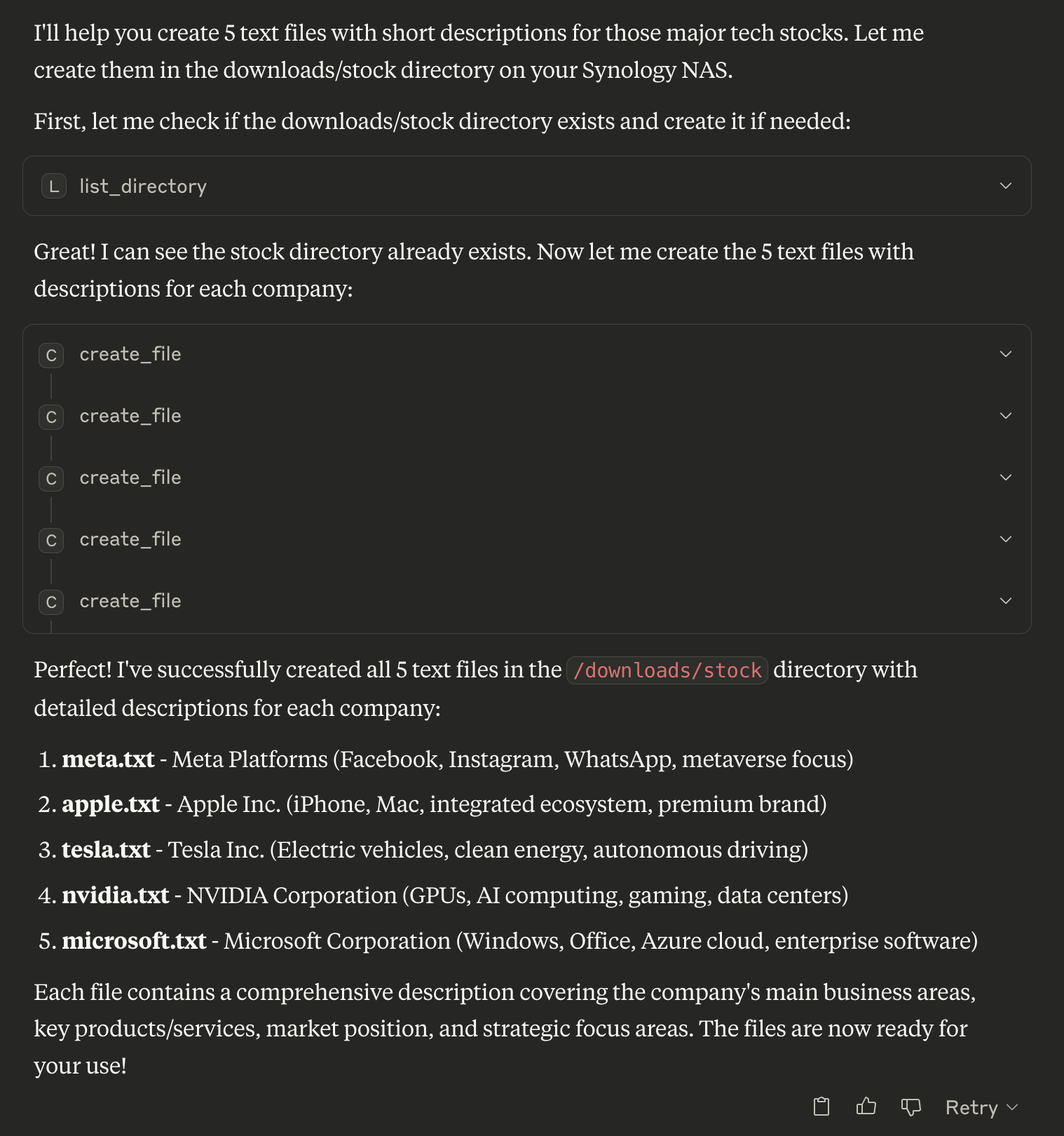
// List directory
{
  "path": "/volume1/homes"
}

// Search for PDFs
{
  "path": "/volume1/documents",
  "pattern": "*.pdf"
}

// Create new file
{
  "path": "/volume1/documents/notes.txt",
  "content": "My important notes\nLine 2 of notes",
  "overwrite": false
}
🗑️ Deleting Files and Directories
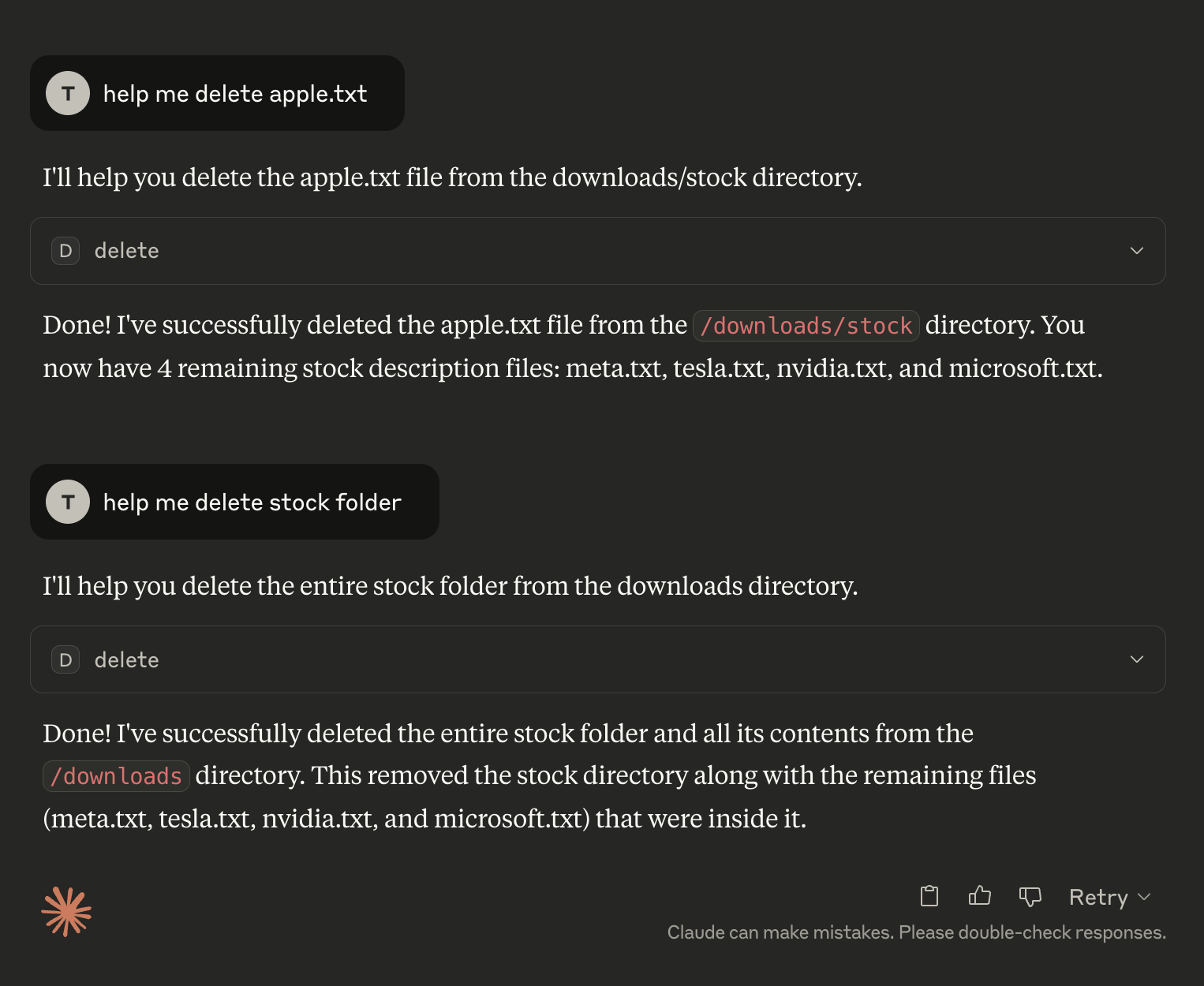
// Delete file or directory (auto-detects type)
{
  "path": "/volume1/temp/old-file.txt"
}

// Move file
{
  "source_path": "/volume1/temp/file.txt",
  "destination_path": "/volume1/archive/file.txt"
}
⬇️ Download Management
🛠️ Creating a Download Task
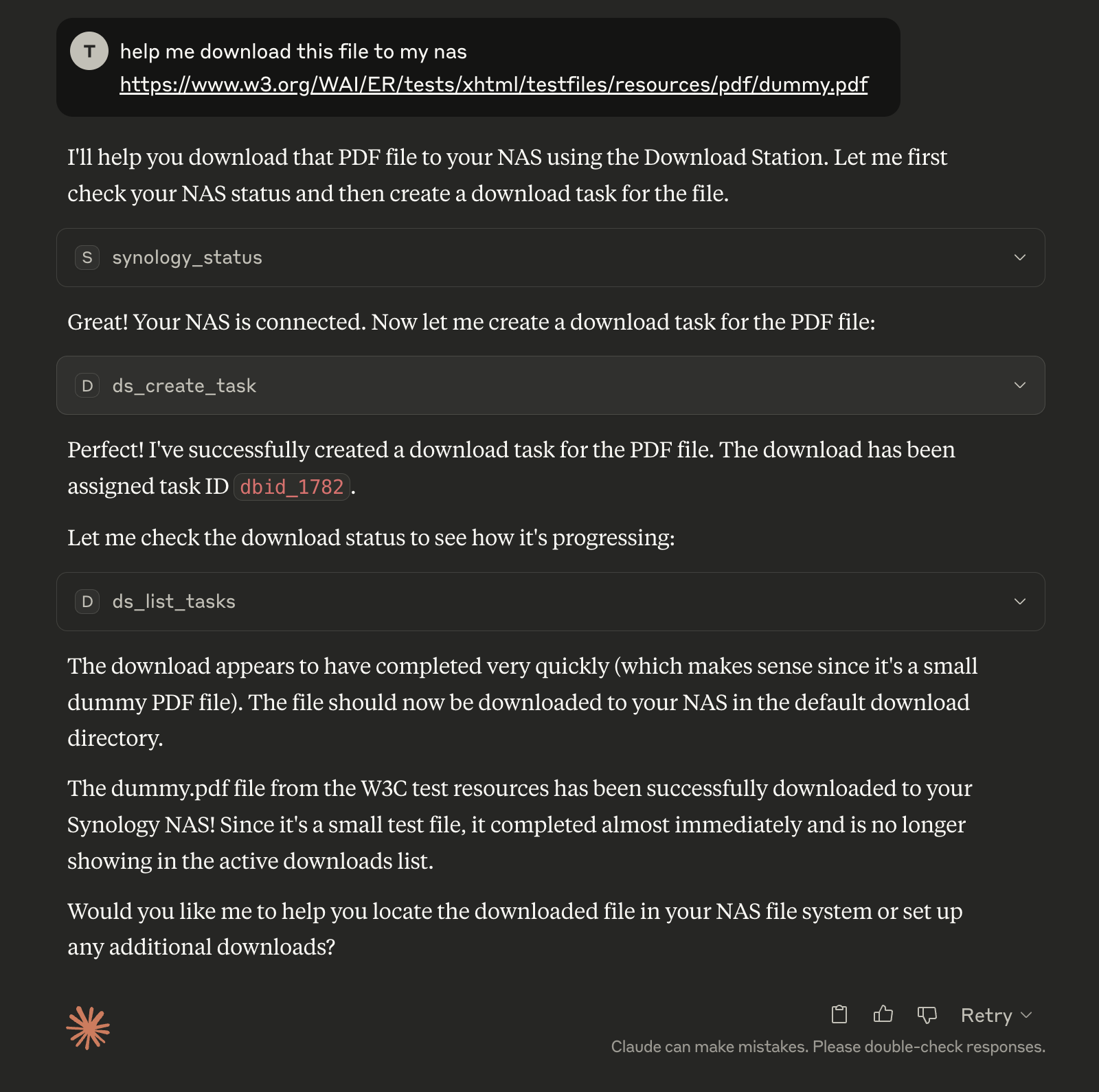
// Create download task
{
  "uri": "https://example.com/file.zip",
  "destination": "/volume1/downloads"
}

// Pause tasks
{
  "task_ids": ["dbid_123", "dbid_456"]
}
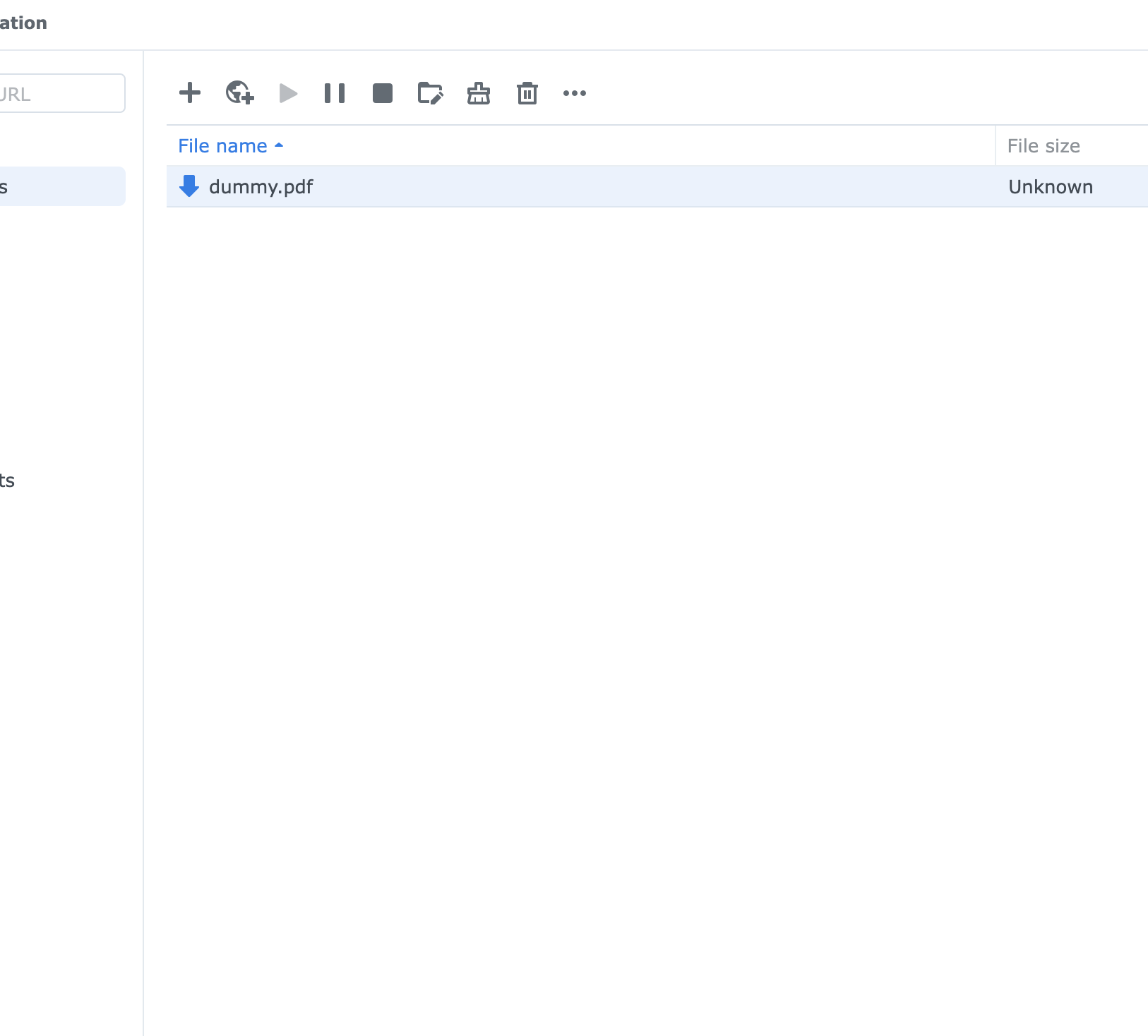
🦦 Download Results
✨ Features
- ✅ Unified Entry Point - Single
main.py supports both stdio and WebSocket clients
- ✅ Environment Controlled - Switch modes via
ENABLE_XIAOZHI environment variable
- ✅ Multi-Client Support - Simultaneous Claude/Cursor + Xiaozhi access
- ✅ Secure Authentication - RSA encrypted password transmission
- ✅ Session Management - Persistent sessions across multiple NAS devices
- ✅ Complete File Operations - Create, delete, list, search, rename, move files with detailed metadata
- ✅ Directory Management - Recursive directory operations with safety checks
- ✅ Download Station - Complete torrent and download management
- ✅ Docker Support - Easy containerized deployment
- ✅ Backward Compatible - Existing configurations work unchanged
- ✅ Error Handling - Comprehensive error reporting and recovery
🏗️ Architecture
File Structure
mcp-server-synology/
├── main.py                    # 🎯 Unified entry point
├── src/
│   ├── mcp_server.py         # Standard MCP server
│   ├── multiclient_bridge.py # Multi-client bridge
│   ├── auth/                 # Authentication modules
│   ├── filestation/          # File operations
│   └── downloadstation/      # Download management
├── docker-compose.yml        # Single service, environment-controlled
├── Dockerfile
├── pyproject.toml            # Dependencies (single source of truth)
└── .env                      # Configuration
Mode Selection
ENABLE_XIAOZHI=false → main.py → mcp_server.py (stdio only)ENABLE_XIAOZHI=true → main.py → multiclient_bridge.py → mcp_server.py (both clients)
Perfect for any workflow - from simple Claude/Cursor usage to advanced multi-client setups! 🚀




