
koala73/worldmonitorConnectors
Real-time global intelligence dashboard. AI-powered news aggregation, geopolitical monitoring, and infrastructure tracking in a unified situational awareness interface
86k
Apify MCP Server connects an MCP client to Apify Actors, documentation, datasets, key-value stores, and task management. It discovers tools dynamically, loads Actor input schemas, and exposes them as MCP tools so the agent can call the right scraper or utility without manual wiring.
Builders who want their agent to search the web, scrape sites, and read Apify results through MCP.
You can give your agent access to thousands of Apify scrapers and your Apify storage from one MCP connection.
Find Actors in Apify Store, inspect their details, and run them as MCP tools.
Loads Actor input schemas and turns selected Actors like `apify/rag-web-browser` and `apify/web-fetch` into callable tools.
Fetch run details, logs, dataset items, dataset schemas, and key-value store records on demand.
Lets the agent search and fetch Apify documentation pages for context while working.
Create, update, publish, and unpublish saved Actor tasks.
Works through `https://mcp.apify.com` or locally with `npx @apify/actors-mcp-server` over stdio.
Supports AGI, direct x402, and Skyfire payment flows for paid Actor runs.
# Create a new wallet
mcpc x402 init

# Import an existing wallet
mcpc x402 import <private-key>

# Show the wallet address and a funding QR code, so you can fund it with USDC on Base (https://base.org)
mcpc x402
mcpc connect "mcp.apify.com?payment=x402" @apify --x402
mcpc @apify tools-call call-actor actor:="apify/rag-web-browser" input:='{"query": "latest AI news"}'



The Apify Model Context Protocol (MCP) server at mcp.apify.com enables your AI agents to extract data from social media, search engines, maps, e-commerce sites, and any other website using thousands of ready-made scrapers, crawlers, and automation tools from Apify Store. It supports OAuth, allowing you to connect from clients like Claude.ai or Visual Studio Code using just the URL.
🚀 Use the hosted Apify MCP Server!
For the best experience, connect your AI assistant to our hosted server at
https://mcp.apify.com. The hosted server supports the latest features - including output schema inference for structured Actor results - that are not available when running locally via stdio.
⚠️ Legacy SSE transport removed. The
https://mcp.apify.com/sseendpoint has been removed in favor of Streamable HTTP. Migrate your client tohttps://mcp.apify.com— drop the/ssesuffix from your configuration.
💰 The server also supports agentic payments: buy a token from AGI to run any Actor, or pay per-request via direct x402 (Pay Per Event Actors only) or Skyfire.
Apify MCP Server is compatible with Claude Code, Claude.ai, Cursor, VS Code and any client that adheres to the Model Context Protocol.
Check out the MCP clients section for more details or visit the MCP configuration page.
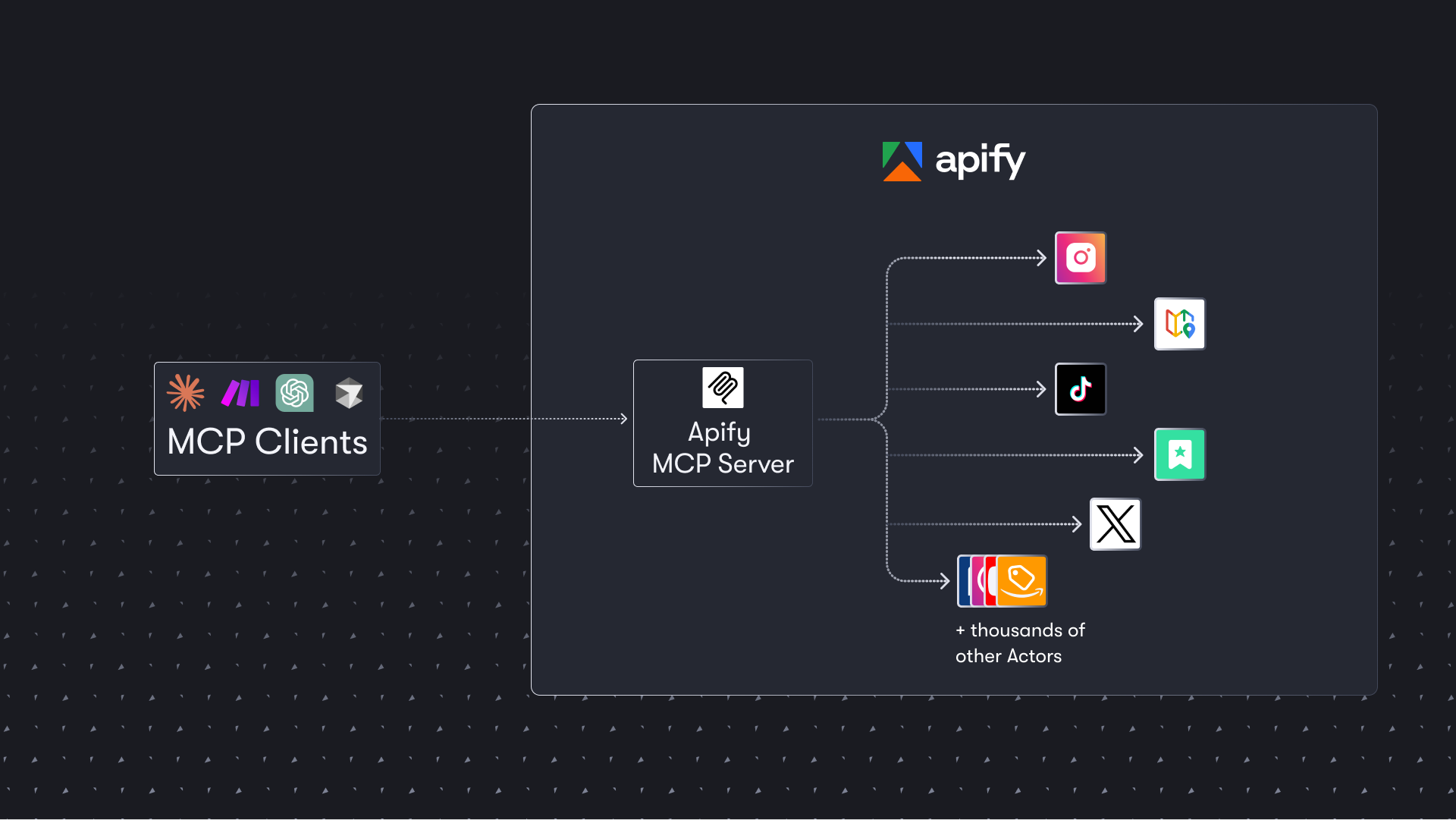
The Apify MCP Server allows an AI assistant to use any Apify Actor as a tool to perform a specific task. For example, it can:
Video tutorial: Integrate 8,000+ Apify Actors and Agents with Claude

You can use the Apify MCP Server in two ways:
HTTPS Endpoint (mcp.apify.com): Connect from your MCP client via OAuth or by including the Authorization: Bearer <APIFY_TOKEN> header in your requests. This is the recommended method for most use cases. Because it supports OAuth, you can connect from clients like Claude.ai or Visual Studio Code using just the URL: https://mcp.apify.com.
https://mcp.apify.com streamable transportStandard Input/Output (stdio): Ideal for local integrations and command-line tools like the Claude for Desktop client.
npx @apify/actors-mcp-server and the APIFY_TOKEN environment variable to your Apify API token.npx @apify/actors-mcp-server --help for more options.You can find detailed instructions for setting up the MCP server in the Apify documentation.
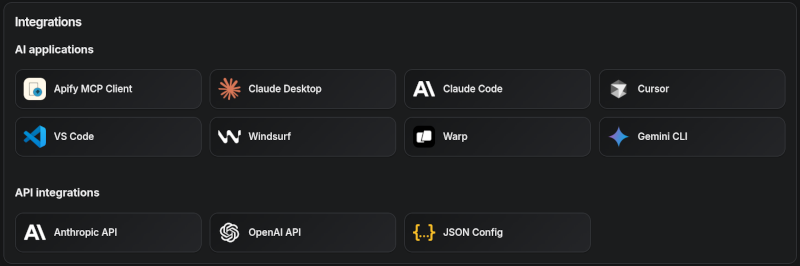
Apify MCP Server is compatible with any MCP client that adheres to the Model Context Protocol, but the level of support for dynamic tool discovery and other features may vary between clients.
To interact with the Apify MCP Server, you can use clients such as Claude Desktop, Visual Studio Code, or Apify Tester MCP Client.
Visit mcp.apify.com to configure the server for your preferred client.
Want to try Apify MCP without any setup?
Check out Apify Tester MCP Client
This interactive, chat-like interface provides an easy way to explore the capabilities of Apify MCP without any local setup. Sign in with your Apify account and start experimenting with web scraping, data extraction, and automation tools!
Or use the MCP bundle file (formerly known as Anthropic Desktop extension file, or DXT) for one-click installation: Apify MCP Server MCPB file
You can pay for Actor runs without an Apify API token using AGI, direct x402, or Skyfire.
mcp.apify.com and api.apify.com — works for any Actor, not just Pay Per Event ones. Recommended for new integrations; see AGI (recommended) below.mcpc (brew install apify/tap/mcpc or npm install -g @apify/mcpc). We use mcpc because it is one of the few MCP clients that supports the latest features and the x402 protocol natively.ℹ️ Scope: Both direct x402 and Skyfire are limited to Pay Per Event Actors, don't support Standby Actors, and settle per run instead of minting a token.
Actor run costs vary, so both payment methods use a prepaid balance model. The payment flow happens in four steps:
search-actors or fetch-actor-details. Those calls are free.mcpc automatically signs a $1.00 USDC transaction.create-pay-token tool.mcpc using the prepaid balance.skyfire-pay-id input property.AGI (Apify Agent General Interface) is the recommended way for autonomous agents to pay for Apify usage without an account. Pay once via x402 or MPP, receive a prepaid, spend-capped Apify API token, and use it directly against mcp.apify.com and api.apify.com (Authorization: Bearer <token>) — for any Actor.
Full protocol, supported payment methods, and current terms (minimum amount, token lifetime, refund policy) are documented at agi.apify.com/AGENTS.md — treat it as the single source of truth.
The x402 protocol enables direct, machine-to-machine payments. Your MCP client can use it to pay for Actor runs with USDC on the Base blockchain, completely bypassing the need for an Apify API token.
Create or import a wallet:
# Create a new wallet
mcpc x402 init

# Import an existing wallet
mcpc x402 import <private-key>

# Show the wallet address and a funding QR code, so you can fund it with USDC on Base (https://base.org)
mcpc x402
Connect to the server with x402 enabled:
mcpc connect "mcp.apify.com?payment=x402" @apify --x402
You can now call a paid tool:
mcpc @apify tools-call call-actor actor:="apify/rag-web-browser" input:='{"query": "latest AI news"}'
Skyfire provides managed payment infrastructure for AI agents. Instead of authenticating with an Apify API token, your agent passes a Skyfire payment token to cover the cost of each tool call using PAY tokens.
Configure the Skyfire MCP server and the Apify MCP Server in your client. Add payment=skyfire to the Apify server URL:
{
  "mcpServers": {
    "skyfire": {
      "url": "https://api.skyfire.xyz/mcp/sse",
      "headers": {
        "skyfire-api-key": "<YOUR_SKYFIRE_API_KEY>"
      }
    },
    "apify": {
      "url": "https://mcp.apify.com?payment=skyfire"
    }
  }
}
See the Skyfire integration documentation for setup details. The Agentic Payments with Skyfire post provides additional background.
The MCP server provides a set of tools for interacting with Apify Actors. Since Apify Store is large and growing rapidly, the MCP server provides a way to dynamically discover and use new Actors.
Any Apify Actor can be used as a tool.
By default, the server is pre-configured with two Actors, apify/rag-web-browser and apify/web-fetch, and several helper tools.
The MCP server loads an Actor's input schema and creates a corresponding MCP tool.
This allows the AI agent to know exactly what arguments to pass to the Actor and what to expect in return.
For example, for the apify/rag-web-browser Actor, the input parameters are:
{
  "query": "restaurants in San Francisco",
  "maxResults": 3
}
You don't need to manually specify which Actor to call or its input parameters; the LLM handles this automatically. When a tool is called, the arguments are automatically passed to the Actor by the LLM. You can refer to the specific Actor's documentation for a list of available arguments.
One of the most powerful features of using MCP with Apify is dynamic tool discovery. It allows an AI agent to find new tools (Actors) as needed and incorporate them. Here are some special MCP operations and how the Apify MCP Server supports them:
Here is an overview list of all the tools provided by the Apify MCP Server.
Legend for the Enabled by default column:
call-actor, an Actor tool, or get-actor-run is present (which is true in the default configuration).local-agent-mode-apify. To disable, pass an explicit tools= list that omits it.| Tool name | Category | Description | Enabled by default |
|---|---|---|---|
search-actors | actors | Search for Actors in Apify Store. | ✅ |
fetch-actor-details | actors | Retrieve detailed information about a specific Actor, including its input schema, README (summary when available, full otherwise), pricing, and Actor output schema. | ✅ |
call-actor | actors | Call an Actor and get its run results. Use fetch-actor-details first to get the Actor's input schema. | ✅ |
get-actor-run | runs | Get detailed information about a specific Actor run. | ⚡ |
get-dataset-items | storage | Retrieve items from a dataset with support for filtering and pagination. | ⚡ |
get-key-value-store-record | storage | Get the value associated with a specific key in a key-value store. | ⚡ |
abort-actor-run | runs | Abort a running Actor run, optionally gracefully. | ⚡ |
search-apify-docs | docs | Search the Apify documentation for relevant pages. | ✅ |
fetch-apify-docs | docs | Fetch the full content of an Apify documentation page by its URL. | ✅ |
apify--rag-web-browser | Actor (see tool configuration) | An Actor tool to browse the web. | ✅ |
apify--web-fetch | Actor (see tool configuration) | An Actor tool to fetch a URL and return its content. | ✅ |
report-problem | dev | Report a problem with an Apify tool or Actor to the Apify team. | ✅¹ |
get-actor-run-list | runs | Get a list of an Actor's runs, filterable by status. | |
get-actor-log | runs | Retrieve the logs for a specific Actor run. | |
get-dataset | storage | Get metadata about a specific dataset. | |
get-dataset-schema | storage | Generate a JSON schema from dataset items. | |
get-key-value-store | storage | Get metadata about a specific key-value store. | |
get-key-value-store-keys | storage | List the keys within a specific key-value store. | |
get-dataset-list | storage | List all available datasets for the user. | |
get-key-value-store-list | storage | List all available key-value stores for the user. | |
create-actor-task | tasks | Create a saved Actor task (a named, reusable Actor configuration). | |
get-actor-task | tasks | Get a saved Actor task, its publication state and public display configuration. | |
update-actor-task | tasks | Update a task's input, run options, or public display configuration. | |
publish-actor-task | tasks | Publish a task on its public landing page. | |
unpublish-actor-task | tasks | Unpublish a task from its public landing page. |
Note:
When
call-actor, an Actor tool, orget-actor-runis present, the server auto-injectsget-actor-run,get-dataset-items,get-key-value-store-record, andabort-actor-run.When you call an Actor — through
call-actoror directly via an Actor tool (e.g.,apify--rag-web-browser) — the response contains run metadata, storage IDs, and asummary+nextStep, but no dataset items. To fetch items, follownextStepand callget-dataset-items(auto-injected), passing thedatasetIdreturned from the call.
All tools include metadata annotations to help MCP clients and LLMs understand tool behavior:
title: Short display name for the tool (e.g., "Search Actors", "Call Actor", "apify/rag-web-browser")readOnlyHint: true for tools that only read data without modifying state (e.g., get-dataset, fetch-actor-details)openWorldHint: true for tools that access external resources outside the Apify platform (e.g., call-actor executes external Actors). Tools that interact only with the Apify platform (like search-actors or fetch-apify-docs) do not have this hint.The tools configuration parameter is used to specify loaded tools – either categories or specific tools directly, and Apify Actors. For example, tools=storage,runs loads two categories; tools=call-actor loads just one tool.
When no query parameters are provided, the MCP server loads the following tools by default:
actorsdocsapify/rag-web-browserapify/web-fetchIf the tools parameter is specified, only the listed tools or categories will be enabled – no default tools will be included.
report-problem is served by default (subject to the gating in the footnote above) but lives in the dev category, so an explicit tools=dev selects it too. To disable it, pass an explicit tools= list that omits it (e.g. tools=actors,docs).
Easy configuration:
Use the UI configurator to configure your server, then copy the configuration to your client.
Configuring the hosted server:
The hosted server can be configured using query parameters in the URL. For example, to load the default tools, use:
https://mcp.apify.com?tools=actors,docs,apify/rag-web-browser,apify/web-fetch
For minimal configuration, if you want to use only a single Actor tool - without any discovery or generic calling tools, the server can be configured as follows:
https://mcp.apify.com?tools=apify/my-actor
This setup exposes only the specified Actor (apify/my-actor) as a tool. No other tools will be available.
Configuring the CLI:
The CLI can be configured using command-line flags. For example, to load the same tools as in the hosted server configuration, use:
npx @apify/actors-mcp-server --tools actors,docs,apify/rag-web-browser,apify/web-fetch
The minimal configuration is similar to the hosted server configuration:
npx @apify/actors-mcp-server --tools apify/my-actor
As above, this exposes only the specified Actor (apify/my-actor) as a tool. No other tools will be available.
⚠️ Important recommendation
The default tools configuration may change in future versions. When no
toolsparameter is specified, the server currently loads default tools, but this behavior is subject to change.For production use and stable interfaces, always explicitly specify the
toolsparameter to ensure your configuration remains consistent across updates.
The ui parameter enables MCP Apps widget rendering in tool responses. When enabled, tools like search-actors return interactive MCP App responses.
Configuring the hosted server:
Enable UI mode using the ui query parameter:
https://mcp.apify.com?ui=true
You can combine it with other parameters:
https://mcp.apify.com?tools=actors,docs&ui=true
Configuring the CLI:
The CLI can be configured using command-line flags. For example, to enable UI mode:
npx @apify/actors-mcp-server --ui true
You can also set it via the UI_MODE environment variable:
export UI_MODE=true
npx @apify/actors-mcp-server
The v2 configuration preserves backward compatibility with v1 usage. Notes:
actors param (URL) and --actors flag (CLI) are still supported.
tools selectors.?actors=apify/rag-web-browser ≡ ?tools=apify/rag-web-browser; --actors apify/rag-web-browser ≡ --tools apify/rag-web-browser.enableAddingActors (URL), enable-adding-actors (CLI), and the legacy enableActorAutoLoading alias have been removed. To call Actors dynamically, use tools=call-actor (included by default via the actors category). Any lingering raw value is ignored.tools are specified, the server loads actors, docs, apify/rag-web-browser, and apify/web-fetch.
tools are specified, the defaults are not added (same as v1 intent for explicit selection).call-actor is now included by default via the actors category (additive change). To exclude it, specify an explicit tools list without actors.tools=add-actor, tools=experimental, and tools=preview are retired: they are ignored and load no tools. Use tools=call-actor (or the default actors category) instead.Existing URLs and commands using ?actors=... or --actors continue to work unchanged.
The server advertises the prompts capability, but no prompts are currently registered — prompts/list returns an empty list.
Your Apify data is not enumerated in resources/list — reads are on demand: pass any Apify API GET URL (https://api.apify.com/v2/...) to `resources/re
Sign in to join the discussion.
No comments yet. Be the first to say what this is good for.
Real-time global intelligence dashboard. AI-powered news aggregation, geopolitical monitoring, and infrastructure tracking in a unified situational awareness interface
High-performance code intelligence MCP server. Indexes codebases into a persistent knowledge graph — average repo in milliseconds. 158 languages, sub-ms queries, 99% fewer tokens. Single static binary, zero dependencies.

Universal provider proxy for OpenAI Codex & Claude Code — use any LLM (Claude, Gemini, Grok, DeepSeek, Ollama…) with Codex CLI, App, SDK, and Claude Code

Git-native persistent memory for AI coding agents. Implements Google OKF v0.2 with sub-300µs in-memory BM25 search, embedded MCP server, and progressive disclosure. Slashes token bloat by 80% with zero external databases or dependencies. Built in pure Go.

Local-first code intelligence graph for MCP and CLI. Builds a persistent map of your codebase so AI coding tools read only what matters, with benchmarked context reductions on reviews and large-repo workflows.

Stop your AI from making things up — it proposes, deterministic tools decide, every claim checked against ground truth with evidence. Grounded facts and context survive resets. Reverse engineering is the proving ground. MCP server + CLI.