
koala73/worldmonitorConnectors
Real-time global intelligence dashboard. AI-powered news aggregation, geopolitical monitoring, and infrastructure tracking in a unified situational awareness interface
86k
This repo is a remote MCP connector that brings Withings health data into an MCP client. It handles OAuth, stores tokens in Supabase, and exposes tools for sleep, activity, measures, workouts, and heart records.
Builders who want their agent to answer questions from their Withings account.
You can ask an MCP client about your sleep, workouts, and body metrics instead of checking Withings manually.
Authenticates a Withings account through OAuth 2.0 with redirect handling and PKCE support.
Provides MCP tools for sleep summaries, activity, intraday activity, workouts, measures, devices, goals, ECG records, and stethoscope data.
Encrypts access tokens, refresh tokens, and auth codes before storing them in the database.
Redacts tokens, user IDs, and other sensitive values from logs.
Uses Supabase migrations and database tables for sessions, tokens, and cleanup.
# The project runs TypeScript directly with Bun — no build step required.
bun run start
bun run start            # Run the server
bun run dev              # Hot-reload mode
bun run typecheck        # Type-check with tsc (no emit)
bun run build            # Bundle for production (outputs to ./build)
bun run generate-secret  # Generate encryption secret for ENCRYPTION_SECRET env variable
Help me pay for the servers on Patreon
A Model Context Protocol (MCP) server that brings your Withings health data into Claude. Access your sleep patterns, body measurements, workouts, heart data, and more through natural conversation.
🔒 Privacy First: This is my personal project, and the repository is intentionally public to demonstrate transparency. The code shows that no personal information is logged or stored maliciously. All sensitive data (tokens, user IDs) is encrypted at rest and automatically redacted from logs. You can review the entire codebase to verify this commitment to privacy.
⚠️ Disclaimer: This server is provided as-is without any guarantees or warranties. While I've made every effort to ensure security and privacy, I make no guarantees about availability, data integrity, or security. Use at your own risk. For production use cases, consider self-hosting your own instance.
https://withings-mcp.com/mcp → click AddThat's it! Ask Claude about your sleep, weight, workouts, or heart data.
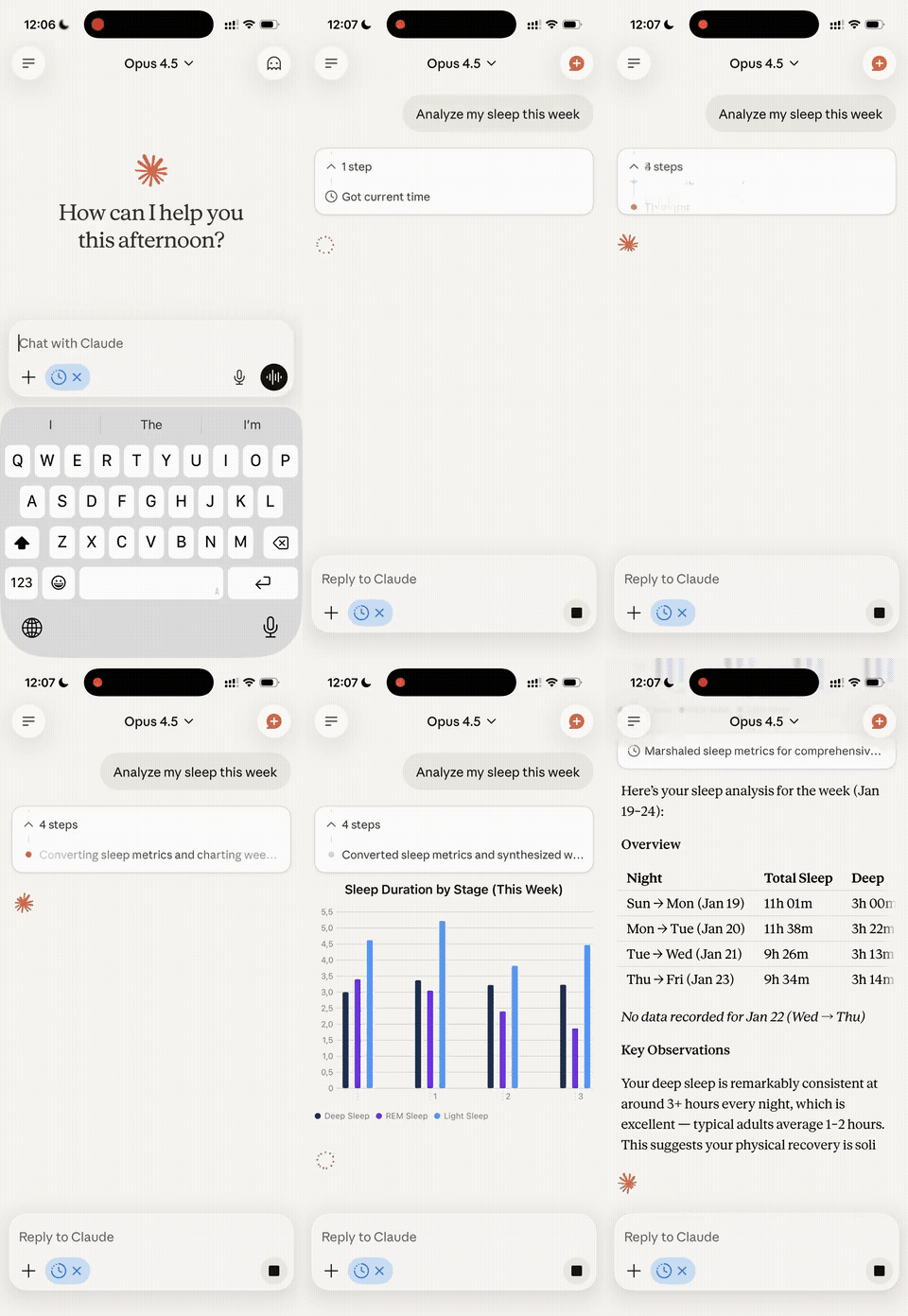
This MCP server gives Claude access to your Withings health data, allowing you to:
All through natural conversation with Claude or any other MCP-compatible client.
If you just want to use this MCP server with Claude Desktop without hosting anything yourself, follow these steps:
Withings (or any name you prefer)https://withings-mcp.com/mcpNote: If your MCP client doesn't support UI-based connector configuration, you can manually edit the config file instead. See the manual configuration guide below.
After authorization, Claude will have access to your Withings data!
Once connected, Claude can use these tools to access your data:
get_hrv - Minute-level RMSSD, SDNN, and quality scores captured during sleepget_sleep_summary - Sleep duration, stages (light/deep/REM), heart rate, breathing, sleep scoreget_activity - Daily steps, distance, calories, elevation, activity durationsget_intraday_activity - High-frequency activity data throughout the dayget_workouts - Detailed workout summaries with heart rate zones and metricsget_measures - Weight, body composition, blood pressure, heart rate, temperature, VO2 max, and moreget_user_devices - List of connected Withings devicesget_user_goals - Your health and fitness goals (steps, sleep, weight)list_heart_records - List of ECG recordingsget_heart_signal - Detailed ECG waveform datalist_stetho_records - List of stethoscope recordingsget_stetho_signal - Detailed audio signal dataTry asking Claude:
Want to run your own instance? Here's how to deploy this MCP server yourself.
https://your-domain.com/callback
The hosted version includes a Google Analytics tag (G-ZMGF9WXL3W) in the static pages under public/. If you're forking this repo, remove or replace the GA snippet in public/index.html and public/health.html, and update the CSP headers in src/server/app.ts accordingly.
# Clone the repository
git clone https://github.com/your-username/withings-mcp.git
cd withings-mcp

# Install dependencies
bun install

# Generate encryption secret
bun run generate-secret
# Copy the output - you'll need it for environment variables
bun install -g supabase (or use brew install supabase/tap/supabase)supabase link --project-ref <your-project-ref>supabase db pushSUPABASE_URLSUPABASE_SECRET_KEYNote: Withings requires a publicly accessible URL for OAuth callbacks. For local development, use a tunneling service to expose your local server or deploy to a staging environment for testing.
# Copy environment template
cp .env.example .env

# Edit .env with your values
# WITHINGS_CLIENT_ID=your_client_id
# WITHINGS_CLIENT_SECRET=your_client_secret
# WITHINGS_REDIRECT_URI=https://your-tunnel-url.com/callback
# ENCRYPTION_SECRET=paste_generated_secret_here
# SUPABASE_URL=https://your-project.supabase.co
# SUPABASE_SECRET_KEY=your_service_role_key
# PORT=3000

# Run locally (Bun executes TypeScript directly — no build step)
bun run dev
Make sure your redirect URI in the .env file matches the publicly accessible URL pointing to your local server.
# The project runs TypeScript directly with Bun — no build step required.
bun run start
Deploy to DigitalOcean App Platform (its Bun buildpack detects package.json and runs bun run start automatically), or any other host that supports Bun.
Set the following environment variables on your hosting platform:
| Variable | Required | Example |
|---|---|---|
WITHINGS_CLIENT_ID | Yes | your_client_id |
WITHINGS_CLIENT_SECRET | Yes | your_client_secret |
WITHINGS_REDIRECT_URI | Yes | https://your-domain.com/callback |
ENCRYPTION_SECRET | Yes | Generated from step 2 |
SUPABASE_URL | Yes | https://your-project.supabase.co |
SUPABASE_SECRET_KEY | Yes | Your Supabase service role key |
PORT | No | 3000 (or your platform's default) |
LOG_LEVEL | No | info |
ALLOWED_ORIGINS | No | https://example.com,https://app.example.com |
Go back to your Withings developer app and update the redirect URI to match your deployed URL:
https://your-domain.com/callback
Withings (or any name you prefer)https://your-domain.com/mcpConfigure your MCP client with the following connection details:
https://your-domain.com/mcp/.well-known/oauth-authorization-server| Variable | Required | Description |
|---|---|---|
WITHINGS_CLIENT_ID | Yes | Your Withings app client ID |
WITHINGS_CLIENT_SECRET | Yes | Your Withings app client secret |
WITHINGS_REDIRECT_URI | Yes | OAuth callback URL (must match Withings app settings) |
ENCRYPTION_SECRET | Yes | 32+ character secret for token encryption (generate with bun run generate-secret) |
SUPABASE_URL | Yes | Your Supabase project URL (from Dashboard → Settings → API) |
SUPABASE_SECRET_KEY | Yes | Your Supabase service role key (from Dashboard → Settings → API) |
PORT | No | Server port (default: 3000) |
LOG_LEVEL | No | Logging level: trace, debug, info, warn, error (default: info) |
ALLOWED_ORIGINS | No | Comma-separated list of allowed CORS origins for browser clients |
bun run start            # Run the server
bun run dev              # Hot-reload mode
bun run typecheck        # Type-check with tsc (no emit)
bun run build            # Bundle for production (outputs to ./build)
bun run generate-secret  # Generate encryption secret for ENCRYPTION_SECRET env variable
src/
├── auth/              # OAuth 2.0 authentication & token storage
├── db/                # Supabase client & cleanup scheduler
├── server/            # Hono app, MCP endpoints, middleware
├── tools/             # MCP tools for Withings API (sleep, measure, user, heart, stetho)
├── types/             # TypeScript type definitions (Hono, Withings API)
├── withings/          # Withings API client
├── utils/             # Logger and encryption utilities
└── index.ts           # Main entry point

supabase/
└── migrations/        # Database schema migrations
See CLAUDE.md for detailed architecture documentation.
All Withings access tokens, refresh tokens, and authorization codes are encrypted at rest using AES-256-GCM:
Important: Keep your ENCRYPTION_SECRET:
bun run generate-secret)/authorize endpoint validates redirect_uri against the registered client's allowed URIs, preventing open redirect attacksunsafe-inline directivesThe custom logger automatically redacts all sensitive information:
You can review the logging implementation in src/utils/logger.ts.
This is a personal project, but contributions are welcome! Please:
MIT License - see LICENSE file for details.
Built with:
Sign in to join the discussion.
No comments yet. Be the first to say what this is good for.
Real-time global intelligence dashboard. AI-powered news aggregation, geopolitical monitoring, and infrastructure tracking in a unified situational awareness interface
High-performance code intelligence MCP server. Indexes codebases into a persistent knowledge graph — average repo in milliseconds. 158 languages, sub-ms queries, 99% fewer tokens. Single static binary, zero dependencies.

Universal provider proxy for OpenAI Codex & Claude Code — use any LLM (Claude, Gemini, Grok, DeepSeek, Ollama…) with Codex CLI, App, SDK, and Claude Code

Git-native persistent memory for AI coding agents. Implements Google OKF v0.2 with sub-300µs in-memory BM25 search, embedded MCP server, and progressive disclosure. Slashes token bloat by 80% with zero external databases or dependencies. Built in pure Go.

Stop your AI from making things up — it proposes, deterministic tools decide, every claim checked against ground truth with evidence. Grounded facts and context survive resets. Reverse engineering is the proving ground. MCP server + CLI.
20 MB lightweight cross-platform database client for 90+ databases, including MySQL, PostgreSQL, SQLite, Redis, MongoDB, DuckDB, SQL Server, and Dameng. Built-in AI, MCP Server, CLI, desktop and Docker. | 轻量级跨平台数据库管理工具,支持 MySQL、PostgreSQL、SQLite、Redis、MongoDB、达梦等 90+ 数据库,提供桌面端、Docker、CLI、内置 AI 助手和 MCP Server。