
koala73/worldmonitorConnectors
Real-time global intelligence dashboard. AI-powered news aggregation, geopolitical monitoring, and infrastructure tracking in a unified situational awareness interface
86k
This project converts n8n workflows into MCP servers that agent tools can call. The flow is: import or upload a workflow, map credentials, deploy it to n8n, and then use the generated MCP endpoint from Claude, Cursor, or another MCP client.
Builders who want to expose n8n workflows as tools inside Claude, Cursor, or other MCP clients.
You can turn an existing n8n workflow into a callable agent tool instead of rebuilding the automation from scratch.
Imports n8n template URLs or workflow JSON, then deploys the workflow to an n8n instance.
Lets you map required credentials through the UI and stores workflow configuration in Supabase.
Creates a per-workflow MCP endpoint such as `/mcp/{workflow_id}/{api_key}` and lists registered servers at `/list`.
Combines a Flask agent marketplace for workflow management with a FastAPI MCP router for serving tools.
Parses n8n workflows to detect nodes and required credentials before deployment.
git clone https://github.com/Super-Chain/N8N2MCP.git
cd N8N2MCP
cp env.example .env
# Edit .env with your actual configuration values
docker-compose up -d
docker-compose logs -f
git clone https://github.com/Super-Chain/N8N2MCP.git
cd N8N2MCP
pip install -r requirements.txt

A comprehensive platform that converts N8N workflows into Model Context Protocol (MCP) servers, enabling seamless integration with AI assistants like Claude, Cursor, and other MCP-compatible platforms. Build powerful automation tools using N8N's visual workflow editor and deploy them as callable AI functions.
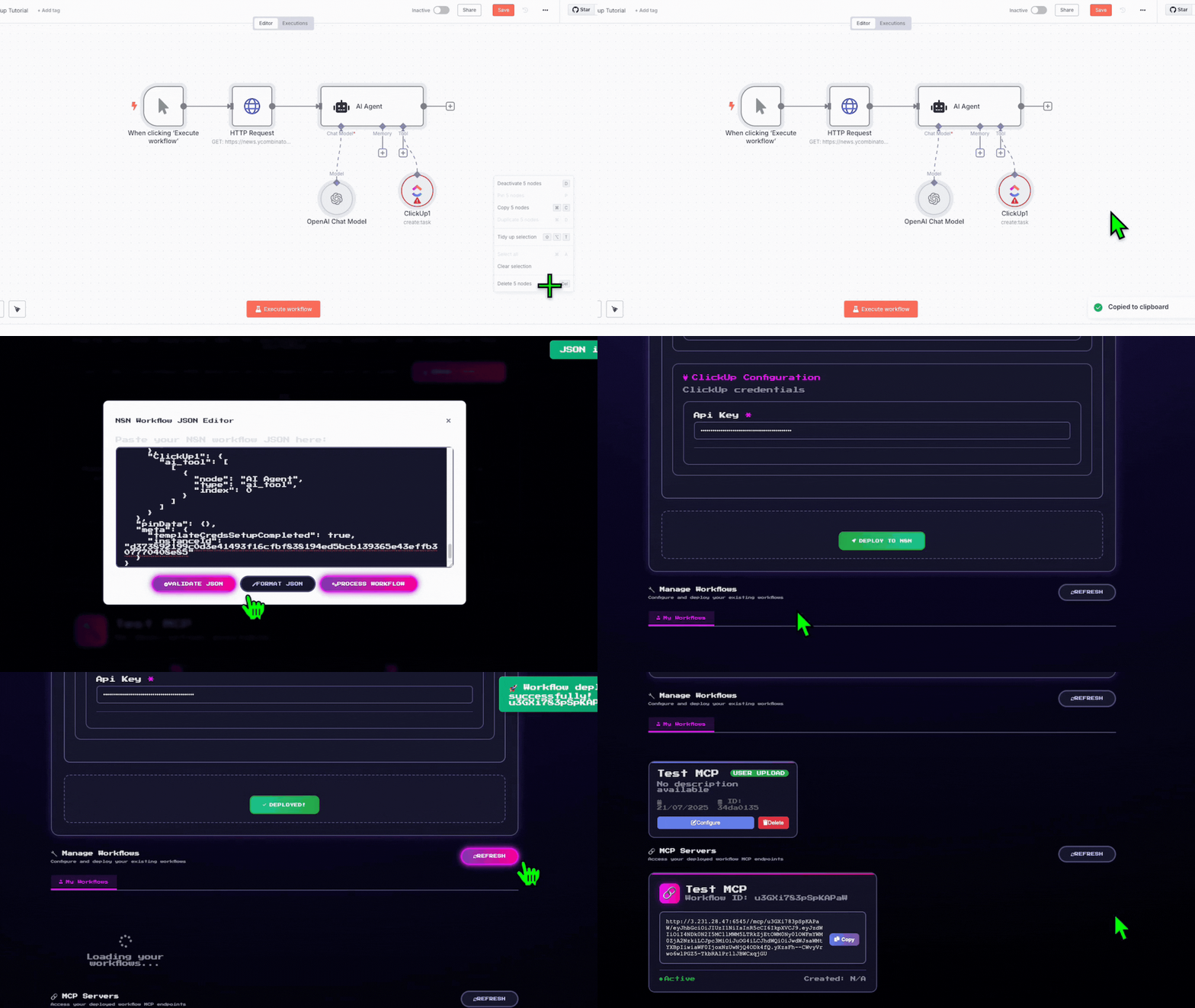
Copy the N8N template link/JSON from any workflow
Map your credentials through our intuitive interface
Deploy with one click!
Your N8N workflow gets deployed and creates a local hosted MCP server. Just paste the server URL into Claude, Cursor, Super Chain, or any MCP-compatible platform!
Convert your N8N workflows into MCP servers that AI assistants can use as custom tools
graph TB
    subgraph "AI Assistant Layer"
        A[Claude/Cursor/Super Chain]
    end

    subgraph "N8N 2 MCP"
        B[Agent Marketplace<br/>Flask Web App]
        C[MCP Router<br/>FastAPI Service]
        D[Workflow Parser<br/>Analysis Engine]
    end

    subgraph "Infrastructure"
        E[Supabase Database]
        F[N8N Instance]
        G[Credential Manager]
    end

    A -->|MCP Protocol| C
    C -->|Dynamic MCP| F
    B -->|Workflow Management| E
    B -->|Deploy & Configure| F
    C -->|User Config| E
    B -->|Parse & Analyze| D
    D -->|Extract Requirements| G
    G -->|Secure Handling| F
⚠️ Important: Playwright installation is required for N8N workflow execution. The system will use dummy credentials if Playwright is not properly installed, limiting functionality.
Clone the repository
git clone https://github.com/Super-Chain/N8N2MCP.git
cd N8N2MCP
Configure environment
cp env.example .env
# Edit .env with your actual configuration values
Start with Docker Compose
docker-compose up -d
This starts:
View logs
docker-compose logs -f
Clone the repository
git clone https://github.com/Super-Chain/N8N2MCP.git
cd N8N2MCP
Install dependencies
pip install -r requirements.txt
Install Playwright browsers (Required)
playwright install
# This downloads the necessary browser binaries for N8N authentication
Configure environment
# Copy and edit the .env file (see Environment Configuration section)
cp .env.example .env
# Supabase Configuration
SUPABASE_URL=https://your-project-id.supabase.co
SUPABASE_KEY=your_supabase_anon_key
SUPABASE_SERVICE_KEY=your_supabase_service_role_key

# N8N Configuration
X_N8N_API_KEY=your_n8n_api_key
N8N_BASE_URL=https://your-n8n-instance.com
N8N_USERNAME=your_n8n_username
N8N_PASSWORD=your_n8n_password

# MCP Router Configuration
N8N_BUILDER_URL=http://localhost:6545

# Server Configuration
FLASK_HOST=0.0.0.0
FLASK_PORT=5000
MCP_HOST=0.0.0.0
MCP_PORT=6545

# Optional: Authentication credentials (auto-populated)
N8N_AUTH=
N8N_BROWSER_ID=
Start both servers
python main.py
This starts:
Access to UI Front end : http://localhost:5000
Configuration Notes:
# Example MCP server URL format:
http://localhost:6545/mcp/{workflow_id}/{api_key}

# Test MCP server:
curl http://localhost:6545/list  # List all registered MCP servers
N8N2MCP/
├── main.py                        # Unified server startup script
├── requirements.txt               # Consolidated Python dependencies
├── .env                          # Environment configuration (shared)
│
├── agent_marketplace/             # Flask web application
│   ├── app.py                    # Main Flask app with API endpoints
│   ├── database.py               # Supabase integration & data models
│   ├── n8n_workflow_parser.py    # Workflow analysis engine
│   ├── setup_supabase.py         # Database setup utilities
│   ├── templates/                # HTML templates
│   │   ├── workflows.html        # Main marketplace interface
│   │   └── static/               # CSS, JS assets
│   └── __init__.py               # Python package marker
│
├── mcp_router/                   # FastAPI MCP service
│   ├── mcp_router.py             # Main FastAPI application
│   ├── n8n_credential_extractor.py # N8N authentication
│   ├── credential_helper.py       # Credential management utilities
│   └── __init__.py               # Python package marker
│
└── README.md                     # This documentation
The system uses 2 main tables in Supabase:
-- Main workflow storage table
CREATE TABLE IF NOT EXISTS public.user_workflows (
    id UUID DEFAULT gen_random_uuid() PRIMARY KEY,
    user_id TEXT NOT NULL,
    template_id TEXT NOT NULL,
    template_url TEXT NOT NULL,
    workflow_name TEXT NOT NULL,
    workflow_json JSONB NOT NULL,
    workflow_description TEXT,
    n8n_workflow_id TEXT,
    source TEXT DEFAULT 'user_upload',
    credentials_required JSONB DEFAULT '[]'::jsonb,
    mcp_link TEXT,
    status TEXT DEFAULT 'pending',
    created_at TIMESTAMP WITH TIME ZONE DEFAULT NOW(),
    updated_at TIMESTAMP WITH TIME ZONE DEFAULT NOW()
);

-- MCP server configurations
CREATE TABLE IF NOT EXISTS public.mcp_configs (
    id UUID DEFAULT gen_random_uuid() PRIMARY KEY,
    workflow_id TEXT NOT NULL,
    user_apikey TEXT NOT NULL,
    code TEXT NOT NULL,
    created_at TIMESTAMP WITH TIME ZONE DEFAULT NOW(),
    updated_at TIMESTAMP WITH TIME ZONE DEFAULT NOW(),
    UNIQUE(workflow_id, user_apikey)
);

-- Enable Row Level Security (recommended)
ALTER TABLE user_workflows ENABLE ROW LEVEL SECURITY;
ALTER TABLE mcp_configs ENABLE ROW LEVEL SECURITY;
python main.py
This automatically starts both services with:
cd agent_marketplace
python app.py
cd mcp_router
python mcp_router.py
# Test Agent Marketplace
curl http://localhost:5000/api/health

# Test MCP Router
curl http://localhost:6545/list

# View all endpoints
curl http://localhost:5000/api/health | grep endpoints
# Kill processes on ports 5000 and 6545
fuser -k 5000/tcp 6545/tcp
# Or restart with main.py which handles this automatically
python main.py
# Verify Supabase configuration
python -c "from agent_marketplace.database import db_manager; print('✅ Database OK' if db_manager.supabase else '❌ Database connection failed')"

# Reset database tables
python agent_marketplace/setup_supabase.py
# Check if MCP Router is running
curl http://localhost:6545/list

# View MCP Router logs
# Logs appear in terminal where main.py was started
N8N_BASE_URL includes https://X_N8N_API_KEY is valid and has workflow creation permissions# Install missing packages
pip install playwright
playwright install # For N8N authentication (required)
# Or install all dependencies
pip install -r requirements.txt
# If playwright browsers fail to download
playwright install --force

# For headless environments (servers)
playwright install chromium

# Check if playwright is working
python -c "from playwright.async_api import async_playwright; print('✅ Playwright OK')"
# Enable debug mode for Flask
export FLASK_DEBUG=1

# View detailed MCP Router logs
cd mcp_router && python mcp_router.py --log-level debug

# Test individual components
python -m agent_marketplace.n8n_workflow_parser  # Test parser
python -m mcp_router.mcp_router                  # Test MCP Router
git checkout -b feature/amazing-featuregit commit -m 'Add amazing feature'git push origin feature/amazing-featureThis project is licensed under the MIT License - see the LICENSE file for details.
GET / - Main marketplace interfaceGET /api/health - Health check and available endpointsPOST /api/import-n8n-template-enhanced - Import N8N templatePOST /api/deploy-workflow-to-n8n - Deploy workflow with credentialsGET /api/user/uploaded-workflows - List user workflowsGET /api/user/mcp-servers - List active MCP serversGET /list - List all registered MCP serversPOST /n8n/build - Create MCP server from N8N workflowGET /n8n/credentials/status - Check N8N credential status/mcp/{workflow_id}/{api_key} - MCP server endpoint.env (root directory)main.pyagent_marketplace/app.pymcp_router/mcp_router.pyBuilt with ❤️ by the SUPERCHAIN team for the AI automation community
Sign in to join the discussion.
No comments yet. Be the first to say what this is good for.
Real-time global intelligence dashboard. AI-powered news aggregation, geopolitical monitoring, and infrastructure tracking in a unified situational awareness interface
High-performance code intelligence MCP server. Indexes codebases into a persistent knowledge graph — average repo in milliseconds. 158 languages, sub-ms queries, 99% fewer tokens. Single static binary, zero dependencies.

Universal provider proxy for OpenAI Codex & Claude Code — use any LLM (Claude, Gemini, Grok, DeepSeek, Ollama…) with Codex CLI, App, SDK, and Claude Code

Git-native persistent memory for AI coding agents. Implements Google OKF v0.2 with sub-300µs in-memory BM25 search, embedded MCP server, and progressive disclosure. Slashes token bloat by 80% with zero external databases or dependencies. Built in pure Go.

Local-first code intelligence graph for MCP and CLI. Builds a persistent map of your codebase so AI coding tools read only what matters, with benchmarked context reductions on reviews and large-repo workflows.

Stop your AI from making things up — it proposes, deterministic tools decide, every claim checked against ground truth with evidence. Grounded facts and context survive resets. Reverse engineering is the proving ground. MCP server + CLI.