

heygen-com/hyperframesFrameworks & SDKs
Write HTML. Render video. Built for agents.
49k
Solace Agent Mesh is a Python framework for building multi-agent systems where agents coordinate through event messaging instead of tight coupling. It uses Solace Platform for transport, an orchestrator for task delegation, and YAML-based configuration for agent capabilities, tools, and integrations.

Builders who want agents to share work, data, and tools through an event-driven runtime.
You can build multi-agent workflows that delegate tasks, share artifacts, and connect to external systems without wiring every interaction by hand.
Agents communicate through the Solace Event Mesh for asynchronous coordination and scaling.
An orchestrator agent breaks complex work into steps and sends tasks to peer agents.
Supports REST, web UI, Slack, and custom integrations through gateways.
You can add custom agents, gateways, or services with minimal code.
Agents can discover peers and delegate work using the A2A protocol.
Includes tools for file handling, SQL, JQ, visualization, and dynamic response embeds.
mkdir my-sam && cd my-sam
python3 -m venv .venv && source .venv/bin/activate
sam -v
pip3 uninstall solace-agent-mesh
pip3 install solace-agent-mesh
sam init --gui
⚠️ Solace Agent Mesh in Python is now deprecated
👋 Thank you to everyone who has built with Solace Agent Mesh! This Python version is now deprecated — it's no longer under active development and won't receive new features, bug fixes or security updates.
🚀 Check out the new version of Solace Agent Mesh → https://docs.solace.com/Agent-Mesh/agent-mesh.htm
🖥️ A free edition of the Solace Agent Mesh desktop app is available: https://solace.com/products/agent-mesh/download
This repository will be archived (read-only) but stays available for reference, so your existing links and installs keep working.




Key Features • Quickstart • Next Steps • Docs
Solace Agent Mesh is a framework that supports building AI applications where multiple specialized AI agents work together to solve complex problems. It uses the event messaging of Solace Platform for true scalability and reliability.
With Solace Agent Mesh (SAM), you can create teams of AI agents, each having distinct skills and access to specific tools. For example, you could have a Database Agent that can make SQL queries to fetch data or a MultiModal Agent that can help create images, audio files and reports.
The framework handles the communication between agents automatically, so you can focus on building great AI experiences.
SAM creates a standardized communication layer where AI agents can:
SAM is built on top of the Solace AI Connector (SAC) which allows Solace Platform Event Brokers to connect to AI models and services and Google's Agent Development Kit (ADK) for AI logic and tool integrations.
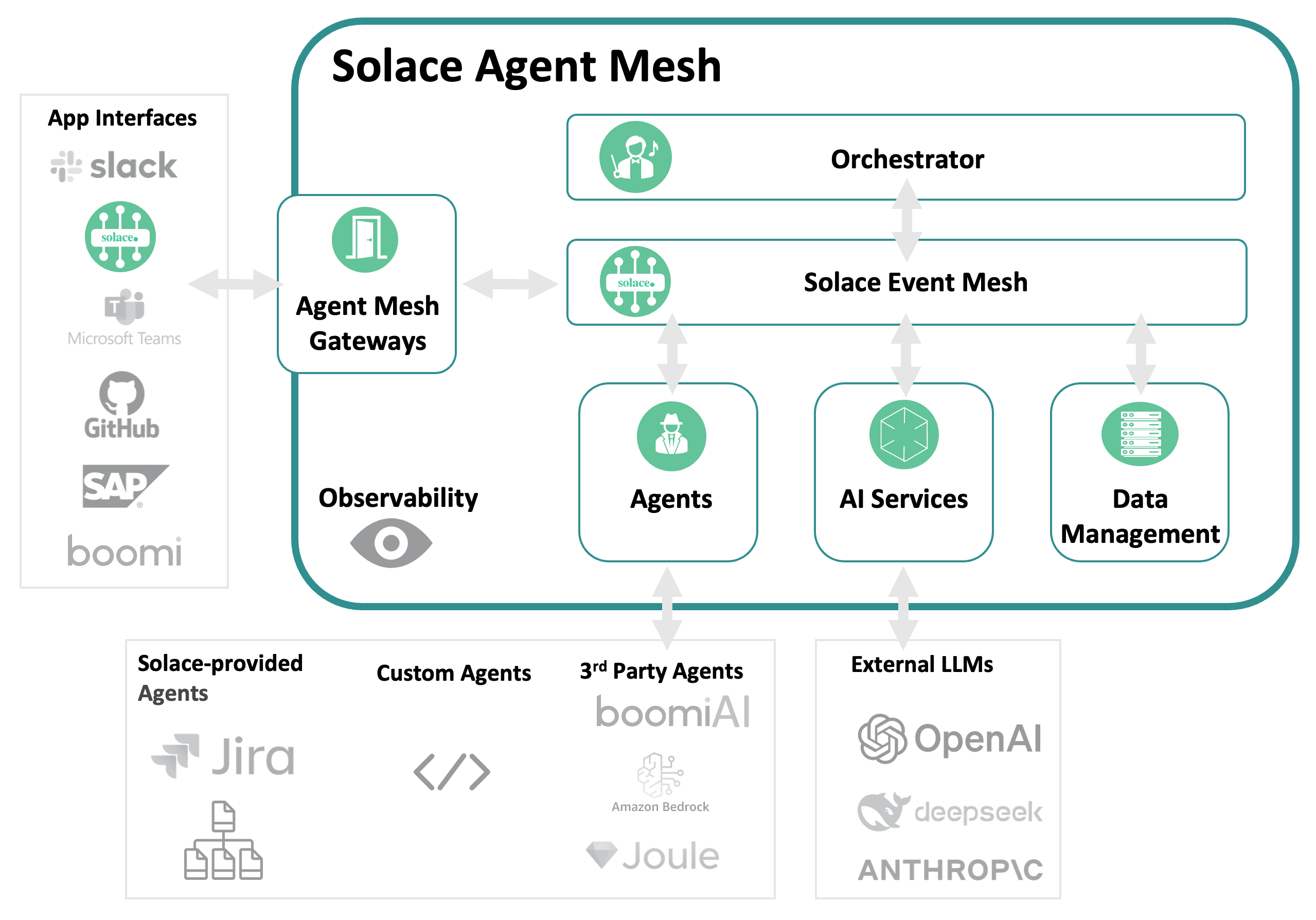
The result? A fully asynchronous, event-driven and decoupled AI agent architecture ready for production deployment. It is robust, reliable and easy to maintain.
📚 Want to know more? Check out the full Solace Agent Mesh documentation.
Set up Solace Agent Mesh in just a few steps.
To run Solace Agent Mesh locally, you'll need:
To quickly setup and customize your Agent Mesh, check out the Vibe Coding Quickstart Guide. This guide walks you through the essential steps to get Solace Agent Mesh up and running with minimal effort.
mkdir my-sam && cd my-sam
python3 -m venv .venv && source .venv/bin/activate
Check if you have a version of SAM already installed.
sam -v
If you have an earlier version, uninstall it and start from scratch:
pip3 uninstall solace-agent-mesh
Note: Optionally, you can try to upgrade versions but this action is not officially supported at this time. (pip3 install --upgrade solace-agent-mesh)
If no previous version exists, install the latest version with:
pip3 install solace-agent-mesh
sam init --gui
Note: This initialization UI runs on port 5002
sam run
Open the Web UI at http://localhost:8000 for the chat interface and ask a question
sam add agent --gui
sam plugin add <your-component-name> --plugin <plugin-name>
Solace Agent Mesh provides a "Universal A2A Agent Host," a flexible and configurable runtime environment built by integrating Google's Agent Development Kit (ADK) with the Solace AI Connector (SAC) framework.
The system allows you to:
Want to go further? Here are some hands-on tutorials to help you get started:
| 🔧 Integration | ⏱️ Est. Time | 📘 Tutorial |
|---|---|---|
| 🌤️ Weather Agent Learn how to build an agent that gives Solace Agent Mesh the ability to access real-time weather information. | ~15 min | Weather Agent Plugin |
| 🗃️ SQL Database Integration Enable Solace Agent Mesh to answer company-specific questions using a sample coffee company database. | ~10–15 min | SQL Database Tutorial |
| 🧠 MCP Integration Integrating a Model Context Protocol (MCP) Servers into Solace Agent Mesh. | ~10–15 min | MCP Integration Tutorial |
| 💬 Slack Integration Chat with Solace Agent Mesh directly from Slack. | ~20–30 min | Slack Integration Tutorial |
| 👔 Microsoft Teams Integration (Enterprise) Connect Solace Agent Mesh Enterprise to Microsoft Teams with Azure AD authentication. | ~30–40 min | Teams Integration Tutorial |
Solace Agent Mesh is built with the help of our amazing community. Thanks to everyone who has contributed ideas, code and time to make this project better!
View the full list of contributors here: GitHub Contributors 💚
Looking to contribute? Check out CONTRIBUTING.md to get started and see how you can help!
This project is licensed under the Apache 2.0 License. See the full license text in the LICENSE file.
This project uses pytest for testing. You can run tests using either hatch or pytest directly.
The recommended way to run tests is through the hatch environment, which ensures all dependencies are managed correctly.
# Run all tests
hatch test

# Run tests with tags
hatch test -m "<tag>"
If you prefer to use pytest directly, you must first install the project with its test dependencies.
# Install the project in editable mode with the 'test' extras
pip install -e .[test]

# Run all tests
pytest
Sign in to join the discussion.
No comments yet. Be the first to say what this is good for.
Write HTML. Render video. Built for agents.
Ultra-lightweight, open-source, self-hosted personal AI agent framework in Python with WebUI, tools, memory, MCP, multi-agent workflows, automation, and chat apps

SkillOpt is a text-space optimizer that trains reusable natural-language skills for frozen LLM agents through trajectory-driven edits, validation-gated updates, and deployable best_skill.md artifacts.

Omnigent is an open-source AI agent framework and meta-harness: orchestrate Claude Code, Codex, Cursor, Pi, and custom agents — swap harnesses without rewriting, enforce policies and sandboxing, and collaborate in real time from any device.

A theoretical reconstruction of the Claude Mythos architecture, built from first principles using the available research literature.
🕷️ An adaptive Web Scraping framework that handles everything from a single request to a full-scale crawl!