

heygen-com/hyperframesFrameworks & SDKs
Write HTML. Render video. Built for agents.
49k
Web Agent Protocol records browser interactions from the Chrome extension, converts them into exact or smart replay lists, and can generate MCP servers from those actions. The Python code in `browser_use/`, `wap_replay/`, and `mcp_servers/` handles collection, processing, replay, and service access.
Builders who want to turn real browser sessions into reusable agent actions.
You can capture a browser task once and replay or expose it again without rebuilding the flow by hand.
Runs a local endpoint that receives browser events from the WAP Chrome extension and saves each session as JSON.
Turns recorded task data into a step-by-step replay list that repeats the captured actions.
Converts the raw event stream into goal-oriented replay steps instead of every low-level action.
Builds per-task MCP servers from recorded actions so other agents can call the workflow again.
Executes replay lists with a chosen model provider through `run_replay.py`.
Includes the `browser_use/` package and supporting utilities for DOM handling, controllers, prompts, and telemetry.
conda create -n WAP python=3.11
conda activate WAP
pip install -r requirements.txt
set PYTHONPATH=C:/path/to/webagentprotocol # for Windows
export PYTHONPATH=/path/to/webagentprotocol # for Linux
OPENAI_API_KEY=sk-proj-...
DEEPSEEK_API_KEY=sk-...



The Web Agent Protocol (WAP) is a standardized framework designed to enable seamless interaction between users, web agents, and browsers by recording and replaying browser actions. It separates the concerns of action recording and execution, allowing for efficient automation and reusability. The Python SDK for WAP implements the full specification, making it easy to:

Install the dependencies with the following command:
Create a conda env
conda create -n WAP python=3.11
Activate the conda env
conda activate WAP
Install the dependencies
pip install -r requirements.txt
Setup your repo source path:
set PYTHONPATH=C:/path/to/webagentprotocol # for Windows
export PYTHONPATH=/path/to/webagentprotocol # for Linux
Create .env file under the repo root directory with your own API keys:
OPENAI_API_KEY=sk-proj-...
DEEPSEEK_API_KEY=sk-...
Please refer to OTA‑WAP Chrome Extension to setup action capturer in your Chrome browser.
Run the following command to start the server to collect data from the extension:
python action_collect_server.py
Once the server is up, you can start to record from the page using WAP Chrome extension.
The server listens on http://localhost:4934/action-data by default, please make sure the Host and Port in the extension settings match this server config. Each session will be saved to:
data/YYYYMMDD/taskid/summary_event_<timestamp>.json
An example of the formatted data which you will received in the WAP backend server is like:
{
  "taskId": "MkCAhQsHgXn7YgaK",
  "type": "click",
  "actionTimestamp": 1746325231479,
  "eventTarget": {
    "type": "click",
    "target": "<a ota-use-interactive-target=\"1\" data-ordinal=\"3\" href=\"https://www.allrecipes.com/recipe/68925/cheesy-baked-salmon/\" data-tax-levels=\"\" data-doc-id=\"6592066\" class=\"comp mntl-card-list-card--extendable mntl-universal-card mntl-document-card mntl-card card card--no-image\" id=\"mntl-card-list-card--extendable_3-0\">\n<div class=\"loc card__top\"><div class=\"card__media mntl-image card__media universal-image__container\">...",
    "targetId": "mntl-card-list-card--extendable_3-0",
    "targetClass": "comp mntl-card-list-card--extendable mntl-universal-card mntl-document-card mntl-card card card--no-image"
  },
  "allEvents": {},
  "pageHTMLContent": "<header data-tracking-container=\"true\" data-collapsible=\"true\" class=\"comp header mntl-header mntl-header--magazine mntl-header--open-search-bar mntl-header--myr\" id=\"header_1-0\"><a data-tracking-container=\"true\" id=\"mntl-skip-to-content_1-0\" class=\"mntl-skip-to-content mntl-text-link\" rel=\"nocaes\" href=\"#main\"></a><div class=\"mntl-header__menu-top\">..."
}
| Mode | Command |
|---|---|
| Exact replay – exactly reproduce every action | python wap_replay/generate_exact_replay_list.py --data_dir_path data/<date>/<task_id> --output_dir_path data_processed/exact_replay |
| Smart replay – condensed goal‑oriented steps | python wap_replay/generate_smart_replay_list.py --data_dir_path data/<date>/<task_id> --output_dir_path data_processed/smart_replay |
Replace <task_id> with the folder produced by the extension (e.g. em3h6UBDZykz0gnH).
Output structure:
data_processed/smart_replay/
 ├─ subgoals_<task_id>/                     # intermediate prompts & replies
 └─ wap_smart_replay_list_<task_id>.json   # final smart replay list for the agent

data_processed/exact_replay/
 └─ wap_smart_replay_list_<task_id>.json   # final exact replay list for the agent
python run_replay.py --model-provider openai --wap_replay_list data_processed/exact_replay/wap_exact_replay_list_<task_id>.json --max-concurrent 1
For smart-replay, replace the path with a smart‑replay JSON to test this mode.
python wap_replay\generate_mcp_server.py --task_id <task_id>
converted MCP servers will be located under mcp_servers folder
You would need 2 terminals to replay with MCP. In the first termnial
python wap_service.py
In the second termnial
python mcp_client.py
Then enter your prompt in the second terminal
example: find a top rated keyboard on amazon.ca using smart replay
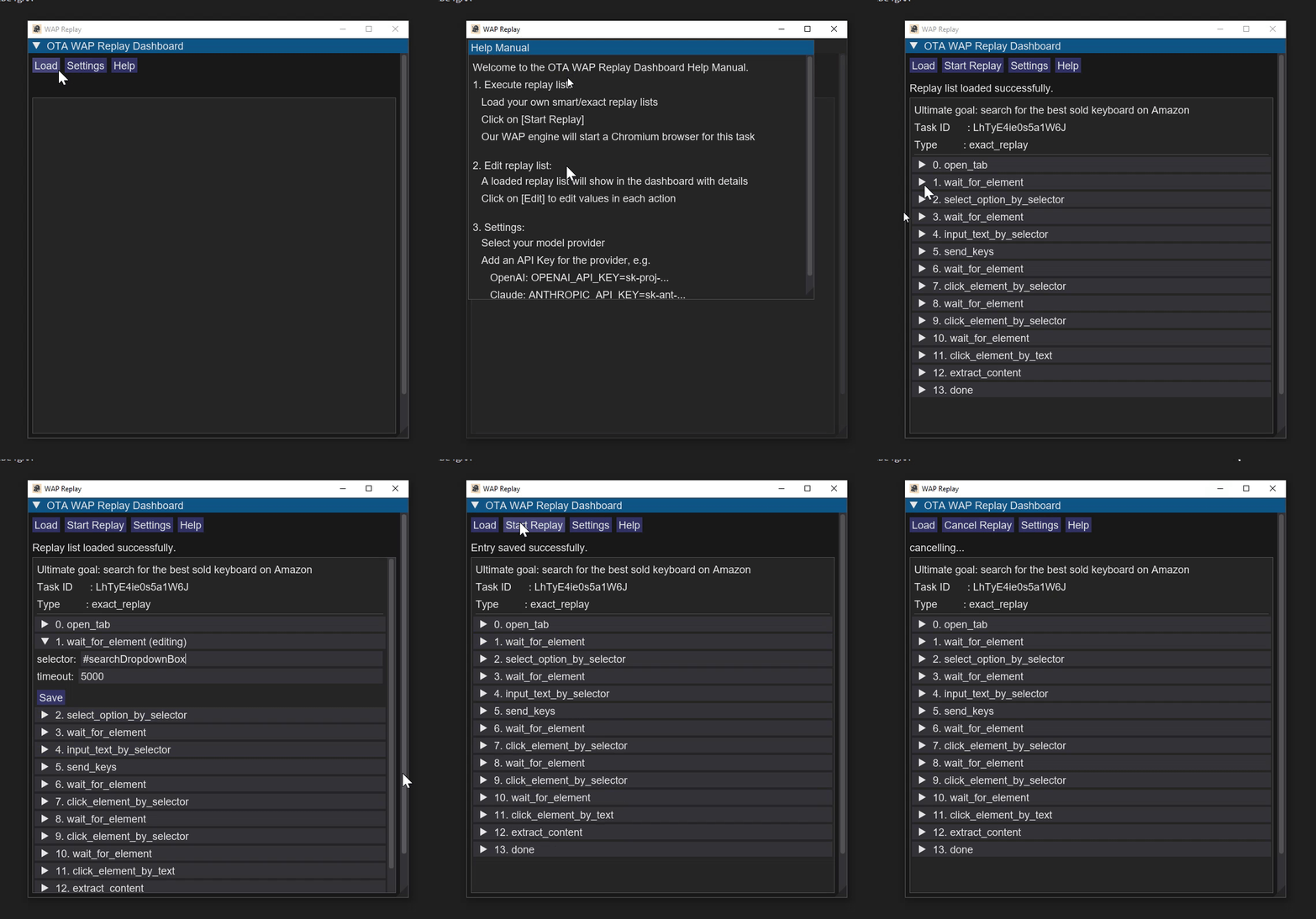
We provide out-of-box desktop app for running replay lists. It is easy to install and you don't need any extra steps for setup and deployments. Visit WAP Replay Tool releases for more details.
ModuleNotFoundError – run commands from the project root or export PYTHONPATH=. (set PYTHONPATH=. for Windows).
“no task‑start file” – ensure the extension recorded a full session; the generators require exactly one task-start and one task-finish record.
Browser-Use: https://github.com/browser-use/browser-use
MCP: https://github.com/modelcontextprotocol/python-sdk
DOM Extension: https://github.com/kdzwinel/DOMListenerExtension
Sign in to join the discussion.
No comments yet. Be the first to say what this is good for.
Write HTML. Render video. Built for agents.
Ultra-lightweight, open-source, self-hosted personal AI agent framework in Python with WebUI, tools, memory, MCP, multi-agent workflows, automation, and chat apps

SkillOpt is a text-space optimizer that trains reusable natural-language skills for frozen LLM agents through trajectory-driven edits, validation-gated updates, and deployable best_skill.md artifacts.

Omnigent is an open-source AI agent framework and meta-harness: orchestrate Claude Code, Codex, Cursor, Pi, and custom agents — swap harnesses without rewriting, enforce policies and sandboxing, and collaborate in real time from any device.

A theoretical reconstruction of the Claude Mythos architecture, built from first principles using the available research literature.
🕷️ An adaptive Web Scraping framework that handles everything from a single request to a full-scale crawl!